

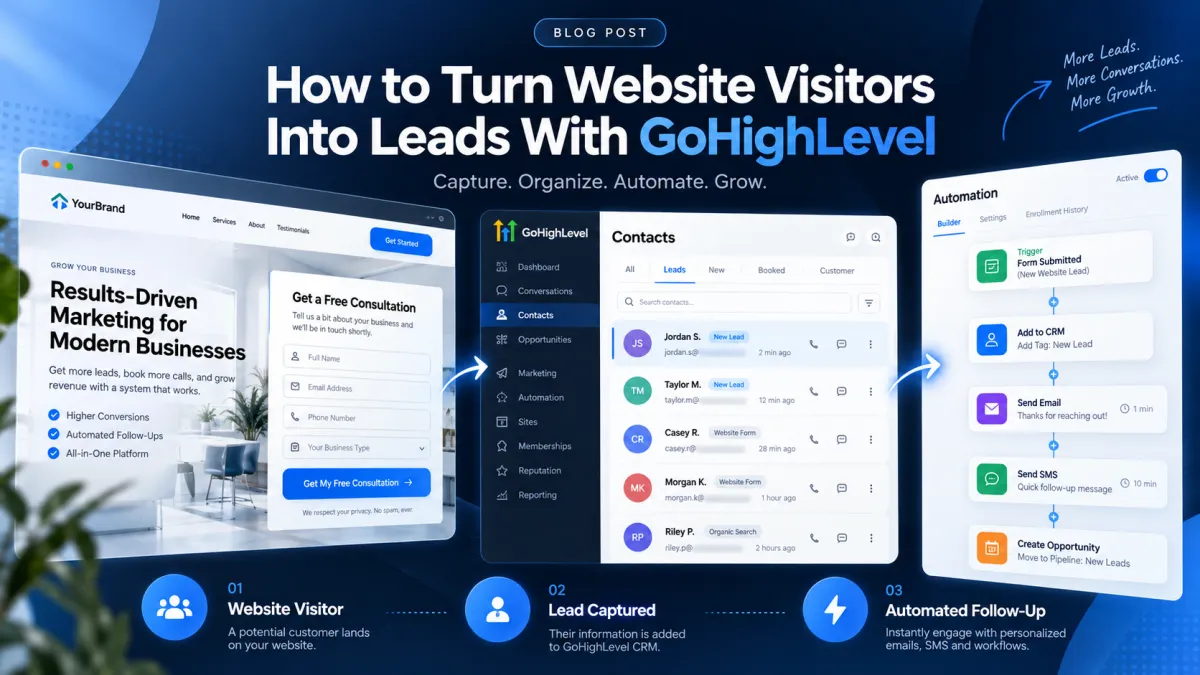
How to Turn Website Visitors Into Leads With GoHighLevel
How to Turn Website Visitors Into Leads With GoHighLevel
Getting people to visit your website is only the beginning. A visitor can read your services page, browse your offers, and leave without ever becoming someone your sales team can contact.
That is the gap a well-built lead capture system needs to close.
GoHighLevel can connect your website’s conversion points with its CRM and automation tools so that when a visitor takes an identifiable action, their information can enter an organized follow-up process. The key is understanding that an anonymous visitor is not automatically a lead. Generally, the visitor needs to provide identifiable information, such as a name, email address, or phone number, before the business can meaningfully follow up.
Here is how to build that journey.
Why Website Traffic Does Not Automatically Mean More Leads
Traffic measures visits. Lead generation requires action.
A person landing on your website may be interested, but unless you provide a clear opportunity to take the next step, that interest can disappear when they leave.
Effective website visitor conversion therefore depends on two things: giving visitors a compelling reason to identify themselves and having a reliable process ready once they do.
Instead of treating your website, CRM, and follow-up as separate systems, GoHighLevel can help connect these stages into one customer journey.
How GoHighLevel Helps Turn Visitors Into Leads
Capture Visitor Information
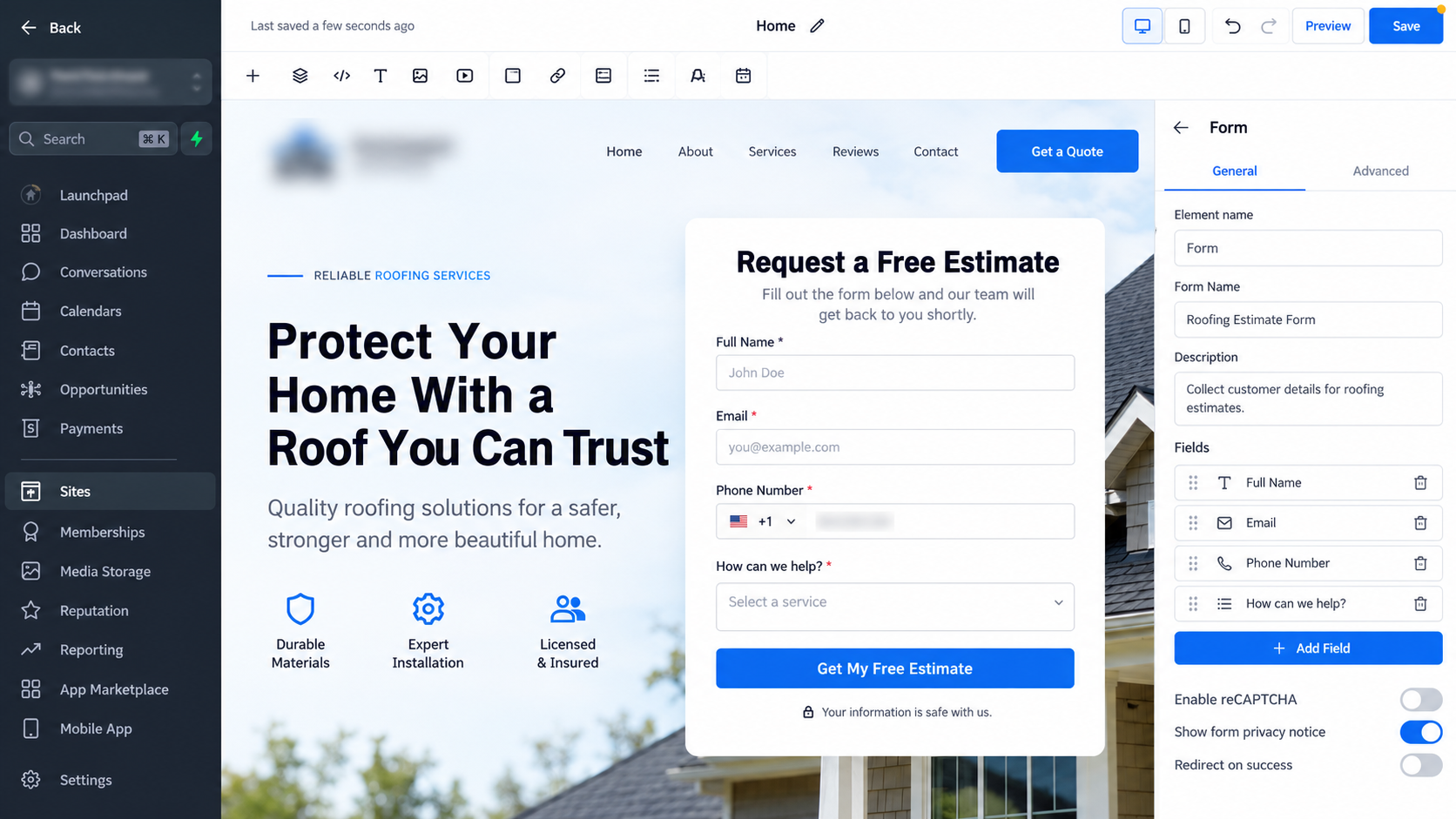
GoHighLevel forms are one practical way to capture information from interested visitors. Depending on the business and offer, surveys, calendars, and supported website chat tools can also provide conversion opportunities.
The capture method should match the visitor’s intent. A service business might offer a “Request a Quote” form, while a consultant may encourage prospects to schedule a consultation.
Avoid asking for information simply because you can. For an initial inquiry, fields such as name, email, phone number, and one or two qualifying questions may be enough. Every additional requirement creates another decision for the visitor.
Add and Organize Leads in the CRM
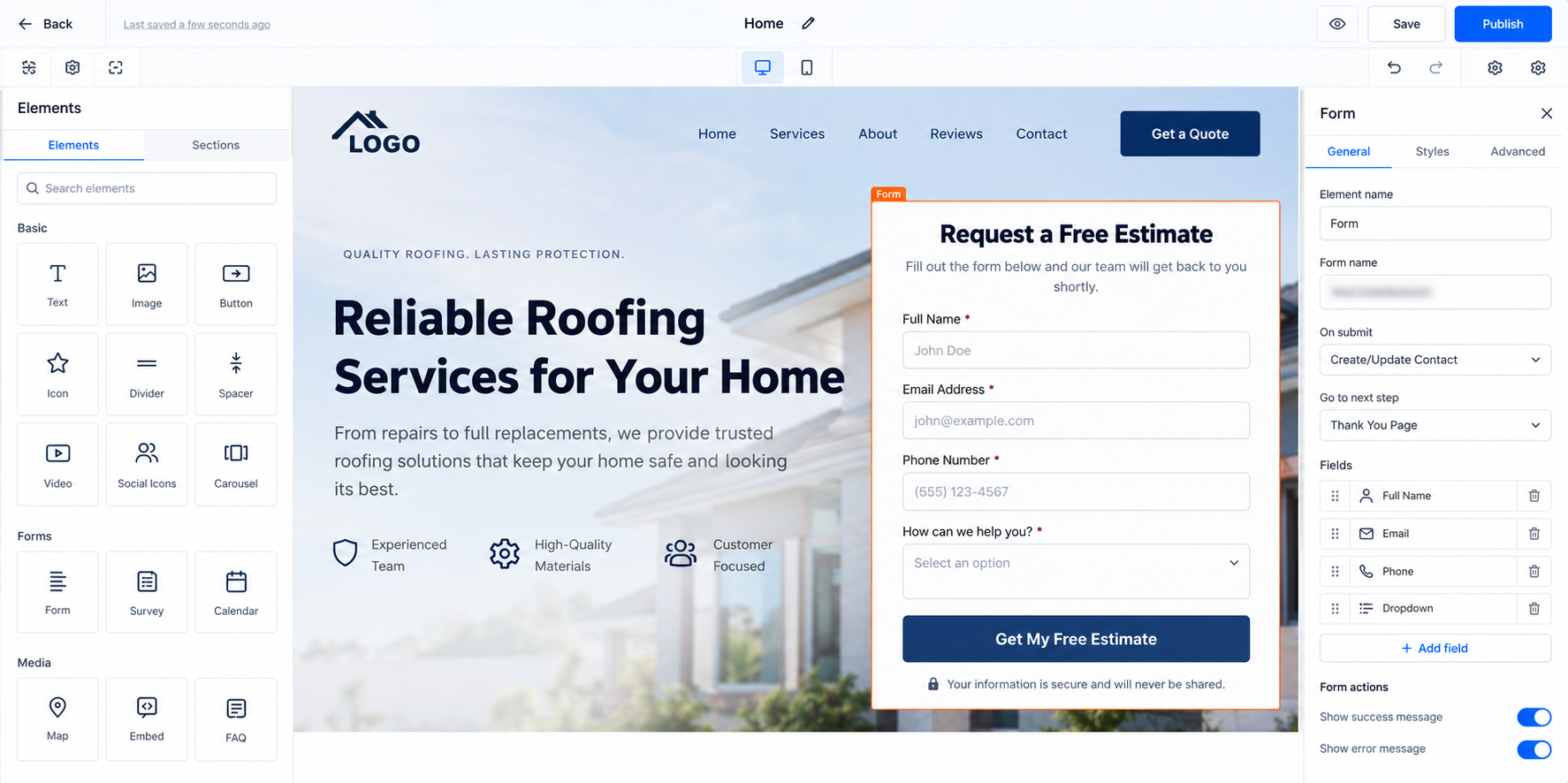
Once a visitor submits identifying information through a properly configured capture point, that data can be stored in the GoHighLevel CRM as a contact or used to update an existing contact.
This creates a usable record rather than leaving the inquiry buried in a disconnected inbox.
Businesses can then use relevant CRM features to organize contacts and support their sales process. The exact structure should reflect how the business actually handles leads rather than adding unnecessary complexity.
Trigger Automated Follow-Up
Capturing the lead is only half the job. The next question is: what happens immediately afterward?
GoHighLevel workflows can automate appropriate steps based on events such as form submissions or other configured lead actions.
Depending on the business’s setup and communication permissions, a workflow might send an appropriate follow-up message, apply organizational information to the contact, create internal notifications, or help route the inquiry to the right person.
Automation is particularly useful here because it reduces the risk of a genuine inquiry sitting unnoticed until someone manually checks for it.
How to Build a Website-to-Lead System in GoHighLevel
Start with the conversion goal. Decide what you want a visitor to do: request an estimate, schedule an appointment, ask for more information, or take another meaningful action.
Next, create the appropriate capture mechanism. Keep required fields focused on information you genuinely need for the next step.
Place that conversion opportunity where intent is strongest. A generic form hidden at the bottom of the website is less useful than a relevant call to action placed alongside the service or offer being considered.
Then configure how submitted information enters your GoHighLevel CRM. Make sure the information you collect supports the way your team will qualify and contact the lead.
Build a workflow around the relevant action. For example, a completed inquiry form can initiate an automated process designed specifically for new inquiries.
Add only useful follow-up steps. This might include acknowledging the inquiry, notifying a team member, organizing the contact, and initiating appropriate communication. Avoid creating long automation sequences simply because the software allows them.
Finally, test everything yourself. Submit the form as a visitor would, verify the contact information, confirm the workflow behaves correctly, and check that both customer-facing and internal communications reach the intended recipients.
Example: From Website Visitor to Sales Conversation
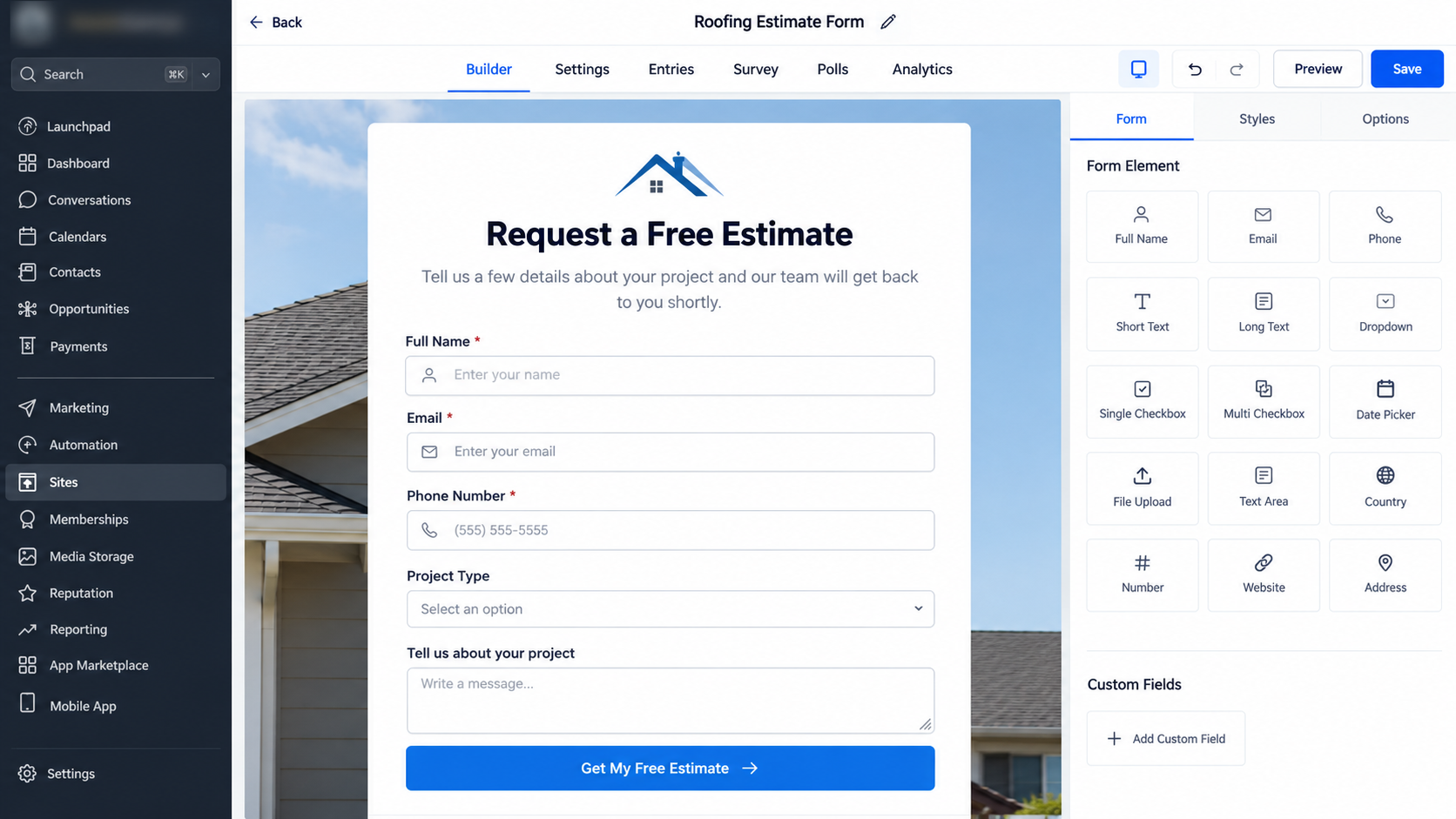
Consider a roofing company using GoHighLevel for lead capture.
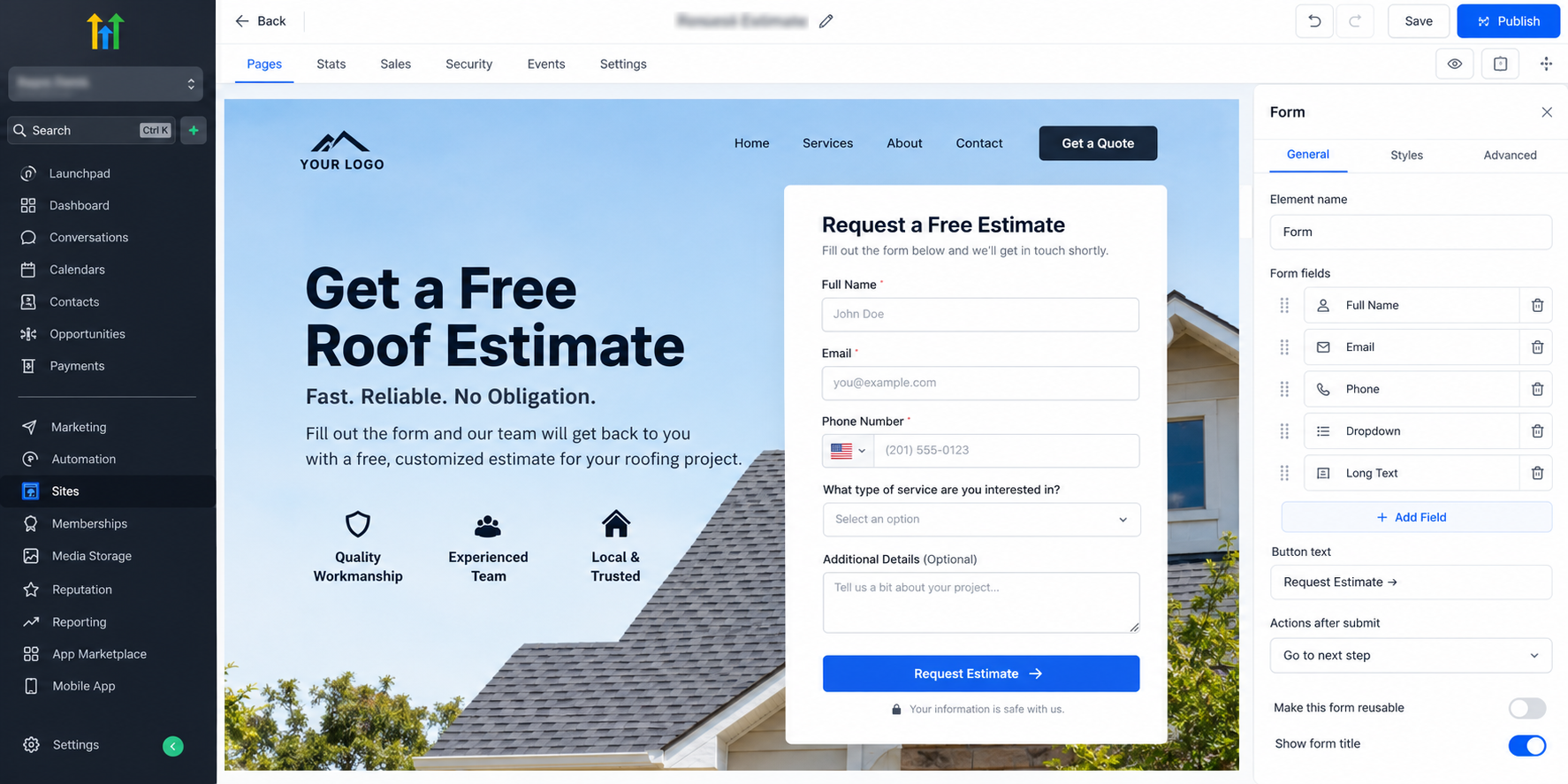
A homeowner finds the company’s roof replacement page and sees a clear Request an Estimate call to action. They submit their name, phone number, email address, and basic information about their request.
That submission gives the company identifiable contact information. The information is captured in the CRM, and the configured workflow begins.
The homeowner receives an appropriate acknowledgment, while the responsible team member is notified about the new inquiry. The salesperson can then review the information and continue the conversation personally.
The journey becomes:
Website visitor → estimate form → CRM contact → workflow → initial follow-up → human sales conversation.
Automation has not replaced the salesperson. It has made sure the opportunity reaches them in an organized way.
Best Practices for Converting More Visitors
Give every important page a clear next step. Match calls to action with visitor intent, keep forms focused, and explain what someone can expect after submitting their information.
Your offer also matters. “Submit” provides little motivation, while a specific action such as requesting an estimate or booking a consultation makes the outcome clearer.
Most importantly, connect lead capture with follow-up. Collecting contact details without a process for handling them simply moves the bottleneck somewhere else.
Common Mistakes to Avoid
One common mistake is asking too many questions before a visitor has established trust. Another is using vague calls to action that do not explain what happens next.
Businesses should also avoid building GoHighLevel workflows filled with irrelevant messages, launching automations without testing them, or assuming every inquiry should receive exactly the same treatment.
And automation should not become an excuse to remove human interaction. High-intent leads often need a real conversation.
Final Thoughts
Turning website visitors into leads with GoHighLevel is not about tracking every anonymous person who lands on a page. It is about creating deliberate opportunities for interested visitors to identify themselves and connecting those actions to your CRM and follow-up process.
When your capture points, GoHighLevel CRM, workflows, and sales process work together, your website becomes more than a source of traffic. It becomes a structured entry point into your lead management system.
Frequently Asked Questions
Can GoHighLevel identify every visitor who lands on my website?
No. GoHighLevel does not automatically turn every anonymous website visitor into an identifiable lead. A visitor generally needs to provide contact information through a form, survey, calendar booking, chat interaction, or another supported conversion method before the business can follow up with them directly.
How does GoHighLevel capture website leads?
GoHighLevel can capture lead information through tools such as forms, surveys, calendars, funnels, and supported website communication features. Once a visitor submits identifiable information, that data can be stored or updated in the GoHighLevel CRM.
What information should I collect from website visitors?
Collect only the information you actually need to continue the conversation. For many businesses, this may include a name, email address, phone number, and one or two qualifying questions. Asking for too much information can create unnecessary friction.
Can GoHighLevel automatically follow up with new website leads?
Yes. GoHighLevel workflows can be configured to begin after relevant actions, such as a form submission or appointment booking. Depending on your setup, the workflow can support follow-up communication, internal notifications, contact organization, and other lead-management steps.
Do website leads automatically appear in the GoHighLevel CRM?
When your lead capture tools are properly configured, submitted contact information can create or update a contact record in the GoHighLevel CRM. It is important to test the entire process before publishing your website or funnel.
Can I notify my sales team when a new website lead comes in?
Yes. A workflow can be configured to notify the appropriate team member when a new inquiry is captured. This can help reduce delays and make sure new leads are reviewed quickly.
Need Expert Help with GoHighLevel?
New to GoHighLevel and ready to get started? Buy your GoHighLevel account here and launch with confidence.
Already know what you need and want our team to handle everything, from complete setup and customization to funnels, workflows, automations, CRM, and pipelines? Click here.



