

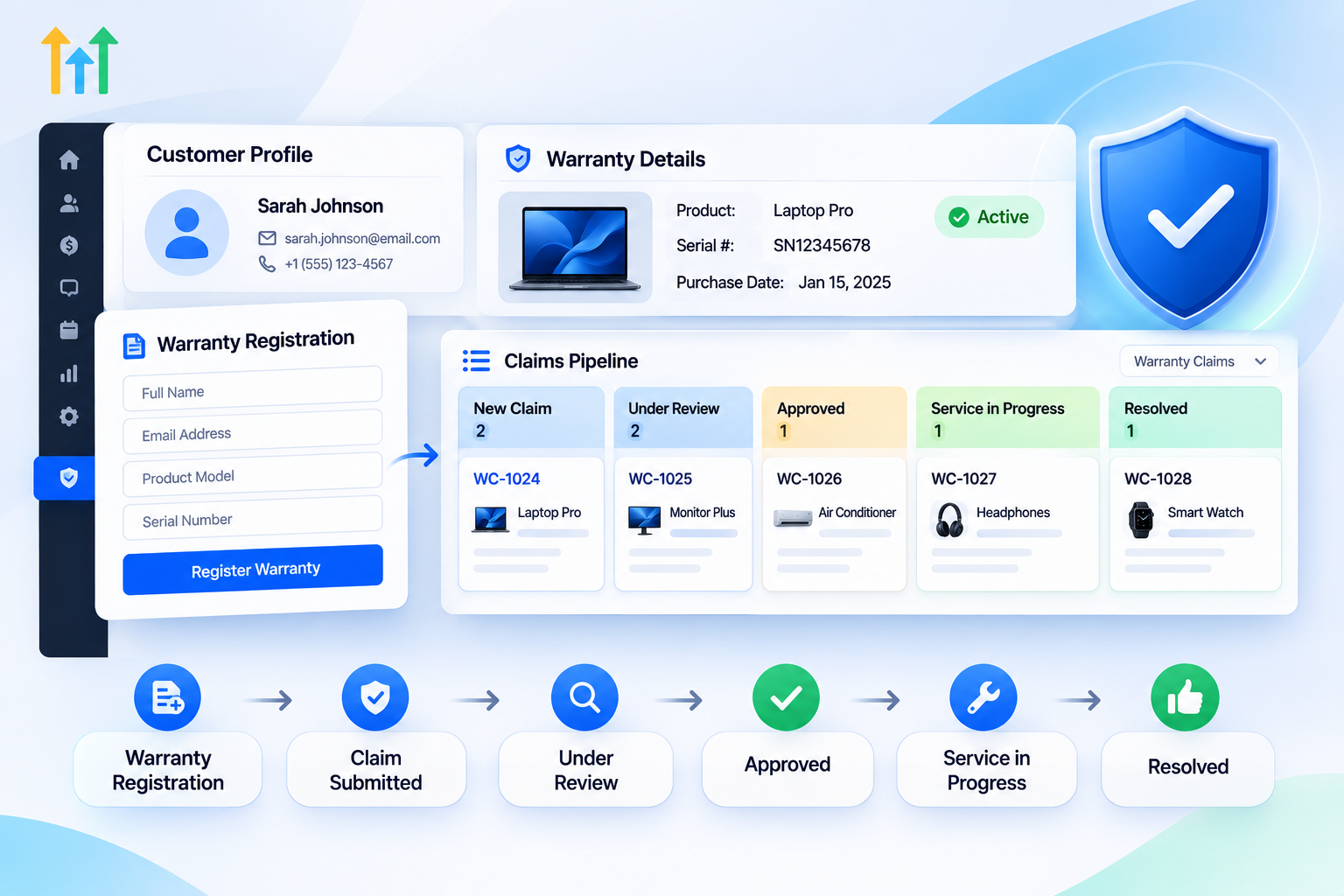
How to Build a Warranty Registration and Claim Management System
How to Build a Warranty Registration and Claim Management System in GoHighLevel
Introduction
Warranty management can quickly become complicated when registrations, customer details, product information, claim requests, and follow-ups are handled manually.
A customer may register a product today, submit a claim months later, and expect the business to immediately know what they purchased, when they purchased it, whether the warranty is still active, and what has already been done.
That is where a structured CRM process can make a major difference.
While GoHighLevel does not provide a dedicated warranty-management module, you can build a practical warranty registration and claim management system using its CRM, forms, custom fields, Custom Objects, pipelines, workflows, and tasks. These features can be combined to organize warranty information and automate repetitive steps without treating every claim as a completely manual process.
What a Warranty Management System Should Handle
Before building anything, define what the system actually needs to track.
A typical warranty process has two related parts:
Warranty registration: Capturing customer and product information after purchase.
Warranty claims: Managing service requests when a customer reports a problem.
A useful system should make it easy to answer questions such as:
Who owns the product?
Which product was registered?
When was it purchased?
When does the warranty expire?
What is the current claim status?
Has the claim been reviewed?
Does the customer need to provide additional information?
Has the service team completed the required work?
The goal is not simply to collect more data. The goal is to create a process where the right information is available when the team needs it.
Step 1: Define the Warranty Data You Need
Start by identifying the information required for registrations and claims.
For the customer, you may need:
Full name
Email and phone
Address
For the product:
Product name and model
Serial number
Purchase date and source
Warranty start and expiration dates
For claims:
Claim type
Issue description
Claim date and status
Service notes
Assigned team member
Resolution details
Avoid creating unnecessary fields. Decide which information belongs to the customer, warranty record, or individual claim.
HighLevel custom fields can store business-specific information and be used across forms, workflows, pipelines, Smart Lists, and records.
Step 2: Decide How to Structure Warranty Records
Decide where warranty information should be stored before building the system.
For a simple process, custom fields may be enough. However, if one customer can own multiple products, each with its own warranty, a separate record structure can be more practical.
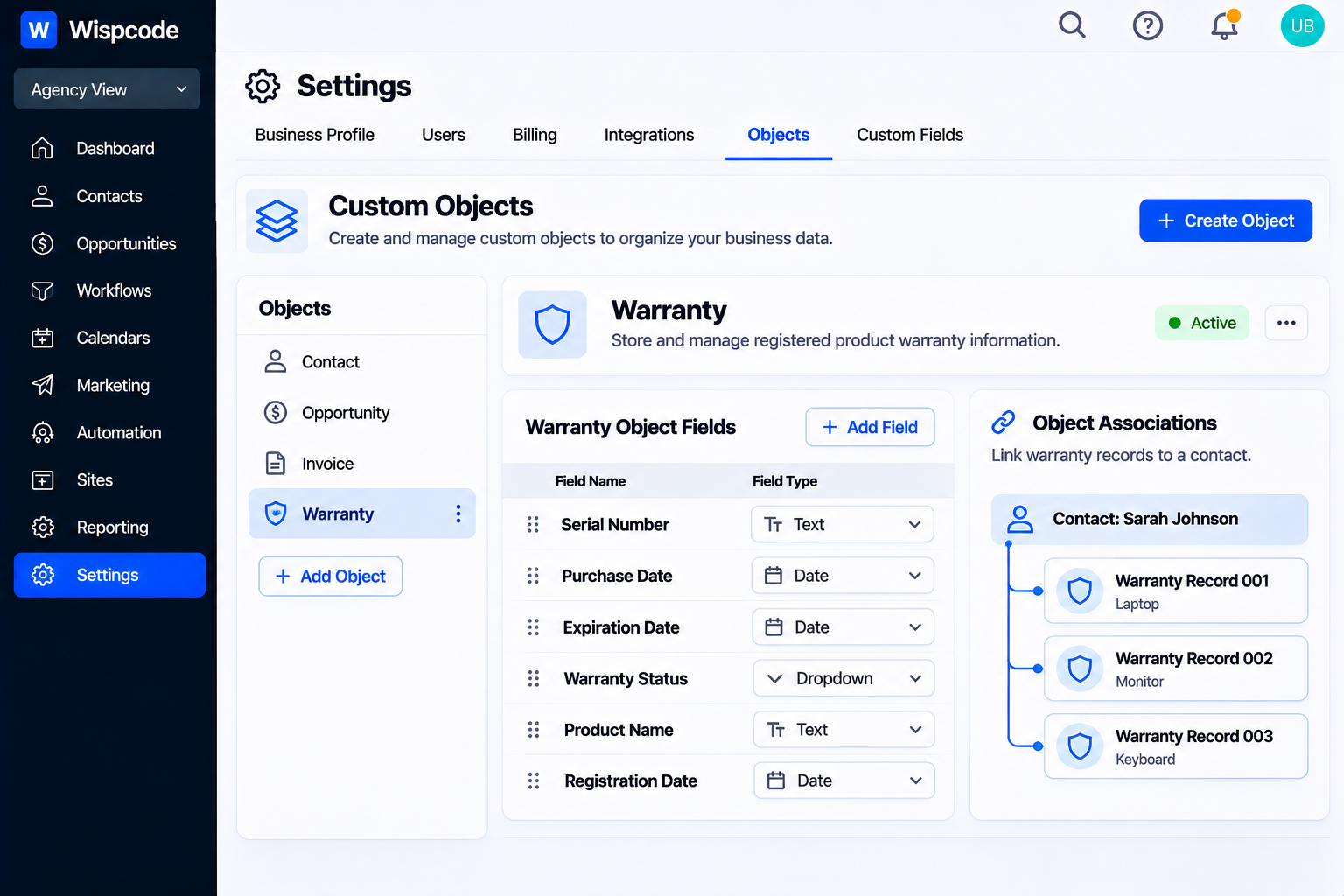
This is where "Custom Objects" can help. HighLevel allows businesses to create custom record types with their own fields and relationships.
For example, you could create a "Warranty" or "Registered Product" Custom Object containing:
Warranty number
Product model
Serial number
Purchase date
Warranty start and expiration dates
Warranty status
This provides a more organized structure than placing every warranty detail on the contact record.
Step 3: Build the Warranty Registration Form
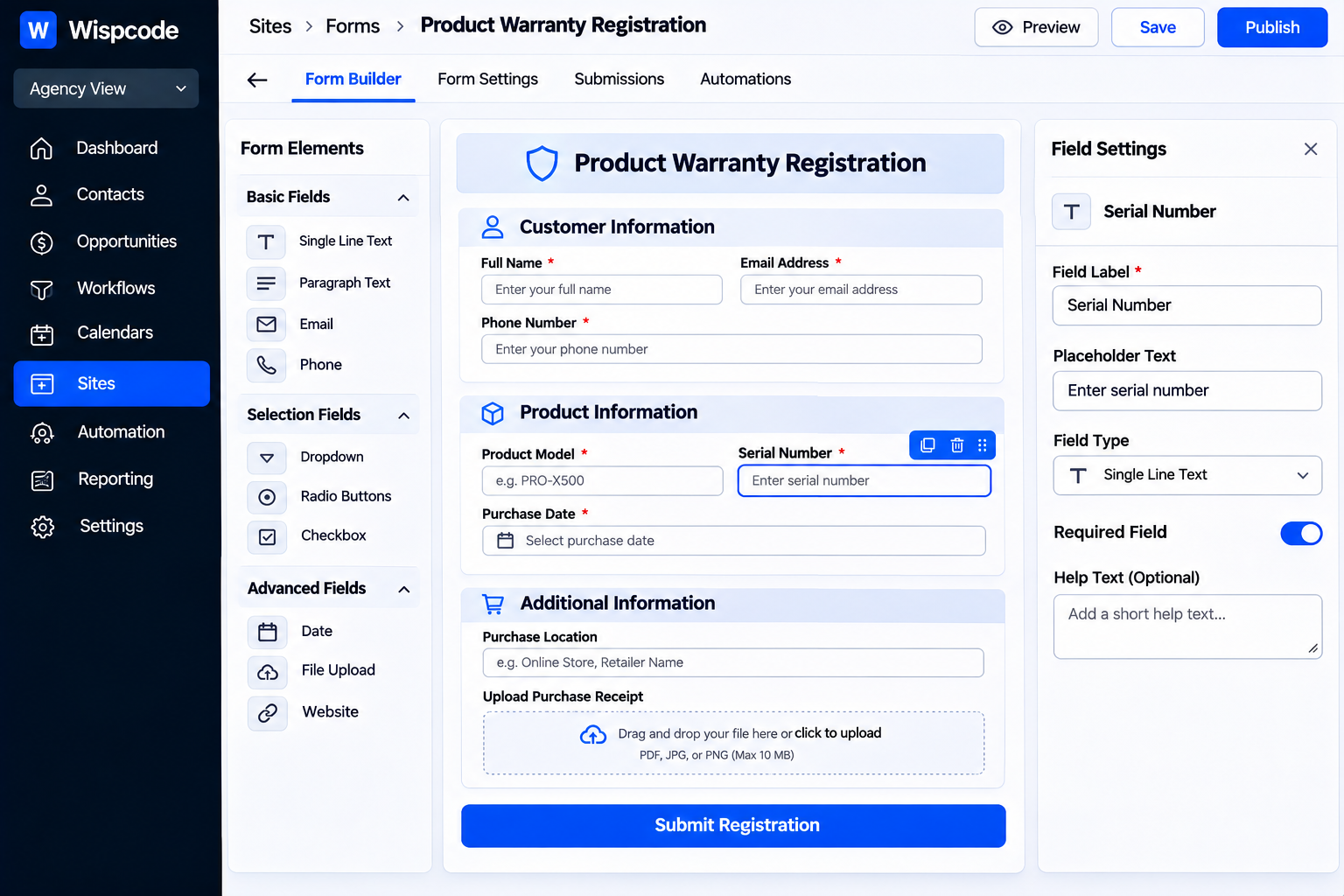
Create a registration form that collects the information needed to create or update the warranty record.
Keep it focused on:
Customer information
Name
Email
Phone
Product information
Product
Model
Serial number
Purchase date
Purchase location
Warranty information
Warranty type
Registration details
Other required information
HighLevel's "Form Submitted" workflow trigger can start automation when the form is submitted. This can lead to record updates, notifications, and follow-up tasks.
Registration can therefore become the starting point for the entire warranty process rather than ending with a simple confirmation.
Step 4: Automate the Registration Process
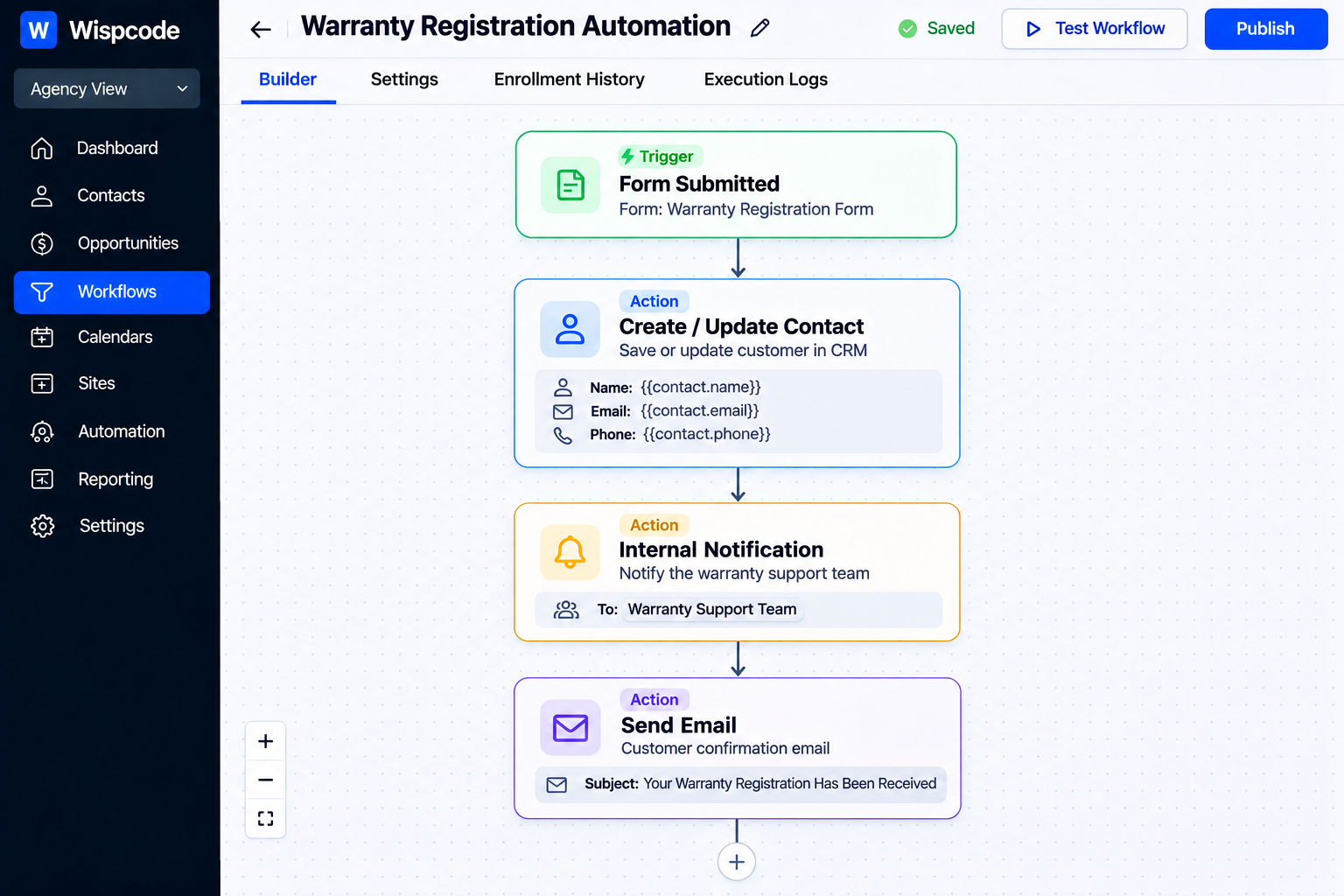
Once the registration form is submitted, build a workflow around it.
A basic process could be:
Registration form submitted → Create or update record → Save warranty information → Notify team → Send confirmation
The workflow could:
Identify the customer.
Capture the submitted information.
Create or update the relevant record.
Apply a tag if needed.
Notify the appropriate team member.
Send a confirmation email.
HighLevel workflows use triggers and actions to automate repetitive processes.
Keep the workflow predictable and avoid unnecessary branches unless they support a real business requirement.
Step 5: Create a Claim Submission Process
Warranty registration and claims should be separate processes.
When a customer needs service, create a dedicated claim form to capture information such as:
Customer information
Warranty or product reference
Serial number
Problem description
Purchase date
Preferred contact information
Other information needed for review
Collect enough information for the team to evaluate the claim without making the form unnecessarily long.
Once submitted, use a workflow to start the internal claim process.
Step 6: Track Claims With a Pipeline
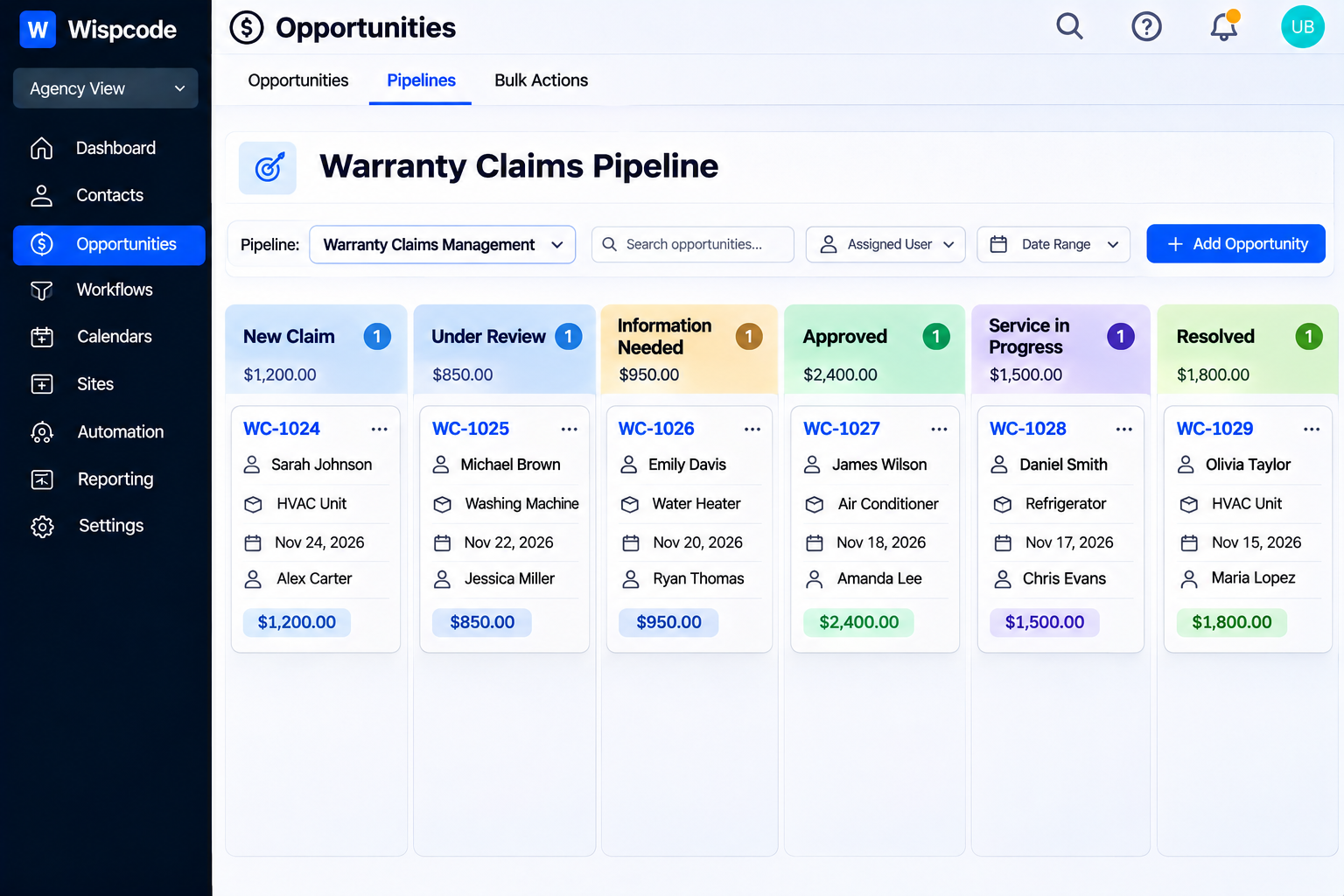
A pipeline provides a visual way to manage claim progress.
For example:
New Claim → Under Review → Information Needed → Approved → Service in Progress → Resolved → Closed
Use stages that match your actual business process.
This allows the team to quickly see which claims need attention instead of searching through emails or spreadsheets.
HighLevel supports opportunity pipelines and custom opportunity fields for storing information related to individual opportunities.
A warranty claim can potentially be managed as an opportunity, while a Custom Object may be more suitable when the warranty itself needs to remain a separate record.
Step 7: Automate Internal Claim Tasks
Not every part of warranty management should be automated. Some claims require human review.
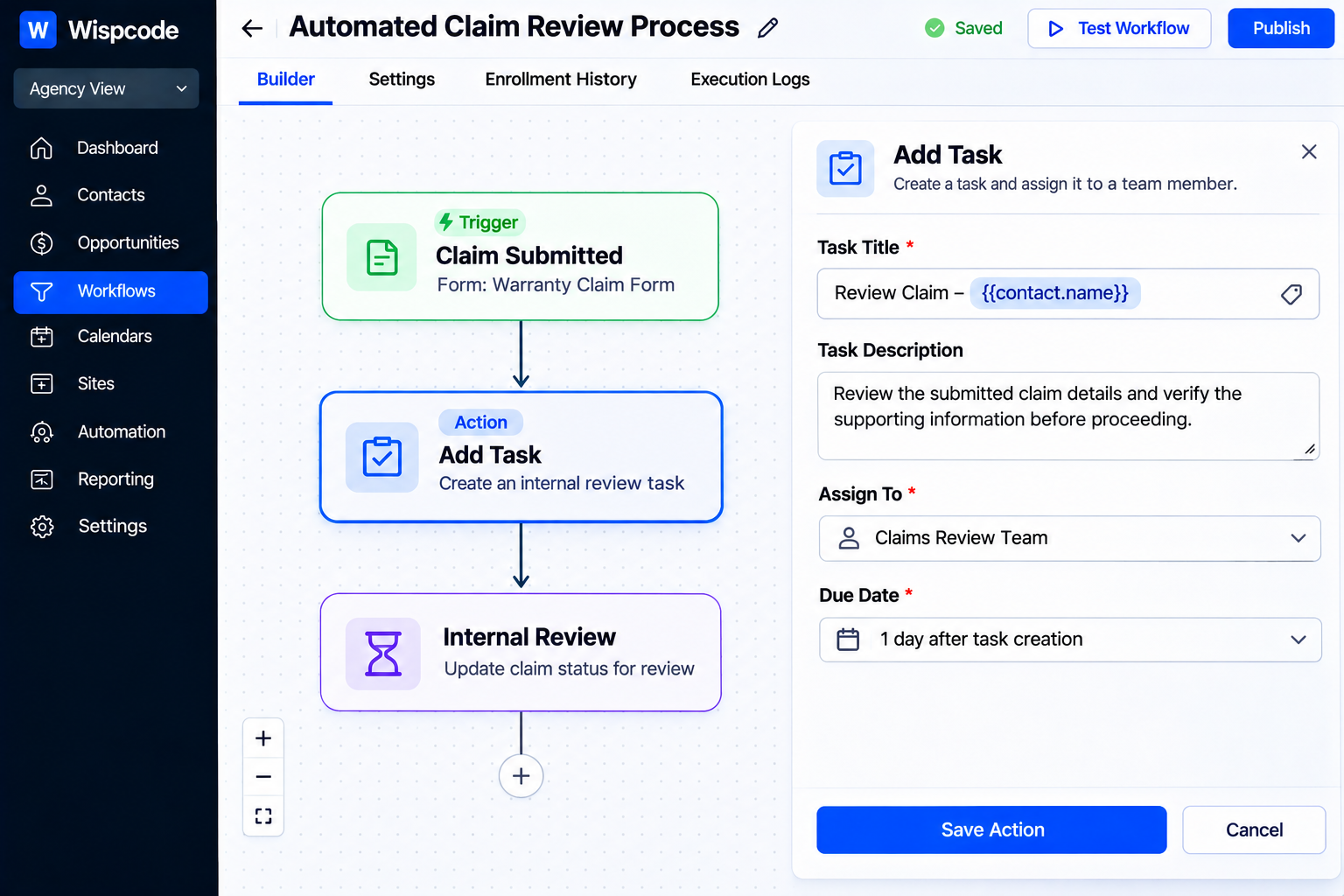
For example, when a new claim arrives, a workflow could create:
“Review warranty claim – [Customer Name]”
The task can be assigned to the appropriate team member with a due date.
HighLevel's "Add Task" workflow action can create tasks, assign them to users, add descriptions, and set due dates.
The goal is simple:
Automation handles routing and reminders. Humans handle decisions.
This is especially important when eligibility, repairs, replacements, or exceptions require judgment.
Step 8: Keep Customers Updated Automatically
Customers should not have to repeatedly contact the business for claim updates.
Workflows can automate appropriate communication at different stages.
Claim received
Send confirmation that the request was received.
Claim under review
Notify the customer that the claim is being evaluated.
Additional information required
Explain what information is still needed.
Claim resolved
Send an update when the process is complete.
Messages should always reflect the actual claim status and company policies.
Avoid automatically telling customers a claim is approved before a human has made that decision.
Step 9: Use Custom Fields for Better Claim Tracking
Custom fields become increasingly useful as the process grows.
A claim record could include:
Claim type
Product model
Purchase date
Warranty status
Claim priority
Assigned technician
Resolution type
Claim reference number
Use "opportunity custom fields" when the information belongs specifically to a claim or opportunity rather than the customer.
This distinction helps keep customer data separate from process-specific information. HighLevel also supports conditional opportunity fields, allowing certain fields to appear or become required based on relevant conditions.
For example, additional service information could become relevant only after a claim reaches a specific stage.
Step 10: Test the Entire Warranty Journey
Before launching, test the process from registration through claim resolution.
Confirm that:
Registration forms capture the required information.
The correct workflow starts.
Customer and warranty information are stored correctly.
Claims create the expected process.
Internal notifications reach the right team.
Tasks are assigned correctly.
Pipeline stages update as expected.
Customer communications contain accurate information.
Do not test only the normal scenario.
Also test:
Incomplete submissions
A customer registering another product
Claims for expired warranties
Claims requiring additional information
Team member handoffs
Duplicate claim submissions
Testing these scenarios helps identify process gaps before real customers encounter them.
Best Practices for Warranty Management
A few design principles can make the system easier to maintain.
Keep registration separate from claims
A warranty registration confirms that a product has been registered. A claim represents a service request.
Keeping those processes distinct makes reporting and automation easier to understand.
Use consistent statuses
Do not allow every team member to invent their own claim statuses.
Define a standard set of stages and document what each one means.
Avoid unnecessary fields
Only collect information that the business actually uses.
Every unnecessary field increases the amount of data customers and employees have to manage.
Automate routine communication
Confirmation messages, internal notifications, and reminders are good candidates for automation.
Keep decisions human-controlled
Eligibility decisions, exceptions, replacements, and complex resolutions may require human review.
Automation should not remove necessary judgment from the process.
Document the workflow
Record what triggers each workflow, what fields it changes, which stages exist, and who owns each part of the process.
This becomes especially important when multiple employees manage warranty claims.
Common Mistakes to Avoid
Treating GoHighLevel as a native warranty platform
GoHighLevel provides the CRM and automation components needed to build a warranty process, but that does not mean it has a dedicated warranty-management application.
Design around the features actually available.
Putting everything on the contact record
If customers can own multiple products or have multiple claims, storing every detail on the contact can become difficult to manage.
Consider whether Custom Objects or opportunities provide a better structure.
Automating every decision
Not every claim should automatically become approved or rejected.
Use automation for repetitive tasks while leaving business-critical decisions to the appropriate team.
Building workflows before defining the process
A complicated workflow cannot fix an unclear process.
Define your registration and claim stages first, then automate them.
Failing to test edge cases
A workflow that works for one normal submission may still fail when customers submit duplicate, incomplete, or unusual information.
Test realistic scenarios before publishing.
Frequently Asked Questions
1. Does GoHighLevel have a built-in warranty management system?
No dedicated warranty-management module is required for this approach. Instead, businesses can build a custom process using CRM records, forms, custom fields, Custom Objects, pipelines, workflows, and tasks.
2. Can I create a warranty registration form in GoHighLevel?
Yes. GoHighLevel forms can collect customer and business-specific information, and a Form Submitted workflow trigger can start automation after a submission.
3. Can GoHighLevel track warranty claims?
Yes, a claim process can be modeled using available CRM structures such as opportunities and pipelines, or Custom Objects where a separate record type is appropriate. Custom Objects can have their own fields, relationships, and workflow automation.
4. Can warranty claims create tasks automatically?
Yes. HighLevel's Add Task workflow action can create and assign tasks with descriptions and due dates, making it useful for routing claims that require human review.
5. Should warranties and claims be stored as the same record?
Not necessarily. A warranty represents the registered product or coverage, while a claim represents a service request. Separating them can be more practical when one customer can have multiple products or multiple claims.
Conclusion
A warranty process does not have to rely on spreadsheets, scattered emails, and manual follow-ups.
With the right structure, GoHighLevel can be used to create a centralized workflow for collecting warranty registrations, organizing product information, receiving claims, assigning internal work, tracking claim progress, and keeping customers informed.
The key is to design the data model before building the automation.
Use "forms" to collect information, "custom fields" to structure business-specific data, "Custom Objects" or "opportunities" where separate records are needed, "pipelines" to visualize claim progress, and "workflows" and "tasks" to automate repetitive steps.
Most importantly, build the system around your actual warranty process rather than forcing the business into a complicated automation.
When each registration and claim has a clear place in the CRM, your team can spend less time searching for information and more time resolving customer issues efficiently.
Need Expert Help with GoHighLevel?
New to GoHighLevel and ready to get started? Buy your GoHighLevel account here and launch with confidence.
Already know what you need and want our team to handle everything, from complete setup and customization to funnels, workflows, automations, CRM, and pipelines? Click here.