

The Complete Guide to Automatic Phone Validation in GoHighLevel
How to Validate Phone Numbers Automatically Using Number Validation in GoHighLevel
Introduction
If you're running SMS campaigns in GoHighLevel, chances are some numbers in your contact list can't actually receive a text. Landlines, disconnected lines, and mistyped digits quietly eat into your sending budget and drag down deliverability. That's exactly the problem GoHighLevel's Number Validation feature was built to solve.
Whether you're an agency managing client sub-accounts or a business owner running your own campaigns, unvalidated phone numbers are one of the most overlooked sources of wasted marketing spend. A number that looks fine on paper can still be a landline, a disconnected line, or a number never capable of receiving texts.
In this guide, you'll learn what Number Validation is, how it works, how to enable it, how to automate workflows around it, and the common mistakes to avoid, so you can keep your contact list clean and your deliverability high without manually checking a single number.
What Is Number Validation in GoHighLevel?
Number Validation is part of a larger feature set inside GoHighLevel called Number Intelligence, which also includes Spam Detection and Name Lookup. Number Validation specifically checks whether a contact's phone number is real, correctly formatted, and capable of receiving SMS before the first message is ever sent.
Under the hood, GoHighLevel relies on Twilio Lookup to run this check. Twilio Lookup verifies the number's format and confirms with the telecom carrier that the number actually exists and is active, a live check against carrier-level data, not a simple pattern match.
If the system detects a landline, it blocks the message from going out to that carrier at all, saving you a wasted send. Landlines are especially common for real estate, insurance, and local service businesses, where many contacts still list a home or office landline as their primary number.
Worth repeating, since it trips people up: validation happens the moment an SMS is queued for sending, not during contact import or creation. It's not a tool for scrubbing your whole list on upload; it's a safety net right before that first text goes out.
Why Automatic Phone Number Validation Matters
Sending SMS to invalid or unreachable numbers isn't just a minor inefficiency. It has real consequences for your account, your reporting, and your bottom line.
Wasted spend: every failed SMS attempt to a dead or landline number still costs you, and those costs add up fast across large campaigns.
Poor deliverability: carriers track your sending patterns, and repeated failed sends can hurt your sender reputation and future delivery rates industry-wide.
Bad data: without validation, your CRM fills up with contacts your team assumes are reachable, when in reality they're dead weight in your database.
Skewed reporting: campaign performance metrics look worse than they should when a chunk of your list was never going to convert in the first place.
Wasted follow-up effort: sales and support teams waste time calling or texting contacts who were never reachable to begin with.
Bad numbers are more common than most agencies expect. One HighLevel user reported that around 10 percent of a client's entire contact list turned out to be numbers that weren't messaging-enabled at all. That's a meaningful chunk of any campaign quietly failing in the background, and it's exactly the kind of hidden cost that automatic validation is designed to catch.
How Number Validation Fits Into the Number Intelligence Bundle
It helps to understand Number Validation in context, since GoHighLevel groups it with two related features under Number Intelligence:
Number Validation: verifies a number is real, active, and capable of receiving SMS before the first message is sent.
Spam Detection: flags risky incoming calls from unknown numbers as "Spam Likely" in your call logs and conversations.
Name Lookup: fetches the caller name for unknown incoming calls, so your team has more context before they pick up.
These three work together to give your sub-account a fuller picture of who's calling and texting, and whether the numbers on the other end are trustworthy and reachable.
Coverage: What Number Validation Does and Doesn't Cover
Before turning this on, it helps to understand where it applies and where its limits are.
SMS number validation works worldwide, regardless of the sub-account's location or where the number originates.
Spam Detection and Name Lookup, the other two pieces of Number Intelligence, are currently limited to calls from US phone numbers only.
All three features are bundled together. Since a December 2024 platform update, you can't enable Number Validation without also turning on Spam Detection and Name Lookup, and vice versa.
Spam calls are still logged. Even when flagged as "Spam Likely," these calls still appear in your call logs and Contacts tab.
If you disable Number Intelligence entirely, calls and texts still go through as normal, but you lose spam flagging, caller name lookups, and the validation check, which means your SMS delivery rate may drop since messages will keep going out to numbers that can't receive them.
How to Enable Number Validation in GoHighLevel
Setting this up takes just a few steps at the agency level:
Log in to your GoHighLevel agency account.
Go to Agency Settings.
Navigate to Phone Integration Settings

GoHighLevel agency settings dashboard displaying phone integration options, call recording, and voicemail preferences. Enable Number Validation for each sub-account or location where you want it active

GoHighLevel phone integration settings interface showing options to enable number validation and manage SMS deliverability.
Once enabled, the feature runs automatically in the background every time an SMS is queued for a first send. There's no per-contact toggle to manage and no manual review required for it to start working; it simply becomes part of how your sub-account sends messages from that point forward.
Since Number Validation, Spam Detection, and Name Lookup are billed and enabled together, it's worth checking with your team or agency admin on which locations should have it turned on, especially if you manage multiple clients with different SMS volumes.
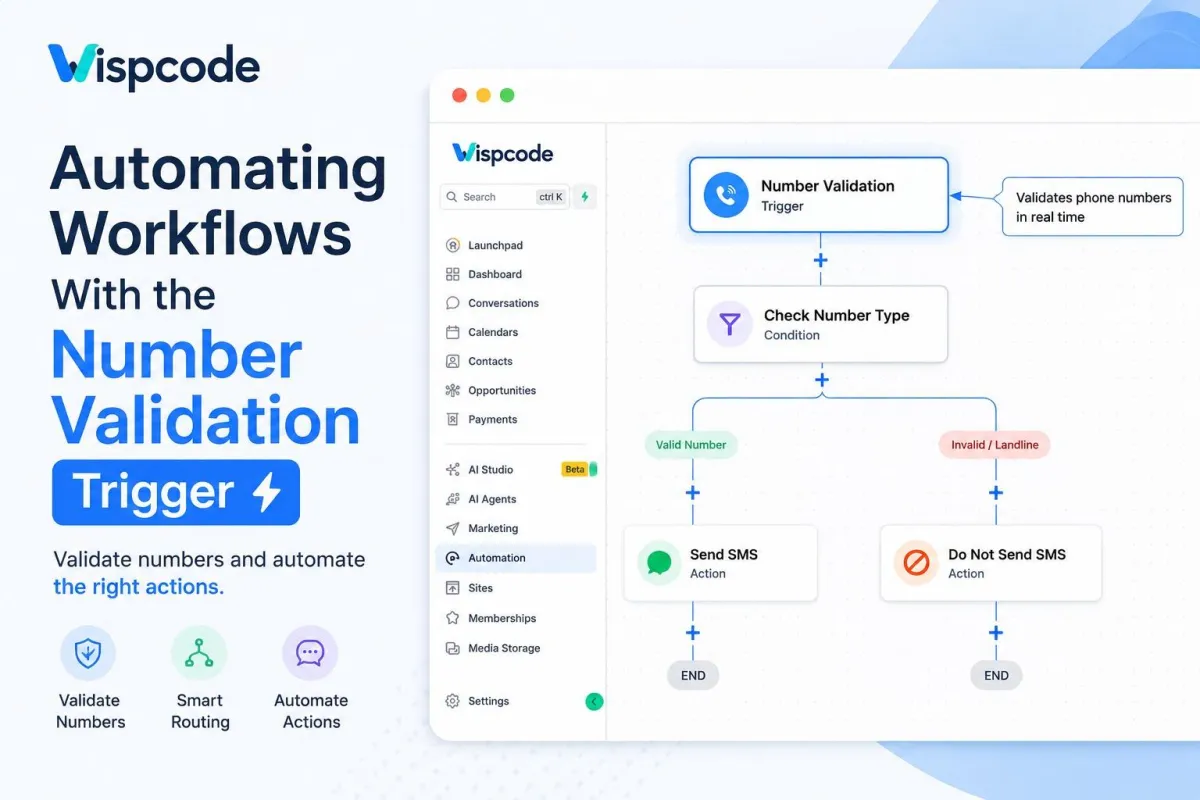
Automating Workflows With the Number Validation Trigger
Turning the feature on is only half the picture. The real power comes from combining it with the Number Validation workflow trigger, which lets you build automations around a contact's validation status instead of just letting invalid numbers quietly fail in the background.
Here's how to set it up:
Go to Automation in the left sidebar

GoHighLevel automation workflows list displaying active practice workflows, folders, and status metrics. Open an existing workflow you want to add the trigger to, or create a new one from scratch

GoHighLevel workflows dashboard displaying the create workflow dropdown menu with options to start from scratch, build using AI, or use templates. Add the Number Validation trigger and configure it to fire based on whether a number comes back valid, invalid, or identified as a landline

GoHighLevel workflow builder showing the configuration for the Number Validation trigger and filter options. Build out the branching logic so each outcome routes to the right next step

GoHighLevel automation builder showing a number validation workflow with condition branches for sending SMS or skipping invalid numbers.
With this trigger in place, you can:
Automatically filter invalid numbers out of SMS campaigns before they go out, so your send list only includes reachable contacts.
Route flagged contacts into a cleanup, enrichment, or manual review pipeline instead of losing track of them entirely.
Update a custom field or tag on the contact record based on their validation status, so your team can see it at a glance.
Trigger an alternative outreach channel, such as a phone call or email, for contacts whose numbers return as invalid for SMS.
Track how many contacts in your database have valid, messaging-ready numbers for better campaign reporting and forecasting.
This turns a passive safety check into an active part of your CRM hygiene process, so your team always knows which contacts are worth pursuing by text and which need a different approach.
Best Practices for Using Number Validation Effectively
Enabling the feature is straightforward, but a few habits will help you get more value out of it over time.
Review your invalid-number tag regularly. Check flagged contacts monthly and decide whether they need manual correction, removal, or a different outreach channel.
Pair validation with a re-engagement workflow. Instead of dropping invalid contacts, route them into a sequence that tries a call or email to confirm updated details.
Use validation status in your reporting. Segmenting performance by valid versus invalid numbers gives a more accurate picture of true SMS engagement.
Communicate the bundle limitation to clients. Make sure clients understand Number Validation comes packaged with Spam Detection and Name Lookup, not as a standalone toggle.
Don't treat it as a substitute for good list-building. Validation catches bad numbers after the fact; collecting accurate numbers at opt-in is still the best first line of defense.
Common Mistakes to Avoid
A few misunderstandings come up often enough that they're worth addressing directly
Assuming it validates on import
Many users expect newly imported contacts to be checked immediately, but validation only fires when the first SMS is queued
Trying to enable only one Number Intelligence feature
Since the three features are bundled, isolating just Number Validation isn't currently possible
Ignoring flagged landlines
A landline isn't necessarily a dead lead; it may just need a call or email instead of a text
Forgetting to build the workflow trigger
Enabling Number Validation in settings does the checking, but without a workflow trigger, you won't get automated routing or reporting
Frequently Asked Questions
Does Number Validation check numbers when I import a contact list?
No. Validation only runs when an SMS is queued for sending, not during contact import or creation. To vet an entire imported list up front, you'd need a separate workflow action calling a validation API.
Can I enable Number Validation without Spam Detection or Name Lookup?
No. Since December 2024, all three Number Intelligence features are activated or deactivated together as a bundle.
Does Number Validation work outside the United States?
Yes. SMS number validation works worldwide. Spam Detection and Name Lookup for calls, however, are currently limited to US numbers.
What happens if a number is identified as a landline?
GoHighLevel blocks the first message from being sent to that number's carrier entirely, so you're not billed for a message that was never going to be delivered.
Will turning off Number Intelligence break my automations?
No, calls and texts will still send as usual. You'll lose the validation, spam flagging, and caller name lookup, which can lower your overall SMS delivery rate over time.
Can I see which of my contacts have invalid numbers?
Yes, if you build a workflow around the Number Validation trigger, you can tag or update a custom field on each contact based on their validation status, giving you a filterable view of valid versus invalid numbers.
Conclusion
Number Validation in GoHighLevel is a simple, largely automatic way to protect your SMS deliverability and stop paying for messages that were never going to land. By enabling it at the agency level and pairing it with the Number Validation workflow trigger, you get clean, actionable data on every contact's messaging status without lifting a finger for each individual send.
If you're managing SMS campaigns for clients and haven't turned this on yet, it's a five-minute setup with a real, measurable payoff. Head into your Agency Settings today, enable Number Validation, and build a workflow around it so your team always knows exactly which numbers are worth reaching out to.
Need Expert Help with GoHighLevel?
New to GoHighLevel and ready to get started? Buy your GoHighLevel account there and launch with confidence.
Already know what you need and want our team to handle everything, from complete setup and customization to funnels, workflows, automations, CRM, and pipelines? Click here.



