
How to Separate Transactional and Marketing Communication in GoHighLevel
How to Separate Transactional and Marketing Communication in GoHighLevel
A customer books an appointment, but instead of receiving a simple confirmation, they also receive a promotional offer. Another customer unsubscribes from marketing emails but continues receiving messages they never expected. These situations often happen when businesses use the same automation process for every type of communication.
GoHighLevel gives businesses the tools to organize customer communication through contact preferences, DND settings, and separate workflows. With the right setup, you can manage essential service updates independently from promotional campaigns and make sure each message serves its intended purpose.
In this guide, we'll walk through the features you need, how to configure them, and how to test the complete setup.
1. Understand the Difference Between Transactional and Marketing Messages
Before building workflows, identify the purpose of each message.
Transactional communication provides information related to an existing appointment, purchase, account, or service. Examples include:
Appointment confirmations and reminders.
Payment receipts and invoice notifications.
Order confirmations and delivery updates.
Important account or service updates.
Marketing communication promotes a product, service, or business. Examples include:
Discounts and special offers.
Newsletters and product announcements.
Seasonal promotions.
Upselling and cross-selling campaigns.
Classification depends on the message's actual purpose and applicable regulations. Adding a promotional offer to a service notification can change how that message is treated. Simply calling it transactional does not make it so.
2. Understand the GoHighLevel Features You'll Need
GoHighLevel provides several features that help organize communication.
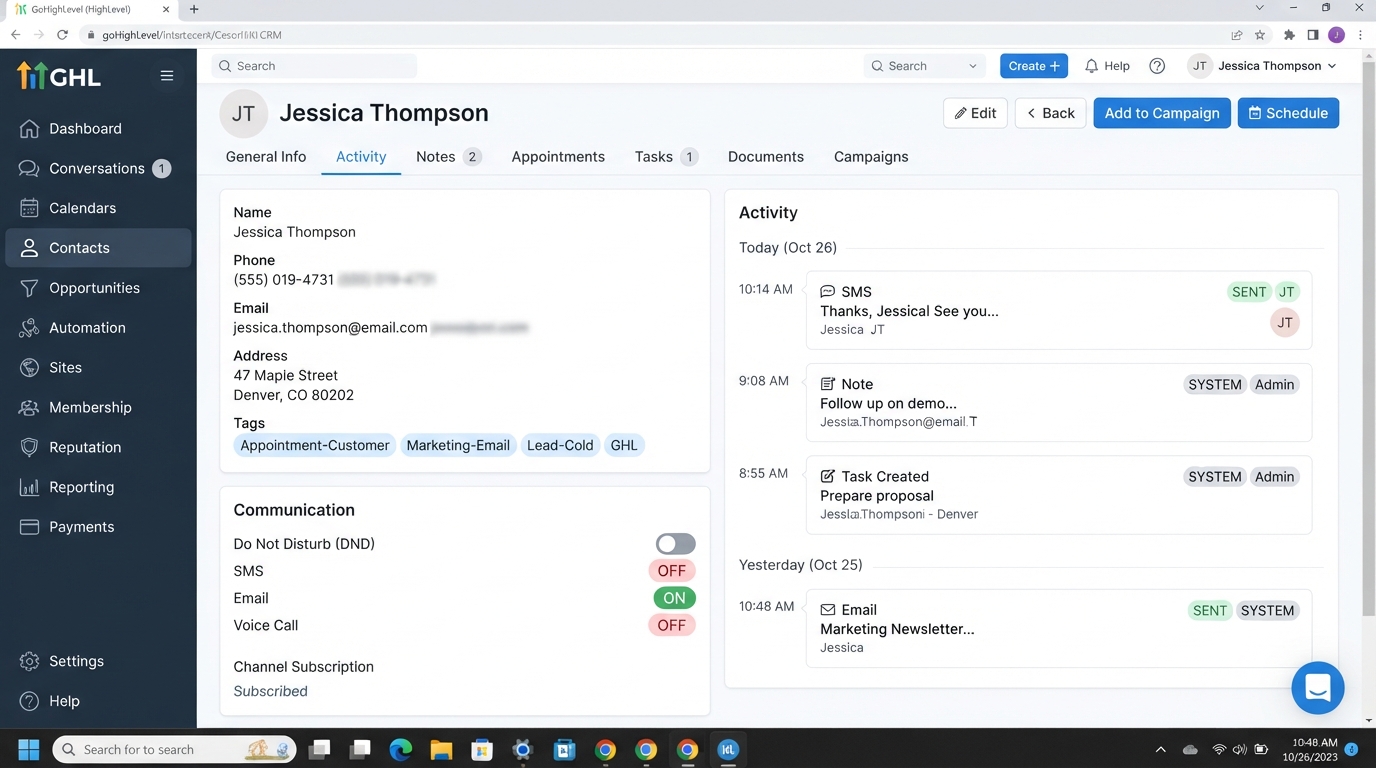
Contact Tags and Custom Fields: Use tags to group contacts and custom fields to store supporting information, such as consent source, consent date, or marketing preferences. Tags help with organization, but they do not prove consent.
DND (Do Not Disturb): HighLevel supports communication restrictions by channel, including email and SMS. You can manage these preferences from a contact's record.
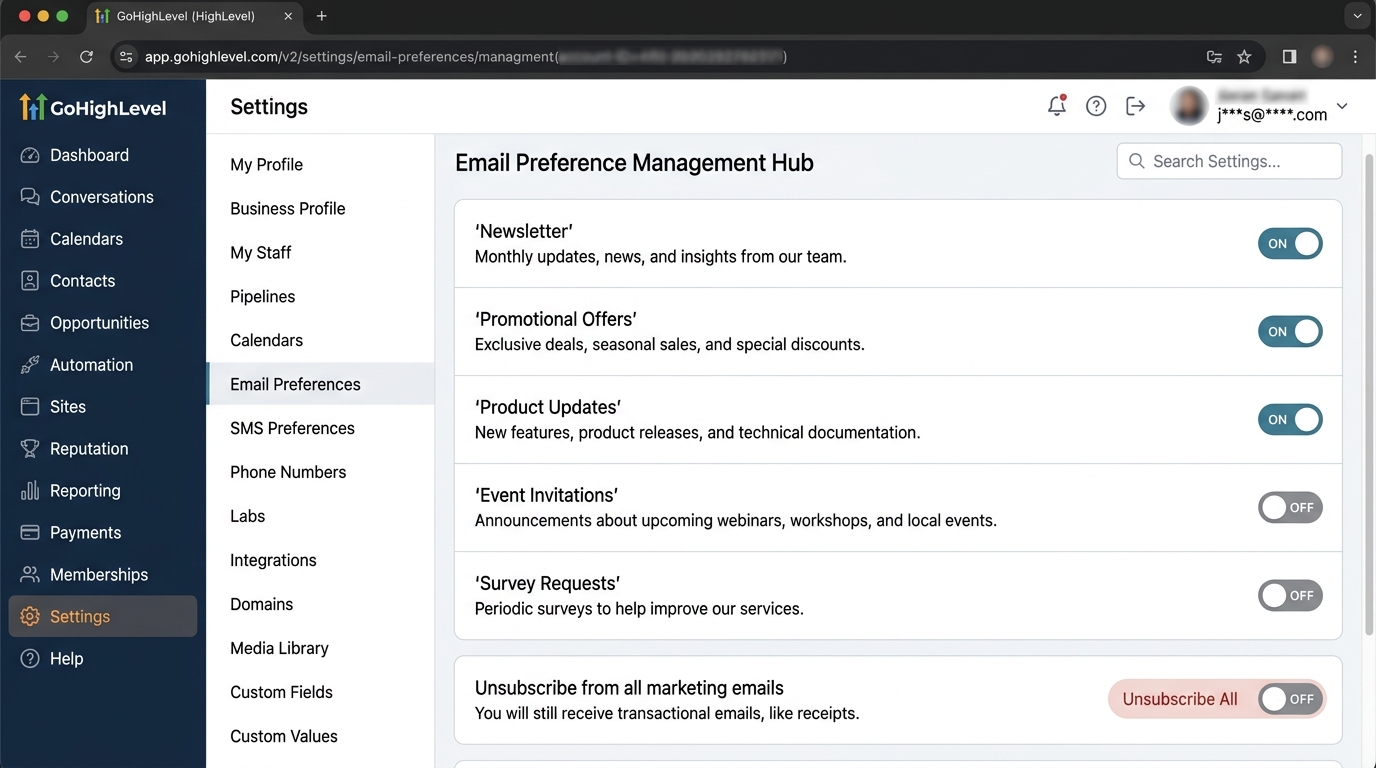
Preference Management: This feature lets you create email subscription categories, such as Newsletters, Promotions, and Product Updates. Contacts can manage their preferences, and HighLevel can exclude unsubscribed contacts from campaigns assigned to the relevant category.
You can find it under Settings → Preference Management Hub at the location level.
Workflows: Workflows connect triggers, actions, conditions, and waiting steps to automate communication based on customer activity.
One important distinction: email subscription categories and channel-specific DND are different controls. Preference Management is for email categories; it is not a substitute for SMS consent or opt-out handling.
3. Configure Your Contact Organization and Preferences
Start by creating a consistent way to identify contacts.
For example, you might use these tags:
Appointment-CustomerMarketing-EmailMarketing-SMS
You can also create custom fields to record consent details, including when permission was obtained and its source.
Next, configure your email subscription categories in the Preference Management Hub. Create categories that clearly describe the emails customers will receive, such as Promotional Offers and Newsletters.
When sending an email campaign, select the appropriate preference category in the Email Builder. HighLevel uses that category to respect the contact's subscription choices, including when emails are sent through supported workflows.
For SMS, manage the relevant channel restrictions and honor opt-out requests. Do not assume that an email subscription preference automatically controls SMS permissions.
4. Build Separate Transactional and Marketing Workflows
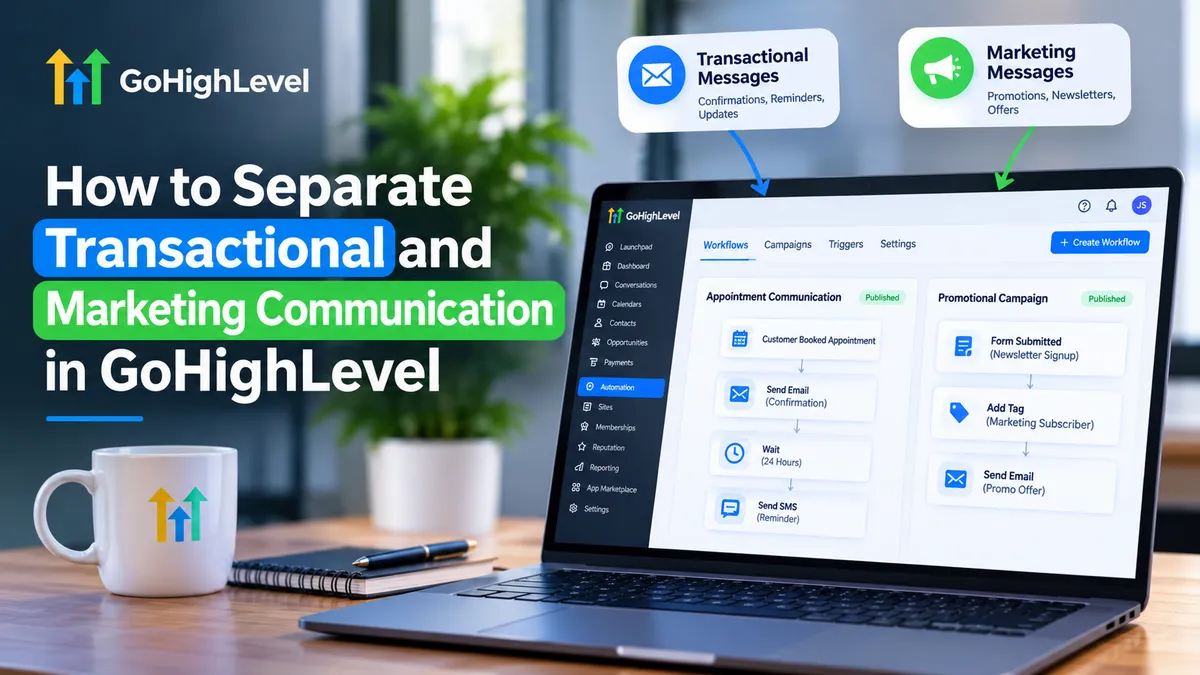
Now create two separate workflows in Automation → Workflows.
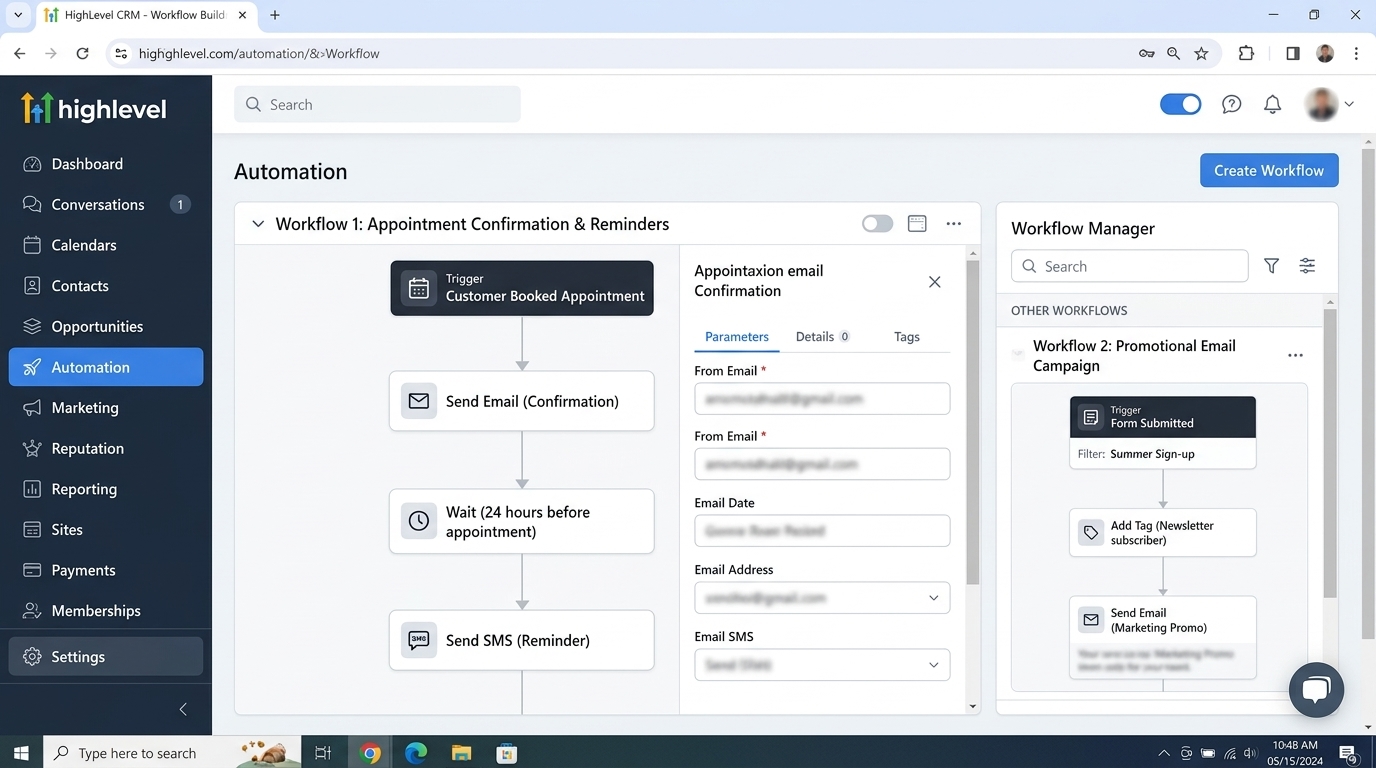
Workflow A: Appointment Confirmation and Reminders
For a business that accepts online bookings, the setup could be:
Trigger: Customer Booked Appointment.
Filter: In Calendar → Select the relevant appointment calendar.
Action: Send Email with booking details.
Action: Wait until 24 hours before the appointment.
Action: Send SMS with the appointment reminder.
The Customer Booked Appointment trigger starts the workflow when a customer independently books an appointment through an online booking system. The Send Email and Send SMS actions handle the actual messages.
Use appointment-related information in your templates, such as the customer's name, appointment date, and start time.
Workflow B: Promotional Email Campaign
Suppose a customer submits a newsletter signup form.
You can organize the process as follows:
Trigger: Form Submitted.
Filter: Select the specific newsletter signup form.
Action: Record the appropriate consent information.
Action: Add a relevant organizational tag.
Action: Send the welcome email using the Newsletter preference category.
For ongoing promotions, use a separate campaign and assign the relevant email subscription category. Make sure the contact's subscription status is respected before sending.
For more complex workflows, an If/Else action can check stored contact fields and route contacts through different branches. For example, contacts with a recorded marketing preference can follow the appropriate path, while others are excluded from promotional messaging.
Remember that a custom field or tag is not enough on its own to establish valid consent.
5. Test Your Workflows Before Publishing
Before activating your setup, test it with sample contacts.
Check that:
A new appointment triggers the correct confirmation.
Reminder messages are sent at the intended times.
Newsletter signups enter the correct marketing process.
Unsubscribed contacts are excluded from relevant promotional emails.
SMS opt-outs are respected.
No promotional messages appear in appointment notification workflows.
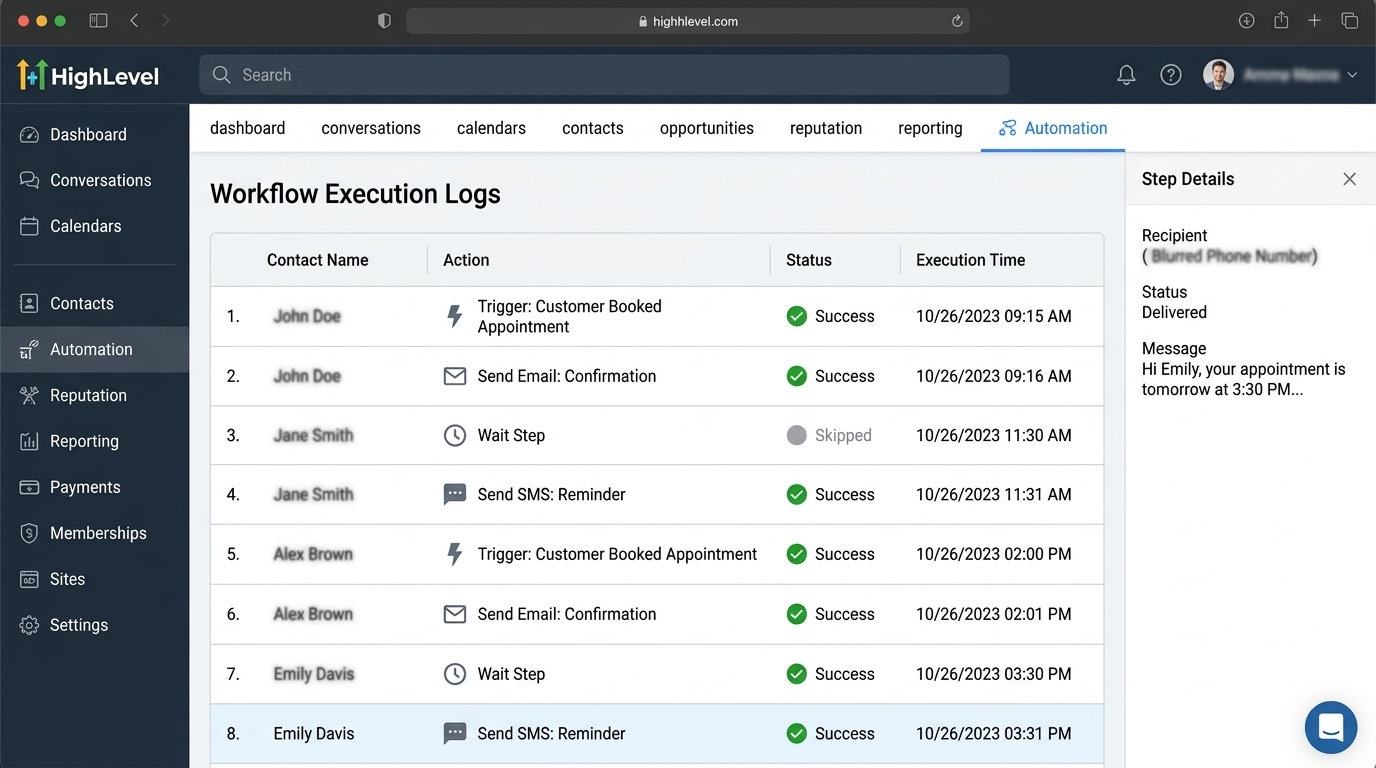
Also review workflow execution history to identify skipped steps, failed actions, or incorrect trigger filters.
6. Troubleshoot and Maintain Your Setup
If a message is not sent, first check whether the contact meets the trigger filters and whether the workflow is published.
If a promotional email reaches an unsubscribed contact, review the campaign's assigned preference category and the contact's subscription status.
If an appointment reminder fails, check the appointment trigger, calendar filter, contact details, and execution history.
Review your setup whenever you introduce a new campaign or change your communication process.
Remember that consent requirements differ by channel and jurisdiction. Regulations such as CAN-SPAM, TCPA, and UK PECR may apply depending on your audience and use case. Check the relevant laws and carrier policies before sending messages. This guide is operational information, not legal advice.
Conclusion
Separating transactional and marketing communication in GoHighLevel doesn't require a complicated system. Start with organized contact records, configure the appropriate communication preferences, and build separate workflows for service updates and promotions.
The result is a cleaner automation process and better control over the messages your customers receive.
If you need help organizing workflows, managing customer communication, or building reliable GoHighLevel automations, WispCode can help you create a system that fits your business.
Visit WispCode to explore how better automation can improve your customer communication.
Frequently Asked Questions (FAQs)
1. What is the difference between transactional and marketing communication in GoHighLevel?
Transactional communication provides essential updates, such as appointment confirmations, payment receipts, and service notifications. Marketing communication promotes products or services through newsletters, discounts, and promotional campaigns.
2. Can I create separate workflows for transactional and marketing messages in GoHighLevel?
Yes. You can create dedicated workflows using different triggers and actions. For example, an appointment booking can trigger a confirmation workflow, while a newsletter signup can start a separate marketing workflow.
3. How can I manage marketing email subscriptions in GoHighLevel?
You can use the Preference Management Hub to create email subscription categories, such as Newsletters, Promotional Offers, and Product Updates. This helps contacts manage the types of marketing emails they want to receive.
4. Does GoHighLevel allow businesses to manage SMS and email opt-outs separately?
Yes. GoHighLevel provides channel-specific Do Not Disturb (DND) controls for communication channels such as email and SMS. Businesses should configure these preferences correctly and respect applicable opt-out requirements.
5. Can I send appointment reminders to contacts who have unsubscribed from marketing emails?
Appointment reminders can be managed separately from marketing campaigns. However, whether a reminder can legally be sent depends on its purpose, communication channel, jurisdiction, and applicable consent requirements. Always respect relevant channel restrictions and avoid adding promotional content to service notifications.
Need Expert Help with GoHighLevel?
New to GoHighLevel and ready to get started? Buy your GoHighLevel account here and launch with confidence.
Already know what you need and want our team to handle everything, from complete setup and customization to funnels, workflows, automations, CRM, and pipelines? Click here.