

How to Track Marketing Leads in GoHighLevel: A Guide
How to Track Marketing Leads in GoHighLevel
Getting leads from Google Ads, Facebook, your website, and email campaigns is encouraging. But do you actually know which channels bring in customers and which ones simply generate inquiries?
Without proper tracking, businesses can spend thousands on marketing without knowing what delivers results. A campaign might generate 100 leads, yet only a handful become paying customers.
That's where GoHighLevel comes in. It brings contact management, marketing attribution, and sales pipeline tracking into one platform, making it easier to understand where leads originate and what happens after they enter your CRM.
How Lead Tracking Works in GoHighLevel
GoHighLevel lead tracking connects two important pieces of information: where a lead came from and how that lead progresses toward a sale.
When someone submits a form, completes a survey, books an appointment, or interacts through a supported chat widget, GoHighLevel can capture their information in a contact record.
Depending on the interaction and tracking configuration, that record may contain attribution details identifying the marketing channel or campaign involved.
Opportunities then help your sales team track potential deals through different pipeline stages. Reporting tools bring this information together to evaluate performance.
Step-by-Step: How to Track Marketing Leads in GoHighLevel
Step 1: Capture Leads Through Forms and Funnels
Start by making sure your marketing channels send prospects into GoHighLevel.
Navigate to Sites → Forms to create a lead capture form. Include essential fields such as name, email address, and phone number.
You can place forms on GoHighLevel websites, funnels, or supported external pages.
When a visitor submits a form, GoHighLevel creates or updates their contact record based on the submission and contact-matching behavior.
Check Contacts after a test submission to confirm that information is being recorded correctly.
Step 2: Configure Lead Source Tracking
Knowing that someone became a contact isn't enough. You also need to identify where the inquiry originated.
In GoHighLevel, open Sites → Forms, select your form, and add the Source element.
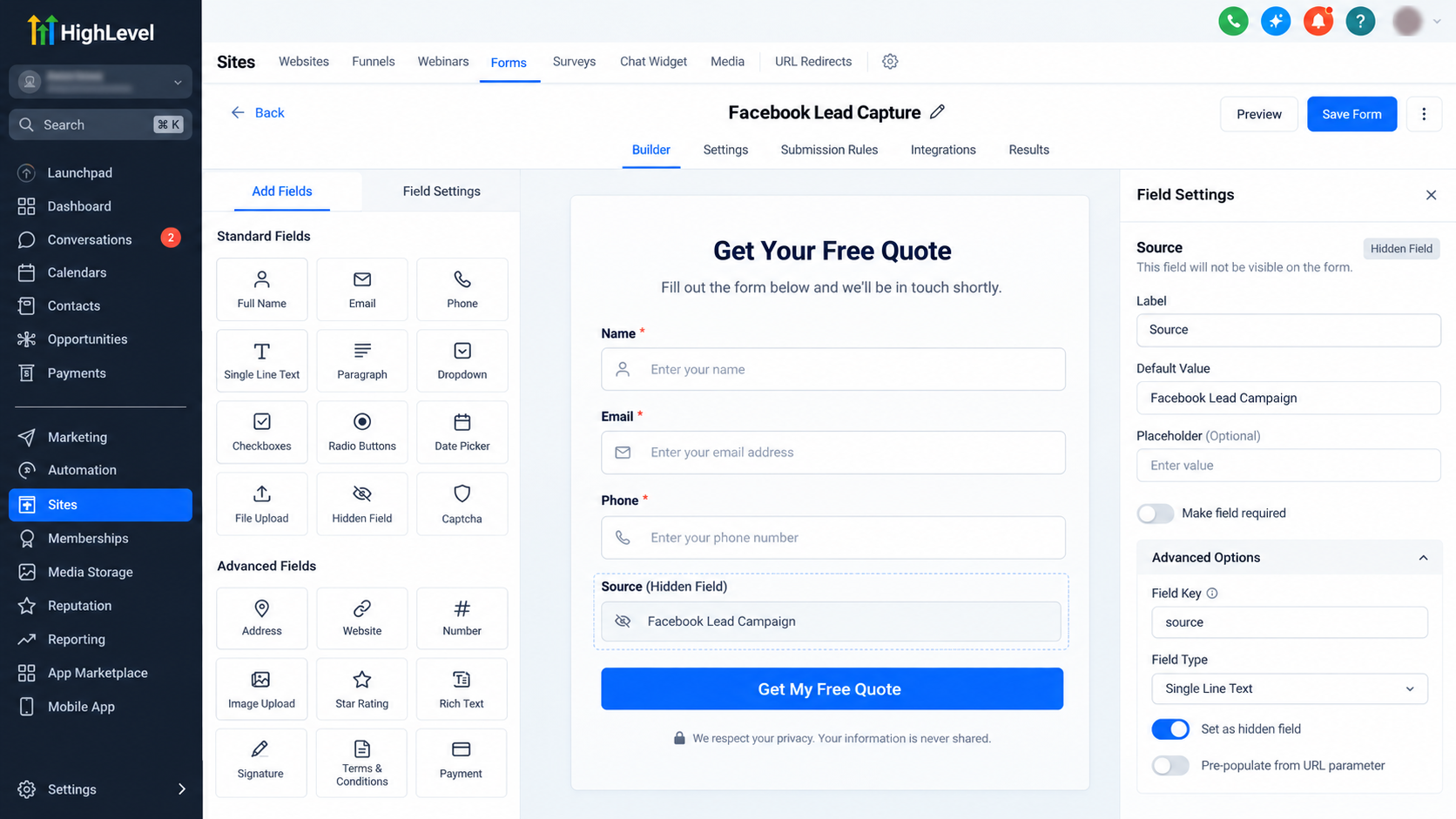
Assign a descriptive source value, such as:
Facebook Lead Campaign
Website Contact Form
Google Search Campaign
Save your changes and submit a test response.
GoHighLevel also supports a source URL parameter for supported forms and surveys, allowing different links to pass different source values.
Remember that Contact Source and marketing attribution are separate pieces of information. A source label identifies an assigned origin, while attribution records information about qualifying marketing interactions.
Step 3: Track Marketing Campaigns With UTM Parameters
UTM parameters help identify the campaigns sending visitors to your landing pages.
Three commonly used parameters are:
utm_source: Identifies the traffic source, such as Facebook or Google.
utm_medium: Describes the marketing medium, such as paid social or email.
utm_campaign: Identifies the specific campaign.
For example:
https://example.com/offer?utm_source=facebook&utm_medium=paid_social&utm_campaign=october_offer
This URL identifies traffic associated with a Facebook paid social campaign.
Use consistent naming conventions across advertisements and campaigns. Avoid mixing values like Facebook, facebook, and FB unnecessarily.
Importantly, adding UTMs to a URL does not guarantee they will appear in a contact record. The visitor must complete a supported, properly tracked interaction, and the attribution information must be successfully captured.
Step 4: Review First and Latest Attribution
GoHighLevel distinguishes between two types of recorded contact attribution.
First Attribution identifies the contact's earliest recorded qualifying marketing interaction.
Latest Attribution identifies the most recently recorded qualifying interaction.
To review this information:
Navigate to Contacts.
Open the relevant contact record.
Locate the attribution information in the lower-right area of the Activity tab.
Suppose someone initially submits a form after clicking a Google advertisement. Later, they return through an email campaign and complete another tracked action.
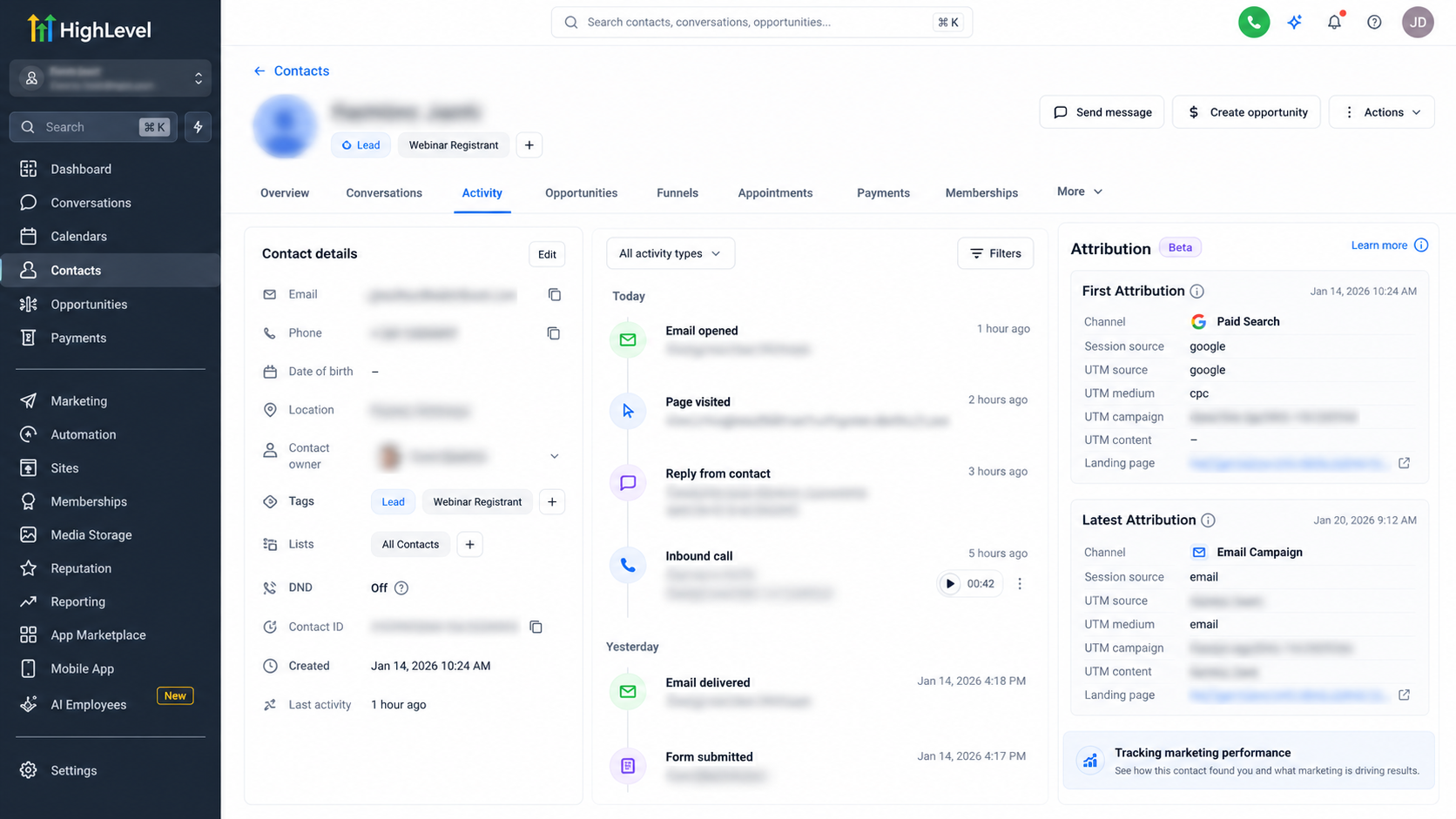
Their First Attribution may reflect Google Ads, while Latest Attribution may reflect the subsequent email interaction.
This helps you understand both initial acquisition and later engagement. However, attribution will only reflect interactions successfully recorded by GoHighLevel.
Step 5: Monitor Leads Through Opportunity Pipelines
Attribution explains where prospects came from. Opportunity pipelines explain what happens afterward.
Navigate to Opportunities and create or open a pipeline suited to your sales process.
A typical custom pipeline might include:
New Lead → Contacted → Appointment Booked → Qualified → Closed
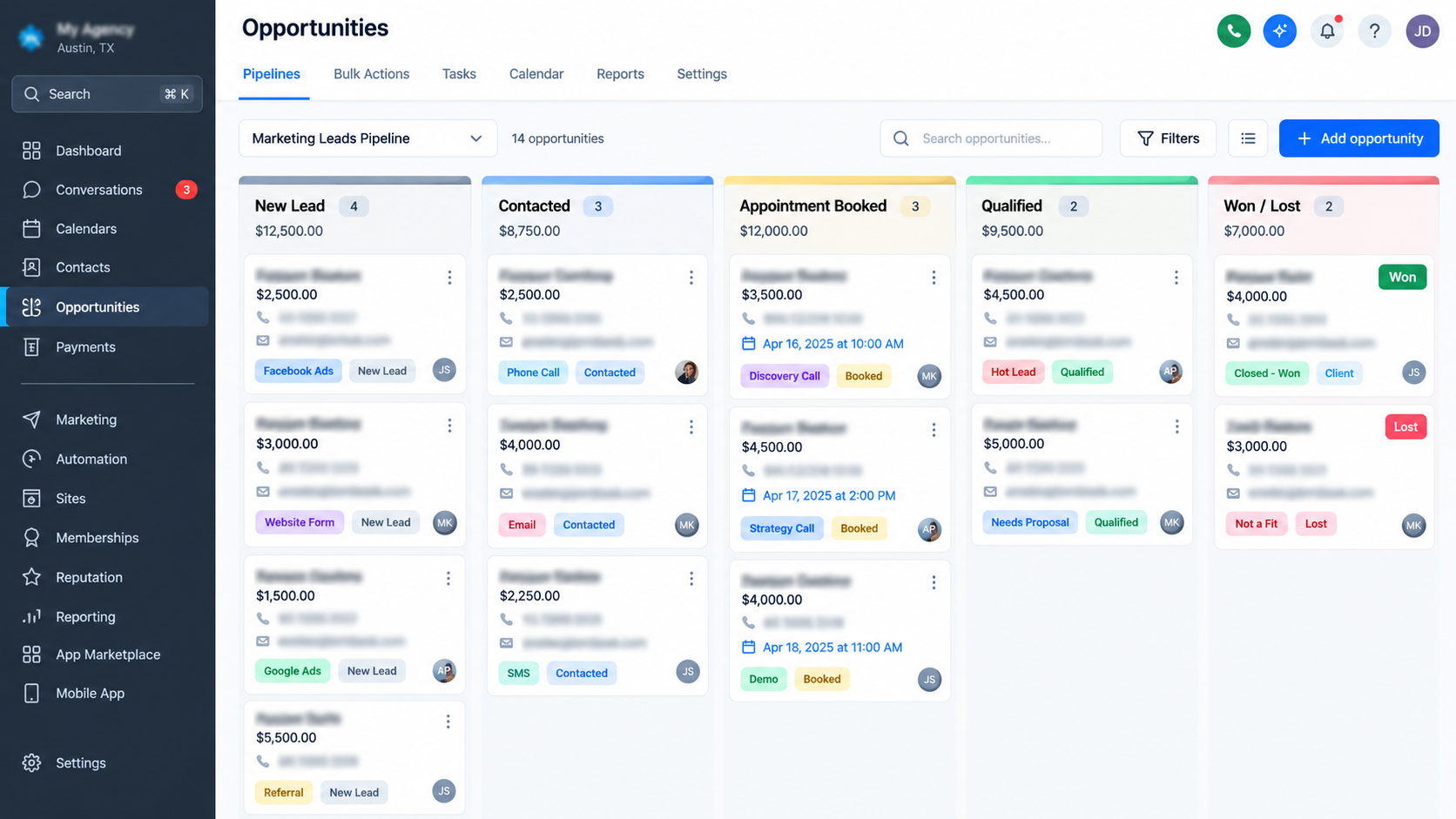
These are example stages that you can configure for your business.
Create opportunities for relevant prospects, assign responsible team members, and update their stages as conversations progress.
Record opportunity values when you have reasonable estimates.
This makes it easier to distinguish someone who submitted a form from someone who became a genuine sales opportunity.
Step 6: Analyze Lead Sources and Marketing Results
GoHighLevel provides reporting widgets that help businesses evaluate opportunities by source and status.
Navigate to Dashboard → Edit dashboard → Add widget and select Lead Source Report under the General category.
Choose the relevant pipeline and configure your filters.
The report displays opportunity counts across statuses such as Open, Won, Lost, and Abandoned. You can examine individual opportunities behind the reported figures.
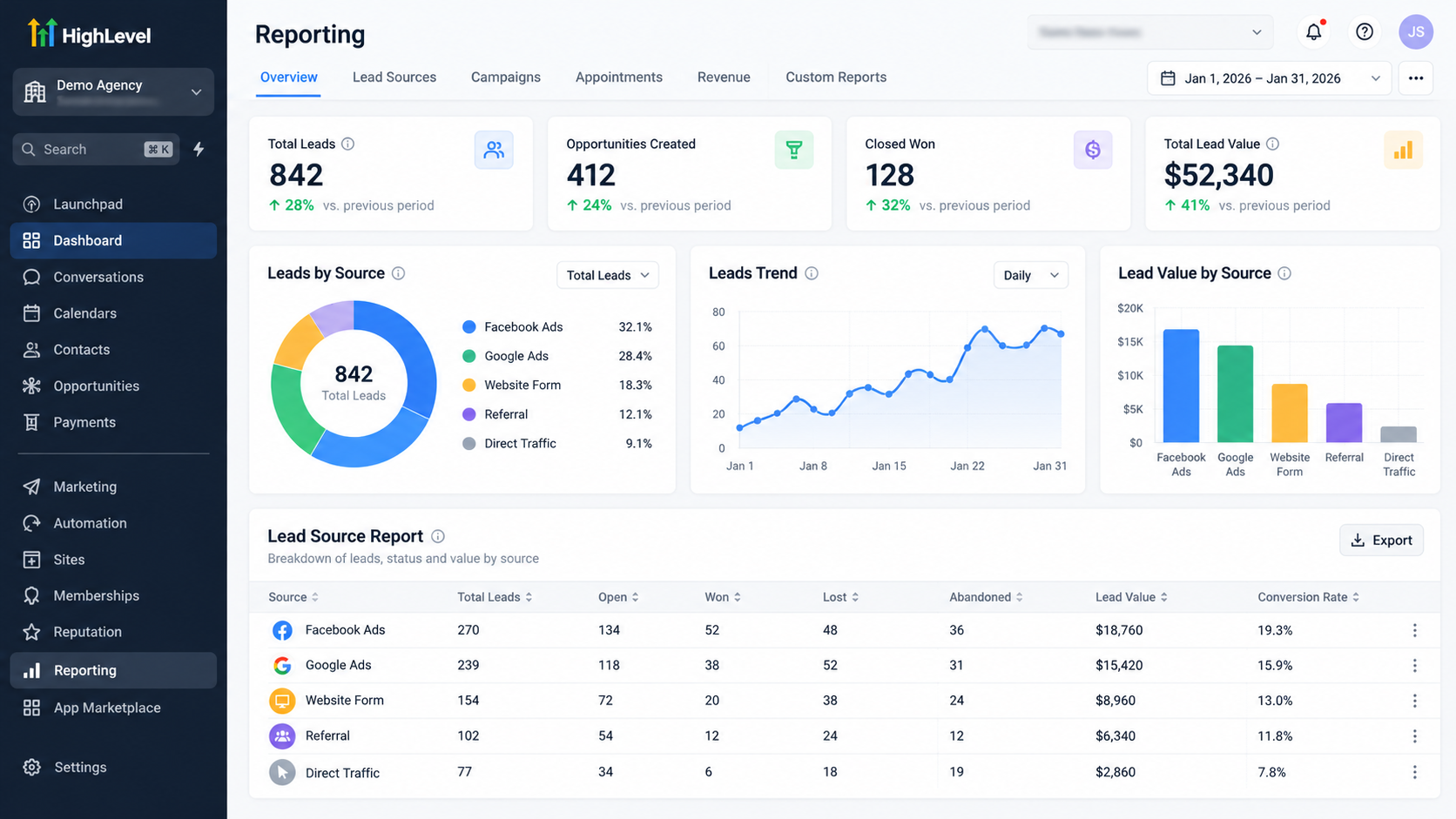
One important distinction: the report counts opportunities, not unique contacts. Multiple opportunities associated with one contact may appear separately.
Which Lead Tracking Metrics Actually Matter?
Generating more leads doesn't automatically mean better marketing.
Focus on lead volume, source quality, lead-to-customer conversion rate, cost per lead, and recorded closed revenue.
Consider two hypothetical campaigns. Campaign A generates 100 leads and two customers. Campaign B generates 40 leads and eight customers.
Despite producing fewer inquiries, Campaign B achieves a 20% lead-to-customer conversion rate compared with Campaign A's 2%.
To calculate true profitability, also consider advertising costs and actual revenue.
Common Lead Tracking Mistakes to Avoid
Inconsistent UTM naming: Establish standardized campaign names before launching advertisements.
Confusing Source with Attribution: Review the appropriate field instead of assuming they contain identical information.
Outdated pipeline stages: Keep opportunity statuses current so reporting reflects actual sales progress.
Missing attribution: Imported contacts and manually created records may lack original marketing interaction data. Review missing values rather than assigning unsupported sources.
Final Thoughts: Make Every Marketing Lead Count
Effective lead tracking isn't just about collecting data. It's about using reliable information to make better marketing decisions.
With properly configured forms, attribution tracking, UTM parameters, opportunity pipelines, and reporting, GoHighLevel can help businesses understand their customer acquisition process more clearly.
Start by reviewing your current tracking setup, fixing missing lead-source information, and measuring which campaigns produce meaningful sales opportunities.
The goal isn't simply to generate more leads. It's to identify and invest in the leads that actually grow your business.
Frequently Asked Questions (FAQs)
1. How do I track marketing leads in GoHighLevel?
You can track marketing leads in GoHighLevel by capturing inquiries through forms, funnels, surveys, and other supported channels. Once a lead enters your CRM, you can review its contact details, source information, and available attribution data. Opportunity pipelines and reporting tools help you monitor progress and evaluate marketing performance.
2. Can GoHighLevel track where my leads come from?
Yes. GoHighLevel supports lead-source tracking through Contact Source values, UTM parameters, and First and Latest Attribution data. Depending on your tracking configuration, you can identify leads associated with channels such as Google Ads, Facebook campaigns, email marketing, and website forms. However, not every interaction is automatically tracked.
3. What is the difference between First Attribution and Latest Attribution in GoHighLevel?
First Attribution identifies the earliest qualifying marketing interaction recorded for a contact, while Latest Attribution identifies the most recently recorded qualifying interaction. For example, a lead might initially arrive through Google Ads and later return through an email campaign. These attribution fields help businesses understand different stages of the customer's journey.
4. How do I track Facebook and Google Ads leads in GoHighLevel?
You can use properly configured tracking URLs with UTM parameters to identify campaign traffic. When visitors complete supported tracked actions, GoHighLevel may capture attribution information associated with those campaigns. You can then review contact records and related opportunities to evaluate lead quality and sales outcomes.
5. Does GoHighLevel automatically track lead conversions?
GoHighLevel can help monitor conversions through contact records, opportunity pipelines, workflows, and supported reporting features. However, accurate conversion tracking depends on how your CRM, opportunities, and marketing integrations are configured. Not every conversion or revenue event is automatically recorded.
6. How can I identify which marketing campaign generates the most customers?
Start by comparing campaign attribution data with the associated opportunities and their sales outcomes. Review the number of qualified prospects, won opportunities, and recorded revenue for each source. This helps you identify campaigns generating actual business results rather than simply attracting the most inquiries.
Need Expert Help with GoHighLevel?
New to GoHighLevel and ready to get started? Buy your GoHighLevel account here and launch with confidence.
Already know what you need and want our team to handle everything, from complete setup and customization to funnels, workflows, automations, CRM, and pipelines? Click here.



