

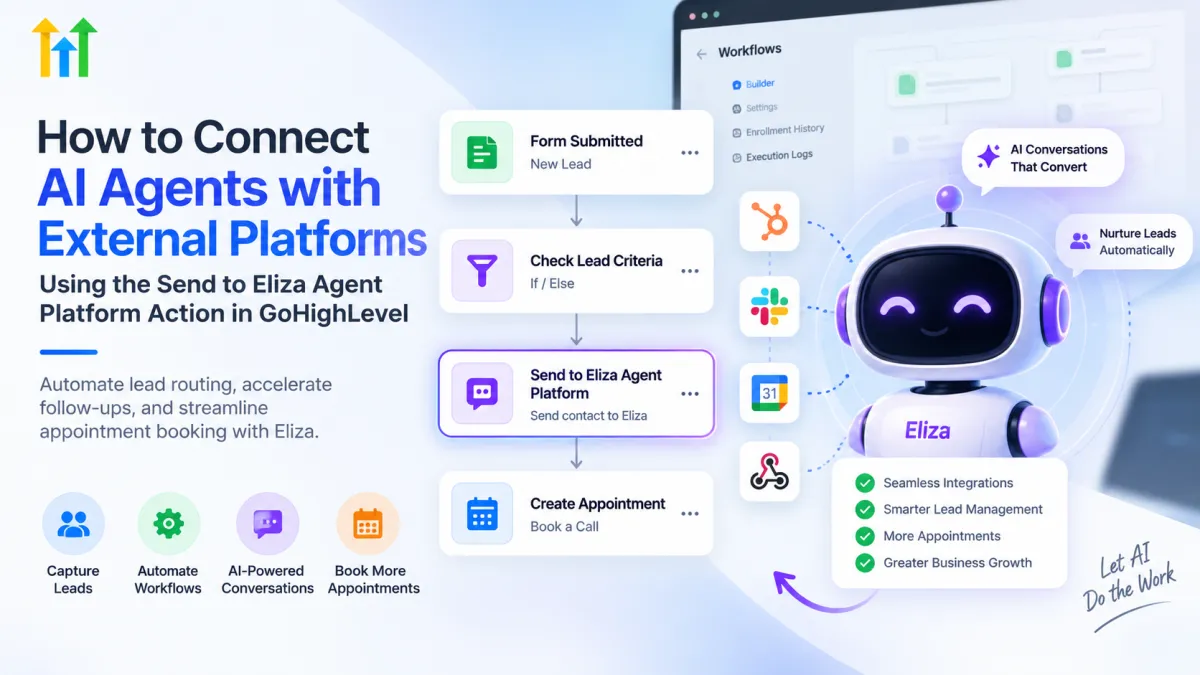
How to Use Send to Eliza Agent Platform in GoHighLevel
How to Connect AI Agents with External Platforms Using the Send to Eliza Agent Platform Action in GoHighLevel
Capturing a lead is only the beginning of the sales process. The bigger challenge is making sure that lead reaches the right follow-up process quickly enough.
A prospect may submit a form, call your business, enter a pipeline, or meet certain qualification criteria inside your CRM. But if someone still has to manually review the contact and move them into the next conversation process, valuable time can be lost.
The Send to Eliza Agent Platform GoHighLevel workflow action helps solve this specific problem. It allows qualifying contacts inside a GoHighLevel workflow to be sent directly to the connected Eliza Agent Platform rather than requiring the contact to first send an inbound message.
This creates a more controlled connection between GoHighLevel workflow automation and Eliza-based lead nurturing.
What Is the Send to Eliza Agent Platform Action in GoHighLevel?
The Send to Eliza Agent Platform action is a workflow action available in GoHighLevel that sends a contact to the connected Eliza Agent Platform.
HighLevel describes the Eliza Agent Platform as a messaging platform designed to help agencies manage lead conversations, nurture prospects, and support appointment-focused processes.
The important part is that the workflow action gives businesses control over when a contact should enter Eliza.
Normally, inbound conversations can be routed into Eliza based on the location's configuration. However, there are situations where a business may want to begin the Eliza process before the contact sends a new inbound message.
That is where the Eliza workflow action becomes useful.
Why Businesses Use the Send to Eliza Agent Platform Action
The main advantage is better control over lead routing.
Instead of depending entirely on a lead starting a conversation, businesses can use workflow conditions to determine when a contact should be sent forward.
This can help with:
Faster routing of qualified leads
Reducing manual contact handling
Creating more consistent lead nurturing processes
Moving selected contacts into an AI-assisted conversation workflow
Supporting appointment-oriented follow-up
Scaling lead management as contact volume increases
The action should not be viewed as a replacement for every human sales interaction. Its value comes from helping businesses create a structured handoff between CRM automation and their Eliza lead-management process.
How the Send to Eliza Agent Platform Action Works
The setup is straightforward because the routing decision happens inside a normal GoHighLevel workflow.
A typical process looks like this:
Open Workflows inside the appropriate GoHighLevel location.
Create a new workflow or open an existing workflow.
Configure a trigger that identifies the contacts you want to process.
Add filters or qualification conditions where necessary.
Add the Send to Eliza Agent Platform workflow action.
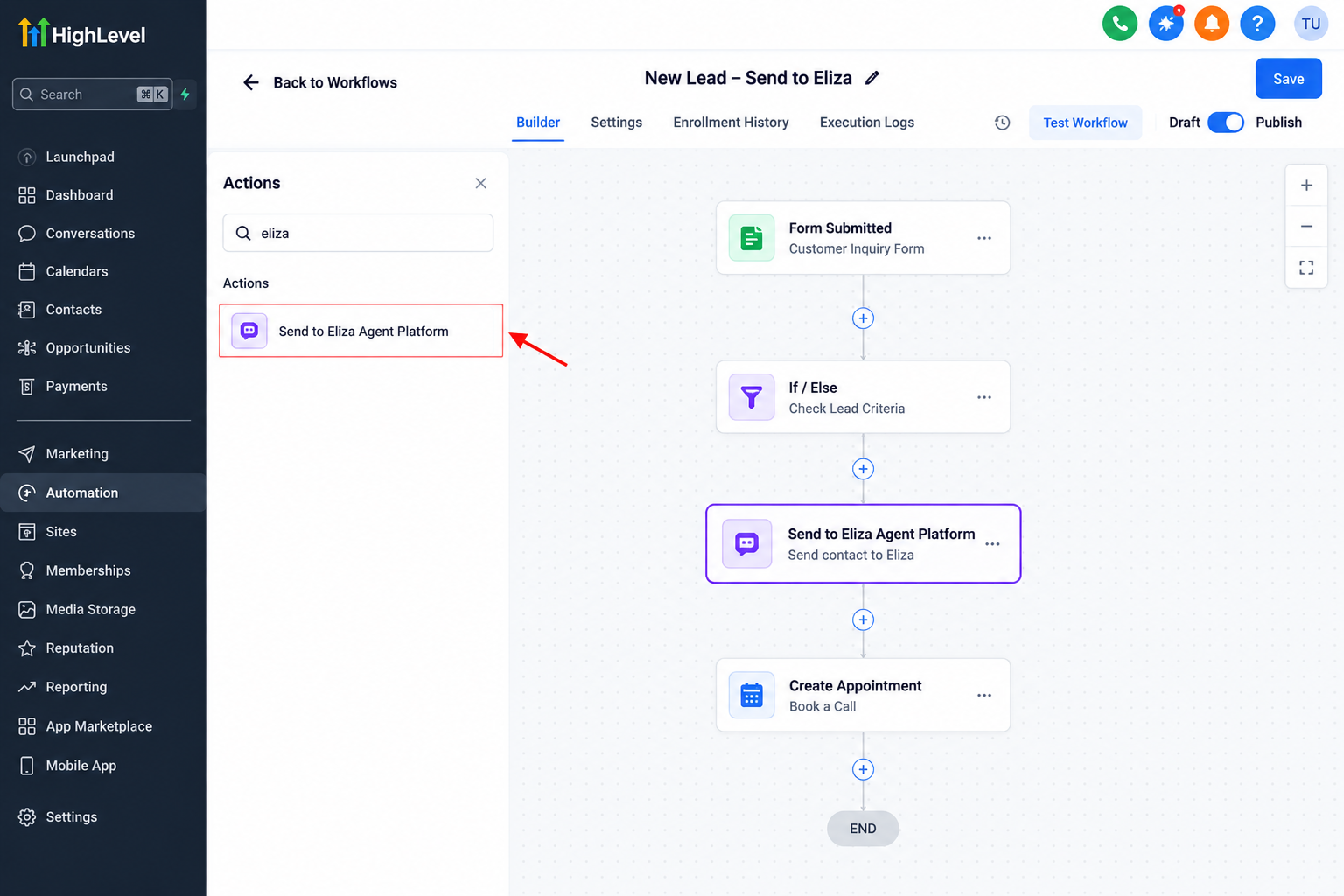
Example of a GoHighLevel workflow where qualified leads are automatically sent to the connected Eliza Agent Platform. Allow qualifying contacts to reach that step.
When the workflow reaches the action, the contact is forwarded to the connected Eliza Agent Platform.
HighLevel's documentation confirms that contacts reaching this action are sent immediately into Eliza rather than waiting for an inbound message.
The relevant Eliza account, location access, and permissions must already be configured correctly. HighLevel also notes that the location must be added to the Eliza account and that appropriate users need the required Eliza access.
Practical GoHighLevel Lead Nurturing Example
Imagine a home-services company running paid ads.
A homeowner completes a website form requesting information about a service. The business does not necessarily want every form submission immediately handled in the same way, so it creates qualification logic inside GoHighLevel.
The workflow could look like:
Form Submitted → Check Lead Criteria → Send to Eliza Agent Platform → AI-Assisted Lead Nurturing / Appointment Process
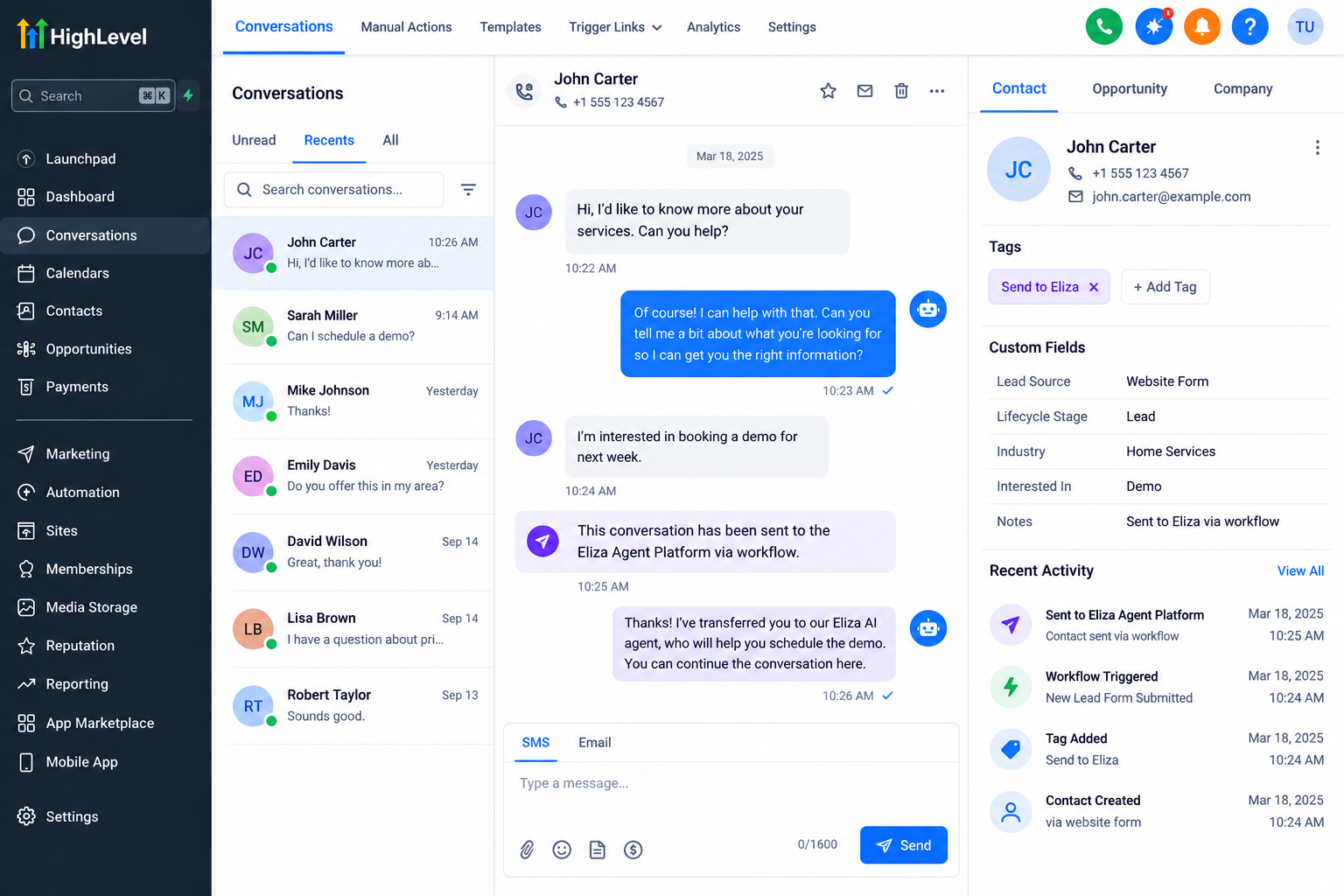
Once the lead meets the required criteria, the workflow sends the contact to Eliza automatically.
The team no longer has to manually identify that qualifying contact and move it into the next conversation process.
Similar workflows could support businesses in real estate, insurance, consulting, agencies, local services, and other industries where prompt lead follow-up and appointment generation are important.
Send to Eliza Action vs. Send to Eliza Tag
This distinction is one of the most important parts of the feature.
The Send to Eliza Agent Platform workflow action immediately pushes the contact into the Eliza Agent Platform when the workflow reaches that step.
The Send to Eliza tag works differently.
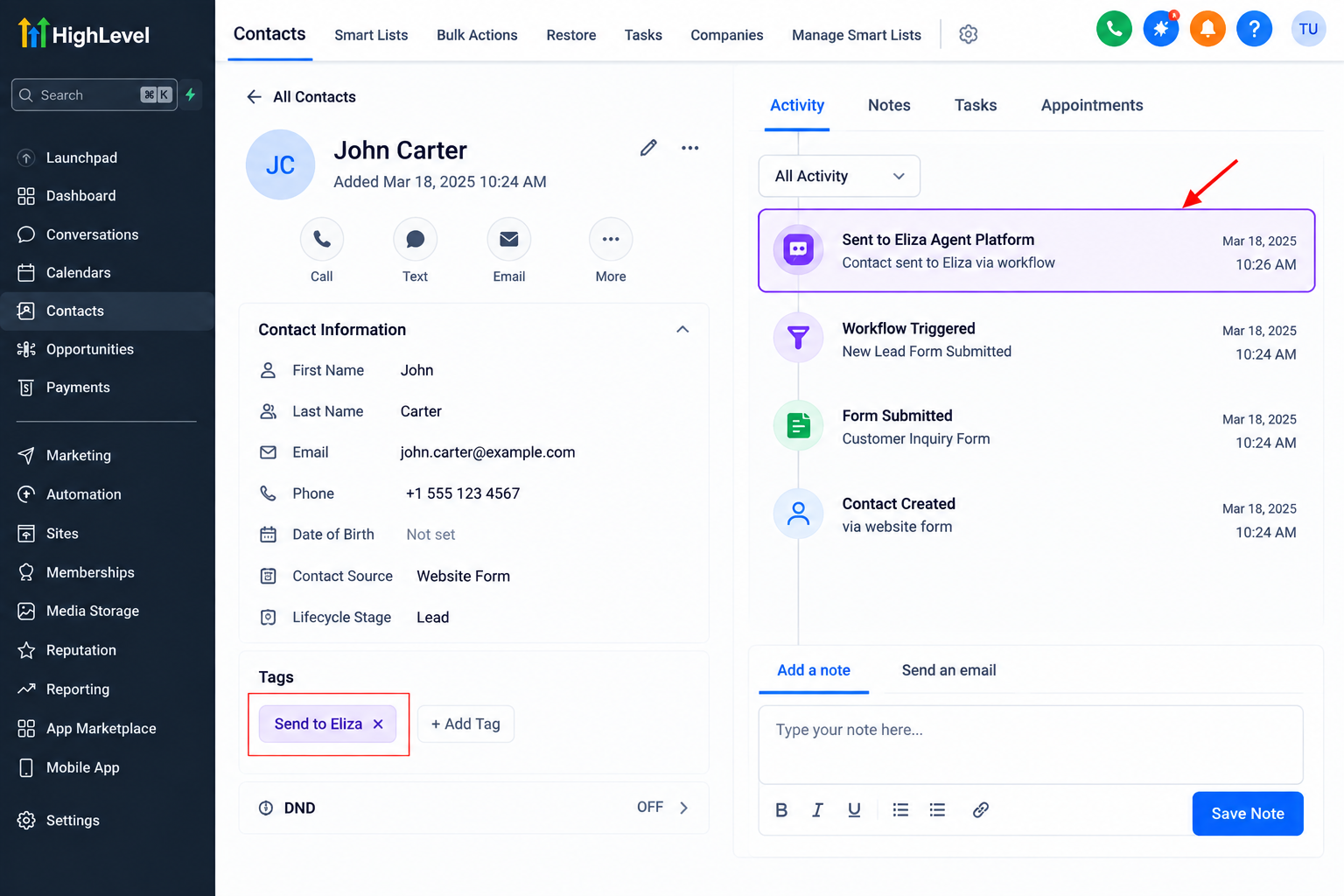
HighLevel explains that a location can configure a specific tag as its Send to Eliza tag. When selective routing is enabled this way, new inbound conversations from contacts carrying that tag can be routed into Eliza. Simply assigning the tag does not mean that the contact immediately appears in Eliza without an inbound message.
So the distinction is:
Workflow Action: intentionally sends the contact into Eliza immediately.
Send to Eliza Tag: helps determine which qualifying inbound conversations should be routed into Eliza.
If your goal is to push a contact into Eliza even though they have not sent an inbound message, the workflow action is the appropriate mechanism documented by HighLevel.
Best Practices for GoHighLevel Eliza Automation
A good GoHighLevel AI automation workflow should be selective rather than simply sending every CRM contact into the same process.
Use filters or conditions before the action when qualification matters. Verify that important contact information is available and avoid creating unnecessary duplicate routing paths.
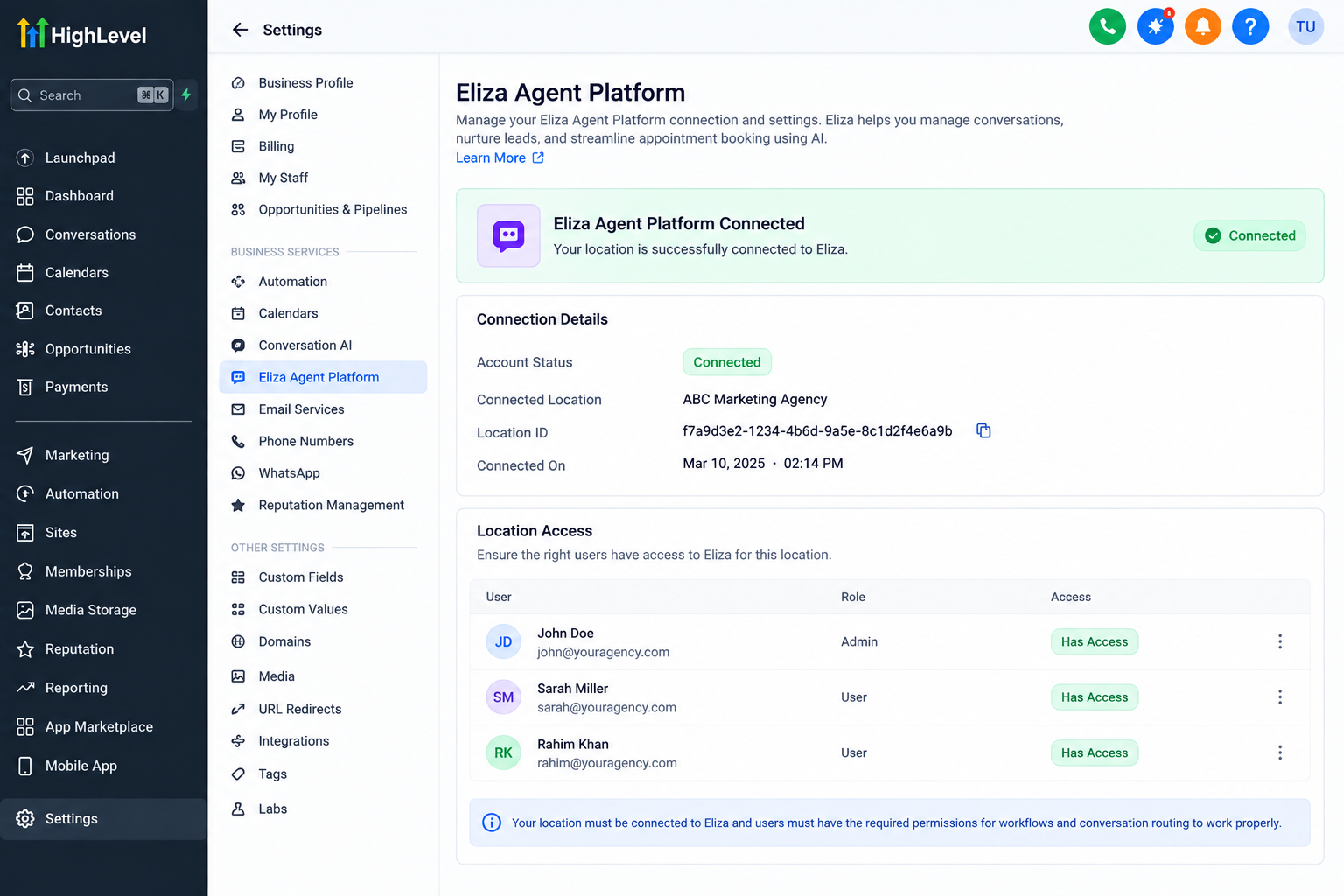
Contact assignment also deserves attention. HighLevel notes that when workflow or Eliza messaging uses assigned-user information, the contact needs to be assigned appropriately for that user information to populate correctly.
Before activating the workflow broadly, run sample contacts through it and confirm that they reach the expected destination.
After launch, continue monitoring how those leads progress and maintain a clear path for human involvement when a conversation requires individual attention.
Common Mistakes to Avoid
One common mistake is assuming that every contact should automatically be sent to Eliza. Qualification logic can make the automation more focused.
Another is treating the Send to Eliza tag and workflow action as interchangeable. They serve related but different routing purposes.
You should also avoid adding the action without confirming that the relevant Eliza location is configured, launching without testing, or describing the feature as a universal connector for arbitrary third-party AI tools.
The action specifically sends contacts to the Eliza Agent Platform supported by HighLevel.
Conclusion
The real value of the Send to Eliza Agent Platform GoHighLevel action is not simply adding AI to a workflow. It is creating a controlled bridge between your CRM automation and the next stage of lead handling.
GoHighLevel workflows can determine when a contact is qualified and ready to move forward. The Eliza Agent Platform can then support the conversation, nurturing, and appointment-focused process that follows.
For businesses looking to automate lead routing in GoHighLevel while maintaining clear qualification rules, this workflow action provides a practical way to move the right contacts into Eliza at the right point in the customer journey.
Frequently Asked Questions
1. What does the Send to Eliza Agent Platform action do in GoHighLevel?
The Send to Eliza Agent Platform workflow action sends a contact from a GoHighLevel workflow directly into the connected Eliza Agent Platform. This allows a business to move selected contacts into the Eliza lead-nurturing process without waiting for the contact to send a new inbound message first.
2. Is the Send to Eliza Agent Platform action the same as the Send to Eliza tag?
No. The workflow action and the Send to Eliza tag serve different purposes. The workflow action can send a contact to Eliza immediately when the contact reaches that step in the workflow. The configured Send to Eliza tag is generally used to determine which qualifying inbound conversations should be routed into Eliza.
3. Can I send only qualified leads to Eliza from GoHighLevel?
Yes. You can use GoHighLevel workflow triggers, filters, conditions, and qualification logic before the Send to Eliza Agent Platform action. This allows you to control which contacts reach the action instead of sending every lead into Eliza automatically.
4. Can the Send to Eliza Agent Platform action connect GoHighLevel with any AI platform?
No. This action is specifically designed for the Eliza Agent Platform supported by HighLevel. It should not be treated as a universal AI connector, webhook, or generic third-party integration for sending contacts to any external AI service.
5. What should I check before using the Eliza workflow action?
Make sure the relevant Eliza account and GoHighLevel location are properly connected and that the required permissions are configured. You should also verify your workflow trigger and qualification logic, confirm that contact information is accurate, and test the workflow with sample contacts before using it with live leads.
Need Expert Help with GoHighLevel?
New to GoHighLevel and ready to get started? Buy your GoHighLevel account here and launch with confidence.
Already know what you need and want our team to handle everything, from complete setup and customization to funnels, workflows, automations, CRM, and pipelines? Click here.



