

Streamline Sales-to-Operations Handovers with GoHighLevel
How to Build a Sales-to-Operations Handover System
Closing a deal should mark the beginning of a smooth customer experience, not another round of confusion. Yet many businesses struggle when sales representatives fail to communicate customer requirements, project timelines, or promised services to operations teams. These gaps create delays, duplicated work, and frustrated customers.
A well-designed Sales-to-Operations Handover System ensures that every closed deal moves into fulfillment with accurate information and clear responsibilities. GoHighLevel helps businesses organize customer records, automate internal communication, and create structured workflows that connect sales activities with operational execution.
Why Sales-to-Operations Handovers Often Break Down
Sales and operations teams frequently work with different priorities. Sales focuses on closing opportunities, while operations concentrates on delivering services. Without a standardized handover process, important information can disappear between departments.
Customer requirements may remain buried in emails, sales notes, or disconnected spreadsheets. Operations employees might receive incomplete project details or unclear instructions about the next steps.
Manual communication creates additional challenges. When handovers depend on individual employees remembering to send updates, delays become more likely.
The biggest problem is often accountability. If nobody owns the transition, teams may assume someone else has already handled it.
What an Effective Sales-to-Operations Handover System Needs
A dependable handover process starts with centralized customer information and clearly defined responsibilities.
Every handover should include essential details such as purchased services, project requirements, agreed deliverables, expected timelines, and relevant customer preferences.
Businesses also need consistent pipeline stages that show where each project stands. Automated notifications can inform operations teams when new work becomes available, while assigned tasks establish responsibility.
However, automation cannot compensate for an undefined process. Before configuring GoHighLevel, businesses should determine what information must be collected, who reviews it, and when fulfillment can begin.
How to Build a Sales-to-Operations Handover System in GoHighLevel
GoHighLevel provides CRM and workflow automation capabilities that businesses can configure to support structured handovers.
Step 1 — Define the Handover Trigger
Start by identifying the event that officially transfers responsibility from sales to operations.
For example, a business might use the Closed Won opportunity stage to indicate that a customer has purchased a service.
In GoHighLevel, an opportunity-stage-based workflow trigger can initiate the handover when a deal enters the designated stage.
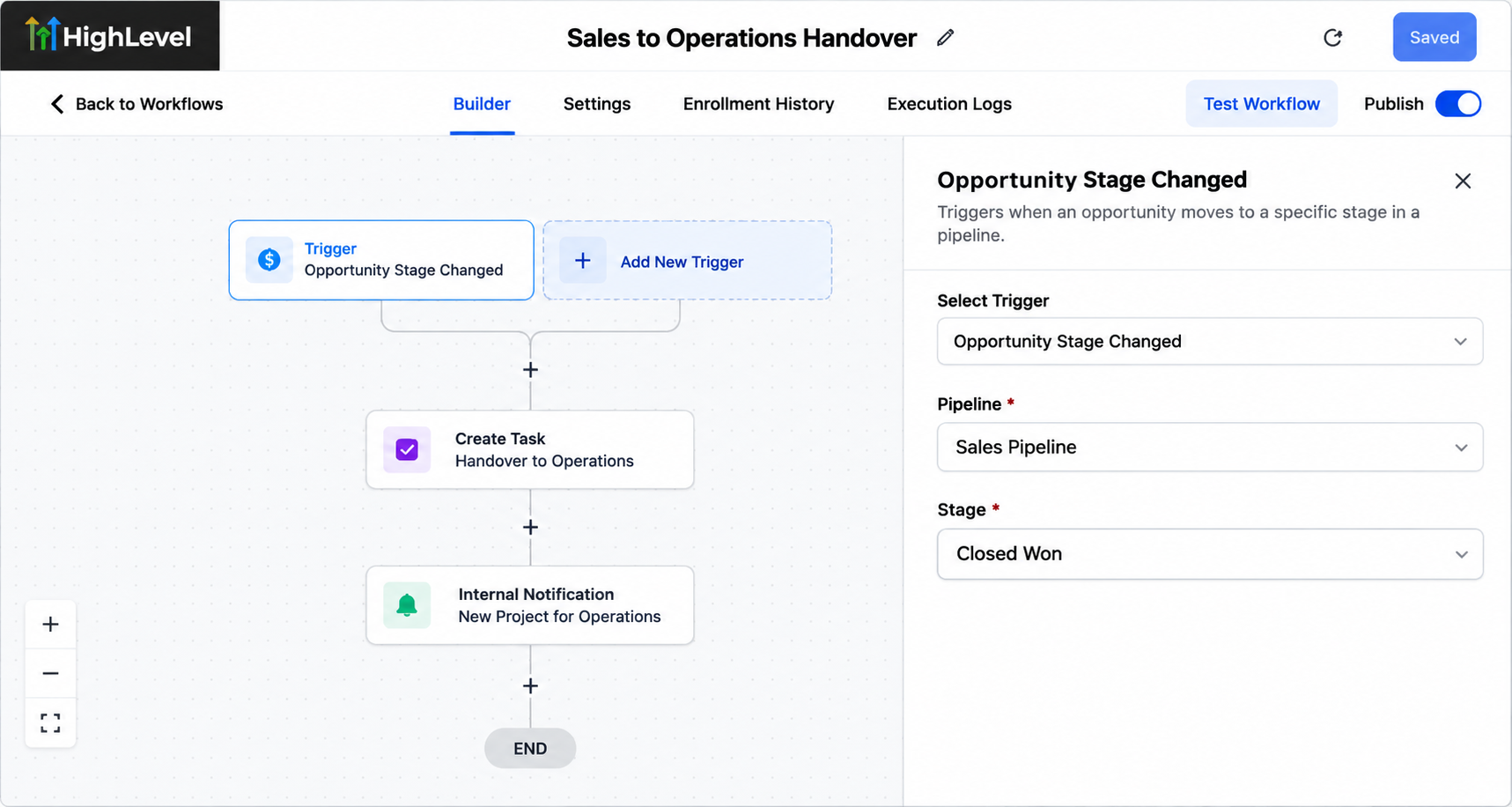
Configure the trigger carefully so that unrelated pipeline movements do not initiate unnecessary handovers.
Step 2 — Standardize Customer and Project Information
Accurate information is essential for successful fulfillment.
GoHighLevel contact records, opportunity details, notes, and custom fields can help organize relevant customer information.
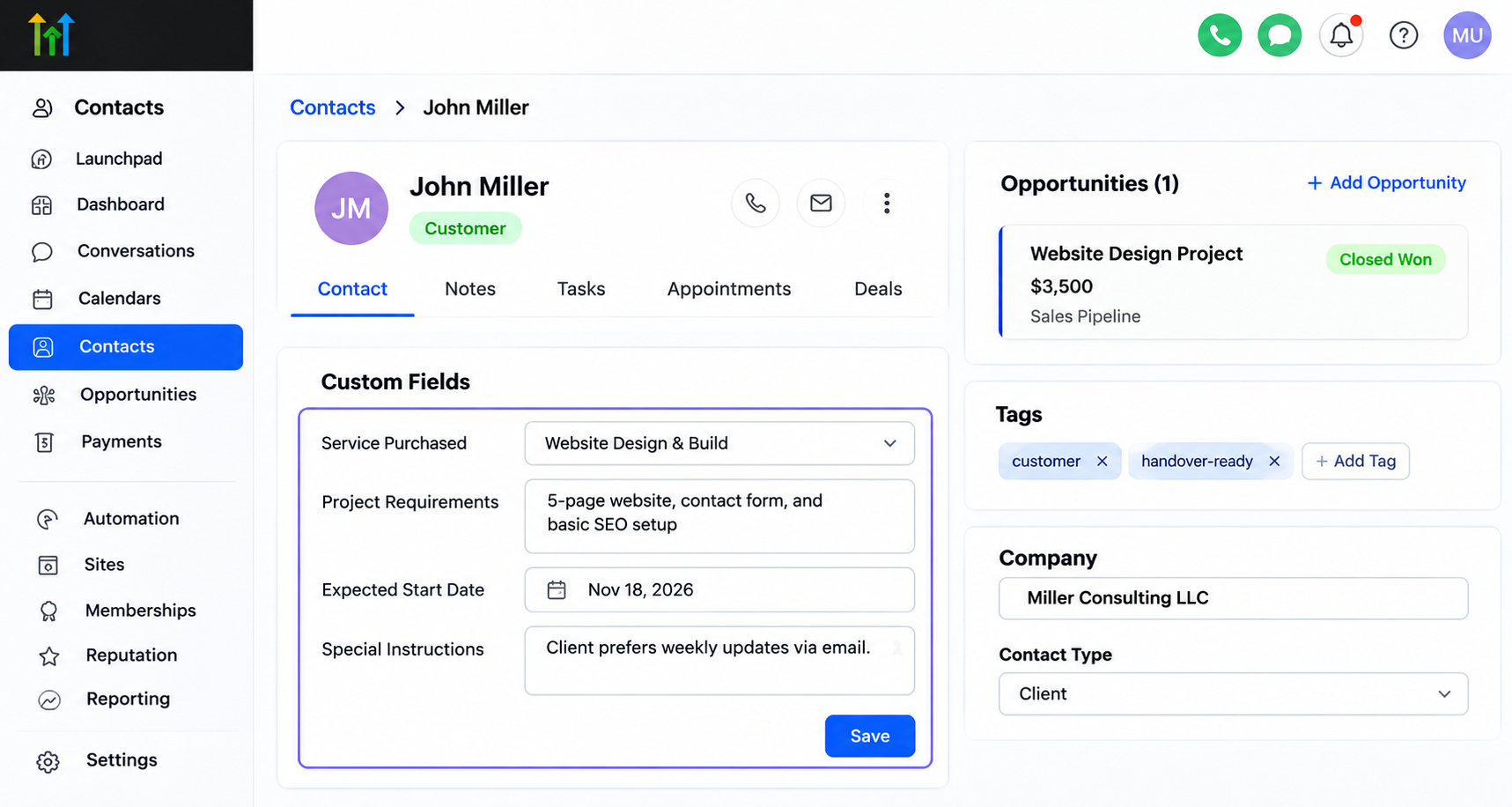
Useful handover fields might include:
Service purchased
Project requirements
Expected start date
Special customer instructions
Sales representatives should complete these details before transferring the opportunity.
Because GoHighLevel does not automatically validate every required handover field, businesses should establish a review process or configure appropriate workflow conditions to identify missing information.
Step 3 — Create a Clear Operations Pipeline
An operations-focused pipeline helps teams track projects after sales closes a deal.
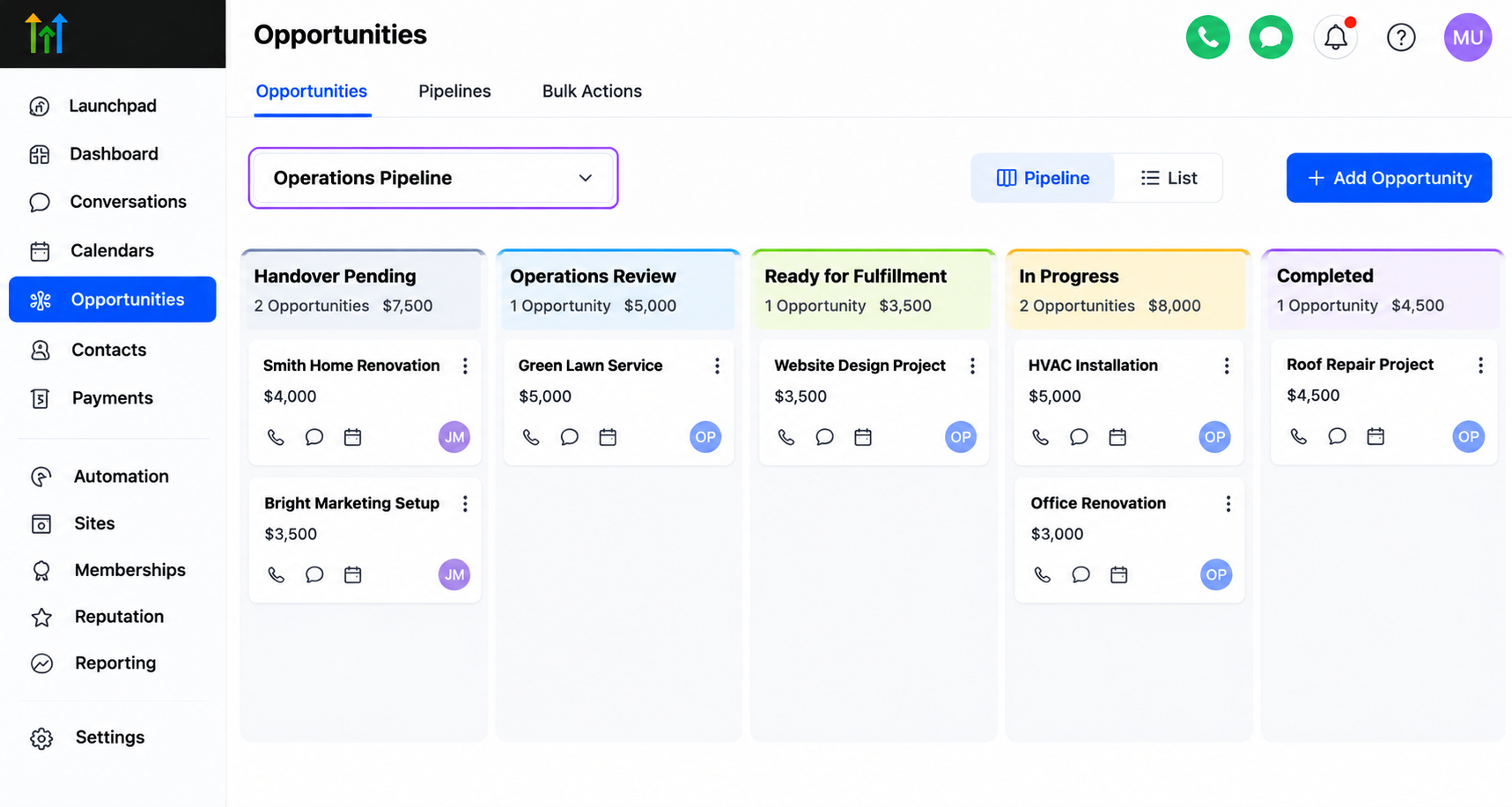
For example, businesses can configure these stages:
Handover Pending
Operations Review
Ready for Fulfillment
In Progress
Completed
Each stage represents a meaningful operational milestone.
Businesses can configure opportunity actions to move or create records within an appropriate pipeline. However, separate sales and operations pipelines are optional, and the chosen structure should reflect the organization's reporting and fulfillment needs.
Step 4 — Automate Internal Notifications and Task Assignment
Once a handover begins, operations employees need to know what requires attention.
GoHighLevel workflow automation can send internal notifications and create tasks for designated team members.
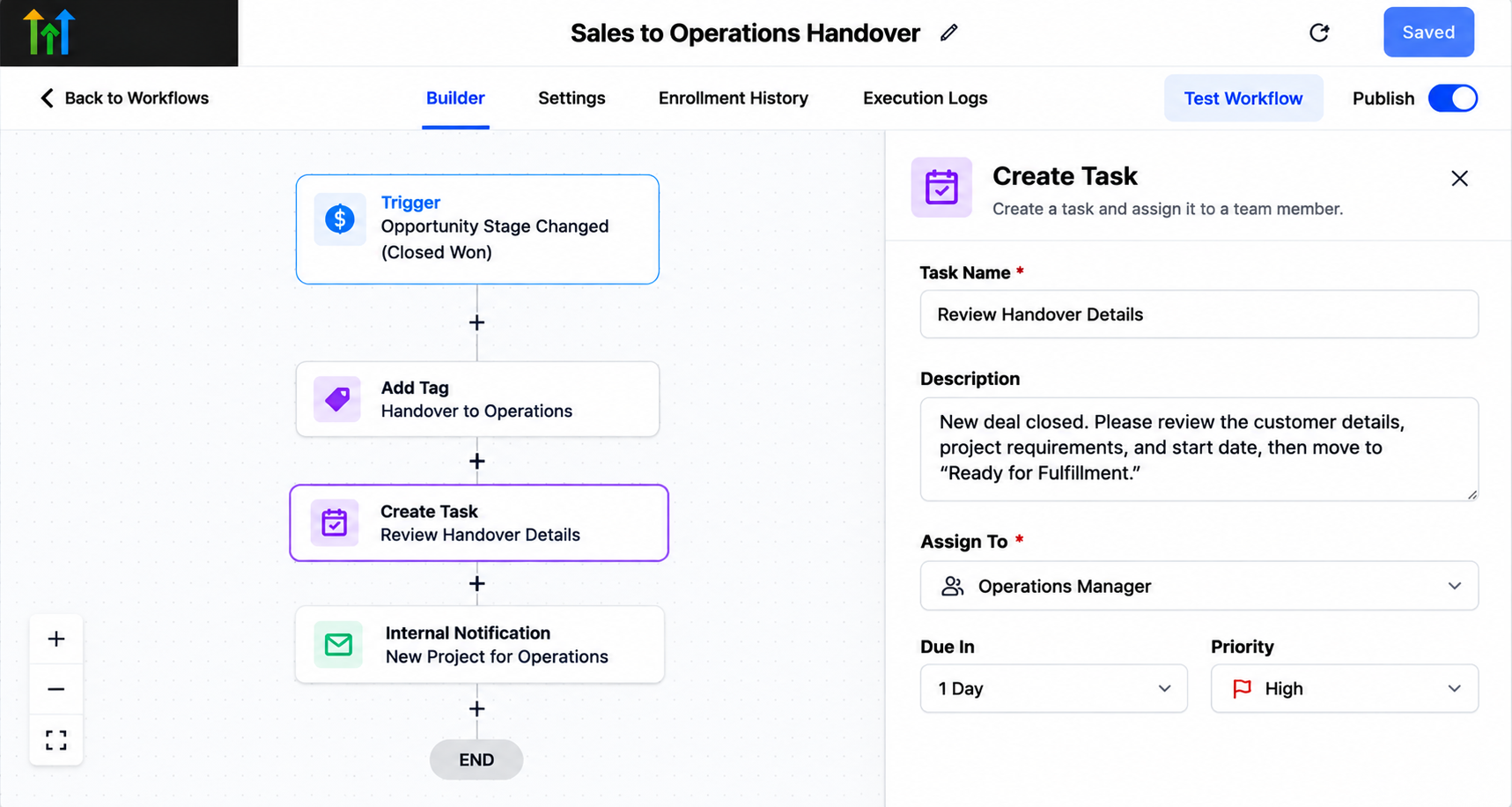
For example, a workflow could notify an operations manager that a new project requires review and create a task to verify customer requirements.
Task ownership and routing rules must be configured intentionally. GoHighLevel should not be expected to identify the correct employee automatically without appropriate assignment settings.
Step 5 — Add a Handover Review and Approval Process
Not every closed deal should immediately enter fulfillment.
Operations teams should first confirm that customer details, deliverables, and timelines are accurate.
A practical approach is to keep the opportunity in an Operations Review stage until the responsible employee verifies the information.
The employee can then move the opportunity into Ready for Fulfillment.
This creates a controlled review checkpoint without assuming that GoHighLevel includes a dedicated handover approval feature.
Step 6 — Test and Improve the Handover Workflow
Before activating the system for actual customers, test it using sample contacts and opportunities.
Confirm that stage changes trigger the correct workflow, notifications reach the intended employees, and tasks receive appropriate ownership.
Also test incomplete records, repeated stage changes, and potential duplicate workflow execution.
Review the system periodically as team responsibilities, services, and operational requirements evolve.
Example: Sales-to-Operations Handover for a Service Business
Consider a home remodeling company that closes a bathroom renovation project.
The sales representative updates the opportunity to Closed Won and records the agreed scope, estimated start date, and customer preferences.
A configured GoHighLevel workflow initiates the handover, creates an operations task, and notifies the project coordinator.
The coordinator reviews the details, confirms any missing information, and advances the project into fulfillment.
This illustrative setup reduces dependence on scattered messages while giving both departments visibility into the customer's progress.
How to Measure Handover Performance
Businesses should monitor whether their handover process consistently delivers complete information on time.
Useful indicators include the time between deal closure and operations acknowledgment, the percentage of complete handovers, delayed transfers, and tasks completed within expected deadlines.
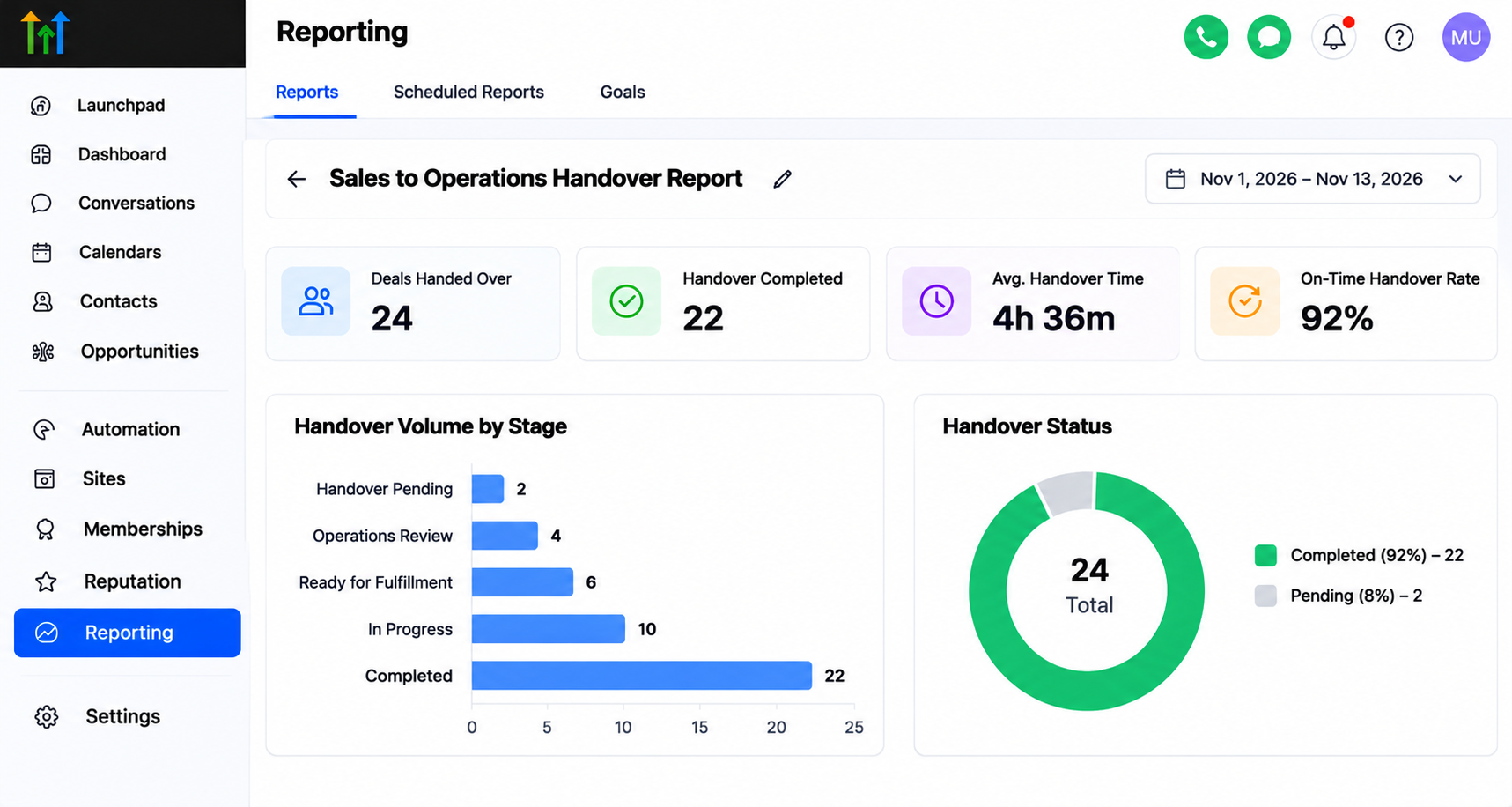
Some measurements may require custom timestamp fields, workflow configuration, data exports, or external reporting tools.
Reviewing these indicators helps managers identify recurring bottlenecks and improve operational accountability.
Conclusion
A reliable Sales-to-Operations Handover System connects successful sales with consistent service delivery.
By standardizing customer information, defining ownership, organizing pipelines, and configuring GoHighLevel automation, businesses can reduce communication gaps and improve coordination.
The strongest handover systems combine thoughtful processes with practical automation, ensuring every new customer receives a clear, organized transition from sales to fulfillment.
Frequently Asked Questions (FAQs)
1. What is a sales-to-operations handover system?
A sales-to-operations handover system is a structured process that transfers customer information, project requirements, and responsibilities from the sales team to the operations team after a deal closes. It helps ensure that employees have the information needed to begin delivering services without unnecessary delays or confusion.
2. How does GoHighLevel help automate the sales-to-operations handover process?
GoHighLevel supports handover automation through workflows, pipelines, custom fields, internal notifications, and task assignments. Businesses can configure workflows to initiate handovers when opportunities reach specific stages, helping reduce manual communication and improve coordination between departments.
3. Can GoHighLevel automatically assign tasks to operations team members?
Yes. GoHighLevel workflows can create tasks and assign them to designated users based on the configured settings. Businesses must establish appropriate assignment rules to ensure tasks reach the correct employees. This improves accountability and helps operations teams manage incoming projects efficiently.
4. What information should be included in a sales handover?
An effective sales handover should include customer contact information, purchased services, project requirements, agreed deliverables, expected timelines, and special instructions. Businesses can use GoHighLevel custom fields, contact records, and opportunity details to organize this information and make it accessible to relevant team members.
5. How can businesses track sales-to-operations handover performance in GoHighLevel?
Businesses can monitor handover performance by tracking opportunity stages, assigned tasks, completion deadlines, and operational progress. Additional metrics, such as handover acknowledgment time and information completeness, may require custom fields, workflow configuration, or external reporting tools.
6. What are the benefits of automating sales-to-operations handovers?
Automating sales-to-operations handovers can reduce administrative work, improve information accuracy, clarify team responsibilities, and minimize communication delays. A properly configured system also helps businesses deliver a more consistent customer experience by ensuring operations teams receive timely notifications and essential project details.
Need Expert Help with GoHighLevel?
New to GoHighLevel and ready to get started? Buy your GoHighLevel account here and launch with confidence.
Already know what you need and want our team to handle everything, from complete setup and customization to funnels, workflows, automations, CRM, and pipelines? Click here.