

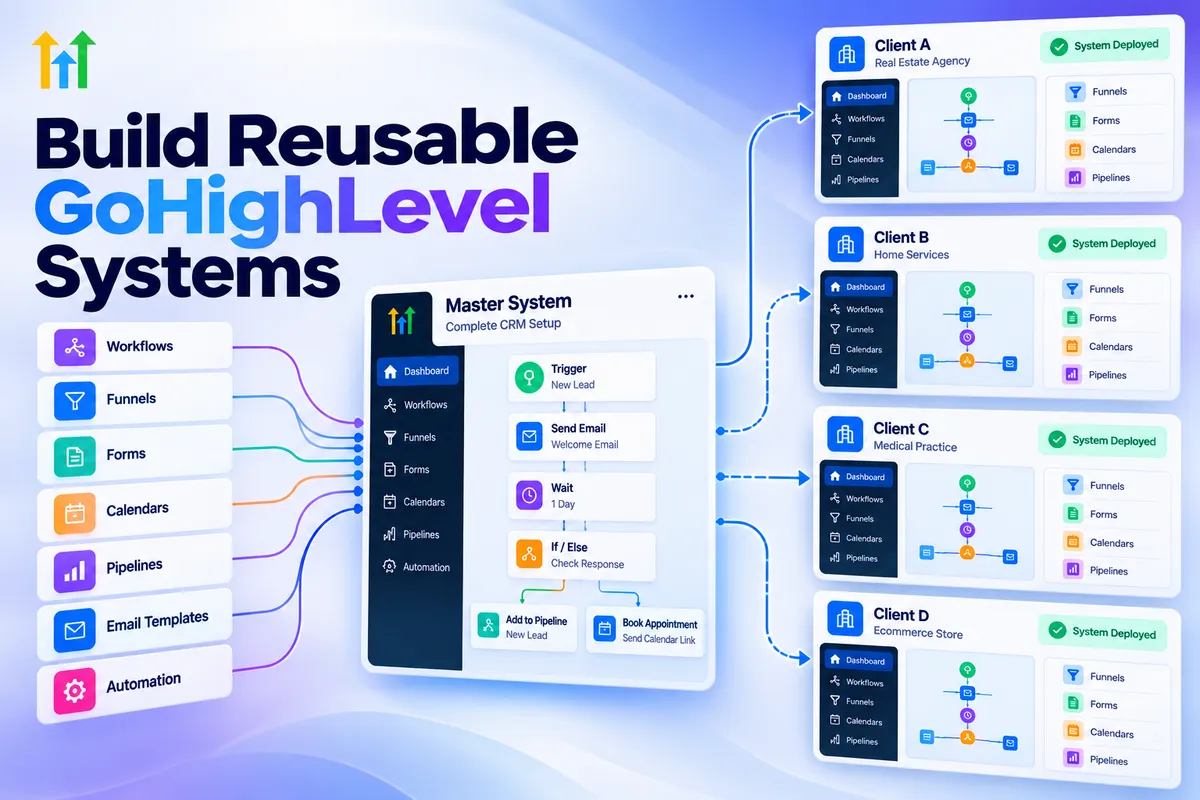
Create Reusable GoHighLevel Systems for Clients: Step-by-Step Guide
How to Create Reusable GoHighLevel Systems for Different Clients
Introduction
Building a GoHighLevel account from scratch for every client can quickly become one of the most repetitive parts of running an agency. The same workflows, forms, pipelines, calendars, custom fields, funnels, and settings often need to be configured again and again.
A better approach is to build reusable GoHighLevel systems that give every new client a reliable starting point while still allowing you to customize the account for their business.
GoHighLevel's Snapshots are particularly useful for this. A Snapshot can capture supported configuration from a sub-account and make it reusable across other sub-accounts.
The goal, however, isn't to make every client account identical. The goal is to create a repeatable foundation that your team can deploy, customize, test, and maintain efficiently.
What Is a Reusable GoHighLevel System?
A reusable GoHighLevel system is a collection of CRM and automation assets that you build once and adapt for multiple clients.
Depending on the system you're creating, this can include:
Workflows
Funnels and websites
Forms
Calendars
Pipelines
Custom fields
Email templates
Campaign-related assets
Custom values
Supported account settings
Other supported Snapshot assets
GoHighLevel Snapshots are designed specifically for this type of reuse. You first build a sub-account containing the configuration you want, then create a Snapshot from that sub-account.
For example, a home-services agency might create a reusable lead-management system containing:
Lead → Follow-Up → Appointment → Opportunity → Won/Lost
The same underlying structure could then be adapted for an HVAC company, roofing company, plumbing company, or electrical contractor.
The workflows may remain largely the same while the business-specific messaging, calendars, pipeline details, and branding are changed.
Why Agencies Should Build Systems Instead of Starting From Scratch
The biggest advantage is consistency.
Without reusable systems, every client onboarding becomes a new project. One team member might build a workflow one way while another uses a different naming structure or trigger.
Over time, that creates unnecessary complexity.
A standardized system gives your team a repeatable foundation.
1. Faster Client Onboarding
Instead of manually recreating every workflow and funnel, you can deploy a prepared configuration.
GoHighLevel allows agencies to create a new sub-account using a Snapshot, which automatically loads the selected Snapshot configuration into the new account.
This is especially useful when onboarding clients with similar requirements.
2. More Consistent Builds
Reusable systems make it easier to maintain the same basic architecture across client accounts.
For example, you can standardize:
Workflow naming
Pipeline stages
Lead follow-up logic
Appointment reminders
Internal notifications
Form structures
Custom fields
Reporting structure
Your team doesn't have to reinvent the setup every time.
3. Easier Quality Control
When the same foundation is used repeatedly, you can test the system before deploying it.
Instead of asking, "Did we remember everything for this client?" you can work from a predefined checklist and tested configuration.
That makes troubleshooting much easier.
Start With One Proven Client System
One of the biggest mistakes agencies make is trying to build a massive universal Snapshot immediately.
Instead, start with a system that already works.
Build one complete sub-account around a specific use case and test it thoroughly.
For example, a lead-generation system for a home-service business could contain:
Lead capture form
Contact creation
Pipeline opportunity
Immediate notification
Follow-up workflow
Appointment booking
Appointment reminders
Sales pipeline movement
Customer follow-up
Once the system works reliably, identify which parts are reusable and create a Snapshot from the source sub-account.
GoHighLevel's current Snapshot creation process allows you to select the assets you want to include rather than necessarily capturing everything.
That selective approach is useful because different clients rarely need every asset.
Design the System in Layers
A strong reusable system should separate the core architecture from client-specific information.
Think of it as two layers.
Core Layer
This contains the parts you want to repeat:
Workflow logic
Pipeline structure
Standard follow-up sequences
Forms
Automation triggers
Internal notifications
Basic funnel structure
Appointment processes
Client Layer
This contains information that changes from one client to another:
Business name
Phone number
Email address
Website
Calendar
Domain
Staff
Branding
Service names
Offer details
Location
Client-specific messaging
This separation makes your system much easier to maintain.
Use Custom Values for Reusable Business Information
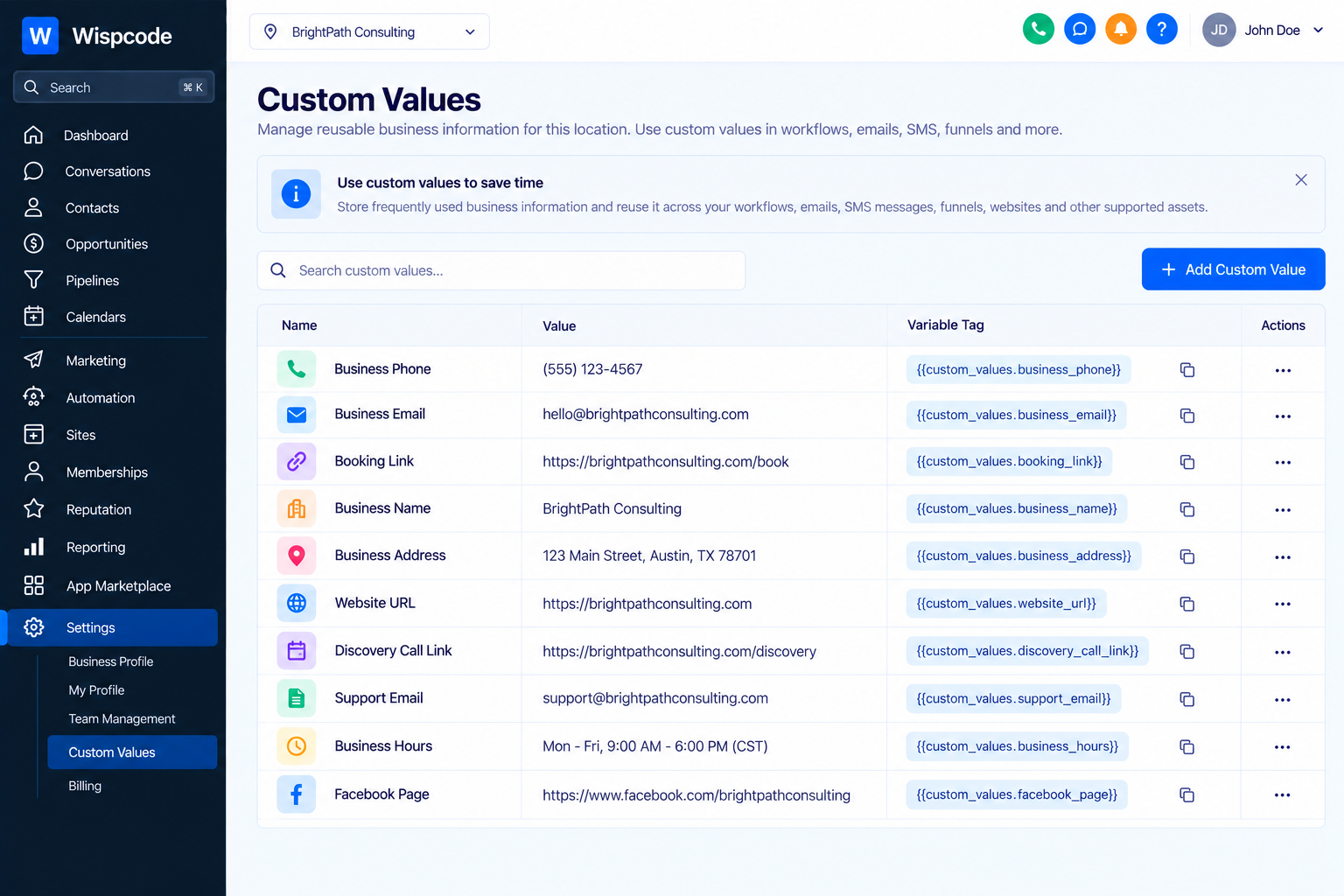
Custom Values are particularly useful when creating reusable systems.
HighLevel describes Custom Values as reusable placeholders for information that remains consistent across communications, pages, workflows, and other supported areas.
Instead of hard-coding a company phone number into multiple workflows and emails, you can use a Custom Value.
For example:
Business Phone:
{{custom_values.business_phone}}Booking Link:
{{custom_values.booking_link}}Support Email:
{{custom_values.support_email}}
If the client's information changes, you can update the Custom Value rather than manually editing every place where that information appears.
This is one of the simplest ways to make a system more reusable.
However, Custom Values should not replace Custom Fields. HighLevel specifically distinguishes reusable information from information unique to individual contacts or opportunities.
Standardize Your Workflow Naming
Reusable systems become much easier to manage when every workflow follows a predictable naming convention.
For example:
01 - Lead Capture02 - New Lead Notification03 - Lead Follow-Up04 - Appointment Confirmation05 - Appointment Reminder06 - No-Show Follow-Up07 - Won Customer08 - Lost Lead Nurture
You can use a similar structure for pipelines, forms, calendars, and other assets.
The exact naming convention matters less than using the same convention consistently.
When your team opens an unfamiliar client account, they should immediately understand how the system is organized.
Build Around the Client's Process, Not Just GoHighLevel Features
A reusable system should solve a business process.
Don't create a Snapshot simply because you have several workflows that look impressive.
Start by asking:
What happens when a new lead enters this business?
Then map the process.
For example:
Lead submits form → Contact created → Opportunity created → Team notified → Follow-up begins → Appointment booked → Opportunity progresses → Sales outcome recorded
Now you have an actual operational system rather than a collection of unrelated automations.
This distinction is important because reusable systems should be designed around repeatable business outcomes.
How to Create a GoHighLevel Snapshot
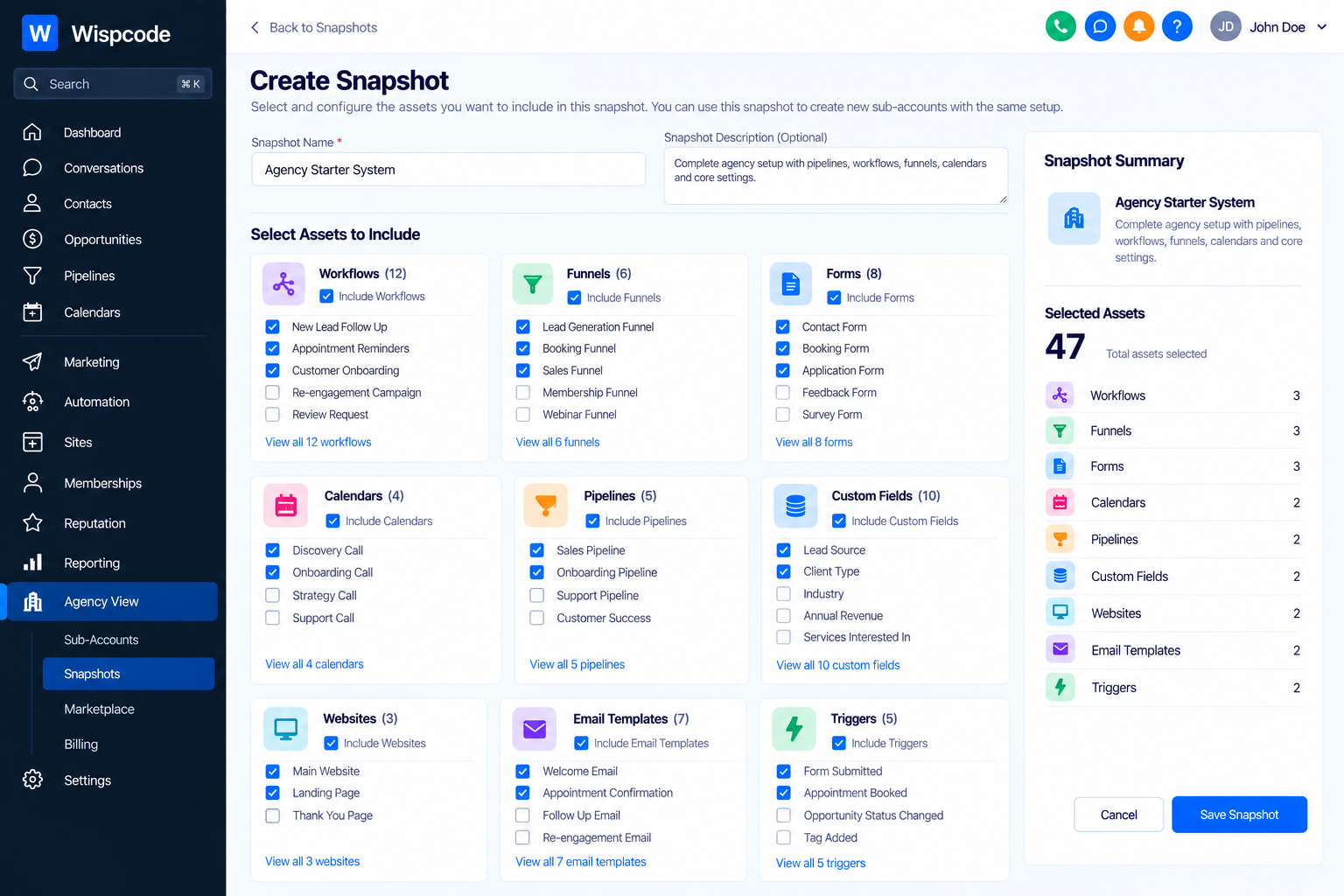
Once your source sub-account is properly built and tested, you can turn its configuration into a Snapshot.
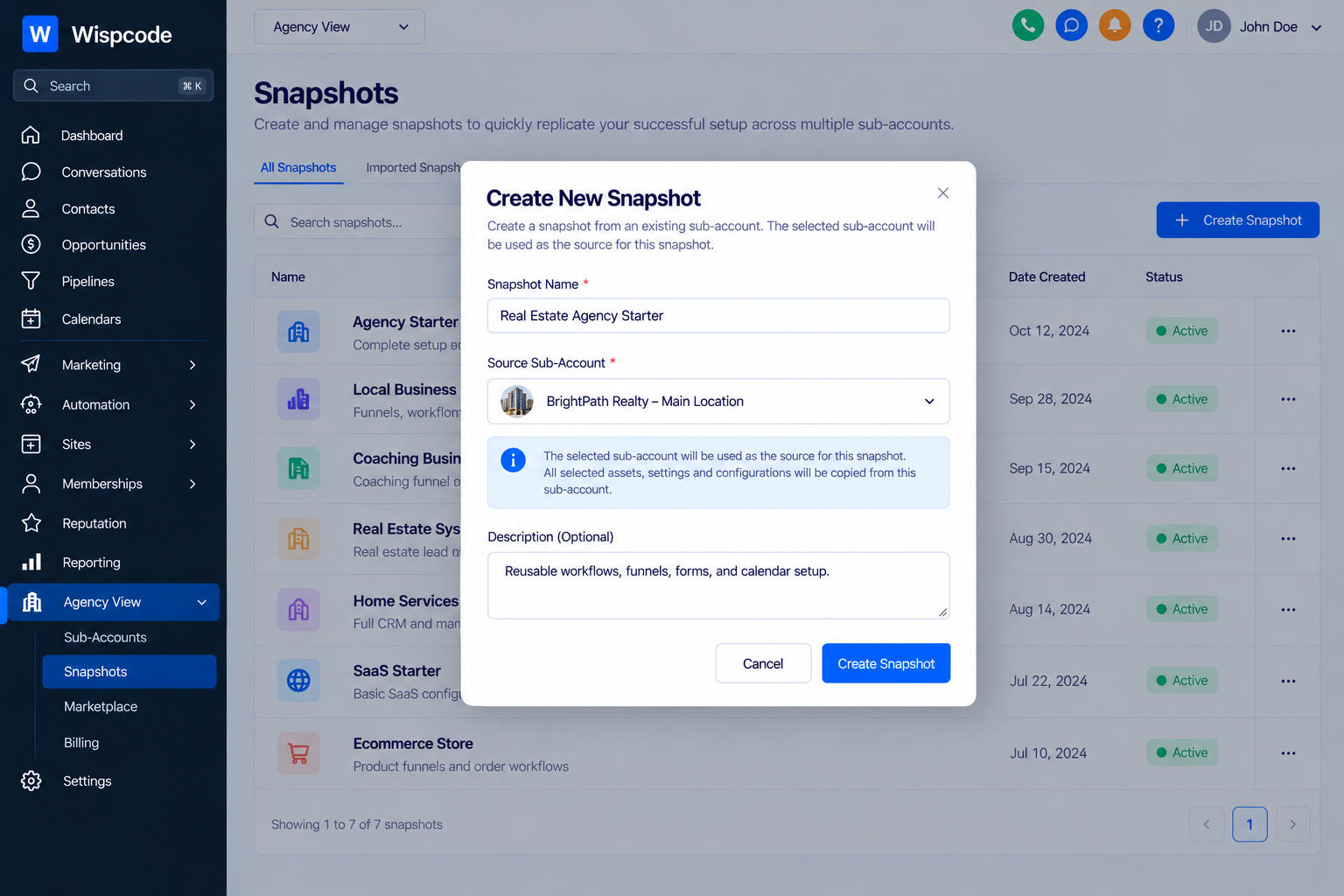
GoHighLevel's current process starts from Agency View → Account Snapshots → Create New Snapshot. You then select the source sub-account and choose the assets to include.
A practical process is:
Step 1: Build the Source Account
Create and test the complete system in one sub-account.
Step 2: Clean Up the Account
Before creating the Snapshot, remove unnecessary test assets and outdated workflows.
Step 3: Review Dependencies
Check whether your workflows depend on specific calendars, custom fields, forms, pipelines, or other assets.
Step 4: Create the Snapshot
Go to "Account Snapshots" and create a Snapshot from the source sub-account.
Step 5: Select the Required Assets
Choose the assets that belong in the reusable system.
Step 6: Name the Snapshot Clearly
Use a name that tells your team exactly what the Snapshot is for.
For example: "Home Services – Lead Generation System v1"
Rather than: "Snapshot Final New 2"
Good naming becomes increasingly important as your agency builds more systems.
Deploy the System to New Clients
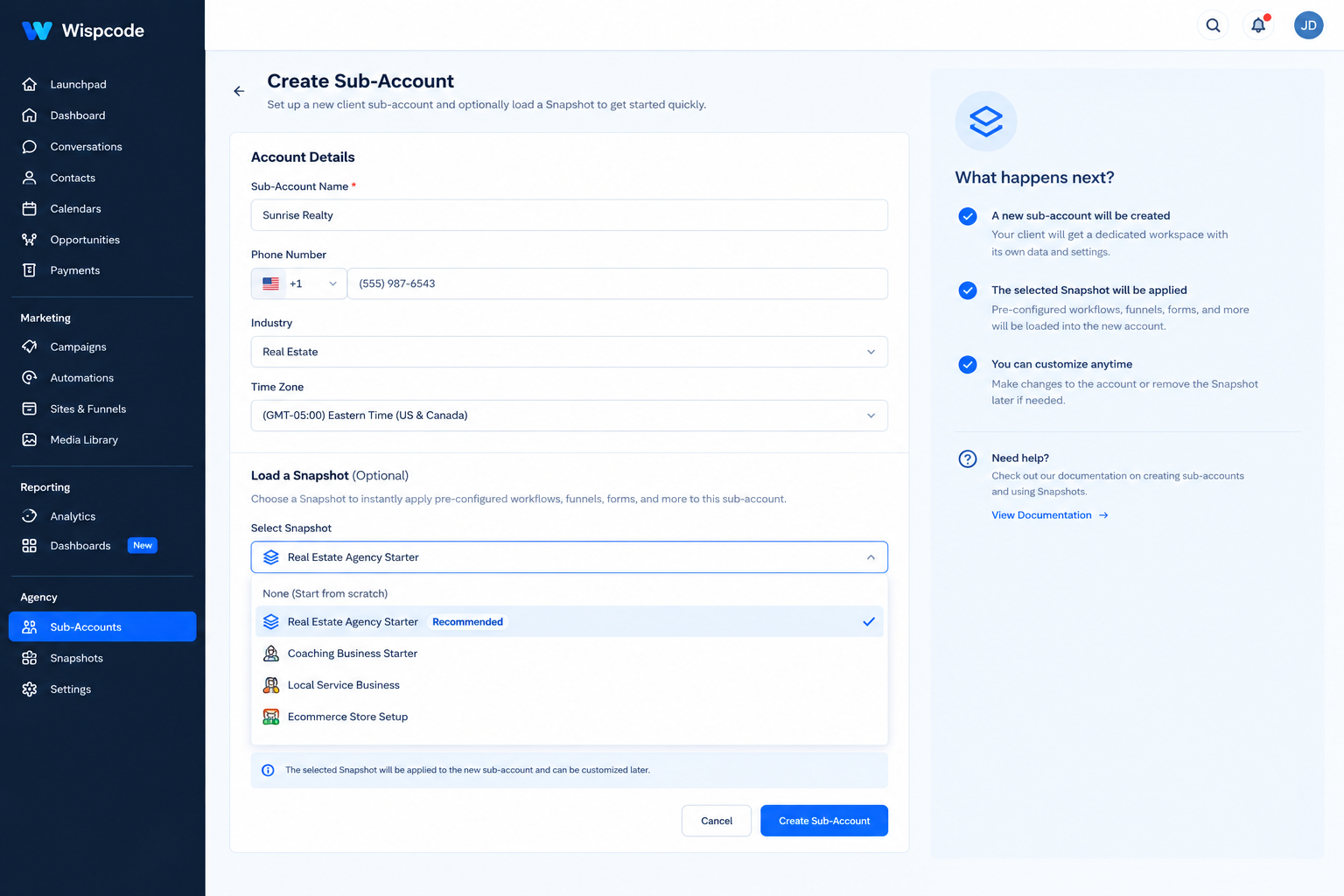
For a brand-new client, you can create a sub-account using the Snapshot. HighLevel supports selecting a Snapshot during new sub-account creation, allowing the configuration to be loaded as part of the account setup.
For an existing sub-account, you can load a Snapshot into that account instead.
The current HighLevel Snapshot loading experience allows you to select supported assets, review conflicts, and decide what should be imported.
This distinction matters.
New client account: Use the Snapshot as the starting configuration.
Existing client account: Carefully load the required Snapshot assets and review conflicts before replacing anything.
Never treat an existing client account like an empty template.
Customize Every Client Before Going Live
A Snapshot is a starting point, not a finished client account.
After deployment, review the account carefully.
Check:
Business information
Contact details
Custom Values
Calendars
Users
Domains
Email configuration
Phone/SMS configuration
Forms
Funnels
Workflow triggers
Workflow actions
Pipeline stages
Appointment links
Client-specific messaging
HighLevel's own Snapshot documentation emphasizes that a Snapshot is a reusable configuration rather than a finished live account.
This is an important operational rule:
Deploy first. Customize second. Test third. Activate last.
Use Snapshots for Updates, Not Just New Builds
Reusable systems become even more valuable once your agency has multiple clients using the same architecture.
Suppose you discover a better follow-up workflow.
You update the source system, test it, and then refresh the Snapshot.
HighLevel supports refreshing Snapshots selectively, allowing agencies to update particular assets rather than rebuilding the Snapshot from scratch.
For agencies with many client accounts, this creates a more structured way to manage improvements.
However, don't automatically push every change to every client.
A change that makes sense for one niche may not make sense for another.
Create Niche-Specific Systems
Instead of maintaining one enormous Snapshot for every type of client, consider creating smaller systems for specific use cases.
For example:
Home Services System
Lead capture
Estimate request
Appointment booking
Missed-call follow-up
Sales pipeline
Review request
Professional Services System
Consultation form
Qualification
Appointment scheduling
Nurture
Proposal follow-up
Client onboarding
Agency Lead Management System
Lead capture
Qualification
Sales pipeline
Appointment reminders
No-show follow-up
Nurture
This approach makes customization easier and reduces unnecessary assets.
Common Mistakes to Avoid
Copying Everything Into Every Client Account
More assets do not automatically mean a better system.
Only include what the client actually needs.
Hard-Coding Client Information
If the same business information appears throughout multiple workflows, use appropriate reusable values rather than manually entering the information everywhere.
Deploying Without Testing
Never assume that a copied system will automatically be correct for the new client.
Test the actual client journey.
Mixing Multiple Versions
If your agency has several versions of the same Snapshot, clearly label them.
For example:
Home Services v1Home Services v2Home Services v3
Document what changed between versions.
Forgetting Existing Account Conflicts
When loading a Snapshot into an existing sub-account, review conflicts before replacing assets. HighLevel's current loading workflow provides conflict review specifically for this purpose.
Frequently Asked Questions(FAQs)
1. What are reusable GoHighLevel systems?
Reusable GoHighLevel systems are pre-built CRM and automation setups that can be adapted for multiple clients. They can include workflows, funnels, forms, calendars, pipelines, custom fields, and other supported assets.
2. How do GoHighLevel Snapshots help agencies?
GoHighLevel Snapshots allow agencies to capture supported account configurations and reuse them in other sub-accounts. This can reduce repetitive setup work and provide a consistent starting point for new clients.
3. Can I use the same GoHighLevel Snapshot for every client?
Yes, when the clients have similar requirements. However, you should customize the deployed system for each client's business, including their branding, calendars, contact information, messaging, and other business-specific settings.
4. How should I customize a Snapshot for a new client?
After deploying the Snapshot, review and update client-specific information such as Custom Values, calendars, domains, communication settings, workflows, forms, pipelines, and messaging. Always test the complete customer journey before activating the system.
5. Can I update a GoHighLevel Snapshot after creating it?
Yes. GoHighLevel supports refreshing Snapshots with selected assets. This allows agencies to improve their reusable systems over time while maintaining a structured version of their standard setup.
Conclusion
The real power of reusable GoHighLevel systems isn't simply saving a few hours during onboarding. It's creating an agency operation that becomes more consistent, easier to improve, and easier to scale.
Start with one proven client build. Separate reusable automation from client-specific information. Use Custom Values where appropriate, standardize naming, document your process, and use Snapshots to distribute supported configuration across sub-accounts.
Most importantly, don't try to make every client account identical.
Build a strong foundation, then customize that foundation around the client's actual business process.
When done properly, every new client doesn't require you to start over. Instead, you begin with a tested system and spend your time improving the parts that actually make the client successful.
Need Expert Help with GoHighLevel?
New to GoHighLevel and ready to get started? Buy your GoHighLevel account here and launch with confidence.
Already know what you need and want our team to handle everything, from complete setup and customization to funnels, workflows, automations, CRM, and pipelines? Click here.



