

The No-Show Fix with Reminders
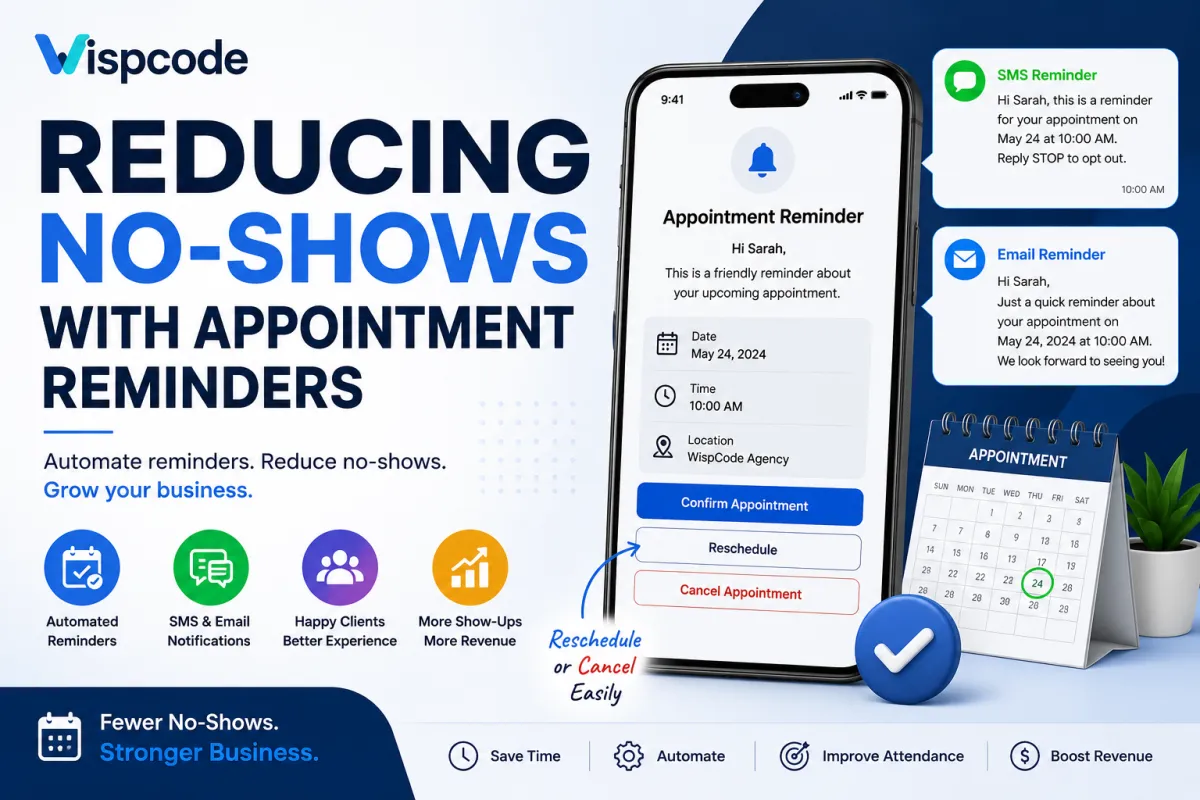
Reducing No-Shows with Appointment Reminders
Missed appointments can disrupt schedules, reduce productivity, and create unnecessary revenue loss for service-based businesses. Whether you run a marketing agency, medical practice, coaching business, salon, or consulting firm, every unattended appointment represents lost time that could have been used to serve another client.
This is where GoHighLevel Appointment Reminders become incredibly valuable. By combining GoHighLevel Calendars with Workflows, businesses can automatically send confirmation messages, reminders, and follow-ups without requiring manual effort. Instead of relying on staff to remember every appointment, automation ensures customers receive timely communication that helps them stay informed and prepared.
While no reminder system can eliminate missed appointments, a well-designed reminder workflow can significantly improve attendance, enhance customer communication, and create a more organized scheduling experience.
What Are Appointment Reminders in GoHighLevel?
Appointment reminders are automated messages sent to contacts before their scheduled appointments. These reminders help customers remember upcoming bookings and provide important appointment details.
Within GoHighLevel, appointment reminders work alongside Calendars and Workflows:
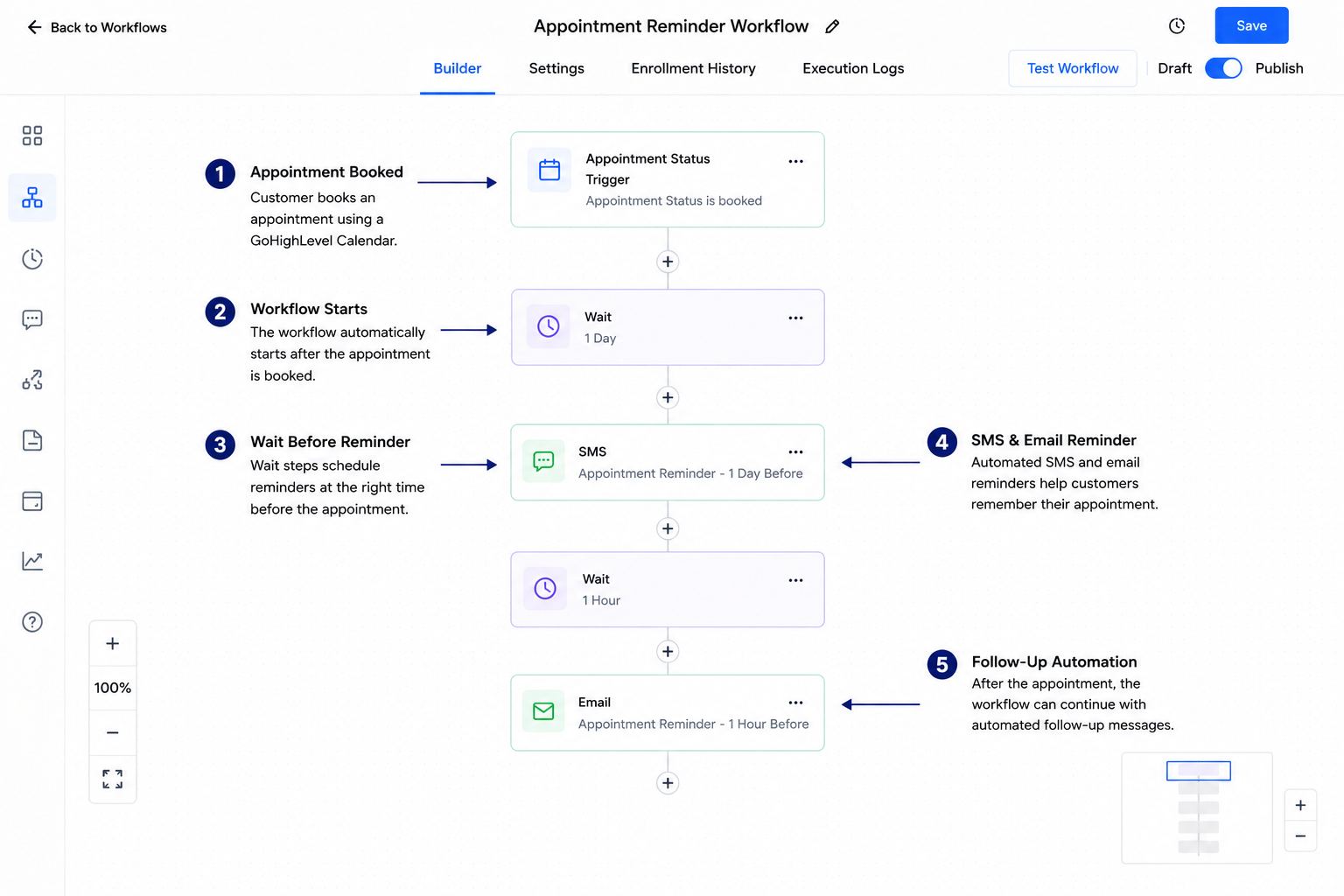
Customers schedule appointments through a GoHighLevel Calendar.
The appointment can trigger a workflow automatically.
The workflow sends SMS messages, emails, or both at scheduled intervals before the appointment.
Additional automation can send follow-up messages after the appointment is completed.
Because the reminder process is automated, businesses can maintain consistent communication without manually tracking every booking.
Why Appointment Reminders Matter
Effective appointment reminders benefit both businesses and customers.
Fewer Missed Appointments
Many missed appointments happen simply because customers forget. Automated reminders help keep appointments top of mind.
Better Customer Communication
Reminder messages keep customers informed about appointment dates, times, and important details, reducing confusion.
Improved Scheduling Efficiency
When customers remember their appointments, or notify the business if they need to reschedule, teams can better manage their calendars.
Increased Team Productivity
Employees spend less time making manual reminder calls or sending individual messages, allowing them to focus on customer service and other priorities.
Better Customer Experience
Professional reminder communication demonstrates organization and reliability while making the booking process more convenient.
Higher Appointment Attendance
Consistent reminders encourage customers to arrive prepared and on time, helping businesses maintain fuller schedules.
How to Reduce No-Shows Using GoHighLevel
Send Instant Booking Confirmations
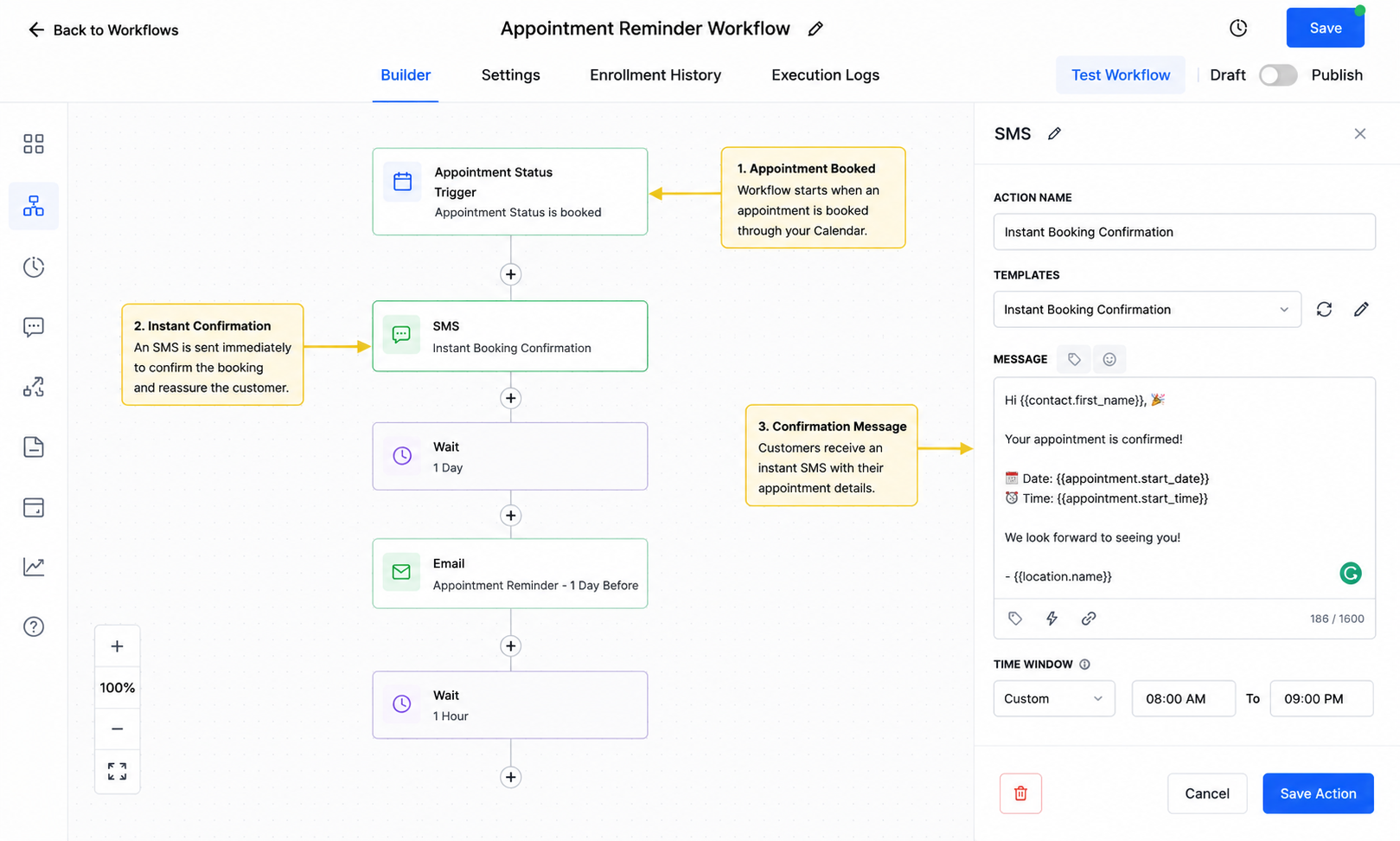
The first communication should occur immediately after an appointment is scheduled.
GoHighLevel workflows can send an instant SMS or email confirmation when a calendar appointment is created. This reassures customers that their booking has been successfully received and provides immediate appointment details.
Best practice: Include the appointment date, time, business name, and any preparation instructions if necessary.
Schedule Multiple Reminder Messages Before Appointments
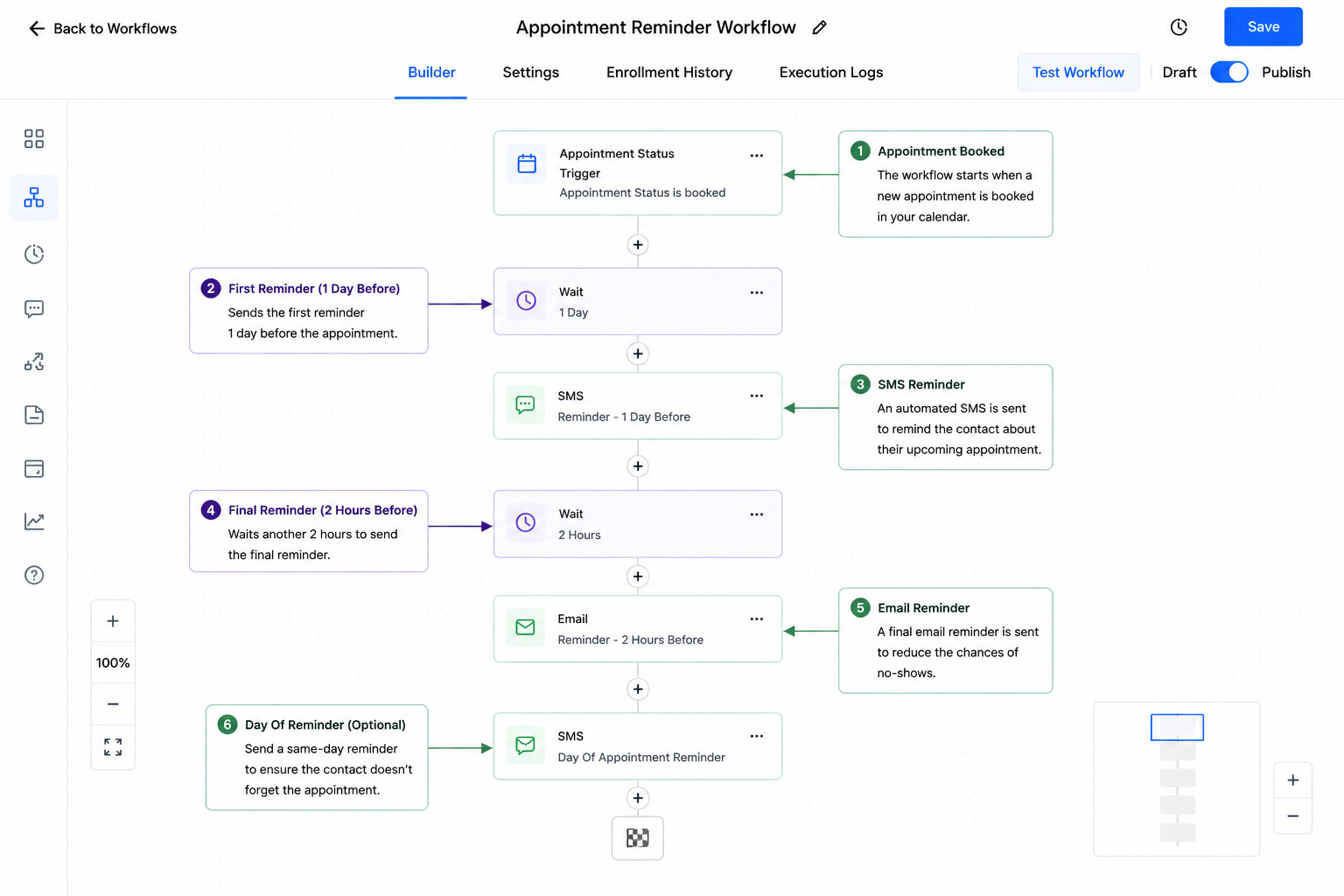
One reminder is helpful, but multiple reminders sent at appropriate intervals are often more effective.
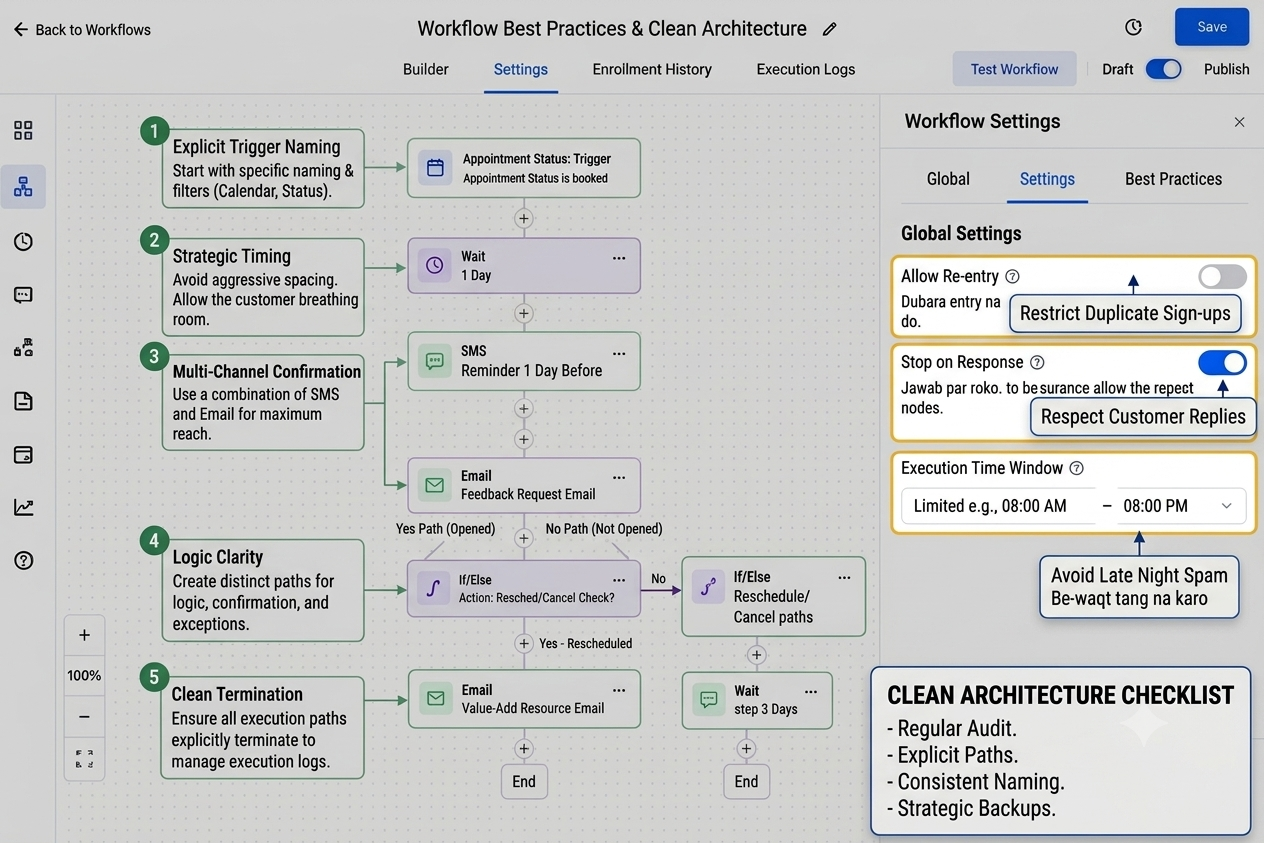
Using GoHighLevel Workflows, businesses can add Wait steps before sending reminder messages at different times leading up to the appointment.
For example:
Confirmation immediately after booking
Reminder one day before
Final reminder shortly before the appointment
Spacing reminders appropriately keeps customers informed without overwhelming them.
Combine SMS and Email Reminders
Different customers respond differently to communication channels.
GoHighLevel supports both:
SMS Appointment Reminders
Email Appointment Reminders
Using both channels increases the likelihood that customers will see the reminder, especially if they miss one notification.
Choose communication methods that align with your customers' preferences while avoiding unnecessary duplicate messaging.
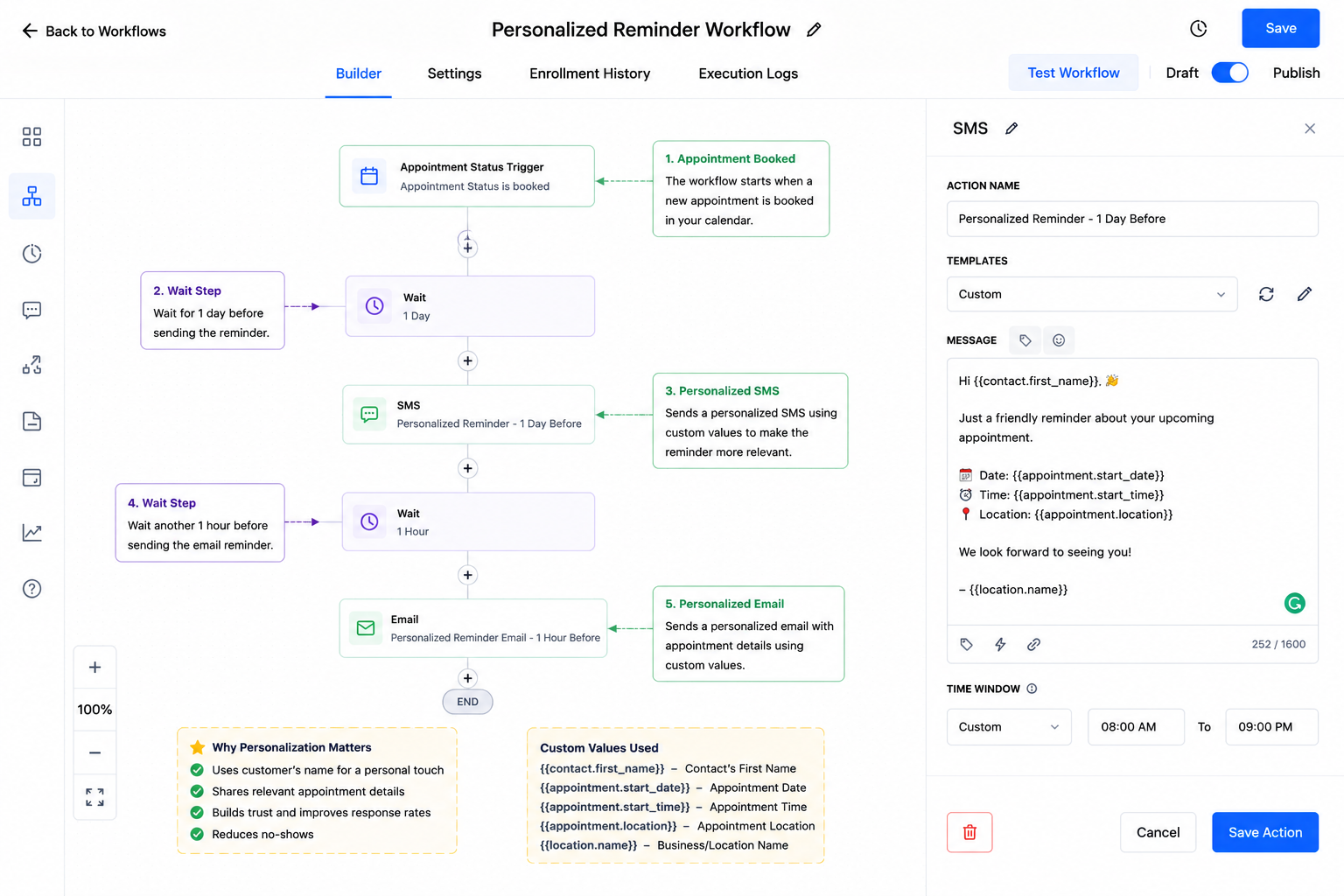
Personalize Reminder Messages Using Custom Values
Generic reminders can feel impersonal.
GoHighLevel allows businesses to insert Custom Values into reminder messages, making communication more relevant.
Personalized reminders may include:
Customer name
Appointment date
Appointment time
Business name
Assigned team member (when applicable)
Personalization creates a more professional customer experience while reducing confusion.
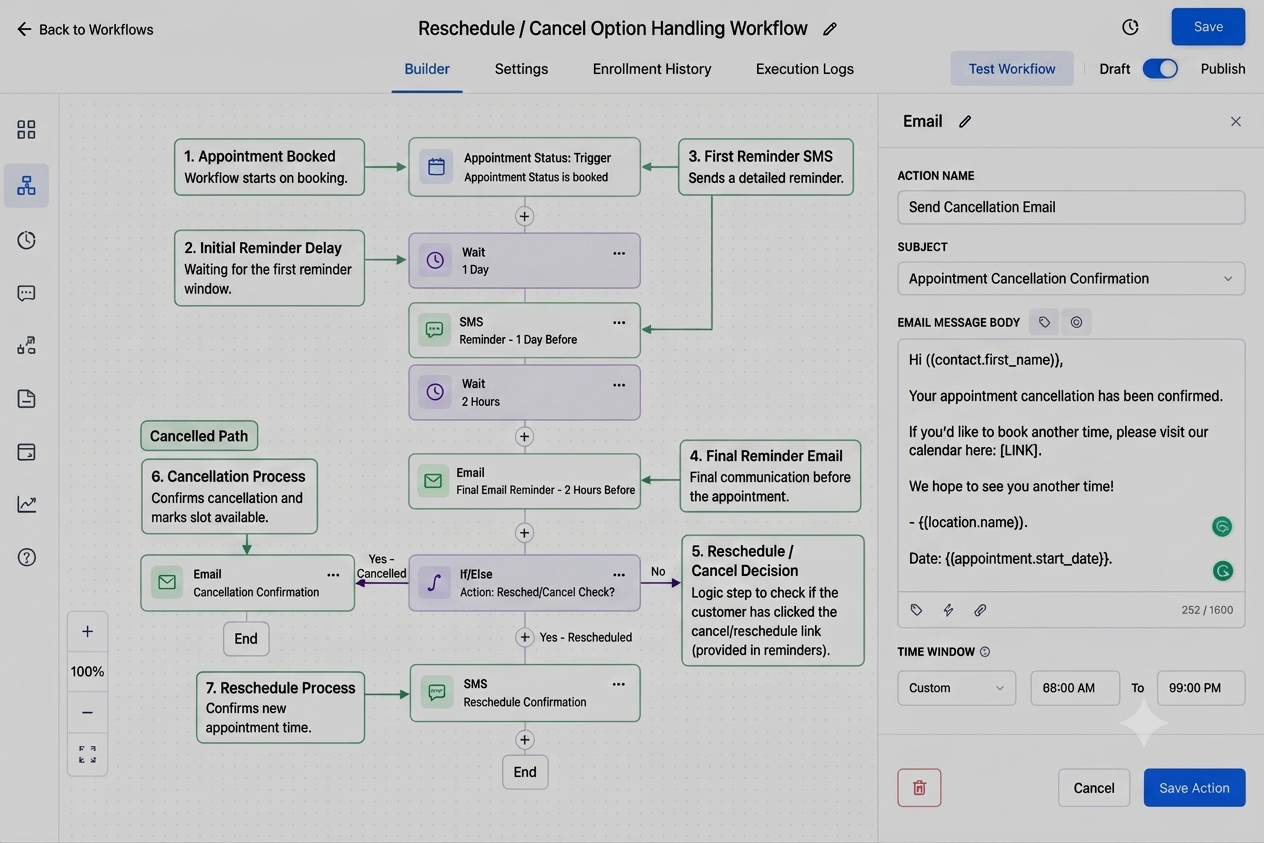
Include Reschedule or Cancellation Options When Appropriate
Sometimes customers genuinely cannot attend.
Providing a clear method for rescheduling or canceling helps businesses avoid unexpected no-shows and allows appointment slots to become available for others.
When appropriate, reminder messages can direct customers to the appropriate scheduling or cancellation process used by the business.
Use Workflows to Automate the Entire Reminder Process
One of GoHighLevel's biggest strengths is Appointment Automation through workflows.
Instead of manually managing reminders, businesses can build workflows that automatically:
Trigger after appointment booking
Send confirmation messages
Wait until scheduled reminder times
Send additional reminders
Continue with post-appointment communication if needed
Automation ensures every customer receives consistent communication.
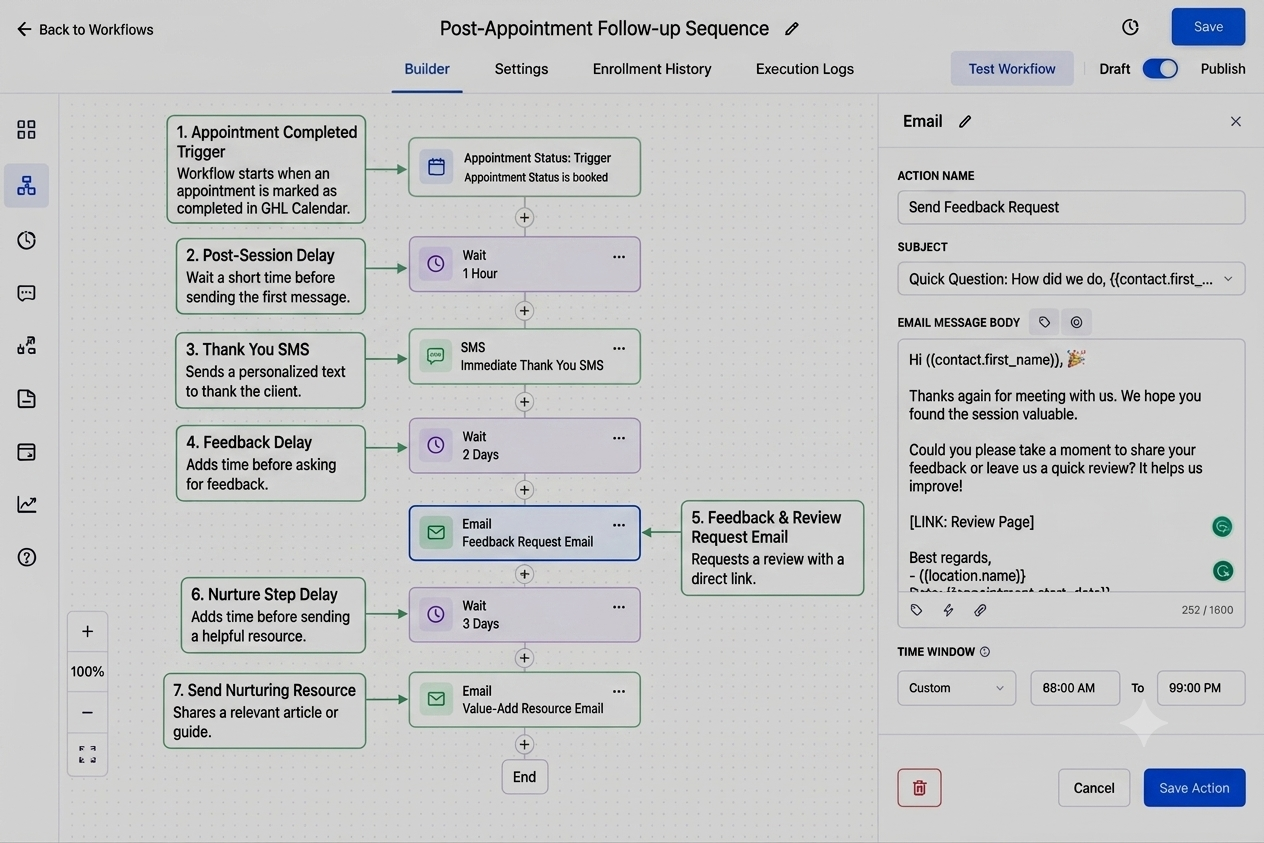
Send Follow-Up Messages After Appointments
Communication should not end when the appointment is over.
GoHighLevel workflows can also send follow-up emails or SMS messages after appointments.
Depending on the business, follow-up messages may:
Thank the customer
Share additional resources
Request feedback
Encourage future bookings
Consistent follow-up strengthens customer relationships beyond the initial appointment.
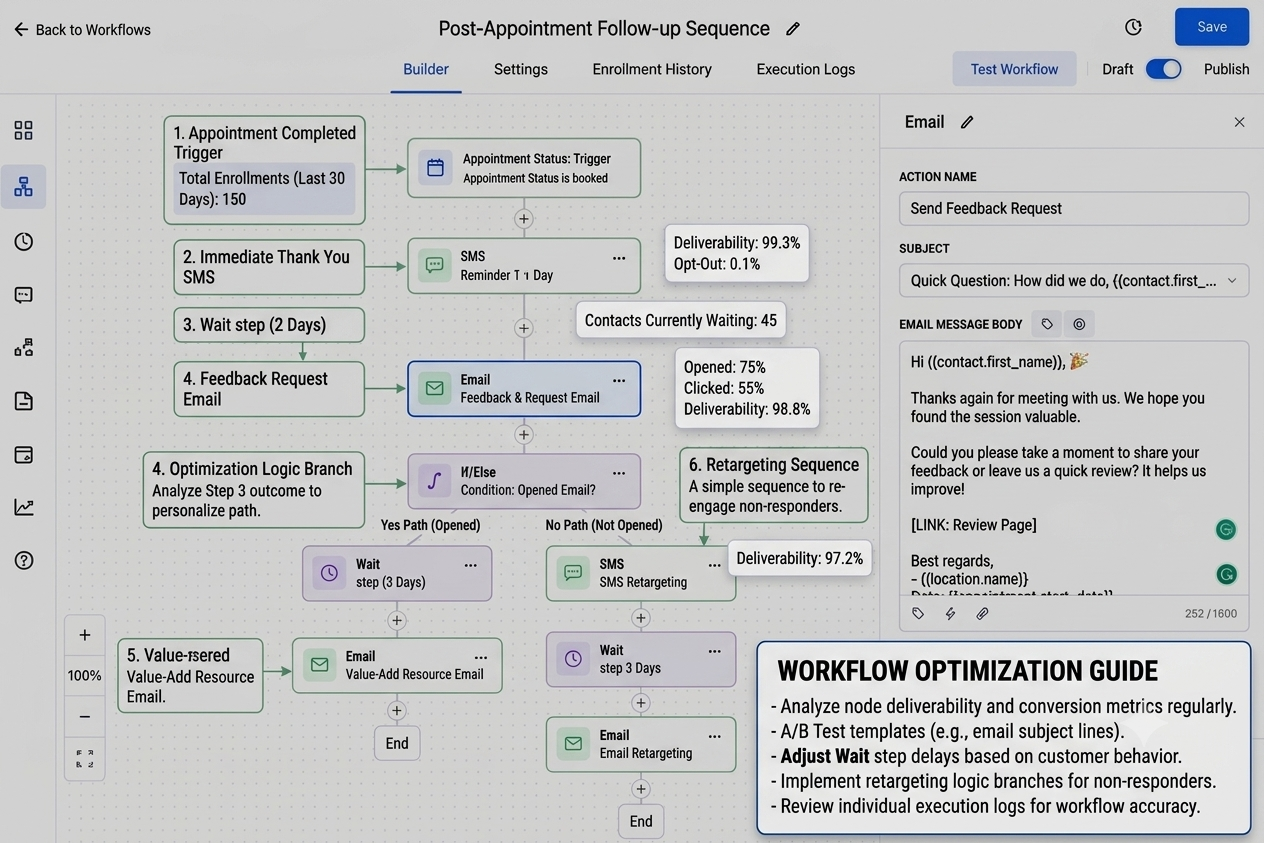
Monitor and Optimize Reminder Workflows Regularly
Automation should not be considered "set and forget."
Review reminder workflows regularly to verify:
Messages are sent correctly.
Timing still matches business needs.
Customers receive clear communication.
Workflow logic functions as expected.
Small improvements can make reminder automation even more effective over time.
Real Business Example
A consulting business regularly experienced customers forgetting scheduled discovery calls. Team members often spent valuable time manually sending reminder emails, and some appointments were still missed.
The business implemented a GoHighLevel workflow connected to its appointment calendar. Customers began receiving an immediate booking confirmation, followed by scheduled SMS and email reminders before the appointment. After each meeting, an automated follow-up message thanked the customer and shared the next steps.
Although occasional scheduling conflicts still occurred, the business achieved smoother scheduling, more consistent communication, and better appointment attendance while significantly reducing the manual effort required from the team.
Best Practices
To get the most from GoHighLevel Appointment Reminders, follow these recommendations:
Test reminder workflows before activating them.
Send reminders at appropriate intervals rather than all at once.
Keep messages short, clear, and actionable.
Personalize reminders using custom values whenever possible.
Avoid excessive reminders that may frustrate customers.
Review workflow performance regularly.
Update reminder content whenever business processes or scheduling policies change.
Common Mistakes to Avoid
Sending Reminders Too Late
A reminder sent only minutes before an appointment may not give customers enough time to prepare.
Sending Too Many Reminder Messages
Excessive notifications can annoy customers and reduce engagement.
Forgetting Appointment Confirmations
Customers should receive confirmation immediately after booking so they know the appointment has been successfully scheduled.
Not Testing Reminder Workflows
Unverified workflows may contain incorrect timing, missing actions, or configuration errors that prevent reminders from being delivered as intended.
Using Generic Messages Without Personalization
Generic reminders feel less engaging and may create confusion if important appointment details are missing.
Ignoring Timezone Settings
Incorrect timezone settings can result in reminders being sent at the wrong time, creating a poor customer experience.
Not Reviewing Workflow Performance Regularly
Businesses need to evolve. Reviewing workflows helps ensure reminder timing, messaging, and automation continue to meet customer expectations.
Conclusion
Reducing No-Shows with Appointment Reminders is one of the most practical ways to improve scheduling efficiency and customer communication in GoHighLevel. By combining GoHighLevel Calendars with Workflows, businesses can automate confirmations, send timely SMS and email reminders, personalize communication, and maintain consistent follow-up without adding manual work.
While automation cannot eliminate every missed appointment, a thoughtfully designed reminder system helps customers stay informed, supports smoother scheduling, and delivers a more professional experience. Make it a habit to test, review, and refine your appointment reminder workflows regularly so they continue to serve both your team and your customers effectively.
Frequently Asked Questions (FAQs)
1. How do appointment reminders help reduce no-shows?
Appointment reminders help customers remember their scheduled appointments, improving attendance and reducing missed bookings.
2. Can GoHighLevel send both SMS and email appointment reminders?
Yes. GoHighLevel can automatically send both SMS and email reminders through Workflows.
3. Can I personalize appointment reminder messages in GoHighLevel?
Yes. You can use Custom Values to personalize reminders with customer and appointment details.
4. What is the best time to send appointment reminders?
A good practice is to send an instant booking confirmation followed by one or more reminders before the appointment.
5. Can GoHighLevel automate follow-up messages after appointments?
Yes. GoHighLevel Workflows can automatically send follow-up SMS or email messages after appointments.
Need Expert Help with GoHighLevel?
New to GoHighLevel and ready to get started? Buy your GoHighLevel account here and launch with confidence.
Already know what you need and want our team to handle everything, from complete setup and customization to funnels, workflows, automations, CRM, and pipelines? Click here.



