

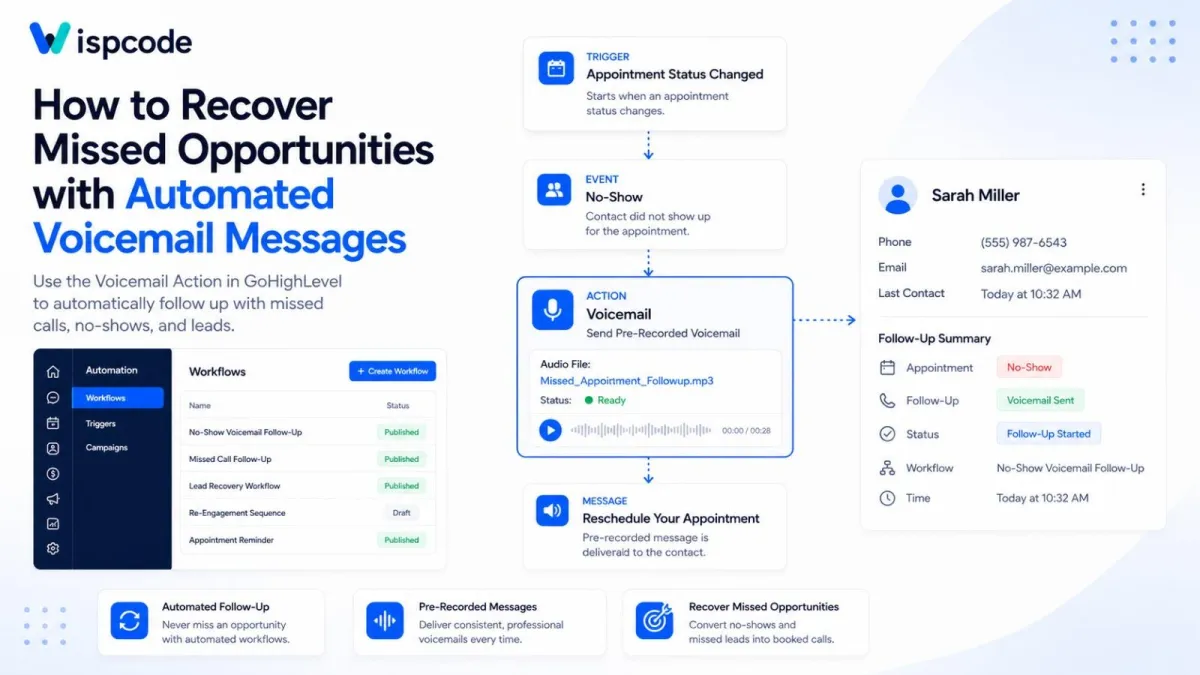
GoHighLevel Voicemail Action: How to Recover Missed Opportunities Step-by-Step Guide
How to Recover Missed Opportunities with Automated Voicemail Messages Using the Voicemail Action in GoHighLevel
Introduction
A missed call, unanswered lead, or no-show appointment does not necessarily mean a lost customer. The real problem is what happens after the opportunity is missed.
If your team has to manually remember every missed call, follow-up, or appointment no-show, some prospects will inevitably slip through the cracks. GoHighLevel can help solve this problem by using workflows to automatically deliver a pre-recorded voicemail when a specific event occurs.
The Voicemail workflow action allows you to upload a pre-recorded audio message and automatically send it to a contact as part of an automated workflow. GoHighLevel documents this action as a way to send a pre-recorded voicemail directly to a contact, including use cases such as follow-ups and appointment-related communication.
In this guide, you'll learn what the Voicemail action does, how to configure it, how to use it for missed opportunities, and how to build practical follow-up workflows without relying on manual outreach.
What Is the Voicemail Action in GoHighLevel?
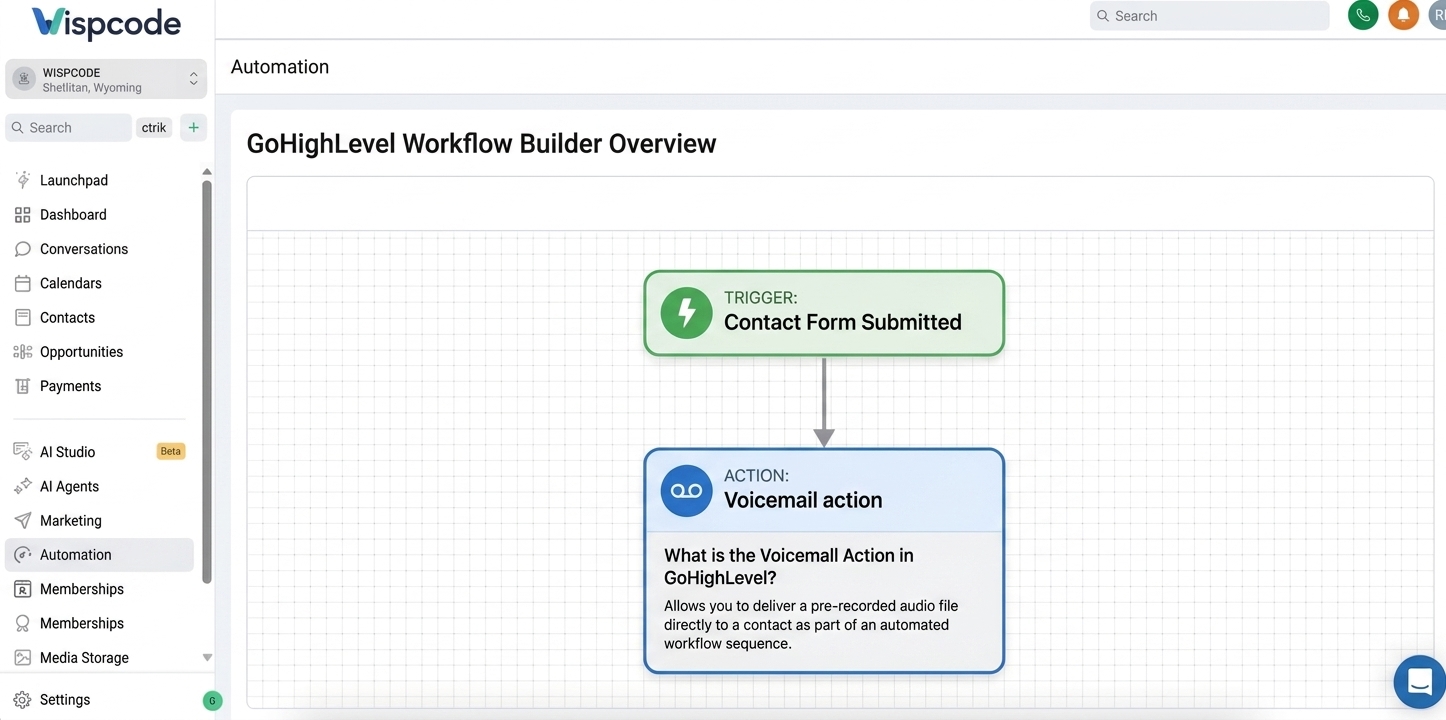
The Voicemail action is a communication action inside the GoHighLevel Workflow Builder.
It allows you to upload a pre-recorded voicemail file and have GoHighLevel deliver that message to a contact when the workflow reaches that step. GoHighLevel's documentation also refers to this capability as ringless voicemail or voicemail drop.
Instead of having a sales representative call every contact and manually leave the same message, you can create a recording once and use it within an automated workflow.
For example, imagine a prospect misses a scheduled appointment.
Your workflow could follow a sequence such as:
Appointment becomes a no-show → Voicemail action → Pre-recorded rescheduling message
The important point is that the Voicemail action does not independently decide when someone should receive a message. A workflow trigger or another workflow step determines when the automation reaches the Voicemail action.
This makes the action particularly useful when you already have an event-based follow-up process in GoHighLevel.
Why Use Automated Voicemail for Missed Opportunities?
Missed opportunities often require timely follow-up.
A lead might have submitted a form but failed to answer your call. A prospect might have booked an appointment and then failed to show. A sales representative might attempt to reach someone who is temporarily unavailable.
Without automation, the next step depends entirely on someone remembering to follow up.
An automated voicemail workflow can create a consistent process.
1. It reduces manual follow-up
Instead of asking a team member to remember every missed opportunity, the workflow can send the appropriate pre-recorded message when the configured trigger occurs.
2. It creates a consistent customer experience
Your business can prepare a clear voicemail message in advance and use the same approved message for a particular scenario.
3. It helps keep opportunities moving
A voicemail can give the contact a clear next step, such as calling the business back or rescheduling an appointment.
4. It works as part of a larger workflow
The Voicemail action does not have to be the entire follow-up strategy. It can be combined with other workflow actions, waits, notifications, tasks, or additional communication steps depending on the process you want to build.
GoHighLevel's workflow system executes actions sequentially after a triggering event, allowing different communication and operational steps to be combined in a single automation.
How to Set Up the Voicemail Action in GoHighLevel
The setup is straightforward once you have identified the event that should initiate your follow-up.
Step 1: Open the Workflow Builder
From your GoHighLevel sub-account, open Automation and create a new workflow or open an existing workflow.
You can build the voicemail automation around an existing process or create a dedicated workflow for missed-opportunity follow-up.
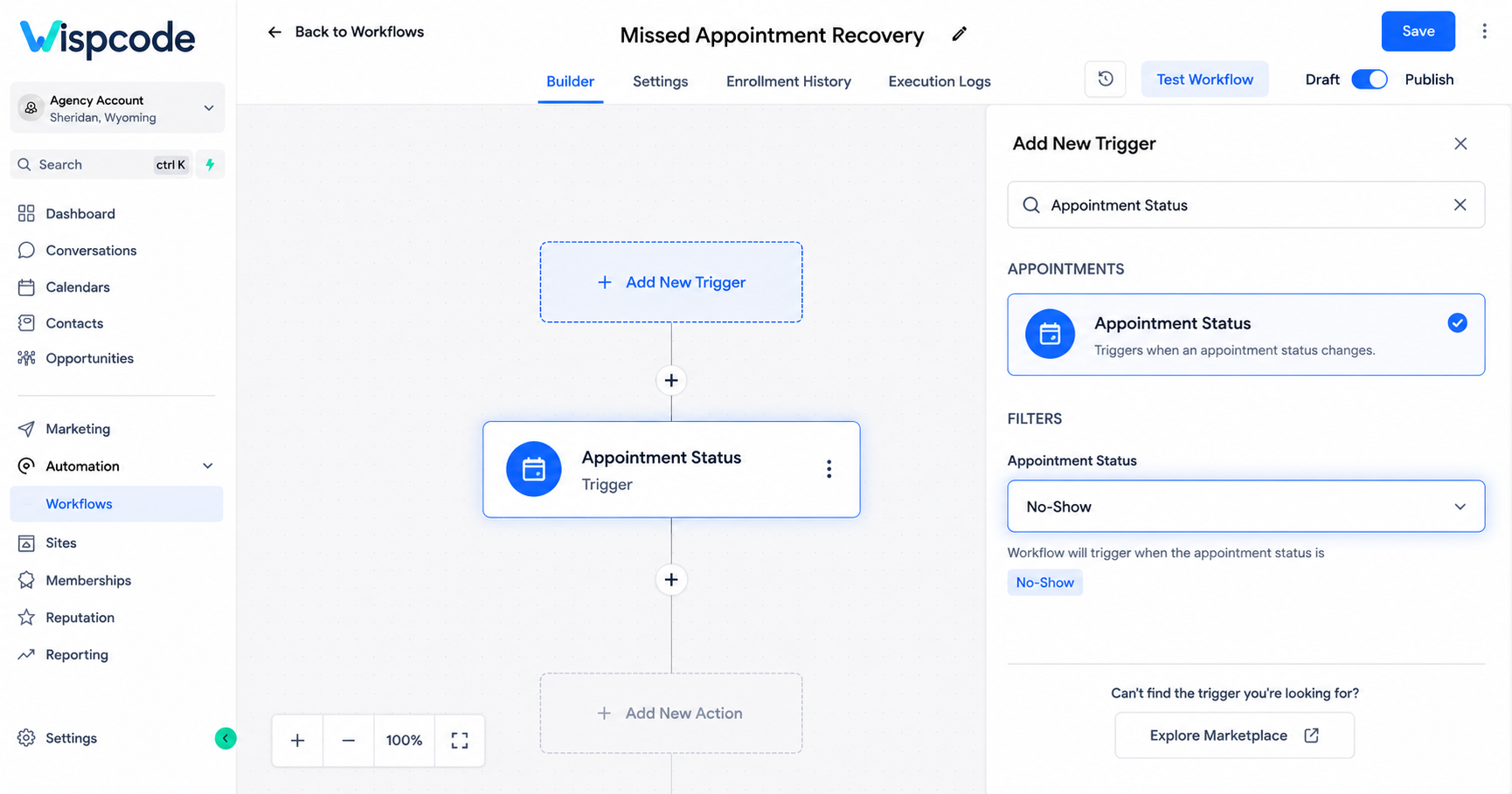
Step 2: Choose Your Trigger
The trigger should represent the event that requires a voicemail.
For example, you could build a workflow around an appointment-related event or another relevant contact event.
GoHighLevel's own voicemail documentation gives examples such as an appointment no-show or a follow-up situation where the contact has not responded.
For a missed appointment, your workflow might conceptually look like:
"Appointment Status Changes → No-Show → Voicemail"
The exact trigger and filters should match the process you are trying to automate
.
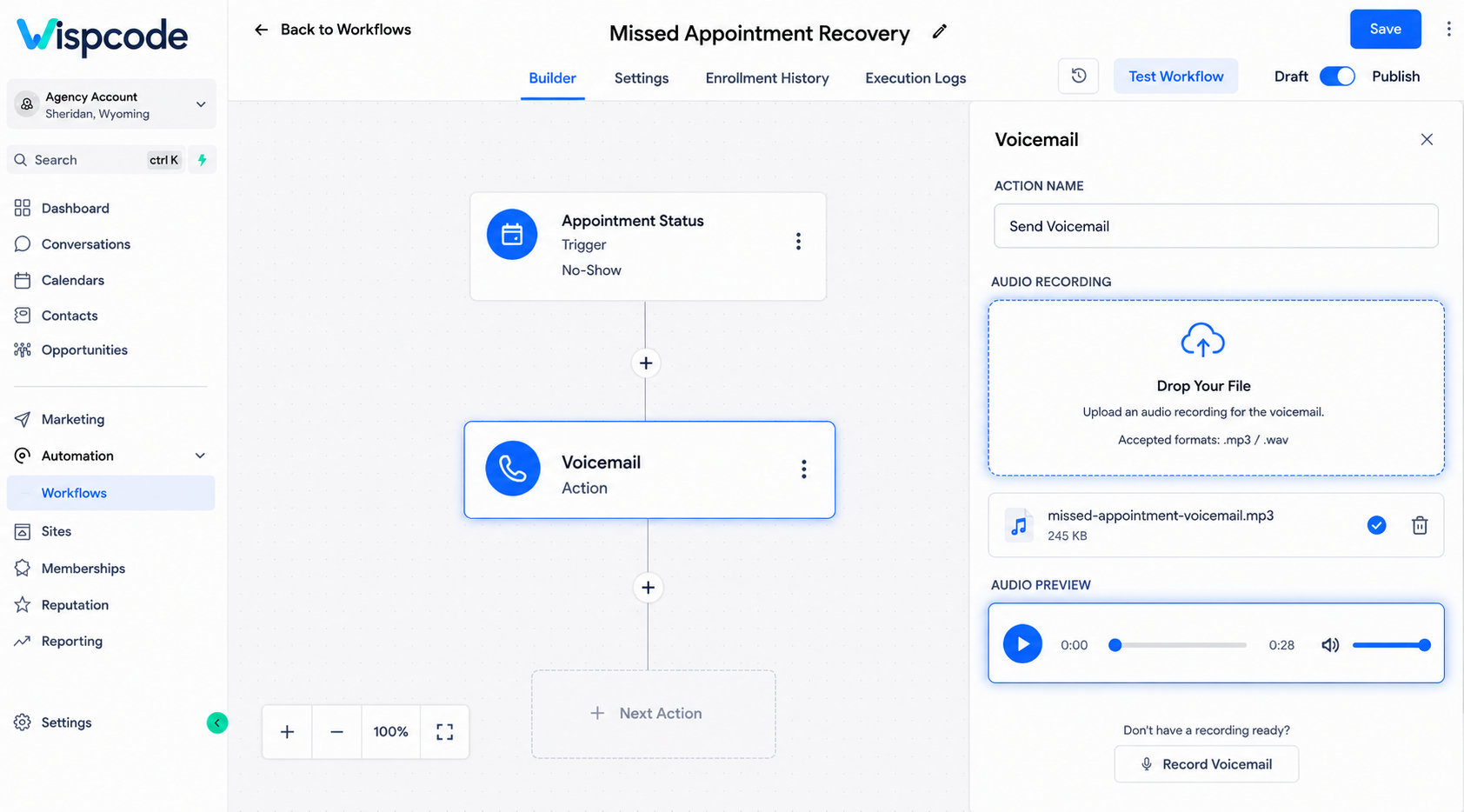
Step 3: Add the Voicemail Action
Click the + button in the workflow and search for Voicemail.
Select the Voicemail action.
GoHighLevel's documented configuration includes an Action Name and a Drop Your File field where you upload the pre-recorded voicemail.
Step 4: Upload Your Recording
Upload the pre-recorded voicemail file you want the contact to receive.
GoHighLevel's setup instructions recommend playing the uploaded message to confirm that it is the correct recording before saving the action.
Your recording should be:
Clear and easy to understand
Relevant to the event that triggered it
Short enough to maintain attention
Focused on one specific next step
Recorded in a professional tone
For example, a missed-appointment recording could say:
“Hi, this is Sarah from ABC Dental. We missed you at your scheduled appointment today. Please give us a call back when you have a moment, and we'll be happy to help you find another appointment time.”
The message should give the recipient enough context to understand why they are hearing from you.
Step 5: Save the Action and Workflow
After uploading and verifying the recording, save the Voicemail action.
Then save or publish the workflow according to your account's workflow configuration.
Before relying on the automation, test the workflow with an appropriate contact and verify that the expected event causes the workflow to reach the voicemail step.
A Practical Missed-Opportunity Workflow
Let's build a simple example for a service business.
Imagine an auto repair company receives appointment bookings throughout the day. Occasionally, customers fail to show up.
Instead of leaving the missed appointment without follow-up, the business can create a workflow designed to encourage the customer to reschedule.
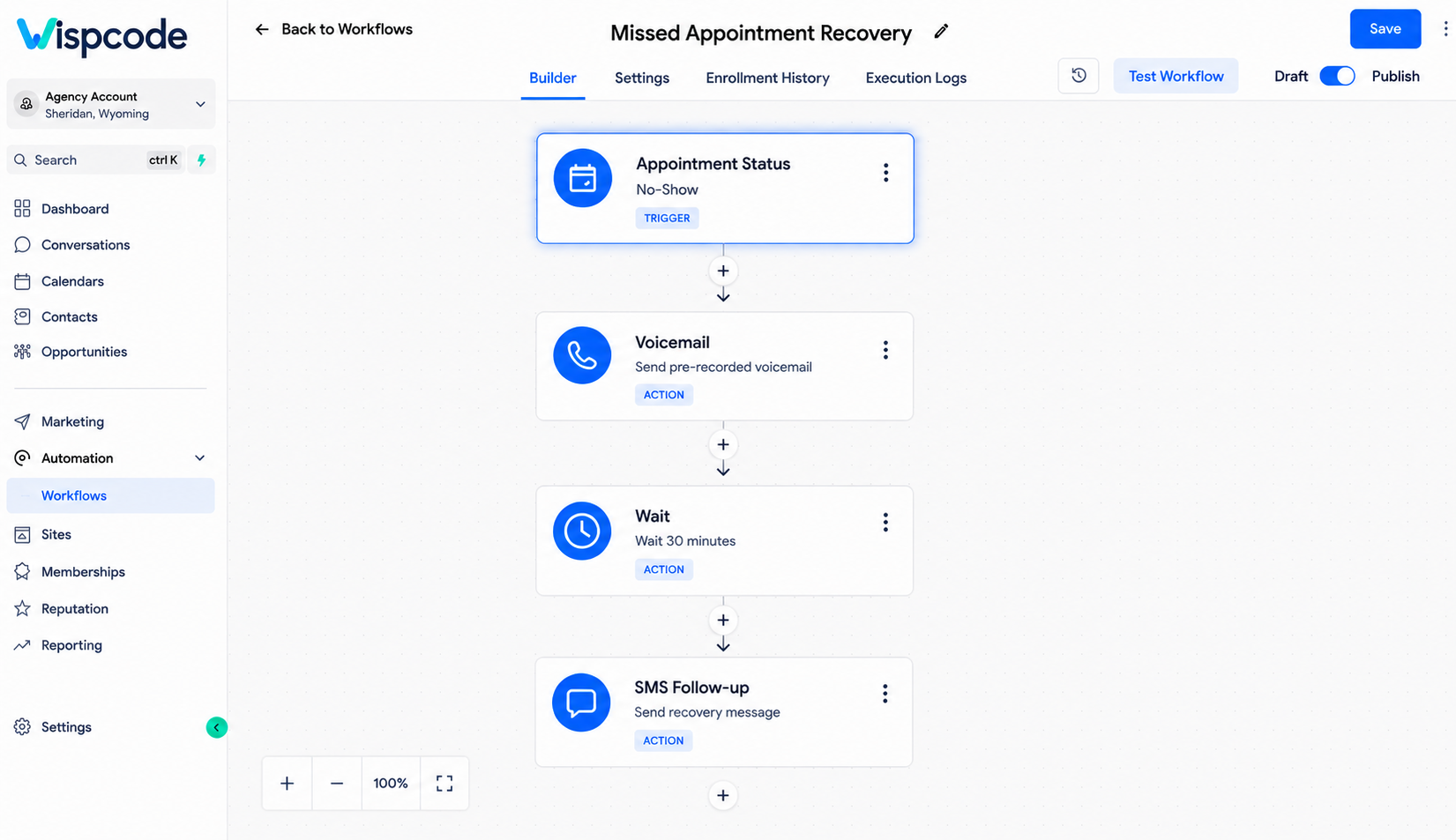
The workflow could be structured like this:
Trigger: Appointment status changes to No-Show
↓
Action: Voicemail
↓
Message: Pre-recorded rescheduling voicemail
The recording might explain that the business noticed the missed appointment and invite the customer to contact the business to select another time.
This approach is useful because the automation is connected directly to the business event.
The team does not have to manually search for every no-show appointment before starting the first follow-up.
GoHighLevel's official Voicemail documentation specifically gives an appointment no-show followed by a voicemail encouraging rescheduling as an example workflow.
Other Ways to Recover Missed Opportunities
The same concept can be applied beyond appointment no-shows.
Missed Lead Follow-Up
Suppose a new lead enters your CRM, but your sales representative cannot immediately connect with them.
You could create an appropriate workflow that eventually reaches a voicemail action after the relevant event or follow-up condition occurs.
The voicemail could briefly introduce the business and explain how the prospect can reconnect.
Appointment Follow-Up
Voicemail can also be incorporated into an appointment communication strategy.
For example, a business could use a pre-recorded message to provide useful information associated with an appointment, depending on the workflow and communication strategy.
GoHighLevel's documentation lists appointment-related follow-up among potential applications for the Voicemail action.
Sales Follow-Up
A sales team can also use pre-recorded voicemail messages as one component of a broader lead-nurturing workflow.
For example:
"Lead enters follow-up process → Wait → Voicemail → Additional follow-up action"
The exact sequence should depend on the business's communication strategy rather than sending the same message to every contact.
Best Practices for Automated Voicemail Messages
Automation makes delivery easier, but the quality of the message still matters.
Keep the Message Specific
Avoid generic recordings that could apply to almost anyone.
Instead of:
“Hi, we're calling about your inquiry. Please call us back.”
Try to provide meaningful context about why the business is contacting the person.
Give One Clear Next Step
The listener should know what to do after hearing the voicemail.
For example:
Call the business back
Contact the team about an appointment
Reschedule a missed appointment
A single clear action is generally easier to understand than a long list of instructions.
Match the Message to the Trigger
Create different recordings for different situations when necessary.
A no-show message should sound different from a general lead follow-up message because the recipient's context is different.
Use a Professional Recording
Poor audio quality can make an otherwise useful automation feel unprofessional.
Record in a quiet environment and make sure the speaker sounds natural, clear, and confident.
Test Before Activating the Workflow
Do not assume that an automation works simply because the workflow appears correctly configured.
Run a controlled test and verify:
The trigger fires correctly.
The contact enters the workflow.
The workflow reaches the Voicemail action.
The intended recording is selected.
The message is delivered as expected.
Testing is particularly important when the workflow contains additional conditions or multiple steps.
Common Mistakes to Avoid
Using the Wrong Recording
Uploading the wrong audio file can create a confusing customer experience.
Always verify the recording before saving the action.
Sending the Same Message for Every Situation
A no-show customer and a new sales lead may need completely different communication.
Create messages around the specific use case.
Making the Recording Too Long
A voicemail should communicate the essential information without unnecessary background.
If the recipient has to listen through a long explanation before discovering what to do next, the message becomes less effective.
Forgetting the Trigger
The Voicemail action is only one part of the automation.
You still need a suitable workflow trigger and configuration that determines when the action should execute.
Treating Automation as a Replacement for Every Human Follow-Up
Automation can handle repetitive communication, but some opportunities still require personal attention.
For higher-value prospects or complex customer situations, consider using the voicemail as one step in a broader follow-up process rather than the only response.
Frequently Asked Questions (FAQ'S)
1.What does the Voicemail action do in GoHighLevel?
The Voicemail workflow action sends a pre-recorded voicemail file to a contact when the workflow reaches that action. GoHighLevel provides an upload field for the pre-recorded audio file.
2.Can I use the Voicemail action after an appointment no-show?
Yes. GoHighLevel's official documentation specifically provides an appointment no-show followed by a Voicemail action as an example use case for encouraging a contact to reschedule.
3.Do I need to record the voicemail inside the workflow?
The Voicemail action documented by GoHighLevel uses an uploaded pre-recorded voicemail file. You upload the recording when configuring the action and can play it back to verify the file.
This is different from the Record Voicemail (IVR) action, which is designed to allow callers to record a voicemail during an IVR call flow.
4.Can the Voicemail action be combined with other workflow actions?
Yes. Workflow actions are designed to execute sequentially after a trigger, so the Voicemail action can be incorporated into a larger workflow containing other supported actions.
5.Is the Voicemail action the same as Record Voicemail?
No. These are different actions.
The Voicemail action delivers a pre-recorded voicemail to a contact. Record Voicemail (IVR) allows a caller to record an audio message during an IVR flow.
6.What type of recording should I use?
Use a clear, professional pre-recorded message that is appropriate for the workflow event. GoHighLevel's Voicemail setup requires you to upload the voicemail file, so prepare and verify the recording before activating the workflow.
Conclusion
Missed opportunities do not always need to become lost opportunities.
With the GoHighLevel Voicemail action, businesses can create automated follow-up processes that deliver pre-recorded voicemail messages when specific workflow events occur. Whether you're recovering appointment no-shows, following up with leads, or creating a structured communication process, the action can help reduce the amount of repetitive manual follow-up required from your team.
The key is not simply to add a voicemail to a workflow. Build the automation around a meaningful trigger, create a message that matches the situation, provide one clear next step, and test the complete workflow before putting it into production.
When thoughtfully configured, automated voicemail becomes another useful piece of a larger GoHighLevel follow-up system—helping your team respond consistently while giving missed opportunities another chance to turn into conversations.
Need Expert Help with GoHighLevel?
New to GoHighLevel and ready to get started ?Buy your GoHighLevel account here and launch with confidence.
Already know what you need and want our team to handle everything, from complete setup and customization to funnels, workflows, automations, CRM, and pipelines? Click here.



