

Purchase-Based Segmentation in GoHighLevel
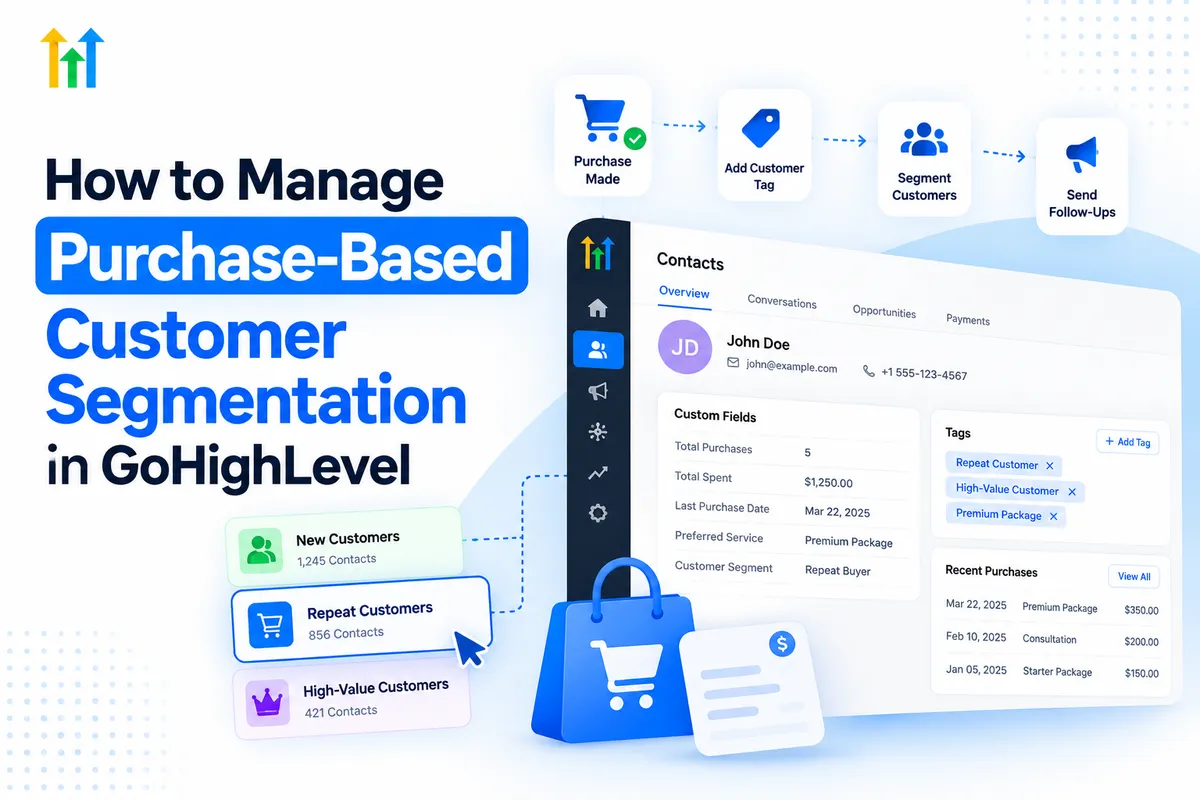
How to Manage Purchase-Based Customer Segmentation in GoHighLevel
Imagine a business sending the same promotional email to three customers: someone who purchased yesterday, a loyal customer who buys regularly, and someone who hasn't purchased in six months. Although each customer has a different relationship with the business, everyone receives identical messaging.
This approach overlooks valuable opportunities for personalized engagement.
Purchase-Based Customer Segmentation in GoHighLevel offers a smarter way to organize customers according to their purchasing behavior. By combining customer information, contact tags, custom fields, Smart Lists, and automated workflows, businesses can deliver more relevant communications.
Instead of treating every customer equally, businesses can build meaningful relationships based on individual purchasing experiences.
What Is Purchase-Based Customer Segmentation?
Purchase-based customer segmentation involves dividing customers into groups based on their purchasing history, preferences, and behavior.
Common customer segments include:
First-time customers: Individuals who recently made their first purchase.
Repeat customers: Customers who have purchased multiple times.
High-value customers: Individuals whose recorded purchases meet a defined spending threshold.
Product-specific customers: People who purchased particular products or services.
Inactive customers: Previous buyers who haven't purchased within a specified period.
These categories help businesses understand customer needs and create more relevant marketing campaigns.
For example, first-time customers might receive onboarding information, while returning customers could receive loyalty offers.
With properly organized customer purchase history, businesses can make communication more timely, useful, and personalized.
How GoHighLevel Supports Purchase-Based Customer Segmentation
GoHighLevel provides several CRM and automation tools that businesses can combine to manage customer segments effectively.
Contact Tags
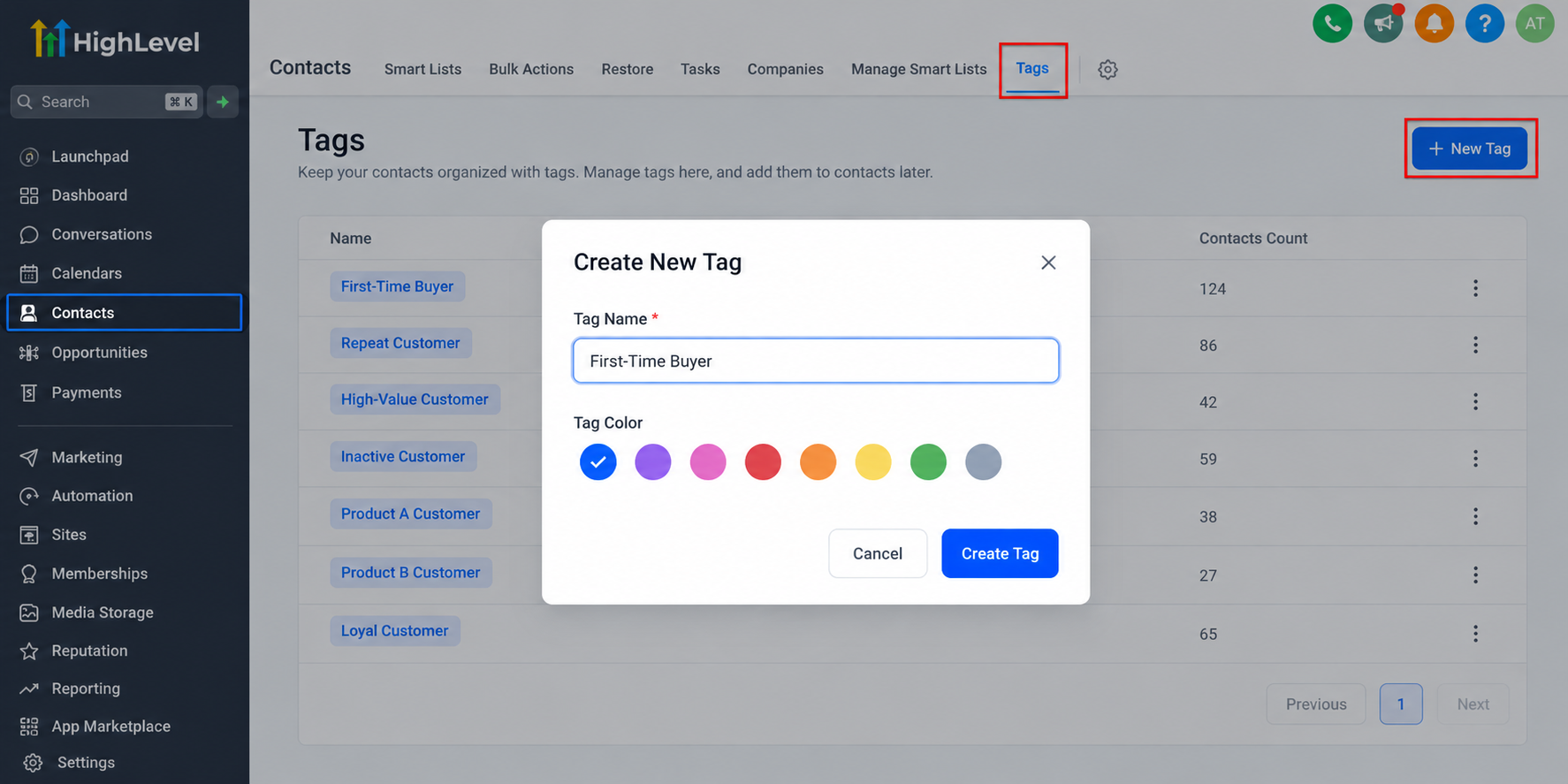
GoHighLevel customer tags help classify contacts into recognizable categories.
Businesses can create tags such as "First-Time Buyer," "Repeat Customer," or "Premium Service Customer."
These labels make customer records easier to organize and help workflows identify appropriate audiences.
Custom Fields
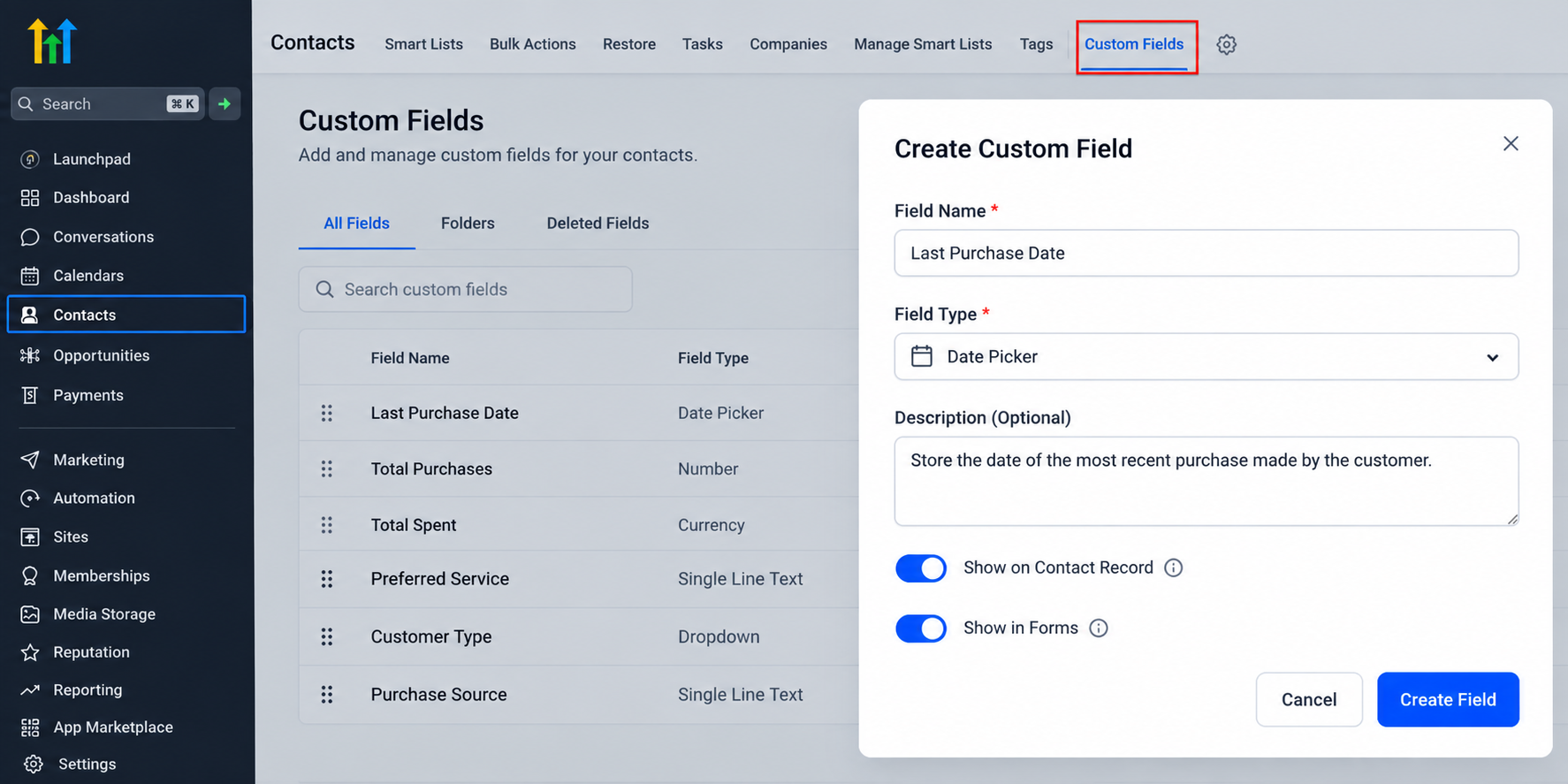
Custom fields allow businesses to store additional purchase-related information.
For example, a business might create fields for the last purchase date, preferred service, or recorded purchase count.
However, these values must be entered, imported, or updated through appropriately configured processes. Creating a field alone doesn't automatically populate purchase information.
Smart Lists
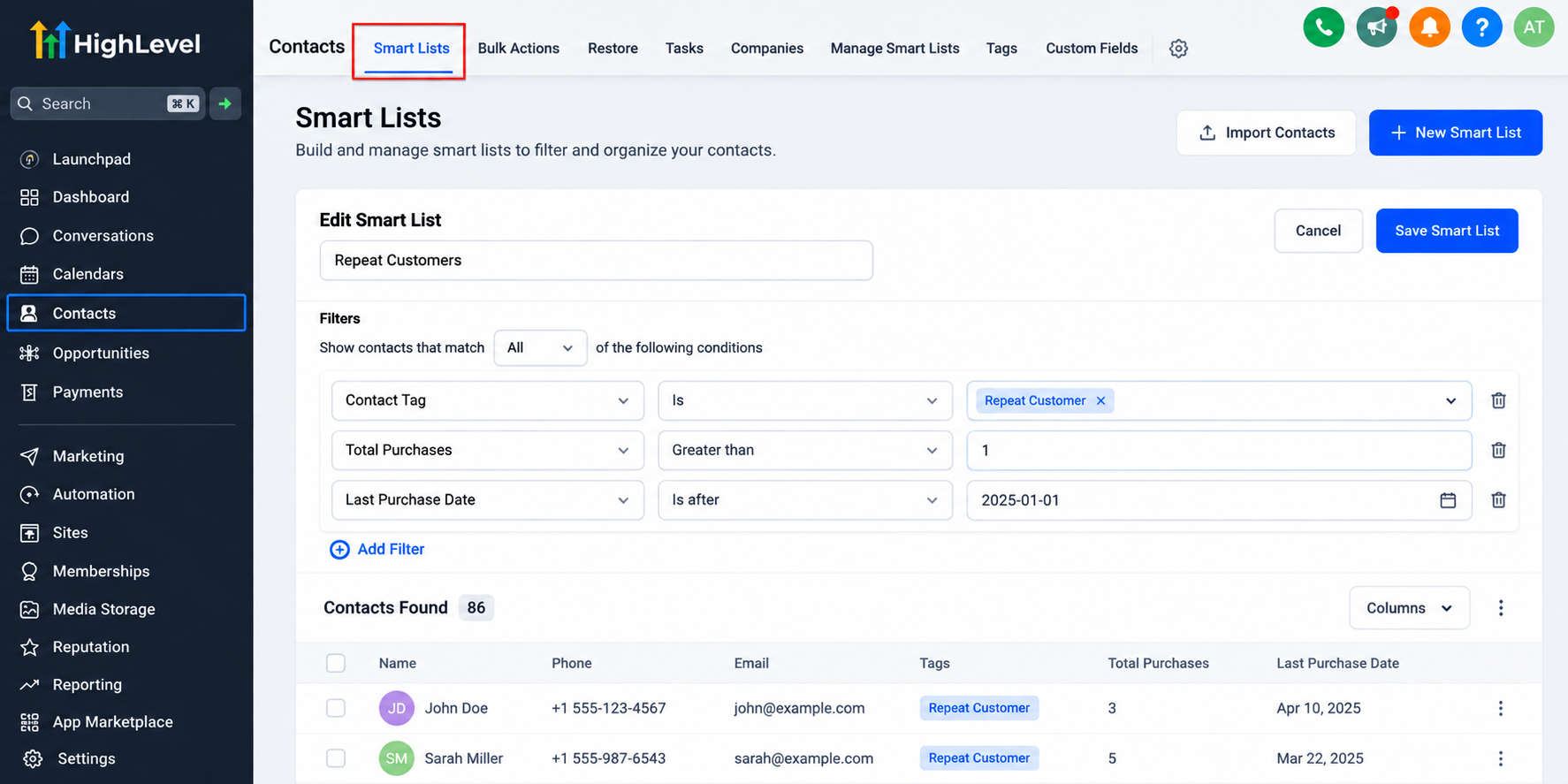
GoHighLevel Smart Lists provide saved, dynamic contact views based on supported filters.
Businesses can filter contacts using tags and available custom field criteria to identify relevant customer groups.
For example, a Smart List could display contacts tagged "Repeat Customer," helping marketers focus on an established audience.
Workflows and Contact Records
GoHighLevel workflows support customer segmentation automation through configured triggers, conditions, and actions.
Depending on the purchase source and available data, workflows can update contact information, apply tags, and send follow-up communications.
CRM contact records provide a central location for maintaining customer details and communication history.
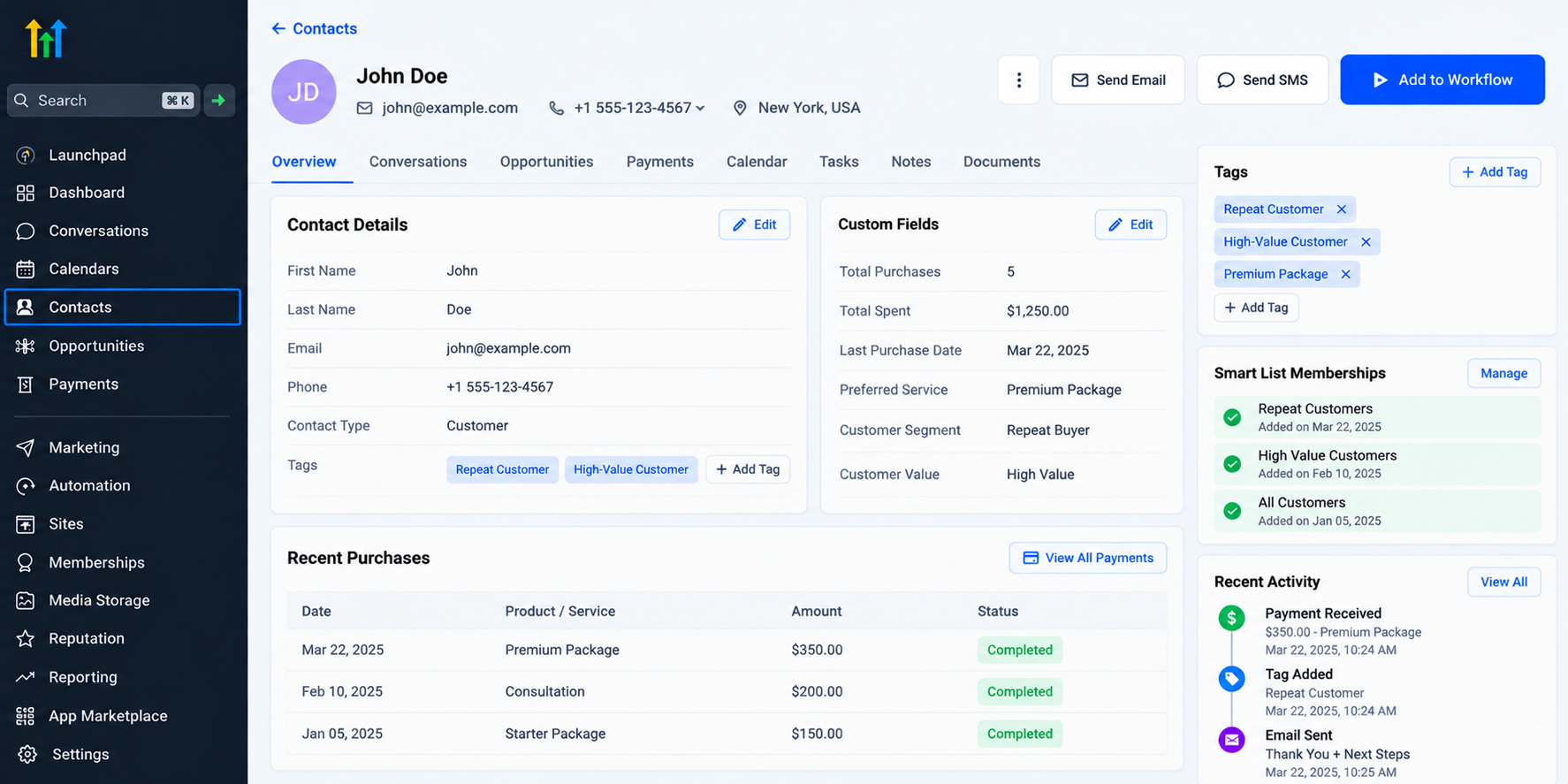
Together, these features support organized, personalized customer marketing.
How to Set Up Purchase-Based Customer Segmentation in GoHighLevel
Creating an effective segmentation system starts with reliable customer information and clearly defined categories.
Step 1: Identify Your Customer Segments
Determine which purchasing behaviors matter most to your business.
Consider purchase frequency, spending thresholds, service categories, and the time since a customer's last purchase.
Start with a few meaningful segments rather than creating unnecessary complexity.
Step 2: Organize Purchase-Related Data
Create descriptive contact tags and relevant custom fields.
For example, use a "First-Time Buyer" tag and a custom field for the most recent purchase date.
Ensure purchase information reaches the contact record through supported payment processes, imports, or configured integrations.
Step 3: Create Smart Lists
Navigate to your contact management area and configure Smart Lists using available filtering criteria.
You might create separate views for first-time buyers, repeat customers, and customers associated with specific services.
Remember that Smart Lists depend on stored data and supported filters; they don't independently calculate purchasing metrics.
Step 4: Build Automated Workflows
Use GoHighLevel workflows to automate appropriate customer follow-ups.
For purchases recorded through supported payment processes, configure an applicable payment-related trigger and verify its conditions.
The workflow could apply a customer tag, update relevant information, or send a post-purchase email.
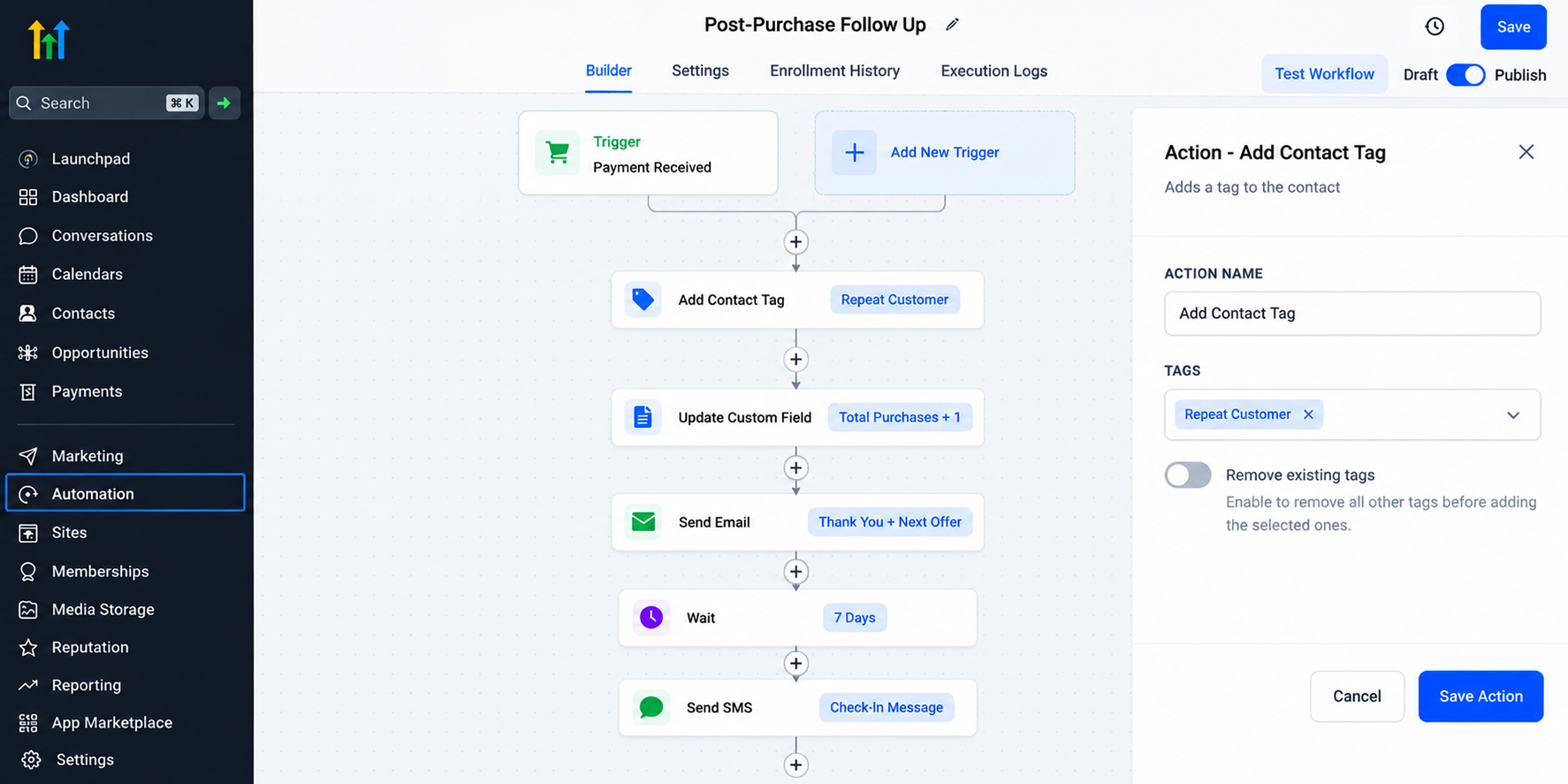
External purchases may require imported data or additional integration.
Step 5: Personalize Customer Communication
Create messages that reflect each segment's relationship with your business.
Welcome new customers, thank repeat buyers, and reconnect with inactive customers through relevant offers.
This approach makes purchase-based marketing automation more purposeful.
Real-World Examples of Purchase-Based Segmentation
E-commerce Businesses
An online retailer can organize customers according to available purchase information.
After a recorded purchase, a configured workflow might send product care instructions or relevant follow-up recommendations.
Home Service Companies
A plumbing company could tag customers according to completed services.
Customers who previously purchased maintenance services might receive seasonal reminders, while new customers receive introductory follow-ups.
Coaching and Consulting
A consulting business can distinguish new clients from returning customers.
First-time clients might receive onboarding resources, while established clients receive information about additional services.
Each example depends on accurate customer data and appropriate workflow configuration.
Best Practices for Effective Customer Segmentation
To maintain reliable segmentation:
Use consistent naming conventions for tags and custom fields.
Keep purchase-related information accurate and updated.
Focus on meaningful customer groups.
Test workflows before activating automated communications.
Review segments regularly as customer behavior changes.
Respect marketing consent and communication preferences.
These practices help prevent inaccurate targeting and unnecessary messaging.
Conclusion
Effective customer segmentation begins with understanding what customers purchase and how their needs evolve.
GoHighLevel brings contact organization, Smart Lists, custom fields, and workflow automation together to support more relevant customer experiences.
Rather than sending identical messages to everyone, businesses can build communication strategies around meaningful customer relationships.
Frequently Asked Questions (FAQs)
1. What is purchase-based customer segmentation in GoHighLevel?
Purchase-based customer segmentation involves grouping customers according to their purchase history, spending behavior, and product preferences using GoHighLevel tags, custom fields, and Smart Lists.
2. Can GoHighLevel automatically segment customers based on purchases?
Yes, GoHighLevel can automate customer segmentation using configured workflows, tags, and purchase-related data. The appropriate triggers and data connections must be set up first.
3. How do Smart Lists help with customer segmentation in GoHighLevel?
Smart Lists allow businesses to filter and organize contacts based on tags, custom fields, and other supported criteria, making customer groups easier to manage.
4. Can GoHighLevel track customer purchase history?
GoHighLevel can maintain purchase information from supported payment activities. External purchase data may require imports or integrations to make it available for segmentation.
5. Why is purchase-based segmentation important for customer retention?
It helps businesses deliver personalized follow-ups, relevant offers, and timely communications based on customer purchasing behavior, encouraging repeat purchases and stronger relationships.
Need Expert Help with GoHighLevel?
New to GoHighLevel and ready to get started? Buy your GoHighLevel account here and launch with confidence.
Already know what you need and want our team to handle everything, from complete setup and customization to funnels, workflows, automations, CRM, and pipelines? Click here.



