

GoHighLevel Product Review Submitted Trigger for Repeat Sales
How to Turn Product Reviews into Repeat Sales Using the Product Review Submitted Trigger in GoHighLevel
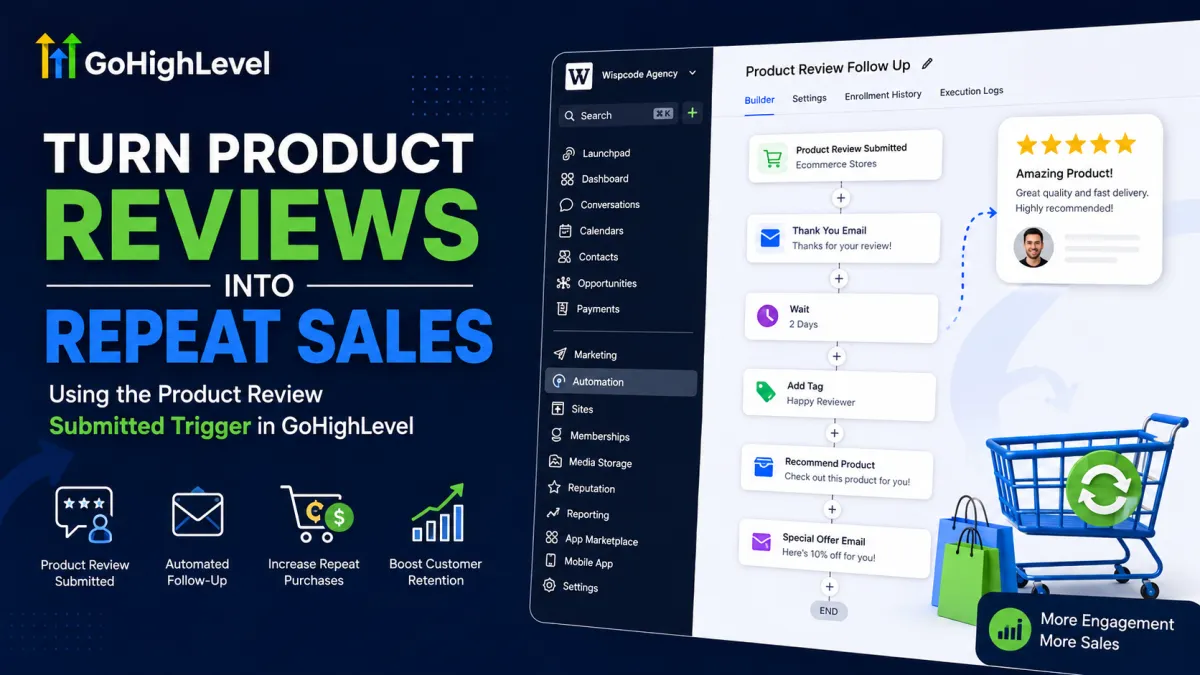
A product review does more than provide social proof. It also creates another opportunity to continue the customer relationship. Instead of treating a review as the final step after a purchase, businesses can use it as an event that starts a relevant follow-up sequence.
The Product Review Submitted trigger in GoHighLevel is designed for Ecommerce Stores. It fires when a shopper submits a review for a product in a HighLevel store, allowing a workflow to respond automatically.
What Is the Product Review Submitted Trigger in GoHighLevel?

The GoHighLevel Product Review Submitted trigger starts a workflow when a customer submits a product review. HighLevel captures review-related information such as the rating, headline, comment, reviewer information, store, and product, which can then be used within the automation.
You can find the trigger in the Workflow Builder under Add Trigger → Ecommerce Stores → Product Review Submitted. Filters can narrow which reviews enter the workflow. For example, you can filter by product, review rating, store, review comment, review headline, reviewer email, or reviewer name.
It is important to understand the difference between a trigger and an action. The Product Review Submitted trigger only identifies the event that starts the workflow. It does not itself send a message, apply an offer, or create a sale. Those outcomes come from the workflow actions you configure afterward.
This also makes it different from triggers such as Order Submitted or New Review Received. Product Review Submitted specifically relates to a review submitted for a product in a HighLevel Ecommerce Store.
How the Automation Works
The basic logic is straightforward:
Customer submits product review → Product Review Submitted trigger fires → workflow executes → business follows up → relevant offer or content is delivered → customer has an opportunity to purchase again
The important point is that the trigger creates an automation opportunity, not a guaranteed sale. Whether the customer buys again depends on factors such as the product, timing, relevance of the recommendation, offer, customer experience, and purchasing cycle.
Step-by-Step Workflow Example

Imagine an online store sells skincare products. A customer purchases a facial cleanser and later submits a product review.
A practical post-purchase automation could work like this:
1. Start with Product Review Submitted
Create a workflow and select Product Review Submitted under Ecommerce Stores. If the automation is intended for one particular product, use the available product filter to limit which reviews can start the workflow. HighLevel currently supports one product in the Global Product filter per trigger.
2. Send a thank-you message
After the trigger fires, use an appropriate communication action to thank the customer for taking the time to submit a review. The message should acknowledge their feedback rather than immediately pushing another product.
3. Add a Wait action

Give the customer some breathing room before making another offer. The appropriate delay depends on the product and buying cycle. A consumable product might justify a shorter interval than a product that is purchased only occasionally.
4. Recommend a complementary product
After the wait period, send a relevant recommendation. For example, someone who reviewed a facial cleanser could receive information about a compatible moisturizer or serum.
5. Add an incentive when appropriate
If the business strategy supports it, the follow-up can include a loyalty discount or another suitable incentive. The goal should be to reward continued engagement rather than train customers to expect a discount after every review.
6. Follow up and monitor conversion
A second message can remind the customer about the recommendation. If the customer purchases, the workflow strategy should account for that conversion so customers do not continue receiving unnecessary promotional messages.
This is where good GoHighLevel workflow automation matters: the review starts the process, while the actions determine what happens next.
How Product Reviews Can Lead to Repeat Sales

A review event can support several forms of customer retention automation:
Cross-selling: Recommend products that naturally complement the reviewed item.
Upselling: Introduce a higher-value version when there is a genuine reason to upgrade.
Replenishment: Recommend another purchase when the original product is likely to run out.
Loyalty offers: Give returning customers a reason to purchase again.
Post-purchase engagement: Share useful product information before presenting another offer.
Customer reactivation: Use the review as a new engagement point with an existing customer.
You can also use the trigger's rating filter to separate workflows by star rating. HighLevel supports selecting specific ratings, which means businesses can design different paths for different review scores.
For example, a lower-rated review could receive a customer-service-focused follow-up instead of a sales promotion, while a high-rated review could enter an advocacy or loyalty sequence. This is preferable to assuming every reviewer should immediately receive the same sales message.

Best Practices for Product Review Automation
Keep the automation useful and customer-focused.
Choose timing based on the product's buying cycle.
Keep recommendations relevant to the item reviewed.
Personalize messages where useful without overcomplicating the workflow.
Avoid sending multiple promotional messages too close together.
Use rating filters when different customer experiences require different follow-ups.
Test timing, messaging, and offers instead of assuming one sequence will work forever.
Track purchases and other meaningful outcomes to evaluate whether the automation actually generates repeat business.
If you want more sophisticated text analysis, HighLevel also provides AI workflow actions, including AI Intent Detection, but that is a separate workflow action rather than something the Product Review Submitted trigger automatically performs.
Common Mistakes to Avoid
One common mistake is sending a discount immediately after every review. A customer may have just completed a valuable interaction with your brand and may not want another sales message.
Other mistakes include:
Promoting products unrelated to the customer's purchase
Assuming every reviewer wants to buy again
Over-messaging customers
Building complicated workflows without a specific objective
Confusing the trigger with the actions that follow it
Treating a review submission as proof that another purchase will happen
The strongest workflows use the review as a contextual customer touchpoint, not as an excuse to send another generic promotion.
Conclusion
The Product Review Submitted trigger in GoHighLevel gives Ecommerce businesses a practical starting point for post-purchase automation. When a customer submits a product review, that event can launch a carefully designed workflow containing thank-you messages, delays, relevant recommendations, loyalty incentives, and follow-up actions.
The trigger itself does not create repeat sales. It simply tells GoHighLevel that a valuable customer interaction has occurred. The real opportunity comes from what you build after that event.
Used thoughtfully, GoHighLevel review automation can turn product feedback into another stage of the customer journey—and give businesses a structured way to encourage repeat purchases without making every interaction feel like a sales pitch.
Frequently Asked Questions (FAQs)
1. What is the Product Review Submitted trigger in GoHighLevel?
The Product Review Submitted trigger in GoHighLevel starts a workflow when a customer submits a product review for an item in a GoHighLevel Ecommerce Store.
2. How can the Product Review Submitted trigger generate repeat sales?
It can start a post-purchase workflow that follows up with customers using relevant product recommendations, replenishment reminders, loyalty offers, or other appropriate messages. The trigger creates the opportunity; the follow-up strategy determines whether it leads to another purchase.
3. What can I do after the Product Review Submitted trigger fires?
You can configure workflow actions such as sending customer communications, adding wait periods, applying tags, and continuing the customer through a planned follow-up sequence.
4. Can I filter the Product Review Submitted trigger by star rating?
Yes. GoHighLevel allows you to use review-rating filters, making it possible to create different workflows or paths based on the submitted rating.
5. Can I recommend another product after a customer submits a review?
Yes. A workflow can be designed to send a relevant cross-sell, upsell, or replenishment recommendation after an appropriate delay.
6. Should I send a discount immediately after every product review?
Not necessarily. Sending an offer immediately after every review can feel overly promotional. A better approach is to consider the customer's purchase, product lifecycle, review rating, and appropriate follow-up timing.
7. Is the Product Review Submitted trigger the same as an Order Submitted trigger?
No. Product Review Submitted is triggered by a product review submission, while Order Submitted relates to an order event. They represent different events and can be used for different automation purposes.
Need Expert Help with GoHighLevel?
New to GoHighLevel and ready to get started? Buy your GoHighLevel account here and launch with confidence.
Already know what you need and want our team to handle everything, from complete setup and customization to funnels, workflows, automations, CRM, and pipelines? Click here.



