

How to Build a Patient Inquiry Management System for Healthcare Practices
A Practical Guide to Managing Patient Inquiries in GoHighLevel
Introduction
Healthcare practices receive patient inquiries from many different sources. Someone may submit a form on the website, call the office, request information about a service, or ask about scheduling an appointment. When those inquiries are handled manually, it can become difficult to keep track of who contacted the practice, what they need, and what should happen next.
A structured patient inquiry management system can help healthcare practices organize these interactions and create a more consistent follow-up process.
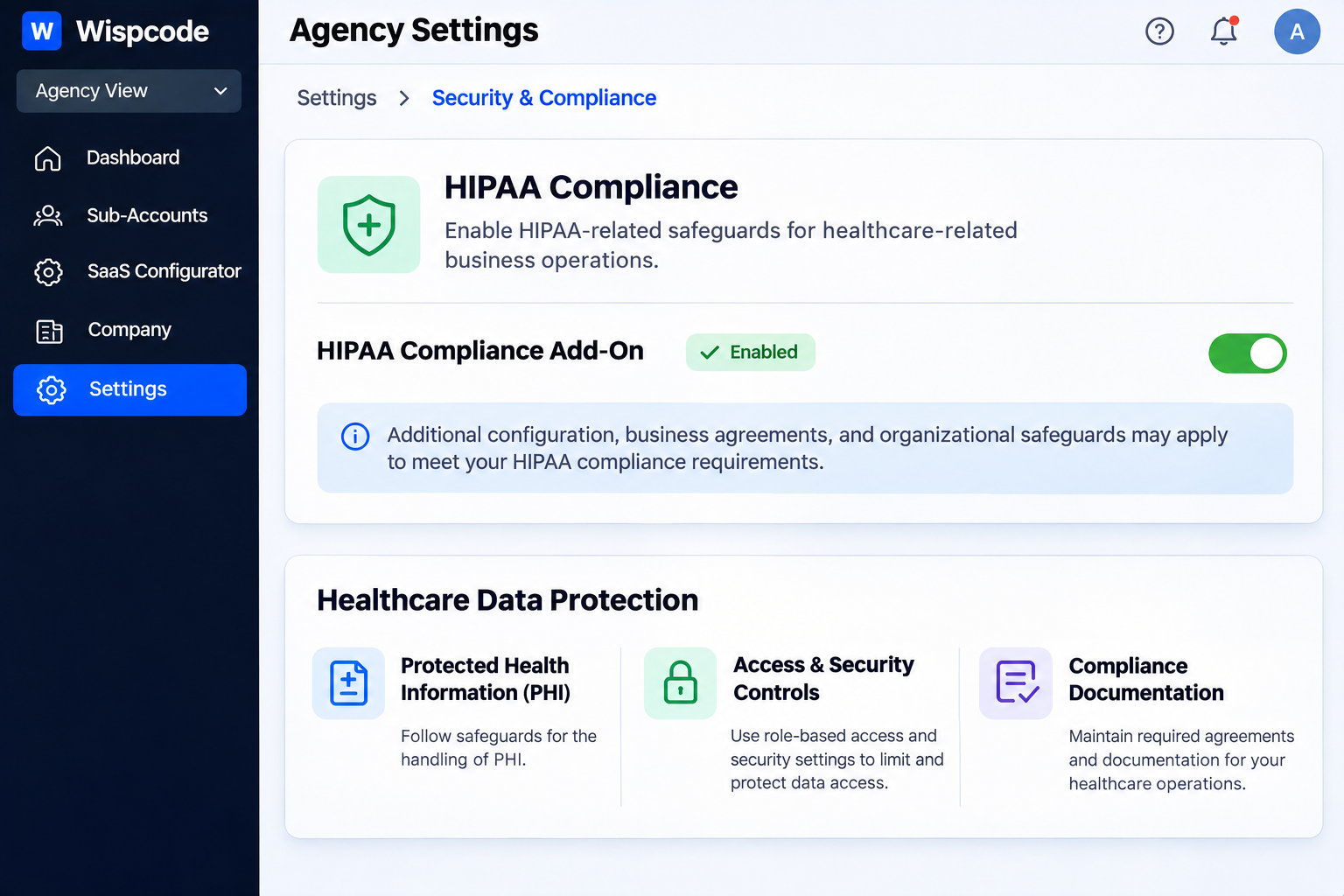
GoHighLevel provides several tools that can support this type of workflow, including forms, contacts, custom fields, workflows, calendars, appointments, tasks, and opportunity pipelines. However, healthcare practices must also consider privacy and compliance requirements when handling protected health information (PHI). HighLevel's HIPAA capabilities are provided through a paid HIPAA Compliance package and are not enabled by default.
The goal is not to automate every part of patient communication. Instead, the goal is to create a system where routine administrative steps are organized and automated while sensitive clinical decisions remain with qualified healthcare professionals.
What Is a Patient Inquiry Management System?
A patient inquiry management system is a structured process for capturing, organizing, routing, and following up on inquiries from prospective or existing patients.
For example, a healthcare practice might receive an inquiry from someone asking about:
A specific service
Appointment availability
Insurance or payment information
Practice location
New-patient procedures
General service information
Instead of allowing these inquiries to remain scattered across emails, spreadsheets, forms, and individual conversations, the practice can create a central process for managing them.
A simple journey might look like:
Inquiry received → Contact created or updated → Inquiry categorized → Team notified → Follow-up completed → Appointment booked or inquiry resolved
The exact process should depend on the practice's workflow and the type of information it collects.
Why Healthcare Practices Need a Structured Inquiry Process
A manual process can create unnecessary gaps.
For example, one staff member may receive an inquiry but forget to follow up. Another employee may respond without knowing that someone else already contacted the patient. A form submission might also sit unnoticed if there is no internal notification or task associated with it.
A structured system helps create consistency.
Instead of relying entirely on memory, staff can use predefined processes to determine what should happen after an inquiry is received.
GoHighlevel workflows are designed around triggers and actions. For example, a form submission can trigger actions such as updating contact information, assigning work, or sending appropriate communications.
This can make the administrative side of inquiry management easier to organize.
Step 1: Define What Counts as a Patient Inquiry
Before building the system in GoHighLevel, define the types of inquiries your practice receives.
For example:
General service inquiries
New-patient inquiries
Appointment requests
Consultation requests
Insurance-related questions
Follow-up requests
Existing-patient administrative questions
Avoid treating every inquiry the same. Someone asking for the practice address does not need the same process as someone requesting a consultation.
Defining inquiry types first helps you create better categories, fields, workflows, and follow-up processes.
Step 2: Decide What Information You Need to Collect
Determine what information is genuinely necessary for the inquiry process.
Depending on the use case, this might include:
Name
Email address
Phone number
Preferred contact method
Inquiry type
Preferred appointment time
Service of interest
Other required administrative information
Be especially careful with sensitive medical information. Do not request detailed medical information simply because custom fields are available. Only collect what is necessary and appropriate for the practice's privacy and compliance requirements.
HighLevel's HIPAA documentation states that its HIPAA-enabled environment covers data that can store PHI, including contacts, custom fields, forms, calendars, messages, recordings, and other account data.
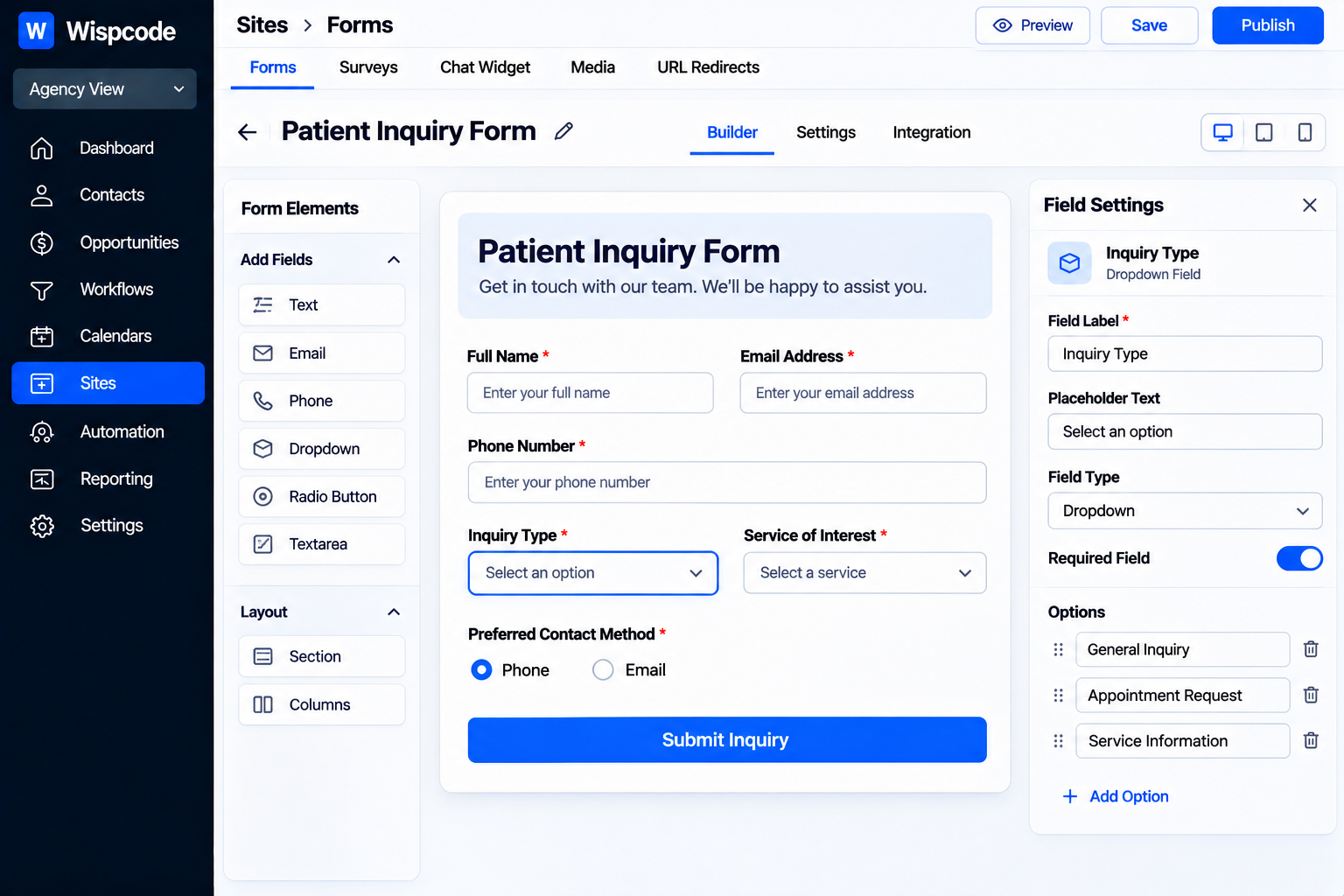
Step 3: Create a Patient Inquiry Form
Once you know what information is required, create a focused form that is easy for prospective patients to complete.
For example:
Basic information
Full name
Email
Phone
Inquiry information
Reason for contacting the practice
Service of interest
Preferred contact method
Scheduling information
Preferred appointment type
Preferred availability
The exact fields should depend on the practice. HighLevel forms can be connected with workflows so a submission can start an automated process.
Step 4: Create the Contact and Organize the Inquiry
When an inquiry arrives, organize the information consistently.
The contact record can contain information about the person, while custom fields can categorize the inquiry.
For example:
Inquiry type
Preferred communication method
Service of interest
Inquiry source
Assigned team member
Follow-up status
Keep contact information separate from information related to a specific process. For example, a phone number describes the contact, while New Patient Inquiry describes the current business process.
Step 5: Build the Initial Workflow
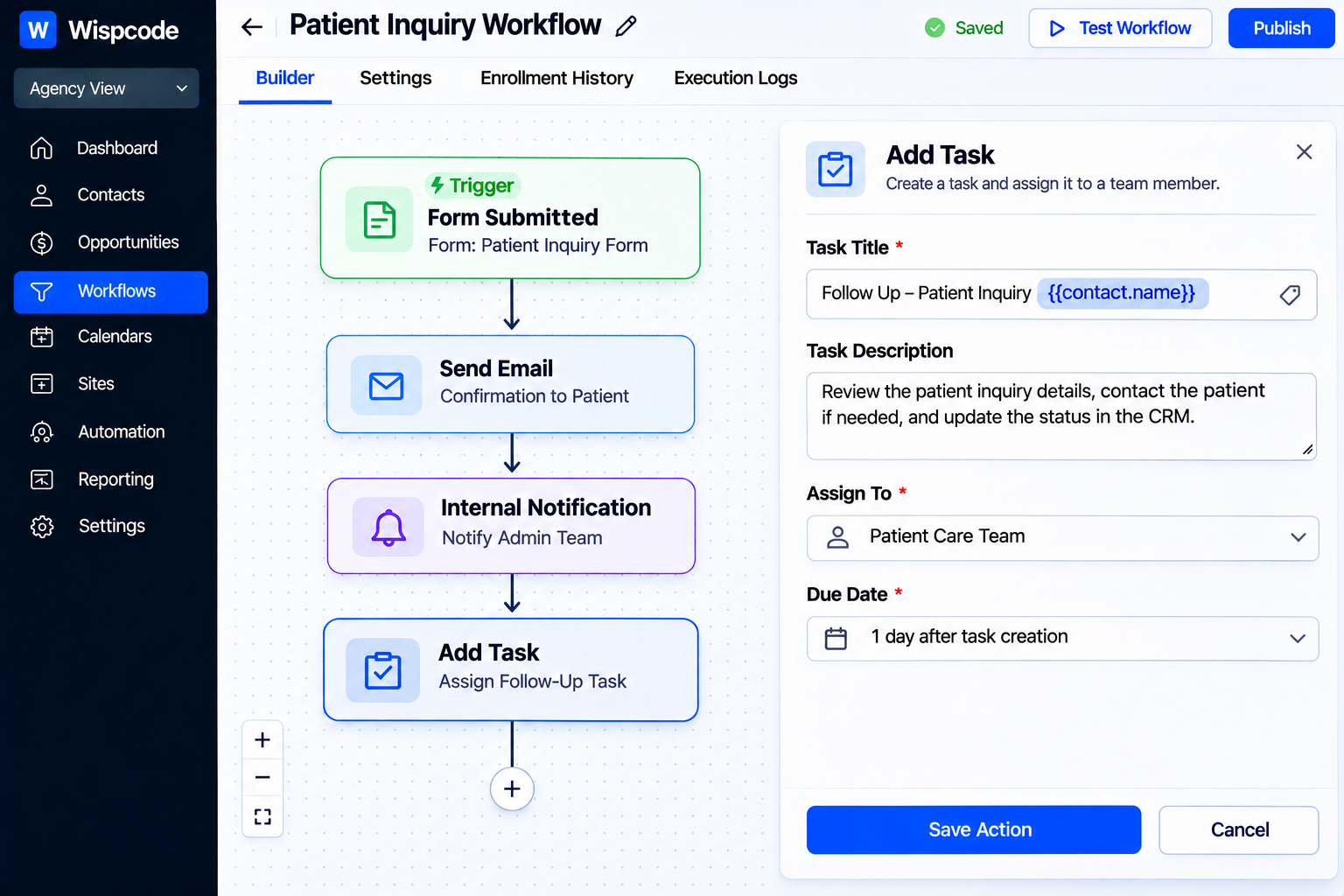
Create a workflow triggered by the inquiry.
A basic workflow could be:
Form Submitted → Update Contact → Notify Team → Create Follow-Up Task → Send Confirmation
HighLevel workflows use triggers to start automations and actions to perform configured steps. Form submissions and appointment events can be used as part of these processes.
For example, the workflow can notify a team member about a new inquiry and create a review task.
The automation should support staff rather than attempt to make clinical decisions.
Step 6: Create an Inquiry Pipeline
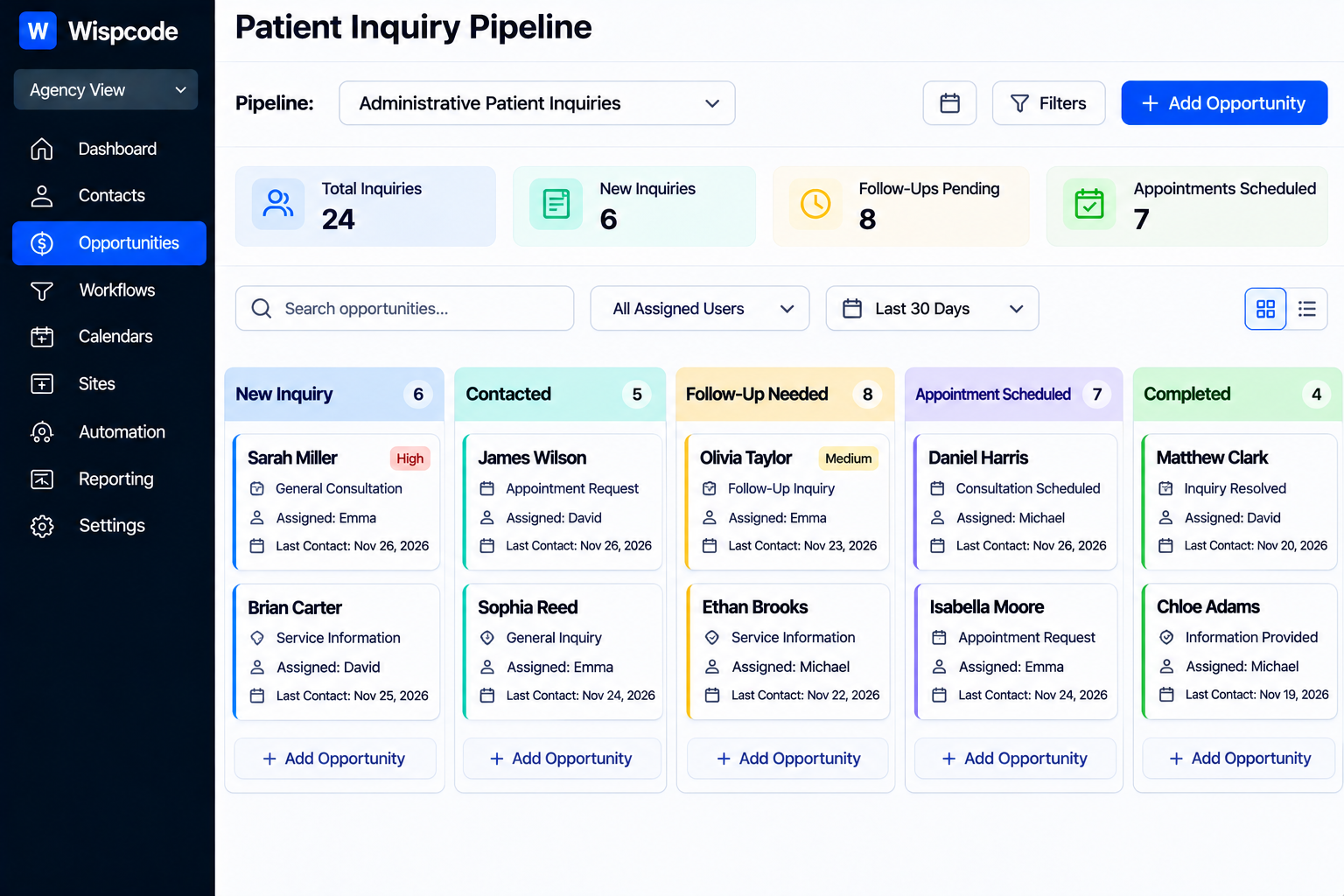
For practices receiving many inquiries, an opportunity pipeline can provide a visual way to track progress.
A simple pipeline might include:
New Inquiry → Contacted → Follow-Up Needed → Appointment Scheduled → Completed
The stages should match the practice's actual administrative process.
HighLevel supports creating or updating opportunities through workflows. A form submission can, for example, trigger the creation or update of an opportunity in a selected pipeline and stage.
This helps staff see which inquiries are new, require follow-up, or have progressed to an appointment.
The pipeline should remain focused on the administrative process rather than functioning as a clinical record.
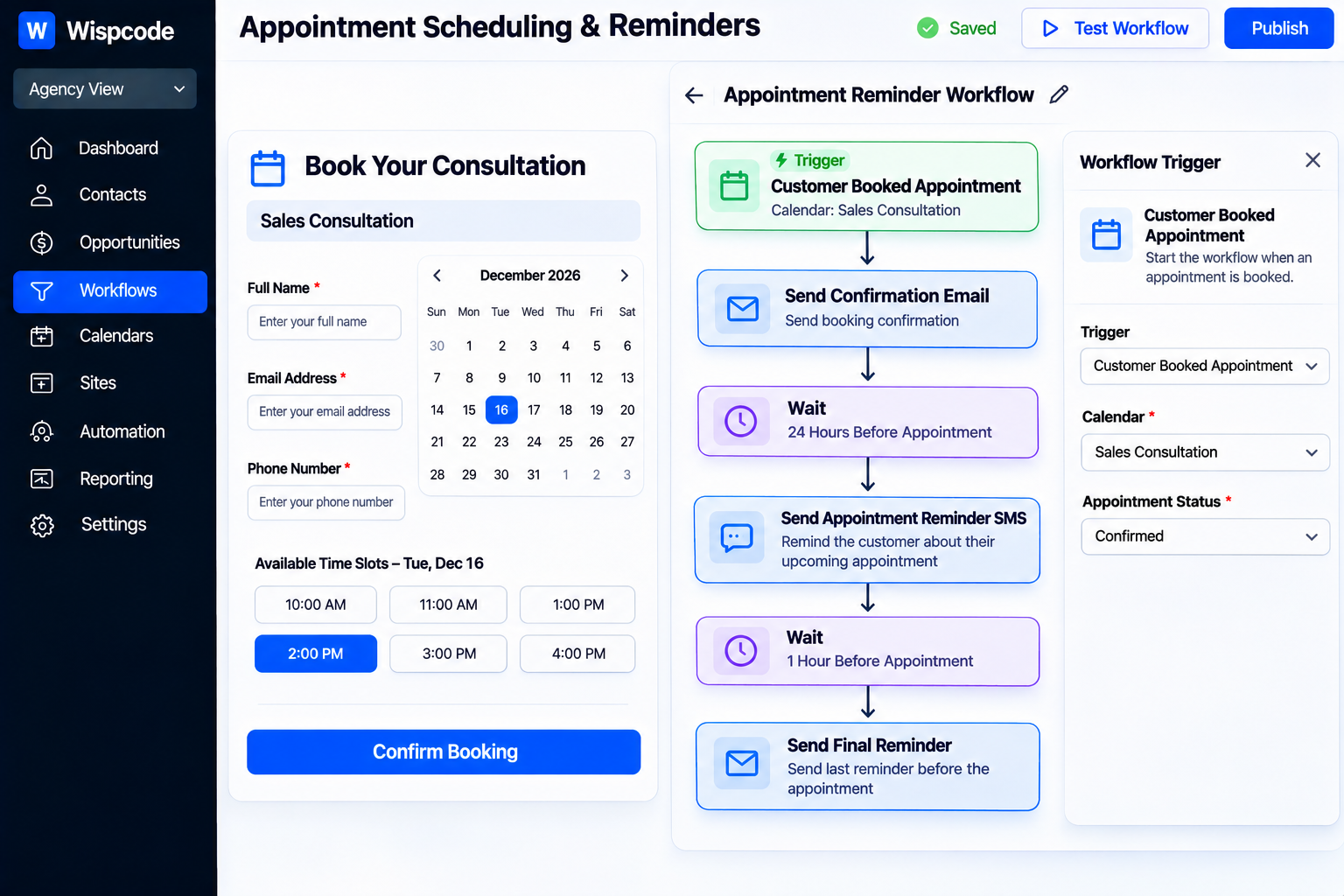
Step 7: Connect the Inquiry Process to Appointment Scheduling
If the inquiry is intended to lead to an appointment, connect the inquiry process with the practice's calendar.
HighLevel calendars can use custom forms to collect additional information during booking, with submitted information saved to the contact's CRM record.
This can create a smoother process:
Inquiry → Review → Appointment Booking → Confirmation → Reminder
For example, someone requesting a consultation can receive appropriate scheduling instructions after the practice determines that an appointment should be offered.
HighLevel also supports workflow-based appointment actions. Use automatic appointment creation carefully and only when it fits the practice's scheduling rules.
Step 8: Automate Internal Follow-Up
Not every inquiry should receive the same automated response. Some require staff review before responding.
Workflows can create internal tasks and notifications so inquiries do not depend entirely on someone remembering to check a form or inbox.
For example:
New Inquiry → Create Task → Assign Team Member → Review Inquiry → Contact Patient
Automation handles routing and reminders, while staff handles the actual interaction and decisions.
Step 9: Create Appropriate Patient Communications
Communication should be clear and appropriate to the inquiry.
After a form submission, the practice might send a confirmation explaining that:
The request was received
The practice will review it
How to contact the office if immediate assistance is needed
What the next administrative step is
Avoid automated messages that provide medical advice, diagnoses, treatment recommendations, or clinical decisions unless specifically designed and approved for that purpose.
Automation should manage communication logistics, not replace qualified healthcare professionals.
Step 10: Add Follow-Up and Appointment Reminders
Once an inquiry becomes an appointment, the process can continue through appointment-related workflows.
For example:
Appointment Booked → Confirmation → Reminder → Appointment → Follow-Up
HighLevel's workflow system supports appointment-related triggers and actions, allowing businesses to automate appropriate reminders and follow-ups.
The timing and communication channels should follow the practice's policies. The goal is consistent administrative communication without requiring staff to send every reminder manually.
Step 11: Monitor Inquiry Performance
Once the system is running, review how well it performs.
Ask questions such as:
How many inquiries are being received?
Which sources generate the most inquiries?
How quickly are inquiries followed up?
How many become appointments?
Which inquiry types require the most manual work?
Where are inquiries getting stuck?
Are staff receiving the correct notifications?
These insights can reveal process problems. For example, if inquiries remain in New Inquiry for several days, the issue may be assignment, notifications, staffing, or workflow design rather than lead volume.
Healthcare Privacy and HIPAA Considerations
Healthcare practices need to treat privacy as part of the system design, not as an afterthought.
HighLevel explicitly states that accounts are not HIPAA compliant by default. Its HIPAA Compliance package is an optional paid add-on that provides controls including encryption of ePHI, Business Associate Agreements, audit logging, and MFA enforcement. The package must be enabled for the relevant sub-accounts when required.
HighLevel also states that the HIPAA package covers data stored in areas such as contacts, custom fields, form submissions, calendars, SMS/MMS, recordings, email bodies and attachments, and other objects capable of storing PHI.
That does not mean a practice can simply turn on the package and consider its entire compliance program complete.
Healthcare organizations should still determine their own legal, regulatory, security, access-control, retention, and operational requirements and obtain appropriate professional guidance when necessary.
Common Mistakes to Avoid
Collecting Too Much Information
Do not turn a basic inquiry form into a detailed medical questionnaire unless the information is genuinely required and the appropriate privacy and compliance controls are in place.
Automating Clinical Decisions
Workflows are useful for administrative automation, but they should not be used as a substitute for qualified clinical judgment.
Creating Too Many Pipeline Stages
A pipeline should make the process easier to understand. Too many stages can create confusion and inconsistent updates.
Forgetting Human Review
Some inquiries need staff attention before a response is sent. Automation should make that review easier, not eliminate it.
Ignoring Privacy Requirements
Do not assume that using a CRM automatically makes a healthcare workflow compliant. Review the platform configuration and the practice's broader compliance obligations before handling PHI.
Frequently Asked Questions (FAQs)
1. What is a patient inquiry management system?
It is a structured process for capturing, organizing, tracking, and following up on patient inquiries before or during appointment scheduling.
2. Can GoHighLevel manage patient inquiries?
Yes. GoHighLevel provides tools such as forms, contacts, custom fields, workflows, pipelines, tasks, calendars, and appointment automation to organize patient inquiries.
3. Can GoHighLevel automate patient follow-up?
Yes. Workflows can automate appropriate administrative follow-ups, notifications, tasks, confirmations, and appointment-related communications.
4. Is GoHighLevel HIPAA compliant for healthcare practices?
GoHighLevel is not HIPAA compliant by default. Healthcare practices that need to handle PHI must enable the appropriate HIPAA Compliance package and configure their systems accordingly.
5. Can GoHighLevel connect patient inquiries with appointments?
Yes. Forms, workflows, and calendars can be used together to create a structured process from an initial inquiry through appointment scheduling and related follow-up.
Conclusion
A well-designed patient inquiry management system can help healthcare practices organize incoming requests, improve administrative follow-up, and create a more consistent path from inquiry to appointment.
GoHighLevel provides several building blocks for this process, including forms, contacts, custom fields, workflows, pipelines, tasks, calendars, and appointment automation.
The best system is not necessarily the most complicated one.
Start with the actual patient inquiry journey. Decide what information is necessary, create clear stages, automate repetitive administrative steps, and leave appropriate decisions to the practice team.
Most importantly, treat healthcare privacy as a core design requirement. If the system will handle PHI, make sure the appropriate HighLevel HIPAA capabilities and the practice's broader compliance processes are in place before using it for that purpose.
When the process is designed carefully, automation can take care of repetitive administrative work while your team focuses on what matters most: providing patients with a clear, professional, and responsive experience.
Need Expert Help with GoHighLevel?
New to GoHighLevel and ready to get started? Buy your GoHighLevel account here and launch with confidence.
Already know what you need and want our team to handle everything, from complete setup and customization to funnels, workflows, automations, CRM, and pipelines? Click here.