

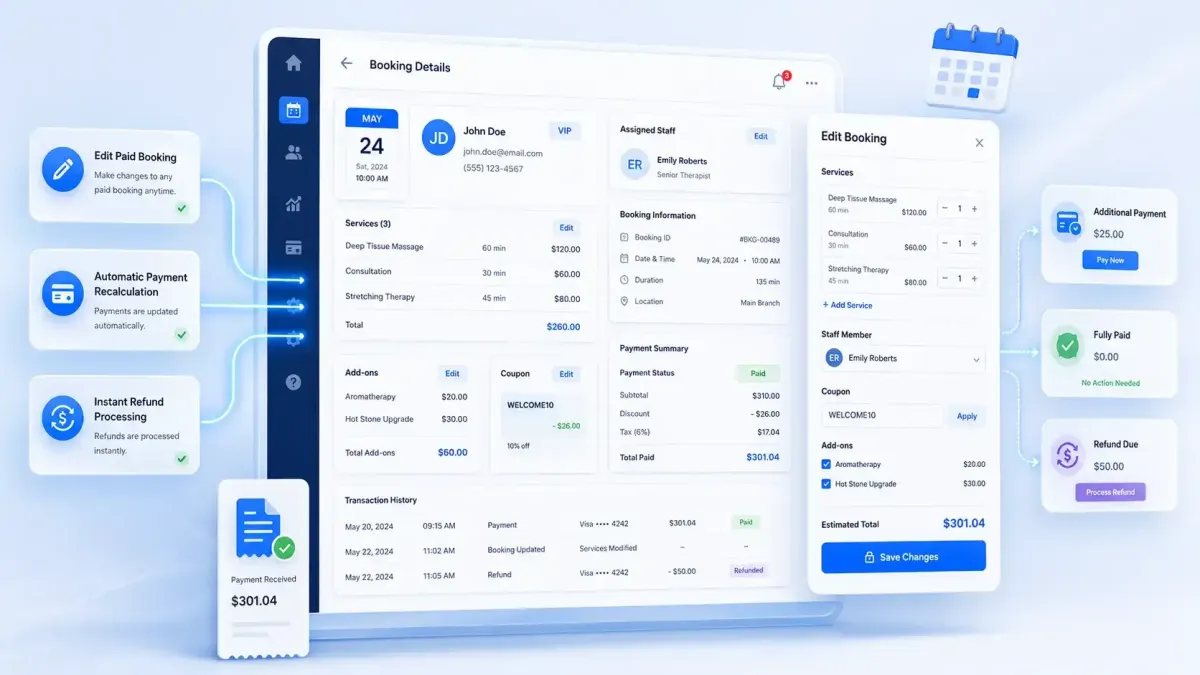
GoHighLevel Service Booking Updates
GoHighLevel's New Update: Fully Edit Service Bookings Even After Payment
Managing appointments has always been a crucial part of running a service-based business. Whether you own a salon, dental clinic, marketing agency, coaching business, or spa, appointment changes are inevitable. Until now, editing a paid booking inside GoHighLevel wasn't exactly convenient.
In this new service calendar update, if a customer wanted to switch services, change staff, or apply a discount after payment, the usual solution was to cancel the appointment and create a new one. That meant extra work, duplicate records, and unnecessary confusion.
This New update changes that experience completely.
With this latest GoHighLevel Update, businesses can now edit both paid and unpaid service bookings without deleting or recreating appointments. Payments are automatically recalculated, refunds are easier to manage, and orders stay organized all from a single booking.
What Is the "Fully Edit Service Bookings Even After Payment" Update?
The latest GoHighLevel Calendar Update introduces full editing capabilities for service bookings, regardless of whether payment has already been collected.
Instead of canceling an appointment and starting over, users can simply update the existing booking. The system automatically adjusts pricing, payment status, and order information behind the scenes.
This makes GoHighLevel Service Booking management significantly more flexible for businesses that frequently handle appointment changes.
What's New in This Update?
The new release expands appointment editing in several practical ways.
Edit Paid Bookings
Paid appointments can now be modified without canceling them.
For example, if a salon customer upgrades from a haircut to a haircut and color after paying, staff can update the booking instantly.
Edit Unpaid Bookings
Unpaid appointments are just as easy to edit, making scheduling changes much faster before checkout.
Add, Remove, or Update Services
Businesses can:
Add additional services
Remove existing services
Replace one service with another
Update service quantities or pricing
For example, a spa guest can easily upgrade from a facial to a complete wellness package.
Change Staff Members
Need to assign another team member?
Simply select a different staff member without rebuilding the appointment.
Manage Add-ons
Additional products and services are now fully editable.
You can:
Add add-ons
Remove add-ons
Update add-ons
A dental clinic, for example, can include teeth whitening after an initial cleaning appointment has already been booked.
Apply or Remove Coupons
Discounts can now be managed after the booking has been created.
Users can:
Apply promotional coupons
Remove existing coupons
Replace coupons when needed
Update Booking Details
Businesses can also edit appointment information like dates, notes, or customer details while keeping everything tied to the original booking.
No More Recreating Appointments
Perhaps the biggest advantage is that businesses no longer need to delete and recreate appointments simply to make small changes.
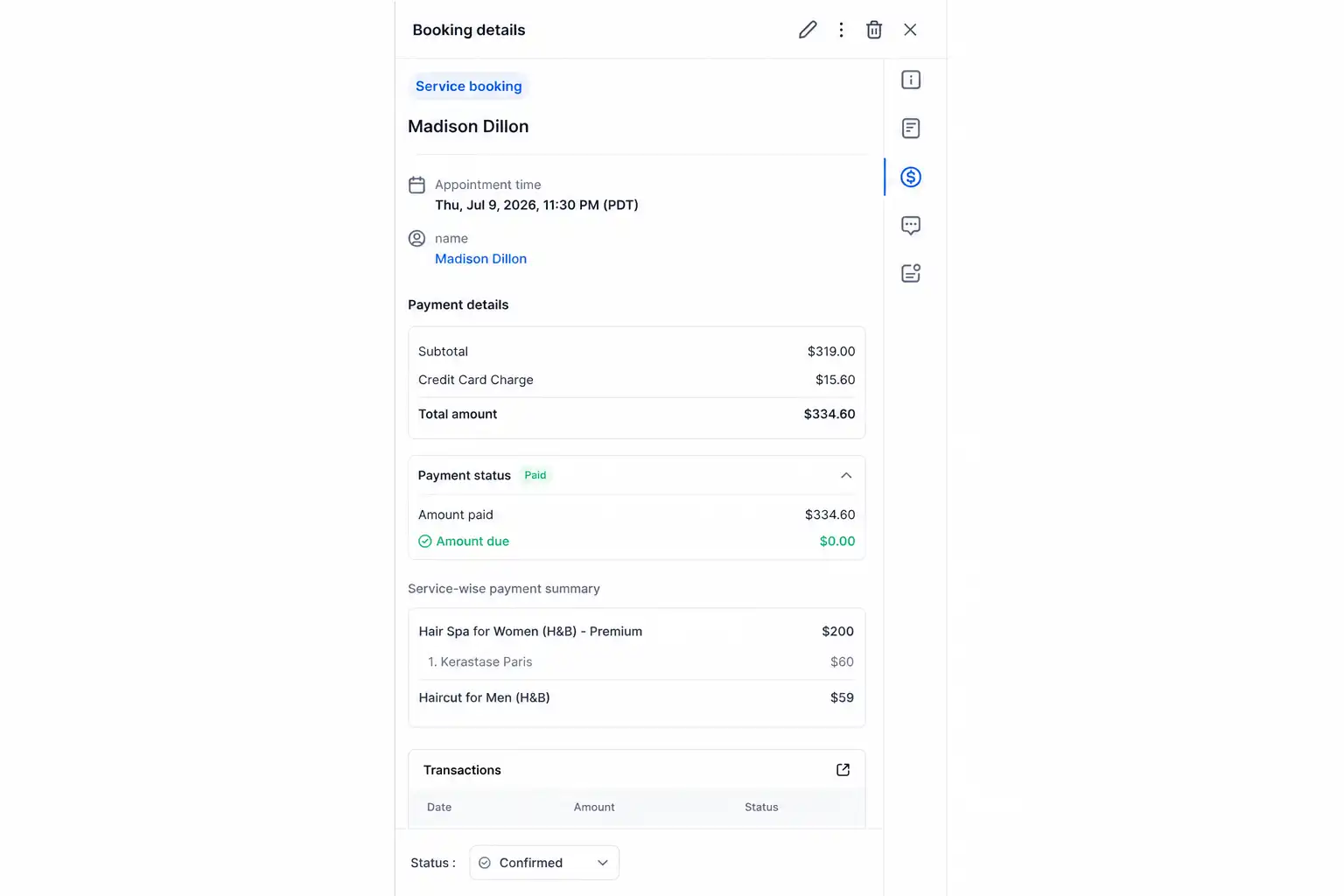
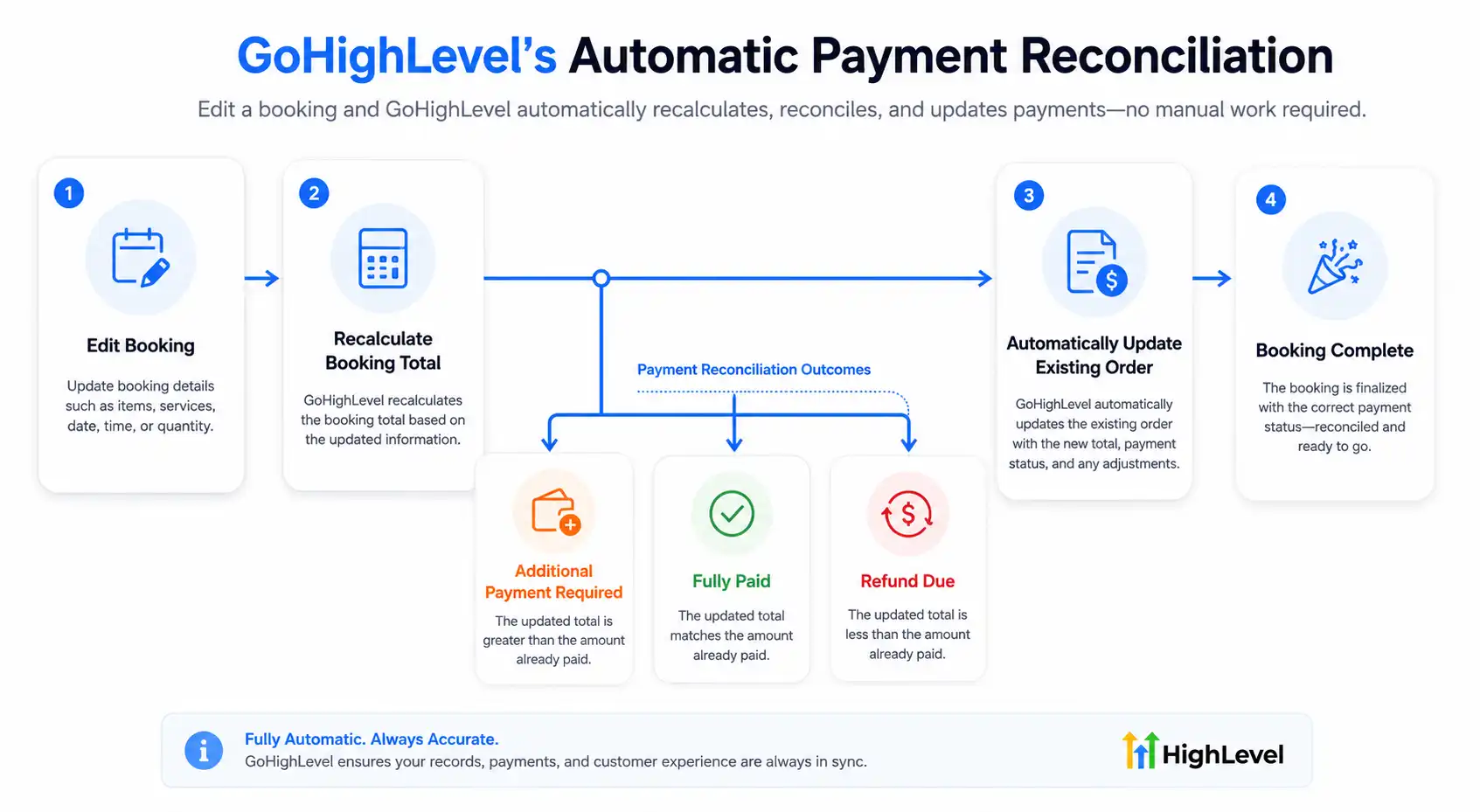
Automatic Payment Reconciliation
One of the smartest improvements in this GoHighLevel Payments update is automatic payment reconciliation.
Whenever a booking changes, GoHighLevel recalculates the payment automatically.
Different scenarios include:
Additional payment required: The customer adds more services, increasing the total balance.
Fully paid: The updated booking total matches the payment already collected.
Refund due: Services are removed, reducing the appointment value.
This automation eliminates manual calculations while reducing billing errors.
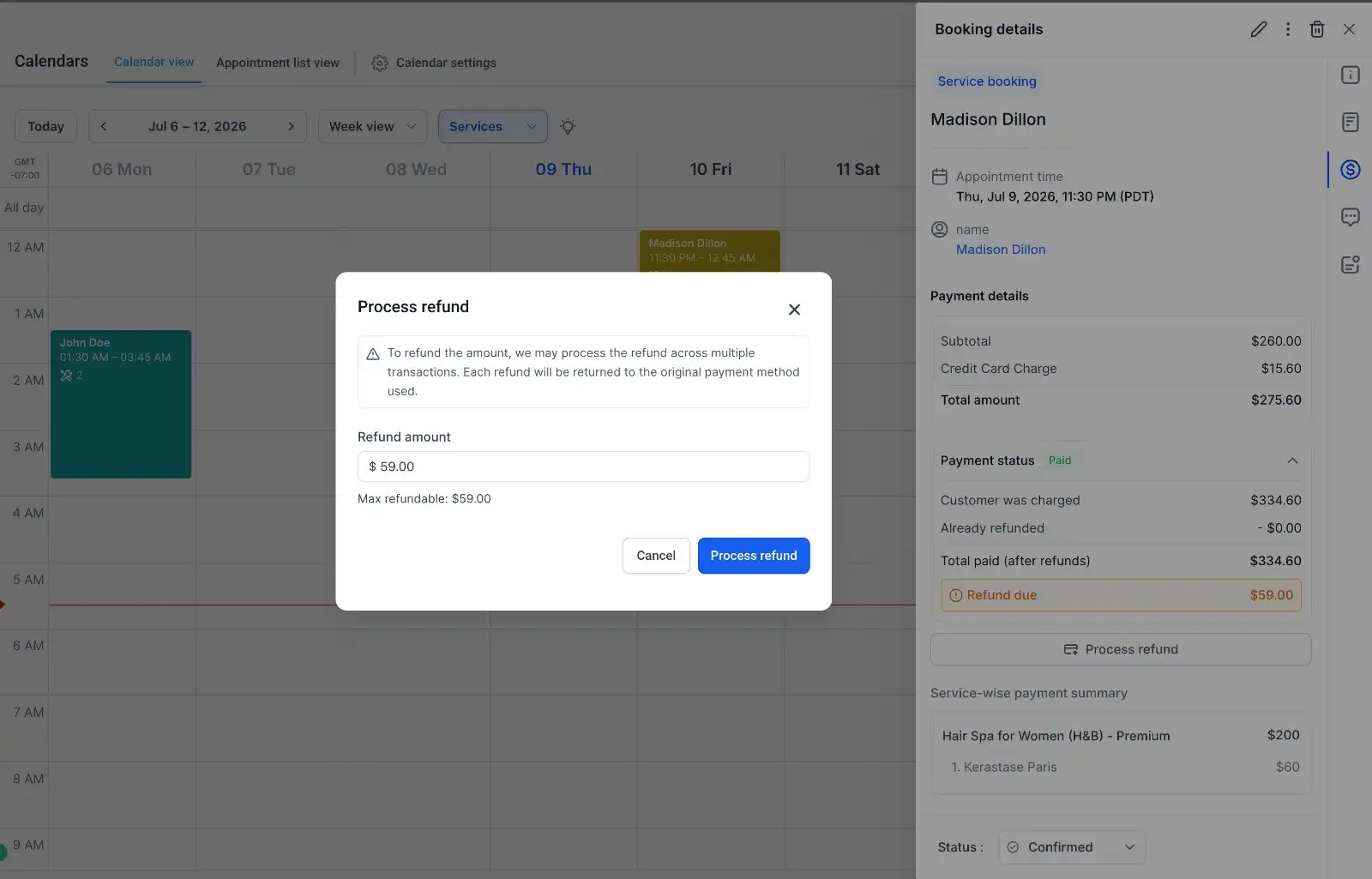
Refund Processing
Refund management is now built directly into the appointment workflow.
When a refund is required, users can process it from inside the booking instead of navigating elsewhere.
Key improvements include:
Refund initiated directly from the appointment
Automatic payment reconciliation
Clear refund pending status
Editing is temporarily disabled while the refund is processing to prevent conflicts
Appointments can still be rescheduled during refund processing
This creates a smoother experience for both staff and customers.
Smarter Order Management
Rather than generating new orders every time an appointment changes, GoHighLevel keeps everything connected to the original order.
A single connected order keeps your order history clean and organized. Automatic order updates eliminate duplicate transactions, while accurate payment records make bookkeeping easier. Unified reporting provides better financial insights, helping you track and manage your business more effectively.
This improvement makes GoHighLevel Services much easier to manage at scale.
Step-by-Step Guide
Updating a booking is straightforward.
Open the existing booking.
Click Edit.
Add or remove services.
Change the assigned staff member if needed.
Edit add-ons.
Apply or remove coupons.
Save your changes.
Review the updated payment status.
Process any refund or additional payment if required.
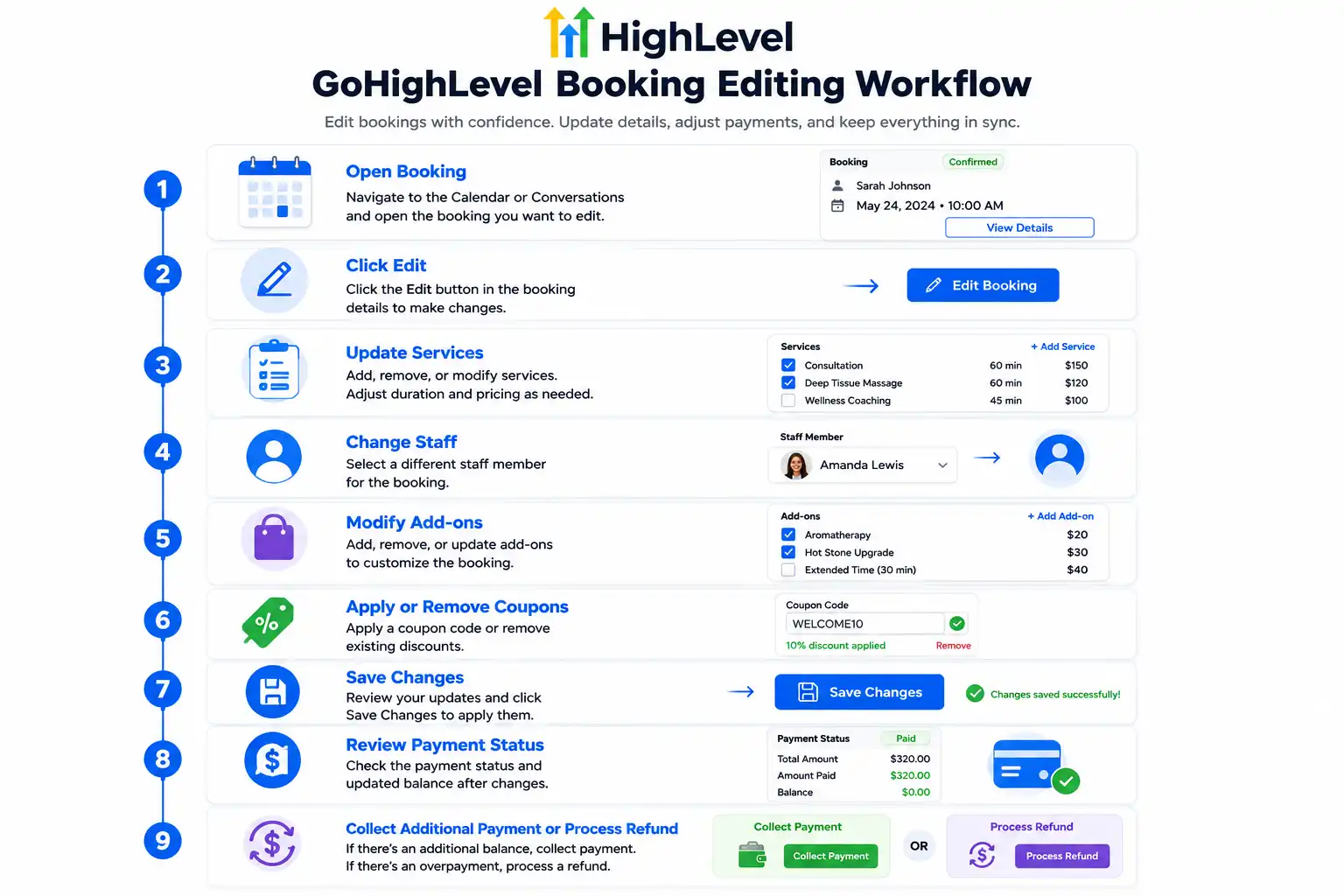
Editing a booking now takes just a few steps, with payment updates handled automatically.
Real Business Examples
Salon
A client upgrades from a haircut to a complete color treatment after arriving. The stylist updates the booking, and GoHighLevel automatically calculates the remaining balance.
Spa
A guest removes one massage service and adds aromatherapy instead. The booking stays intact, and payment adjusts automatically.
Dental Clinic
A patient decides to add whitening during their cleaning appointment. Staff update the booking without creating another appointment.
Coaching Business
A coaching client upgrades from a single session to a premium consultation package without losing the original booking history.
Marketing Agency
A client requests additional strategy sessions after paying the initial invoice. The agency updates the booking while maintaining one clean order record.
Benefits of This Update
The Feature offer meaningful advantages for service businesses.
Better customer experience
Faster appointment edits
Less manual administration
No duplicate bookings
Accurate payment calculations
Easier bookkeeping
Built-in refund management
More flexible appointment scheduling
Cleaner CRM records
Why This Update Matters
This Update is one of the most impactful improvements to GoHighLevel Services.
It removes unnecessary administrative work, reduces billing mistakes, and gives businesses the flexibility to adapt appointments as customer needs change. Instead of wasting time canceling and recreating bookings, staff can make updates confidently while GoHighLevel handles payment adjustments automatically.
For growing service businesses, that translates into smoother operations, happier customers, and more accurate financial records.
Frequently Asked Questions
Can I edit a paid booking?
Yes. Paid bookings can now be fully edited without canceling or recreating the appointment.
Can I process refunds from the appointment?
Yes. Refunds can be initiated directly within the appointment screen whenever the updated booking requires one.
Will editing create a new order?
No. The booking remains connected to the existing order, which updates automatically.
What happens if a refund is already processing?
While a refund is pending, editing is temporarily disabled to prevent payment conflicts. However, appointments can still be rescheduled if necessary.
Conclusion
This Update makes appointment management far more flexible than before. Whether you're updating services, changing staff, managing add-ons, or processing refunds, everything can now be handled from a single booking while GoHighLevel automatically reconciles payments and keeps order history clean.
This enhancement saves time, reduces manual work, and delivers a smoother experience for both businesses and customers.
Need Expert Help with GoHighLevel?
New to GoHighLevel and ready to get started? Buy your GoHighLevel account here and launch with confidence.
Already know what you need and want our team to handle everything, from complete setup and customization to funnels, workflows, automations, CRM, and pipelines? Click here.



