

New Community Triggers in Workflows: Automate More, Faster
New Community Triggers in Workflows
Introduction
Managing an active community requires keeping track of member activity, conversations, and events. As communities continue to grow, manually responding to every important action can quickly become time-consuming. To make community management more efficient, GoHighLevel has introduced New Community Triggers in Workflows, giving administrators more ways to automate actions based on what members do inside their communities.
With this official update, GoHighLevel adds four new Community workflow triggers that allow workflows to start automatically when specific community activities occur. Whether it's a rejected join request, a new post, a new comment, or an event registration, these triggers help connect Community activity directly with Workflow Automation.
In this article, we'll explore each new trigger, its available filters, why this update matters, and how you can start using these new workflow triggers.
What's New in This Update
GoHighLevel has expanded Community Automation by introducing four new workflow triggers. Each trigger activates when a specific activity takes place inside a Community group, allowing admins to automate follow-ups, alerts, moderation flows, and event-related actions.
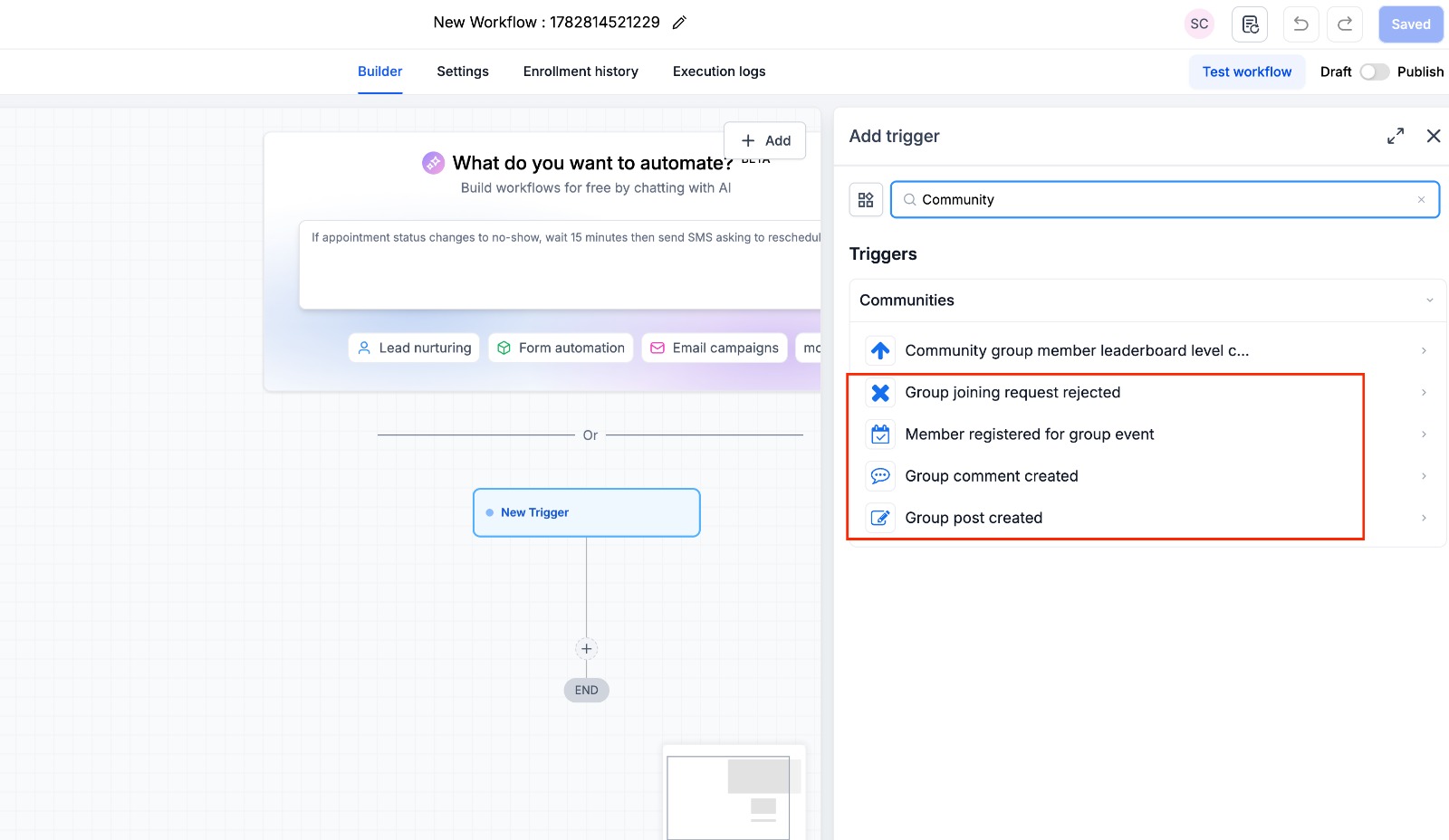
Group Joining Request Rejected
The Group Joining Request Rejected trigger starts a workflow whenever a member's request to join a Community group is rejected.
This trigger allows workflows to react automatically whenever a membership request is declined.
Required Filter
Group (Required)
Since the Group filter is required, admins can choose exactly which Community group should trigger the workflow.
(Insert Group Joining Request Rejected Screenshot here if available.)
Group Post Created
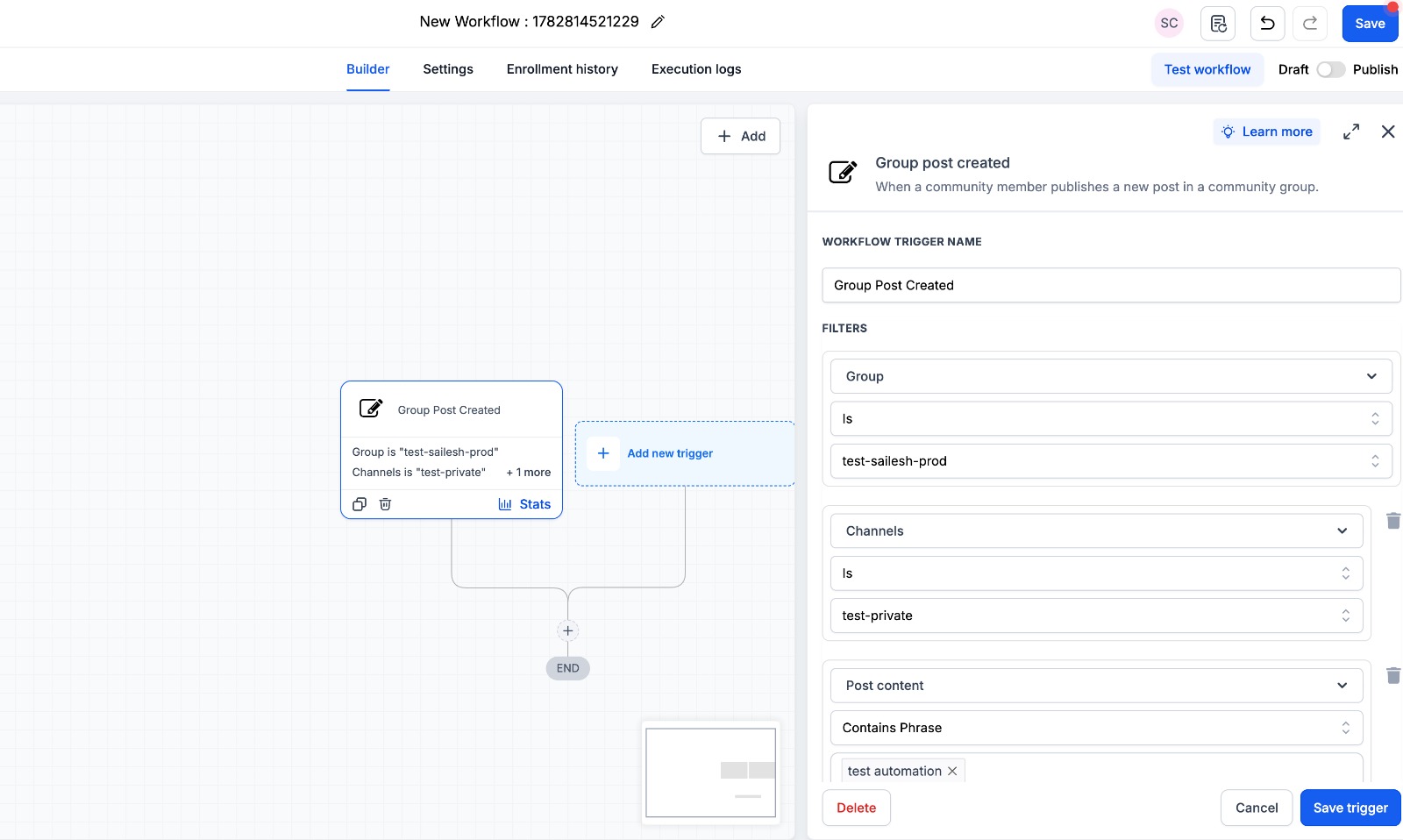
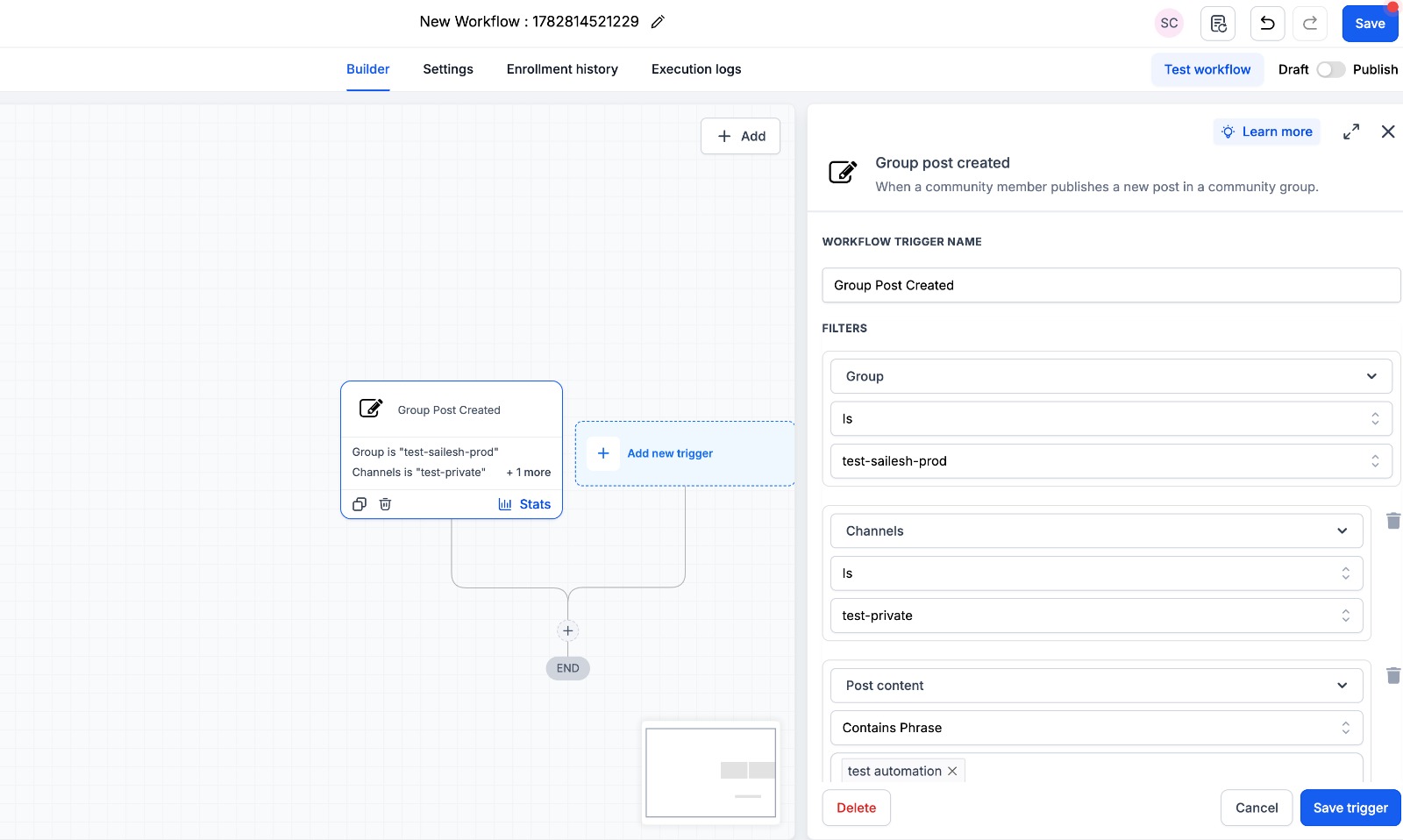
The Group Post Created trigger activates whenever a new post is published inside a Community group.
This trigger includes several filters that allow workflows to respond only to posts matching specific conditions.
Available Filters
Group (Required)
Channel
Post Title
Post Content
For example, you can configure the trigger by selecting a specific group, limiting it to a particular channel, or filtering posts using their title or content.
Group Comment Created
The Group Comment Created trigger launches a workflow whenever a member adds a new comment to a Community post.
Like the Group Post trigger, it includes multiple filtering options to make workflow automation more targeted.
Available Filters
Group (Required)
Channel
Post Title
Post Content
Comment Content
These filters allow admins to configure workflows based on both the original post and the newly added comment.
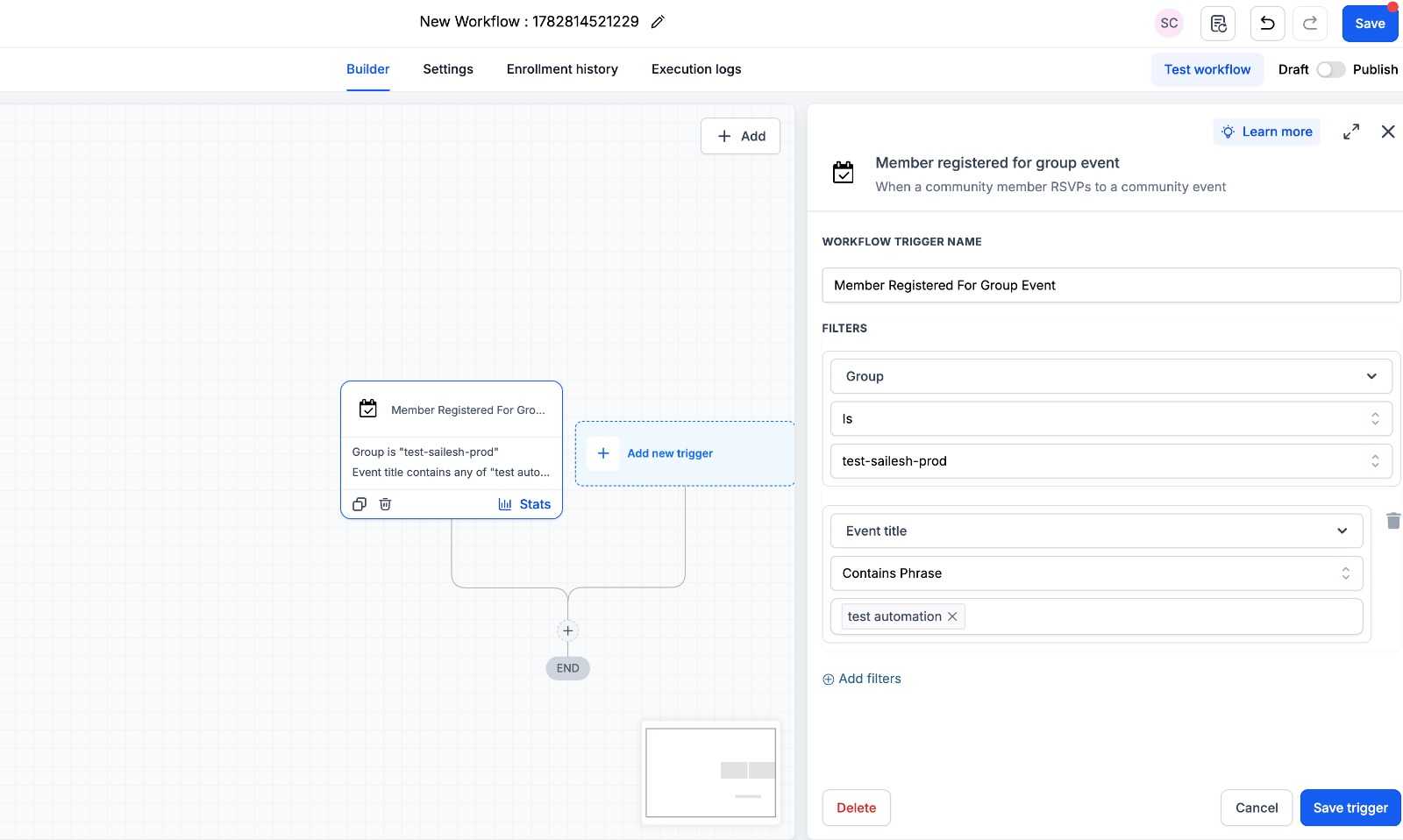
Member Registered for Group Event
The Member Registered for Group Event trigger activates whenever a member registers for a Community event.
This trigger is designed to respond automatically whenever someone signs up for an event inside a selected Community group.
Available Filters
Group (Required)
Event Title
Admins can choose the required Community group and optionally filter the workflow by Event Title.
Why This Update Matters
The new Community triggers strengthen the connection between GoHighLevel Community and GoHighLevel Workflows, allowing important member activities to automatically start workflows.
According to the official update, these new triggers provide several advantages:
More automation possibilities by turning Community activity into workflow actions.
Smarter targeting using filters like Channel, Post Content, Comment Content, and Event Title.
Faster moderation and better visibility for important Community activities.
Less manual effort as Communities continue to grow.
Stronger integration between Communities and Workflows.
Together, these improvements make it easier for admins to build automations that respond directly to Community activity instead of relying on manual monitoring.
How to Use the New Community Triggers
Setting up the new Community triggers is straightforward inside GoHighLevel.
Follow these official steps:
Navigate to Automation → Workflows.
Create a new workflow or open an existing one.
Click Add New Trigger.
Search for Community.
Select one of the new Community triggers.
Choose the required Group.
Apply optional filters if needed.
Build your workflow actions.
Save the trigger.
Publish the workflow.
Once the workflow is published, it will automatically run whenever the selected Community activity matches your configured trigger and filters.
Bringing Community Activity into Workflow Automation
These four new workflow triggers make Community Automation more flexible by allowing workflows to respond automatically to key member actions.
Workflows can now start when:
A member's request to join a group is rejected.
A new group post is created.
A new comment is added to a group post.
A member registers for a Community event.
Combined with the available filters, admins can create more targeted workflows while reducing manual monitoring inside Community groups.
Conclusion
The New Community Triggers in Workflows update gives GoHighLevel users more control over Community Automation by connecting member activity directly with workflow automation.
With the addition of Group Joining Request Rejected, Group Post Created, Group Comment Created, and Member Registered for Group Event triggers, admins can automate responses to important Community activities using built-in filters for more precise targeting.
If you already use GoHighLevel Community and GoHighLevel Workflows, these new triggers are worth exploring. They make it easier to automate community management, reduce manual work, and build workflows that respond automatically as your Community grows.
Frequently Asked Questions
1. What are the new Community Triggers in GoHighLevel Workflows?
GoHighLevel has introduced four new Community Triggers in Workflows: Group Joining Request Rejected, Group Post Created, Group Comment Created, and Member Registered for Group Event. These triggers allow workflows to start automatically based on specific Community activities.
2. Which filters are available for the new Community workflow triggers?
The available filters depend on the selected trigger. Supported filters include Group (required), Channel, Post Title, Post Content, Comment Content, and Event Title, allowing admins to create more targeted workflow automations.
3. How do I add a Community Trigger to a workflow in GoHighLevel?
Go to Automation → Workflows, create a new workflow or open an existing one, click Add New Trigger, search for Community, choose one of the new triggers, select the required Group, apply any optional filters, add your workflow actions, save the trigger, and publish the workflow.
4. Why are the new Community Triggers useful?
According to the official GoHighLevel update, these triggers provide more automation possibilities, smarter targeting with filters, faster moderation and visibility, reduced manual effort as communities grow, and stronger integration between Communities and Workflows.
5. Can I filter Community Triggers by posts, comments, or events?
Yes. Depending on the selected trigger, you can apply filters such as Channel, Post Title, Post Content, Comment Content, and Event Title to ensure your workflow runs only when the specified conditions are met.
Watch This GoHighLevel Update in Action
Want a quick overview of this new GoHighLevel feature? We’ve created a short video explaining the update, its benefits, and how you can use it effectively.
Click below to watch the video and stay ahead with the latest GoHighLevel updates.
Watch Here
Need Expert Help with GoHighLevel?
New to GoHighLevel and ready to get started? Buy your GoHighLevel account here and launch with confidence.
Already know what you need and want our team to handle everything, from complete setup and customization to funnels, workflows, automations, CRM, and pipelines? Click here.



