

How to Manage Email Unsubscribes in GoHighLevel
How to Build a Process for Managing Email Unsubscribes in GoHighLevel
An unsubscribe request should never become a customer service problem. Yet businesses running multiple email campaigns can easily lose track of who wants to receive messages and who has opted out. Sending another promotional email after someone unsubscribes can damage trust, generate complaints, and create compliance risks.
Learning how to manage email unsubscribes in GoHighLevel helps businesses build a reliable process for respecting customer preferences. With contact records, email unsubscribe functionality, Do Not Disturb (DND) settings, and configurable workflows, GoHighLevel provides tools to manage communication more consistently without relying entirely on manual tracking.
Why Email Unsubscribe Management Matters
Unsubscribes are a normal part of email marketing. Customers change interests, receive too many messages, or simply decide that certain promotions are no longer relevant.
The important part is how your business responds.
A structured unsubscribe process helps protect customer trust, reduces unwanted communication, and supports responsible email marketing practices. It also makes managing larger contact databases easier.
Without a reliable system, marketing teams may accidentally include opted-out contacts in future campaigns, particularly when contacts appear in multiple lists or automated sequences.
How GoHighLevel Helps Manage Email Unsubscribes
GoHighLevel brings contact management and email marketing tools into one platform, making it easier to maintain communication preferences.
Its relevant capabilities include:
Email unsubscribe links: Give recipients a way to opt out of marketing emails.
Email-channel DND: Restricts email communication for contacts who should no longer receive it.
Centralized contact records: Allow teams to review contact information and communication settings.
Smart Lists and filters: Help organize contacts based on supported contact attributes.
Configurable workflows: Support additional internal processes, such as updating organizational tags or notifying staff when appropriately configured.
These features serve different purposes. Native unsubscribe handling and email DND manage communication restrictions, while tags and custom workflows help teams organize and monitor their processes.
Step-by-Step: How to Manage Email Unsubscribes in GoHighLevel
Step 1: Include an Unsubscribe Option in Marketing Emails
Every marketing email should provide a clear, functional unsubscribe option.
When preparing emails in GoHighLevel, use its supported unsubscribe functionality and verify that the link appears correctly in the delivered message.
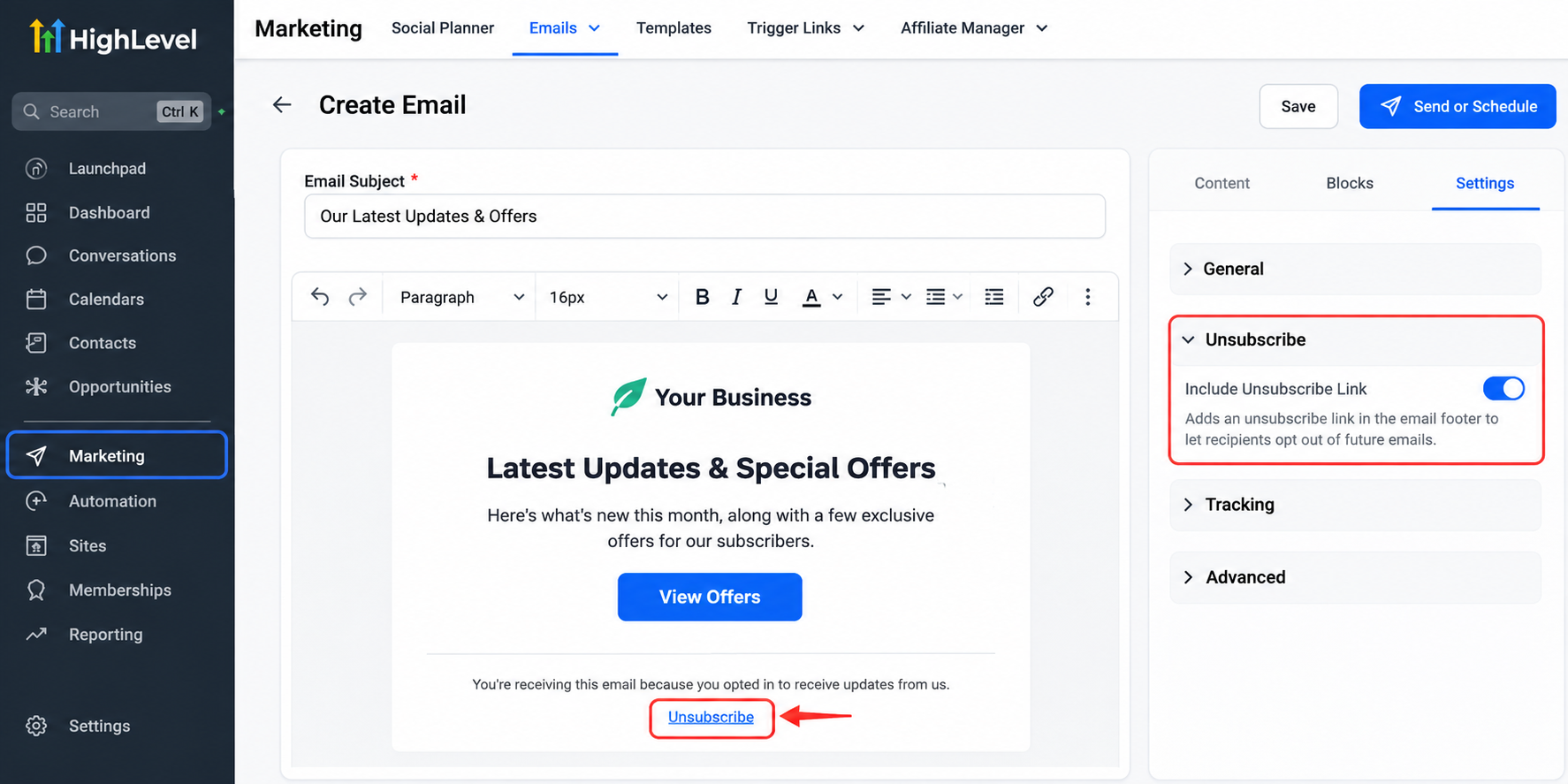
Avoid hiding unsubscribe information or making recipients contact your business manually to stop promotional emails.
A straightforward opt-out experience demonstrates respect for customer preferences and helps reduce unnecessary complaints.
Step 2: Understand Email Unsubscribe and DND Behavior
When a contact unsubscribes through GoHighLevel's supported email unsubscribe mechanism, the platform can apply an email communication restriction to prevent further unwanted email sends.
Email-channel DND is different from broader DND restrictions.
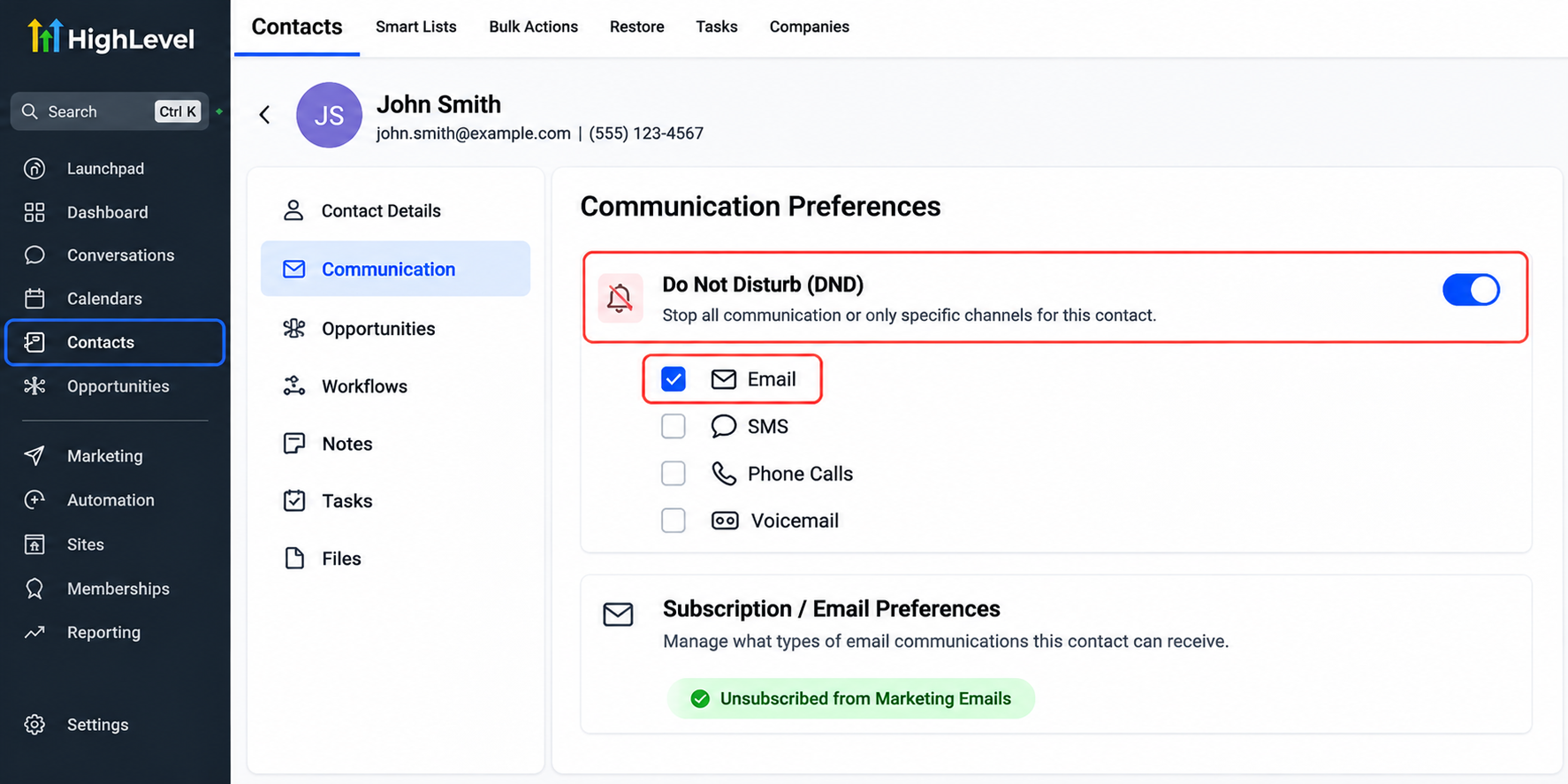
For example, a contact who opts out of marketing emails has not necessarily opted out of SMS messages or phone calls. Those communication preferences must be managed separately, according to applicable consent requirements.
Importantly, unsubscribing does not automatically delete the contact's CRM record.
Step 3: Organize Contacts by Communication Preferences
An organized CRM makes unsubscribe management easier to maintain.
GoHighLevel users can use supported contact filters and Smart Lists to review relevant contact groups. Tags or custom fields can also help identify internal categories when configured appropriately.
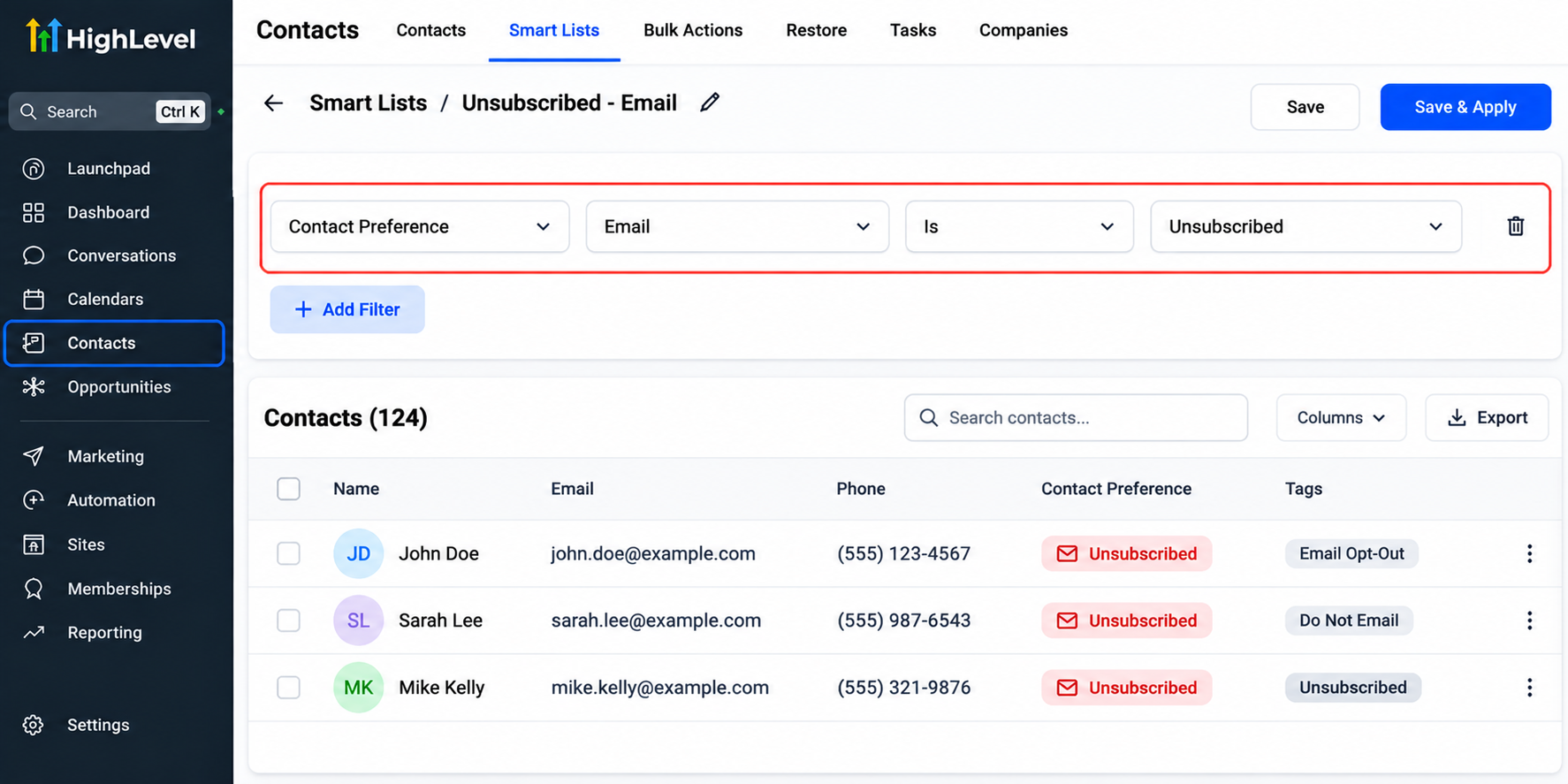
For example, a marketing team might use a custom tag to identify contacts requiring a preference review.
However, a tag alone does not enforce an email unsubscribe. Actual email restrictions must be maintained through the platform's supported opt-out and DND mechanisms.
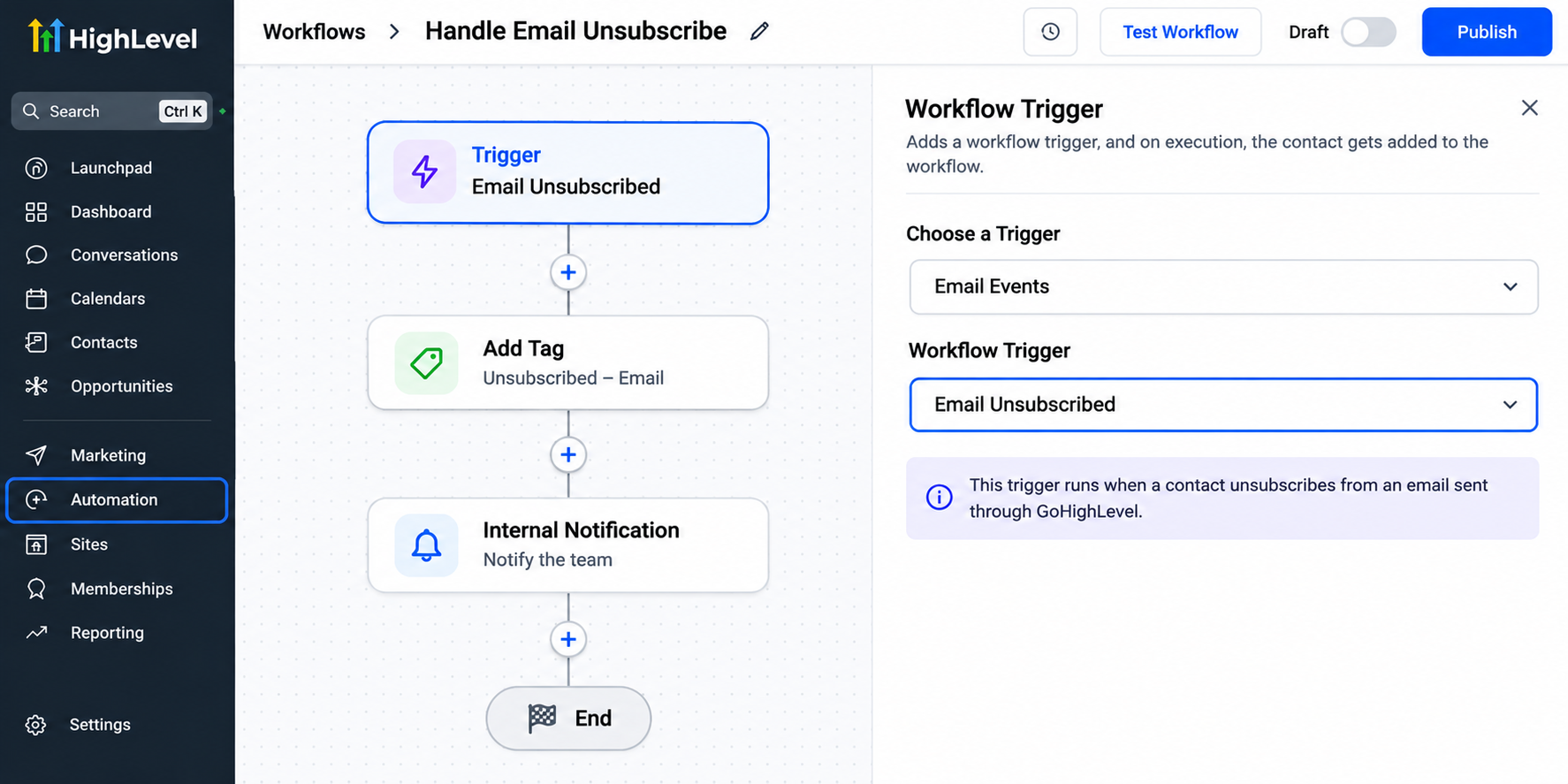
Step 4: Review Existing Marketing Workflows
Review your automated email sequences, nurture campaigns, and reactivation workflows.
Check whether contacts with email restrictions are appropriately excluded from email delivery. Remember that preventing an email from sending is not necessarily the same as removing a contact from an entire workflow.
Other workflow actions may continue unless separate conditions or removal logic have been configured.
Where necessary, add supported conditions or internal procedures to keep campaign behavior aligned with customer preferences.
Step 5: Test and Monitor the Process
Before launching campaigns, test the unsubscribe experience using dedicated test contacts.
Send a test marketing email, use its unsubscribe link, and inspect the contact's communication settings afterward.
Then verify that subsequent marketing emails are appropriately restricted.
Repeat these checks after significant changes to workflows, email templates, or contact management procedures.
Common Email Unsubscribe Management Mistakes to Avoid
Even organized marketing teams can make mistakes when handling unsubscribe requests.
Common issues include:
Ignoring unsubscribe requests or delaying their processing.
Maintaining separate spreadsheets without updating CRM preferences.
Assuming an email opt-out automatically applies to SMS.
Using tags as the only protection against unwanted email sends.
Re-enabling marketing communication without valid consent.
Failing to retest automated campaigns after configuration changes.
Avoiding these mistakes requires clear internal procedures and regular system reviews.
Practical Example: A Service Business Using GoHighLevel
Consider a home services company sending automated follow-up emails to prospective customers.
A recipient decides to unsubscribe using the email's opt-out link. GoHighLevel's supported unsubscribe handling restricts further email communication, while the customer's contact record remains available for appropriate CRM purposes.
The company can review the email preference, maintain accurate records, and ensure future marketing campaigns respect the restriction.
This creates a more consistent customer experience without unnecessarily deleting valuable contact history.
Best Practices for Maintaining a Healthy Email List
Effective GoHighLevel email unsubscribe management works best alongside responsible list maintenance.
Focus on collecting appropriate consent, sending relevant content, reviewing contact preferences, and regularly checking automated campaigns.
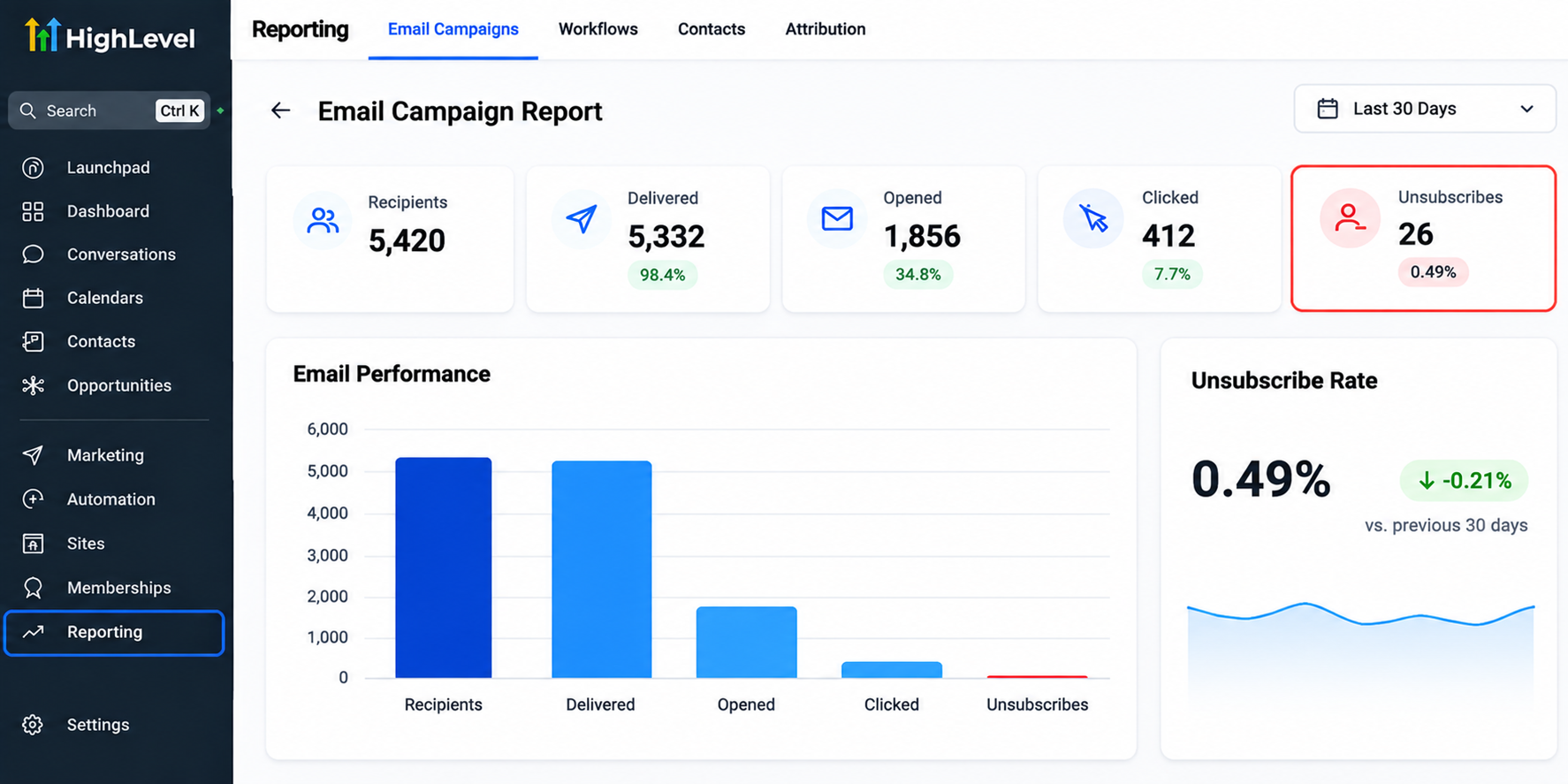
Monitor available email engagement and deliverability indicators to identify potential issues. Keep contact records organized and avoid restoring opted-out recipients to marketing lists without valid permission.
These practices help businesses maintain a cleaner, more trustworthy email marketing operation.
Conclusion
A reliable unsubscribe process is essential for maintaining customer trust and running responsible email campaigns. Businesses need more than an unsubscribe link; they need accurate communication preferences, organized contact records, and workflows that respect opt-out decisions.
GoHighLevel provides useful tools for building that structure through email unsubscribe handling, DND settings, and configurable automation.
Review your existing campaigns, test your unsubscribe functionality, and establish a consistent process that protects customer preferences as your marketing operations grow.
Frequently Asked Questions (FAQs)
1. How do I manage email unsubscribes in GoHighLevel?
You can manage email unsubscribes in GoHighLevel using its built-in unsubscribe functionality, contact-level Do Not Disturb (DND) settings, and contact management tools. When contacts unsubscribe through a supported email unsubscribe link, GoHighLevel records their opt-out preferences and applies the appropriate email communication restrictions.
2. Does GoHighLevel automatically stop sending emails to unsubscribed contacts?
Yes. When a contact unsubscribes through GoHighLevel's supported unsubscribe mechanism, the platform applies the relevant email restrictions to prevent further email communication. However, the contact may remain enrolled in existing workflows, and other workflow actions can continue unless separately configured.
3. What happens when someone unsubscribes from an email in GoHighLevel?
When someone unsubscribes, GoHighLevel updates the relevant email communication preference or restriction. The contact remains in the CRM unless manually deleted. Businesses can retain appropriate contact information while respecting the recipient's decision not to receive further marketing emails.
4. What is the difference between email unsubscribe and DND in GoHighLevel?
An email unsubscribe represents a recipient's decision to stop receiving certain emails. Do Not Disturb (DND) is a contact communication restriction that can apply to specific channels, such as email or SMS, or more broadly. An email opt-out does not automatically mean the contact has opted out of every communication channel.
5. Can I create an automated unsubscribe management process in GoHighLevel?
Yes. GoHighLevel provides native unsubscribe handling and workflow automation capabilities. Businesses can configure additional workflows to organize contacts, update internal tags, or notify team members when supported triggers and conditions are available. These automations complement the platform's native unsubscribe restrictions rather than replacing them.
Need Expert Help with GoHighLevel?
New to GoHighLevel and ready to get started? Buy your GoHighLevel account here and launch with confidence.
Already know what you need and want our team to handle everything, from complete setup and customization to funnels, workflows, automations, CRM, and pipelines? Click here.