

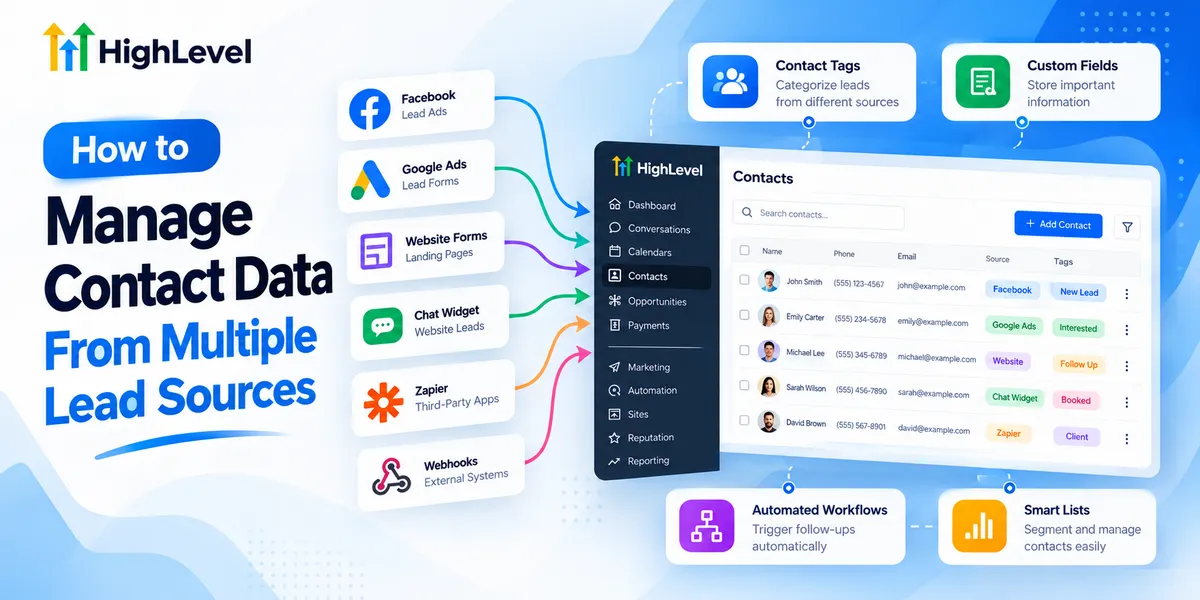
How to Manage Contact Data From Multiple Lead Sources
How to Manage Contact Data From Multiple Lead Sources
A potential customer submits a Facebook ad form. Another requests a quote through your website. Someone else calls your business after finding it online. All three could become paying customers, but their information may end up scattered across different platforms.
Learning how to manage contact data from multiple lead sources is essential for businesses that want organized customer records, reliable follow-ups, and better visibility into their sales opportunities.
GoHighLevel helps address these challenges by bringing contact information, communication tools, and lead management processes into one CRM system.
Why Managing Multiple Lead Sources Becomes Difficult
Collecting leads from several marketing channels creates opportunities, but it also introduces operational challenges.
When businesses use separate tools for advertising, website inquiries, appointments, and customer communication, contact information can become fragmented.
A prospect might submit a website form after previously responding to a Facebook advertisement. Without proper contact management, the business could create duplicate records or overlook earlier conversations.
Common problems include inconsistent contact details, unclear lead origins, delayed responses, and repetitive manual data entry.
These issues affect more than database organization. Sales representatives may contact the same prospect unnecessarily, miss important inquiries, or struggle to understand previous interactions.
A structured CRM contact organization process helps businesses maintain accurate information and manage incoming opportunities more consistently.
How GoHighLevel Centralizes Contact Information
The GoHighLevel CRM provides a centralized contact database where businesses can store customer information collected through supported lead capture methods and integrations.
Instead of switching between disconnected systems, teams can access contact records and relevant communication history within one platform.
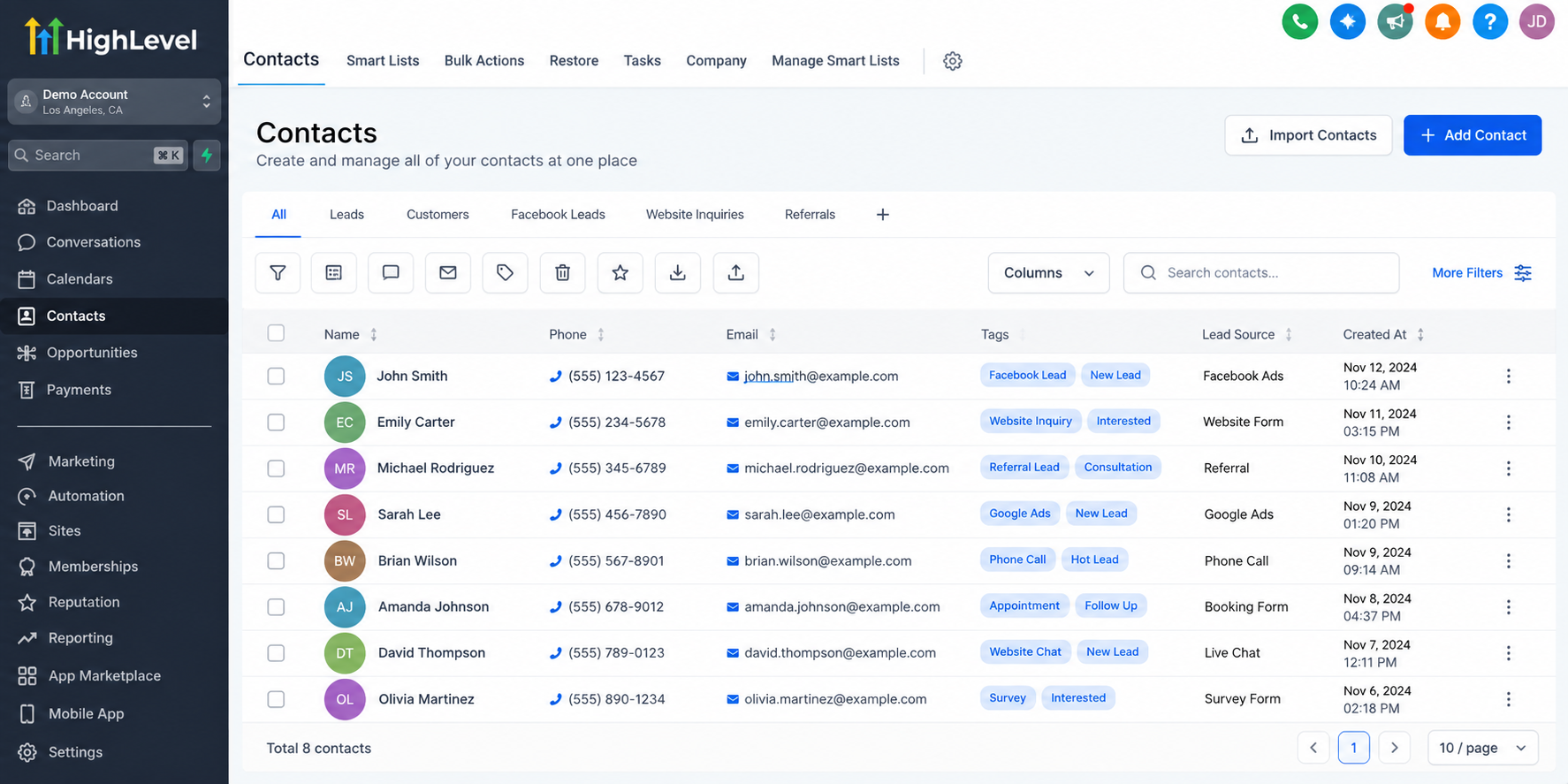
Connecting Different Lead Sources
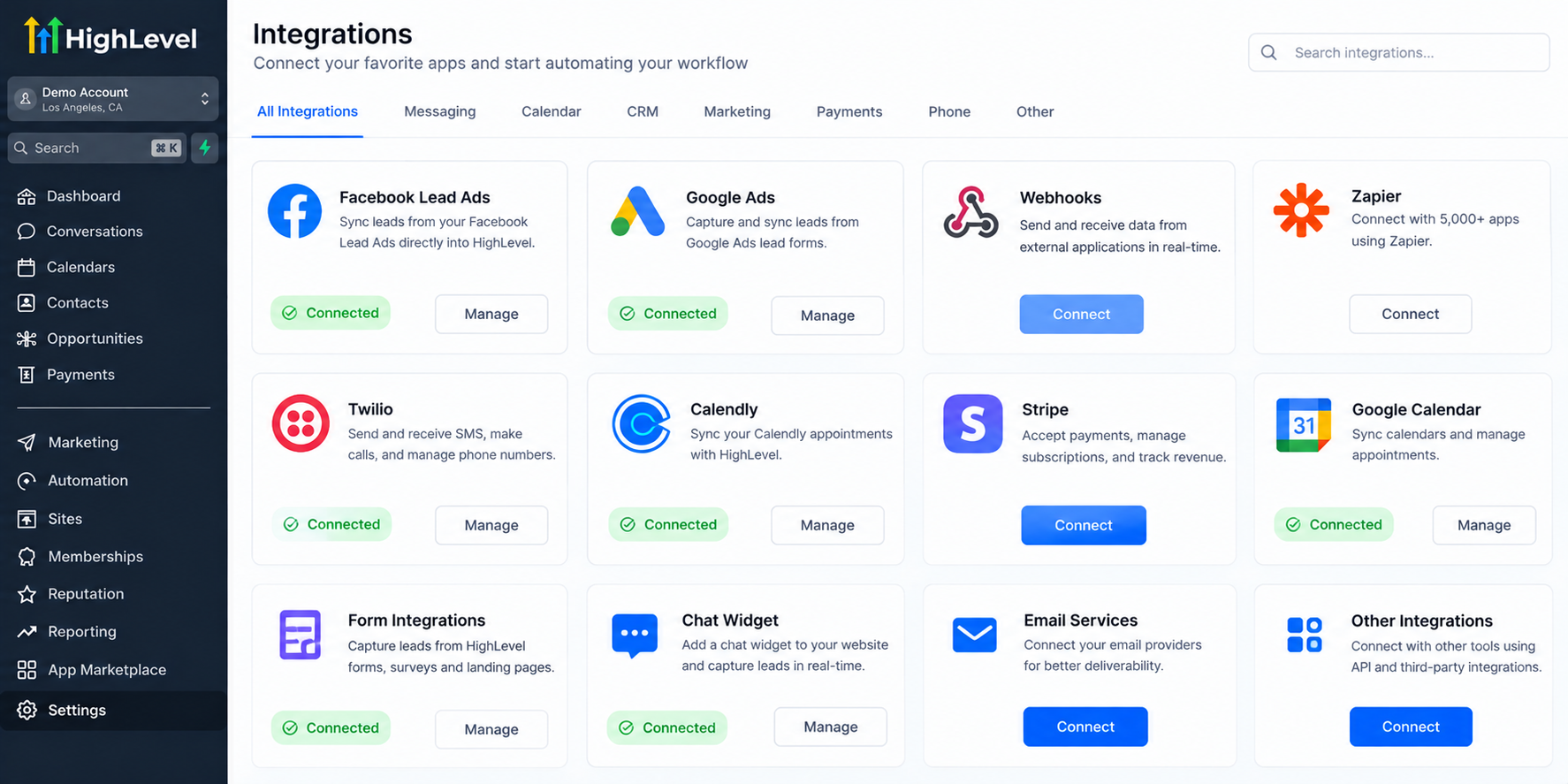
Businesses can configure GoHighLevel to collect information through several channels, including website forms, landing pages, surveys, appointment forms, and chat widgets.
Facebook Lead Ads can also connect through supported integrations. Google Ads lead forms and other external platforms may require specific integration methods, additional configuration, or third-party tools.
APIs and webhooks provide further options for transferring information between supported systems.
Incoming calls and messages can also contribute to contact records when the appropriate phone services and settings are configured.
The important distinction is that centralized contact management requires properly connected lead sources. Information does not automatically appear from every external platform.
Once configured, these connections help businesses maintain a more accessible customer database.
Organizing Contact Data Inside GoHighLevel
Collecting information is only the beginning. Businesses also need consistent methods for organizing their contacts.
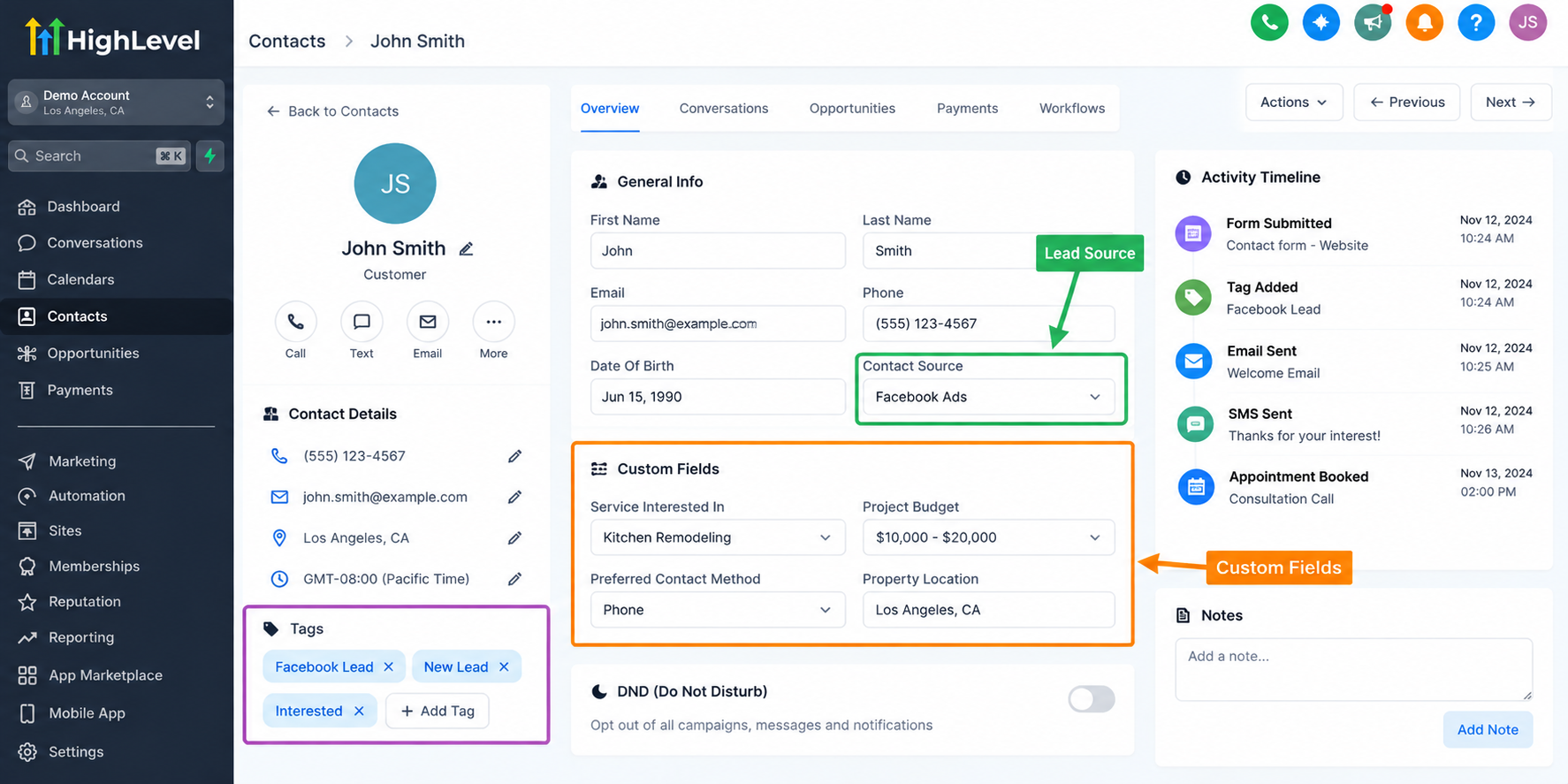
Use Tags to Categorize Contacts
GoHighLevel contact management includes tags that help identify contacts according to their source, interests, or campaign.
For example, a business could use tags such as "Facebook Lead," "Website Inquiry," and "Referral Lead."
These categories make it easier to identify relevant contacts and apply appropriate follow-up processes.
Store Important Information With Custom Fields
Custom fields allow businesses to capture information beyond standard contact details.
A remodeling company might store project type, estimated budget, or preferred service location.
These details help sales representatives understand customer requirements without repeatedly asking for the same information.
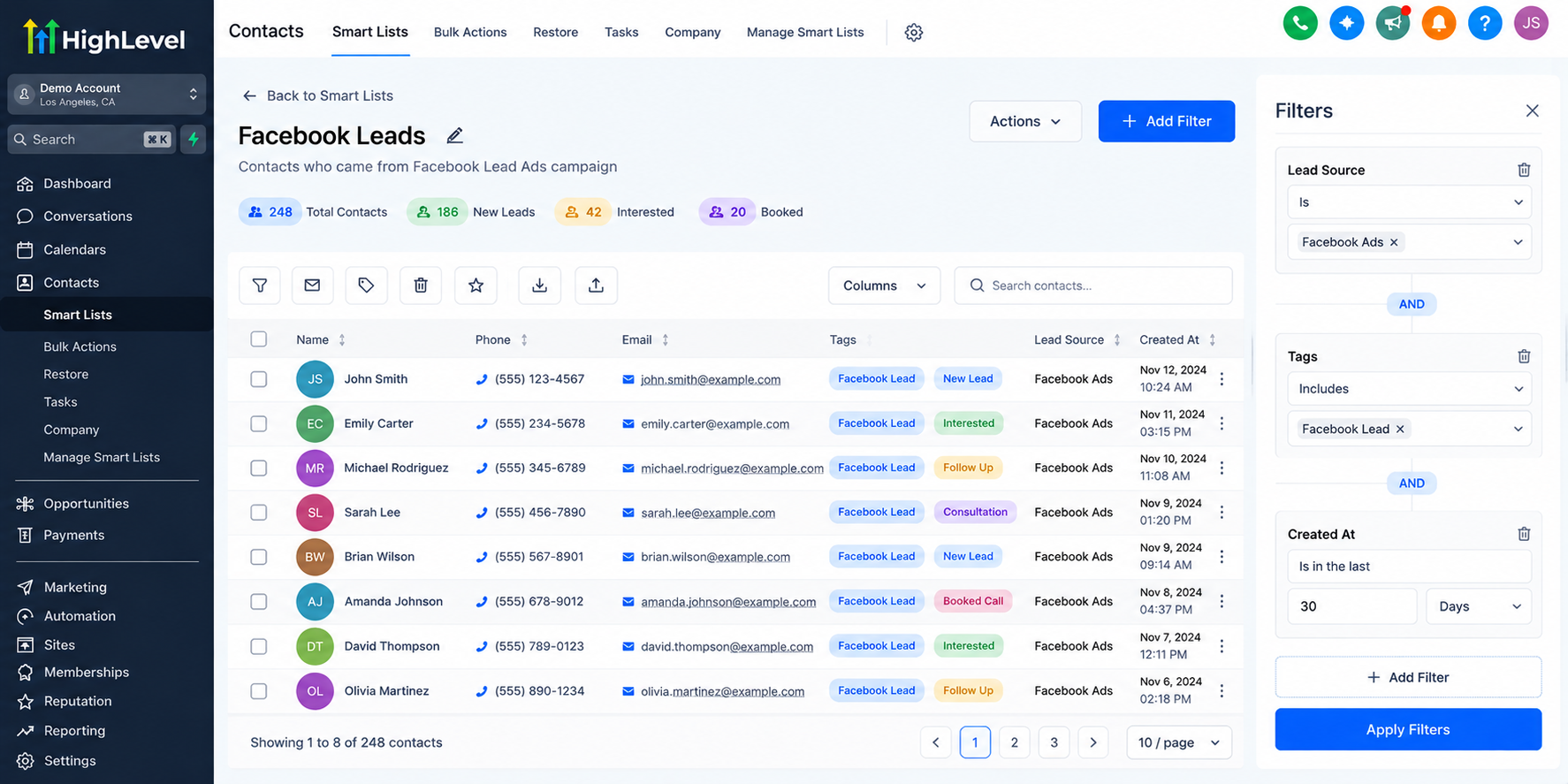
Segment Contacts With Smart Lists
GoHighLevel Smart Lists allow users to filter contacts using configured conditions.
A business could create a filtered view showing contacts associated with a particular campaign or those meeting specific contact criteria.
Because Smart Lists reflect their filtering conditions, they provide a practical way to work with changing contact groups.
Maintain Accurate Contact Records
Names, phone numbers, email addresses, and other essential details should remain consistent.
GoHighLevel provides contact management settings and duplicate-handling capabilities, but businesses still need appropriate configuration and regular database reviews.
Duplicate prevention should be treated as an ongoing data quality practice rather than a completely automatic solution.
Automating Lead Management With GoHighLevel Workflows
Manually organizing every incoming inquiry becomes difficult as lead volume increases.
GoHighLevel workflow automation helps businesses create repeatable processes based on configured triggers, conditions, and actions.
For example, a workflow triggered by a form submission can apply a contact tag, send an internal notification, or create an opportunity in a sales pipeline.
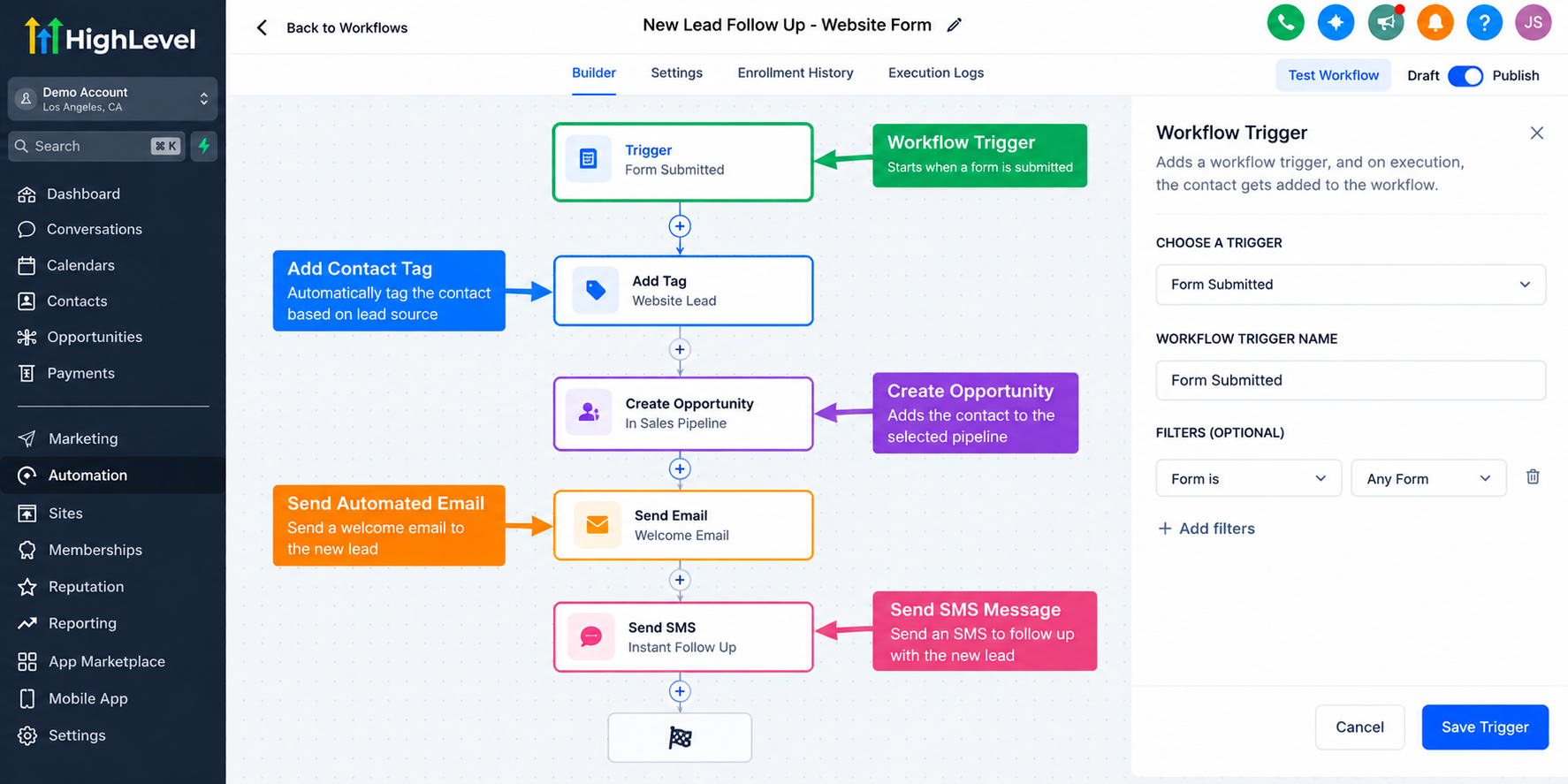
Businesses can also configure contact assignment, custom field updates, and automated lead follow-up sequences.
When appropriate permissions and communication requirements are satisfied, workflows can send email or SMS messages to eligible contacts.
However, automation depends on accurate field mapping, reliable triggers, and correctly configured integrations.
A workflow cannot reliably categorize every lead source unless the necessary source information is available.
Practical Example: A Home Remodeling Company
Consider a remodeling company receiving inquiries through Facebook advertisements, website forms, and customer referrals.
The company connects its supported lead capture channels to GoHighLevel and configures consistent contact fields.
Facebook inquiries receive a campaign-specific tag, while website submissions include details about the requested remodeling service.
Referral contacts are identified through a dedicated form field or tag.
Configured workflows notify the sales team and create opportunities in the appropriate pipeline.
The team can then review customer information, prioritize inquiries, and initiate suitable follow-up actions.
This approach reduces unnecessary manual organization and supports a more consistent sales process.
Best Practices for Managing Contact Data
Successful GoHighLevel lead management depends on maintaining reliable processes as the business grows.
Start by establishing consistent naming conventions for tags and custom fields. Avoid creating multiple labels that represent the same information.
Map incoming fields carefully so important details reach the correct CRM fields.
Use reliable lead source tracking information rather than assuming every integration provides identical attribution data.
Review duplicate records regularly and use Smart Lists to identify contacts requiring attention.
Test forms, integrations, and workflows before relying on them for daily operations.
Finally, review contact quality and automation performance periodically to identify missing information or ineffective processes.
Conclusion
Effective contact data management involves more than collecting names and phone numbers.
Businesses need organized records, clear lead visibility, and dependable follow-up processes.
GoHighLevel helps bring these activities together through its CRM, contact organization features, integrations, and workflow automation.
With thoughtful configuration and ongoing maintenance, businesses can turn scattered inquiries into a more structured customer acquisition process.
Explore GoHighLevel's contact management capabilities to build a system that supports your team's daily operations and future growth.
Frequently Asked Questions
1. Can GoHighLevel collect leads from multiple sources?
Yes. GoHighLevel supports lead capture through forms, landing pages, surveys, appointment booking, and supported integrations. Businesses can also connect certain external platforms using APIs, webhooks, or third-party integration tools. The available methods depend on the lead source and the configuration required.
2. How can I identify where a contact came from in GoHighLevel?
You can use contact tags, custom fields, and available attribution information to help identify lead origins. For reliable tracking, configure the appropriate source information during lead capture and verify that integrations transfer the expected data. Attribution details may vary between channels.
3. Does GoHighLevel automatically remove duplicate contacts?
GoHighLevel provides duplicate-handling capabilities and contact management settings that can help prevent unnecessary duplicate records. However, results depend on configuration and the identifying information available. Businesses should regularly review their databases, especially when importing contacts or connecting multiple external lead sources.
4. Can GoHighLevel automatically follow up with leads from different sources?
Yes. GoHighLevel Workflows can trigger follow-up actions based on supported events and configured conditions. Businesses can create different sequences for specific forms, campaigns, or contact categories. Email and SMS follow-ups must also respect applicable consent requirements, messaging regulations, and account configuration.
5. What is the best way to organize a growing contact database in GoHighLevel?
Use consistent contact fields, clearly defined tags, and Smart Lists to keep records organized. Establish reliable lead source tracking, review duplicate contacts, and test integrations regularly. As your database grows, periodically evaluate whether your contact categories and automation workflows still support your business processes.
Need Expert Help with GoHighLevel?
New to GoHighLevel and ready to get started? Buy your GoHighLevel account here and launch with confidence.
Already know what you need and want our team to handle everything, from complete setup and customization to funnels, workflows, automations, CRM, and pipelines? Click here.



