

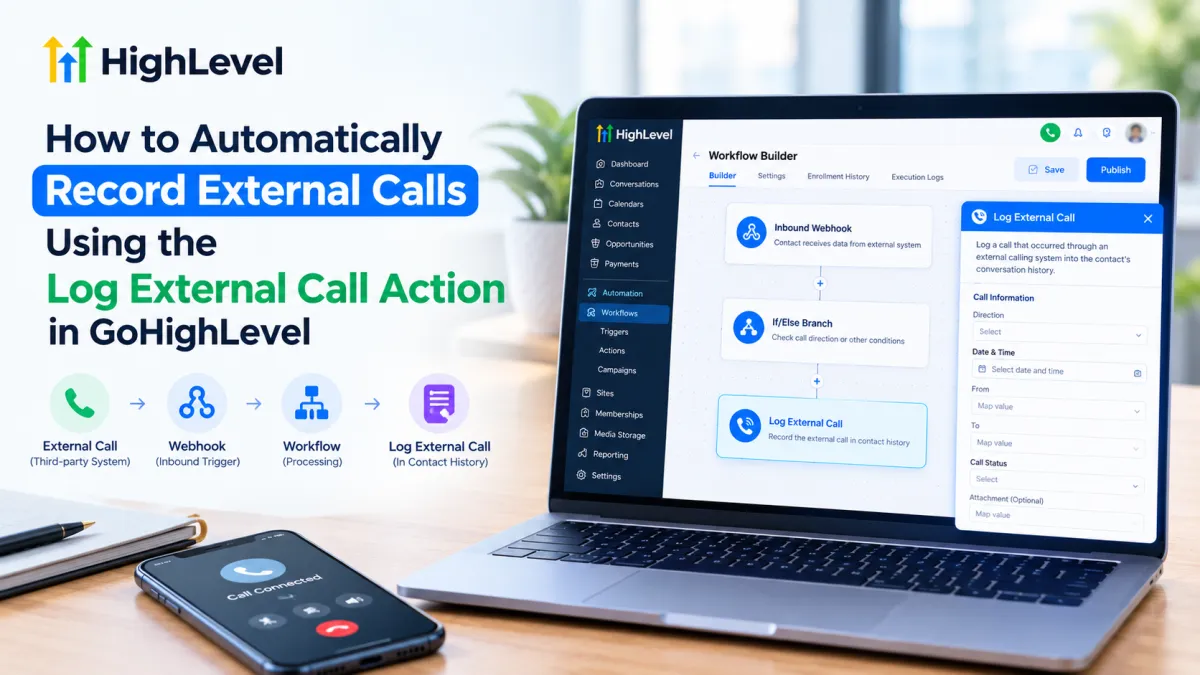
GoHighLevel Log External Call Action Workflow
How to Automatically Record External Calls Using the Log External Call Action in GoHighLevel
When customer calls happen outside GoHighLevel, keeping your CRM activity history complete can become difficult. A sales representative might use a third-party phone system, mobile phone, or another calling platform, while the rest of the customer journey remains inside GoHighLevel.
That is where the Log External Call Action in GoHighLevel becomes useful. It allows calls handled by third-party calling tools to be posted into the CRM so the interaction can appear in the contact's Conversations history. HighLevel also supports passing a call recording through this action when a recording is provided by the external calling system.
The key point: logging an external call is not the same as making a call or automatically recording its audio.
What Is the Log External Call Action in GoHighLevel?
The Log External Call Action is a GoHighLevel workflow action designed to post calls that occurred through an external or third-party calling system into the CRM. This helps centralize communication history instead of leaving important customer interactions outside GoHighLevel.
An “external call” in this context is a call handled outside GoHighLevel's native calling environment. The external system provides the relevant call information to a GoHighLevel workflow, which then uses the action to log that interaction against the appropriate contact.
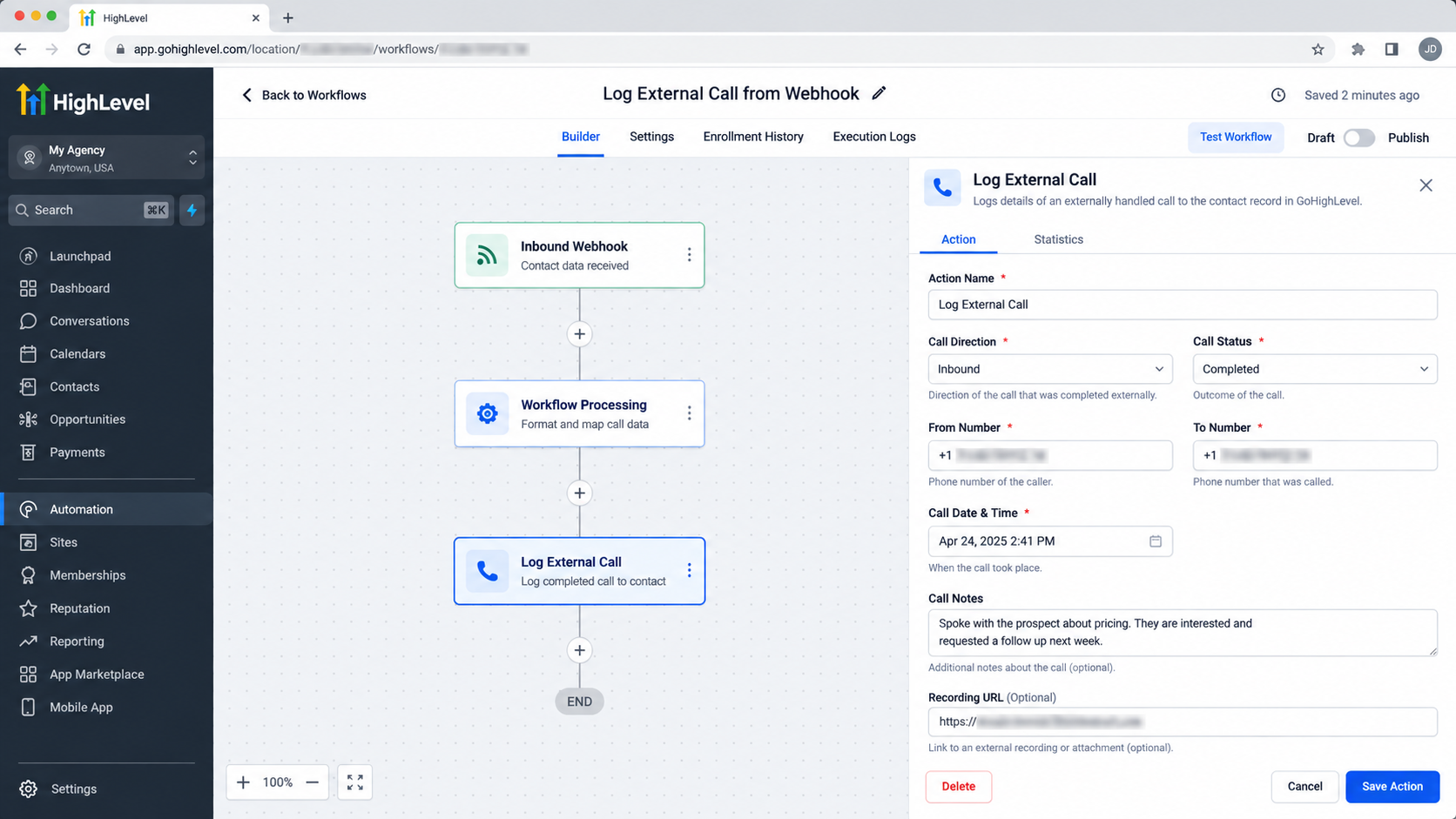
The logged call can appear in the contact's Conversations section. The action can receive information such as call direction, date, phone numbers, call status, and an attachment.
However, the action does not initiate the external phone call. It also should not be confused with native call recording. If an audio recording needs to appear in GoHighLevel, that recording must be supplied by the external calling system.
Why Automatically Log External Calls?
External call logging can solve a surprisingly common CRM problem: important conversations happen, but the CRM does not know about them.
Automatically sending those interactions into GoHighLevel can help you:
Maintain a more complete customer timeline.
Give sales and support teams better visibility into previous conversations.
Improve follow-up consistency.
Reduce manual CRM data entry.
Keep external communication connected to the correct contact.
Make customer activity easier to review from one place.
For teams using multiple communication platforms, this can make the CRM much more useful as a single source of customer history.
How the Log External Call Action Works
The important concept is that the event causing the workflow to run and the action that logs the call are two different things.
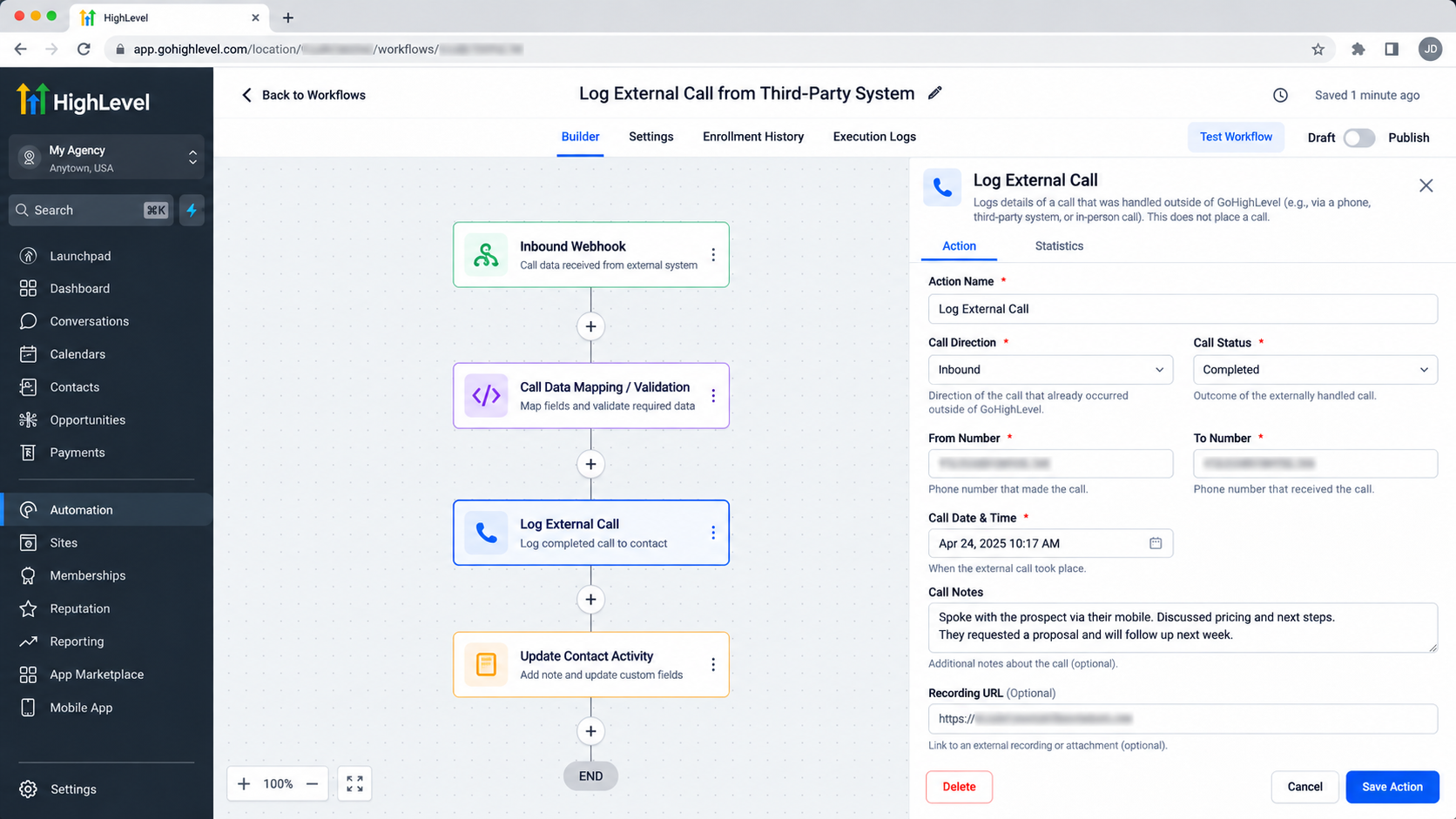
A practical setup can use GoHighLevel's Inbound Webhook Trigger. The external calling system sends call information to the webhook whenever a relevant call occurs. HighLevel then processes that information through the workflow.
The general logic is:
External Call Occurs → External System Sends Call Data → GoHighLevel Workflow Runs → Log External Call → Call Appears in Contact History
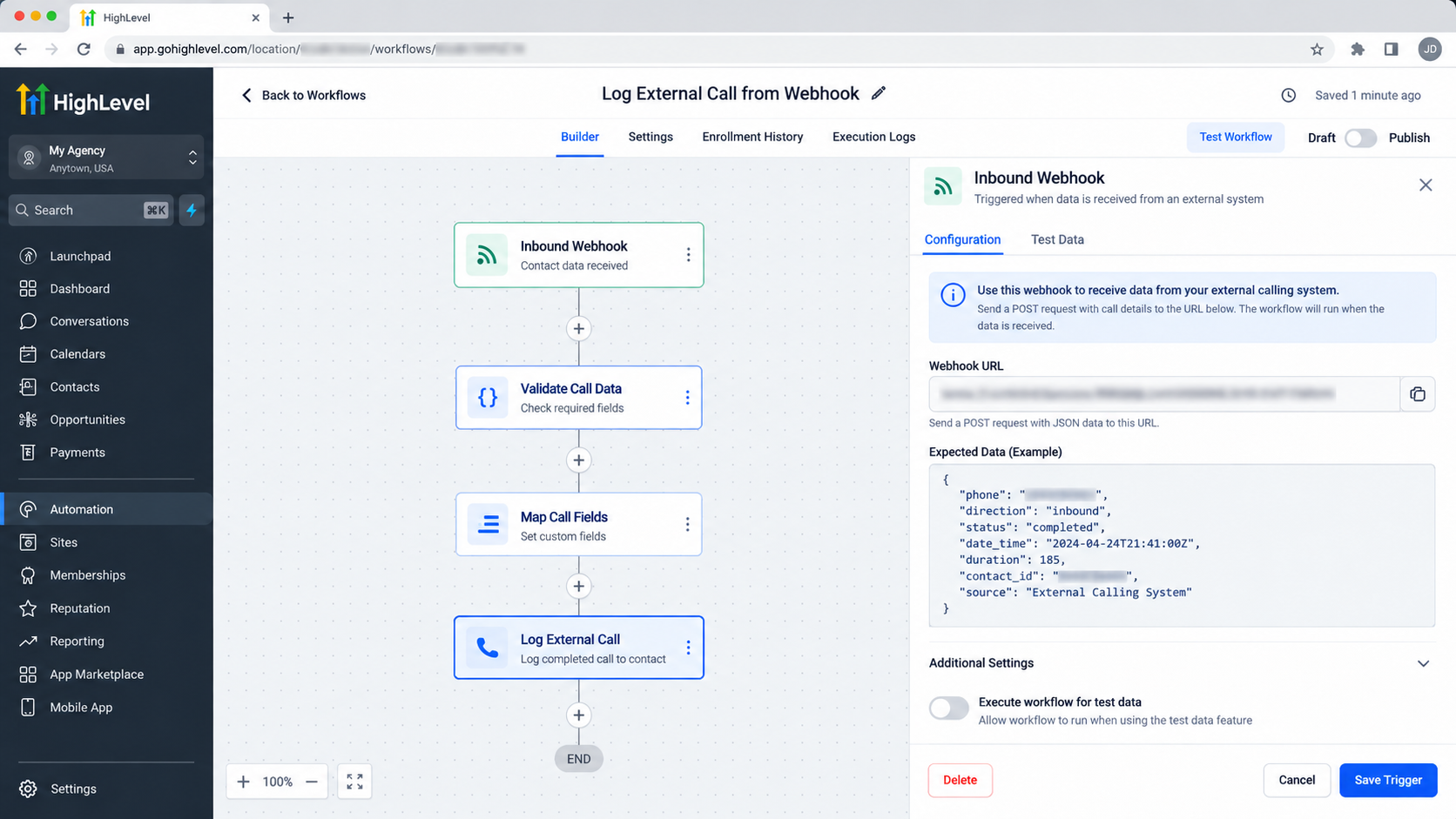
If inbound and outbound calls need different handling, an If/Else branch can separate the workflow based on the call direction.
How to Set Up Log External Call in a GoHighLevel Workflow
Start by creating a workflow and using the Inbound Webhook Trigger. This provides a webhook URL that your external calling system can call when an external call takes place.
Next, process the incoming information so GoHighLevel can identify the correct contact.
For example:
Create the Inbound Webhook Trigger.
Configure the external calling platform to send the relevant call information to the webhook.
If necessary, use an If/Else branch to separate inbound and outbound calls using the direction information.
Use Create Contact to identify or create the contact using the phone number supplied by the webhook.
Add the Log External Call action.
Map the available webhook values to the corresponding call information, such as Direction, Date, To, From, Call Status, and Attachment.
Publish the workflow.
HighLevel's documentation specifically describes using custom values from the Inbound Webhook Trigger for these fields.
The exact data available depends on what your external system sends. Automation cannot log information that was never provided to the workflow.
Practical Example
Imagine a sales company uses a third-party calling platform for its sales representatives.
A representative speaks with a prospect using that external system. After the call finishes, the calling platform sends the call information to a GoHighLevel inbound webhook.
The workflow processes the information, identifies the prospect using the relevant phone number, and then executes the Log External Call action.
The workflow logic is:
Trigger/Event → Workflow Processing → Log External Call → Contact History/Follow-Up
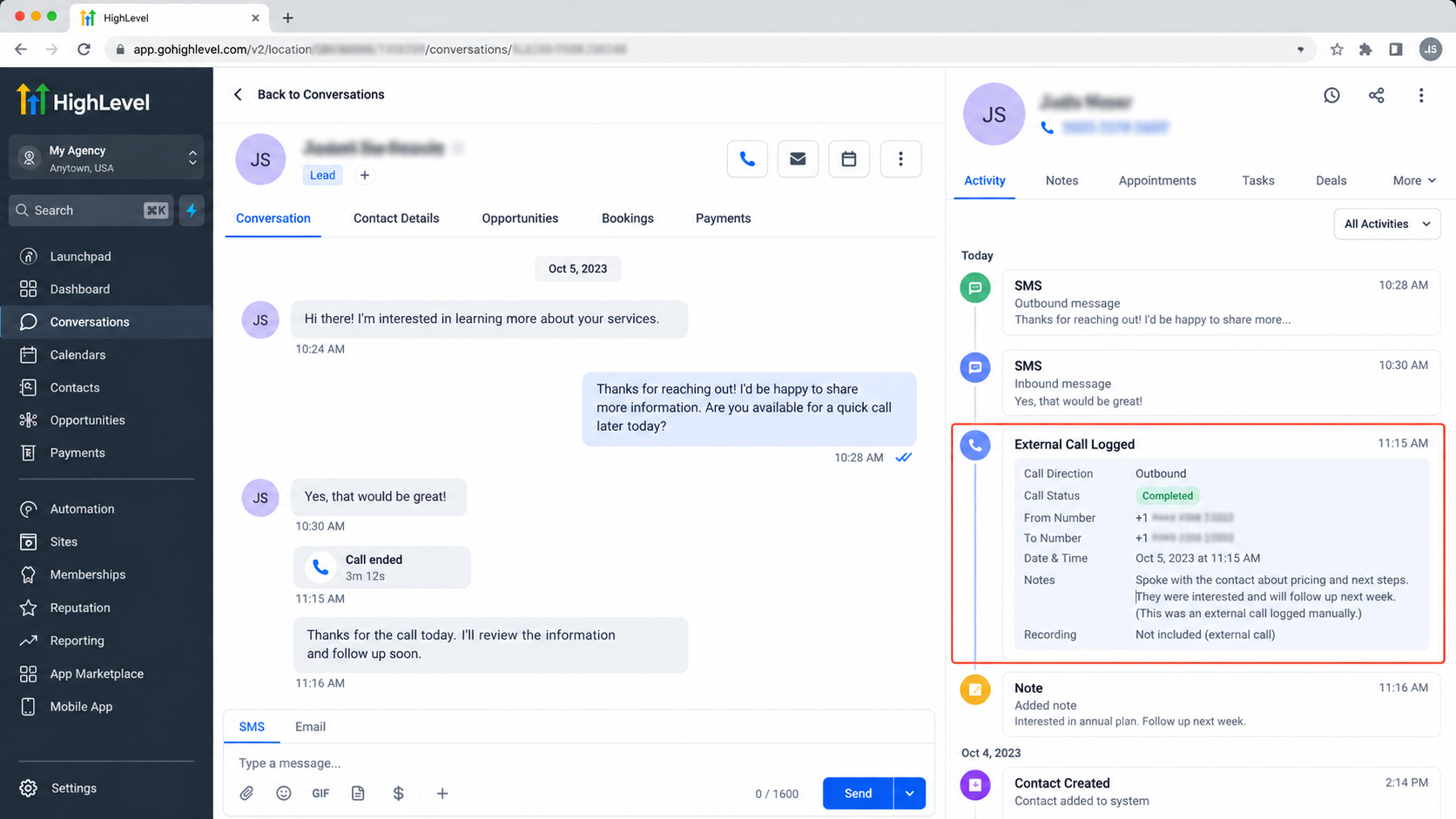
If the external system also provides a call recording, that recording can be passed through the workflow and displayed with the logged call in Conversations.
Log External Call vs. Native GoHighLevel Calling
These functions solve different problems.
Log External Call: Records an externally handled call inside GoHighLevel. It does not place the call.
Native GoHighLevel Calling: Uses GoHighLevel's supported phone/calling functionality to make or handle calls.
This distinction matters because logging an external call is primarily a CRM synchronization and record-keeping process, not a calling mechanism.
Common Mistakes to Avoid
Avoid these common workflow mistakes:
Assuming the action places a call: It logs an external call; it does not initiate one.
Assuming it automatically creates audio: A recording must be supplied by the external calling system.
Confusing call logging with call recording: A CRM record and an audio recording are separate things.
Using the wrong workflow trigger: The workflow needs an event or data source capable of providing the call information.
Expecting missing data to appear automatically: If the external system does not send a phone number, status, date, or recording, the workflow cannot invent it.
Best Practices for External Call Logging
Keep the workflow focused and make sure the external system sends consistent data.
Use reliable contact-identification information, carefully distinguish inbound from outbound calls when required, and test the webhook with real call data before putting the workflow into production.
Most importantly, decide what you actually need to capture. If your goal is simply to maintain a CRM timeline, call details may be enough. If your business needs the conversation audio available in GoHighLevel, make sure the external calling platform can provide a recording and that it is passed through the workflow.
FAQs
Does Log External Call place a phone call?
No. It logs a call that occurred through an external calling system.
Does it automatically record the conversation?
No. The action does not create an audio recording by itself. A recording can be passed to GoHighLevel when it is available from the external system.
Where does the logged call appear?
HighLevel states that logged external calls are visible in the contact's Conversations section.
Can I use an external calling platform with this action?
Yes. The action is specifically designed to bring calls from third-party calling tools into the CRM.
What is the recommended trigger?
HighLevel's documentation demonstrates using the Inbound Webhook Trigger so an external calling system can send call details into the workflow.
Need Expert Help with GoHighLevel?
New to GoHighLevel and ready to get started? Buy your GoHighLevel account here and launch with confidence.
Already know what you need and want our team to handle everything, from complete setup and customization to funnels, workflows, automations, CRM, and pipelines? Click here.



