

Inline Schema Validation
Inline Validation Errors for Schema Markup JSON View in GoHighLevel
Introduction
Have you ever validated your Schema Markup in GoHighLevel only to receive a generic error message without knowing exactly where the problem is? Searching through lines of JSON-LD to find a single mistake can be frustrating, especially when working with large or complex schema structures. To improve this experience, GoHighLevel has enhanced the Schema Markup JSON View in both the Website Builder and Funnel Builder by displaying validation errors directly on the exact lines that need fixing. Instead of relying on a general alert, users now see inline error markers with plain-language tooltips that explain each issue more clearly. This update makes Schema Markup Validation easier to understand, helping users identify and resolve errors more efficiently while editing their JSON-LD scripts.
What Is the Inline Validation Errors for Schema Markup JSON View Update?
The latest improvement focuses on the GoHighLevel Schema Markup editor available inside the Website and Funnel Builder.
Previously, when users validated their schema, any problems were presented as a general alert. Although this indicated that errors existed, it did not clearly identify where they were located within the JSON code.
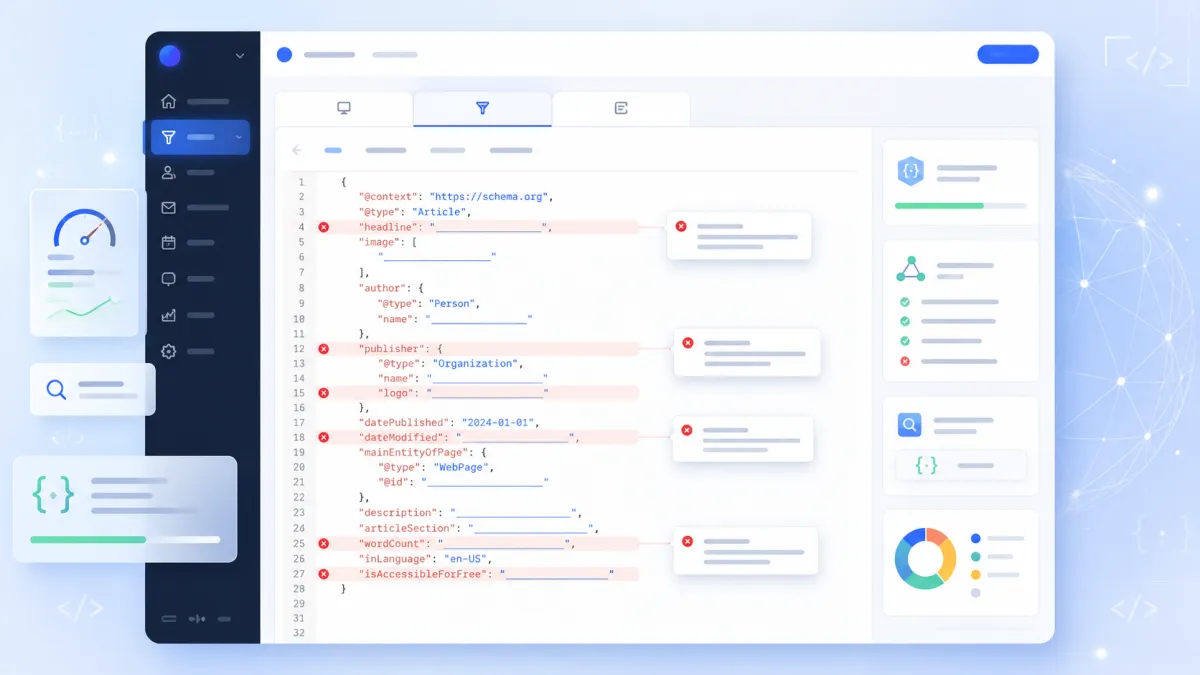
With the updated GoHighLevel JSON View, validation errors now appear directly beside the specific lines that need attention. Each highlighted error includes a tooltip with a plain-language explanation, helping users understand the issue without searching through large sections of JSON manually.
The update also supports nested fields and multi-schema @graph JSON structures, ensuring that validation messages are displayed in the correct location.
What Has Changed?
The update introduces several improvements that make Schema Markup Validation easier to understand and manage.
Inline Validation Errors
Instead of receiving a general validation message, errors now appear directly beside the JSON line responsible for the issue. This allows users to immediately identify where a correction is needed.
Plain-Language Error Tooltips
Each error marker includes a tooltip. Hovering over the marker displays an explanation written in plain language, making the validation message easier to interpret.
Support for Nested Schema Fields
Complex schema structures often contain nested fields. The updated validation system works with these structures and points users to the appropriate location within the JSON.
Multi-Schema (@graph) Support
Many users organize multiple schemas inside a single @graph JSON structure. The updated validation correctly routes each validation error to the relevant schema block rather than displaying a general message.
Errors Clear Individually
As each validation issue is corrected, its corresponding error marker disappears. This allows users to see their progress while fixing multiple issues without waiting for every problem to be resolved first.
How the New Inline Validation Works
The new validation experience is designed to make editing JSON-LD more straightforward.
After opening the JSON View and selecting Validate & Save, GoHighLevel checks the schema markup for validation issues.
If any problems are detected:
The exact line containing the issue is marked.
Hovering over the marker displays a plain-language explanation.
Nested schema fields are validated correctly.
Multi-schema (@graph) JSON files display errors within the appropriate schema block.
Each marker disappears individually once its specific issue has been fixed.
This approach removes much of the uncertainty that came with a general validation alert by showing exactly where attention is needed.

Step-by-Step: How to Access It
You can access the updated validation experience by following these steps:
Open Website Builder or Funnel Builder.
Select Edit Page.
Navigate to SEO & AI Search Optimization.
Open Schema Markup.
Select Add/Edit Schema.
Switch to JSON View.
Click Validate & Save to display any inline validation markers.
Once validation runs, any detected issues will appear directly beside the relevant JSON lines.

Why This Update Matters
Editing schema markup becomes more manageable when validation messages point directly to the problem instead of requiring users to search through their code.
This update offers several practical improvements:
Schema errors are easier to locate.
Less time is spent identifying where an issue exists.
Editing large or complex JSON-LD scripts involves less guesswork.
Users can save valid schema more quickly.
Advanced schema editing becomes easier to manage through clearer validation feedback.
Rather than relying on a single general alert, the updated validation process provides more precise guidance throughout the editing experience.

Supported Schema Types
The updated validation system works across both the Website Builder and Funnel Builder.
It supports all schema types listed in the official update, including:
Product
Organization
FAQ
LocalBusiness
Article
Recipe
Event
And additional supported schema types
The feature also fully supports multi-schema @graph payloads, allowing validation errors to be associated with the correct schema block.

Who Will Benefit Most
This update is useful for anyone who edits GoHighLevel Schema Markup, whether working with simple or more complex JSON structures.
It can be especially valuable for:
Website owners maintaining structured data
Marketing agencies managing multiple websites or funnels
Digital marketers working with GoHighLevel SEO
Users editing JSON-LD directly
Anyone creating or updating schema within the Website Builder or Funnel Builder
Because validation messages now appear exactly where issues occur, users can spend more time correcting problems and less time searching for them.
Frequently Asked Questions (FAQs)
1. What is GoHighLevel Schema Markup JSON View?
It is the editor where you can add and manage JSON-LD schema markup for your websites and funnels.
2. What does the inline validation update do?
It highlights validation errors directly on the affected JSON lines and provides clear tooltip explanations.
3. Does this feature support @graph schema?
Yes. The updated validator fully supports multi-schema (@graph) JSON and routes errors to the correct schema block.
4. Where can I access the Schema Markup JSON View?
Go to Website or Funnel Builder → Edit Page → SEO & AI Search Optimization → Schema Markup → Add/Edit Schema → JSON View.
5. Which schema types are supported?
It supports Product, Organization, FAQ, LocalBusiness, Article, Recipe, Event, and other supported schema types.
Final Thoughts
The updated Inline Validation Errors for Schema Markup JSON View improves the way users work with structured data inside GoHighLevel.
Instead of relying on a general validation alert, the platform now highlights errors directly beside the affected JSON lines and explains them using clear tooltips. Support for nested fields, multi-schema @graph structures, and individual error clearing further improves the editing experience.
For anyone managing GoHighLevel Schema Markup in the Website Builder or Funnel Builder, this update provides a clearer and more efficient way to identify, understand, and resolve Schema Validation Errors before saving their schema.
Watch This GoHighLevel Update in Action
Want a quick overview of this new GoHighLevel feature? We’ve created a short video explaining the update, its benefits, and how you can use it effectively.
Click below to watch the video and stay ahead with the latest GoHighLevel updates.
Need Expert Help with GoHighLevel?
New to GoHighLevel and ready to get started? Buy your GoHighLevel account here and launch with confidence.
Already know what you need and want our team to handle everything, from complete setup and customization to funnels, workflows, automations, CRM, and pipelines? Click here.



