

GoHighLevel Email List Hygiene: 10 Steps Before a Campaign
GoHighLevel Email List Hygiene: How to Clean Your List Before a Campaign
Introduction
A successful email campaign starts long before you write the subject line.
If your GoHighLevel account contains outdated addresses, bounced contacts, unsubscribed recipients, or people who have not engaged with your emails for a long time, sending to everyone at once can create unnecessary deliverability problems. A clean, well-maintained list gives you a much stronger foundation for your next campaign.
That is where email list hygiene comes in.
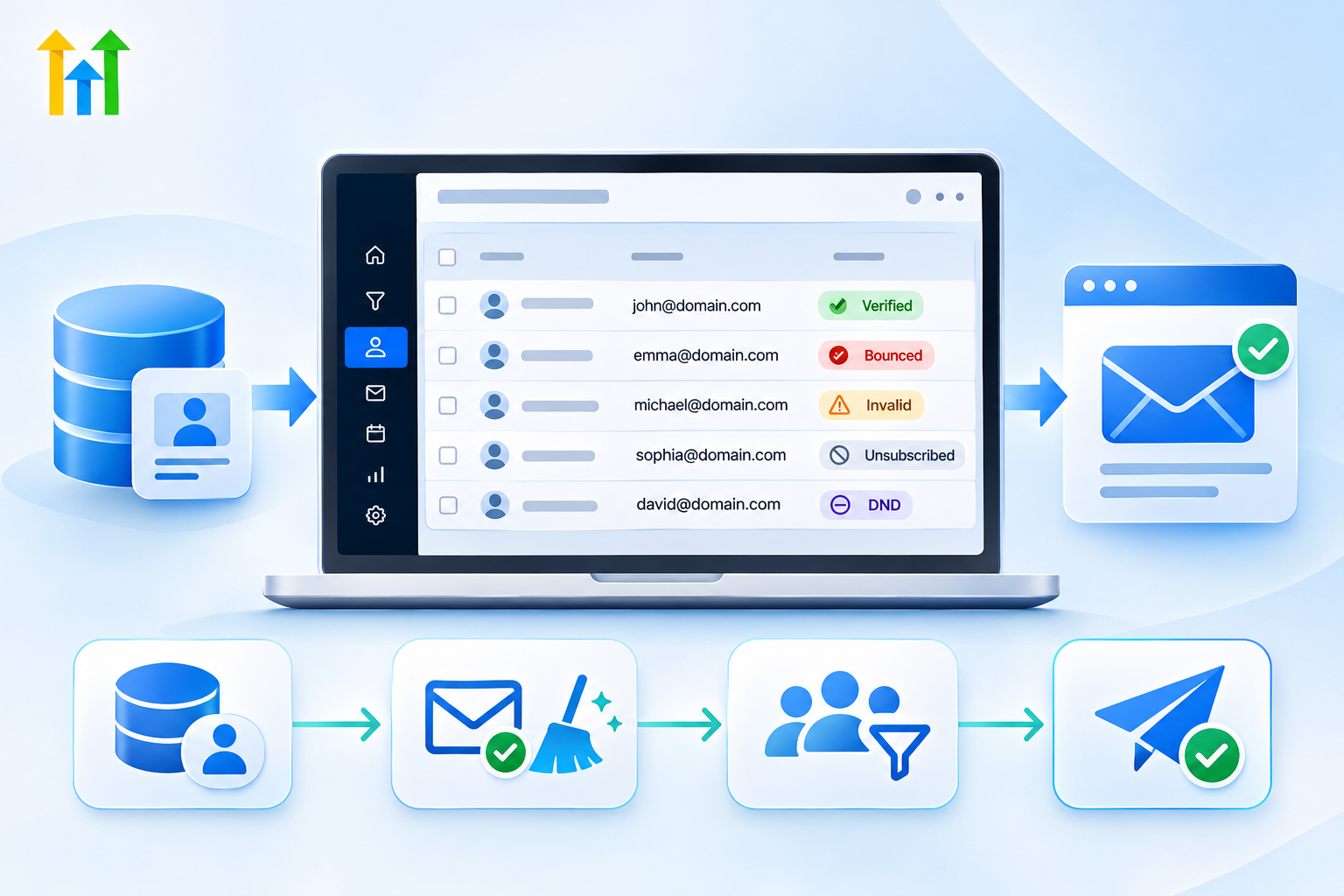
Email list hygiene is the process of reviewing, verifying, segmenting, and maintaining your contacts before sending marketing emails. In GoHighLevel, you can use tools such as Email Verification, contact filters, Smart Lists, email statistics, DND, and suppression behavior to identify contacts that should not receive your next campaign.
The goal is not simply to reduce your contact database. The goal is to make your sendable audience healthier, more accurate, and more relevant.
What Is Email List Hygiene?
Email list hygiene means regularly checking your contact database and removing or suppressing records that can negatively affect your email-sending health.
A contact may be unsuitable for a campaign for several reasons:
The email address is invalid.
The address has previously bounced.
The person has unsubscribed.
The contact has complained about previous emails.
The address has become inactive.
The contact is no longer relevant to the campaign.
The record contains outdated or incorrect information.
The contact has not engaged with your emails for an extended period.
HighLevel's email reporting distinguishes between hard bounces, soft bounces, unsubscribes, complaints, and suppressions. Hard bounces generally indicate permanent delivery problems, while soft bounces can result from temporary issues such as a full mailbox or a temporarily unavailable receiving server.
This distinction matters because not every failed delivery should be treated the same way.
Why Email List Hygiene Matters Before a Campaign
Sending an email to your entire database may seem simple, but your total contact count is not the same as your eligible recipient count.
Before sending, HighLevel can filter out contacts because of invalid email addresses, unsubscribed status, or applicable Email DND restrictions.
That is why the goal should not be to “send to everyone,” but to identify the contacts who should actually receive the campaign.
Poor list hygiene can also contribute to sending and deliverability problems. HighLevel recommends verifying contacts and removing or suppressing problematic addresses, particularly when bounce or complaint activity increases.
A clean list also makes your campaign results more meaningful because your metrics better represent the audience you are actually trying to reach.
Step 1: Review Your Existing Contact Data
Before making changes, review what is actually in your database and look for obvious quality issues.
Pay attention to:
Missing or incorrectly formatted email addresses
Duplicate records
Old or irrelevant contacts
Incorrect tags
Unsubscribed contacts
Email DND-enabled contacts
Previously bounced addresses
Do not immediately delete inactive contacts. Some may still be valuable for future campaigns or other communication channels.
Instead, separate your audience into useful groups such as recently engaged contacts, existing customers, active leads, inactive contacts, and records requiring manual review.
This gives you more control than treating your entire database as one audience.
Step 2: Verify Email Addresses Before Sending
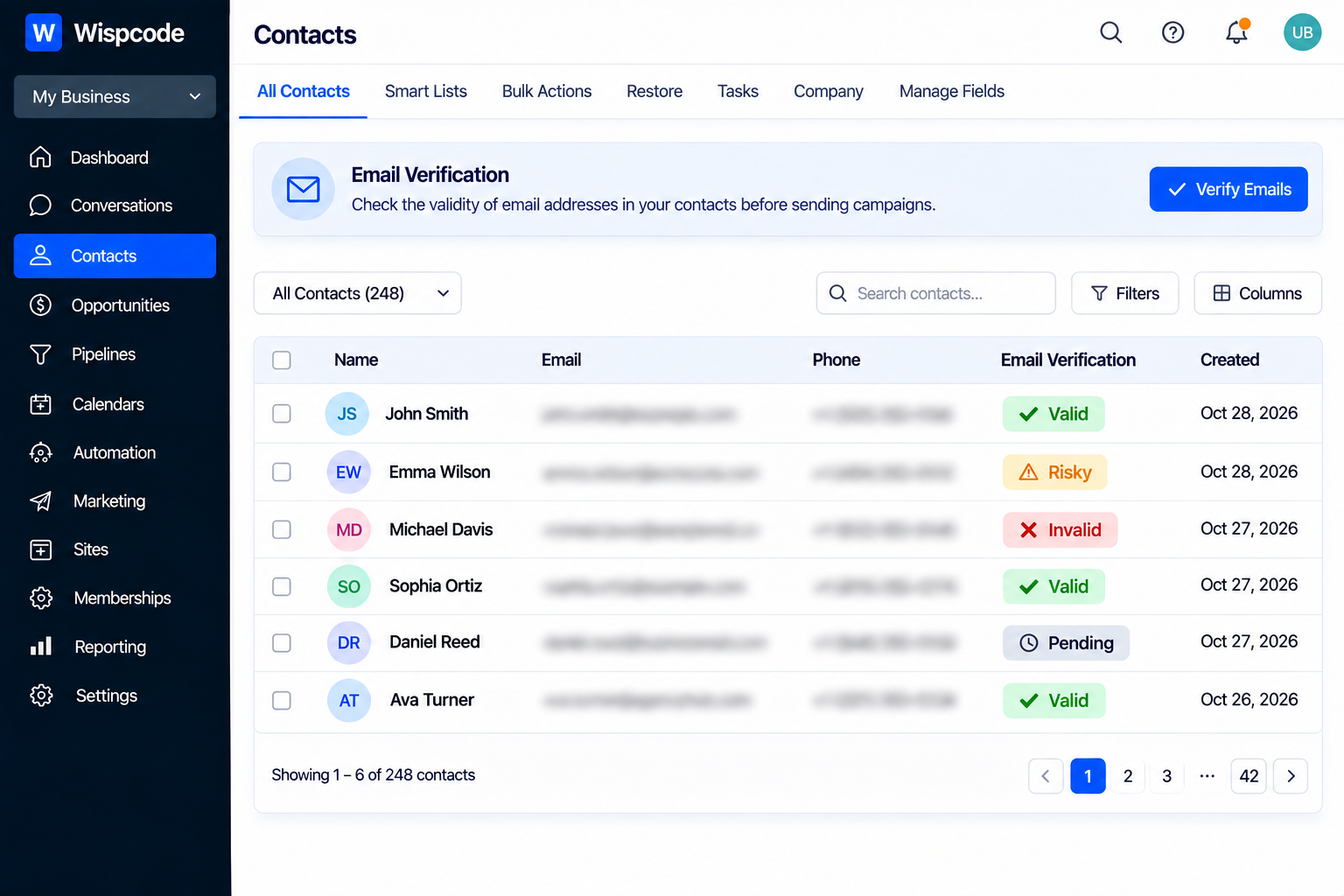
One of the most useful tools for list hygiene is Email Verification.
HighLevel's Email Verification service checks characteristics such as email syntax, domain configuration, whether the address exists, whether it appears on known bad lists, and whether it may be risky or role-based.
This is especially useful when you have:
Imported an older database
Inherited contacts from another system
Added a large number of contacts
Not cleaned your database recently
Experienced increased bounce activity
However, verification is a quality-control step, not a guarantee of inbox delivery. A verified address can still fail because of an inactive mailbox, temporary server issues, catch-all domains, sender reputation, or spam filtering.
In other words, verification reduces risk; it does not eliminate it.
Step 3: Pay Special Attention to Bounced Contacts
Review bounced addresses carefully before launching a campaign.
A hard bounce generally indicates a permanent delivery problem, such as an invalid address or domain. A soft bounce is usually associated with a temporary issue and may resolve without intervention.
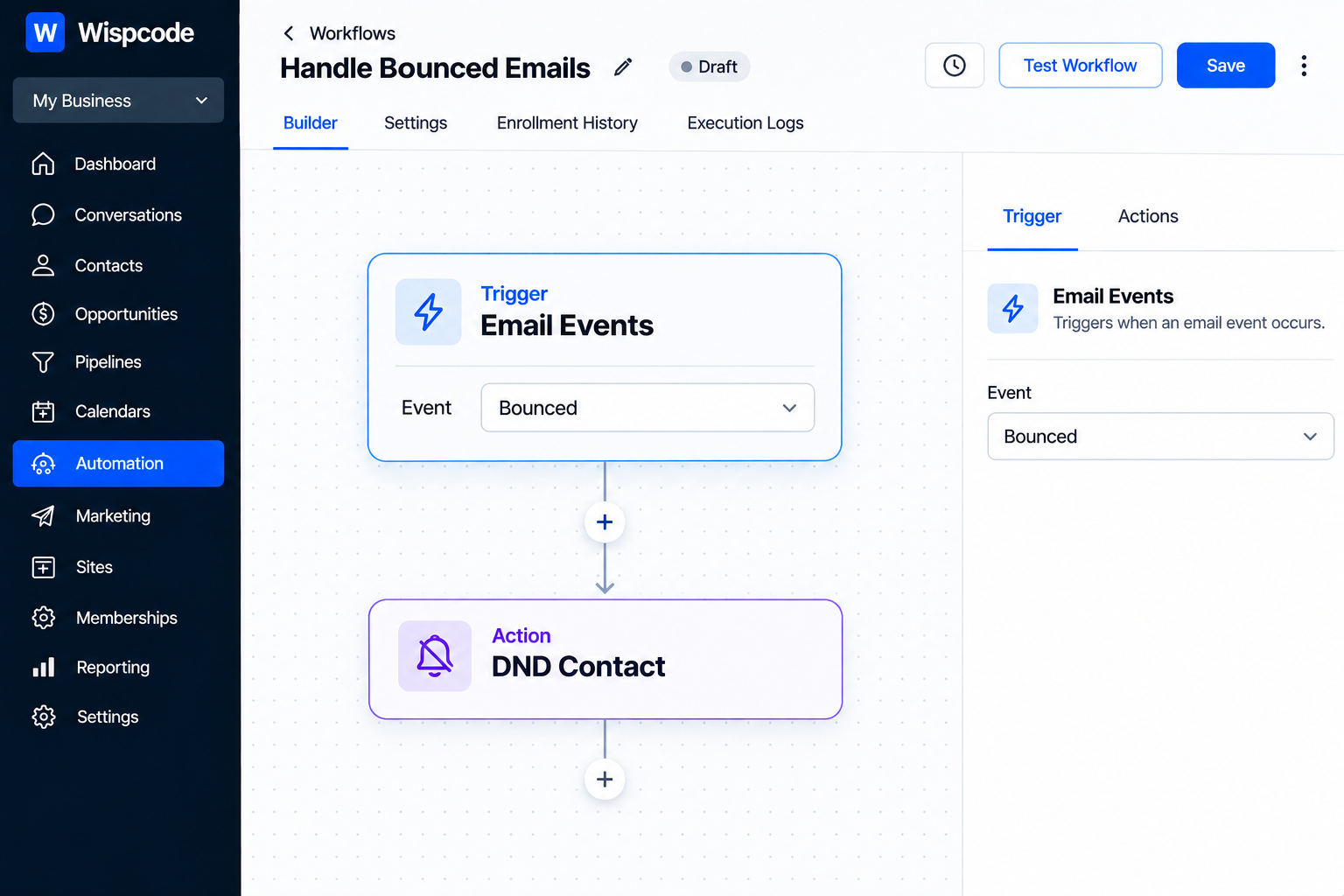
HighLevel provides automation options for bounced emails. For example, an Email Events workflow trigger can be filtered for bounced events and paired with the DND Contact action to enable outbound Email DND for the contact.
This can help prevent future emails from being sent to addresses that have already shown delivery problems.
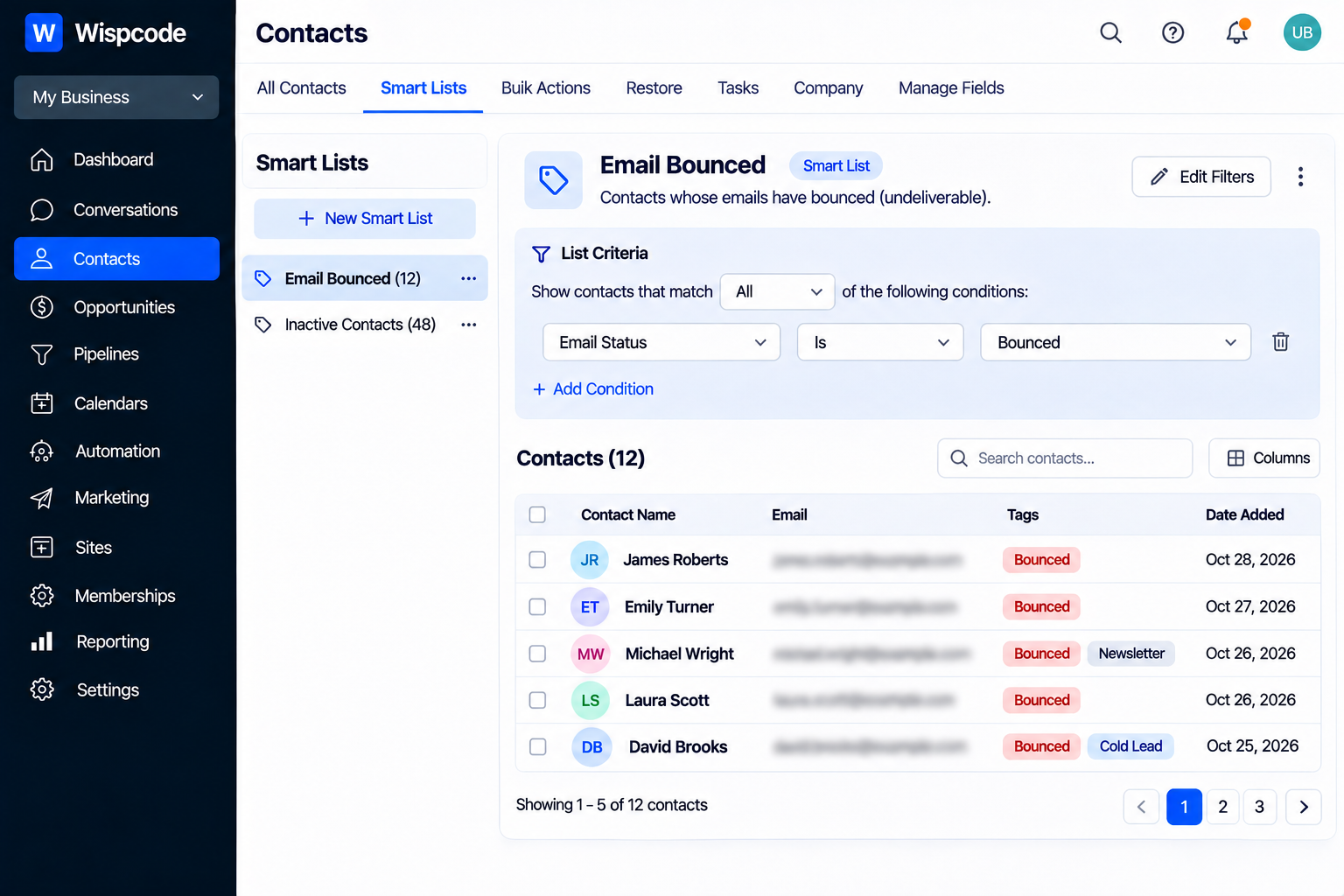
You can also apply a tag such as Email Bounced to make these contacts easier to filter and review later.
Step 4: Respect Unsubscribes and Email DND
Email list hygiene is not only about invalid addresses. You also need to identify contacts who should not receive your campaign.
Unsubscribed contacts and contacts with applicable email DND restrictions can be excluded from bulk email sends.
Before launching a campaign, review your audience filters and ensure you are not circumventing these restrictions by creating another list or reimporting the same person.
Respecting recipient preferences keeps your email process cleaner and makes it easier to distinguish opted-out contacts from contacts who are simply inactive.
Step 5: Segment Engaged and Inactive Contacts
Not every contact needs the same message.
Separate your audience according to engagement and business relevance. For example, you might create segments for:
Recently engaged: Contacts who have recently opened, clicked, or otherwise interacted with your emails.
Existing customers: People who have already purchased and may need customer-focused communication.
Active leads: Prospects who are still moving through your sales process.
Inactive contacts: People who have not interacted with your email communication for a significant period.
Your segments should depend on your business and campaign objective.
HighLevel's email statistics can help you review available opens, clicks, replies, bounces, complaints, and unsubscribes. This information can help determine which contacts belong in your primary audience and which may need a different approach.
Step 6: Use Smart Lists for Repeatable List Management
If you repeatedly perform the same cleanup manually, turn it into a repeatable filtering system.
Smart Lists can organize contacts based on available information and conditions, making it easier to find records that need attention without repeatedly searching through the entire database.
Useful lists might include:
Email Review Needed
Recently Engaged
Inactive Contacts
Email Bounced
Customers
Leads
Do Not Email
The exact filters should match your business and available contact data.
The goal is consistency: your team should know which segments are appropriate for a campaign and which require review first.
Step 7: Review Your Campaign Audience Before Sending
HighLevel's bulk-email workflow provides a recipient summary before sending, showing selected contacts, filtered-out contacts, and eligible recipients.
Invalid addresses, unsubscribes, and applicable DND restrictions can reduce the final eligible audience.
Before sending, compare:
Selected contacts → Filtered-out contacts → Eligible recipients
If the difference is unexpectedly large, stop and investigate. You may find that your database contains a significant number of invalid, unsubscribed, or restricted contacts.
This final review can reveal list-quality issues that should be addressed before continuing with the campaign.
Step 8: Review Previous Campaign Performance
Previous campaigns can provide useful information about the quality of your email list.
HighLevel's Email Statistics area allows you to review available delivery and engagement data across supported email sources, including campaigns, workflows, and bulk actions.
Look for patterns such as:
Increasing hard bounces
Increasing complaints
Increasing unsubscribes
Low engagement
Unexpected delivery failures
Segments that consistently perform better or worse
Do not judge list health using a single metric. For example, a low open rate alone does not prove that your entire list is unhealthy.
Consider the audience, message, sending history, and campaign objective when evaluating the results.
Step 9: Be Careful With Deleting Contacts
Cleaning a database does not always mean deleting records.
Deleting a contact is a significant action because associated contact information can also be affected, and HighLevel notes that contact deletion can impact historical reporting and associated data.
Before deleting a contact, ask:
Does this contact need to disappear from the database, or do I simply need to prevent them from receiving this email?
These are different problems.
If a contact is no longer suitable for email but still has value for sales, customer service, SMS, or calls, suppressing outbound email may be more appropriate than deleting the entire record.
Step 10: Build an Ongoing Hygiene Process
Email list hygiene should not be something you remember only before a campaign. Make it part of your regular CRM maintenance process.
Before major campaigns
Review the target audience.
Check recent email performance.
Verify questionable or older addresses.
Review bounced and unsubscribed contacts.
Confirm DND restrictions.
Check the eligible recipient count.
After campaigns
Review hard bounces.
Review complaints and unsubscribes.
Identify poorly engaged segments.
Update relevant tags or lists.
Investigate unexpected changes in sending performance.
Periodically
Recheck older contact data.
Review inactive segments.
Remove genuinely unnecessary records.
Review your email-sending configuration.
Confirm your team follows the same hygiene process.
HighLevel also documents 90-day re-verification options for email verification in applicable setups, allowing verification status to be checked again before a later send after the verification period expires. Common Email List Hygiene Mistakes to Avoid
Sending to Your Entire Database Automatically
More contacts do not necessarily mean a better campaign.
Choose the audience based on relevance and contact status.
Treating Every Bounce as Permanent
Hard and soft bounces are different. A temporary delivery failure does not necessarily mean the email address is permanently invalid.
Assuming Verification Guarantees Delivery
Email verification cannot guarantee inbox placement or prevent every future bounce.
Deleting Instead of Suppressing
If the contact is still useful for sales or other communication channels, deleting the entire record may be unnecessary.
Ignoring Campaign Data
Your email reports can reveal recurring list-quality problems. Review them instead of treating each campaign as an isolated event.
A Simple GoHighLevel Email Hygiene Checklist
Before pressing send, ask:
Is the campaign audience relevant?
Have questionable addresses been verified?
Are previously bounced addresses excluded or suppressed?
Are unsubscribed contacts excluded?
Are applicable Email DND restrictions being respected?
Have inactive contacts been separated where appropriate?
Did I review recent bounce and complaint activity?
Did I check the eligible recipient count?
Am I deleting contacts only when deletion is actually necessary?
Do I have a process for reviewing the list after the campaign?
If you can answer these questions confidently, your campaign is starting from a much stronger foundation.
Frequently Asked Questions (FAQs)
1. What is email list hygiene in GoHighLevel?
Email list hygiene means reviewing and maintaining contacts before a campaign, including checking email addresses, bounced or unsubscribed contacts, DND status, and audience segments.
2. Does GoHighLevel automatically remove invalid email addresses?
No. GoHighLevel provides Email Verification and sending controls to identify or exclude problematic contacts, but invalid addresses are not necessarily removed automatically.
3. Should I delete inactive contacts before an email campaign?
Not necessarily. Inactive contacts may still be valuable through other channels or future campaigns. Consider segmenting or suppressing email communication before deleting the entire contact record.
4. How can I prevent bounced contacts from receiving future emails?
GoHighLevel workflows can respond to bounce events and apply Email DND, helping prevent future outbound emails to contacts with delivery problems.
5. How often should I clean my GoHighLevel email list?
Review your list before important campaigns and check bounce, unsubscribe, and complaint activity afterward. For frequent campaigns, make list hygiene part of your regular email process.
Conclusion
Good email marketing starts with clean, relevant contact data.
GoHighLevel provides tools such as Email Verification, Smart Lists, email statistics, DND controls, and recipient filtering to help maintain a healthier email audience.
Make list hygiene an ongoing process rather than a one-time cleanup. Review your audience before campaigns, monitor results afterward, and separate healthy contacts from records that need attention.
Instead of asking, “How many contacts can I email?”, ask:
“How many contacts should actually receive this campaign?”
That shift can help you build a cleaner and more responsible email marketing process.
Need Expert Help with GoHighLevel?
New to GoHighLevel and ready to get started? Buy your GoHighLevel account here and launch with confidence.
Already know what you need and want our team to handle everything, from complete setup and customization to funnels, workflows, automations, CRM, and pipelines? Click here.