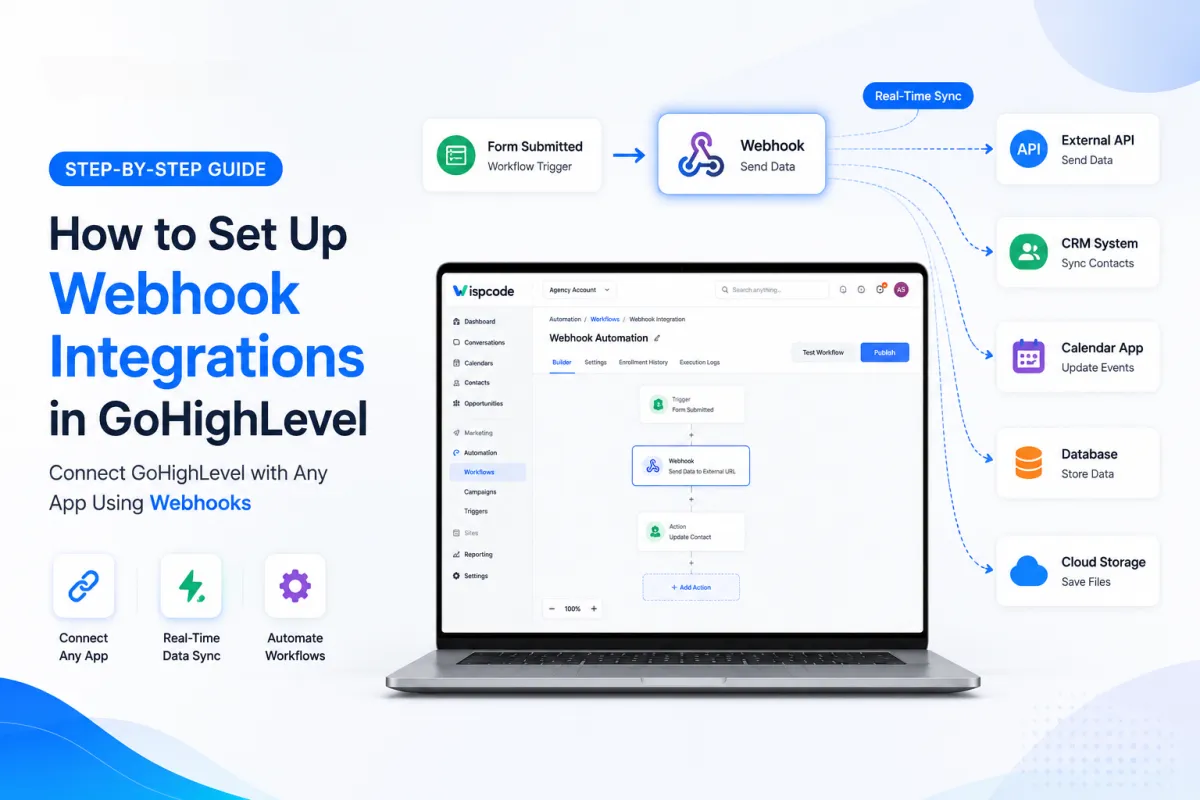
How to Set Up Webhook Integrations in GoHighLevel: A Complete Step-by-Step Guide
Introduction
Businesses today depend on multiple software platforms to manage leads, automate marketing, process payments, schedule appointments, and maintain customer relationships. While GoHighLevel provides an all-in-one CRM with powerful built-in automation, there are situations where your business needs to exchange information with external applications in real time. This is where webhook integrations become incredibly valuable.
If you're wondering how to set up webhook integrations in GoHighLevel, you're in the right place. Whether you're a beginner, digital marketer, agency owner, or small business owner, understanding webhooks can help you build smarter automations and eliminate repetitive manual work.
Unlike manual exports or scheduled data syncing, webhooks instantly send information whenever a specific event occurs inside GoHighLevel. This means your business tools can communicate automatically without requiring constant monitoring or intervention.
In this comprehensive guide, you'll learn:
What webhook integrations are
How webhooks work in GoHighLevel
Why businesses use them
Step-by-step instructions for configuring webhooks
Best practices for reliable automation
Common mistakes to avoid
Real-world business examples
By the end of this guide, you'll have a solid understanding of how to use GoHighLevel webhooks to create more efficient and scalable workflows.
What Are Webhook Integrations in GoHighLevel?
Before jumping into the setup process, it's important to understand what a webhook actually does.
A webhook is an automated method of sending data from one application to another whenever a specific event happens. Instead of waiting for another system to request information, GoHighLevel immediately pushes data to a designated Webhook URL (Endpoint) as soon as the trigger occurs.
Think of it like an instant notification.
For example, when someone submits a lead form on your website, GoHighLevel can immediately send that lead's information to another application. The receiving system processes the data automatically, allowing both platforms to stay synchronized in real time.
This event-driven communication helps businesses automate processes without requiring manual exports or frequent polling between systems.
How Do Webhooks Work?
The process is surprisingly simple.
A webhook integration consists of three main components:
1. Trigger Event
This is the action that starts the automation.
Examples include:
A new contact is created
A lead submits a form
A customer books an appointment
A payment is completed
A tag is added
A workflow reaches a specific step
Whenever one of these events occurs, GoHighLevel prepares the relevant data to send.
2. Webhook Action
Inside a GoHighLevel workflow, you'll add a Webhook action.
This action tells GoHighLevel:
where to send the information,
when to send it, and
what event should trigger the request.
3. Receiving Application
The receiving application provides a Webhook URL (also called an endpoint).
Once the trigger fires, GoHighLevel sends an HTTP request containing relevant contact or workflow data to that endpoint. The receiving system can then process the information according to its own logic.
Why Webhook Integrations Matter
Webhook integrations are one of the most powerful automation tools available in GoHighLevel because they allow your CRM to communicate with external systems in real time.
Without webhooks, many business processes require manual updates or scheduled imports, which can lead to delays and duplicate work.
By using webhooks, businesses can automate these tasks almost instantly.
Some of the biggest benefits include:
Real-Time Data Transfer
Information is sent immediately after a trigger occurs, reducing delays and keeping connected systems up to date.
Better Workflow Automation
Webhooks allow your GoHighLevel workflows to extend beyond the CRM by triggering actions in external applications.
Reduced Manual Work
Instead of copying customer information between systems, webhooks automate the transfer for you.
Improved Customer Experience
Real-time automation enables faster follow-ups, notifications, and internal processes, helping businesses respond more quickly to customer actions.
Increased Flexibility
Whether you use custom software, automation platforms, or internal business systems, webhooks make it possible to connect GoHighLevel with a wide variety of external tools that support webhook endpoints.
Common Use Cases for GoHighLevel Webhooks
Many beginners assume webhooks are only for developers, but they can solve practical business problems across many industries.
Here are a few common examples.
Lead Distribution
When a visitor submits a form, GoHighLevel can instantly send the lead data to another CRM, database, or custom application for further processing.
Appointment Notifications
A webhook can notify another system whenever a customer books, reschedules, or cancels an appointment.
Internal Team Alerts
Businesses can trigger notifications in external systems after important customer actions occur, helping sales or support teams respond faster.
Payment-Based Automations
After a successful payment or order event, webhook integrations can trigger downstream business processes such as invoicing, fulfillment, or record updates in connected systems.
Custom Business Applications
Organizations with proprietary software can synchronize customer information between GoHighLevel and their internal platforms using webhook endpoints.
Before You Set Up Webhook Integrations in GoHighLevel
Before configuring your first webhook, make sure you have everything ready.
1. Access to GoHighLevel
You'll need access to the appropriate Sub-Account, where your workflows and automations are managed.
2. A Valid Webhook URL
The destination application must provide an active Webhook URL (Endpoint URL) that can receive incoming HTTP requests.
Always verify that the URL is correct before saving your workflow, as even a small typo can prevent the integration from working.
3. A Workflow Trigger
Since webhook actions are typically executed within workflows, decide which event should trigger the webhook.
Examples include:
Form Submission
Appointment Booking
Contact Creation
Opportunity Updates
Tag Changes
Customer Replies
Selecting the correct trigger ensures the webhook runs at the right time.
Step-by-Step Guide: How to Set Up Webhook Integrations in GoHighLevel
Now that you understand the basics, it's time to configure your first webhook.
Step 1: Open Your GoHighLevel Account
Sign in to your GoHighLevel dashboard and select the Sub-Account where you want to build the automation.
Most webhook integrations are created inside individual client accounts, allowing each business to maintain its own workflows and integrations.
Once you're inside the correct account, navigate to the automation section.
GoHighLevel Master Agency dashboard displaying sub-accounts overview metrics and client management list
Step 2: Navigate to Workflows
From the left-hand navigation menu:
Automation → Workflows
Here you'll see all of your existing workflows.
You can either:
Create a new workflow for your webhook automation, or
Edit an existing workflow if you want to extend its functionality.
For beginners, creating a dedicated workflow for testing webhooks is often the easiest approach. It allows you to verify the integration without affecting your existing automations.
GoHighLevel automation workflows screen showing active sequences, total workflows, and management options
Step 3: Choose the Right Workflow Trigger
Every webhook starts with a trigger.
Click Add New Trigger and choose the event that should activate your automation.
Some of the most commonly used triggers include:
Contact Created
Form Submitted
Survey Submitted
Appointment Booked
Tag Added
Opportunity Status Changed
Customer Replied
Choose the trigger that best matches the business process you want to automate.
For example, if your goal is to send lead information to another application whenever someone fills out a website form, the Form Submitted trigger is the most appropriate choice.
At this point, your workflow is ready for the next step: adding the webhook action itself, configuring the endpoint, testing the integration, and ensuring data is sent successfully.
GoHighLevel workflow editor displaying trigger selection settings to automate lead capture and webhooks
Step 4: Add the Webhook Action
Once you've selected your workflow trigger, the next step is to tell GoHighLevel what should happen after the trigger fires. This is where you'll add the Webhook action.
Inside your workflow:
Click the + (Add Action) button beneath your trigger.
Search for Webhook in the list of available actions.
Select the Webhook action.
A configuration panel will appear where you can enter the destination Webhook URL.
The webhook action acts as the bridge between GoHighLevel and the external application. Whenever the workflow reaches this step, GoHighLevel sends an HTTP request to the endpoint you've provided, containing the available contact and workflow data.
Pro Tip: Give your workflow actions clear names, especially if your automation contains multiple steps. This makes future troubleshooting much easier.
GoHighLevel automation builder showing how to configure a webhook action and endpoint URL
Step 5: Enter the Webhook URL
The Webhook URL, sometimes called the Endpoint URL, is supplied by the external application or service that will receive the data.
Copy the URL exactly as provided and paste it into the Webhook action field inside GoHighLevel.
Before saving, double-check:
The URL is complete.
There are no missing or extra characters.
The endpoint is currently active.
The receiving application is configured to accept incoming requests.
A single incorrect character in the URL can prevent the webhook from working correctly.
If you're working with a developer or another software platform, verify that they've shared the correct endpoint before testing the workflow.
GoHighLevel workflow settings displaying the Webhook URL entry field and endpoint configuration
Step 6: Save and Publish the Workflow
After configuring the webhook action, save your changes and publish the workflow.
Many beginners configure everything correctly but forget to publish the workflow. If the workflow remains unpublished or inactive, the webhook will never execute, even if the trigger event occurs.
Before moving on, verify that:
The workflow status is Published.
The trigger is enabled.
The webhook action appears in the correct position within the workflow.
All required workflow conditions have been configured.
Taking a few moments to review your setup can save significant troubleshooting time later.
GoHighLevel automation builder showing a successfully published workflow with active status and execution settings.
Step 7: Test the Webhook Integration
Testing is one of the most important steps in the entire process.
Rather than assuming your integration is working, create a test event that matches your workflow trigger.
For example:
Submit a test form.
Create a test contact.
Book a sample appointment.
Add a test tag.
Trigger the workflow manually if appropriate.
After running the test, confirm that:
The workflow starts successfully.
The webhook action executes.
The receiving application receives the request.
The expected data appears correctly in the destination system.
If everything works as expected, your webhook integration is ready for production use.
GoHighLevel automation builder showing a successful webhook test response with 200 OK status code and request payload details.
Real Business Use Cases for Webhook Integrations
One of the biggest advantages of GoHighLevel webhooks is their flexibility. Businesses across many industries use them to automate repetitive tasks and connect systems that would otherwise require manual updates.
Here are some practical examples.
1. Lead Distribution
Marketing agencies often need to send new leads to another CRM, reporting system, or internal database.
Instead of manually exporting contact information, a webhook can automatically send new lead data as soon as a form is submitted.
This allows sales teams to begin follow-up immediately.
2. Appointment Management
Service-based businesses frequently rely on appointment scheduling.
When a customer books an appointment, a webhook can notify another business system so that records remain synchronized without requiring manual updates.
3. Customer Onboarding
Businesses often have multiple systems involved in onboarding new customers.
A webhook can initiate additional processes after a customer completes an important action inside GoHighLevel, helping teams maintain a consistent onboarding workflow.
4. Internal Notifications
Many companies use webhooks to trigger notifications for internal teams.
For example, after a high-value lead enters the sales pipeline, another system can receive the webhook request and notify the appropriate team members to take action promptly.
5. Custom Business Applications
Some organizations have proprietary software that manages inventory, reporting, customer records, or operational processes.
Webhook integrations enable GoHighLevel to communicate with these internal systems, allowing information to flow automatically whenever important workflow events occur.
Best Practices for Webhook Integrations in GoHighLevel
Professional GoHighLevel agencies follow several best practices to ensure their automations remain reliable, scalable, and easy to maintain.
Always Use HTTPS Endpoints
Whenever possible, use secure HTTPS endpoints to help protect customer information while it is transmitted between systems.
Secure connections contribute to better data protection and reliability.
Keep Workflows Organized
As your automation grows, workflows can become increasingly complex.
Use descriptive workflow names such as:
Website Lead Webhook
Appointment Notification Webhook
Customer Onboarding Automation
Clear naming conventions make workflows much easier to manage.
Test Every Change
Even small workflow updates can affect webhook behavior.
Whenever you modify:
triggers,
conditions,
workflow logic, or
webhook destinations,
perform another test before relying on the automation in a live environment.
Avoid Duplicate Webhook Actions
Sometimes users accidentally create multiple webhook actions inside the same workflow.
This can cause duplicate requests to be sent to the receiving application.
Review your workflow carefully to ensure each webhook serves a specific purpose.
Document Your Integrations
If you're managing multiple client accounts, maintain documentation that includes:
Workflow name
Trigger event
Destination application
Purpose of the webhook
Endpoint owner
Date of implementation
Good documentation simplifies future updates and troubleshooting.
Troubleshooting Common Webhook Issues
Even well-designed integrations can occasionally encounter issues. Fortunately, most webhook problems are caused by a few common mistakes.
The Webhook Doesn't Trigger
If the webhook never runs, check the following:
Is the workflow published?
Is the trigger configured correctly?
Does the test event match the trigger conditions?
Is the workflow active?
The Receiving Application Doesn't Get the Request
If the workflow runs but no data reaches the destination:
Verify the webhook URL.
Confirm the endpoint is online.
Ensure the receiving system is configured to accept requests.
Check whether the endpoint has changed.
Data Doesn't Appear as Expected
If the request reaches the destination but the information isn't processed correctly:
Review the receiving application's documentation.
Confirm the expected fields are available for the trigger you've chosen.
Verify that the receiving system is configured to process the incoming request correctly.
Workflow Stops Unexpectedly
If the workflow doesn't reach the webhook action:
Review workflow filters and conditions.
Check whether another action or condition prevents the workflow from continuing.
Test the workflow using a new sample contact to isolate the issue.
Common Mistakes to Avoid When Setting Up Webhook Integrations in GoHighLevel
Even though GoHighLevel makes webhook automation relatively straightforward, small configuration mistakes can prevent your workflows from functioning correctly. Avoiding these common issues will save you valuable time and help ensure your automations run reliably.
1. Using an Incorrect Webhook URL
The most common mistake is entering an invalid or outdated webhook endpoint. Even a single missing or incorrect character can prevent the receiving application from accepting the request.
Best Practice: Copy the endpoint directly from the receiving application and verify it before publishing your workflow.
2. Forgetting to Publish the Workflow
Many beginners complete the workflow configuration but forget to publish it. An unpublished workflow will not execute, regardless of how well it is configured.
Best Practice: Always confirm that your workflow status is Published before testing.
3. Choosing the Wrong Trigger
Selecting the wrong trigger can cause your webhook to execute at an unexpected time, or not at all.
For example, if you want to send data after a form submission, using an appointment-related trigger won't produce the desired result.
Best Practice: Match the workflow trigger to the specific business event you want to automate.
4. Skipping End-to-End Testing
Never assume a webhook is working simply because the workflow appears correct.
A successful integration requires verifying that:
The workflow starts.
The webhook action executes.
The receiving application accepts the request.
The expected data is processed correctly.
Testing each stage helps identify issues before they affect real customers.
5. Creating Duplicate Automations
Sometimes users accidentally create multiple workflows that respond to the same event. This can result in duplicate webhook requests and repeated actions in connected systems.
Best Practice: Review your automation strategy regularly and remove redundant workflows to keep your account organized.
Frequently Asked Questions (FAQs)
1. What is a webhook in GoHighLevel?
A webhook is an automation feature that allows GoHighLevel to send data to another application whenever a specified workflow event occurs. This enables real-time communication between GoHighLevel and external systems.
2. Do I need programming knowledge to use GoHighLevel webhooks?
No. Creating a webhook action inside a GoHighLevel workflow is beginner-friendly. However, if you're connecting to a custom-built application, the receiving endpoint may require technical configuration by a developer.
3. Where can I use webhook integrations in GoHighLevel?
Webhook actions are commonly used within Workflows, where they can be triggered by events such as form submissions, appointment bookings, contact updates, and other supported workflow triggers.
4. Why isn't my webhook working?
Common causes include:
Incorrect webhook URL
Unpublished workflow
Incorrect workflow trigger
Receiving endpoint not accepting requests
Workflow conditions preventing the webhook from executing
Testing each part of the workflow can help identify the root cause.
5. Are webhooks sent instantly?
Webhook actions are designed to send requests automatically when the workflow reaches the configured webhook step, making them well suited for real-time automation.
Conclusion
Understanding how to Set Up Webhook Integrations in GoHighLevel is an essential skill for anyone looking to build smarter, more connected automations. Whether you're a beginner exploring workflow automation or an agency managing multiple client accounts, webhooks provide a reliable way to exchange information between GoHighLevel and external systems in real time.
By following the step-by-step process outlined in this guide, preparing your endpoint, configure the correct workflow trigger, add the webhook action, publish your workflow, and thoroughly test the integration. You can create dependable automations that reduce manual work and improve operational efficiency.
Remember that successful webhook integrations are not just about connecting two applications. They also require thoughtful planning, regular testing, and ongoing maintenance. As your business grows, well-organized workflows and documented integrations will make your automation ecosystem easier to manage and scale.
Start with a simple workflow, validate your setup, and gradually build more advanced automations as your confidence grows. With the right approach, webhook integrations can become a powerful part of your GoHighLevel automation strategy.
Already know what you need and want our team to handle everything, from complete setup and customization to funnels, workflows, automations, CRM, and pipelines? Click here.