

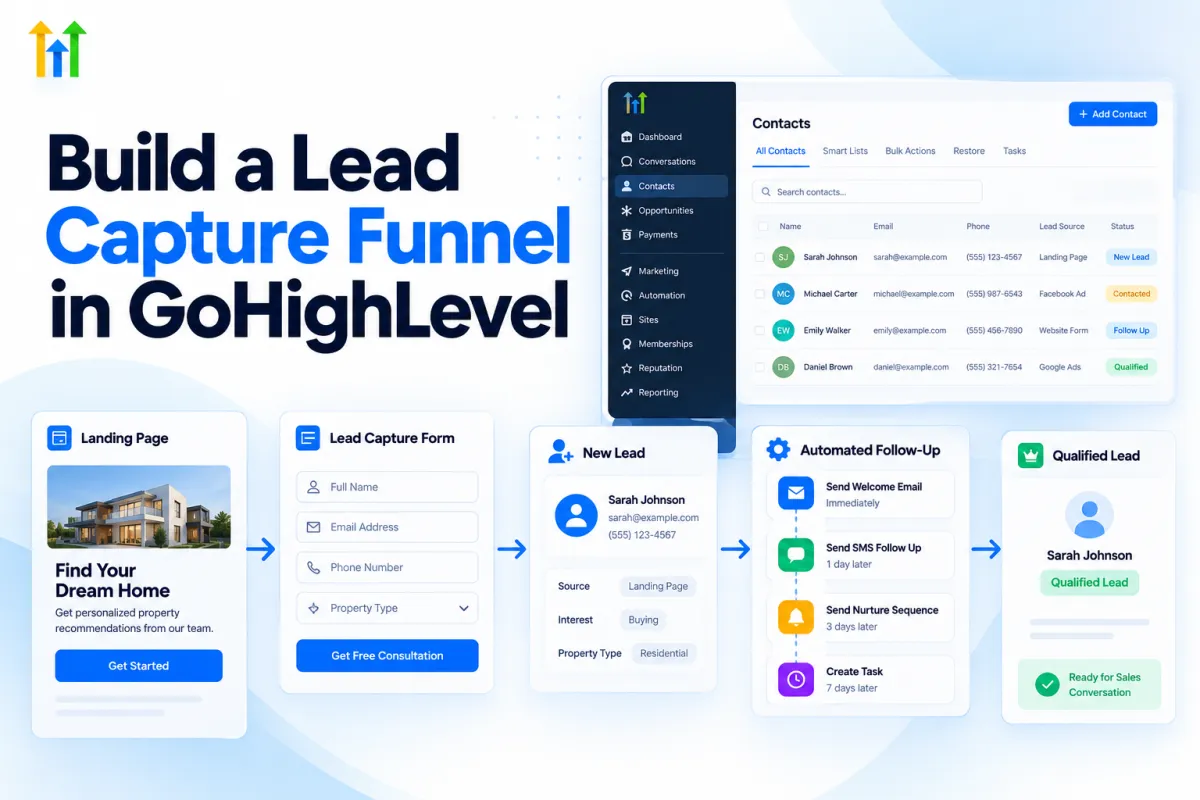
Build a Lead Capture Funnel in GoHighLevel: Step-by-Step Guide
How to Build a Lead Capture Funnel in GoHighLevel
Introduction
A steady flow of leads is essential for almost every growing business. But getting visitors to your website is only the first step. The real challenge is turning those visitors into identifiable leads and making sure their information reaches the right follow-up process.
With "GoHighLevel", you can build a lead capture funnel that combines landing pages, forms, CRM records, workflows, and automated follow-up in one system. GoHighLevel currently supports creating funnels from scratch, templates, or Funnel AI, while its Funnel and Website builders also allow you to create or reuse forms and surveys directly inside the builder.
This guide explains how to build a "lead capture funnel in GoHighLevel", how the different pieces work together, and what you should consider before sending traffic to your funnel.
What Is a Lead Capture Funnel?
A "lead capture funnel" is a series of steps designed to turn a visitor into a lead by collecting useful contact information.
A simple funnel might look like this:
Traffic → Landing Page → Lead Form → CRM → Automated Follow-Up
For example, a potential customer clicks an advertisement and arrives on your landing page. The page explains your offer and includes a form asking for their name, email address, phone number, or other relevant information.
After they submit the form, their information can be stored in GoHighLevel and used to start an automated workflow.
The goal isn't to collect as much information as possible. Instead, the funnel should collect the information you actually need to take the next step with the lead.
Why Build a Lead Capture Funnel in GoHighLevel?
One advantage of building the process inside GoHighLevel is that the landing page, form, CRM, and automation can work together.
Capture Leads Directly Into Your CRM
HighLevel contact forms can collect standard contact information as well as custom fields. When a new lead submits a HighLevel form, the contact can be created in the CRM so the information is available for follow-up.
Start Follow-Up Automatically
A form submission can trigger a workflow. The "Form Submitted" workflow trigger can be configured for a specific form, allowing you to start actions such as follow-up messages, notifications, tasks, or other automation.
Build a More Organized Sales Process
You can continue the automation after capturing the lead by assigning the lead to a team member, adding tags, creating an opportunity, or starting a nurture sequence.
For example:
Form Submitted → Create/Update Opportunity → Notify Sales Team → Follow-Up Email
HighLevel's documentation also provides an example of using a Form Submitted trigger to automatically create an opportunity in a selected pipeline and stage.
What You Need Before Building Your Funnel
Before opening the funnel builder, decide what you want the funnel to accomplish.
You should have:
A clear offer
A specific target audience
A landing page goal
A form or survey
The contact information you need
A follow-up plan
A workflow
A thank-you or next-step experience
The more clearly these pieces are defined, the easier it will be to build the funnel.
Step-by-Step: How to Build a Lead Capture Funnel in GoHighLevel
Step 1: Define Your Funnel Goal
Start with one clear objective.
Your funnel could be designed to:
Generate consultation requests
Collect quote requests
Offer a free resource
Capture webinar registrations
Generate service inquiries
Collect applications
Avoid trying to make one landing page accomplish several unrelated goals.
If the purpose is to generate consultation requests, the page should make that outcome obvious.
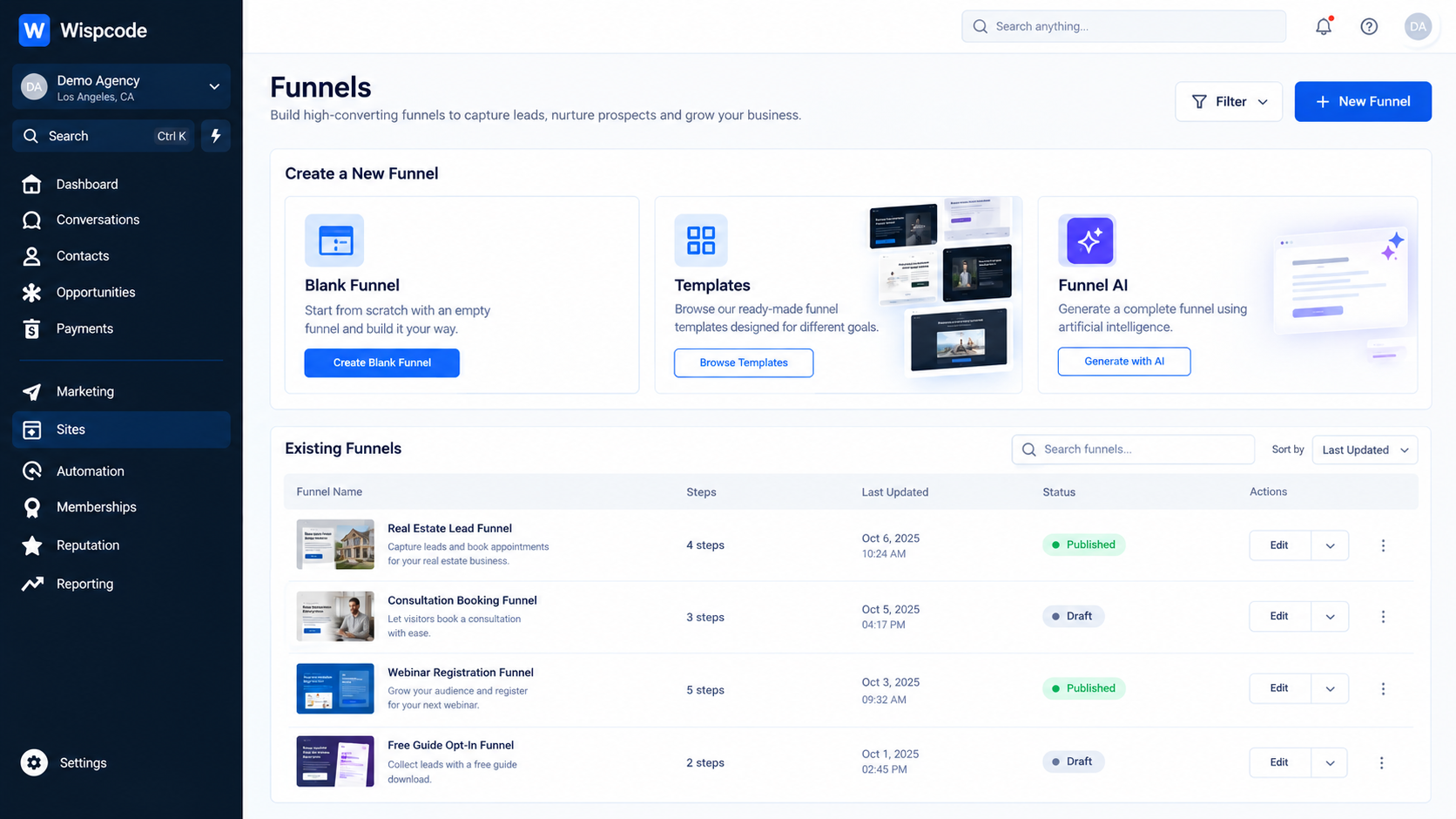
Step 2: Create Your Funnel
In GoHighLevel, go to "Sites → Funnels" and create a new funnel.
GoHighLevel currently provides options including:
Blank
Templates
Funnel AI
Templates can help you start faster, while a blank funnel gives you more control over the structure and design.
Choose the approach that matches your experience and project requirements.
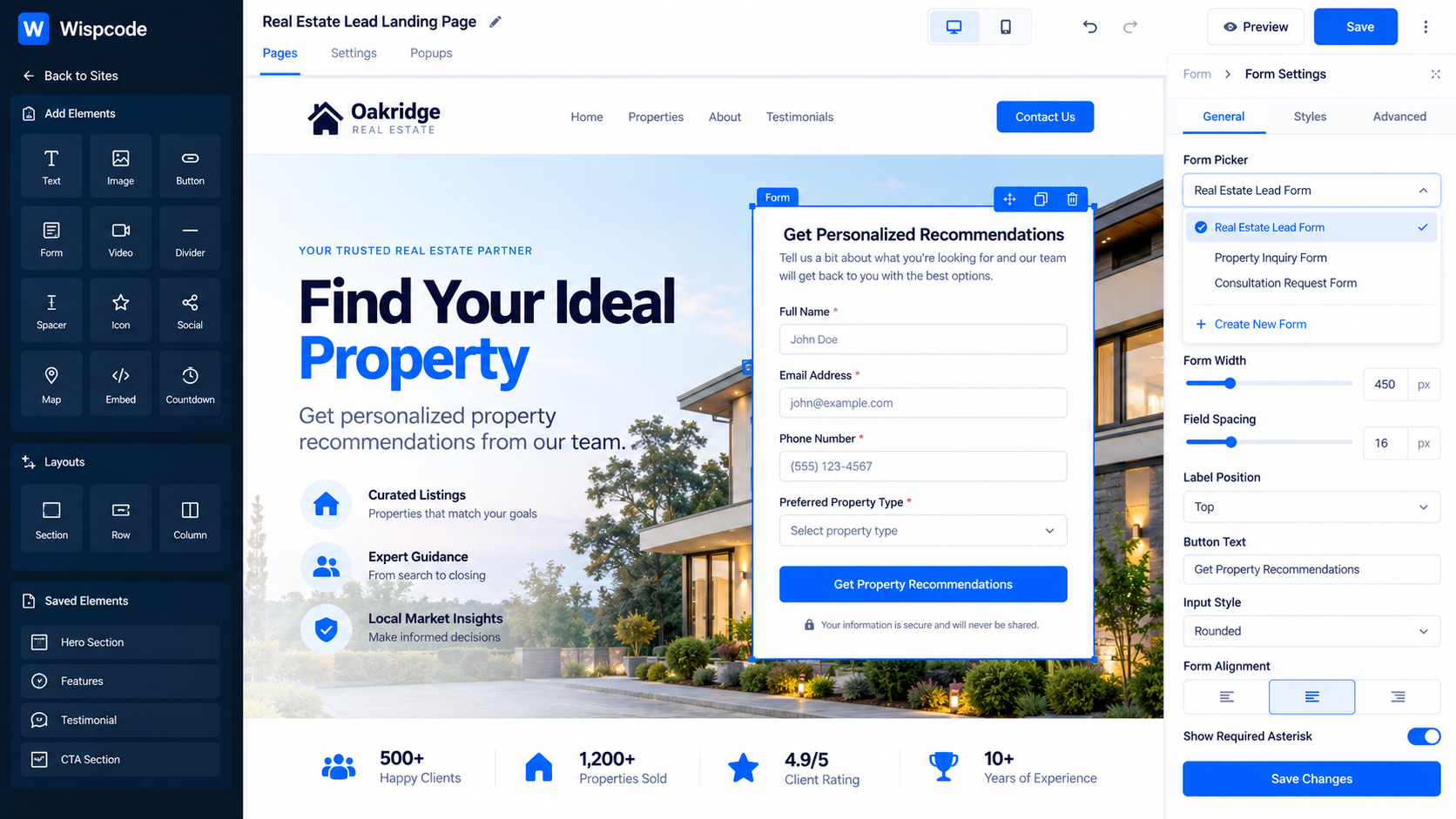
Step 3: Build the Landing Page
Your landing page is where visitors decide whether they want to become leads.
A basic lead capture page should clearly communicate:
What is the offer?
Who is it for?
Why should the visitor care?
What should they do next?
A simple structure could include:
Strong headline
Short explanation of the offer
Key benefits
Supporting information or proof
Lead capture form
Clear call-to-action
Keep the page focused. If the visitor has to figure out what action they should take, the funnel needs improvement.
Step 4: Create Your Lead Capture Form
Next, add a form to your funnel.
HighLevel's current Funnel and Website builder allows forms and surveys to be created or added directly within the builder. You can create a new form, use a prebuilt option, or reuse an existing form through the Form Picker.
For a basic lead capture funnel, you might request:
First name
Last name
Email
Phone number
You can also add custom fields when additional information is genuinely useful.
Step 5: Keep the Form Simple
One common mistake is asking for too much information.
If someone only needs to provide their name and email to receive a resource, don't necessarily ask them to complete a long questionnaire.
However, additional fields can make sense when you need to qualify leads.
For example, a consulting business might ask:
Company name
Business size
Main challenge
Desired service
The right number of fields depends on the purpose of the funnel.
Step 6: Configure the Form Submission
Once your form is ready, make sure it is connected properly to your funnel and that the fields are mapped correctly.
HighLevel's form builder supports standard and custom fields, allowing you to structure the information captured from visitors.
Test the form yourself before sending traffic to the page.
Submit it with test information and confirm that the contact appears correctly inside the CRM.
Step 7: Create a Thank-You Experience
After the visitor submits the form, give them a clear next step.
Depending on your funnel, you could:
Display a confirmation message
Redirect them to a thank-you page
Provide access to a resource
Explain what happens next
Send them toward an appointment booking page
The important thing is that the visitor should know what happens after submitting their information.
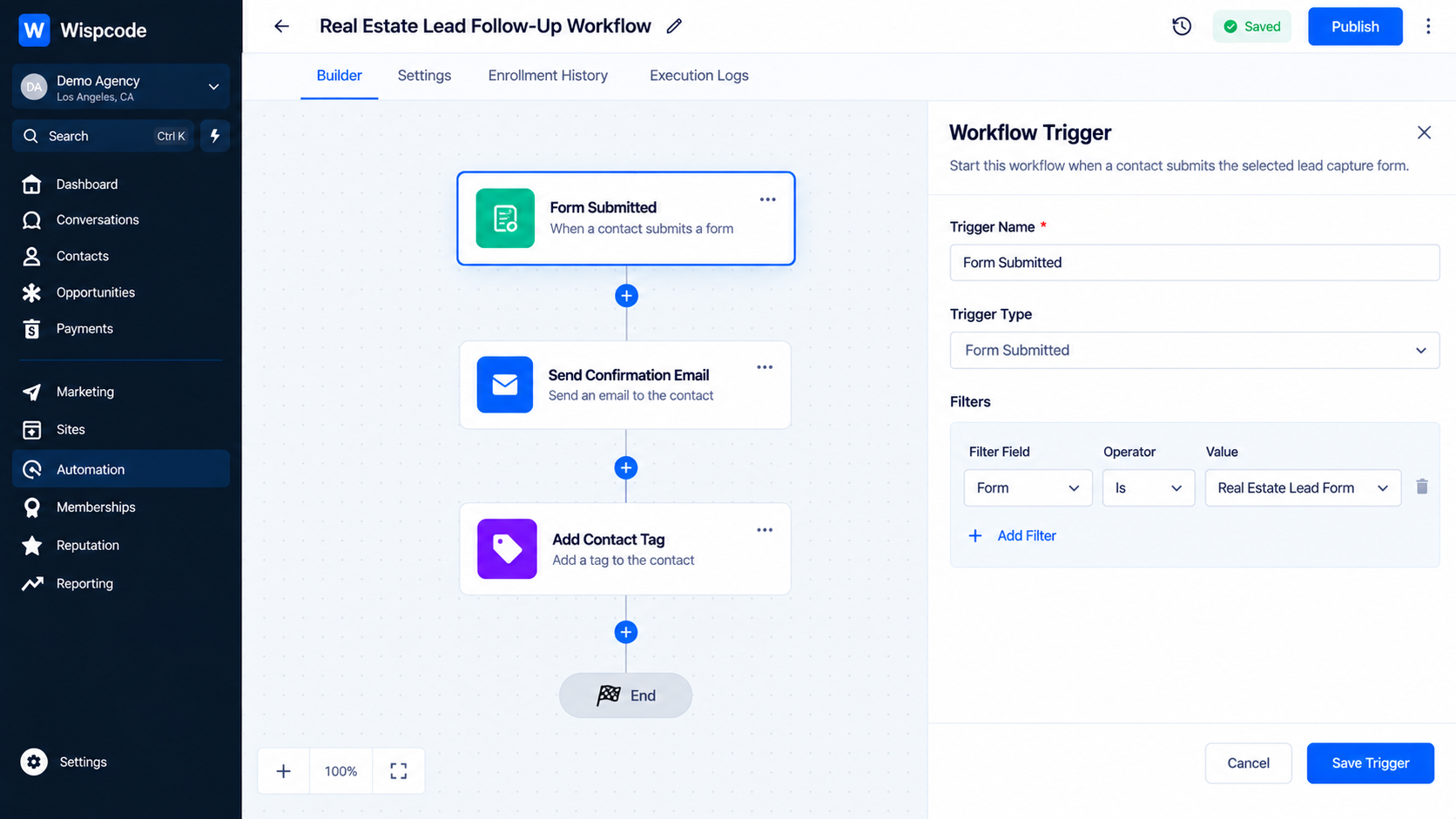
Step 8: Create the Follow-Up Workflow
This is where your lead-capture funnel becomes an automated lead-management system.
Go to "Automation → Workflows" and create a workflow using the "Form Submitted" trigger.
Select the form that should start the workflow. HighLevel allows you to use filters such as selecting the specific form that activates the workflow.
A basic workflow might look like:
Form Submitted
↓
Create/Update Opportunity
↓
Send Internal Notification
↓
Send Follow-Up Email
↓
Wait
↓
Continue Nurture
The exact actions should depend on your sales process.
Step 9: Add Lead Qualification or Routing
Not every lead needs the same follow-up.
If your form collects qualifying information, you can use workflow logic to route leads appropriately.
For example:
High-value lead → Sales notification
General inquiry → Standard nurture
Existing customer → Customer workflow
This prevents every lead from being treated the same way.
Step 10: Create an Opportunity When Appropriate
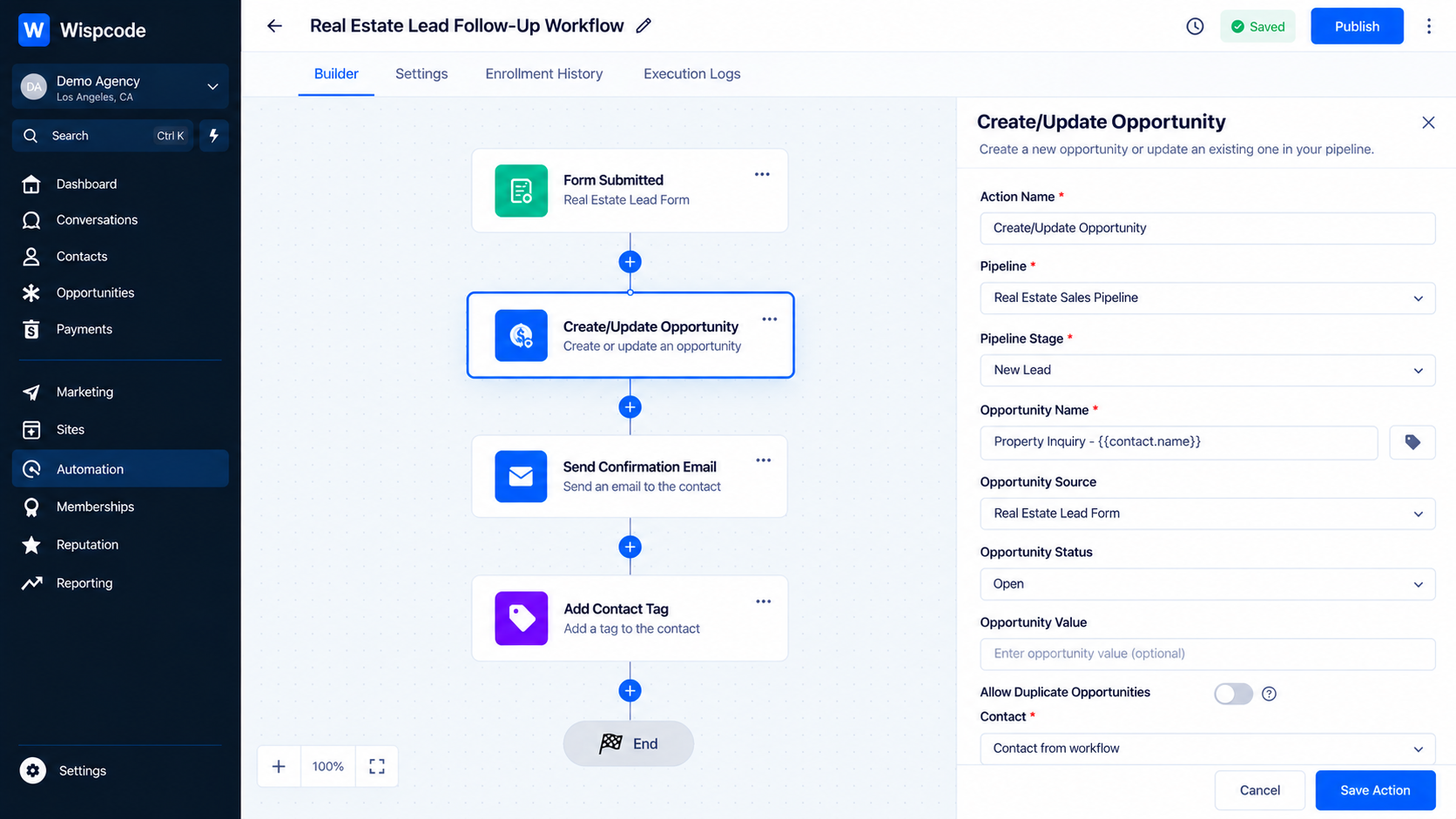
If your business uses a sales pipeline, you can automatically create or update an opportunity after a qualified lead submits the form.
For example:
Form Submitted → Create/Update Opportunity → New Lead
HighLevel supports creating opportunities through workflow automation and allows you to select the relevant pipeline and stage.
This gives your sales team a visible record of the lead's progress, rather than leaving the submission only in the contact database.
Practical Lead Capture Funnel Examples
Free Consultation Funnel
A service business could create:
Advertisement → Landing Page → Consultation Form → CRM → Sales Notification → Appointment
The form captures basic contact information, while the workflow alerts the appropriate team member and continues the follow-up process.
Lead Magnet Funnel
A marketing agency could offer a free guide.
The funnel could be:
Landing Page → Email Form → Contact Created → Resource Delivery → Nurture Sequence
This allows the business to provide immediate value while continuing communication with the lead.
Quote Request Funnel
A home service business might use:
Landing Page → Quote Form → CRM → Opportunity → Team Notification → Follow-Up
Additional custom fields could collect information needed to understand the request before the sales team contacts the prospect.
How to Improve Your Lead Capture Funnel
Building the funnel is only the beginning. You should also make it easy for visitors to complete.
Use One Primary Call-to-Action
Don't give visitors too many competing options.
If the goal is lead capture, make the form and its CTA visually obvious.
Explain the Value Before Asking for Information
People are more likely to submit information when they understand what they will receive in return.
Clearly explain the benefit of completing the form.
Use Relevant Custom Fields
Custom fields are useful when they help your team qualify or understand a lead.
Avoid adding fields simply because the information might be useful someday.
Make the Follow-Up Relevant
A person who requests a consultation should not receive the same sequence as someone who downloaded a general guide.
Use the information collected by the funnel to make the next steps more relevant.
Test the Entire Journey
Don't only test whether the form works.
Test the complete process:
Landing Page → Form → Contact Record → Workflow → Notification → Follow-Up
A funnel isn't finished when the page looks good. It is finished when the complete journey works correctly.
Common Lead Capture Funnel Mistakes
Making the Page Too Complicated
Too much information can distract visitors from the primary action.
Keep the page focused on one goal.
Asking for Too Much Information
Long forms can create unnecessary friction. Only request information that serves a clear purpose.
Forgetting the Automation
Capturing a lead without a follow-up process creates additional manual work.
Connect your form submission to the appropriate workflow.
Not Testing the CRM Record
A successful form submission doesn't automatically mean your entire process is configured correctly.
Verify that the contact information is stored correctly and that the workflow starts as expected.
Sending Every Lead to the Same Process
Different lead types may require different follow-up.
Use the information available from your form and CRM to create appropriate routing.
Frequently Asked Questions
1. Can I create a lead capture form directly inside a GoHighLevel funnel?
Yes. GoHighLevel currently allows you to create or add forms and surveys directly within the Funnel and Website builders.
2. What happens when someone submits a GoHighLevel form?
A submitted GoHighLevel form can create or update contact information in the CRM and can trigger a workflow using the "Form Submitted" trigger.
3. Can I automate follow-up after a lead submits a form?
Yes. You can use the Form Submitted workflow trigger to start automated actions and follow-up processes after a form submission.
4. Can a form submission create a sales opportunity?
Yes. A workflow can use a form submission to create or update an opportunity in a selected pipeline and stage.
5. How many fields should a lead capture form have?
There is no universal number. Use only the fields needed for your offer, qualification process, and follow-up. A shorter form is often appropriate when you only need basic contact information.
Conclusion
A successful "lead capture funnel in GoHighLevel" is more than a landing page with a form. It is a connected process that takes a visitor from initial interest to a captured contact and then into the appropriate follow-up journey.
Start with a clear goal, build a focused landing page, create a simple form, connect it to the CRM, and use workflows to automate what happens after submission. When appropriate, you can also create opportunities and route leads into your sales process.
The biggest advantage comes from connecting these pieces. Instead of simply collecting contact information, you create a repeatable system that can capture, organize, and follow up with leads automatically.
If you keep the funnel focused, test every step, and build automation around your actual sales process, GoHighLevel can become the central system for turning website traffic into actionable leads.
Need Expert Help with GoHighLevel?
New to GoHighLevel and ready to get started? Buy your GoHighLevel account here and launch with confidence.
Already know what you need and want our team to handle everything, from complete setup and customization to funnels, workflows, automations, CRM, and pipelines? Click here.



