

How to Grant Course Access Automatically in GoHighLevel
How to Grant Course Offers Automatically Using the Course Grant Offer Action in GoHighLevel
Introduction
For online course creators, coaches, agencies, and businesses selling digital education products, delivering access to customers quickly is a critical part of the customer experience. Nobody wants to manually add every new customer to a course, membership, or training program after a purchase.
This is where GoHighLevel Course Grant Offer Action helps businesses automate the process. By using GoHighLevel workflows, businesses can automatically provide course or membership access whenever a specific action takes place, such as a successful purchase, form submission, or customer onboarding event.
Instead of spending hours managing enrollments manually, businesses can create a smoother customer journey where access is granted automatically and customers can start learning immediately.
In this guide, we will explore how the Course Grant Offer Action works, how businesses can use it, and why it is an important part of GoHighLevel membership automation.
What Is the Course Grant Offer Action in GoHighLevel?
The Course Grant Offer Action in GoHighLevel is a workflow action that allows businesses to automatically grant access to a specific course offer inside their GoHighLevel membership area.
When a contact meets a specific workflow trigger, GoHighLevel can automatically assign them access to the selected course offer. This eliminates the need for an administrator to manually add users after every purchase or registration.
This feature is especially useful for businesses that sell:
Online courses
Coaching programs
Training memberships
Educational resources
Digital products with learning materials
By connecting course delivery with GoHighLevel CRM automation, businesses can create a complete automated customer experience from payment to onboarding.
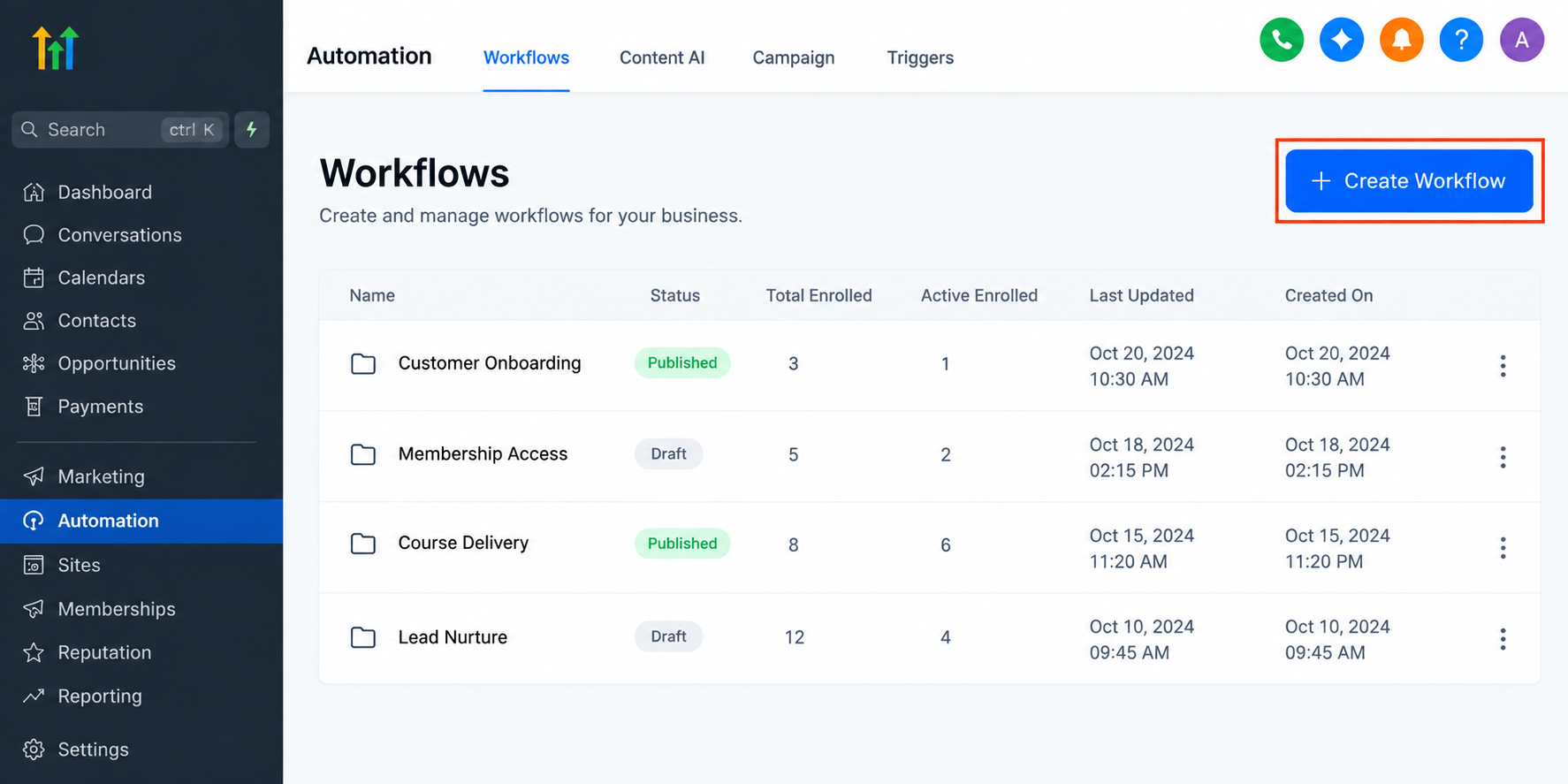
How Course Grant Offer Automation Works in GoHighLevel
The process follows a simple automation flow:
Trigger → Workflow Action → Course Access Granted → Customer Experience
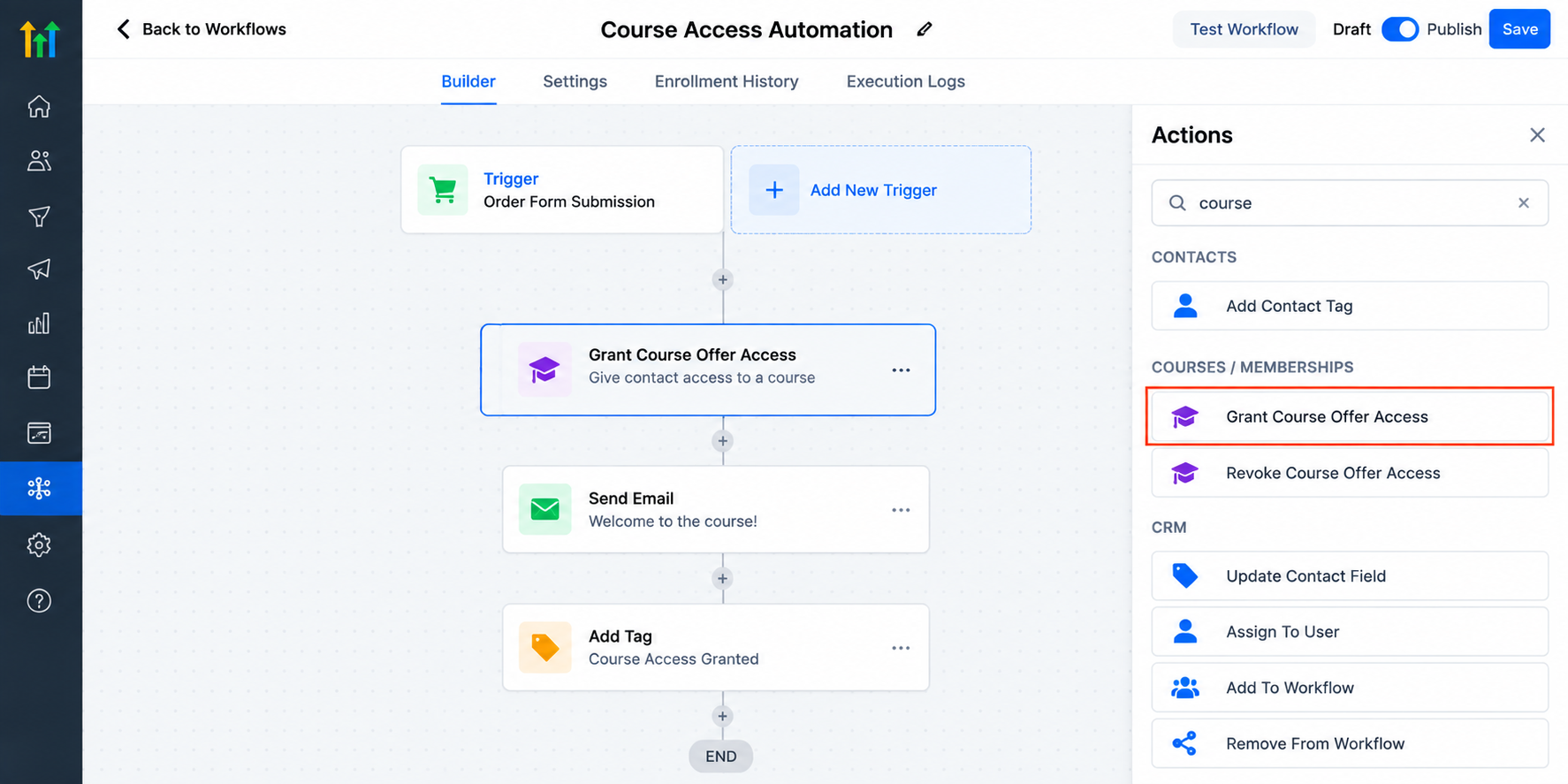
1. Trigger: A Customer Completes an Action
Every GoHighLevel workflow starts with a trigger. The trigger tells the system when automation should begin.
Common triggers include:
A customer purchases a product
A contact submits a form
A tag is added to a contact
A customer enters a specific pipeline stage
Another workflow action updates the contact
For example, when someone purchases an online coaching program, the purchase event can trigger a workflow that automatically provides access to the training material.
2. Workflow Action: Grant Course Offer Access
After the trigger occurs, the workflow runs the Course Grant Offer Action.
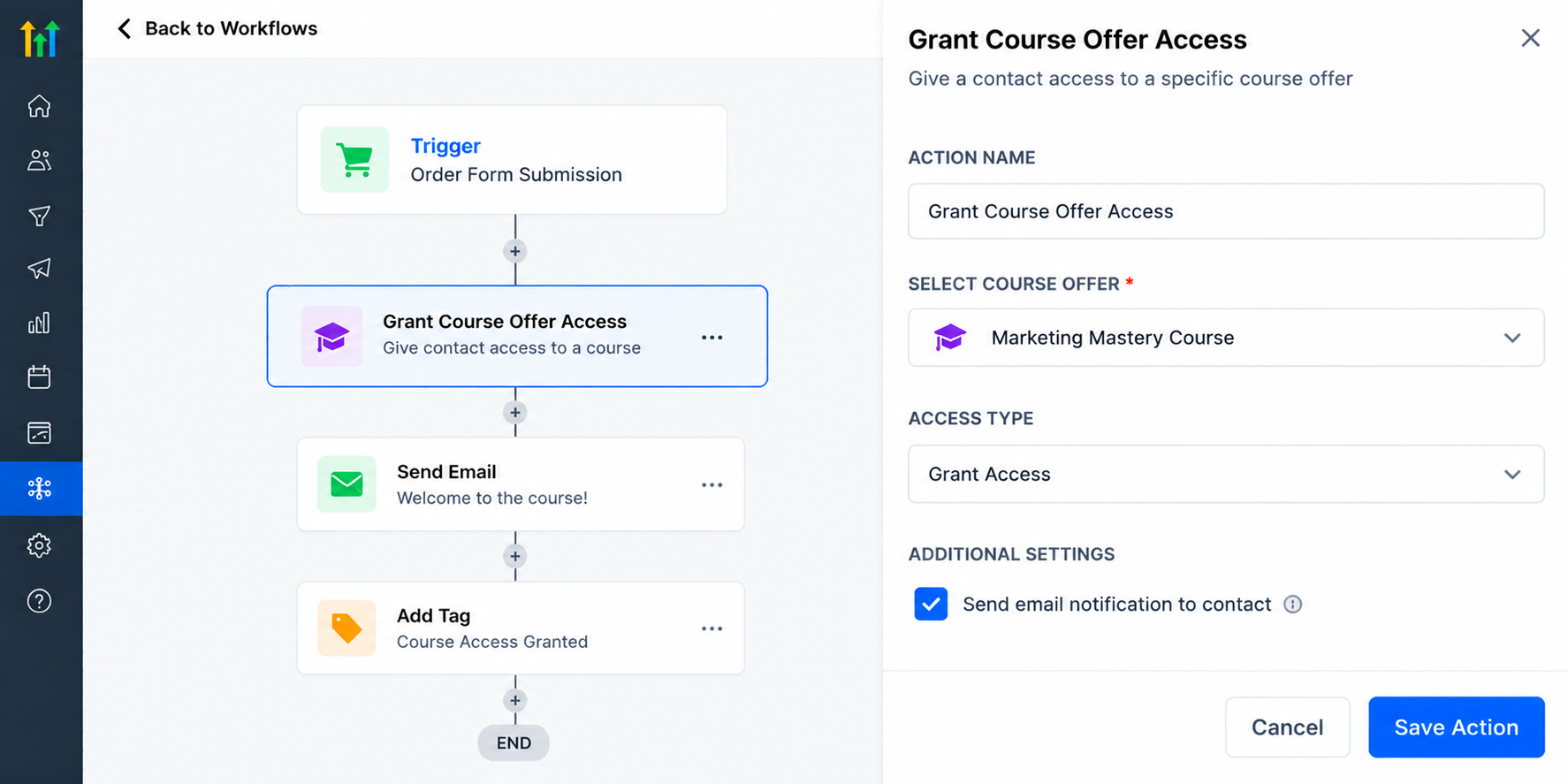
This action allows GoHighLevel to assign the selected course offer to that contact. Once completed, the customer receives access according to the membership setup configured inside the account.
This removes manual enrollment tasks and ensures every customer receives their product consistently.
3. Customer Receives Course Access
After access is granted, businesses can continue building the customer journey using additional GoHighLevel workflow actions.
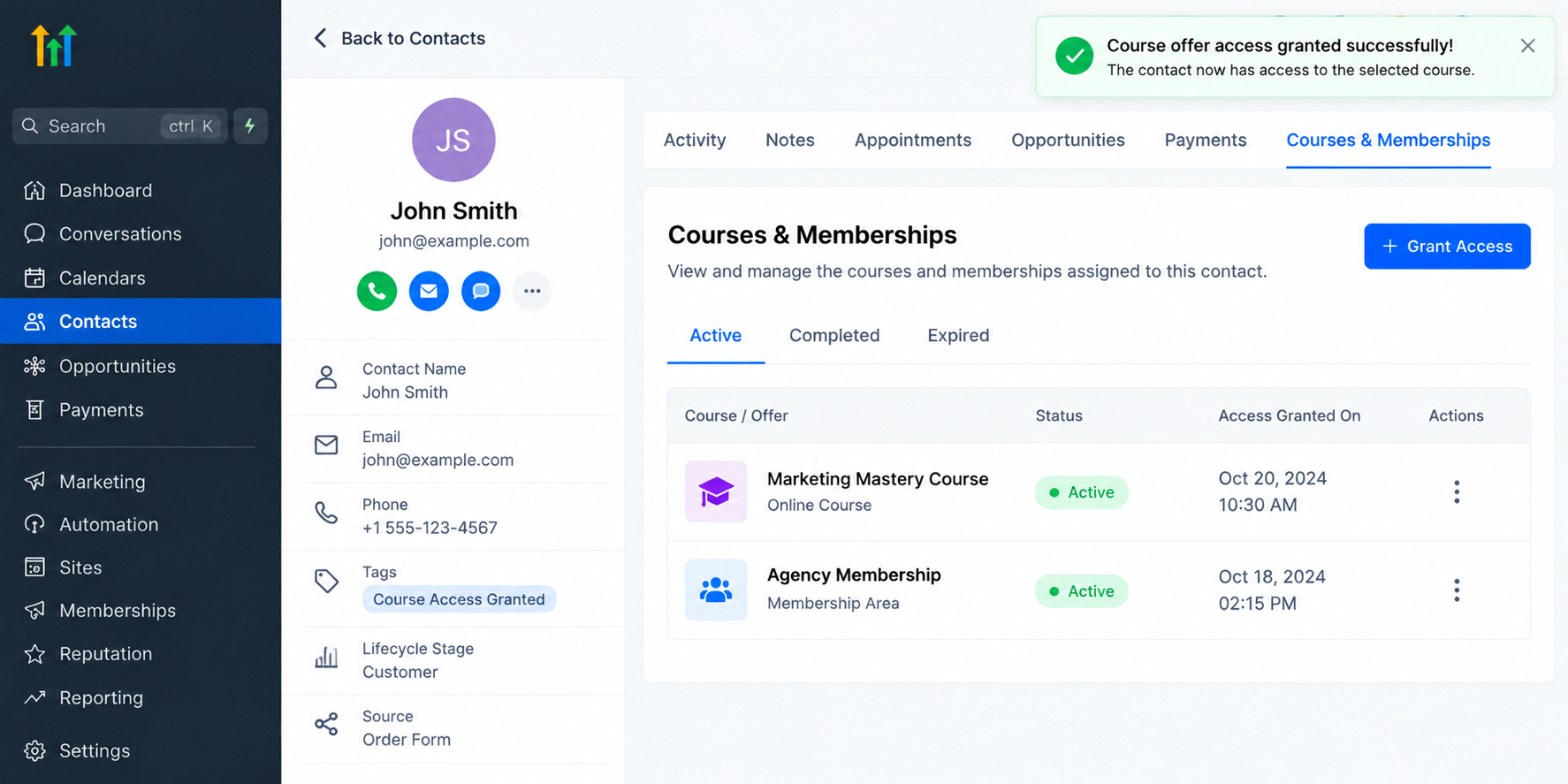
For example, businesses can automate:
Welcome emails
Course instructions
Login information
Follow-up messages
Additional onboarding steps
This creates a complete membership onboarding experience without requiring manual involvement.
Why Businesses Should Automate Course Access
Managing digital products manually becomes difficult as a business grows. A few customers may be easy to handle, but hundreds of students or members require a reliable system.
Using GoHighLevel membership automation provides several advantages.
1. Reduce Manual Administration
Without automation, someone needs to review purchases, find customer information, and manually provide access.
This creates unnecessary administrative work and increases the possibility of mistakes.
With automated course access, businesses can allow their system to handle enrollment while their team focuses on higher-value activities.
2. Provide Instant Customer Access
Customers expect quick delivery after purchasing a digital product.
A delay between payment and course access can create confusion and support requests.
Automating this process allows customers to move from purchase to learning without waiting for manual approval.
3. Improve Membership Onboarding
The first interaction after a purchase is important. A well-organized onboarding experience helps customers understand what happens next.
Businesses can combine the Course Grant Offer Action with other GoHighLevel workflows to create a structured onboarding sequence.
For example:
Customer purchases a coaching program
Workflow grants course access
Customer receives a welcome email
Customer receives instructions for getting started
Follow-up reminders encourage engagement
This creates a professional experience from the beginning.
Practical Use Cases for Course Grant Offer Automation
Online Course Creators
An online instructor selling a marketing course can automatically grant access when a student completes a purchase.
The student immediately receives access to the lessons without the creator manually adding them.
Coaches and Consultants
A business coach offering a six-week training program can automate enrollment after registration.
The system can provide access to training materials while also sending onboarding communication.
Agencies Selling Training Programs
Marketing agencies that provide client education portals can use automation to organize customer access.
For example, when a client signs up for a training package, GoHighLevel can automatically provide access to the relevant resources.
Businesses Creating Internal Training Systems
Companies can also use membership automation for employee education, customer training, or private learning communities.
The same automated process helps keep access management organized.
Building Scalable Learning Systems With GoHighLevel CRM Automation
One of the biggest benefits of using GoHighLevel for course delivery is that businesses can connect their CRM, workflows, and membership systems together.
Instead of using separate tools for customer management and course delivery, businesses can create connected customer journeys inside one platform.
A scalable system might look like this:
Lead enters CRM
Customer completes signup or purchase
Workflow automatically grants course access
Customer receives onboarding communication
Additional follow-ups improve engagement
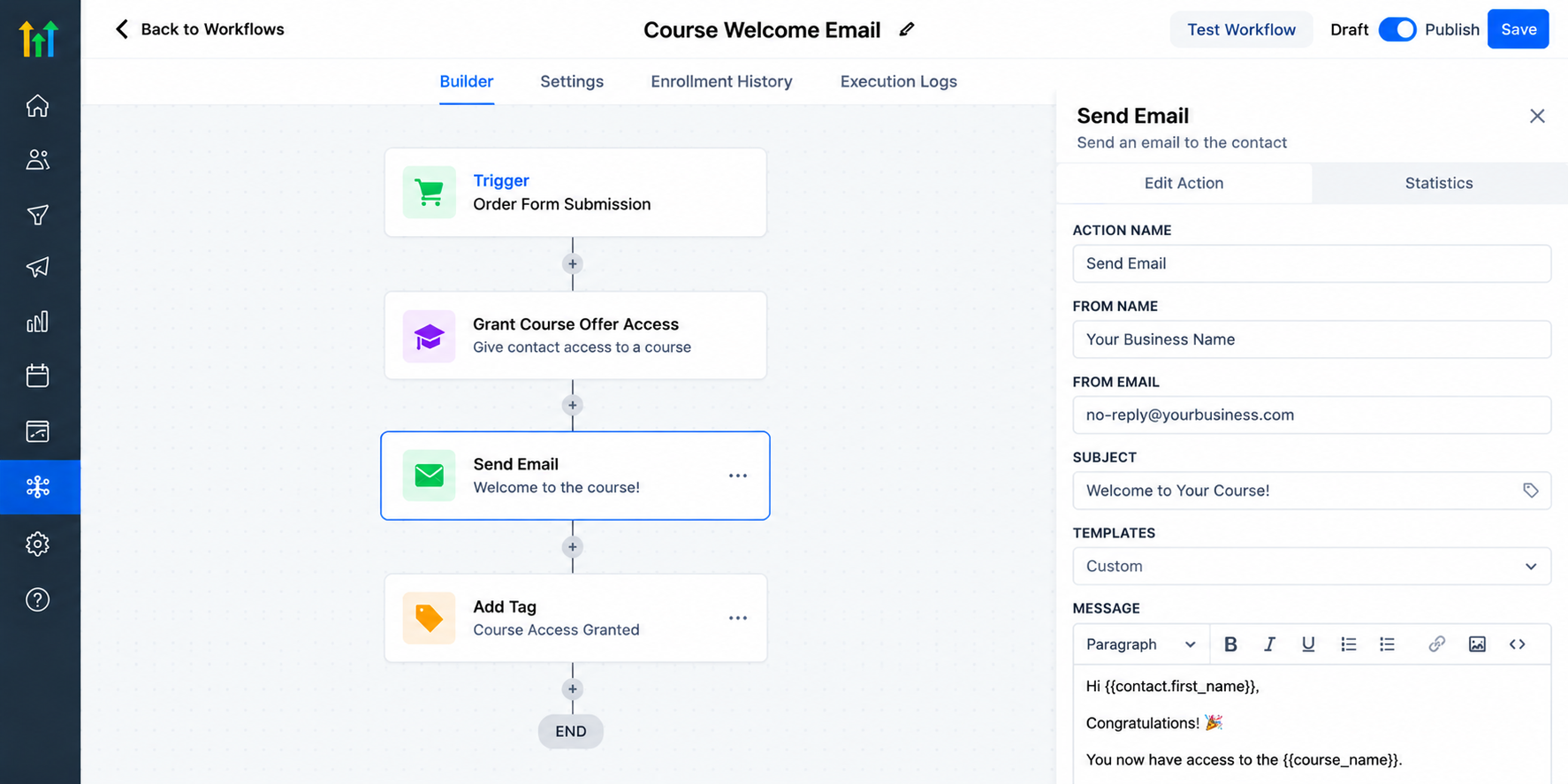
GoHighLevel workflow showing an automated customer journey that delivers course access and sends onboarding communication after enrollment.
This approach helps businesses create repeatable processes that work even as the number of customers increases.
Important Considerations Before Setting Up Automation
Before creating a Course Grant Offer workflow, businesses should make sure their course offers and membership products are properly configured inside GoHighLevel.
Access availability and certain capabilities can depend on the account setup, subscription plan, and enabled features.
It is also important to test workflows before launching them to customers. A simple test purchase or test contact can help confirm that the correct offer is being granted and the onboarding sequence works as expected.
Conclusion
The GoHighLevel Course Grant Offer Action gives businesses a simple way to automate course access and improve the way customers receive digital products. By connecting triggers, workflow actions, and membership delivery, businesses can remove manual enrollment tasks and create smoother customer experiences.
Whether you are an online course creator, coach, agency owner, or business building training programs, GoHighLevel workflows can help you build a reliable system for delivering education at scale.
Automating course access is not just about saving time. It is about creating a professional customer journey where every new member receives the right access, at the right time, through a system designed to grow with your business.
Frequently Asked Questions (FAQs)
1. What is the Course Grant Offer Action in GoHighLevel?
The Course Grant Offer Action in GoHighLevel is a workflow action that automatically provides access to a selected course offer or membership product when a contact meets a specific trigger condition. It helps businesses automate course enrollment instead of manually adding every customer.
2. How can I automatically grant course access after a purchase in GoHighLevel?
You can automate course access by creating a GoHighLevel workflow that starts when a customer completes a purchase or another defined action. The workflow can then use the Course Grant Offer Action to provide access to the selected course offer automatically.
3. Can GoHighLevel automatically add customers to a membership program?
Yes, GoHighLevel can automate membership onboarding by using workflows connected with course and offer access. When a contact meets the required trigger, the workflow can grant access to the appropriate membership offer.
4. What businesses can use GoHighLevel course automation?
GoHighLevel course automation can be useful for:
Online course creators
Coaches and consultants
Marketing agencies
Training companies
Businesses offering educational programs
Communities and membership-based businesses
It helps these businesses deliver digital products without manually managing every enrollment.
5. What is the workflow structure for automating course access in GoHighLevel?
A typical automation follows this structure:
Trigger → Course Grant Offer Action → Course Access Granted → Customer Onboarding
For example, when a customer purchases a training program, the workflow automatically grants access and can continue with welcome emails or onboarding steps.
Need Expert Help with GoHighLevel?
New to GoHighLevel and ready to get started? Buy your GoHighLevel account here and launch with confidence.
Already know what you need and want our team to handle everything, from complete setup and customization to funnels, workflows, automations, CRM, and pipelines? Click here.



