

GoHighLevel Google Ads Analytics for Better Marketing Decisions
Complete Guide to Google Ads Reporting in GoHighLevel
Introduction
Running Google Ads campaigns is only part of a successful marketing strategy. To improve results, businesses need to understand how their campaigns are performing. Metrics such as clicks, impressions, conversions, and advertising costs provide valuable insights that help marketers optimize campaigns and make better decisions.
GoHighLevel simplifies this process with its built in Google Ads Reporting feature. Instead of switching between multiple platforms to review campaign data, businesses can access important advertising metrics directly inside GoHighLevel. This allows agencies and business owners to monitor campaign performance alongside CRM data, lead activity, and other marketing reports.
Whether you manage campaigns for your own business or multiple clients, Google Ads Reporting helps you stay informed and make data driven decisions with greater confidence.
What Is Google Ads Reporting in GoHighLevel?
Google Ads Reporting is a reporting feature that displays important campaign data inside your GoHighLevel account. After connecting your Google Ads account, the platform collects advertising metrics and presents them through easy to understand reports and dashboards.
Instead of logging into several platforms to review campaign performance, businesses can monitor advertising data from the same system they use for CRM, marketing automation, and customer management.
Having campaign performance available alongside other business metrics provides a more complete view of your marketing efforts.

Connect Your Google Ads Account
Before reports become available, your Google Ads account must be connected to GoHighLevel. Once the connection is established, campaign data begins syncing automatically, allowing you to review advertising performance without leaving the platform.
A successful connection keeps your reports updated and provides a centralized location for monitoring multiple campaigns. This is especially helpful for agencies managing several client accounts because everything can be reviewed from one dashboard.

Monitor Key Campaign Metrics
Understanding campaign performance starts with tracking the right metrics. Google Ads Reporting allows businesses to review important data that shows how their advertising campaigns are performing over time.
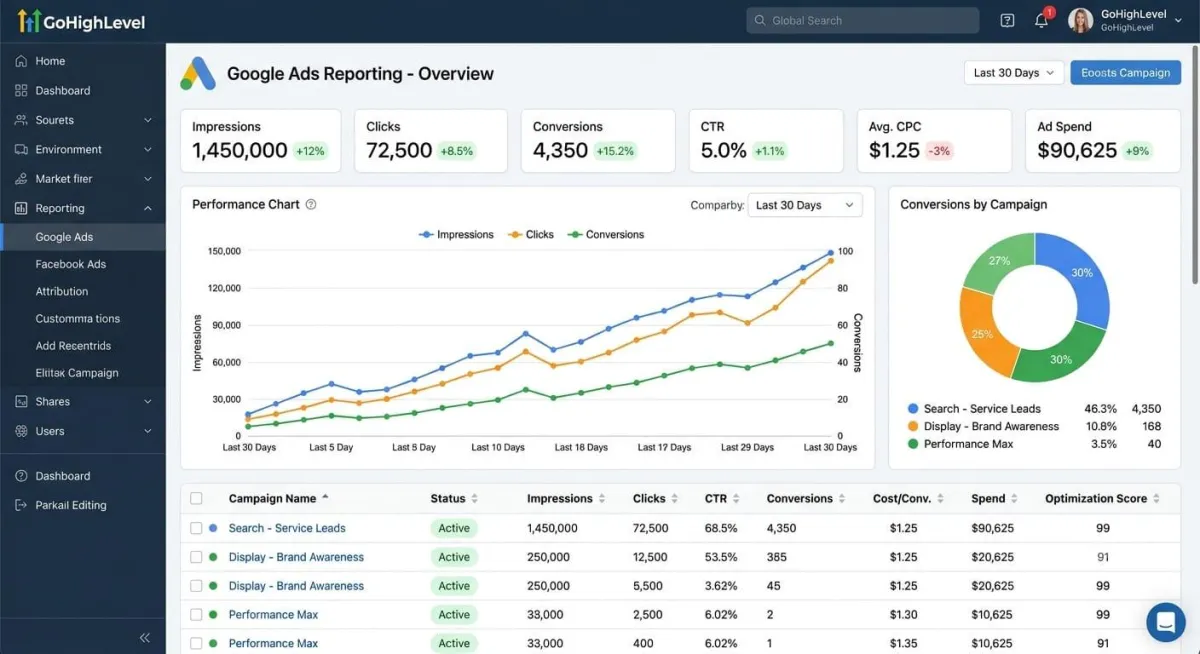
Users can monitor information such as impressions, clicks, click through rates, conversions, and advertising spend from one reporting dashboard. Reviewing these metrics regularly helps identify successful campaigns while highlighting areas that may require optimization.
Having these insights available inside GoHighLevel makes it easier to evaluate marketing performance without switching between different reporting tools.

Analyze Campaign Performance with Clear Reports
Collecting campaign data is only useful when you know how to interpret it. GoHighLevel organizes Google Ads metrics into visual reports that make it easier to identify trends, compare campaign performance, and evaluate marketing results.
Instead of reviewing individual campaigns one by one, businesses can quickly see which ads are generating the most clicks, conversions, and leads. These insights help marketing teams understand where advertising budgets are producing the best return and where adjustments may be needed.
Reviewing campaign reports regularly allows businesses to improve their advertising strategy and achieve better long term results.

Make Better Marketing Decisions
Successful advertising is based on continuous improvement. Google Ads Reporting gives businesses the information they need to evaluate campaign performance and make informed decisions using real data instead of assumptions.
By reviewing reports regularly, businesses can identify high performing campaigns, recognize underperforming ads, and understand which strategies generate the best results. This allows marketing teams to optimize future campaigns, improve lead generation, and make better use of their advertising budget.
Having Google Ads reporting integrated with GoHighLevel also provides a more complete view of the customer journey, making it easier to connect advertising performance with business growth.

Why Google Ads Reporting Matters
Understanding advertising performance is essential for businesses that want to improve their return on investment. Without accurate reporting, it becomes difficult to know which campaigns are producing quality leads and which ones need improvement.
GoHighLevel simplifies campaign analysis by bringing Google Ads data into the same platform used for CRM, automation, and customer management. This centralized approach saves time and helps businesses make faster, data driven decisions.
Whether you manage a single advertising account or multiple client campaigns, Google Ads Reporting provides valuable insights that support smarter marketing strategies.
Conclusion
GoHighLevel Google Ads Reporting helps businesses monitor campaign performance without switching between multiple platforms. By bringing advertising data into one centralized dashboard, users can review important metrics, compare campaign performance, and make informed marketing decisions more efficiently.
For agencies, marketers, and business owners, this feature provides a clearer understanding of advertising performance while supporting better budget management and long term growth. Using accurate reports to guide your marketing strategy can lead to stronger campaigns and improved business results.
Frequently Asked Questions (FAQs)
1. What is Google Ads Reporting in GoHighLevel?
Google Ads Reporting is a feature that displays your Google Ads campaign data inside GoHighLevel, allowing you to monitor advertising performance from one dashboard.
2. Can I connect my Google Ads account to GoHighLevel?
Yes. After connecting your Google Ads account, campaign data is automatically synced and displayed in your reporting dashboard.
3. What metrics can I track in Google Ads Reporting?
You can monitor important metrics such as impressions, clicks, click through rate, conversions, advertising spend, and overall campaign performance.
4. Who should use Google Ads Reporting?
This feature is useful for agencies, marketing teams, and business owners who want to monitor and improve the performance of their Google Ads campaigns.
5. Why is Google Ads Reporting important?
It provides valuable campaign insights, helps optimize advertising strategies, improves budget allocation, and supports better marketing decisions through centralized reporting.
Need Expert Help with GoHighLevel?
New to GoHighLevel and ready to get started? Buy your GoHighLevel account here and launch with confidence.
Already know what you need and want our team to handle everything, from complete setup and customization to funnels, workflows, automations, CRM, and pipelines? Click here.



