

Workflow Automation Guide
Complete Guide to GoHighLevel Workflow Automation
Introduction
Every growing business faces the same challenge: repetitive tasks consume valuable time. Sending follow-up emails, responding to new leads, booking appointments, updating CRM records, assigning tasks, and reminding customers about upcoming meetings can quickly become overwhelming. As the number of leads increases, managing these activities manually often leads to delays, missed opportunities, and inconsistent customer communication.
This is where GoHighLevel Workflow Automation becomes a game changer. Instead of relying on manual processes, businesses can automate routine tasks and create seamless customer experiences from the first interaction to long-term retention. Whether you're a small business owner, marketing agency, consultant, or local service provider, automation helps you save time while ensuring every lead receives timely and consistent communication.
In this guide, you'll learn how GoHighLevel Automation works, explore its most valuable features, discover real-world business applications, and learn best practices for building effective workflows that support long-term growth.
What is GoHighLevel Workflow Automation?
GoHighLevel Workflow Automation is one of the platform's most powerful core features. It enables businesses to automate repetitive tasks by creating workflows that respond to specific customer actions or business events.
A workflow is built using three essential components:
Triggers that start the automation
Conditions that determine the path a contact follows
Actions that perform automated tasks
For example, when someone submits a contact form, a workflow can instantly send a welcome email, apply a contact tag, notify a sales representative, and schedule follow-up messages without requiring manual intervention.
Because these automations run automatically, businesses reduce human error, maintain consistent communication, and ensure that no lead is forgotten.
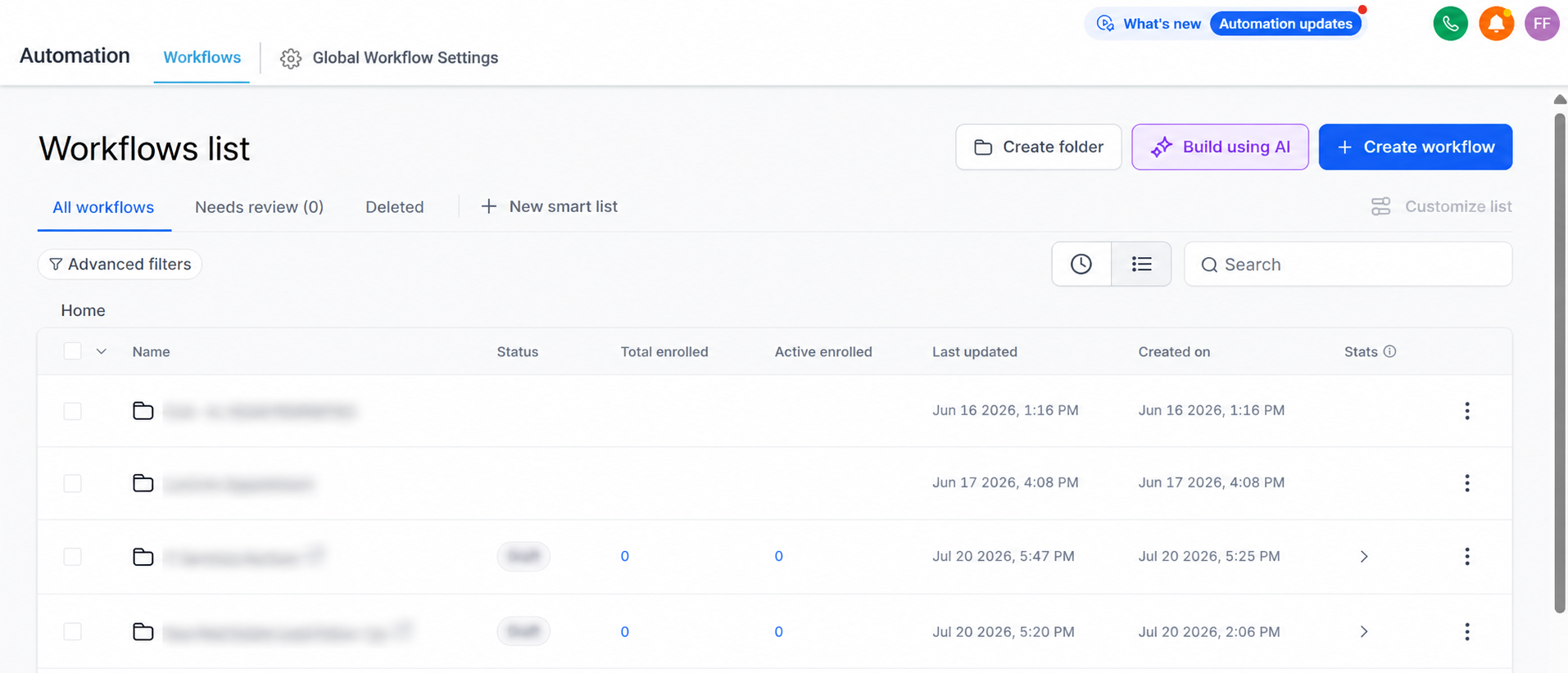
How GoHighLevel Workflow Automation Works
Understanding the workflow process is simple once you know its building blocks.
Triggers
Every workflow begins with a trigger. A trigger could be a form submission, appointment booking, inbound message, contact tag, payment event, or another supported activity.
Conditions
Conditions help determine which contacts should continue through specific parts of the workflow. This allows businesses to personalize automation based on customer behavior or information stored in the GoHighLevel CRM.
If/Else Logic
If/Else branches create different automation paths. For example, if a lead books an appointment, they receive confirmation and reminders. If they don't book, they automatically receive additional follow-up messages.
Wait Steps
Wait steps pause a workflow for a specific amount of time before continuing. This prevents contacts from receiving multiple messages at once and creates more natural communication.
Actions
Actions perform the actual work inside the workflow. These may include sending emails, delivering SMS messages, assigning tasks, updating opportunities, applying tags, or notifying team members.
Workflow Goals
Goals allow contacts to skip unnecessary steps once a desired action has been completed, helping keep customer journeys efficient and relevant.
Together, these elements create flexible Business Automation systems that adapt to different customer behaviors.
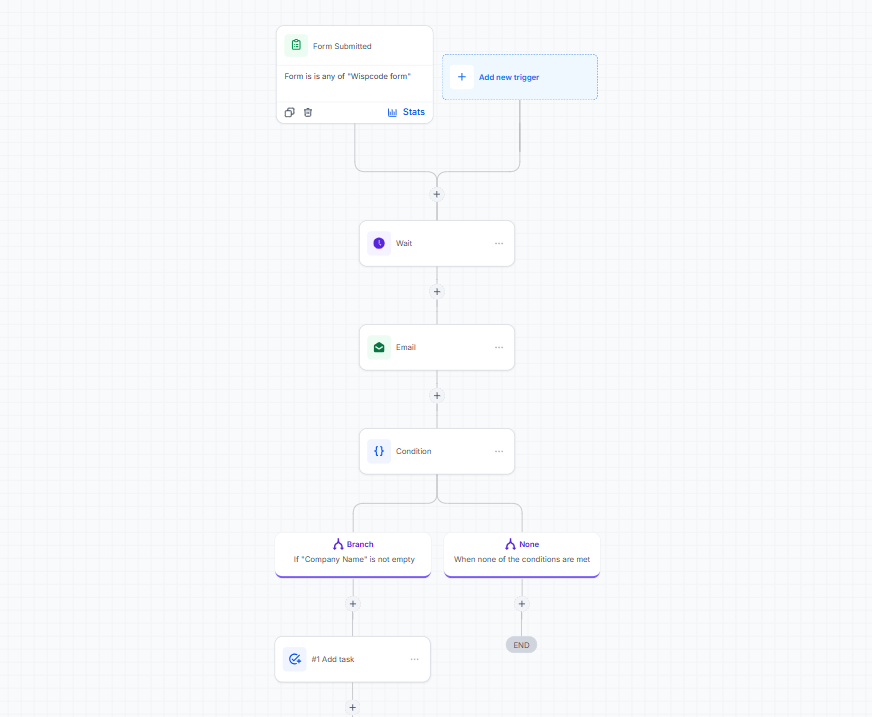
Key Features of GoHighLevel Workflow Automation
GoHighLevel Workflows include a wide range of automation capabilities that simplify daily operations.
Automated Email Campaigns
Automatically send welcome emails, onboarding sequences, educational content, or promotional campaigns after a lead enters your CRM.
SMS Automation
Send instant text messages for confirmations, promotions, or follow-ups, allowing businesses to communicate quickly with customers.
Missed-Call Text Back
If a business missed an incoming phone call, GoHighLevel can automatically send a text message acknowledging the missed call and encouraging the customer to reconnect.
Appointment Reminders
Reduce missed appointments by automatically sending reminder emails and SMS messages before scheduled meetings.
Follow-Up Sequences
Create Automated Follow-Up campaigns that continue nurturing leads until they book an appointment or respond.
Internal Notifications
Notify sales representatives or team members whenever a new lead enters the system or completes an important action.
Task Creation
Automatically assign tasks to staff members, ensuring important follow-up activities never get overlooked.
Contact Tagging
Apply tags based on customer behavior to improve segmentation and support more personalized Marketing Automation.
Opportunity and Pipeline Updates
Automatically move opportunities through sales pipelines as leads progress through different stages.
Lead Nurturing
Deliver educational emails, reminders, and offers over time to keep prospects engaged throughout the buying journey.
Review Requests
After a completed service or appointment, workflows can automatically send review requests to encourage customer feedback.
Workflow Branching
If/Else conditions allow different experiences for different customer actions, making Customer Journey Automation highly personalized.
Time Delays and Scheduling
Schedule messages for specific days or times, helping communication feel more natural and timely.
Trigger Links
Trigger Links allow workflows to react when recipients click specific links in emails, enabling more targeted follow-up based on engagement.
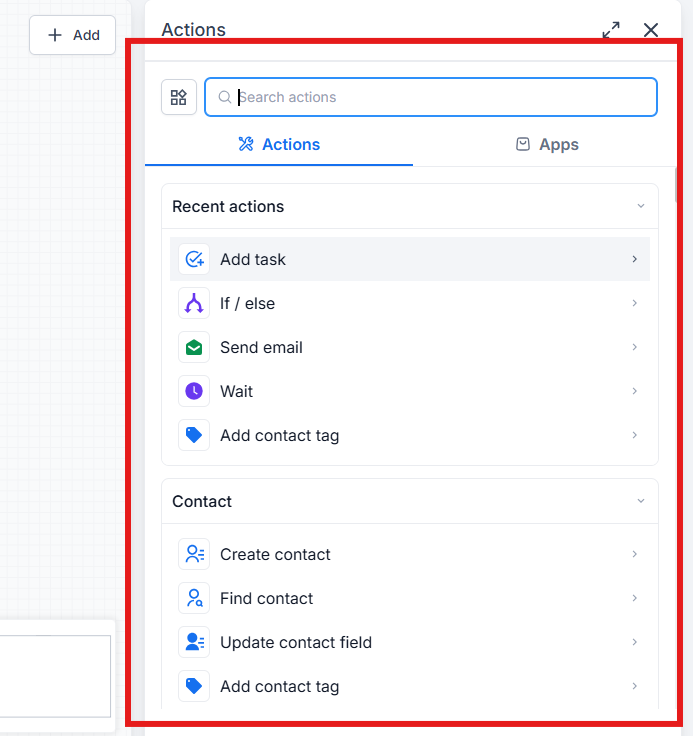
Real Business Use Cases
Businesses across many industries use GoHighLevel Workflow Automation to streamline operations.
A marketing agency can automatically send a welcome email after a prospect completes a consultation form, notify the assigned account manager, and schedule follow-up reminders.
A real estate company can instantly respond to new property inquiries with listing details while alerting an agent to contact the lead.
Healthcare clinics can automate appointment confirmations, reminder messages, and post-visit review requests to improve patient communication.
Coaches and consultants can nurture leads through educational email sequences before inviting them to schedule discovery calls.
Home service businesses can automatically confirm bookings, remind customers before appointments, and request reviews after completing the job.
Fitness studios can welcome new members, send class reminders, and re-engage inactive clients through automated campaigns.
Educational businesses can deliver enrollment information, onboarding emails, and course reminders without manual effort.
Benefits of Using Workflow Automation
Effective CRM Automation provides significant advantages for growing businesses.
It saves time by eliminating repetitive manual tasks while allowing teams to focus on higher-value activities.
Faster lead responses improve customer satisfaction and increase the likelihood of converting prospects into paying customers.
Consistent communication ensures every customer receives the right message at the right time, creating a better overall experience.
Automation also improves organization by keeping contact records updated, assigning tasks automatically, and maintaining accurate sales pipelines.
As businesses grow, Lead Automation and Sales Automation make it possible to handle more customers without proportionally increasing administrative workload.
Best Practices
To build reliable workflows, follow these proven recommendations:
Keep workflows simple and easy to manage.
Use clear, descriptive workflow names.
Test every workflow before publishing.
Avoid creating duplicate automations for the same trigger.
Use contact tags to improve audience segmentation.
Regularly monitor workflow performance.
Update workflows as business processes evolve.
Personalize automated messages with contact information whenever possible.
Common Mistakes to Avoid
Many automation issues can be avoided with proper planning.
Overly complex workflows are difficult to troubleshoot, so start simple and expand gradually.
Always include appropriate exit conditions to prevent contacts from remaining in workflows unnecessarily.
Avoid sending too many emails or SMS messages within short timeframes, as excessive communication can frustrate customers.
Test workflows thoroughly before activating them to verify that triggers, conditions, and actions perform as expected.
Choose triggers carefully so workflows start only when appropriate.
Use contact segmentation to deliver relevant messaging rather than sending identical communications to everyone.
Finally, review workflow performance regularly and refine automations as customer needs and business goals change.
Frequently Asked Questions
1. What is GoHighLevel Workflow Automation?
GoHighLevel Workflow Automation is a feature that automates repetitive business tasks such as sending emails and SMS messages, assigning tasks, updating CRM records, and managing customer follow-ups using triggers, conditions, and actions.
2. How do GoHighLevel Workflows work?
A workflow starts with a trigger, such as a form submission or appointment booking. It then follows a series of actions like sending emails, applying tags, or creating tasks and can use conditions, wait steps, and If/Else logic to personalize the customer journey.
3. Can GoHighLevel Workflow Automation send both emails and SMS messages?
Yes. GoHighLevel Workflows can automate email campaigns and SMS messages, making it easy to follow up with leads, send appointment reminders, and keep customers engaged without manual effort.
4. Which businesses benefit the most from GoHighLevel Workflow Automation?
Almost any service-based business can benefit, including marketing agencies, real estate companies, healthcare clinics, coaches, consultants, fitness studios, home service businesses, and local businesses that want to automate lead management and customer communication.
5. What are the best practices for creating GoHighLevel Workflows?
Keep workflows simple, test them before publishing, use clear naming conventions, avoid duplicate automations, segment contacts with tags, personalize messages, and regularly review workflow performance to ensure everything runs smoothly.
Conclusion
GoHighLevel Workflow Automation is far more than a simple automation feature. It's a complete business process automation system that helps businesses streamline communication, improve lead management, and create consistent customer experiences at scale.
By combining intelligent triggers, flexible conditions, automated actions, and personalized follow-up sequences, businesses can reduce manual work while building stronger relationships with customers. Whether you're automating appointment reminders, nurturing new leads, updating your GoHighLevel CRM, or managing complex customer journeys, well-designed workflows help your business operate more efficiently.
If you're ready to save time, improve productivity, and deliver a better customer experience, explore GoHighLevel Workflows and start automating the repetitive tasks that slow your business down. A thoughtfully designed automation system can become one of your most valuable tools for sustainable business growth.
Need Expert Help with GoHighLevel?
New to GoHighLevel and ready to get started? Buy your GoHighLevel account here and launch with confidence.
Already know what you need and want our team to handle everything, from complete setup and customization to funnels, workflows, automations, CRM, and pipelines? Click here.



