

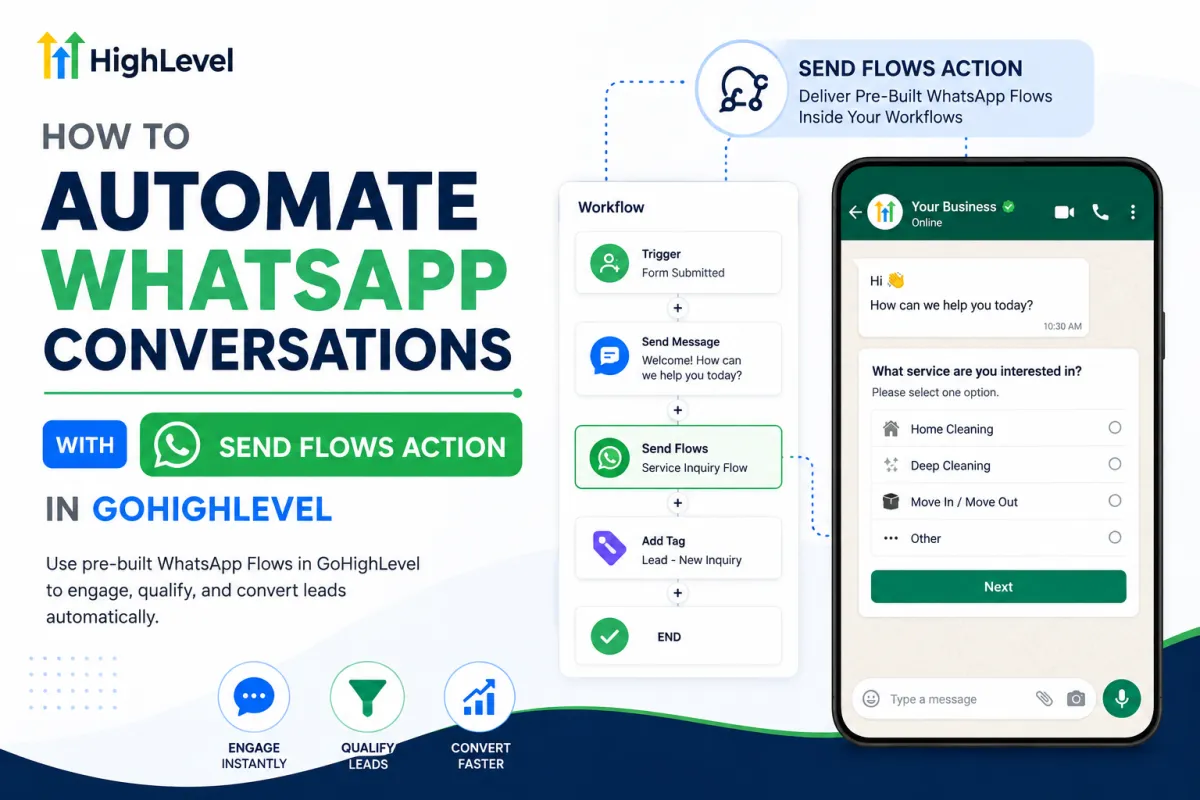
Automate WhatsApp Conversations with GoHighLevel Send Flows
How to Automate WhatsApp Conversations with Pre-Built Flows Using the Send Flows Action in GoHighLevel
WhatsApp can be one of the most convenient ways to communicate with leads and customers. But as conversation volume grows, convenience can quickly turn into repetitive work.
A new lead arrives. Your team asks what service they need. Then they ask for additional information. The next lead gets almost exactly the same questions. Soon, employees are spending valuable time manually guiding people through conversations that follow a predictable pattern.
This is where GoHighLevel WhatsApp automation becomes more strategic.
By combining WhatsApp Flows with the GoHighLevel Send Flows Action, businesses can deliver pre-built, structured interactions at appropriate points in an automated customer journey. Instead of relying entirely on message-by-message conversations, contacts can be guided through a more organized experience.
What Is the Send Flows Action in GoHighLevel?
The GoHighLevel Send Flows Action is a workflow action designed to send a WhatsApp Flow to a contact as part of an automation.
A WhatsApp Flow is different from simply sending another WhatsApp message. Regular messages are primarily conversational: the business sends a message, waits for a response, and continues the exchange.
A pre-built WhatsApp Flow provides a more structured interaction. It can guide a contact through a defined experience rather than requiring the business to recreate the same conversation manually every time.
Within GoHighLevel WhatsApp workflows, the Send Flows action becomes the delivery point. When a contact reaches that step in the workflow, the appropriate pre-built Flow can be sent as part of the broader automation strategy.
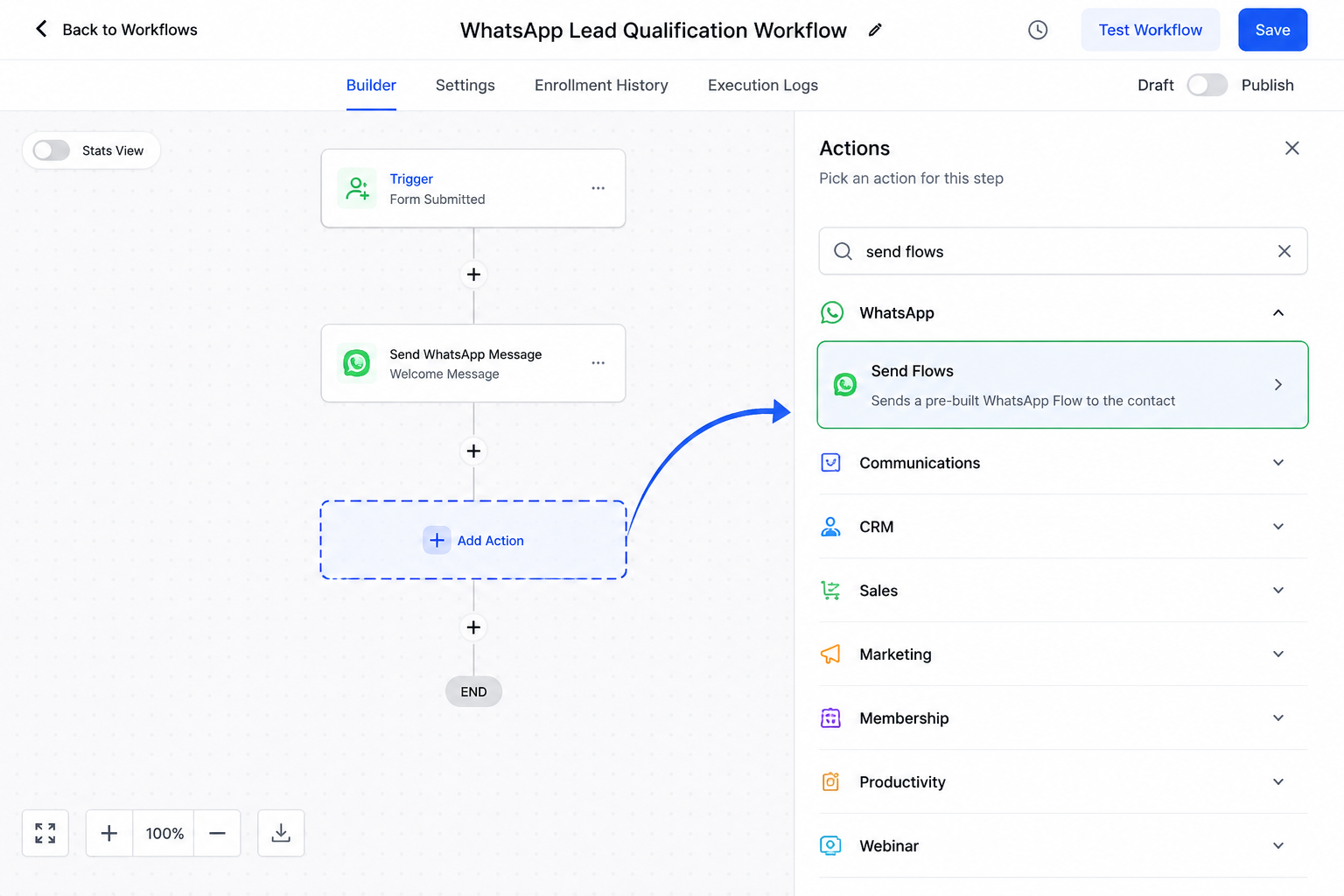
The important distinction is that Send Flows is not the same as Send WhatsApp Message, and a WhatsApp Flow should not be confused with a standard WhatsApp message template.
Why Pre-Built WhatsApp Flows Matter
The biggest advantage of WhatsApp Flows in GoHighLevel is not simply automation. It is structure.
Consider a business that repeatedly needs information from new inquiries. A staff member might normally ask one question, wait for an answer, send another question, and repeat the process.
That approach works, but it becomes inefficient at scale.
A well-designed Flow can organize predictable interactions into a consistent experience. That can reduce repetitive manual messaging, make information collection easier, and help contacts understand what they need to do next.
This can be particularly useful for lead qualification and customer intake, where the same basic information is frequently required.
Consistency matters too. Instead of different team members asking questions differently, pre-built WhatsApp Flows create a repeatable process while still leaving room for human conversations when they are needed.
How the Send Flows Action Works Inside a GoHighLevel Workflow
Conceptually, Send Flows in GoHighLevel can fit into an automation like this:
Workflow Trigger → Contact Enters Automation → Send Flows Action → Pre-Built WhatsApp Flow Sent → Contact Interacts with Flow → Customer Journey Continues
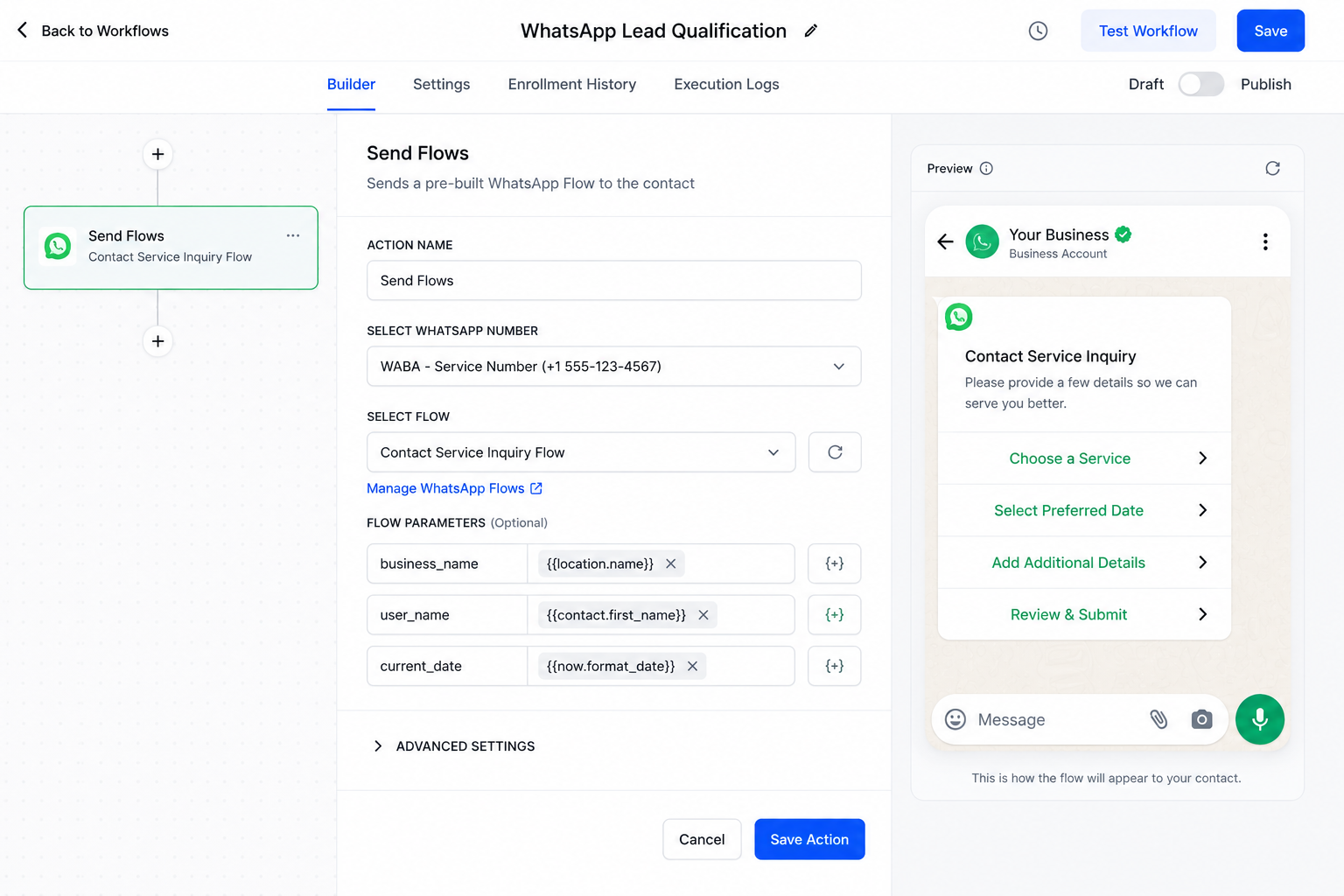
The workflow entry condition determines when the contact enters the automation.
At the appropriate stage, the Send Flows action delivers the selected WhatsApp Flow. The contact can then interact with that structured experience.
What happens afterward depends on how the broader system has been configured. Businesses should not assume every Flow interaction will automatically perform additional CRM actions without the required setup.
The key is to think of the Flow as one part of a larger customer journey rather than an isolated message.
Practical Example: Qualifying a New Service Lead
Imagine a home-service company generating leads from an advertising campaign.
The manual approach
A new inquiry arrives, and an employee opens WhatsApp.
They ask what service the person needs. After receiving an answer, they ask another qualifying question. Then another. The employee waits between responses, and different team members may handle the process differently.
Multiply that by dozens of inquiries and the repetitive workload becomes obvious.
The automated Flow approach
Instead, the business could design an appropriate pre-built Flow for initial qualification.
When the new lead reaches the relevant stage of a GoHighLevel workflow, the Send Flows action delivers that structured experience.
The contact can work through the defined interaction without an employee manually typing every predictable question.
This does not eliminate human communication. If the lead has an unusual request or needs help, a person can still become involved. Automation simply handles the structured part more efficiently.
How to Use the Send Flows Action
A beginner-friendly implementation generally looks like this:
Prepare your WhatsApp setup. Make sure the required WhatsApp functionality is properly connected and available for your account.
Prepare the WhatsApp Flow. Create or have the appropriate Flow available for the interaction you want to automate.
Open your GoHighLevel workflow. Use an existing automation or build one around the relevant customer journey.
Define the entry condition. Decide exactly when contacts should enter the workflow.
Add the Send Flows action. Place it at the logical point where the structured WhatsApp interaction should occur.
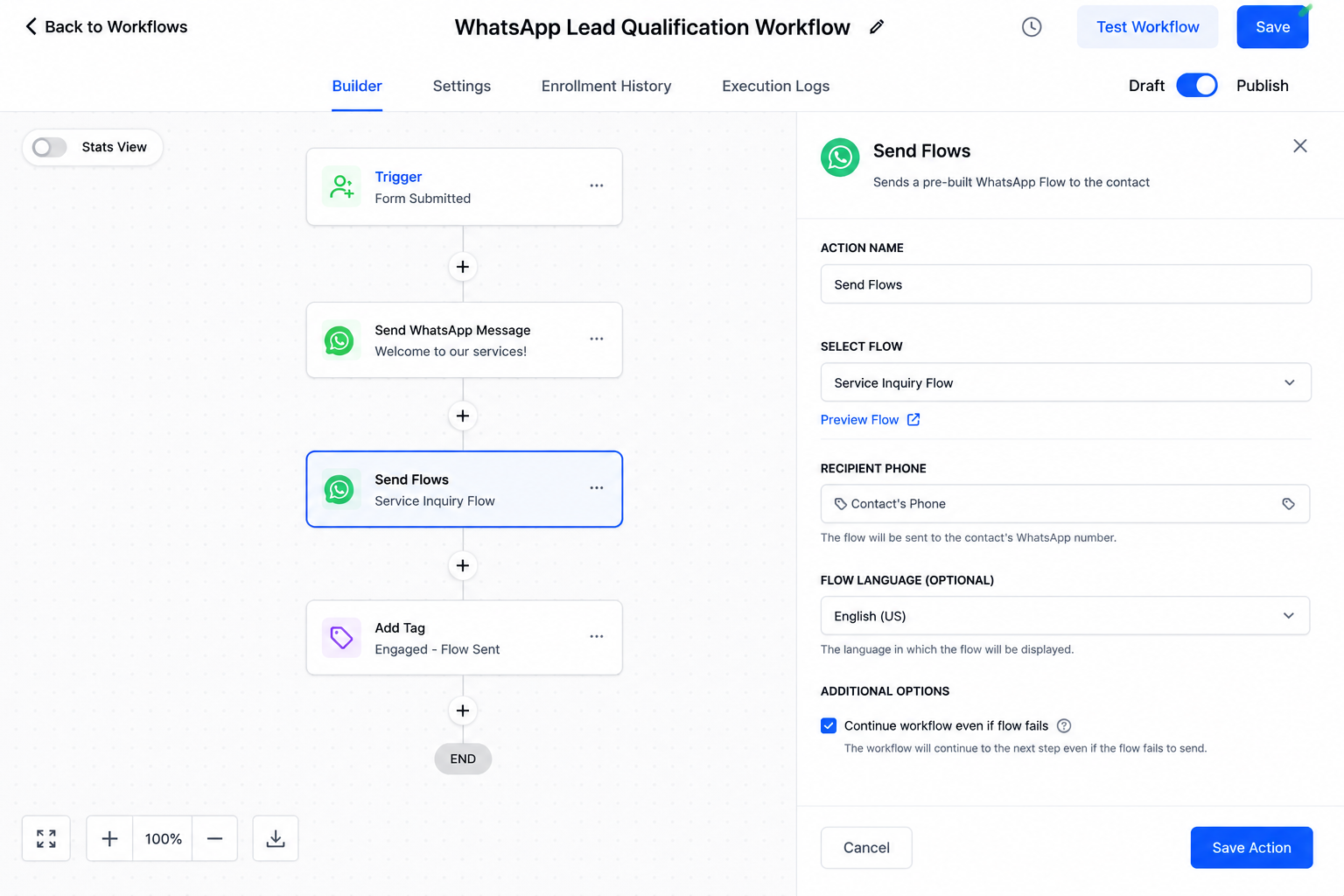
Configure the appropriate Flow. Select the Flow relevant to that particular customer journey.
Test before launch. Experience the automation from the contact's perspective before sending real traffic through it.
Testing is especially important because good WhatsApp workflow automation depends on timing and context, not just technical configuration.
Best Use Cases for WhatsApp Flows
Lead qualification is an obvious use case because businesses frequently need the same information from every new prospect. Customer intake can work similarly by organizing required information into a defined experience.
Appointment-related information collection is another strong scenario when businesses need details before the next stage of service.
Flows can also support service inquiries, registrations, onboarding, feedback, and other structured information-gathering processes.
The common thread is predictability: if your team repeatedly guides contacts through essentially the same interaction, a Flow may be worth considering.
Best Practices and Common Mistakes
Keep each Flow focused on a clear objective. Asking unnecessary questions creates friction instead of removing it.
Place the Send Flows action at a logical stage of the workflow, and test the entire journey rather than testing the action in isolation.
Most importantly, do not automate conversations simply because you can. Some interactions require judgment, empathy, clarification, or human assistance.
WhatsApp automation should make communication easier not become an excuse to bombard contacts with unnecessary messages.
Turn Repetitive WhatsApp Chats Into Structured Journeys
The real value of the GoHighLevel Send Flows Action is not that it can automatically send something.
Its value is that businesses can transform predictable WhatsApp interactions into structured, repeatable experiences that fit naturally into larger customer journeys.
Used thoughtfully, GoHighLevel WhatsApp automation can reduce repetitive work while keeping communication organized and scalable.
If your team repeatedly asks the same questions on WhatsApp, explore where a pre-built Flow could turn that conversation into a smarter GoHighLevel workflow.
Conclusion
The GoHighLevel Send Flows Action gives businesses a practical way to make repetitive WhatsApp interactions more structured and manageable. Instead of manually guiding every contact through the same series of questions or steps, businesses can use pre-built WhatsApp Flows at appropriate points within their GoHighLevel workflows.
The real advantage is not simply sending a Flow automatically. It is creating a more consistent customer journey while reducing unnecessary back-and-forth communication. Whether you are qualifying leads, collecting customer information, supporting onboarding, or handling structured service inquiries, WhatsApp Flows can help organize interactions that would otherwise require repeated manual effort.
The best results come from using automation strategically. Keep each Flow focused, place it at the right stage of the customer journey, test the complete experience, and make human support available whenever a conversation requires personal attention.
When used thoughtfully, GoHighLevel WhatsApp automation can turn predictable conversations into scalable, organized customer experiences without losing the human element that makes WhatsApp such a valuable communication channel.
Frequently Asked Questions
1. What is the Send Flows Action in GoHighLevel?
The Send Flows Action in GoHighLevel is a workflow action that allows businesses to send an appropriate pre-built WhatsApp Flow to a contact as part of an automated workflow. It is useful when contacts need to be guided through a structured WhatsApp interaction.
2. Is Send Flows the same as sending a WhatsApp message?
No. A standard WhatsApp message is primarily used for conversational communication, while a WhatsApp Flow provides a more structured and interactive experience. The Send Flows action is specifically designed to deliver these pre-built WhatsApp Flows within a GoHighLevel automation.
3. What can businesses use WhatsApp Flows for?
Businesses can use WhatsApp Flows for structured processes such as lead qualification, customer intake, appointment-related information collection, service inquiries, registrations, onboarding, feedback, and other situations where contacts need to provide information or follow defined steps.
4. Can GoHighLevel Send Flows completely replace human conversations?
No. GoHighLevel WhatsApp automation is best used for predictable and repetitive interactions. Human involvement is still important when contacts have unusual questions, need clarification, require personalized assistance, or encounter situations that cannot be handled effectively through a predefined Flow.
5. What should I do before using the Send Flows Action with real contacts?
Make sure your WhatsApp setup and required Flow are properly prepared, place the Send Flows action at the appropriate point in your GoHighLevel workflow, and test the complete customer experience before activating it for real contacts. Testing helps ensure the Flow appears at the right stage and supports the intended customer journey.
Need Expert Help with GoHighLevel?
New to GoHighLevel and ready to get started? Buy your GoHighLevel account here and launch with confidence.
Already know what you need and want our team to handle everything, from complete setup and customization to funnels, workflows, automations, CRM, and pipelines? Click here.



