

WhatsApp Contact Info Update
GoHighLevel WhatsApp Update: Collect Phone Numbers from WhatsApp Username Contacts
A WhatsApp conversation can start with a customer, but that does not always mean you have a fully usable contact record.
When a customer using a WhatsApp username messages your business, WhatsApp may share their username instead of their phone number. You can have an active conversation with the person, yet still be missing the phone number that makes the contact easier to reach, export, or use in phone-based follow-up.
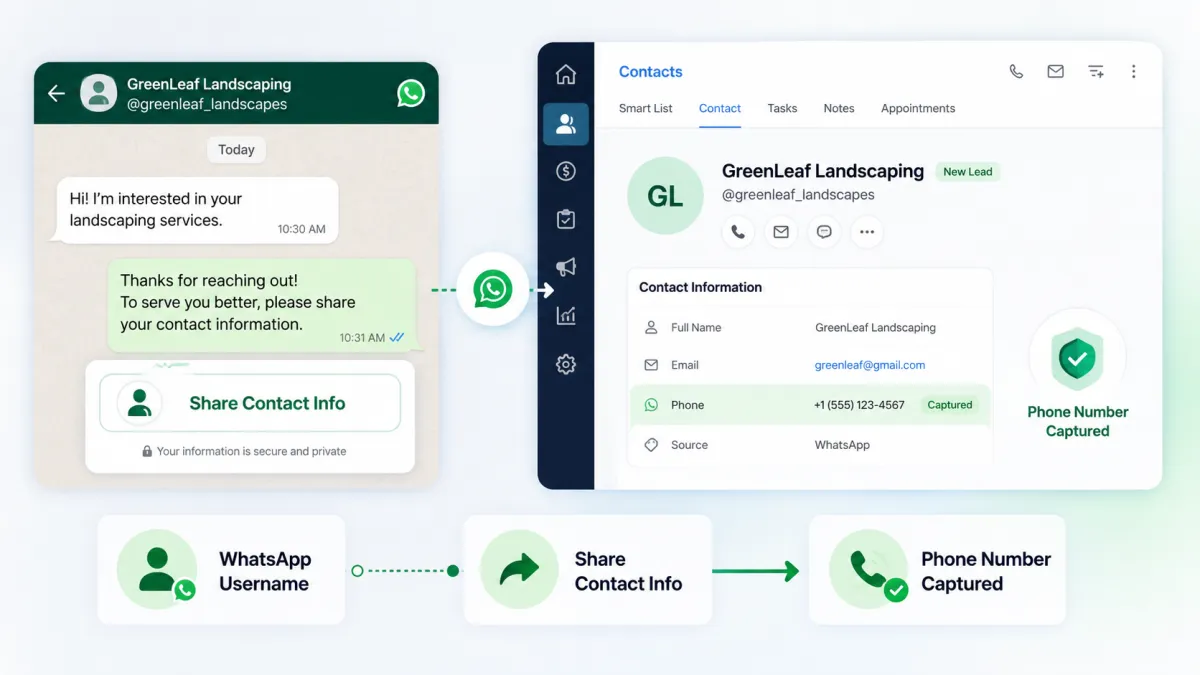
GoHighLevel is addressing this gap with a new Share contact info capability for WhatsApp. Businesses can now request a customer's phone number through a one-tap button or automate the request through a workflow.
The result is a simpler way to turn a username-only lead into a more complete, contactable contact.
What Happens When a WhatsApp Username Adopter Messages You?
The challenge starts with the information available when the conversation begins.
If a customer uses a WhatsApp username, WhatsApp shares only that username with the business, not the customer's phone number. This means the business has the person's WhatsApp conversation and username, but does not automatically receive their phone number.
For businesses that rely on phone numbers as part of their contact records and follow-up processes, that creates a practical contactability gap.
The important point is that GoHighLevel does not reveal the customer's phone number automatically. Instead, the new feature gives the customer a clear way to share it themselves.
Introducing Share Contact Info for WhatsApp
GoHighLevel now lets businesses add a Share contact info button to WhatsApp templates.
When the customer taps the button, they can share their phone number, and that number is captured on their contact. This provides a direct way to move from a username-only contact toward a more complete contact record.
The capability is available for both utility and marketing WhatsApp templates, giving businesses a straightforward option for requesting contact information within their WhatsApp communication.

Rather than requiring a separate manual request, the contact-information request can be presented directly through the WhatsApp message.
Request Contact Info Through WhatsApp Workflows
The update also brings this capability into GoHighLevel workflows.
Businesses can send the same contact-information request as an interactive WhatsApp message using a workflow action. This means the request can happen automatically at the appropriate step in a workflow instead of requiring someone to manually follow up with the customer.

To configure the workflow request:
Go to Workflow > Action > WhatsApp interactive messages.
Set Interactive message type to Request Contact Info.
Add your message body.
This gives businesses a workflow-based way to ask customers to share their phone number while continuing the WhatsApp conversation.
Duplicate-Safe Phone Number Capture
Collecting phone numbers is useful, but maintaining clean contact data is just as important.
GoHighLevel's update includes duplicate-safe capture for shared phone numbers. The phone number is added to the contact only when no existing contact already has that number.

This helps prevent duplicate contacts when businesses are recovering phone numbers at scale.
For teams managing a growing contact database, this keeps the phone-number capture process focused not only on collecting information but also on protecting database quality.
WhatsApp Calling Now Supports Usernames
The update also expands support for WhatsApp usernames through WhatsApp calling.
WhatsApp calling now works for contacts who use usernames. As a result, a customer adopting a username no longer drops out of your calling flows.
This complements the new contact-information request capability. Businesses can request the customer's phone number while GoHighLevel also supports calling for contacts using usernames.
How to Activate Share Contact Info
Setting up the feature through a WhatsApp template is straightforward:
Go to Settings > WhatsApp > Templates.
Create or edit a template.
Under Button (Optional), choose Share contact info.
Once added, the template can give the customer the option to share their phone number with one tap.
If you want to automate the request instead, use the workflow configuration described above with WhatsApp interactive messages and select Request Contact Info as the interactive message type.
Why This Update Matters for Businesses
WhatsApp usernames provide customers with phone-number privacy, but for businesses, receiving only a username can leave a contact without the phone number they need for certain contact and follow-up processes.
The new GoHighLevel capability helps close that gap by giving customers a direct way to share their number.
For businesses relying heavily on WhatsApp conversations, the benefits are practical:
Recover phone numbers from username adopters so contacts become contactable and exportable.
Automate requests through workflows instead of relying on manual follow-up.
Protect contact-data quality with same-number duplicate prevention.
Support WhatsApp calling for contacts who use usernames.
The update is particularly relevant for LatAm and other markets where WhatsApp usernames have high adoption.
A Simpler Way to Turn Conversations Into Usable Contacts
A WhatsApp username can be enough to start a conversation, but businesses may still need a phone number to make the contact record more useful.
GoHighLevel's new Share contact info and Request Contact Info capabilities provide a direct, customer-driven way to bridge that gap. Customers can share their phone number with one tap, businesses can request it through templates or workflows, and duplicate-safe capture helps maintain cleaner contact data.
For businesses using WhatsApp to communicate with customers, adding Share contact info to relevant templates is a practical way to recover phone numbers from username-only contacts while keeping the process simple.
Frequently Asked Questions
1. What is Share Contact Info in GoHighLevel?
It lets WhatsApp customers share their phone number with one tap.
2. Can I request a phone number from a WhatsApp username contact?
Yes. Customers can share their phone number through the Share contact info request.
3. Can I request contact information through a workflow?
Yes. Use WhatsApp interactive messages and select Request Contact Info.
4. Can Share Contact Info be added to WhatsApp templates?
Yes. It can be added to utility and marketing WhatsApp templates.
5. Does GoHighLevel prevent duplicate phone numbers?
Yes. The number is added only when no existing contact already has that number.
6. Does WhatsApp calling support username contacts?
Yes. WhatsApp calling now works for contacts who use usernames.
Need Expert Help with GoHighLevel?
New to GoHighLevel and ready to get started? Buy your GoHighLevel account here and launch with confidence.
Already know what you need and want our team to handle everything, from complete setup and customization to funnels, workflows, automations, CRM, and pipelines?Click here.



