

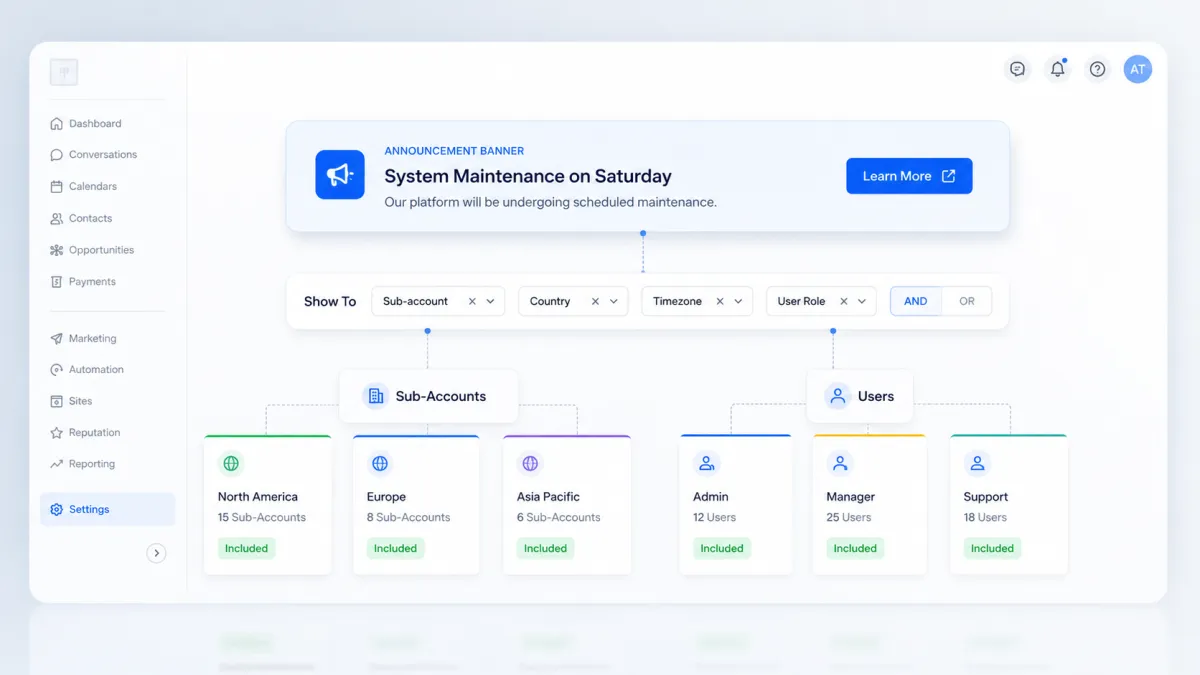
Targeted Announcement Banners
Target Announcement Banners by Sub-Accounts and Users in GoHighLevel
Announcement banners are useful when you need to put an important message directly in front of users. But there has always been one obvious limitation: not every announcement is relevant to everyone.
A promotion might only apply to certain sub-accounts. An onboarding message may be intended for a specific group of users. A role-specific alert may matter to one type of user but create unnecessary noise for everyone else.
GoHighLevel is addressing that problem by giving agencies more control over the audience for Announcement banners.
With the latest improvement to GoHighLevel Announcement banners, agencies can now target specific sub-accounts and users instead of broadcasting every banner across the entire agency. Audience rules can also include multiple conditions using AND/OR logic, and CTA buttons can open external links in a new tab.
It may look like a relatively small change, but it makes Announcement banners much more flexible when different audiences need different messages.
What’s New With GoHighLevel Announcement Banners?
The update introduces three main improvements to how agencies can use Announcement banners.
Target Specific Sub-Accounts and Users
Previously, Announcement banners could only be broadcast across the entire agency.
Now, agencies can control their audience more precisely by targeting particular sub-accounts and users.
This means a message that only matters to part of your audience no longer needs to be displayed to everyone.
For example, if an announcement is intended for particular sub-accounts, you can configure its visibility accordingly rather than placing the same banner in front of users for whom the message may not be relevant.
That makes GoHighLevel audience targeting for announcements considerably more useful for agencies managing different groups of users.
Build Multi-Condition Audience Rules
GoHighLevel has also added Advanced filters for Announcement audiences.
These filters allow you to create rules using fields such as:
Sub-account
Country
Timezone
User role
Each condition includes a field, an operator, and a value.
More importantly, multiple conditions can be combined using AND/OR logic.
Conditions placed inside the same group must all match, creating an AND relationship. Separate groups provide alternate matching paths, creating OR logic.
This gives agencies the ability to create more refined GoHighLevel user targeting rules without showing every announcement to the entire audience.
Open CTA Links in a New Tab
Announcement CTA buttons can now be configured so links open in a new browser tab.
This is especially helpful when an Announcement directs users toward an external promotion or landing page.
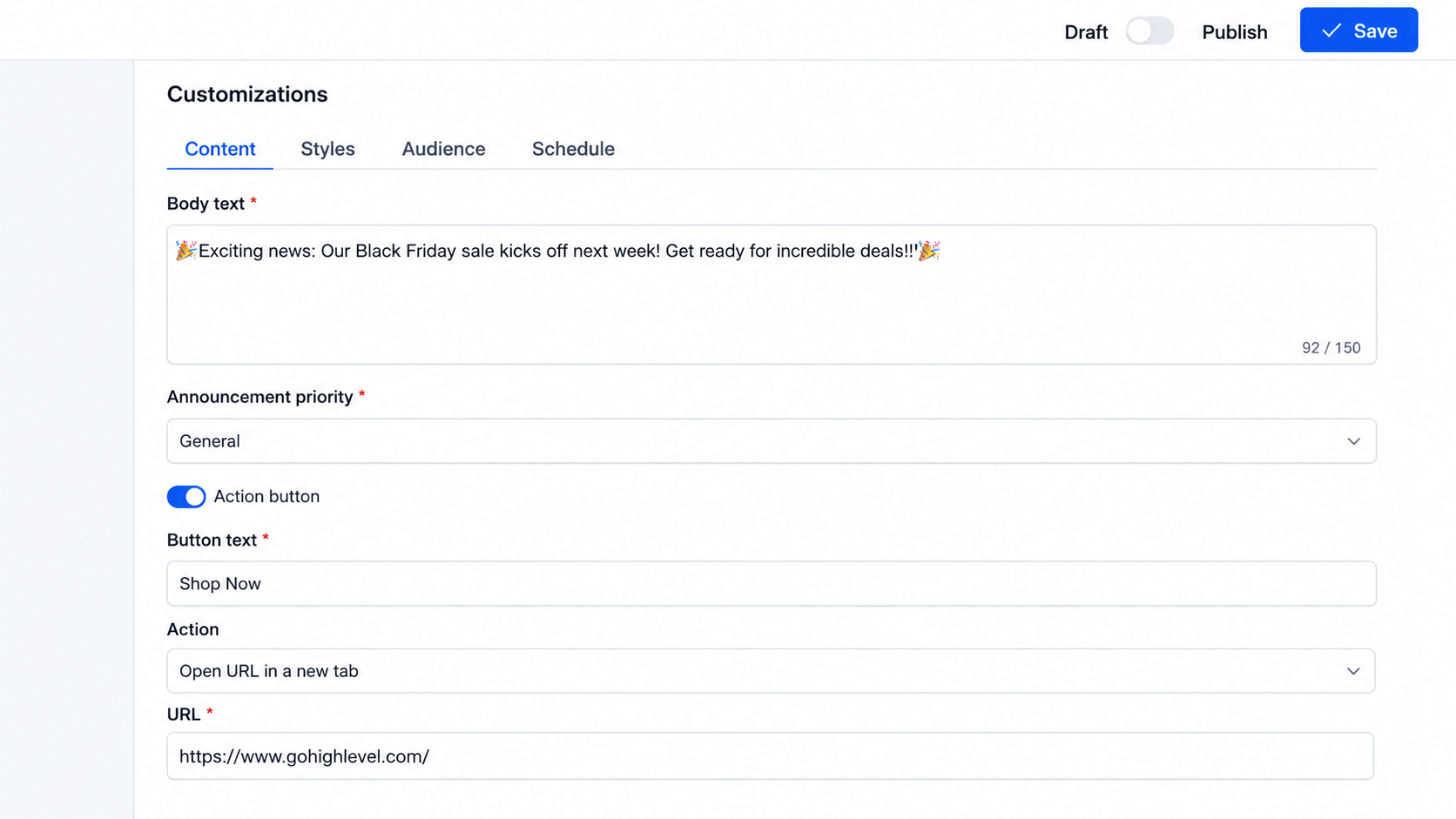
Instead of replacing the page the user is currently viewing, the linked destination can open separately, allowing users to keep their place in the app while exploring the CTA destination.
How GoHighLevel Announcement Banner Targeting Works
The audience configuration process follows a straightforward workflow.
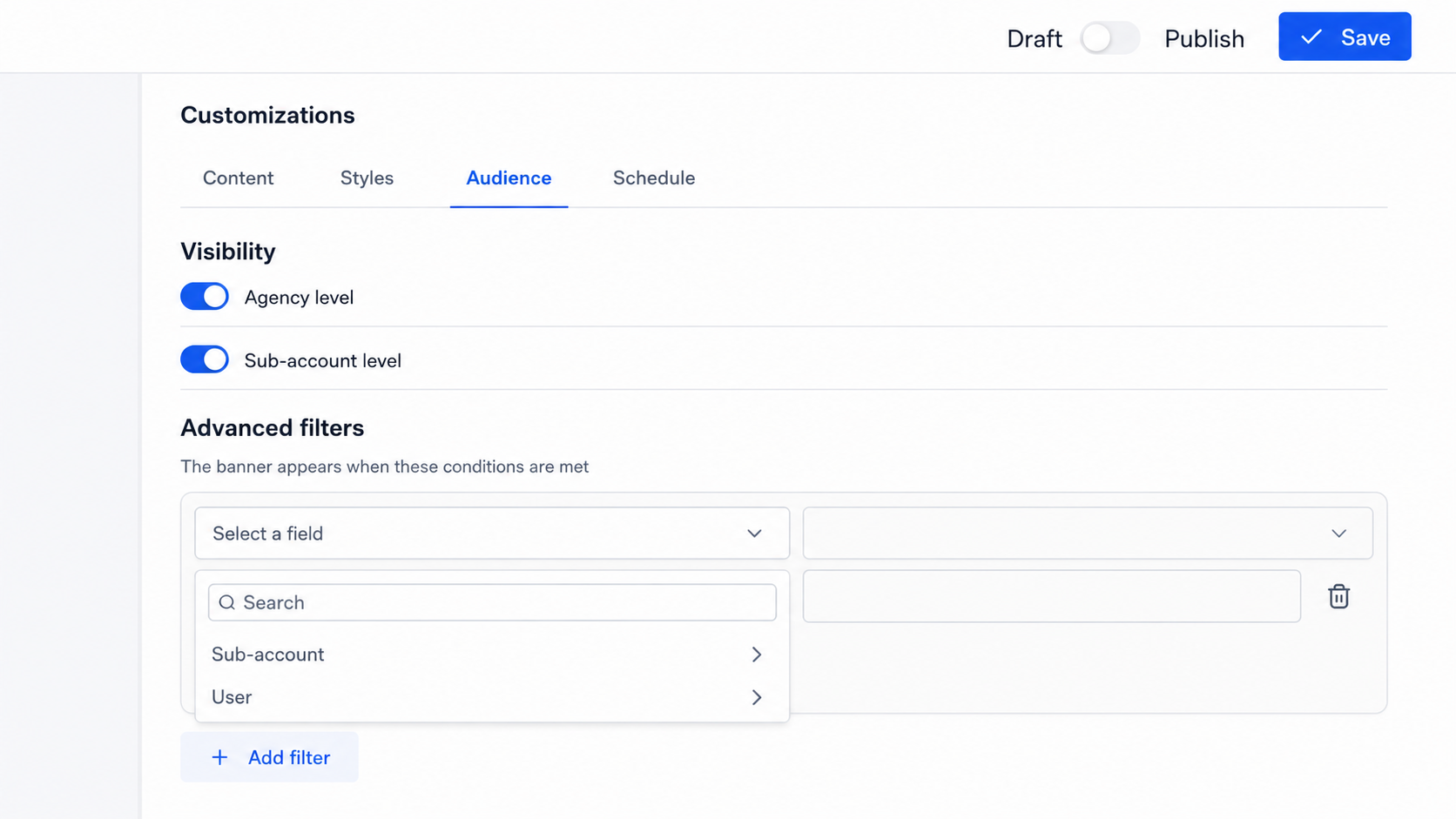
Step 1: Open Your Announcement
Start by opening the Announcement you want to configure.
From there, navigate to the Audience tab.
This is where the visibility and targeting options for the Announcement are managed.
Step 2: Configure Visibility
Set the appropriate Agency-level and Sub-account-level visibility for the Announcement.
This determines the broader visibility of the banner before you begin refining the audience with additional rules.
Step 3: Open Advanced Filters
Under Advanced filters, select the field you want to use for targeting.
The update specifically mentions fields such as Sub-account, Country, Timezone, and User Role.
After selecting the field, choose an operator and enter or select the appropriate value.
This creates the first condition for your audience.
Step 4: Add Additional Conditions
You can then add more conditions to narrow the audience further.
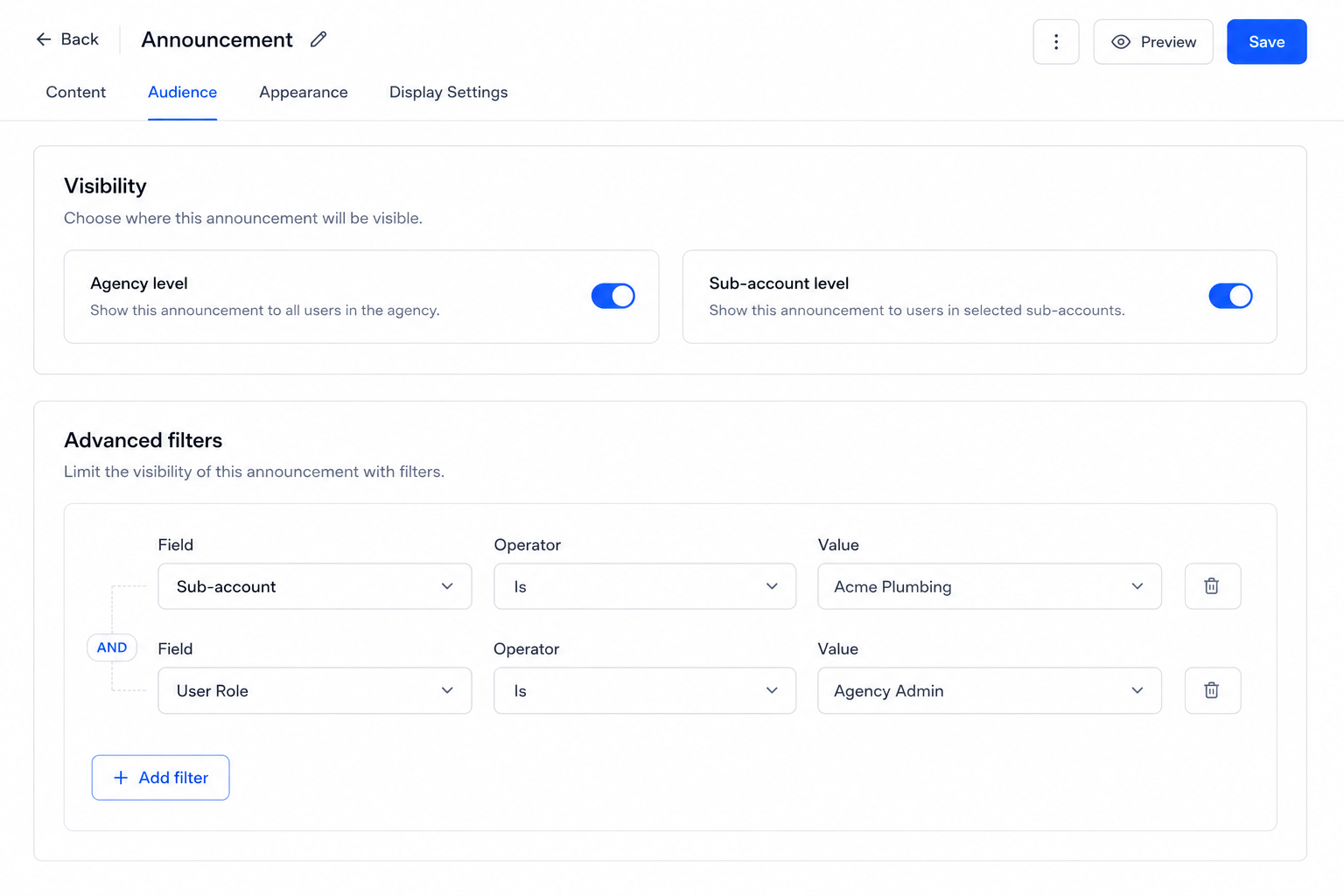
The important part is understanding how GoHighLevel handles the relationship between those conditions.
Conditions inside the same group use AND logic.
That means every condition within that group must match.
For example, you could create a group using a particular Sub-account condition together with a particular User Role condition. A user would need to satisfy both conditions to match that group.
Step 5: Use Additional Groups for OR Logic
If you need an alternate way for someone to qualify for the Announcement, create another group.
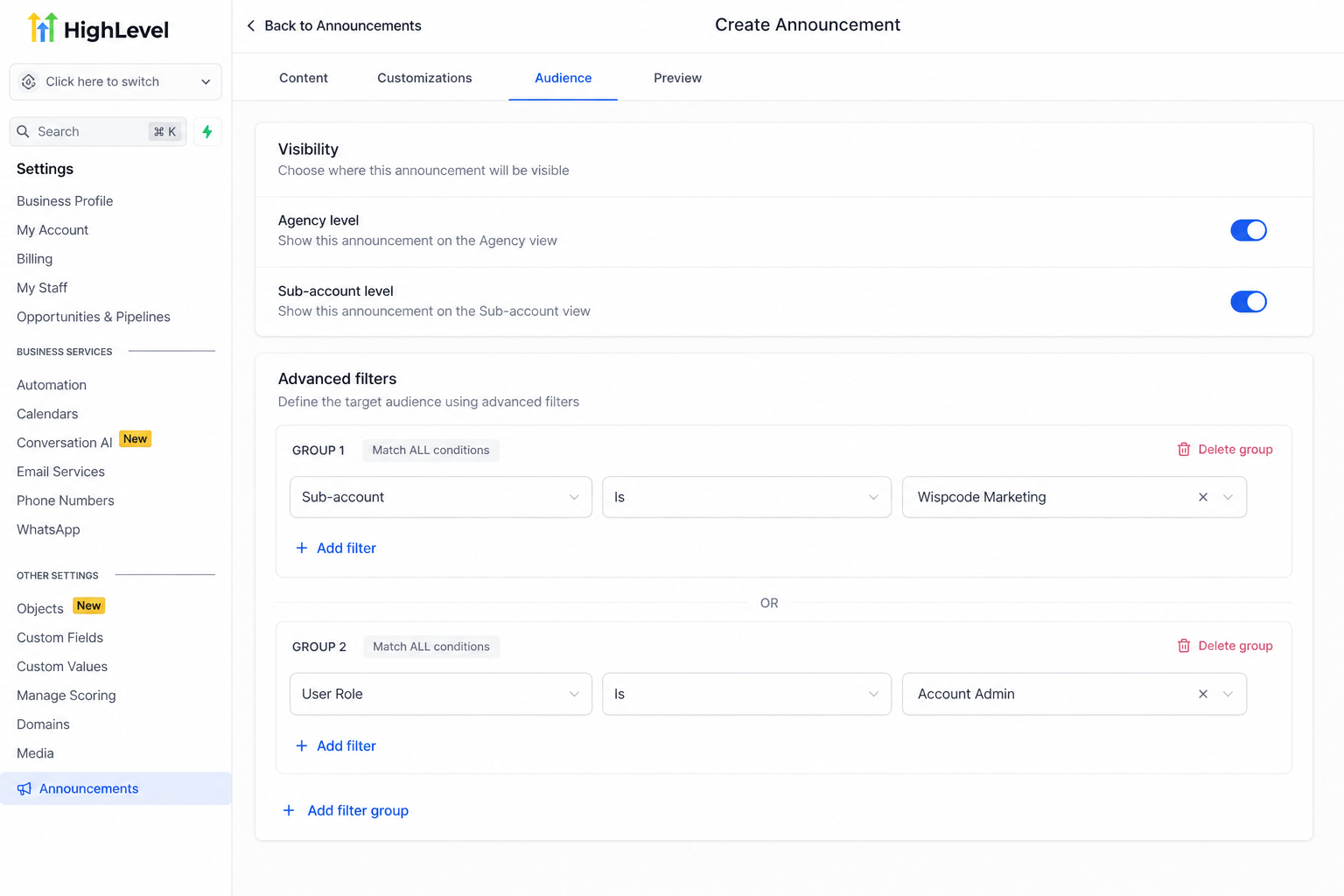
Separate groups work with OR logic.
In practical terms, a user can match the conditions in one group or the conditions in another group.
This combination of AND conditions within groups and OR logic between groups makes GoHighLevel Advanced filters more flexible for controlling who sees an Announcement banner.
Practical Ways Agencies Can Use Targeted Announcements
More precise targeting opens several straightforward use cases without changing the basic purpose of Announcement banners.
One obvious example is promotions. If a promotion is relevant only to selected audiences, agencies can target those audiences instead of broadcasting the promotion everywhere.
The same applies to onboarding nudges. When onboarding information is only relevant to certain users or sub-accounts, audience targeting can help keep the message focused.
Agencies can also create role-specific alerts by using User Role as part of an audience rule. This allows an announcement to be shown only where that role condition is relevant.
Another useful scenario is communication intended for particular sub-accounts. Agencies managing multiple sub-accounts no longer need to treat every Announcement as an agency-wide message.
And when a banner promotes an external offer or resource, the CTA can open the related promotion or landing page in a new tab.
Why This Update Matters
The biggest benefit is relevance.
When every Announcement is shown to everyone, users can easily encounter banners that do not apply to them. GoHighLevel sub-account targeting and user targeting allow agencies to make those messages more focused.
The second benefit is the ability to run smarter campaigns.
By combining conditions such as sub-account, country, timezone, or user role, agencies can create more specific audiences for promotions, onboarding nudges, and role-specific alerts.
Finally, opening GoHighLevel CTA links in a new tab creates a cleaner way to direct users toward external promotions or landing pages while allowing them to keep their current place in the app.
Final Takeaway
Targeted GoHighLevel Announcement banners give agencies more control over a communication tool that was previously much broader.
Instead of treating every banner as an agency-wide broadcast, agencies can now target specific sub-accounts and users, refine audiences with multi-condition AND/OR rules, and open CTA links in a new tab when directing users to external destinations.
For agencies managing different audiences inside GoHighLevel, that additional control can make Announcement banners far more useful because the right message can now be shown to a more relevant audience instead of automatically being shown to everyone.
The feature is available to all agencies, and sub-account and user targeting is available now.
Frequently Asked Questions (FAQs)
1. Can GoHighLevel Announcement banners target specific users?
Yes. You can target specific sub-accounts and users instead of showing a banner to the entire agency.
2. What fields can be used for Announcement targeting?
You can use fields such as Sub-account, Country, Timezone, and User Role in Advanced filters.
3. Can I combine multiple targeting conditions?
Yes. Conditions in the same group use AND logic, while separate groups use OR logic.
4. Can Announcement CTA links open in a new tab?
Yes. CTA buttons can be configured to open URLs in a new browser tab.
5. Is Announcement banner targeting available to all agencies?
Yes. The feature is available to all agencies, including sub-account and user targeting.
Need Expert Help with GoHighLevel?
New to GoHighLevel and ready to get started? Buy your GoHighLevel account here and launch with confidence.
Already know what you need and want our team to handle everything, from complete setup and customization to funnels, workflows, automations, CRM, and pipelines? Click here.



