

GoHighLevel System Documentation: A Guide to Easy Maintenance
How to Document a GoHighLevel System for Future Maintenance
Introduction
Building a GoHighLevel system is only half the job. The other half is making sure someone can understand, maintain, and improve that system months later without having to figure everything out from scratch.
As CRM systems grow, they often contain multiple workflows, pipelines, forms, calendars, funnels, custom fields, tags, automations, and integrations. Without proper documentation, even a well-built GoHighLevel account can become difficult to manage. A small change to one workflow may affect another automation, and a new team member may struggle to understand why certain settings exist.
That is why GoHighLevel system documentation should be treated as part of the build process rather than an optional extra. A clear documentation system creates a reliable reference for troubleshooting, updates, onboarding, and future improvements.
Why Document a GoHighLevel System?
A GoHighLevel account can contain many interconnected components. Documentation gives your team a clear picture of how those components are organized and what each one is responsible for.
For agencies managing multiple client accounts, this becomes even more important. You may build a system today and need to troubleshoot it several months later. Without documentation, you may spend unnecessary time inspecting workflows and settings just to understand the original setup.
Good documentation helps you:
Understand how the system works
Troubleshoot problems faster
Train new team members
Maintain consistent client setups
Track important changes
Reduce dependency on the original builder
Make future updates more safely
The goal is not to document every click you make inside GoHighLevel. The goal is to create enough useful information that another person can understand the system and maintain it confidently.
What Should a GoHighLevel System Documentation Include?
Before documenting anything, define what information actually matters.
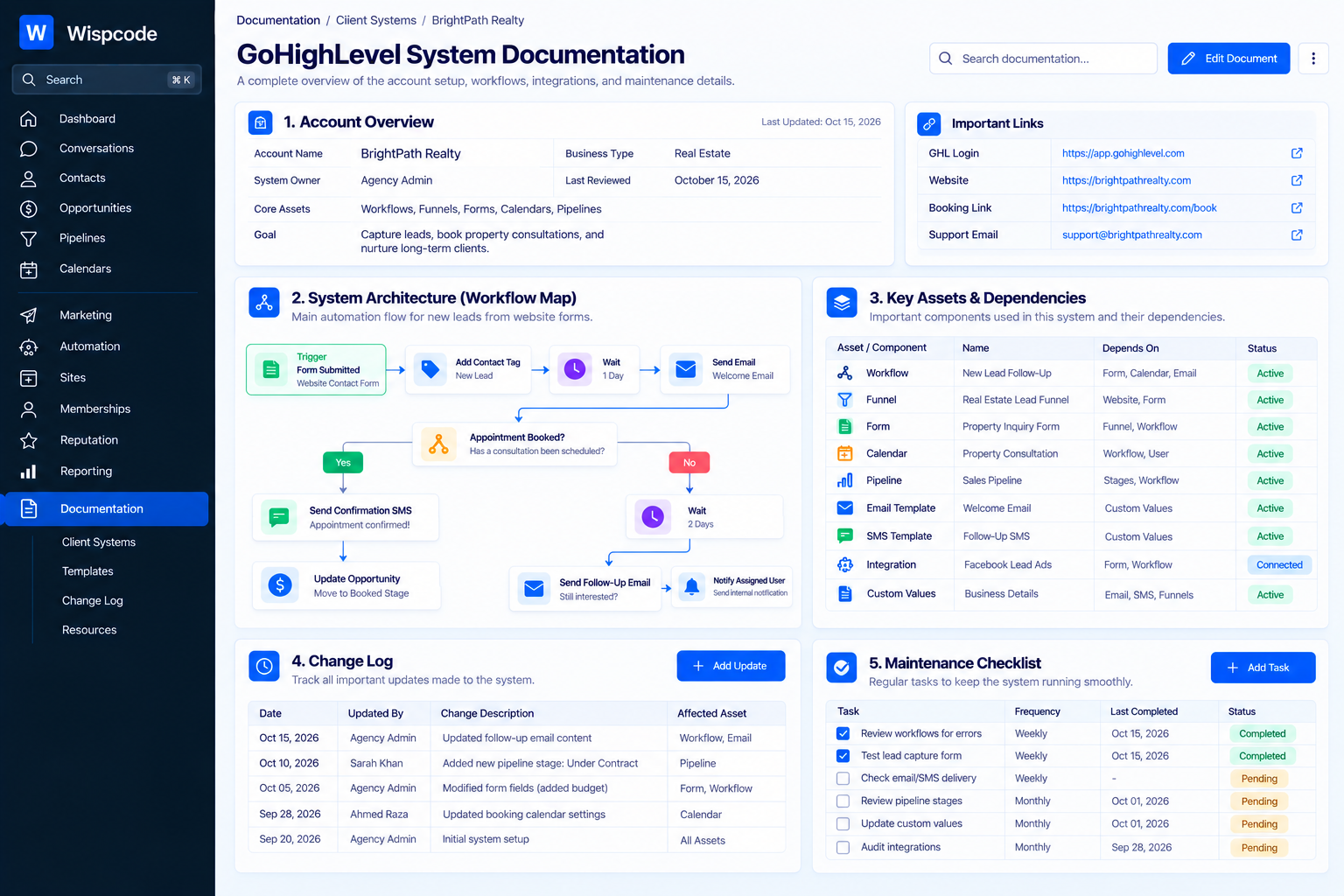
A useful documentation file should provide a high-level overview first and then explain the important components in more detail.
1. Account Overview
Start with basic information about the GoHighLevel sub-account.
Include details such as:
Client or business name
Primary business purpose of the account
Main services or offers
Important domains
Primary calendars
Key pipelines
Major workflows
Important integrations
Main communication channels
This section should help someone understand the purpose of the account before they begin examining individual workflows.
2. System Architecture
Next, explain how the major components connect.
For example, a lead might enter through a form, become a contact, receive a tag, enter a workflow, create an opportunity, and eventually book an appointment.
Your documentation should explain this overall journey in simple terms.
A basic system map might look like:
Lead Source → Contact → Workflow → Opportunity → Appointment → Follow-Up
The exact structure will depend on the business, but documenting the flow makes troubleshooting significantly easier.
Document Your GoHighLevel Workflows
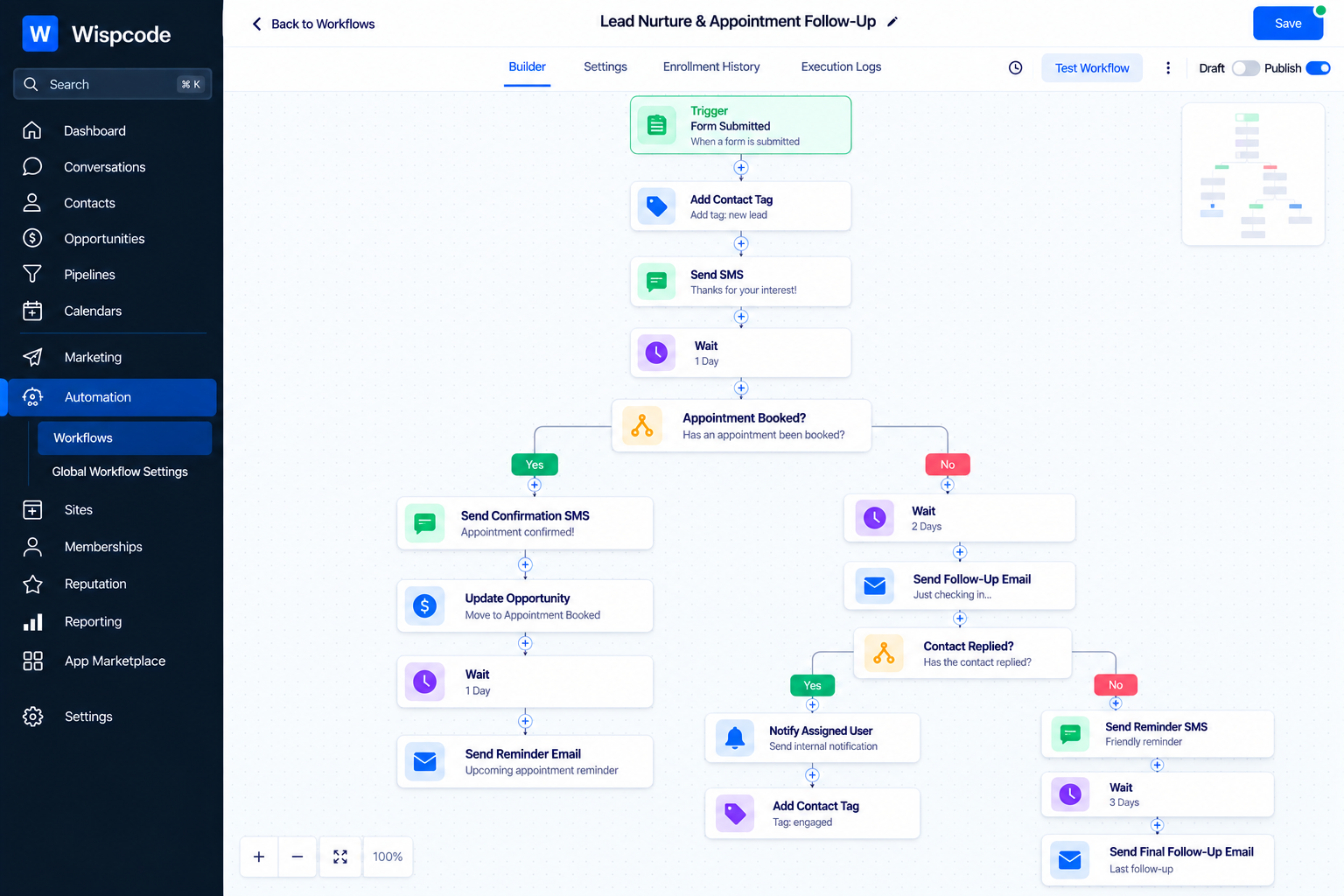
Workflows are often one of the most important parts of a GoHighLevel system, so they deserve detailed documentation.
For each important workflow, record:
Workflow name
Purpose
Trigger
Main actions
Important conditions
Wait steps
Tags added or removed
Pipeline actions
Notifications
Appointment-related actions
Exit conditions
Related workflows
You do not necessarily need to document every individual action if the workflow is simple. Focus on information that would help someone understand what the workflow is designed to accomplish.
Example Workflow Documentation
Suppose you have a workflow called "New Lead Follow-Up."
Your documentation could state:
Purpose: Follow up with leads submitted through the website.
Trigger: New lead submission.
Main actions: Contact creation or update, notification, follow-up communication, and opportunity management.
Important dependency: The workflow relies on specific contact fields and pipeline settings.
This simple explanation can save considerable time when someone needs to modify the automation later.
Document Triggers and Dependencies
One of the easiest things to overlook is the relationship between different automations.
A workflow may appear to work independently while actually depending on another workflow, tag, form, pipeline stage, appointment status, or custom field.
For every important automation, ask:
What starts this automation?
Then ask:
What does this automation affect?
For example, a workflow might trigger when a contact receives a particular tag. Another workflow may remove that tag after an appointment is booked.
If this relationship is not documented, someone modifying the first workflow could unintentionally affect the second.
Documenting these dependencies creates a clearer picture of the system.
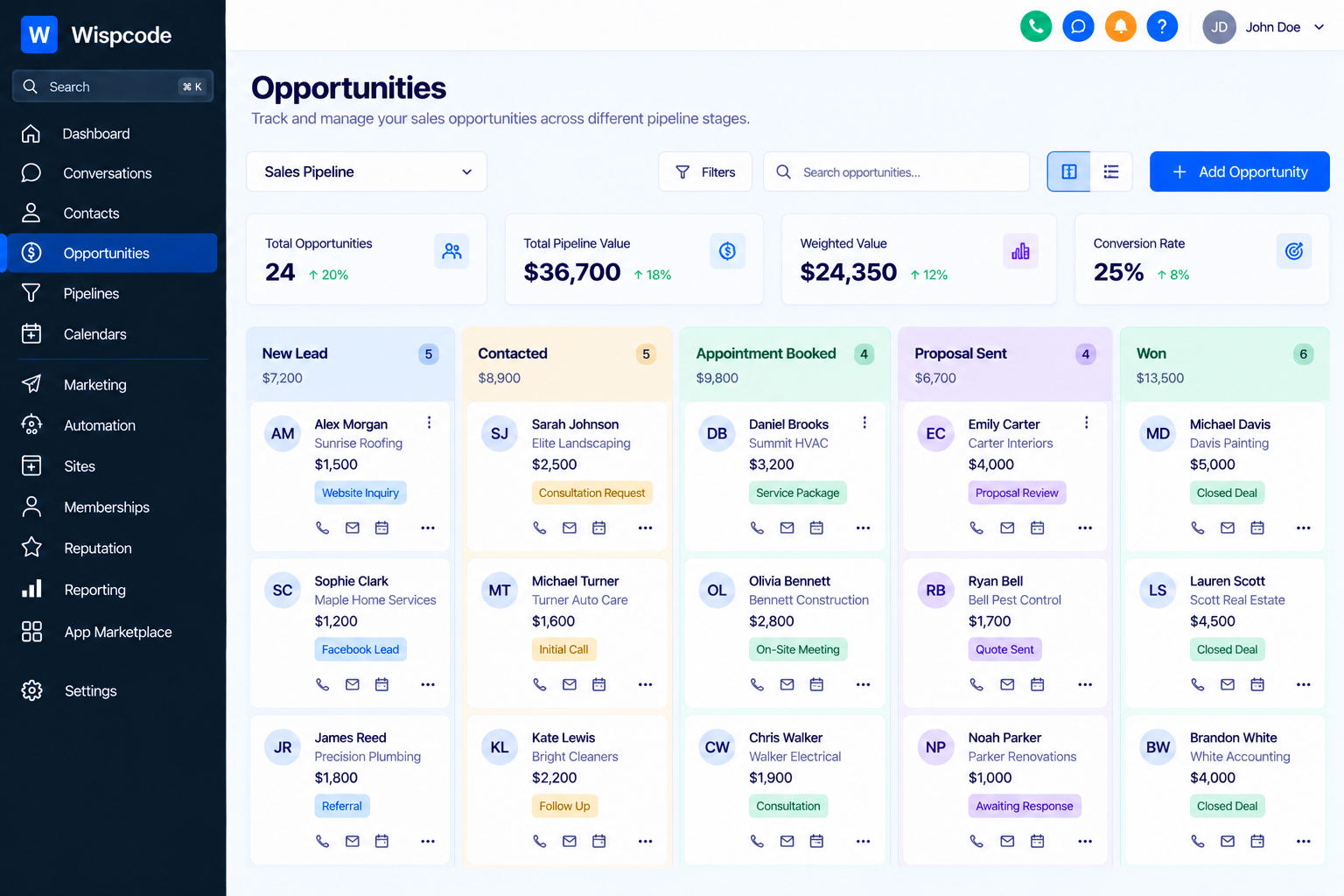
Document Pipelines and Opportunity Stages
If the account uses opportunities, document the pipeline structure as well.
List each important pipeline and explain what its stages represent.
For example:
New Lead → Contacted → Appointment Booked → Qualified → Won → Lost
The exact stages will depend on the business.
More importantly, explain "how opportunities move between stages."
Document whether movement happens through:
Workflow automation
Manual updates
Appointment-related processes
Sales team actions
Other configured automation
This information is particularly useful when a sales team reports that opportunities are appearing in the wrong stage.
Document Forms and Lead Sources
Forms are another important part of a GoHighLevel system.
For each important form, document:
Form name
Where it is used
Information it collects
Important fields
What happens after submission
Which workflow receives the submission
Whether the form is connected to other automation
This becomes especially important when a business has multiple lead sources.
For example, a website form, Facebook lead form, and manually added contact may enter the CRM through different paths. Documentation should make those paths easy to understand.
Document Custom Fields and Custom Values
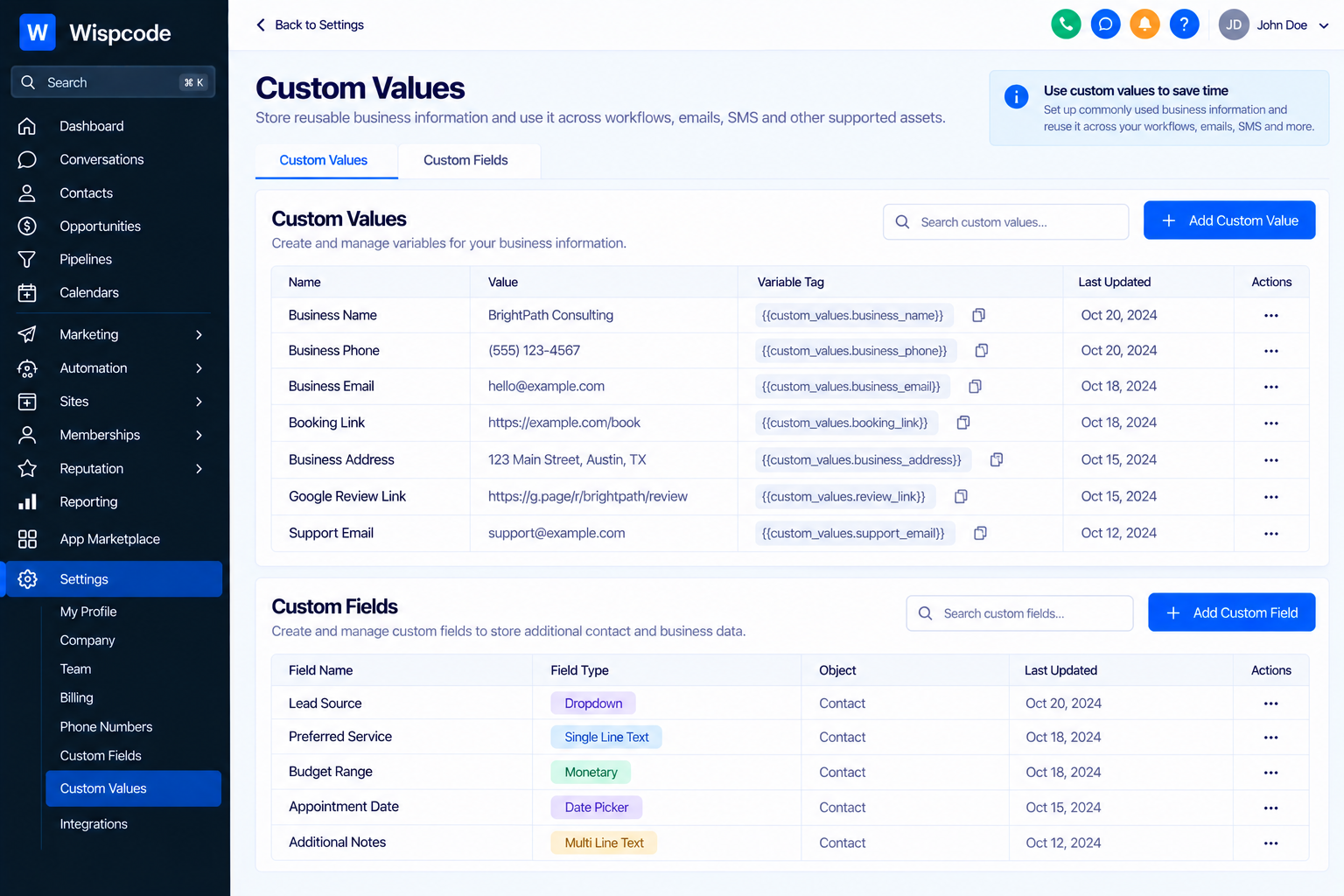
Custom fields and Custom Values can play very different roles inside a GoHighLevel system, so they should be clearly documented.
For important custom fields, record:
Field name
What information it stores
Where it is used
Which workflows depend on it
Whether users enter the information manually or automation populates it
For Custom Values, document what each value represents and where it is used.
This is especially useful for reusable agency systems. If a template uses a business name, booking link, review link, or other reusable information, documentation should explain where those values need to be updated for a new client.
Document Calendars and Appointment Automation
Calendars should also be included in your documentation.
Record the purpose of each important calendar and explain the automation associated with appointments.
For example, document:
Calendar name
Appointment type
Intended users
Booking process
Confirmation automation
Reminder automation
No-show process
Completed appointment process
If an appointment triggers several workflows, document those relationships clearly.
This helps prevent accidental changes to appointment-related automation.
Keep Screenshots of Important Settings
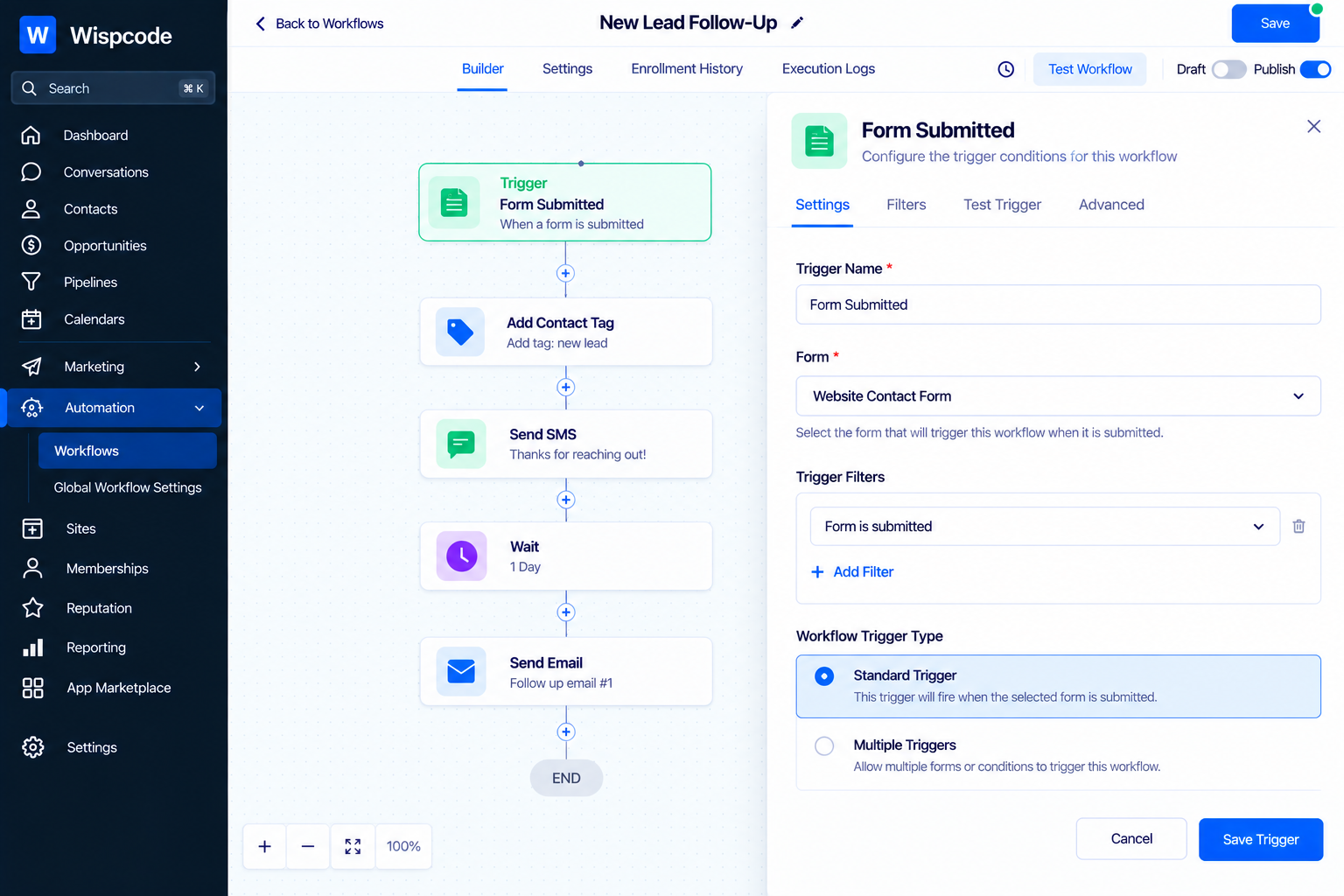
Written documentation is valuable, but screenshots can make maintenance much easier.
Take screenshots of important configuration areas such as:
Workflow triggers
Workflow actions
Pipeline stages
Calendar settings
Form configuration
Important account settings
Screenshots should support the written explanation rather than replace it.
Avoid taking dozens of screenshots without context. Instead, capture the settings that someone is most likely to need when troubleshooting or making changes.
Create a Change Log
A system is rarely finished forever. Workflows get updated, forms change, campaigns are modified, and new automation is added.
A change log gives you a simple history of those modifications.
Record:
Date
Change made
Reason for the change
Person responsible
Related workflow or asset
Any testing performed
For example:
October 21: Updated lead follow-up workflow to change the appointment reminder sequence. Tested the workflow using a test contact.
This makes future troubleshooting much easier because your team can identify when and why a change was introduced.
Use Consistent Naming Conventions
Documentation becomes much more useful when your GoHighLevel assets are named consistently.
Instead of creating vague names such as:
Workflow 1
use descriptive names such as:
WF - New Lead - Website Form Follow-Up
Similarly, use clear names for:
Workflows
Forms
Calendars
Pipelines
Tags
Custom fields
Campaign-related assets
A consistent naming structure makes both the account and its documentation easier to navigate.
Create a Maintenance Checklist
Your documentation should also explain what needs to be reviewed regularly.
A maintenance checklist might include:
Review active workflows
Check important triggers
Test lead capture forms
Verify appointment automation
Review pipeline movement
Check integrations
Confirm important Custom Values
Review communication templates
Test critical customer journeys
The exact frequency will depend on the system. The important point is to create a repeatable maintenance process rather than relying on memory.
Document the Most Important Customer Journeys
Instead of documenting only individual features, document the complete journeys that matter to the business.
For example:
Website Lead Journey
A visitor submits a form → contact information enters the CRM → automation starts → sales team receives a notification → opportunity is created → lead receives follow-up → appointment is booked → appointment reminders are sent.
This gives future maintainers a business-level understanding of the system.
It also makes testing easier because you can test the complete journey rather than checking isolated components.
Common Documentation Mistakes to Avoid
Documenting Too Little
A few workflow names and screenshots are not enough if the system contains complex automation.
Important dependencies and business logic should be explained.
Documenting Too Much
The opposite problem is creating a massive document that nobody wants to read.
Focus on information that helps someone understand, troubleshoot, maintain, or update the system.
Forgetting to Update Documentation
Outdated documentation can be almost as problematic as having no documentation.
Whenever an important system change is made, update the relevant documentation at the same time.
Relying Only on Screenshots
Screenshots show what a system looked like at a particular moment, but they do not always explain why a setting exists.
Combine screenshots with concise explanations.
Ignoring Dependencies
A workflow rarely exists in complete isolation. Tags, fields, forms, pipelines, calendars, and other workflows can influence its behavior.
Document these relationships whenever they are important.
Frequently Asked Questions(FAQs)
1. Why is GoHighLevel system documentation important?
GoHighLevel system documentation helps teams understand workflows, triggers, pipelines, forms, calendars, dependencies, and other account configurations. It makes troubleshooting, maintenance, and future updates easier.
2. What should be included in GoHighLevel system documentation?
Document the account structure, workflows, triggers, pipeline stages, forms, lead sources, custom fields, Custom Values, calendars, important customer journeys, dependencies, screenshots, and significant system changes.
3. How often should a GoHighLevel system be documented?
Documentation should be updated whenever an important change is made to the system. Keeping documentation synchronized with major changes to workflows, pipelines, forms, calendars, or automations helps prevent outdated information.
4. Should I use screenshots when documenting GoHighLevel?
Yes. Screenshots can make important configurations easier to understand, especially workflow triggers, actions, pipeline stages, forms, and calendar settings. However, screenshots should support written explanations rather than replace them.
5. How can agencies make GoHighLevel documentation easier to maintain?
Agencies can use a consistent documentation structure across client accounts, follow clear naming conventions, maintain a change log, document important dependencies, and record the main customer journeys. This creates a repeatable maintenance process as the agency grows.
Conclusion
A well-built GoHighLevel system should not depend entirely on the person who created it.
Documentation turns a collection of CRM assets and automations into a maintainable system. By recording workflows, triggers, dependencies, pipelines, forms, calendars, custom fields, customer journeys, and important changes, you give your team a reliable reference for future work.
For agencies, this becomes even more valuable as the number of clients and sub-accounts grows. A consistent documentation process makes onboarding easier, troubleshooting faster, and system maintenance more predictable.
The best time to document a GoHighLevel system is while you are building it. When documentation becomes part of your standard implementation process, every future update becomes easier to understand, test, and maintain.
Need Expert Help with GoHighLevel?
New to GoHighLevel and ready to get started? Buy your GoHighLevel account here and launch with confidence.
Already know what you need and want our team to handle everything, from complete setup and customization to funnels, workflows, automations, CRM, and pipelines? Click here.



