

GoHighLevel Routines: Automate Tasks with AI Agents
GoHighLevel Routines: Automate Recurring Tasks with Managed Agents
Recurring tasks are part of almost every business operation. From reviewing new leads to checking inactive deals and gathering regular updates, these activities often require repeated instructions and manual attention. Even when a task follows the same pattern, someone still needs to remember when to request it and follow up on the results.
GoHighLevel is addressing this challenge with its new Routines feature for Managed Agents. Instead of repeatedly asking an AI agent to complete the same task, users can now describe what they want done and how often it should happen. The agent then executes the task automatically according to the requested schedule and shares the results in the original conversation.
This update introduces a more convenient approach to Managed Agent Automation, allowing users to schedule recurring activities, receive updates directly in chat, and manage execution through a dedicated Routines tab.
What Are GoHighLevel Routines?
GoHighLevel Routines allow users to schedule recurring tasks through Managed Agents using natural language. Rather than manually configuring triggers or sending repeated prompts, users simply tell their agent what task to perform and how frequently to execute it.
Once created, each routine remains connected to the conversation where it was originally established. This keeps the task's results and related discussions together.
For example, a user can ask:
"Every weekday at 8 AM, summarize my new leads and inactive deals."
The Managed Agent understands the scheduling request and creates a recurring routine. Instead of manually requesting the same summary every morning, users can receive scheduled results automatically.
This makes AI-powered task scheduling more accessible, particularly for people who want recurring assistance without setting up manual triggers.
How Natural-Language Scheduling Works
One of the most useful aspects of GoHighLevel Routines is the ability to create schedules through ordinary conversation.
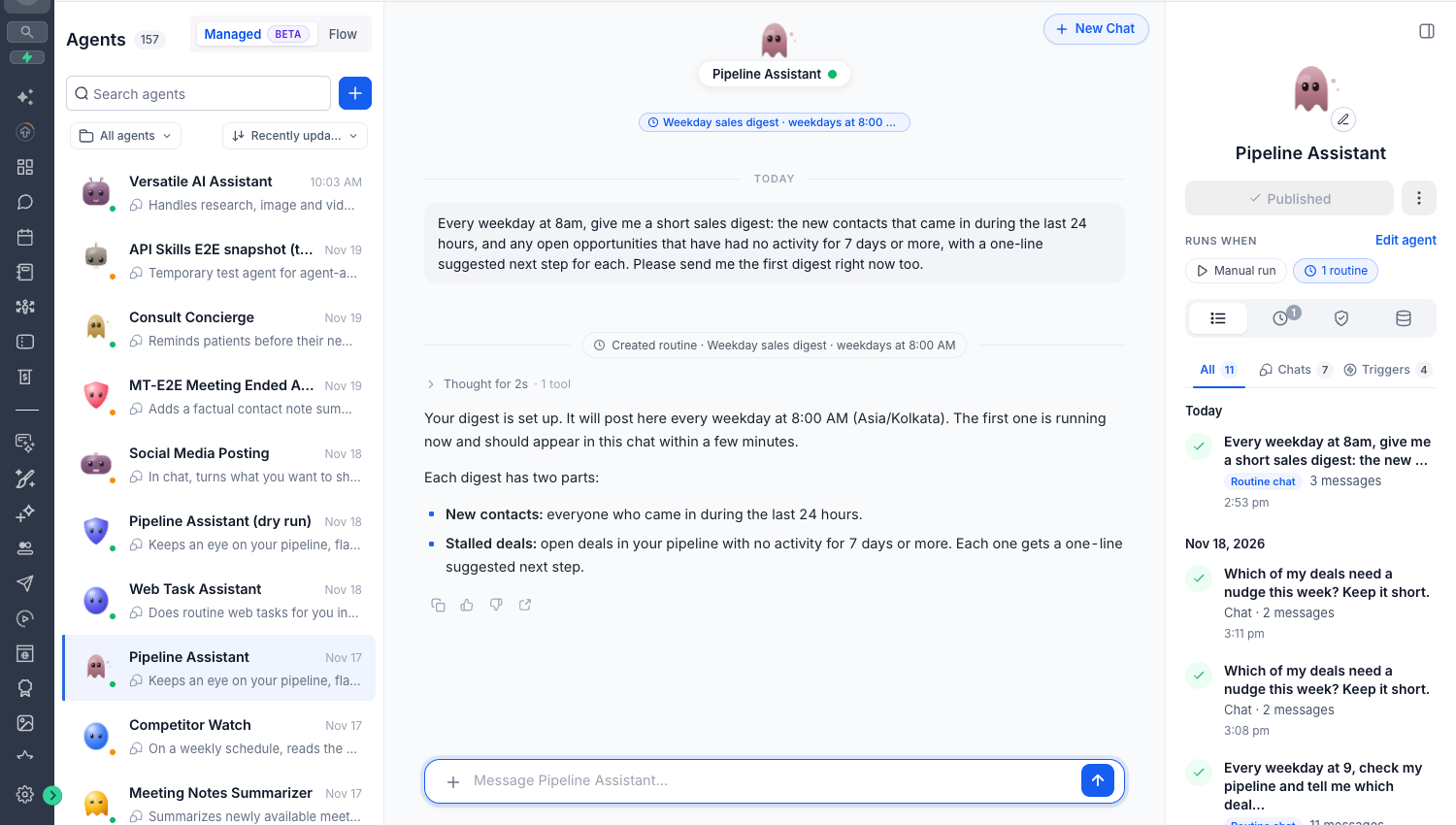
Users do not need to configure scheduling triggers manually. They can simply describe the task and its frequency in a message to their Managed Agent.
The agent uses this instruction to establish a routine that runs on the requested schedule. Each routine remains associated with its original chat, maintaining a connection between the task and the conversation in which it was created.
This approach reduces the need for repeated instructions. Once a routine is established, users can let the agent handle its scheduled execution rather than returning to the chat every time the task needs to be performed.
Receive Automated Updates Directly in Chat
Routines are designed to keep scheduled results within the same conversation where the task was created.
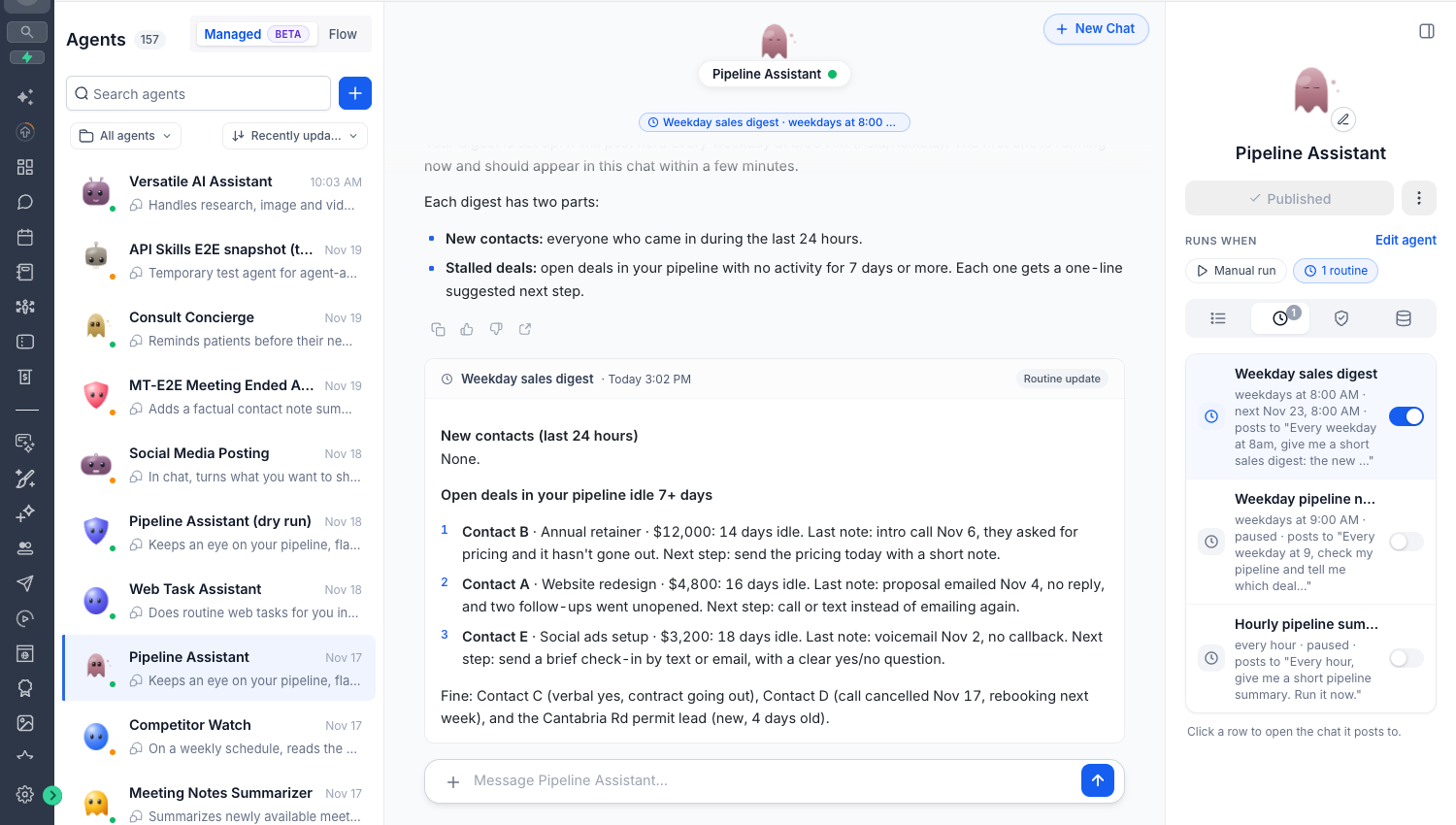
When a routine executes, the Managed Agent shares its updates directly in that chat. Users can then continue the conversation and discuss the results with their agent without moving between separate communication spaces.
GoHighLevel also includes unread indicators to help users identify when new routine updates are available.
This creates a more connected experience: the original instruction, scheduled results, and follow-up conversations remain together, making it easier to keep track of recurring activities.
Computer-Powered Routines: Automate Beyond CRM Tasks
Another important part of this update is Computer-powered routines.
Managed Agents can use Computer to browse websites and complete recurring tasks. This extends the potential use of Routines beyond activities limited to CRM-related information.
For supported website actions, users can approve access once by selecting Allow for this routine. This approval allows the routine to proceed with the supported actions without requesting the same permission every time.
However, GoHighLevel maintains approval requirements for sensitive activities. If an action requires new permissions, the routine pauses until approval is provided. Payments always require approval.
This distinction is important because Computer-powered automation does not mean every action can proceed without user involvement.
Manage Your Routines and Permissions in One Place
GoHighLevel provides a dedicated Routines tab where users can view and manage their scheduled activities.
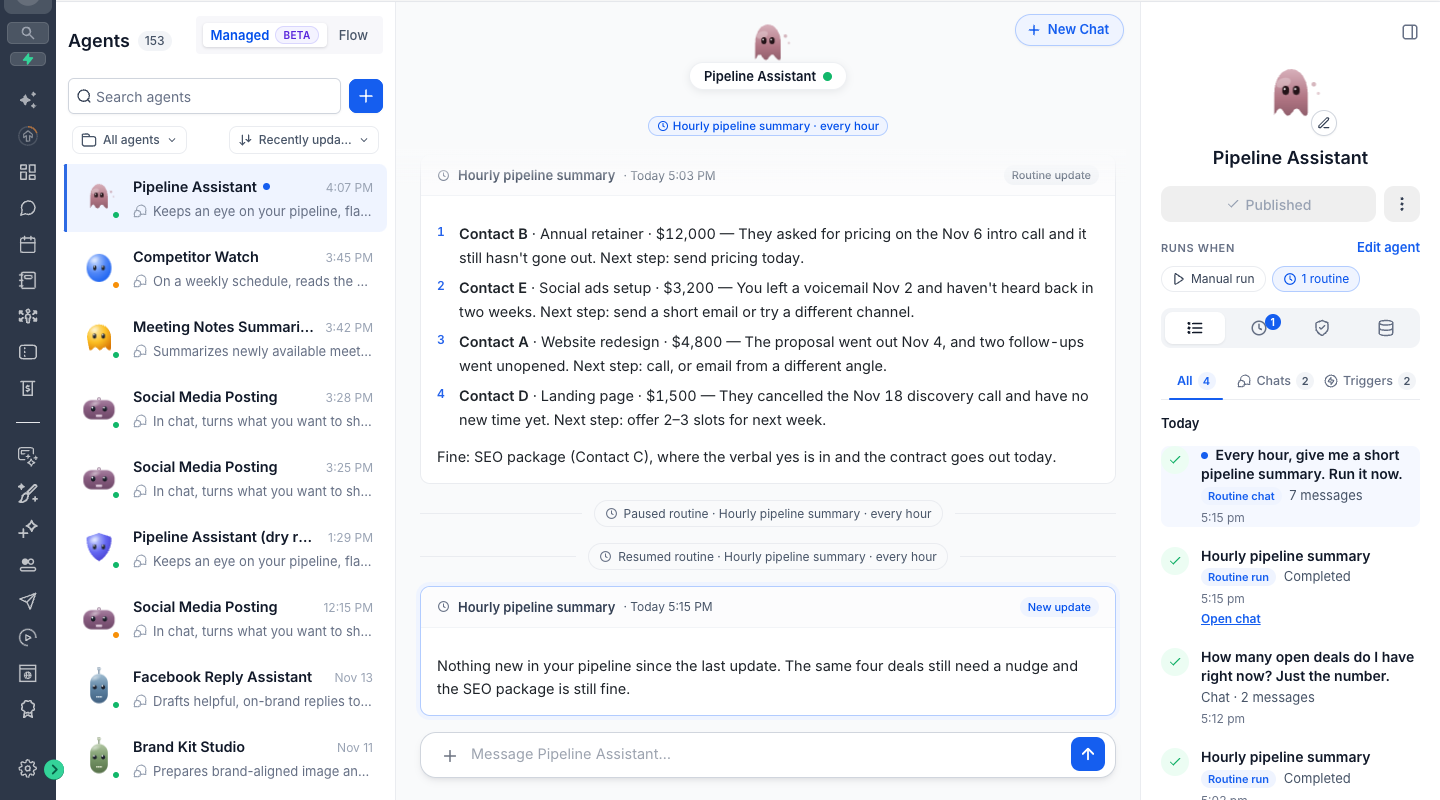
From this section, users can:
View their existing routines.
Pause routines when they are no longer needed.
Resume previously paused routines.
Manage routine permissions.
The platform also includes built-in safety controls that automatically pause routines after repeated failures.
These management options give users visibility and control over their recurring tasks rather than leaving scheduled activities unmanaged.
How to Get Started with GoHighLevel Routines
Getting started involves accessing a published Managed Agent and describing the task you want it to perform.
Follow these steps:
Navigate to AI Agents → Agent Studio → Managed Agents in your GoHighLevel account.
Open a published Managed Agent.
Start a conversation and ask the agent to perform a specific task on a recurring schedule.
When required, approve the necessary Computer permissions during the first run.
Open the dedicated Routines tab to view, pause, resume, and manage your routines and permissions.
Once configured, the agent can execute the scheduled task and share its results in the same conversation.
Important Limits and Scheduling Details
Before using the feature, there are several important details to understand:
Active routine limit: Each person can have up to 10 active routines per agent.
Minimum scheduling interval: The minimum scheduling interval is one hour.
Published agent version: Routines use the Managed Agent's published version.
Usage billing: Every routine execution follows standard Managed Agents usage billing.
Email notifications: Email notifications for routine updates are coming soon and are not yet included in the announced functionality.
These limitations help users understand how routines are scheduled, managed, and billed.
Why GoHighLevel Routines Matter for Businesses
The introduction of Routines makes Managed Agents more useful for recurring operational activities.
Less repetitive work: Users can schedule recurring tasks once instead of repeatedly sending the same instructions.
Consistent updates: Scheduled results arrive automatically in the original conversation, making ongoing activities easier to follow.
More than CRM automation: Computer-powered routines allow agents to browse websites and complete supported recurring website tasks.
Control over execution: Users can manage schedules and permissions, pause or resume routines, and review their activities through a dedicated tab.
For agency owners, business owners, and GoHighLevel users, these capabilities offer a more convenient way to delegate recurring tasks to AI agents.
Final Thoughts
GoHighLevel Routines introduce a practical improvement to how users work with Managed Agents. By combining natural-language scheduling, automatic chat updates, Computer-powered tasks, and centralized routine management, the feature reduces the need to repeatedly request the same work.
The key advantage is simplicity. Users describe what needs to happen, choose how often it should happen, and let their Managed Agent handle the scheduled execution while retaining control over permissions and management.
Set it once. Let your agent handle the rest.
Frequently Asked Questions
1. What is the GoHighLevel Routines feature?
GoHighLevel Routines allow Managed Agents to automatically perform recurring tasks based on schedules created through natural-language instructions.
2. How do I create a routine in GoHighLevel?
Navigate to AI Agents → Agent Studio → Managed Agents, open a published agent, and ask it to perform a task on a recurring schedule.
3. Can GoHighLevel Managed Agents automate website tasks?
Yes. Managed Agents can use Computer to browse websites and complete recurring tasks. Supported website actions can be approved using the Allow for this routine option.
4. What is the maximum number of active routines in GoHighLevel?
Users can have up to 10 active routines per person, per agent. The minimum scheduling interval is one hour.
5. Do GoHighLevel Routines require manual approval?
Supported website actions can be approved once for a routine. Sensitive actions requiring new permissions pause for approval, and payments always require approval.
Need Expert Help with GoHighLevel?
New to GoHighLevel and ready to get started? Buy your GoHighLevel account here and launch with confidence.
Already know what you need and want our team to handle everything, from complete setup and customization to funnels, workflows, automations, CRM, and pipelines? Click here.