

GoHighLevel Remove Assigned User Action Explained
How to Reassign Leads Efficiently Using the Remove Assigned User Action in GoHighLevel
Introduction
Lead assignment plays an important role in keeping a sales process organized. When a contact is assigned to a particular team member, that person may become responsible for follow ups, conversations, appointments, and other customer interactions.
But there are situations where the current assignment needs to be removed. A salesperson may leave the team, a lead may need to enter a different routing process, or an automation may need to clear the existing assignment before another user is assigned.
GoHighLevel's Remove Assigned User action provides a way to remove the user currently assigned to a contact as part of a workflow. Because it is a workflow action, it can be placed after a trigger or another workflow step and executed automatically when the workflow reaches it.
This can make lead reassignment processes more organized and reduce the need for team members to manually open individual contact records and remove assignments.
What Is the Remove Assigned User Action?
The Remove Assigned User action is a GoHighLevel workflow action that removes the assigned user from a contact.
It is useful when you need to clear the current assignment before the contact moves into another part of your lead management process.
For example, imagine a lead is initially assigned to a salesperson for qualification. After the qualification process is complete, your business may want to remove that assignment before another workflow assigns the contact to a different team member.
Instead of requiring someone to manually remove the existing user, the workflow can perform that step automatically.
The action is therefore particularly useful in workflows where contact ownership needs to change as the lead moves through different stages.
Where to Add the Remove Assigned User Action
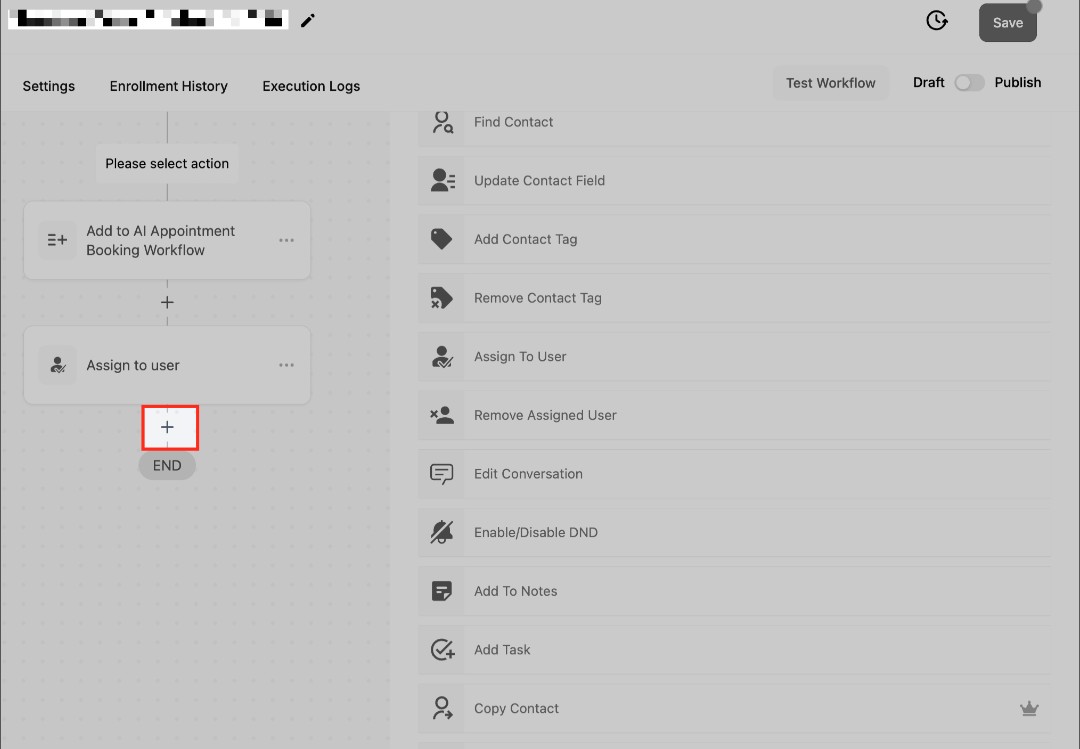
To use this action, open Automation > Workflows in your GoHighLevel account.
Create a new workflow or open an existing workflow where you need to remove a contact's assigned user.
Choose the point in the workflow where the assignment should be removed and click the plus (+) icon to add an action.
Search for Remove Assigned User and select it.
The action can then become part of the workflow's sequence.
Remember that the action itself does not determine when the workflow starts. Your workflow trigger determines when the automation enters the process, while Remove Assigned User performs the assignment removal when the workflow reaches that step.
This distinction is important when designing more advanced lead routing systems.
Why Remove an Assigned User Before Reassigning a Lead?
In some lead routing processes, removing the existing assignment can help create a clean handoff.
For example, suppose a contact is assigned to a qualification representative. Once that process is complete, the business wants the lead to go through another assignment process.
Removing the current assigned user first can make the workflow easier to understand because the old assignment is explicitly cleared before the next stage of the process.
This can also help prevent confusion when multiple automations are responsible for different parts of your lead routing system.
The exact structure will depend on how your account handles assignment, but the general principle is simple: clear the existing assignment when your process requires a fresh ownership handoff.
Build a Simple Lead Reassignment Workflow
Once you have added the Remove Assigned User action, you can connect it with the rest of your lead routing process.
A simple workflow can look like this:
Lead Enters Workflow → Remove Assigned User → Assign New User → Notify Team
The first step determines when the automation should begin.
The Remove Assigned User action then clears the existing assignment when the workflow reaches that point.
After that, you can use the appropriate assignment action or routing process to give the lead to the next team member.
Finally, an internal notification can let the new assignee know that the lead is ready for follow up.
This structure can be useful when leads move between departments or when your business uses different team members for different stages of the sales process.
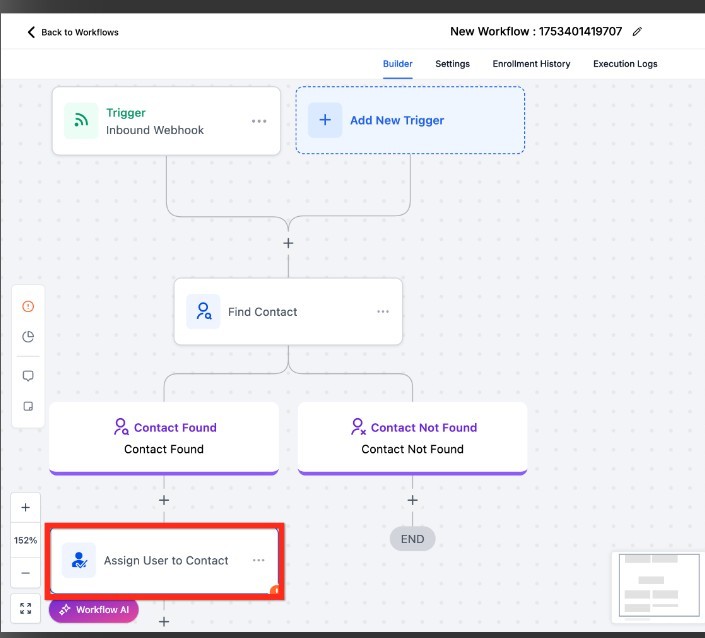
Test the Workflow Before Publishing
Before activating the workflow, test it with a suitable contact.
First, make sure the contact has an assigned user so you can verify that the action performs the expected change.
Then allow the workflow to reach the Remove Assigned User step and check the contact record afterward.
If your workflow includes a new assignment, verify that the correct user receives the contact.
Also check any internal notifications or follow up actions that come after the reassignment.
Testing is especially important when multiple assignment workflows are already active in your account.
Conclusion
The Remove Assigned User action can be a useful part of a structured lead routing system in GoHighLevel.
It allows businesses to automatically clear an existing contact assignment when a lead needs to move into another part of the sales or customer management process.
When combined with conditions, reassignment steps, and internal notifications, it can help create a cleaner handoff between team members.
The key is to understand exactly when the existing assignment should be removed and how that action interacts with the other workflows in your account. With proper planning and testing, you can make lead reassignment more consistent while reducing repetitive manual work.
Frequently Asked Questions
1. What does the Remove Assigned User action do?
It removes the user currently assigned to a contact when the workflow reaches that action.
2. Is Remove Assigned User a trigger?
No. It is a workflow action. A separate trigger determines when the workflow starts.
3. Why would I remove an assigned user?
You may need to clear the current assignment before a lead enters a new routing or ownership process.
4. Can I assign another user after removing the current one?
Yes. You can place an appropriate reassignment step after the removal action as part of your lead routing workflow.
5. Should I test the workflow before publishing?
Yes. Testing allows you to confirm that the existing assignment is removed correctly and that any subsequent assignment or notification works as intended.
Need Expert Help with GoHighLevel?
New to GoHighLevel and ready to get started? Buy your GoHighLevel account here and launch with confidence.
Already know what you need and want our team to handle everything, from complete setup and customization to funnels, workflows, automations, CRM, and pipelines? Click here.



