

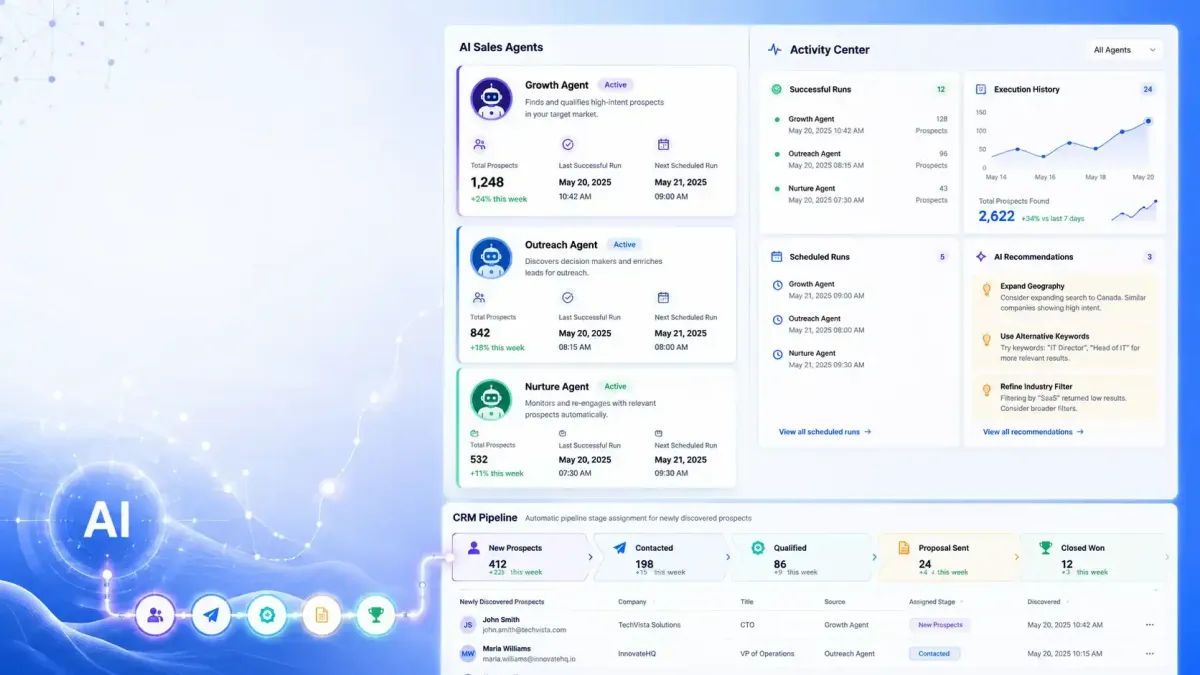
Prospect AI Update: Smarter Sales Automation & CRM Integration
Prospect AI Gets an Activity Center & Native Pipeline Integration in GoHighLevel
GoHighLevel continues to improve Prospect AI with updates that make AI-powered prospecting easier to monitor and manage. The latest release introduces a redesigned experience focused on visibility, execution tracking, and tighter CRM integration.
Instead of simply discovering leads, GoHighLevel Prospect AI now gives users a clearer view of what every AI Sales Agent is doing, when it last ran, what it found, and when it will run again. Alongside that, native CRM Pipeline integration allows newly discovered prospects to flow directly into the appropriate pipeline stage without manual work.
For agencies, sales teams, and businesses using GoHighLevel CRM for prospecting, lead generation, and sales automation, these enhancements provide a more organized workflow while keeping AI prospecting activities transparent.
Redesigned AI Agent Dashboard for Better Visibility
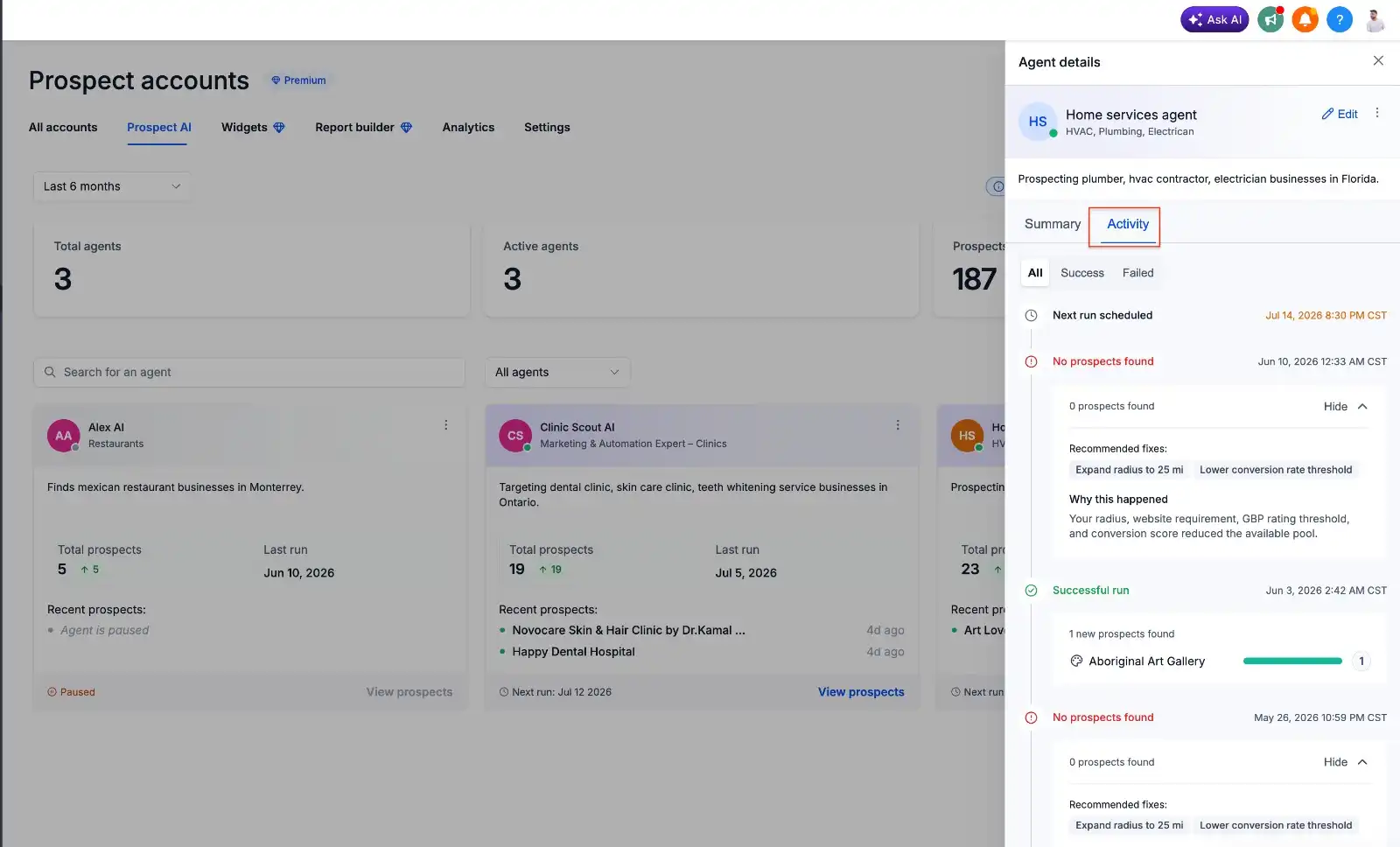
One of the biggest improvements is the redesigned AI agent cards on the Prospect AI dashboard.
Previously, users often needed to open individual agents to understand their status. Now, each card surfaces the most important information at a glance.
Each AI agent card displays:
Total prospects discovered
Last successful run
Next scheduled run
Agent description
Agent specialization
Quick access to all discovered prospects
This redesigned AI Agent Dashboard makes it easier to monitor multiple AI Sales Agents from one place without unnecessary clicks. Whether you're managing one AI Sales Agent or several, the dashboard provides a quick snapshot of overall performance.
A Dedicated AI Agent Workspace
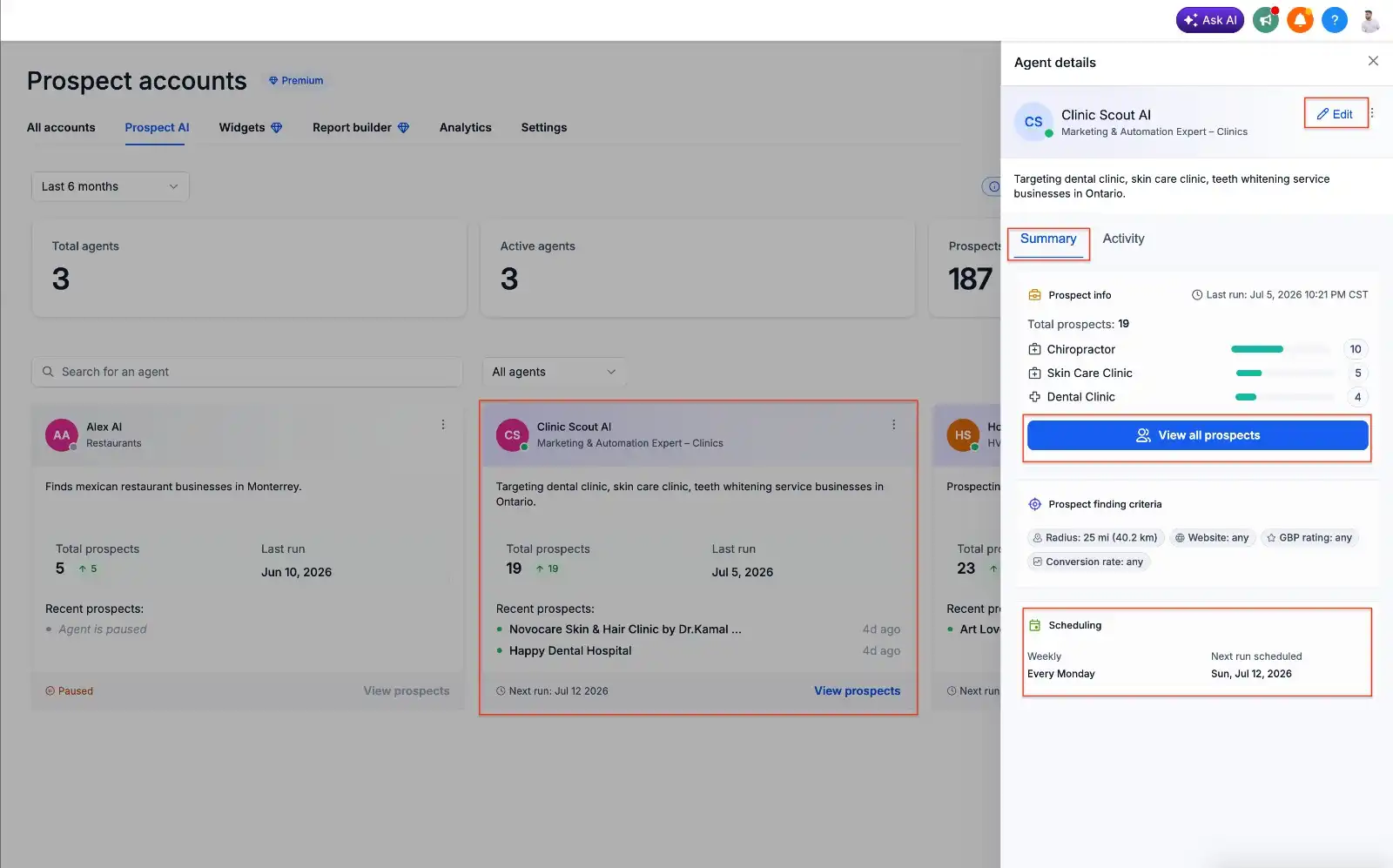
Selecting an agent now opens a dedicated workspace instead of immediately entering edit mode.
This new workspace is divided into two primary sections that help users review an agent before making configuration changes.
Summary
The Summary section includes:
Agent configuration
Prospect statistics
Prospect finding criteria
Next scheduled run
Quick access to discovered prospects
This creates a centralized overview of how the agent is configured and what it has already accomplished.
Activity
The new Activity tab focuses on execution history.
Users can review:
Complete execution history
Previous runs
Upcoming scheduled runs
Success logs
Failure logs
This additional visibility makes it easier to understand how an AI agent has been performing over time before deciding whether any adjustments are needed.
New Activity Center Explains AI Prospecting Results
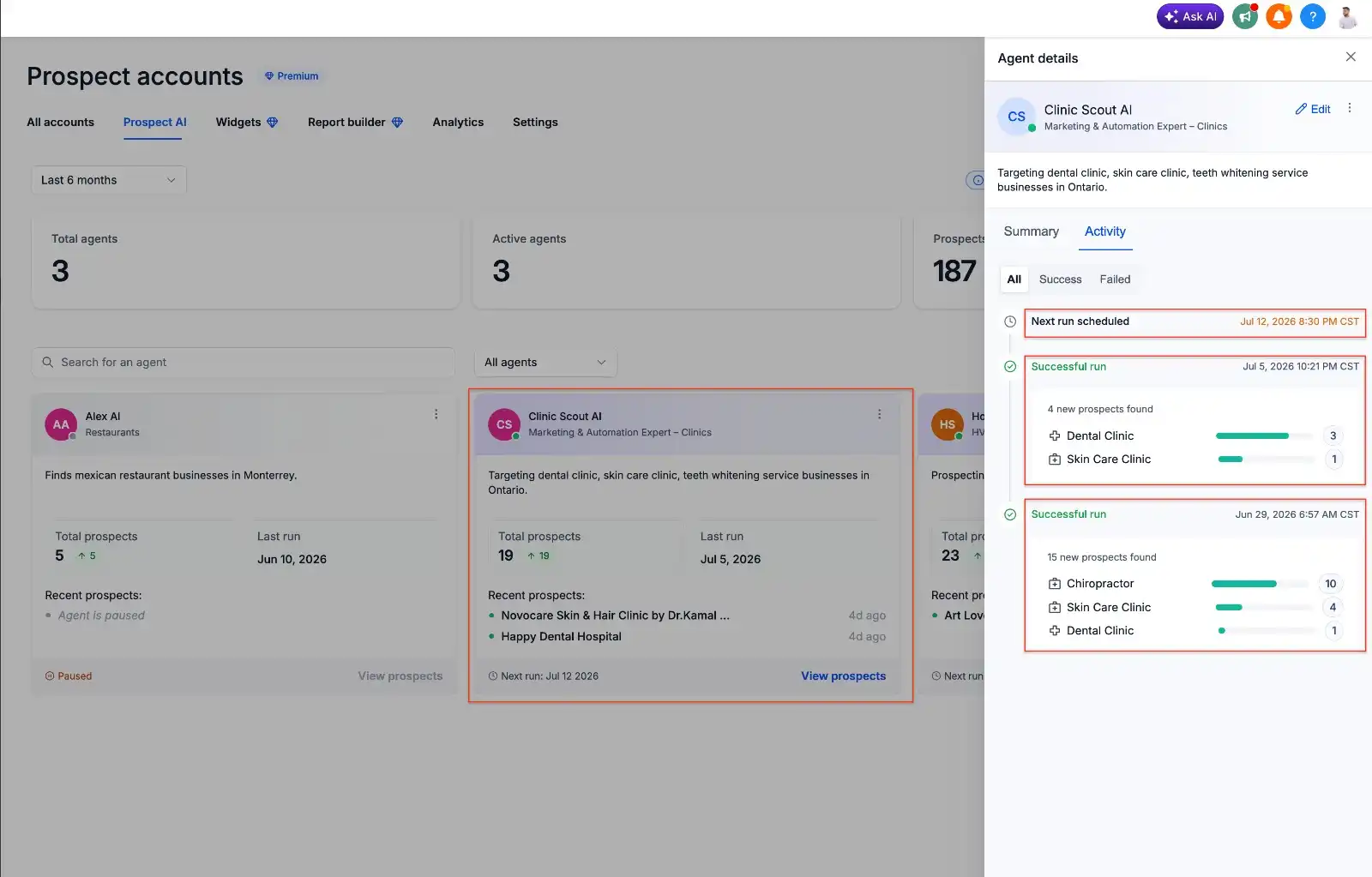
One of the most useful additions is the new Activity Center, which provides much greater visibility into what each AI Sales Agent has been doing and its execution history. Instead of simply showing whether an agent completed its task, Prospect AI now provides additional context around each execution, helping users understand what the AI agent has been doing
Users can review:
Last execution
Next scheduled execution
Number of prospects discovered
Business categories discovered
Historical execution logs
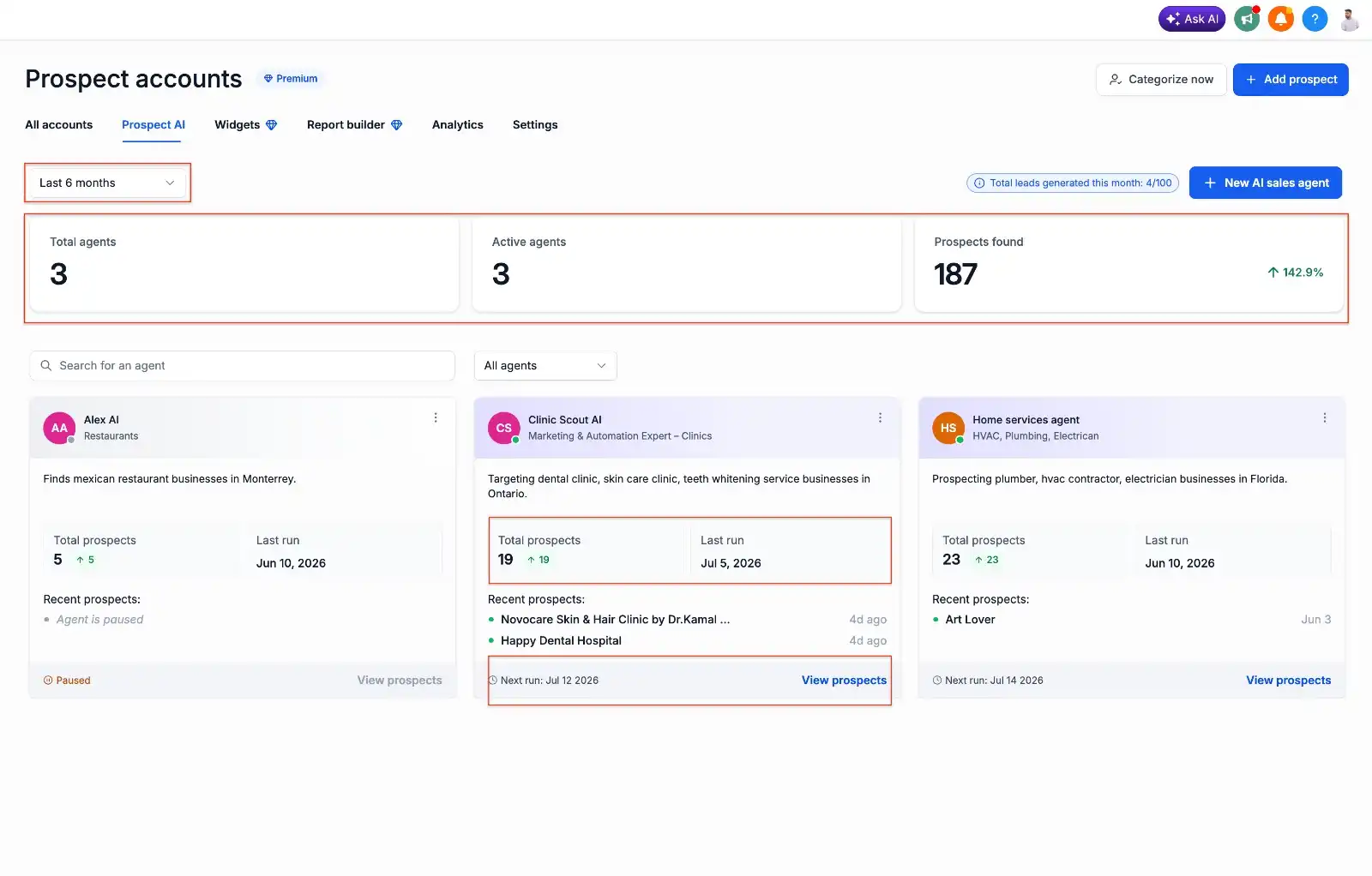
Activity Center provides explanations and recommendations when no prospects are found.
When prospects are successfully discovered, users can immediately see the results.
If an AI agent does not find prospects, the Activity Center also explains why and provides actionable recommendations instead of leaving users guessing.
Suggested improvements may include:
Increase the search radius
Relax conversion score filters
Lower GBP rating requirements
Upgrade monthly limits
Reallocate limits across AI agents
These recommendations help users diagnose prospecting issues and refine their prospecting settings using actionable insights provided directly within GoHighLevel.
Improved Dashboard Metrics
The overall Prospect AI dashboard has also received several usability improvements.
Users can now quickly view:
Total AI agents
Active AI agents
Total prospects discovered
Monthly lead usage (total leads generated this month)
A search bar has also been added, making it easier to locate individual AI agents when managing multiple prospecting campaigns.
Together, these dashboard enhancements provide a clearer overview of AI activity while improving navigation across the Prospect AI workspace.
Native CRM Pipeline Integration Streamlines Lead Management
Another major enhancement is the native Pipeline Integration with GoHighLevel CRM.
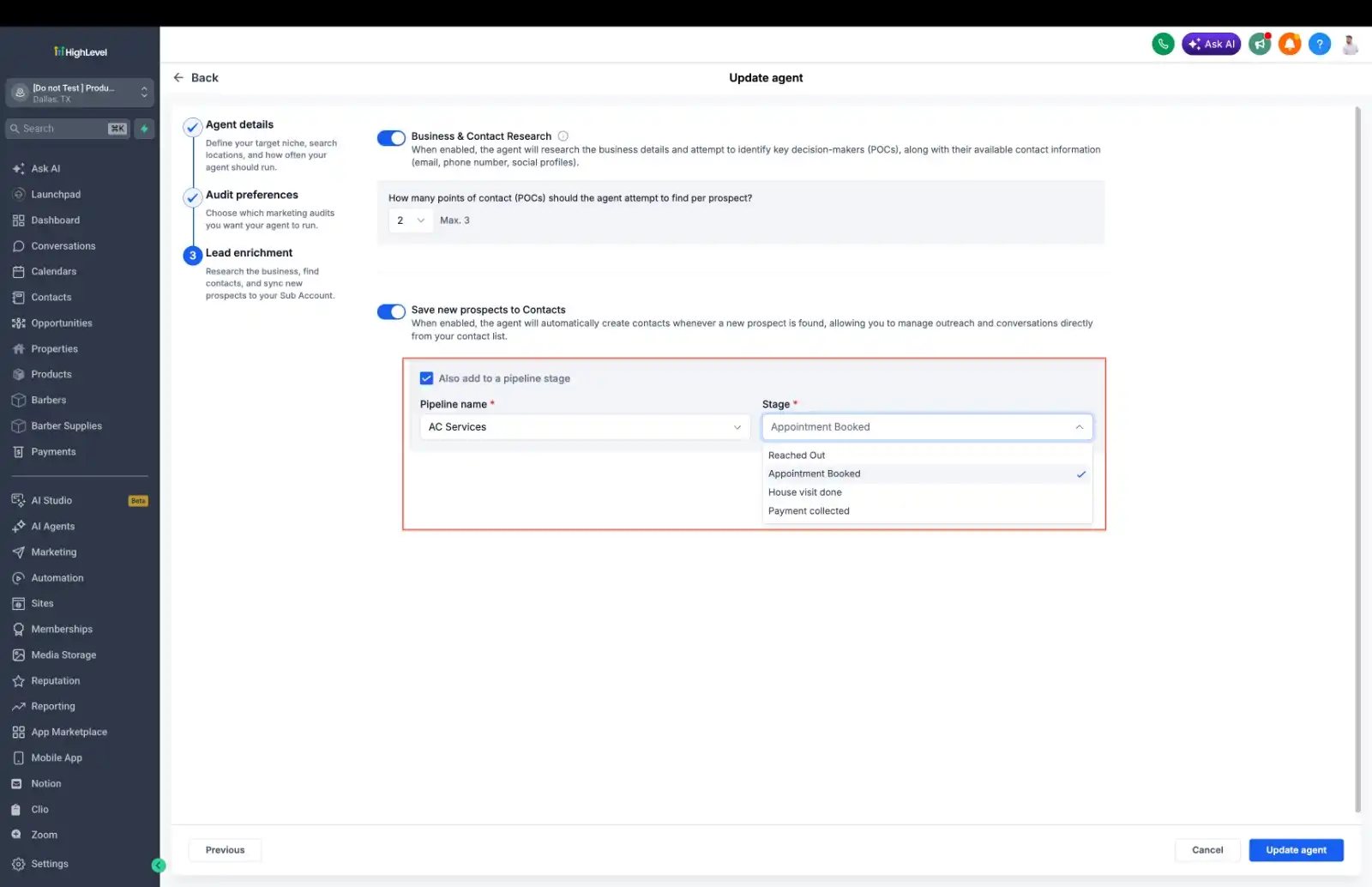
While configuring an AI agent, users can now select:
Which CRM pipeline newly discovered prospects should enter
Which pipeline stage those prospects should be placed into
Once configured, every newly discovered prospect can automatically be added to the selected CRM pipeline.
This removes the need to manually move prospects from Prospect AI into the CRM.
As soon as prospects are discovered, they become immediately available for:
Review
Automation
Outreach
For businesses using CRM Automation and Sales Automation, this creates a smoother workflow by connecting Prospect Discovery directly with pipeline management.
Why This Prospect AI Update Matters
This update represents more than a visual refresh.
GoHighLevel Prospect AI now gives users greater visibility into how AI Sales Agents perform, what they discover, and how they contribute to ongoing lead generation efforts.
With redesigned dashboards, dedicated agent workspaces, a detailed Activity Center, and direct CRM Pipeline integration, users can:
Understand every AI agent at a glance
Monitor execution history
Diagnose prospecting issues with actionable recommendations
Review discovered prospects more efficiently
Automatically organize new prospects inside GoHighLevel CRM
Manage multiple AI Sales Agents from a centralized dashboard
Collectively, these improvements continue evolving Prospect AI from a prospect discovery tool into a more complete AI SDR and sales engine within the GoHighLevel ecosystem.
Conclusion
The latest Prospect AI enhancements focus on giving users greater visibility, better organization, and a more connected workflow. From monitoring agent performance through the new Activity Center to automatically sending discovered prospects into the right CRM Pipeline, GoHighLevel has simplified how businesses manage AI-driven prospecting.
For agencies, sales teams, and businesses relying on Lead Generation, CRM Automation, and AI Prospecting, these updates make it easier to understand what every AI agent is doing while keeping newly discovered prospects ready for review and outreach inside GoHighLevel CRM.
Need Expert Help with GoHighLevel?
New to GoHighLevel and ready to get started? Buy your GoHighLevel account here and launch with confidence.
Already know what you need and want our team to handle everything, from complete setup and customization to funnels, workflows, automations, CRM, and pipelines? Click here.



