

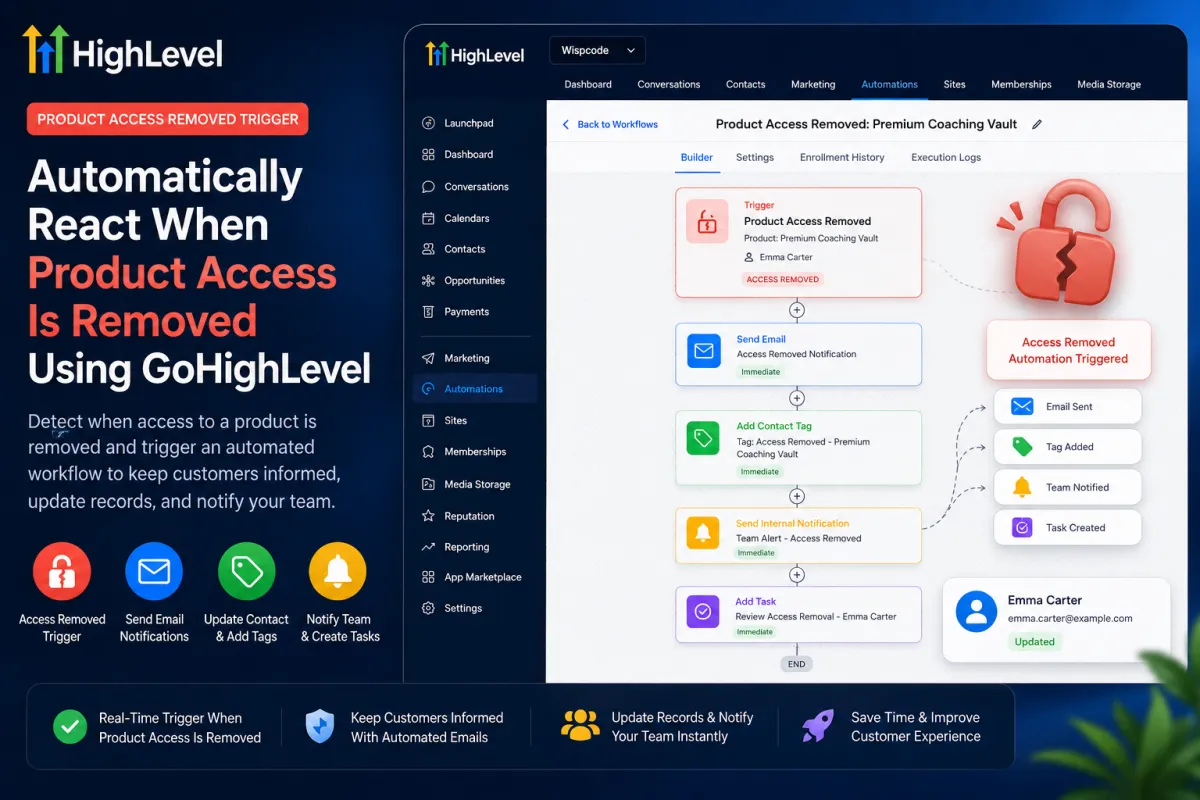
GoHighLevel Product Access Removed Trigger Workflow
How to Manage Customer Access When Product Permissions Are Removed Using the Product Access Removed Trigger in GoHighLevel
When a customer loses access to a course, membership, or digital product, the access change may be only the beginning. You may still need to notify the customer, update CRM segmentation, alert support, or start a retention process. The GoHighLevel Product Access Removed Trigger provides an automation entry point after that access-removal event occurs. HighLevel confirms that it fires when access to a product is revoked or removed.
What Is the Product Access Removed Trigger in GoHighLevel?

Product Access Removed is an event-based workflow trigger. When a customer loses access to a product, the trigger can enter that contact into a workflow so the actions you configure afterward can run.
The distinction matters: the trigger does not revoke access itself. It also does not automatically cancel a subscription, issue a refund, restore access, delete the contact, record course completion, or explain why access was removed. It detects the access-removal event and starts the workflow.
Why Automate Product Access Removal?
Without automation, access changes can leave customer-facing and internal processes out of sync. A contact may lose access while still carrying an outdated CRM tag, or support may not know that follow-up is needed.
A GoHighLevel workflow can respond by sending a customer message, changing segmentation tags, updating a contact field, notifying an internal team, or creating a follow-up task. HighLevel currently documents actions including Send Email, Add Contact Tag, Remove Contact Tag, Update Contact Field, Send Internal Notification, and Add Task.
These are optional workflow actions, not built-in consequences of the trigger.
How to Set Up the Product Access Removed Trigger

Step 1: Open or Create Your Workflow
In the sub-account, go to Automation > Workflows. Open an existing workflow or use + Create Workflow to build one from scratch. HighLevel’s current workflow documentation uses this navigation pattern.
Step 2: Select Product Access Removed
Inside the workflow builder, add a trigger and choose Product Access Removed. Give it a descriptive name so its purpose is obvious later. HighLevel identifies this trigger specifically for removed product access.
Step 3: Choose the Relevant Product
Configure the documented Select Product filter and choose the product whose access-removal event should start the workflow.
Product-specific filtering matters when you sell several courses or digital products. A workflow intended for one course should not react to an unrelated product-access change.
Do not invent trigger-level logic. HighLevel documents the product filter, but not filters for cancellation reason, payment status, course progress, or access-removal reason.
Step 4: Add Your Follow-Up Actions

After the trigger, build the response you want. For example:
Product Access Removed → Send Email → Add Contact Tag → Send Internal Notification → Add Task
The email can explain that access changed and provide the correct support or renewal path. A tag can support CRM segmentation, while an internal notification or task can prompt a team member to review the account.
Step 5: Test and Publish the Workflow
Save the trigger, test the workflow with controlled sample data, and verify every downstream action before enabling it. HighLevel’s guide instructs users to test and then activate the workflow with the Publish toggle.
Example: Access-Removal Follow-Up for an Online Course
Suppose a customer loses access to an online training product. The workflow could use Product Access Removed filtered to that course, then send a neutral access-change email, add an “Access Removed” tag, notify customer success, and create a follow-up task.
This does not mean GoHighLevel determined that the customer canceled, failed a payment, or completed the course. Those conclusions require separate data. The workflow responds only to the verified fact that product access was removed.
Product Access Removed vs. Related GoHighLevel Triggers
Use Product Access Granted when access to a product is granted. Use Offer Access Removed when access to an offer is revoked; HighLevel documents offer access and product access as separate trigger events. Use Product Completed when a learner completes a product or course.
The Subscription trigger is different. It responds to subscription lifecycle events and statuses, including creation and cancellation-related changes. Product access removal should not be treated as proof of subscription cancellation.
Best Practices and Important Limitations
Keep customer-facing messages factual and neutral unless another verified field establishes why access changed. Use separate workflows or branches when different products require different treatment. Test with controlled events before relying on the automation, and review every CRM update, message, and notification.
HighLevel states that repeated removal of access to the same product can activate the trigger each time, so add safeguards where duplicate messaging would be inappropriate.
Most importantly, do not confuse detection with enforcement. Product Access Removed does not remove access, detect payment failure, issue refunds, record completion, or remove offer access.

Final Thoughts
The real value of the GoHighLevel Product Access Removed Trigger is that it creates a dependable automation point after a product-access change occurs. Used carefully, it can support accurate customer communication, cleaner CRM segmentation, better internal visibility, and well-designed follow-up processes without pretending to know why access changed.
Frequently Asked Questions
1. What is the Product Access Removed Trigger in GoHighLevel?
The Product Access Removed Trigger starts a workflow when a customer’s access to a specific product is revoked or removed. The trigger detects the access-removal event; it does not remove access itself. Any emails, CRM updates, notifications, tasks, or other follow-up steps must be configured as workflow actions.
2. Does the Product Access Removed Trigger automatically revoke product access?
No. The trigger responds after product access has been removed. It is an automation entry point, not an action that revokes permissions. Businesses can use the workflow that follows to communicate with the customer, update CRM information, or alert internal teams.
3. Can I trigger the workflow only when access to a specific product is removed?
Yes. HighLevel provides a Select Product filter for the Product Access Removed Trigger. This allows you to choose the relevant product so the workflow responds only to access-removal events associated with that product.
4. Does Product Access Removed mean a customer's subscription was canceled?
Not necessarily. Product access removal and subscription status are separate events in HighLevel. The Subscription trigger is specifically designed to respond to subscription lifecycle changes, including cancellation, expiration, trial, overdue, and other documented statuses. Therefore, you should not assume why product access was removed unless another reliable data point confirms the reason.
5. What is the difference between Product Access Removed and Offer Access Removed?
Product Access Removed responds when access to a product is removed, while Offer Access Removed responds when access to a specific offer is revoked. HighLevel documents them as separate workflow triggers with different filters, so products and offers should not be treated as interchangeable objects when building automations.
6. Can GoHighLevel send an email after product access is removed?
Yes. After the Product Access Removed Trigger starts the workflow, you can configure follow-up actions such as customer notifications, CRM updates, internal team notifications, and other appropriate workflow steps. The communication is performed by the actions you add, not by the trigger itself.
7. What happens if access to the same product is removed more than once?
According to HighLevel's documentation, the Product Access Removed Trigger can activate each time access to the same product is removed. Workflows should therefore be designed carefully to avoid sending duplicate or inappropriate messages when repeated access changes are possible.
Need Expert Help with GoHighLevel?
New to GoHighLevel and ready to get started? Buy your GoHighLevel account here and launch with confidence.
Already know what you need and want our team to handle everything, from complete setup and customization to funnels, workflows, automations, CRM, and pipelines? Click here.



