

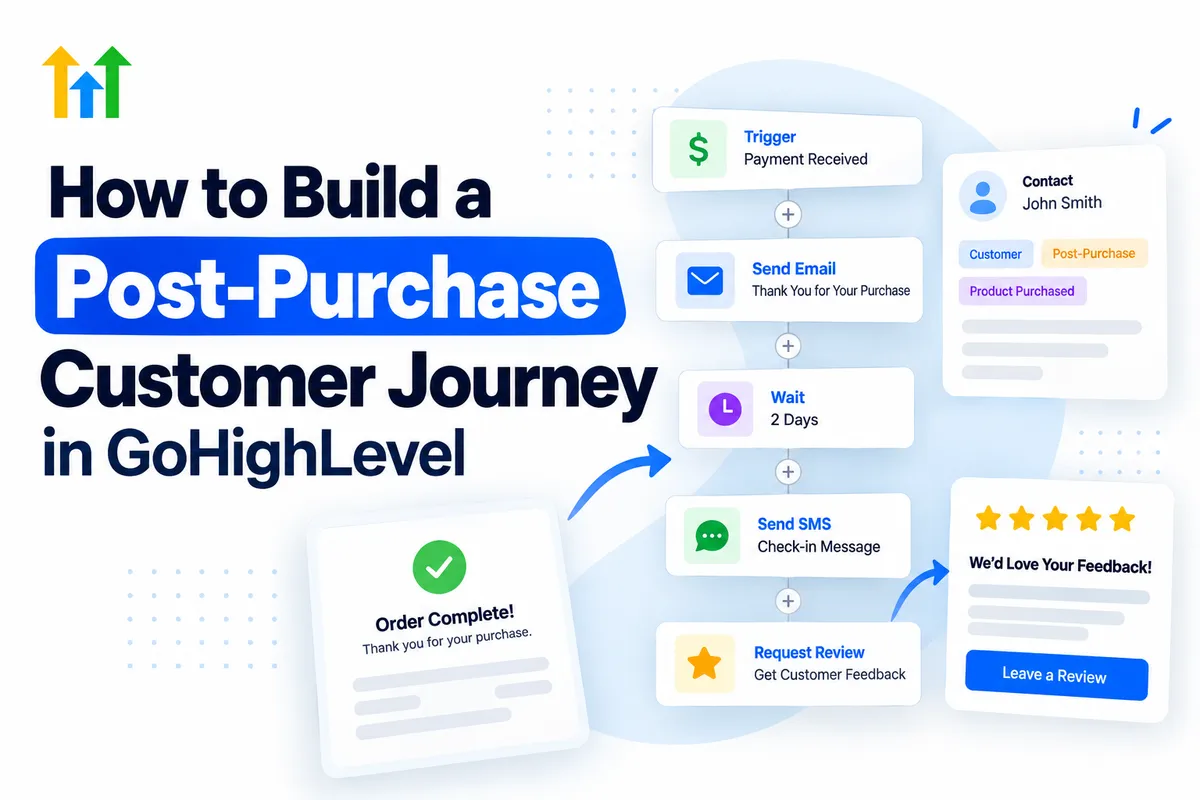
Build a Post-Purchase Journey in GoHighLevel
How to Build a Post-Purchase Customer Journey in GoHighLevel
Winning a new customer is exciting, but what happens after they make a purchase? For many businesses, communication slows down immediately after the transaction. Customers receive a receipt, perhaps a delivery notification, and little else. This missed opportunity can weaken relationships and reduce the chances of repeat business.
A well-designed Post-Purchase Customer Journey in GoHighLevel helps businesses stay connected beyond the initial sale. Through personalized messages, automated follow-ups, onboarding sequences, and feedback requests, businesses can create a consistent customer experience. Instead of treating a purchase as the finish line, GoHighLevel helps make it the beginning of a lasting relationship.
What Is a Post-Purchase Customer Journey?
A post-purchase customer journey includes every interaction between a business and its customers after a transaction.
These interactions may include order confirmations, onboarding instructions, service updates, satisfaction surveys, review requests, and future offers.
The goal is simple: help customers feel supported, informed, and valued.
When managed effectively, these interactions can improve customer satisfaction, encourage repeat purchases, generate referrals, and strengthen brand loyalty.
Why Use GoHighLevel for Post-Purchase Automation?
GoHighLevel combines CRM management, customer communication, and workflow automation within one platform.
Businesses can use it to:
Centralize customer information: Maintain contact details, communication history, tags, and custom fields.
Automate communication: Schedule relevant emails, SMS messages, and follow-up sequences.
Segment customers: Organize contacts based on purchases, services, or engagement.
Personalize interactions: Use available contact information to make communication more relevant.
Manage customer engagement: Track conversations and review workflow activity.
With GoHighLevel post-purchase automation, teams can reduce repetitive tasks while maintaining meaningful customer relationships.
How to Build a Post-Purchase Customer Journey in GoHighLevel
Creating an effective GHL customer journey starts with understanding customer needs and connecting the right automation steps.
Step 1: Define the Customer Journey
Before building workflows, identify the interactions customers should experience after purchasing.
A simple journey might include:
Immediate purchase confirmation and appreciation.
Onboarding instructions or service information.
Delivery updates or helpful educational content.
Customer satisfaction feedback.
Review requests and future engagement.
Map these touchpoints according to your business model. A consulting agency may prioritize onboarding, while an online store may focus on delivery communication and product guidance.
Step 2: Organize Customers in the CRM
Accurate customer information makes personalization easier.
Within GoHighLevel, use contact records to maintain customer details and communication history.
Apply relevant tags such as New Customer, Service Completed, or Repeat Customer.
Custom fields can store additional information, including purchased services or customer preferences. Pipelines can also represent fulfillment or onboarding stages when appropriate.
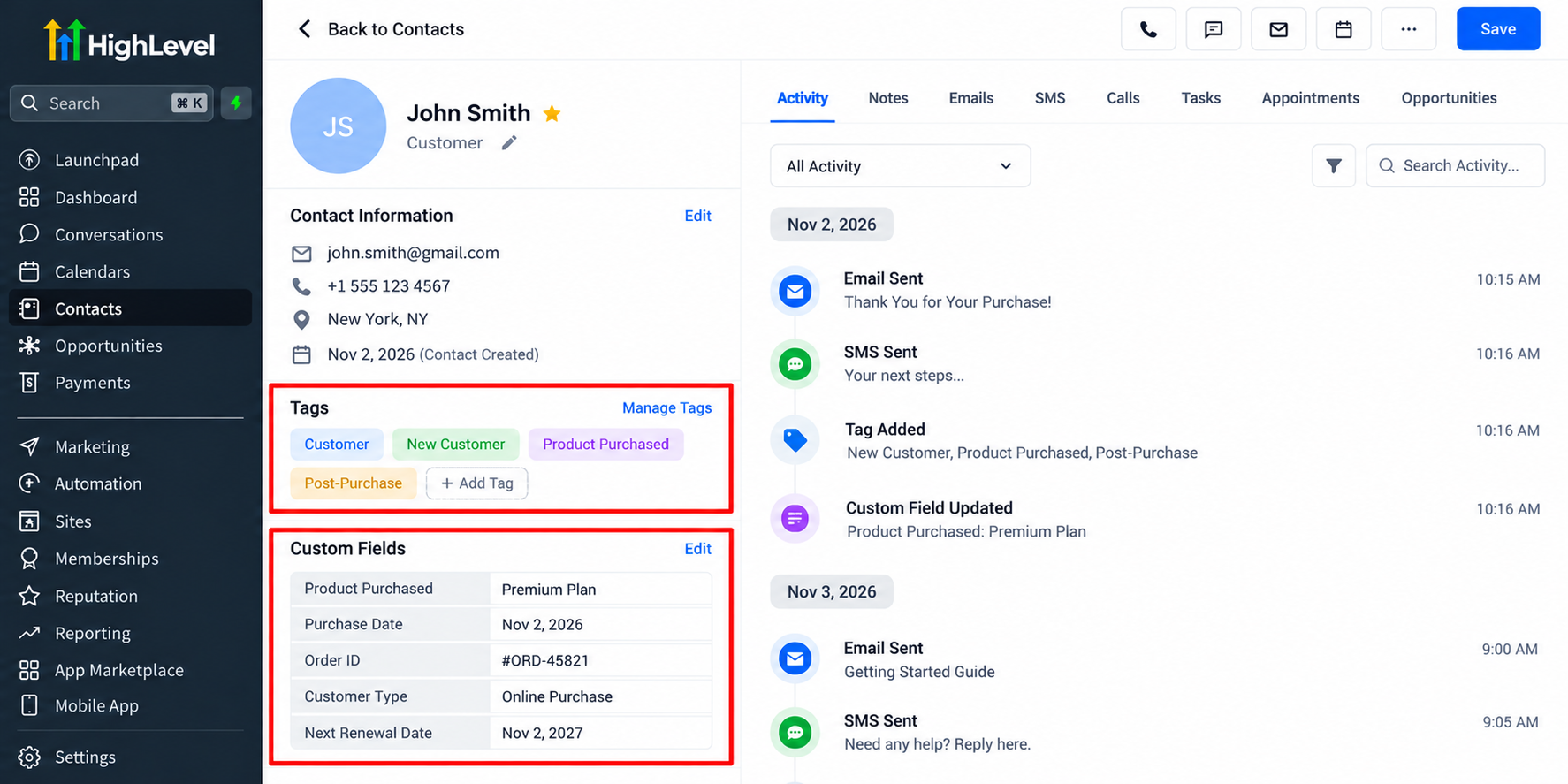
Keep your CRM organized so customers receive communication relevant to their actual experience.
Step 3: Choose a Reliable Purchase or Payment Trigger
Navigate to Automation → Workflows and create a workflow.
Choose a supported trigger that matches your purchasing process.
For example, GoHighLevel provides payment-related workflow triggers, including Payment Received, which can support automation following successful payments.
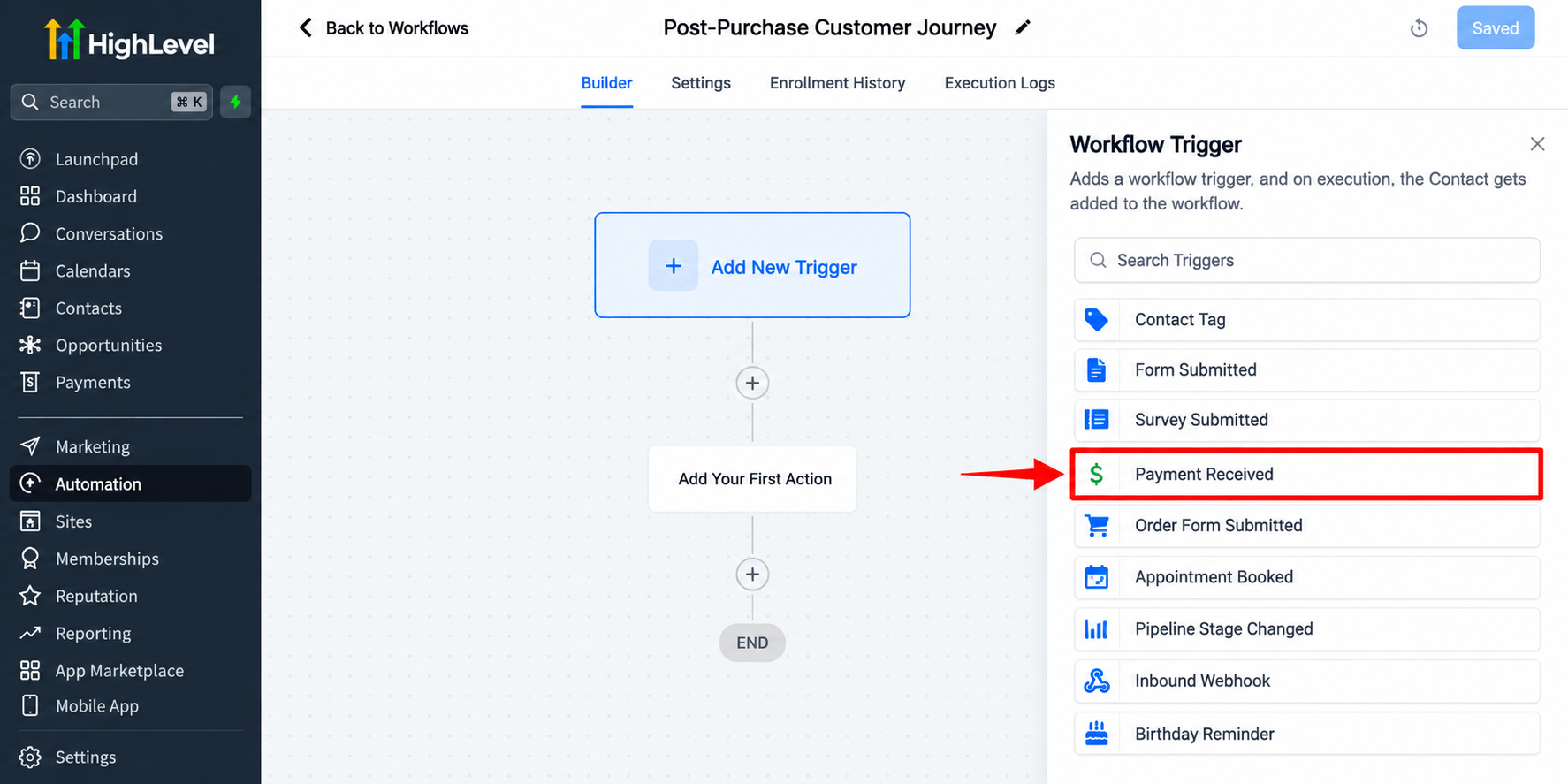
Available triggers and filters depend on the payment channel and account configuration.
For purchases processed outside GoHighLevel, an integration, API connection, or webhook may be necessary to deliver the purchase event.
Always test the trigger before activating customer communication.
Step 4: Send a Personalized Thank-You Message
Use workflow email or SMS actions to acknowledge the purchase.
Include the customer's first name when available, thank them for choosing your business, and explain what happens next.
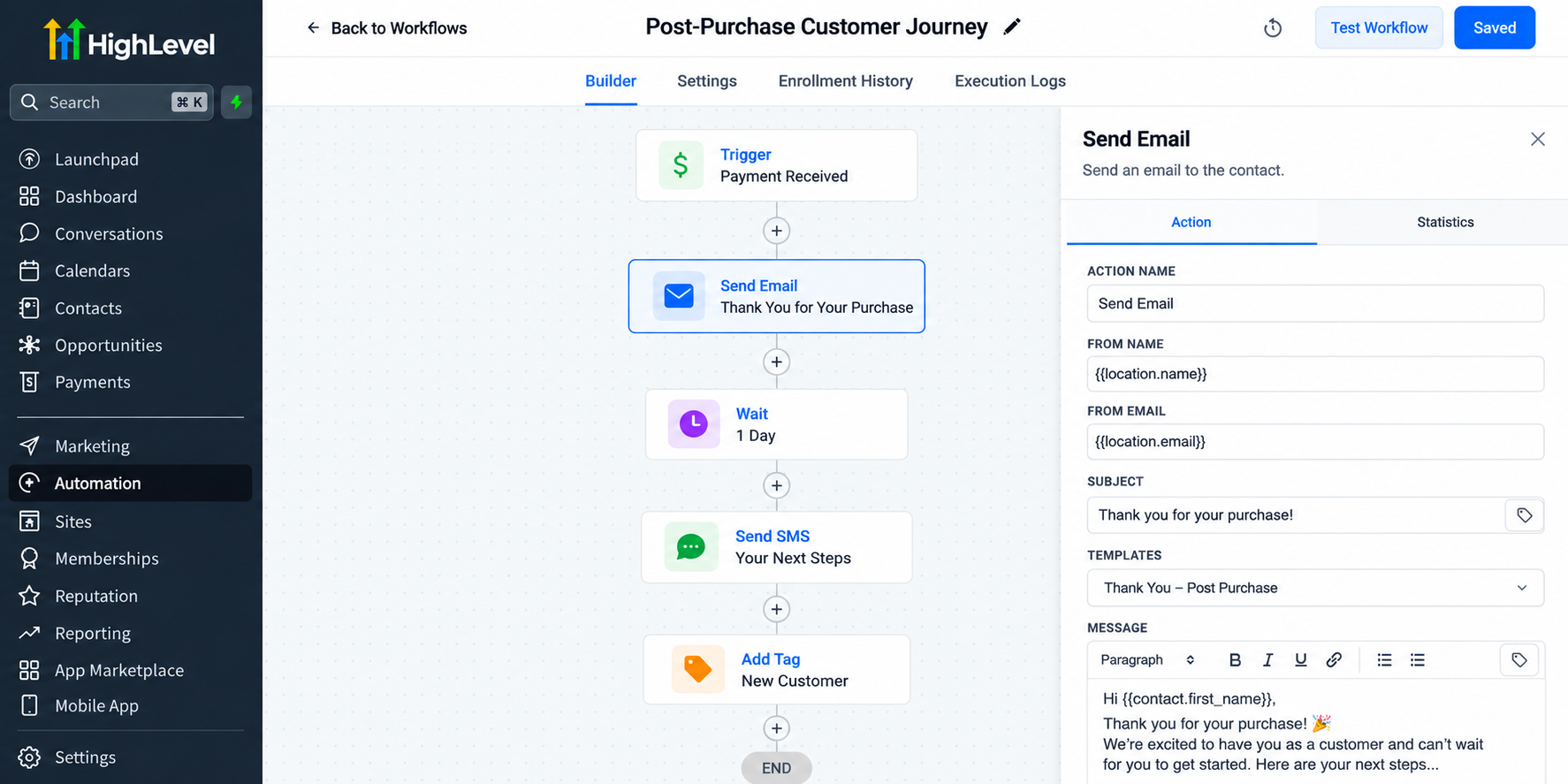
For example:
"Thanks for choosing us! We're excited to get started. You'll receive your next steps shortly."
Keep the message concise, relevant, and consistent with your brand.
Step 5: Automate Onboarding and Helpful Follow-Ups
A purchase should lead naturally into customer support.
Use workflow actions and Wait steps to deliver information at appropriate intervals.
You might send setup instructions immediately, helpful resources the following day, and a service check-in later.
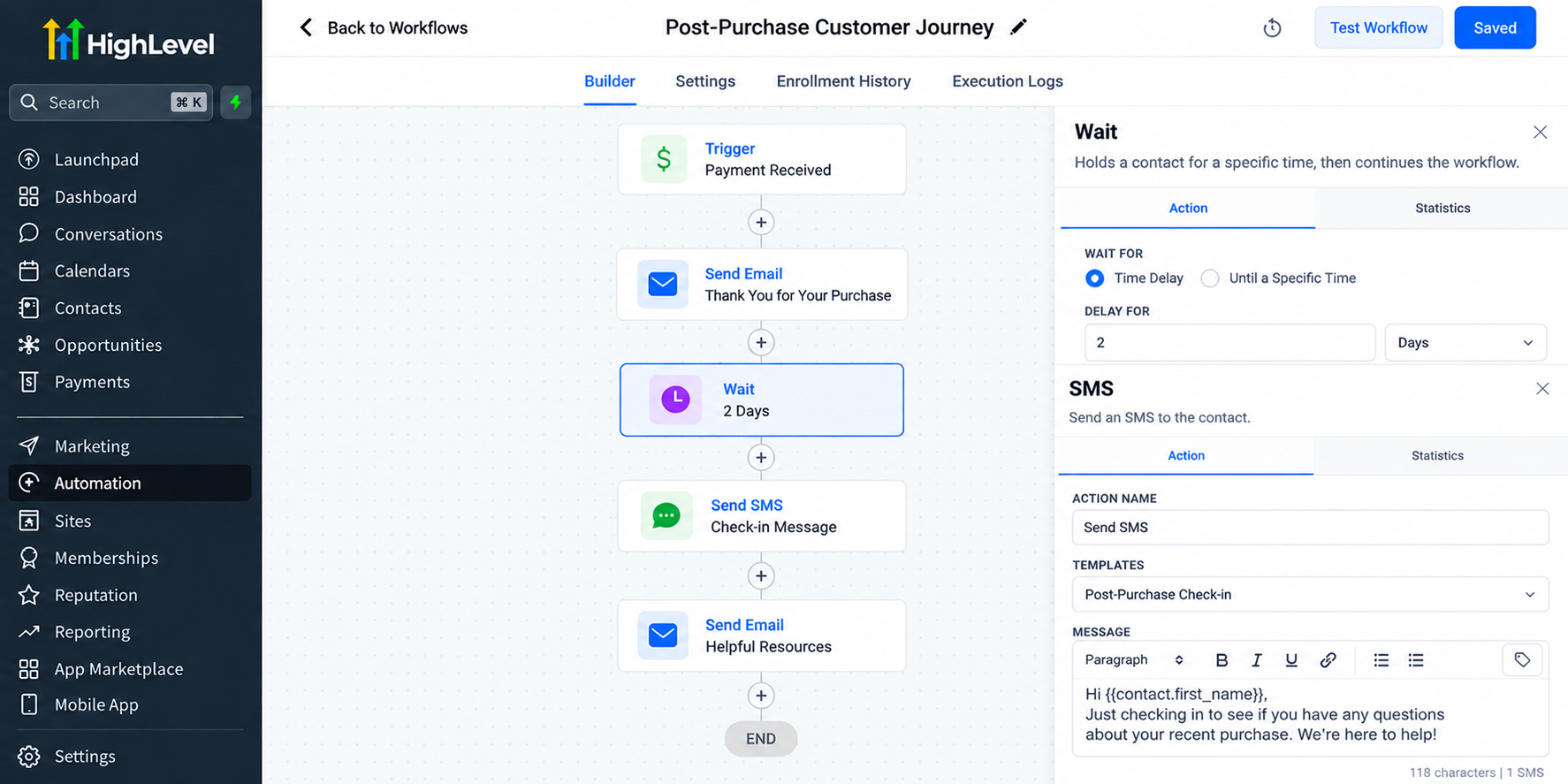
For post-purchase email automation, focus on answering common questions rather than sending unnecessary promotional messages.
Timing should reflect actual delivery or service progress whenever possible.
Step 6: Request Feedback and Reviews
Customer feedback reveals opportunities to improve your experience.
GoHighLevel supports forms, surveys, and reputation management features that can assist with collecting feedback and requesting reviews.
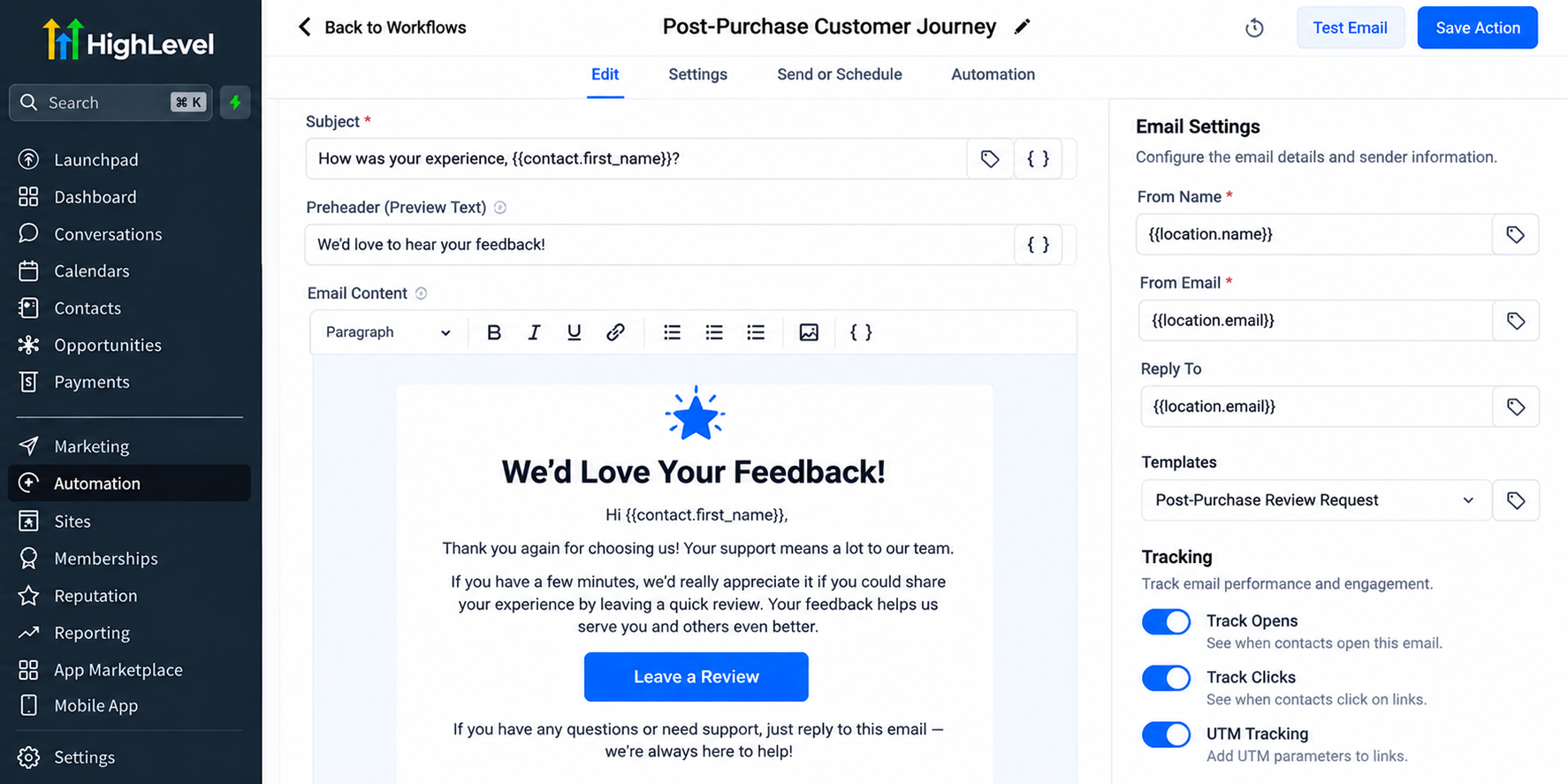
Send requests after customers have had sufficient time to experience the product or service.
Request honest feedback from customers without selectively directing only satisfied customers toward public reviews.
Step 7: Encourage Repeat Purchases and Referrals
Once customers have received value, introduce relevant opportunities for continued engagement.
Use tags, custom fields, and workflow conditions to segment customers for personalized offers, maintenance reminders, or referral invitations.
Avoid aggressive promotions immediately after a purchase.
Successful automated customer follow-ups should feel helpful rather than intrusive.
Step 8: Monitor and Improve the Journey
Review workflow execution history, customer replies, and available email performance information.
Look for failed actions, unnecessary delays, repeated messages, and opportunities to improve timing.
Reporting availability varies by feature and account configuration.
Use these insights to refine your CRM workflow automation and customer engagement strategy.
Practical Real-World Example
Imagine a home cleaning company using GoHighLevel customer retention workflows.
After payment, the customer receives a thank-you email. Following the completed appointment, a workflow sends cleaning maintenance tips.
Two days later, the company requests feedback. Subsequently, eligible customers receive a reminder about recurring cleaning services.
This illustrative example demonstrates how automation can maintain communication without requiring staff to manually contact every customer.
Best Practices for an Effective Post-Purchase Journey
Personalize thoughtfully: Use accurate customer information and relevant purchase details.
Respect communication preferences: Obtain appropriate consent and honor unsubscribe requests.
Avoid excessive messaging: Space communications according to customer needs.
Prevent duplicate follow-ups: Check workflow enrollment settings and use appropriate conditions.
Test before publishing: Verify triggers, message content, timing, and workflow exits.
Conclusion
A successful customer relationship should continue long after the first transaction. With the right strategy, GoHighLevel helps businesses create structured communication that supports customers, encourages engagement, and builds lasting trust.
By combining CRM organization, thoughtful automation, personalized follow-ups, and meaningful feedback, businesses can create a more connected customer experience without adding unnecessary manual work.
Start building your Post-Purchase Customer Journey in GoHighLevel today, and turn everyday customer interactions into opportunities for stronger, longer-lasting relationships.
Frequently Asked Questions (FAQs)
1. What is a post-purchase customer journey in GoHighLevel?
A post-purchase customer journey in GoHighLevel is an automated process that manages customer communication after a purchase, including thank-you messages, onboarding, feedback requests, and follow-ups.
2. Can GoHighLevel automate customer follow-ups after a purchase?
Yes. GoHighLevel allows businesses to create workflows that automatically send emails, SMS messages, and reminders based on supported purchase events or integrated triggers.
3. How does GoHighLevel help improve customer retention?
GoHighLevel supports customer retention through personalized communication, automated follow-ups, customer segmentation, and timely engagement that helps businesses maintain stronger relationships.
4. Can I collect customer feedback and reviews using GoHighLevel?
Yes. GoHighLevel offers forms, surveys, and reputation management tools to collect customer feedback and send review requests after a purchase or completed service.
5. Do I need coding skills to build a post-purchase workflow in GoHighLevel?
No. GoHighLevel provides a visual workflow builder that allows beginners to create automated customer journeys without coding. Some external integrations may require additional technical setup.
Need Expert Help with GoHighLevel?
New to GoHighLevel and ready to get started? Buy your GoHighLevel account here and launch with confidence.
Already know what you need and want our team to handle everything, from complete setup and customization to funnels, workflows, automations, CRM, and pipelines? Click here.



