

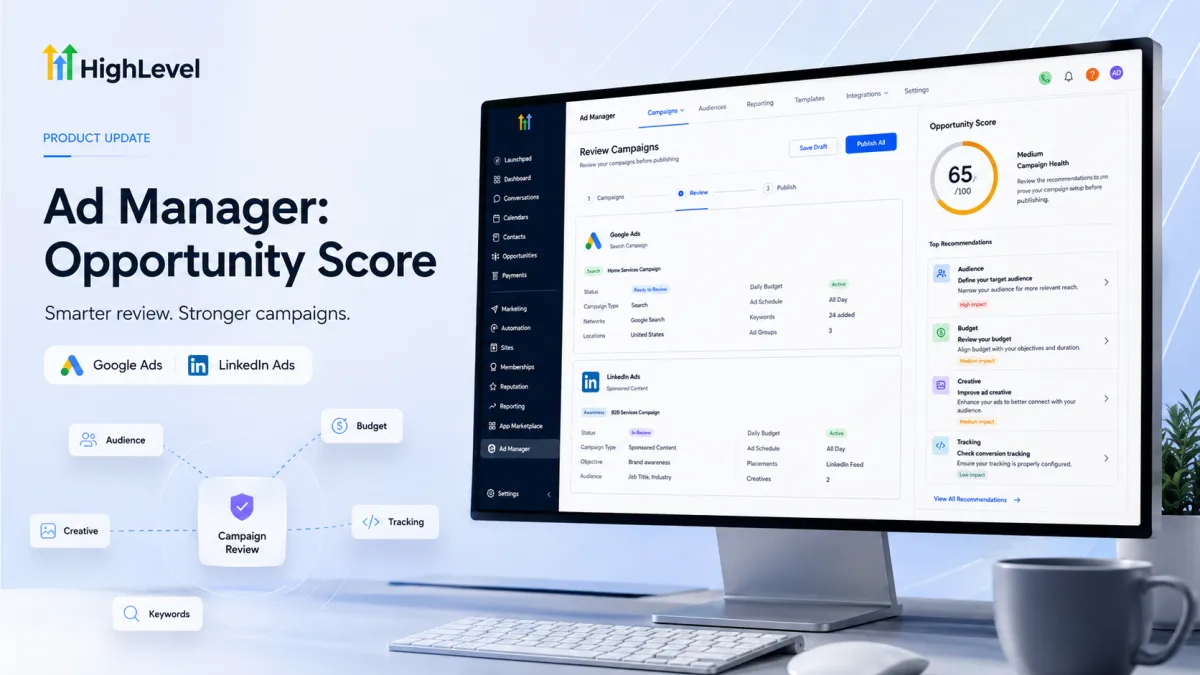
Opportunity Score Update
GoHighLevel Ad Manager: Opportunity Score for Google and LinkedIn Campaigns
Launching an advertising campaign can feel like a final checklist with one frustrating question: Did I configure everything correctly before hitting publish? Important campaign settings can be easy to overlook during setup, especially when different advertising platforms require attention to different areas. With the latest GoHighLevel Ad Manager update, advertisers now have another layer of guidance before launch. Opportunity Score is now available for Google and LinkedIn campaigns, extending the pre-publish campaign review experience already available for Meta.
What Is New With Opportunity Score?
GoHighLevel has expanded Opportunity Score across its Meta, Google, and LinkedIn campaign builders. After initially being introduced for Meta campaigns, the feature now provides similar pre-publish guidance for Google and LinkedIn.
The goal is straightforward: help advertisers review campaign readiness, identify potential setup issues, and understand where improvements may be needed before publishing.
The Opportunity Score appears on the Review screen and provides a campaign readiness score from 0 to 100. Campaign health is also summarized as Low, Medium, or High, giving advertisers a quick way to understand the current state of their campaign before launch.
Importantly, the recommendations are not identical for every campaign. They are adapted to the selected platform and campaign configuration.
How Opportunity Score Works for Google and LinkedIn
For Google and LinkedIn campaigns, Opportunity Score evaluates relevant campaign settings and provides recommendations based on the configuration being reviewed.

The feature considers only applicable settings based on factors such as the selected objective, campaign type, ad format, and configuration. This means the areas reviewed can differ from one campaign to another.
Rather than requiring advertisers to manually inspect every possible setting without guidance, Opportunity Score brings attention to relevant areas that may need review before publishing.
The score is therefore best understood as a campaign readiness and guidance tool, not a prediction of how a campaign will perform.
What Google Campaigns Are Reviewed For
When reviewing a Google campaign, Opportunity Score can provide guidance across several relevant areas of campaign setup.
These include:
Keywords
Audience
Budget
Creatives
Tracking
Ad schedule
Language
Placements
Bidding setup
Applicable campaign assets
The exact areas considered depend on the campaign's configuration. This platform-aware approach helps ensure that the recommendations are relevant to the Google campaign being reviewed.
For advertisers using GoHighLevel Google Ads, this provides a clearer pre-publish review process by highlighting areas that may deserve attention before the campaign goes live.
What LinkedIn Campaigns Are Reviewed For
Opportunity Score also brings platform-specific campaign guidance to LinkedIn.
For LinkedIn campaigns, relevant review areas can include:
Audience and location targeting
Budget
Creatives
Destination URLs
Lead-gen setup
Language
Other campaign-specific requirements
As with Google, only applicable campaign settings are considered according to the selected objective, ad format, and configuration.
This gives GoHighLevel LinkedIn Ads users a way to review important campaign areas before publishing while keeping the recommendations connected to the campaign they are actually building.
Prioritized Recommendations and Quick Fixes
Opportunity Score does more than display a number. It also organizes recommendations into relevant categories, including Audience, Budget, Creative, Tracking, and Keywords, where applicable.


Each suggestion indicates its potential impact, helping advertisers focus their attention on improvements that may be more important during the campaign review process.
Another useful part of the experience is the ability to click a recommendation and navigate directly to the relevant campaign section. Instead of simply identifying an area that needs attention, the Review screen provides a direct path to the setting where the advertiser can make the change.
After making an adjustment, advertisers can return to the review process and check the updated score before publishing.
How to Use Opportunity Score in Ad Manager
Using the feature is part of the normal campaign creation and review process:
Create or edit a Google, LinkedIn, or Meta campaign in Ad Manager.
Complete the campaign setup and move to the Review screen.
Open the Opportunity Score panel.

The Google campaign Review screen in GoHighLevel Ad Manager lets advertisers review campaign details before publishing. Review the overall score and individual recommendations.
Click a suggested action to navigate to the relevant campaign setting.
Make the required improvements and review the updated score before publishing.
The workflow keeps campaign review and improvement within the existing Ad Manager experience.
Why This Update Matters for Advertisers
Campaign setup involves multiple settings, and overlooking a relevant configuration can create uncertainty before launch. Opportunity Score adds an additional validation layer that helps advertisers identify potentially limiting or missing campaign settings earlier in the review process.
It also makes the review process more structured. Instead of treating every setting as equally important, advertisers can use the recommendations and their indicated potential impact to decide where to focus first.
Most importantly, the feature provides guidance rather than guarantees. A higher Opportunity Score should not be interpreted as a promise of more leads, lower costs, higher click-through rates, better ROAS, or improved conversions. The score is designed to help assess campaign readiness and highlight areas for review.
Recommendations also do not automatically change campaign settings. Advertisers remain responsible for reviewing the suggestions, deciding which changes are appropriate, and making those changes themselves.
Final Takeaway
The expansion of GoHighLevel Opportunity Score brings pre-publish campaign guidance to Google and LinkedIn alongside Meta. By providing a 0–100 readiness score, campaign health indicators, platform-aware recommendations, prioritized suggestions, and direct navigation to relevant settings, Ad Manager gives advertisers another way to review their campaigns before publishing.
For marketers managing campaigns across multiple advertising platforms, the update creates a more guided campaign review and optimization experience while keeping the focus where it belongs: making informed setup decisions before a campaign goes live.
Frequently Asked Questions
What is Opportunity Score in GoHighLevel?
Opportunity Score is a campaign readiness and guidance feature that helps advertisers review campaigns before publishing.
Which platforms support Opportunity Score?
Opportunity Score is available for Meta, Google, and LinkedIn campaigns in Ad Manager.
Where can I find Opportunity Score?
You can find it on the Review screen before publishing a campaign.
What does the Opportunity Score measure?
It provides a 0–100 campaign readiness score and summarizes campaign health as Low, Medium, or High.
What does Opportunity Score check in Google campaigns?
It can review areas such as keywords, audience, budget, creatives, tracking, bidding, and ad schedule, where applicable.
Need Expert Help with GoHighLevel?
New to GoHighLevel and ready to get started? Buy your GoHighLevel account here and launch with confidence.
Already know what you need and want our team to handle everything, from complete setup and customization to funnels, workflows, automations, CRM, and pipelines? Click here.



