

Automate Affiliate Rewards with the GoHighLevel New Affiliate Sale Trigger
How to Automatically Reward Affiliates After a New Sale Using the New Affiliate Sale Trigger in GoHighLevel
Introduction
An affiliate generates a sale. What happens next? Without automation, someone may need to check the sale, organize the new customer, alert the team, recognize the affiliate, or follow up on missing payout information manually.
The GoHighLevel New Affiliate Sale Trigger solves the event-detection part of that process. It can start a workflow immediately after an affiliate-generated sale, allowing you to build consistent post-sale automation around customers, affiliate administration, and recognition. The important distinction is that the trigger starts the workflow. It does not, by itself, send an affiliate payment or replace your commission and payout process.
What Is the New Affiliate Sale Trigger in GoHighLevel?

The New Affiliate Sale trigger is an Affiliate-category workflow trigger that fires when a sale is successfully attributed to an affiliate. HighLevel currently states that it supports one-time sales, recurring sales, and manually tracked affiliate transactions.
Think of it as the starting signal for an affiliate sales workflow. The sale happens first. Then the trigger allows GoHighLevel workflows to perform configured actions.
Commission logic is separate. Affiliate commissions are governed by the applicable GoHighLevel Affiliate Manager campaign configuration, including its commission settings. The trigger reacts to the sale event; it should not be treated as an action that sends money to an affiliate.
Why Automate Affiliate Rewards and Post-Sale Actions?
A good GoHighLevel affiliate automation removes repetitive administration without confusing customer and affiliate processes.
You can use the trigger to:
notify your team about important affiliate sales;
segment or tag affiliate-generated customers;
initiate customer post-purchase follow-up;
identify affiliates who still need payout or tax information;
create consistent recognition processes;
support scalable affiliate program management.
The main advantage is consistency. Instead of manually checking every new affiliate transaction, the sale itself becomes the event that launches the appropriate process.
How to Set Up the New Affiliate Sale Trigger

According to HighLevel's current workflow documentation:
Go to Automations → Workflows.
Create a new workflow or open an existing workflow.
Add the New Affiliate Sale trigger.
Configure any relevant trigger filters.
Add the post-sale actions you want the workflow to perform.
Click Save, then make sure the workflow is active before relying on it for live sales.
Configuring the Trigger Filters

HighLevel currently provides four optional filters.
Affiliate(s): Restricts the automation to sales produced by selected affiliates. This is useful for VIP affiliates, specific partners, or special recognition programs.
Campaign: Runs the workflow only for sales associated with a selected affiliate campaign. For example, you could build different post-sale processes for a coaching program and a SaaS subscription.
Payout Method Status: Filters according to whether the affiliate has added the required payout method. This can help identify sales where payout setup still needs attention.
Tax Form Status: Filters based on the affiliate's tax-form submission status. It is useful when your administrative process requires tax information before commissions can progress toward payout.
Adding the Reward or Follow-Up Actions

Safe post-sale possibilities include an Internal Notification for your team, tagging the affiliate-generated buyer, customer follow-up, and routing payout or tax issues for attention. Standard contact actions can also be used when you intentionally want to communicate with the buyer.
For affiliate congratulations or reminders, do not assume ordinary Send Email or Send SMS targets the affiliate. Use only an affiliate-specific communication mechanism whose recipient behavior you have verified in your current account.
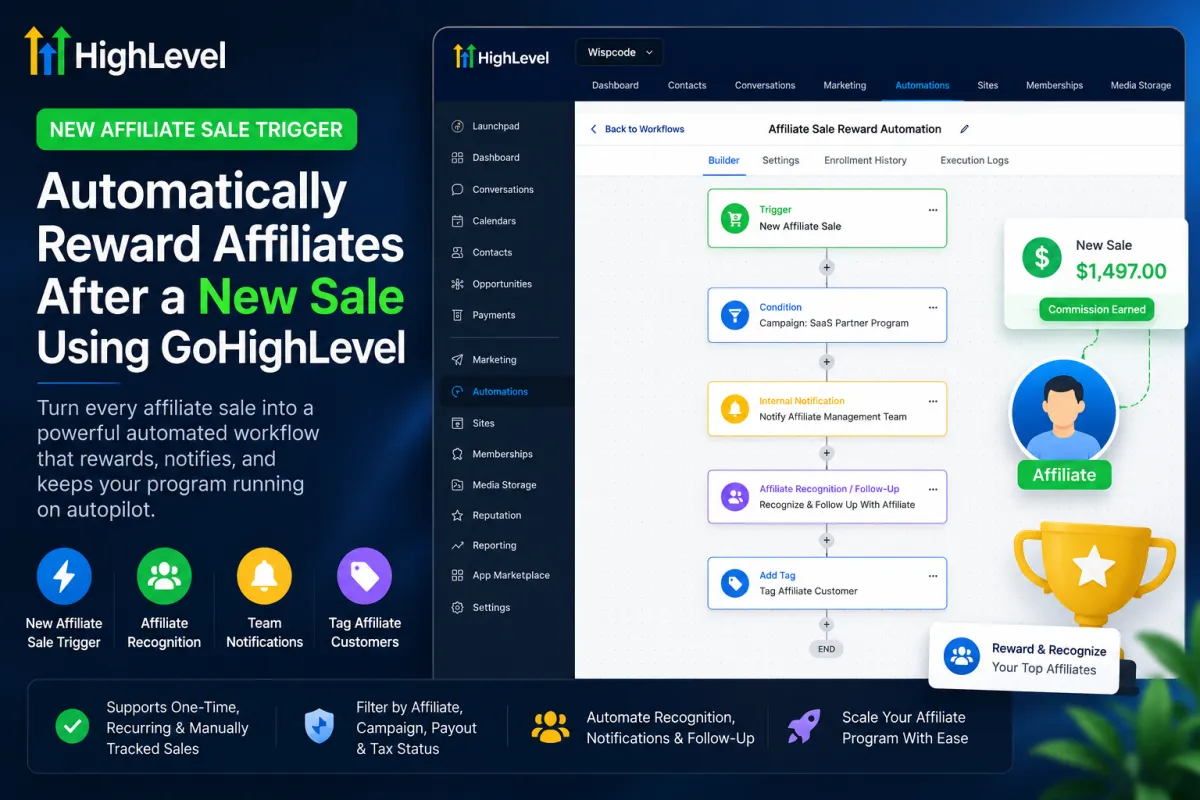
Example Affiliate Reward Workflow

A practical workflow could look like this:
New Affiliate Sale
→ Filter by the relevant Campaign
→ Check payout or tax status where needed
→ Send an Internal Notification to the affiliate-management team
→ Use a verified affiliate-specific method for recognition or follow-up
→ Add an Affiliate Customer tag to the buyer
→ Award community points only when the workflow is operating on the correct community member
Each step serves a different purpose. Campaign filters keep the automation targeted, compliance-related filters help prevent payout administration from being overlooked, internal alerts give your team visibility, and buyer tagging improves segmentation.
This is affiliate reward automation, not automatic cash distribution. Actual commission processing and affiliate payout remain separate concerns.
Important Buyer vs Affiliate Limitation

This is the technical detail you should verify before publishing anything.
With the New Affiliate Sale trigger, HighLevel says the workflow commonly runs using the buyer/customer Contact record as its primary record. Consequently, normal Send Email and Send SMS actions may message the customer, not the affiliate. Contact-level tags, fields, and similar actions can likewise apply to that primary contact.
Never build a “Congratulations on your commission!” email with a standard contact email action until you have verified exactly who the workflow is acting on.
Community gamification requires the same caution. Grant community group leaderboard points awards points to the relevant group member, and HighLevel notes that execution fails if the member is not part of the selected group. The New Affiliate Sale trigger does not automatically switch from the buyer record to the affiliate's community profile.

Best Practices
Test the workflow using dummy affiliate and customer records.
Use filters instead of running every post-sale automation for every affiliate.
Verify the primary workflow record and recipient before sending messages.
Keep buyer communication separate from affiliate communication.
Check payout-method and tax-form requirements when they matter to your process.
Review workflow execution after launch to catch targeting or context problems early.
Frequently Asked Questions
1. What is the New Affiliate Sale Trigger in GoHighLevel?
The New Affiliate Sale Trigger is a workflow trigger that starts an automation when a sale is successfully attributed to an affiliate. It can be used for one-time, recurring, and manually tracked affiliate sales.
2. Does the New Affiliate Sale Trigger automatically pay affiliates?
No. The trigger only starts a workflow after an affiliate sale is detected. It does not automatically transfer money, approve commissions, or process affiliate payouts. Commission and payout handling remain separate functions within the GoHighLevel Affiliate Manager and your configured payout process.
3. What filters are available for the New Affiliate Sale Trigger?
The trigger currently supports these filters:
Affiliate(s)
Campaign
Payout Method Status
Tax Form Status
These filters help you run specific automations only when the appropriate affiliate, campaign, payout setup, or tax-form conditions are met.
4. Can I use the trigger for recurring affiliate sales?
Yes. GoHighLevel states that the New Affiliate Sale Trigger can work with recurring affiliate sales, as well as one-time and manually tracked sales.
5. Can I send an automatic congratulations email to the affiliate?
You need to be careful. The workflow can commonly run using the buyer/customer Contact record as the primary workflow record. Therefore, a normal Send Email or Send SMS action may communicate with the buyer rather than the affiliate.
Before sending affiliate-specific messages, verify that the action you are using specifically targets the affiliate.
6. Can I tag customers who purchase through an affiliate?
Yes. Because the buyer may be the primary contact in the workflow, you can use contact-level actions such as tags to organize affiliate-generated customers. For example, you could add a tag such as Affiliate Customer for segmentation and future follow-up.
Final Thoughts
The GoHighLevel New Affiliate Sale Trigger can turn every successful affiliate sale into a repeatable automated process. Used correctly, it can organize customers, alert your team, support affiliate recognition, and reduce administrative work.
The key is targeting. Treat the trigger as the event that starts your automation, keep commission calculation and actual affiliate payout conceptually separate, and always confirm whether an action is operating on the buyer, affiliate, or community member before publishing the workflow.
Need Expert Help with GoHighLevel?
New to GoHighLevel and ready to get started? Buy your GoHighLevel account here and launch with confidence.
Already know what you need and want our team to handle everything, from complete setup and customization to funnels, workflows, automations, CRM, and pipelines? Click here.



