

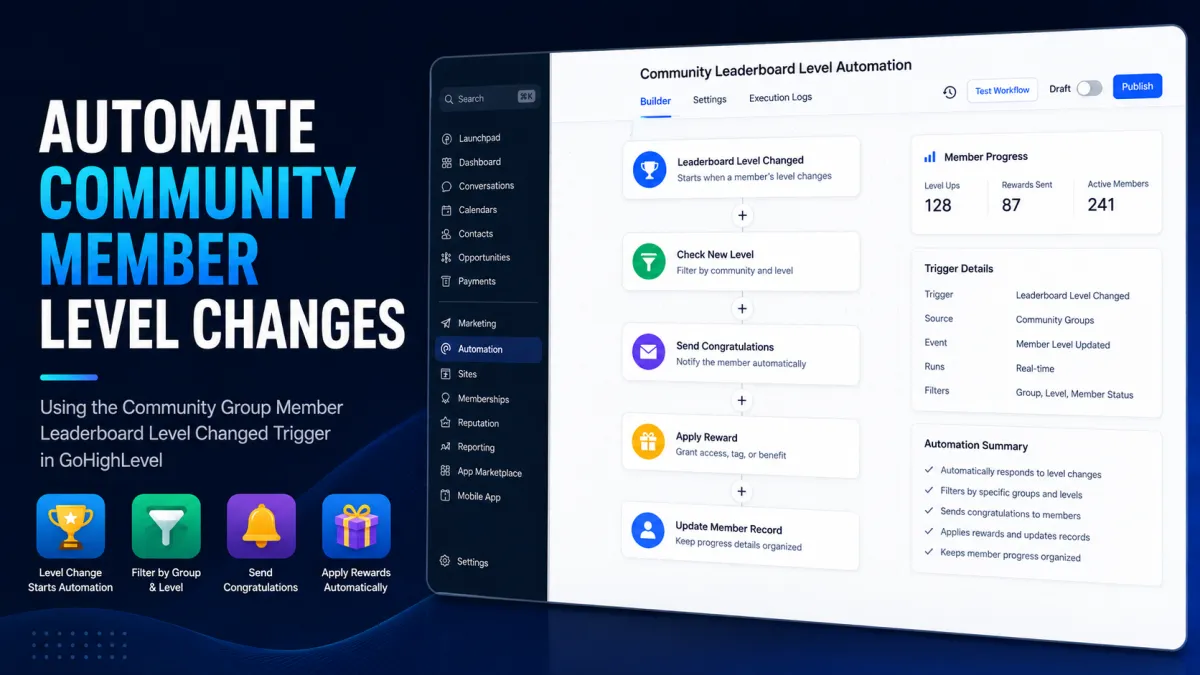
GoHighLevel Community Leaderboard Level Automation
How to Reward Top Community Members When Their Leaderboard Level Changes Using GoHighLevel
Recognizing community members when they reach a new leaderboard level is a simple way to turn engagement into motivation. Instead of manually checking the leaderboard and deciding who deserves recognition, GoHighLevel can respond automatically when a member’s community leaderboard level changes.
With the Community Group Member Leaderboard Level Changed workflow trigger, businesses, coaches, course creators, membership communities, and agencies can build automations around meaningful community milestones.
The result is a more consistent member experience: when someone reaches a qualifying level, the appropriate recognition or reward process can begin automatically.
What Is a GoHighLevel Leaderboard Level Change?
GoHighLevel Communities include gamification features such as points, badges, and leaderboards. A member’s leaderboard position and level are connected to their participation and accumulated gamification activity within the community.
For workflow automation, the important distinction is that a leaderboard level change is a specific Community event. HighLevel currently provides the Community Group Member Leaderboard Level Changed workflow trigger, which fires when a member’s leaderboard level changes.
The trigger can be filtered according to the relevant community group and level. This allows you to build automation around particular milestones rather than reacting to every leaderboard change.
That distinction matters. A leaderboard level is not the same thing as a contact score, opportunity stage, pipeline stage, tag, membership status, or course progress.
Why Automate Rewards for Top Community Members?
A leaderboard is most effective when members understand that their participation leads to meaningful recognition.
Automating the response to level changes can help with:
Member recognition: Celebrate achievements immediately instead of waiting for manual reviews.
Engagement: Give members another reason to participate, post, comment, and contribute.
Gamification: Turn community activity into visible milestones.
Retention: Recognition can encourage members to remain active.
Personalization: Different levels can have different recognition or reward processes.
Reduced administration: Your team does not have to repeatedly monitor the leaderboard manually.
The automation does not replace the reward strategy. Instead, it provides a reliable mechanism for responding when the defined milestone occurs.
How the Leaderboard Automation Works
The basic logic is straightforward:
Leaderboard level changes → HighLevel detects the level-change event → workflow filters determine whether the event qualifies → recognition or reward actions run
The first step is the Community leaderboard event. HighLevel's dedicated trigger detects when the member's leaderboard level changes.
Next, use the trigger's available filters to restrict the automation to the appropriate community group and qualifying level. This is especially useful when only certain levels should receive recognition.
After the trigger qualifies the member, the workflow can continue with appropriate actions. For example, a Send Email action can deliver a personalized congratulatory message, while an Internal Notification can alert your team that a member has reached an important milestone.
Step-by-Step Setup
1. Create the Workflow
Open the GoHighLevel Workflow Builder and create a new workflow. HighLevel's current workflow builder allows you to add a trigger first and then place actions after the triggering event.

2. Select the Leaderboard Level-Change Trigger
Add a new workflow trigger and select the Community leaderboard level-change trigger.
The current workflow trigger list identifies it as Community Group Member Leaderboard Level Changed. HighLevel documentation also refers to the underlying trigger as User Group Gamification Level Changed.

3. Apply the Relevant Filters
Configure the available trigger filters for the community group and qualifying level.
For example, suppose your community uses levels such as Bronze, Silver, and Gold. If the reward should only happen when a member reaches Gold, configure the trigger around the appropriate Gold-level condition rather than allowing every level change into the same reward process.
The exact options displayed can depend on the current account interface and configuration, so use the filters presented by your workflow builder rather than relying on an outdated tutorial.

4. Add the Recognition or Reward Process
Once the correct member reaches the qualifying level, add the workflow actions required by your reward strategy.
A simple implementation could use Send Email to congratulate the member and explain what they have earned. HighLevel's Send Email action supports personalized content and custom values such as the contact's first name.
You can also add an Internal Notification to alert your team. Internal notifications can be delivered through supported channels such as email, in-app notifications, SMS, or WhatsApp, depending on configuration.
If the intended reward is another community gamification action, HighLevel also provides a Grant community group leaderboard points workflow action. However, this action awards leaderboard points; it should not be described as a generic coupon, product, or monetary reward mechanism. HighLevel specifically notes that the member must belong to the selected community group for the points action to execute successfully.

5. Test Before Activating
Test the workflow with a controlled community member or test scenario before publishing it.
Verify that:
The intended level change activates the workflow.
The correct community group is selected.
The level filters behave as expected.
The member receives the intended communication.
Internal notifications reach the appropriate team members.
Any points-based action applies to the correct community group.
Testing is particularly important when rewards have real financial or access value.

Example: Rewarding a Gold-Level Member
Imagine a coaching community where members progress through several leaderboard levels.
A member reaches the Gold level.
The Community leaderboard level-change event activates the workflow. The trigger is configured for the relevant community group and Gold-level milestone. The workflow then sends the member a personalized congratulations email and sends an internal notification to the community manager.
Your team can then fulfill the actual reward according to your established process—for example, providing a promised benefit, discount, or special recognition.
The key advantage is that the achievement detection and communication are automated, while the actual reward mechanism remains aligned with what your business genuinely offers.
Best Practices
Keep leaderboard reward workflows simple and maintainable.
Define reward criteria clearly. Decide exactly which levels qualify before building the workflow.
Separate reward tiers when necessary. Different levels may deserve different workflows or branches.
Avoid accidental duplicate rewards. Design your automation so a member does not unintentionally receive the same benefit multiple times.
Test before going live. Check both the trigger and every downstream action.
Monitor workflow execution. Review executions when troubleshooting unexpected behavior.
Keep the reward logic documented. Your team should know what happens at each qualifying level.
Use only confirmed Community events and workflow actions. Avoid building critical reward logic around undocumented fields or assumptions.
Common Mistakes to Avoid
One common mistake is treating the leaderboard level as if it were a normal contact field. The dedicated Community leaderboard trigger should be used for the actual level-change event rather than trying to recreate the event with unrelated CRM triggers.
Another mistake is confusing leaderboard points with rewards. Points help drive gamification and leaderboard progression, while a business reward may require a separate fulfillment process.
Finally, avoid assuming that every Community account has exactly the same interface or configuration. HighLevel continues to update its Community and Workflow features, so always verify the options currently available in your account.
Conclusion
GoHighLevel's Community Group Member Leaderboard Level Changed trigger provides a practical foundation for automating recognition when community members reach important milestones.
By combining the level-change event with appropriate workflow conditions, personalized emails, internal notifications, and—where appropriate—community gamification actions, you can create a consistent system for recognizing your most engaged members.
The real value is not simply sending an automated message. It is creating a repeatable experience where community participation leads to recognition, and recognition gives members another reason to stay engaged.
Frequently Asked Questions
1. What is the GoHighLevel leaderboard level-change trigger?
The Community Group Member Leaderboard Level Changed trigger starts a workflow when a community member’s leaderboard level changes. It can be used to automate recognition and follow-up actions based on community engagement.
2. Can I reward members automatically when they reach a specific leaderboard level?
Yes. You can configure the leaderboard level-change trigger with the available community and level criteria, then connect it to workflow actions such as emails or internal notifications. The actual reward fulfillment depends on how your business delivers the reward.
3. Can I send a congratulatory email when a member reaches a new level?
Yes. A Send Email workflow action can be used after the qualifying leaderboard event to send a personalized congratulations message to the member.
4. Can my team receive a notification when someone reaches a top level?
Yes. You can use the Internal Notification workflow action to alert your team when a qualifying leaderboard level change occurs.
5. Can different leaderboard levels have different rewards?
Yes, provided your workflow setup supports the required level-based conditions. You can create separate workflows or appropriate conditional logic so different milestones trigger different recognition or reward processes.
6. Can GoHighLevel automatically award leaderboard points?
Yes. GoHighLevel provides a Grant community group leaderboard points workflow action. This is specifically for awarding Community leaderboard points and should not be confused with external rewards such as discounts, products, or cash incentives.
7. Is a leaderboard level the same as a contact score?
No. A Community leaderboard level is part of GoHighLevel's Community gamification system. It should not be treated as the same thing as a CRM contact score, opportunity stage, pipeline stage, tag, or course progress.
Need Expert Help with GoHighLevel?
New to GoHighLevel and ready to get started? Buy your GoHighLevel account here and launch with confidence.
Already know what you need and want our team to handle everything, from complete setup and customization to funnels, workflows, automations, CRM, and pipelines? Click here.



