

GoHighLevel IVR Automation
Automate Incoming Calls with GoHighLevel’s Start IVR Trigger
Incoming calls are often where businesses lose control of an otherwise organized sales or customer service process. A caller reaches the main number, someone has to decide where the call should go, and important follow-up can easily depend on whether the right person was available at the right time.
GoHighLevel’s Start IVR Trigger provides a structured way to turn an incoming call into the starting point of an automated IVR workflow. Instead of treating every call the same, businesses can build a workflow that presents callers with prompts, collects keypad input, and sends them through the appropriate call path.
What Is the GoHighLevel Start IVR Trigger?
The Start IVR Trigger is a workflow trigger that activates an IVR sequence when an inbound call reaches a phone number configured for the IVR workflow.
Think of it as the entry point for your automated phone menu.

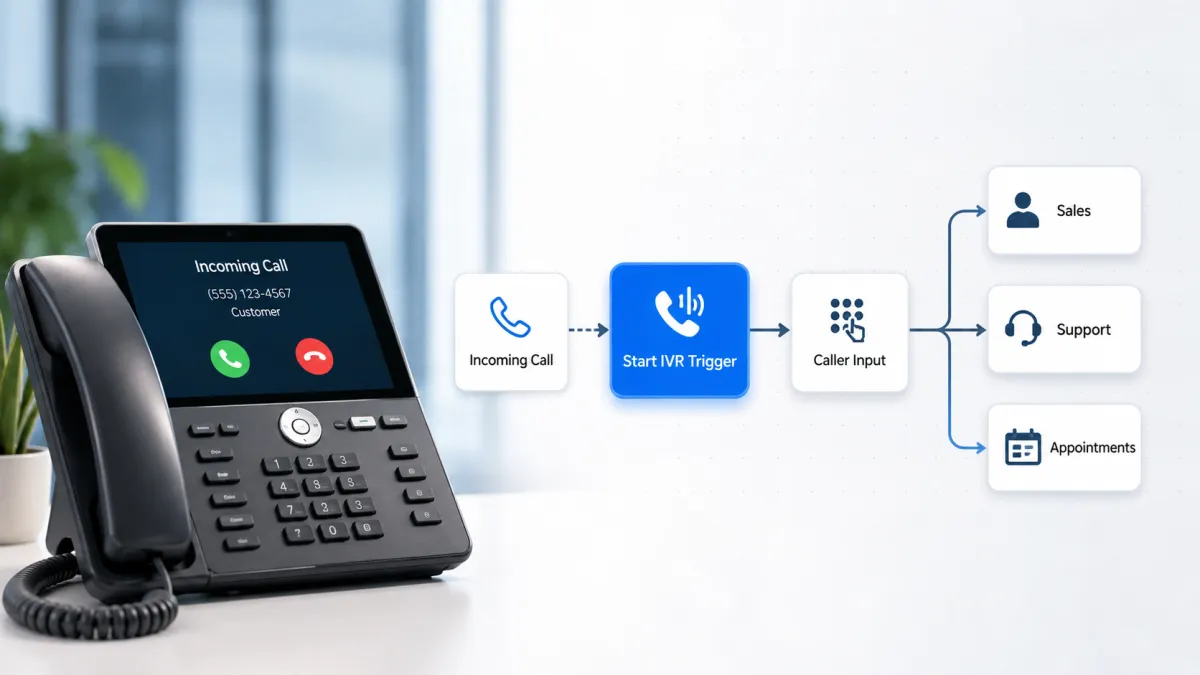
For example, a business could have a main number where callers hear a message such as, “Press 1 for Sales, press 2 for Support, or press 3 for Appointments.” The Start IVR Trigger gets the workflow started. Other IVR actions then determine what the caller hears, what input is collected, and where the call goes next.
This distinction is important. The Start IVR Trigger does not, by itself, perform the entire IVR interaction. It starts the workflow. Actions such as Say/Play Message, Gather Input on Call, Connect Call, Record Voicemail, and End Call define what happens during the IVR process.
How the Start IVR Trigger Works
The process is straightforward:
Incoming call → Start IVR Trigger → IVR actions → Caller input → Conditional path → Next call action
First, the business needs an appropriate LC Phone setup and a phone number configured for IVR. The number is then associated with the IVR workflow. HighLevel notes that a phone number can only be assigned to one IVR workflow at a time.
Once the workflow is active, an incoming call to that number activates the Start IVR Trigger. The workflow can then use IVR actions to interact with the caller.
For example, Gather Input on Call can present a prompt and collect keypad responses. Those responses can then be used with workflow logic to create different paths. A caller pressing 1 might follow one branch, while pressing 2 follows another.

How to Use the Start IVR Trigger in a GoHighLevel Workflow
To build an IVR workflow, start by creating a workflow in GoHighLevel and add a new trigger. Search for Start IVR and select it.

Next, configure the phone number that should activate the IVR. The number is the important connection between the incoming call and the workflow. Save the trigger and activate the workflow when your configuration is ready.
After the trigger, build the actual caller experience.
A common structure can include:
Say/Play Message to introduce the menu.
Gather Input on Call to collect the caller’s keypad selection.
Conditional logic to determine which path matches the caller’s response.
Connect Call (IVR) to send the caller to the appropriate user or external number.
Record Voicemail or End Call (IVR) when a live connection is not appropriate.
The important point is that these actions are what create the IVR experience. The Start IVR Trigger simply provides the workflow entry point.
Real-World Automation Example
Consider an insurance agency receiving calls through one main business number.
The agency could configure the Start IVR Trigger so that an incoming call begins an IVR menu. The caller might hear a prompt asking them to press 1 for new policy inquiries, 2 for existing customer support, or 3 for appointments.
After the caller makes a selection, the workflow can follow the appropriate branch. A new prospect could be connected to the sales team, while an existing customer could be directed toward support. An appointment-related caller could be sent to the appropriate booking team.
The value is not simply having an automated greeting. The workflow creates a defined process for handling different caller intentions instead of forcing every call through the same path. HighLevel supports keypad-based input, conditional routing, call connections, voicemail, and other IVR actions within these workflows.
Practical Use Cases for IVR Automation
Lead management: Incoming prospects can be directed toward the appropriate sales path based on their keypad selection, helping teams handle inquiries more consistently.
Sales team notifications: After an IVR interaction, a workflow can continue with appropriate internal workflow actions where applicable. This can help a business create a follow-up process instead of relying entirely on employees to remember what happened.
Customer service: Businesses can separate support-related callers from sales inquiries at the beginning of the call, reducing unnecessary transfers and helping callers reach the appropriate team.
Appointment-related calls: An IVR menu can give appointment callers a dedicated path, making it easier to separate booking-related calls from other requests.
Fallback handling: If the caller does not provide valid input or nobody is available, the workflow can be configured with appropriate fallback actions such as repeating a prompt, recording voicemail, or ending the call.
Why the Start IVR Trigger Matters
The real benefit of the GoHighLevel Start IVR Trigger is that it turns an incoming phone call into a structured automation process.
Instead of thinking of an inbound call as a standalone event, businesses can design a defined path around it. The caller can receive instructions, provide input, reach the right destination, and enter the next stage of the business process.
There is also an important limitation to understand: voicemail itself cannot be tracked by the Start IVR Trigger. If voicemail handling is required, it should be configured through the appropriate IVR workflow action rather than treating voicemail as a capability of the trigger.
Conclusion
The GoHighLevel Start IVR Trigger is best understood as the starting point for an automated inbound IVR workflow. It connects an incoming call on a configured phone number to a workflow, while the actions and conditional logic that follow determine how the caller is guided and handled.
For businesses receiving regular sales, support, or appointment calls, that distinction matters. A well-designed IVR workflow can create a more consistent call experience while giving the team a structured process for handling different types of callers.
The practical takeaway is simple: use Start IVR to begin the call flow, then use the appropriate IVR actions and workflow logic to build what happens next.
Need Expert Help with GoHighLevel?
New to GoHighLevel and ready to get started? Buy your GoHighLevel account here and launch with confidence.
Already know what you need and want our team to handle everything, from complete setup and customization to funnels, workflows, automations, CRM, and pipelines? Click here.



