

How to Issue Course Certificates Automatically Using the Issue Certificate Action in GoHighLevel
How to Issue Course Certificates Automatically Using the Issue Certificate Action in GoHighLevel
Manually creating and sending a certificate every time a learner completes a course can quickly become repetitive. When several learners finish a course at different times, keeping track of who has completed the required work and who still needs a certificate creates unnecessary administrative work. GoHighLevel provides an automated way to handle this with the Issue Certificate Action, allowing a workflow to issue a selected certificate when the appropriate course related event occurs.
What Is the Issue Certificate Action in GoHighLevel?
The Issue Certificate Action is a workflow action that allows GoHighLevel to issue a certificate automatically for a contact. Instead of manually issuing each certificate, you can place this action inside a workflow and connect it to a relevant trigger.
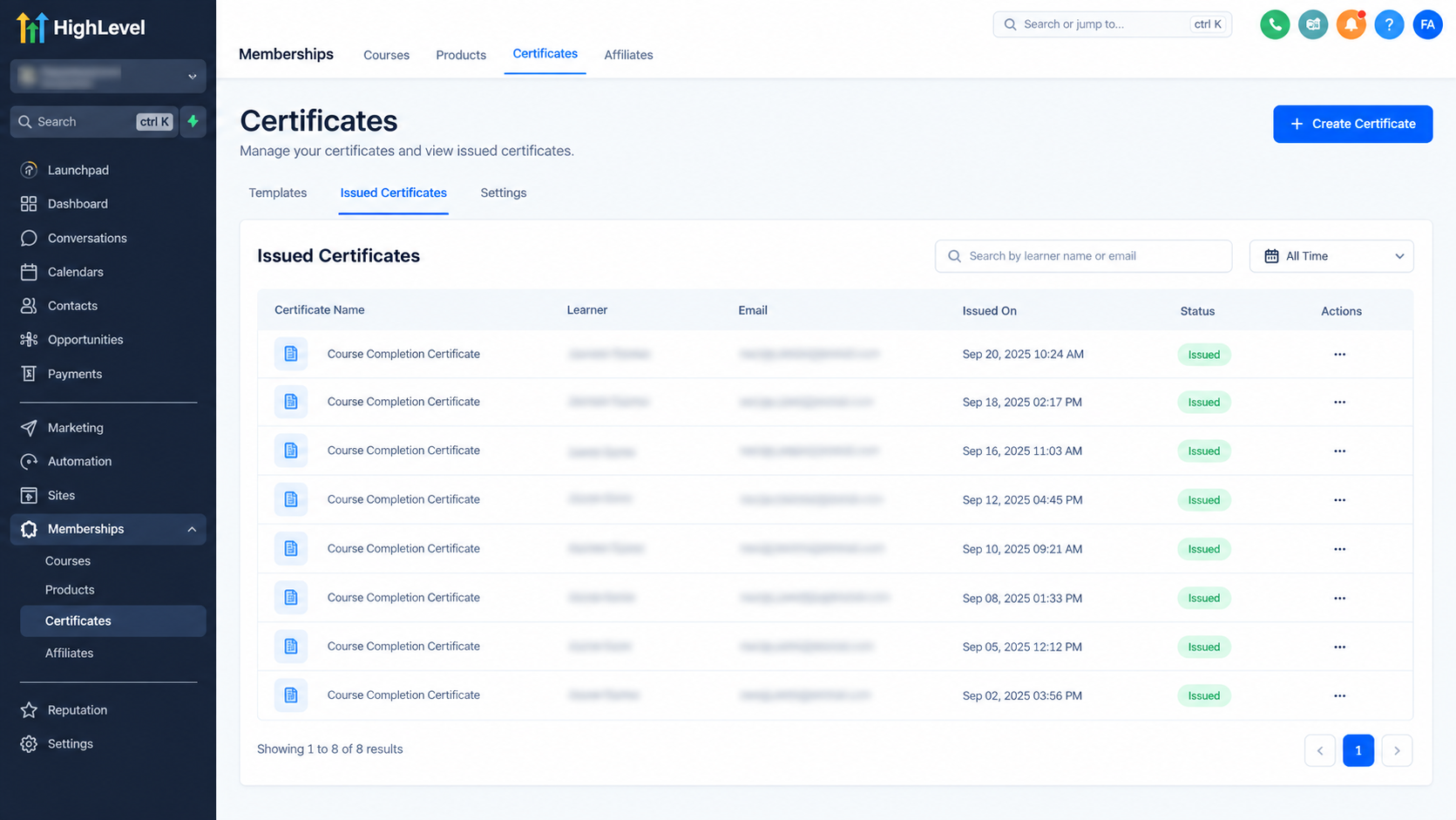
GoHighLevel documentation confirms that the action is available inside Automations > Workflows. After adding an appropriate workflow trigger, you can add the Issue Certificate action and select the certificate template you want to issue. Certificates issued through workflows are also listed under Memberships > Certificates > Issued Certificates.
The important point is that the action handles the certificate issuance itself. The workflow trigger determines when the action should run.
Why Automate Course Certificates?
For course creators and training businesses, certificates are often part of the learner experience. A certificate can provide a formal acknowledgment that someone completed a course or achieved a particular milestone.
Automating this process can help reduce repetitive administrative work while making certificate delivery more consistent. Instead of checking completion records and issuing certificates individually, the workflow can respond to the event you have configured.
This can be especially useful when a course has many learners or when certificates need to be issued regularly.
Where Does the Issue Certificate Action Fit in a Workflow?
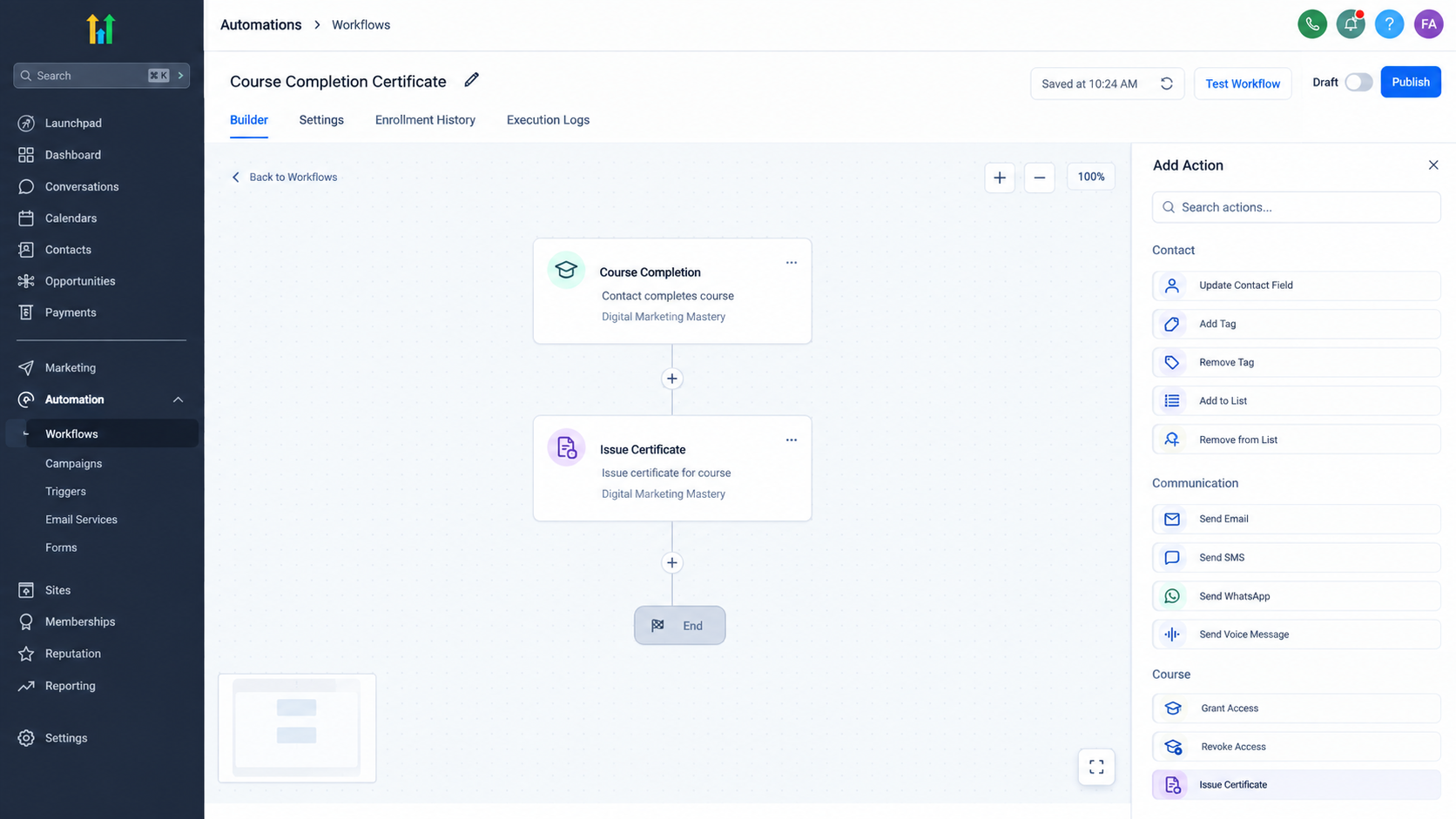
The Issue Certificate Action works as an action inside a GoHighLevel workflow. It does not independently decide when a learner has completed a course.
The basic structure is:
Relevant course event → Workflow → Issue Certificate Action
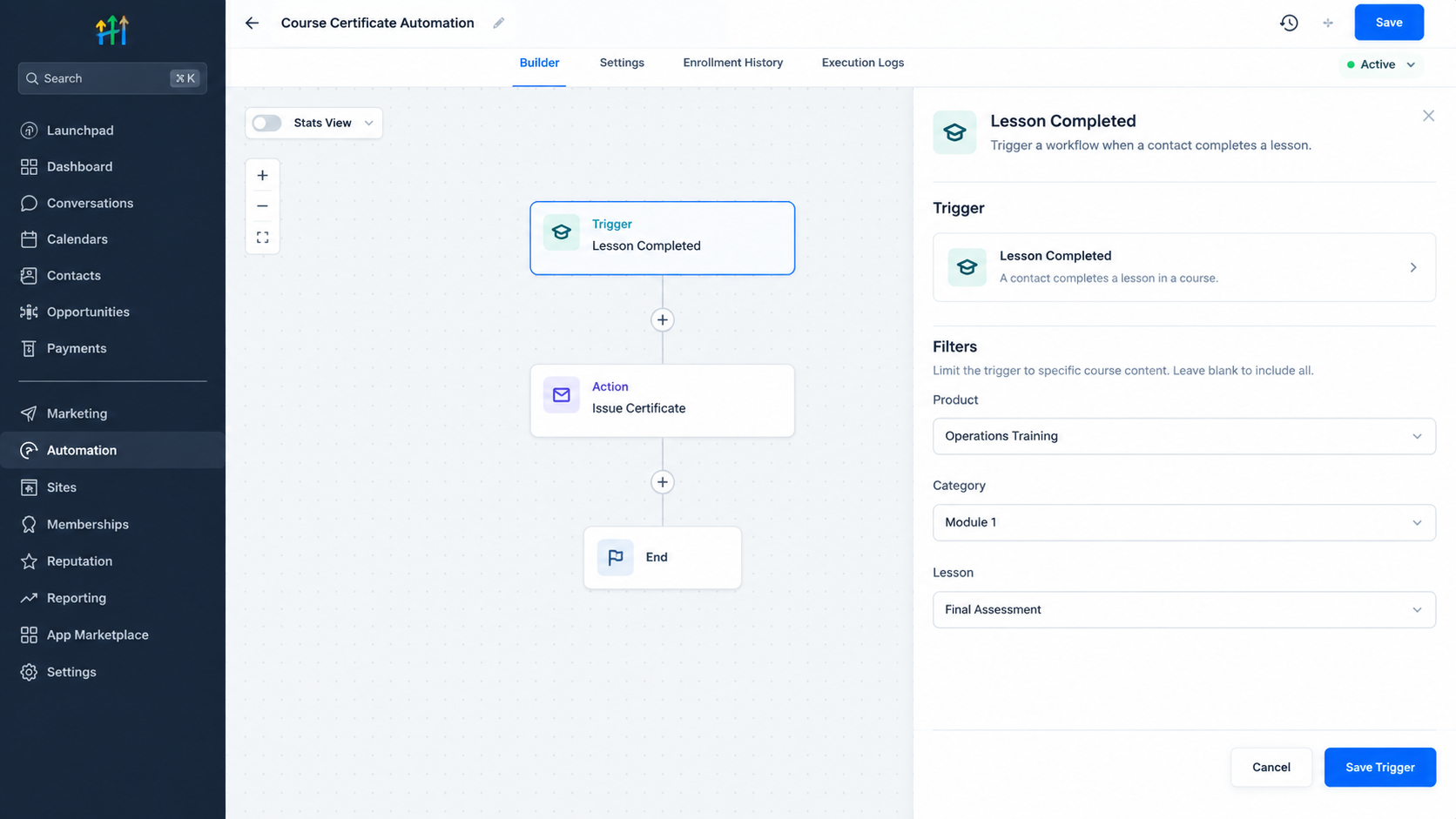
The trigger should represent the event that qualifies the learner for the certificate. GoHighLevel currently documents using the Lesson Completed trigger with filters for a specific product, category, and lesson when issuing a certificate after a particular quiz or assignment is completed. The workflow then uses the Issue Certificate Action to issue the selected certificate template.
This makes the action useful when your certification requirement is based on a particular learning event rather than simply relying on manual certificate issuance.
How to Use the Issue Certificate Action
1. Open Workflows
Go to Automations > Workflows in your GoHighLevel account.
Create a new workflow or open an existing workflow where you want to handle certificate issuance. GoHighLevel places the Issue Certificate Action inside the Workflow Builder.
2. Add the Appropriate Trigger
The next step is to define what should cause the certificate process to run.
The exact trigger depends on the certification process you are building. For example, GoHighLevel documents a setup using Lesson Completed when a certificate should be issued after a specific quiz or assignment. Filters can be used to identify the relevant product, category, and lesson.
The trigger should therefore match the actual event that qualifies the learner.
3. Add the Issue Certificate Action
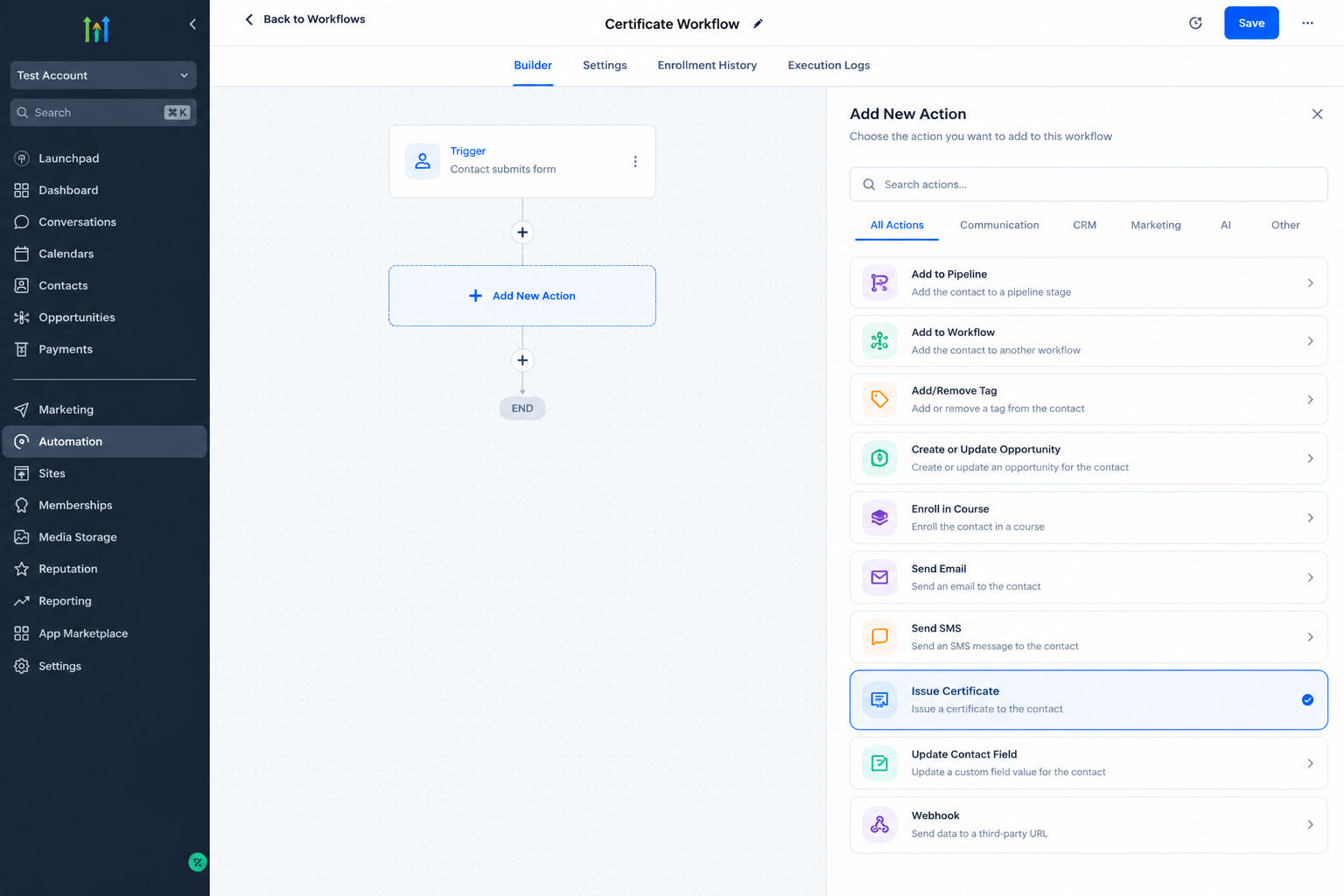
After adding the trigger, click the option to add another workflow action and search for Issue Certificate.
Select the action from the available workflow actions. GoHighLevel specifically identifies this as the workflow action used to issue certificates.
4. Select the Certificate Template
Within the Issue Certificate Action, select the certificate template you want to use.
The template determines the certificate that will be issued when the workflow reaches this action. GoHighLevel's current documentation confirms that the certificate template is selected directly within the Issue Certificate workflow setup.
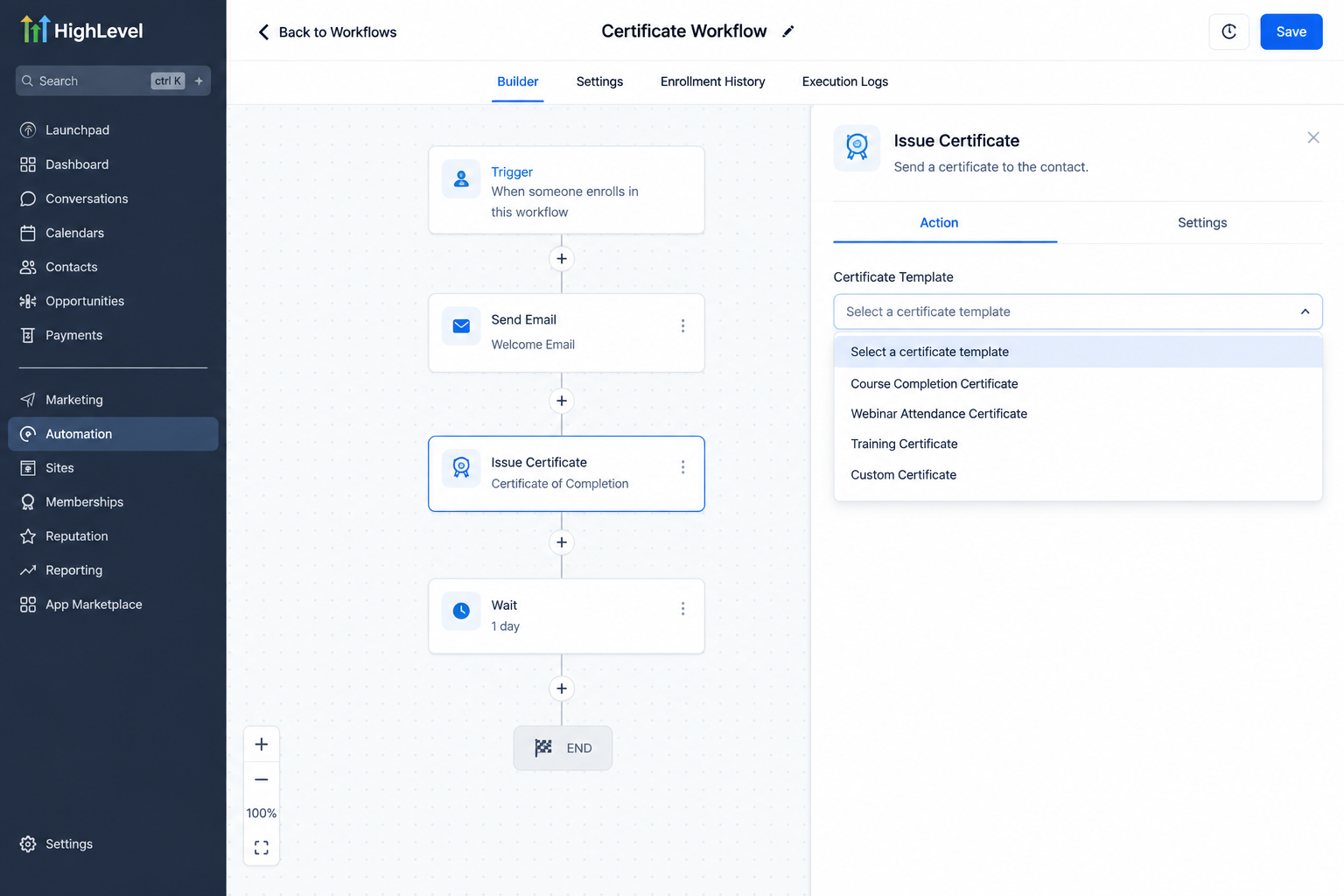
5. Save and Publish the Workflow
Once the trigger and certificate action are configured, save the workflow and publish it.
When the configured event occurs for a learner, the workflow can then reach the Issue Certificate Action and issue the selected certificate.
Practical Use Cases for Course Certificates
The Issue Certificate Action can be useful across several types of education and training businesses.
Online course creators can issue certificates after learners complete a defined course requirement.
Coaches and educators can use certificates to recognize learners who complete structured training.
Training businesses can automate certificate issuance when participants meet their defined completion requirements.
Membership based businesses can use certificates as recognition for educational content and learning milestones.
The specific workflow structure should always reflect the actual completion requirement. For example, GoHighLevel documents using a Lesson Completed trigger with filters when the certificate should follow completion of a particular quiz or assignment.
The Main Benefit of Certificate Automation
The biggest advantage of the Issue Certificate Action is consistency.
Once the workflow is configured correctly, certificate issuance does not require someone to manually check every qualifying learner and issue each certificate individually. GoHighLevel also keeps workflow issued certificates available under Memberships > Certificates > Issued Certificates, providing a central place to reference issued certificates.
For businesses delivering courses at scale, that can make the certification process easier to manage while keeping the learner experience more consistent.
Conclusion
The GoHighLevel Issue Certificate Action provides a direct way to include certificate issuance inside a workflow. By connecting it to an appropriate course related trigger and selecting the required certificate template, course creators and training businesses can automate certificate delivery around their defined completion process.
For anyone managing GoHighLevel course certificates, the action is a practical way to reduce manual certificate administration and make the overall course completion experience more consistent.
Frequently Asked Question (FAQs)
1. What does the Issue Certificate Action do in GoHighLevel?
It issues a selected certificate template as part of a GoHighLevel workflow.
2. Where can I find the Issue Certificate Action?
You can find it inside Automations > Workflows when adding a workflow action.
3. Can I choose which certificate template is issued?
Yes. The Issue Certificate Action allows you to select the certificate template used by the workflow.
4. Where can I view certificates issued by workflows?
Workflow issued certificates are available under Memberships > Certificates > Issued Certificates.
5. Can a certificate be issued after a specific course lesson?
Yes. GoHighLevel documents using the Lesson Completed trigger with filters for the relevant course, category, and lesson before adding the Issue Certificate Action.
Need Expert Help with GoHighLevel?
New to GoHighLevel and ready to get started? Buy your GoHighLevel account here and launch with confidence.
Already know what you need and want our team to handle everything, from complete setup and customization to funnels, workflows, automations, CRM, and pipelines? Click here.



