

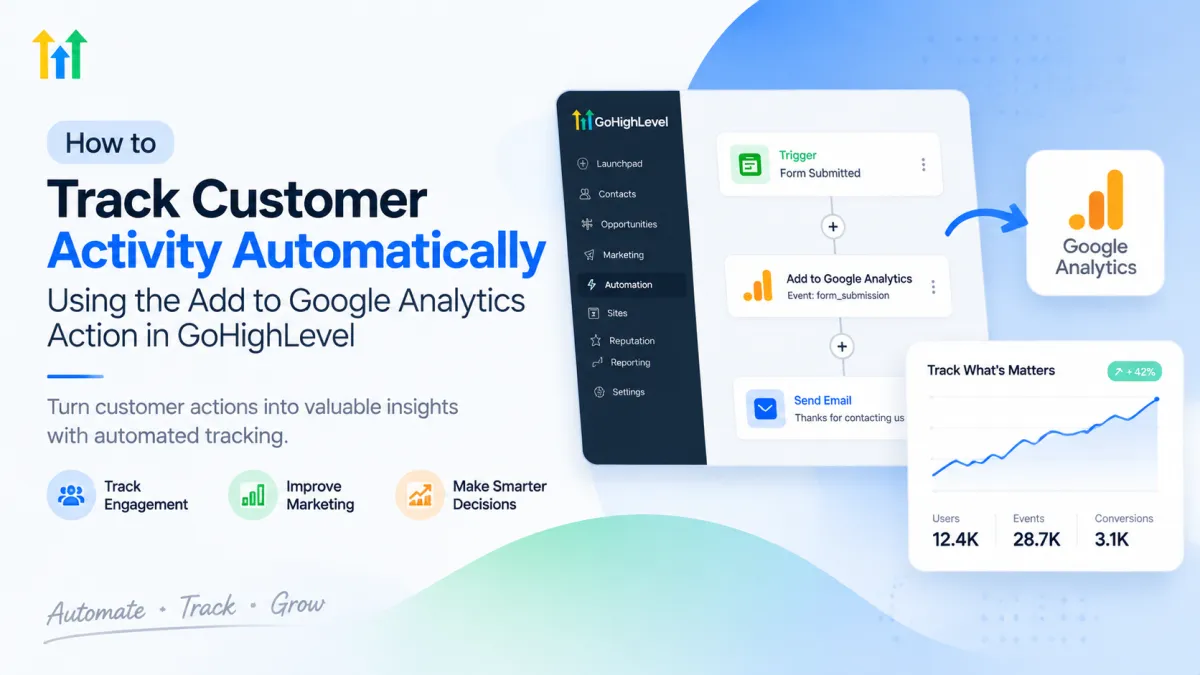
Track Customer Activity with GoHighLevel Google Analytics Action
How to Track Customer Activity Automatically Using the Add to Google Analytics Action in GoHighLevel
Modern businesses collect customer interactions across multiple channels, including websites, landing pages, forms, emails, and sales funnels. However, collecting customer data is only useful when businesses can understand what that data means and use it to improve their marketing strategies.
One of the biggest challenges businesses face is knowing which actions customers take during their journey. Without proper tracking, it becomes difficult to identify which campaigns generate interest, where customers drop off, and what actions lead to conversions.
This is where GoHighLevel analytics tracking and Google Analytics work together. By using the Add to Google Analytics Action in GoHighLevel, businesses can send important customer activity information into Google Analytics and gain deeper insights into user behavior. This allows marketers to make more informed decisions while improving customer journeys through better data visibility.
What Is the Add to Google Analytics Action in GoHighLevel?
The Add to Google Analytics Action in GoHighLevel is a workflow feature that allows businesses to send tracking events to Google Analytics when specific actions happen inside a GoHighLevel workflow.
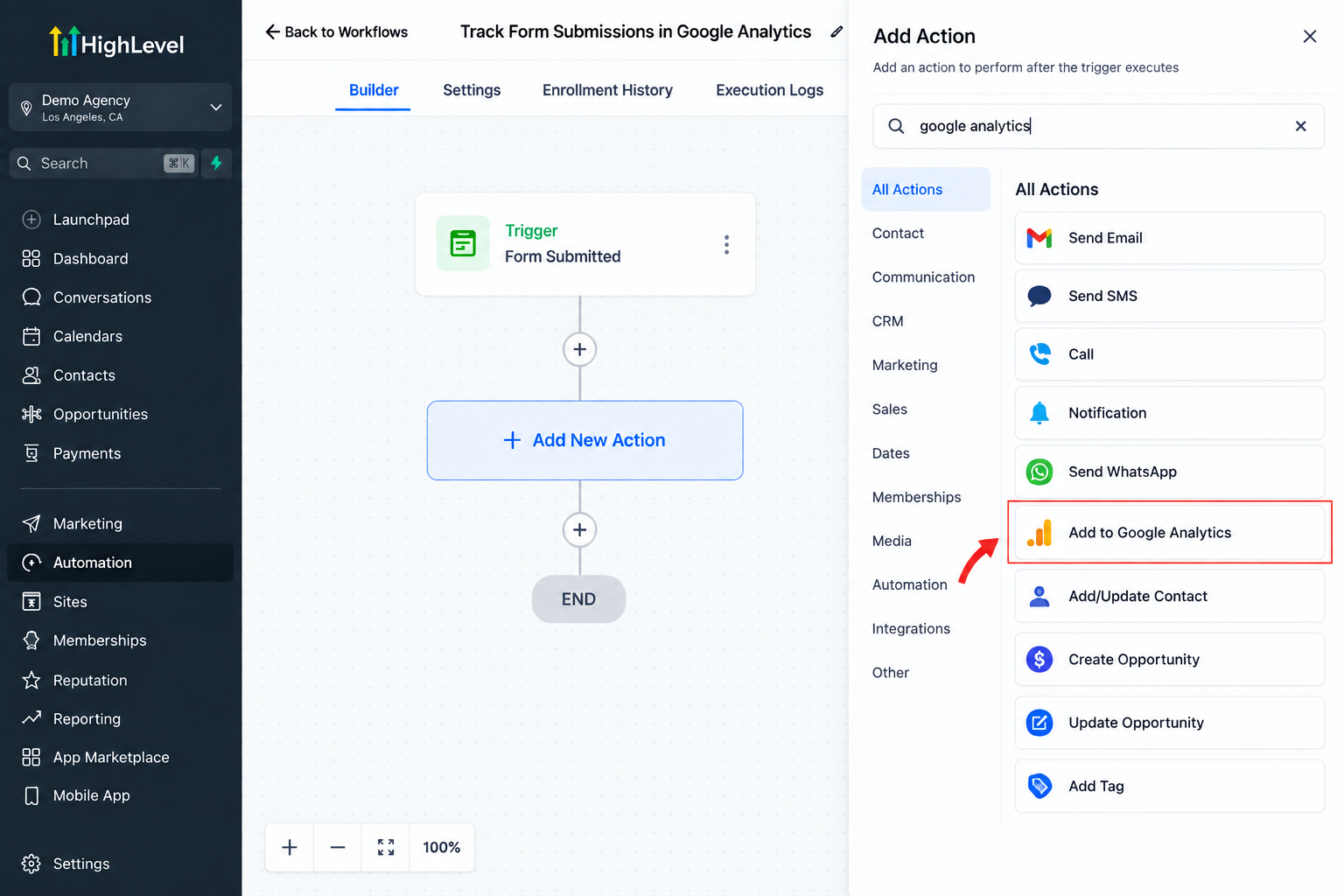
Instead of manually monitoring every customer interaction, businesses can create automated workflows that trigger tracking events based on customer activity.
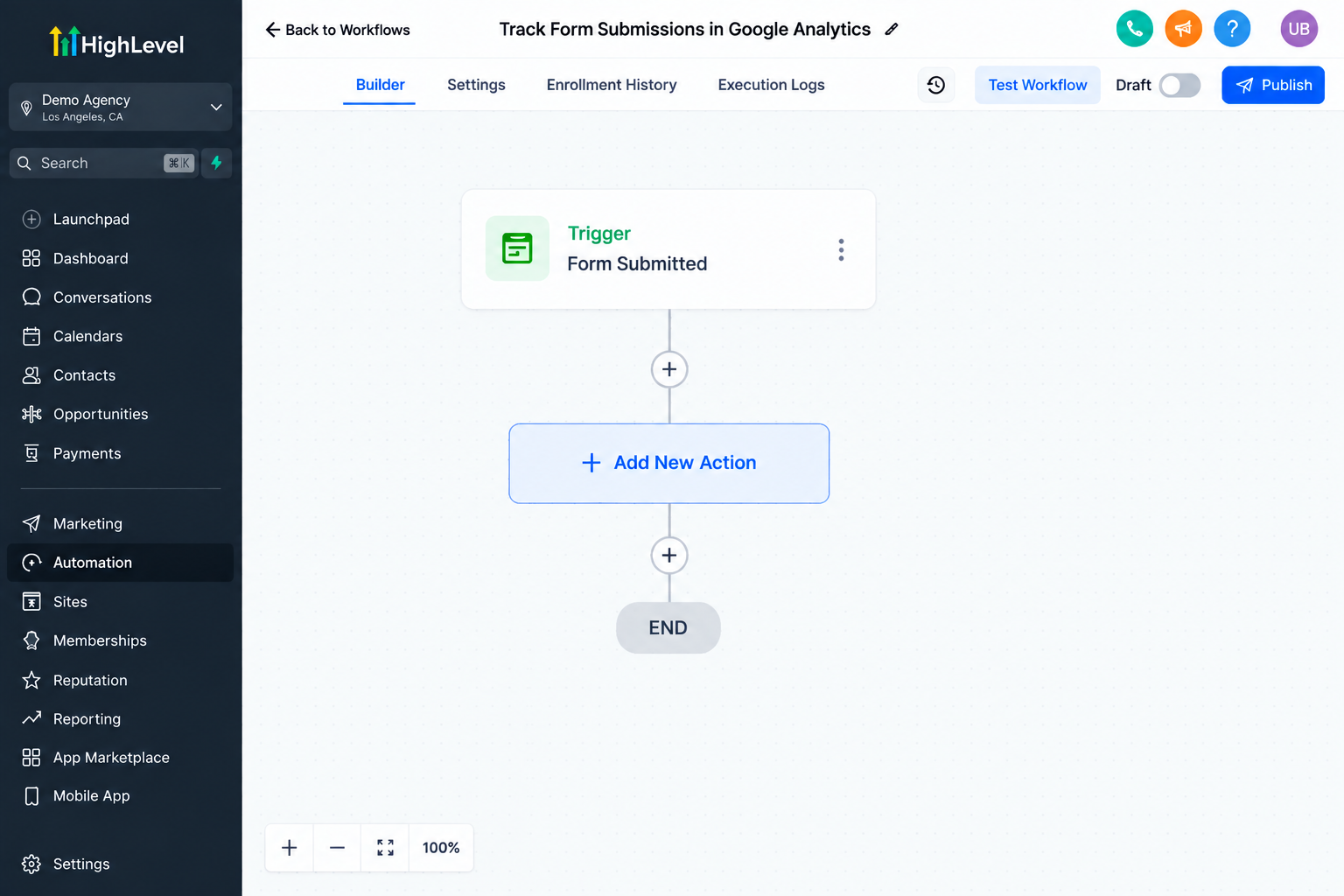
For example, a business may want to track when a customer:
Completes a form.
Enters a specific marketing workflow.
Engages with a campaign.
Reaches a certain stage in a customer journey.
When these actions occur, GoHighLevel can send relevant event information to Google Analytics, helping businesses better understand how users interact with their marketing processes.
It is important to understand that GoHighLevel does not replace Google Analytics. Instead, the two platforms work together. GoHighLevel manages customer relationships, automation, and workflows, while Google Analytics provides additional website and user behavior insights.
How Businesses Can Use This Feature
Track Customer Engagement After Marketing Campaigns
Businesses often run multiple campaigns across email, ads, social media, and landing pages. However, understanding what happens after a customer enters the funnel is just as important as attracting the lead.
With GoHighLevel workflow automation, businesses can create tracking events based on customer interactions and analyze engagement patterns through Google Analytics.
For example, a company running a webinar campaign can track important customer actions after users register or move through different workflow stages.
This helps businesses understand:
Which campaigns create the most engagement.
How customers interact with different offers.
Which steps encourage customers to continue through the funnel.
Understand Which Marketing Activities Generate Interest
Marketing teams need accurate information to determine which strategies are working. Combining CRM analytics with Google Analytics insights helps businesses connect customer actions with marketing efforts.
By tracking important workflow events, businesses can gain a clearer picture of customer behavior and identify opportunities to improve campaigns.
For example, an agency may analyze whether leads coming from a specific campaign are engaging more compared to other sources.
Measure Funnel Performance
Every customer journey has multiple steps. A visitor may become a lead, schedule an appointment, receive follow-up messages, and eventually become a customer.
Automated customer activity tracking helps businesses understand how users move through these stages.
By analyzing tracked events, companies can identify:
Where customers lose interest.
Which steps create stronger engagement.
Which parts of the funnel need improvement.
This allows businesses to optimize their processes instead of making decisions based only on assumptions.
Benefits for Different Industries
Real Estate Businesses
Real estate companies manage many potential buyers and sellers throughout long sales cycles. Tracking customer engagement helps agents understand which leads are showing stronger interest.
For example, a real estate business can monitor interactions after a property inquiry, follow-up campaign, or appointment workflow.
These insights help teams improve follow-up timing and create more personalized customer experiences.
Insurance Agencies
Insurance businesses often need multiple touchpoints before a customer makes a decision. Using customer activity tracking, agencies can better understand how prospects interact with their marketing campaigns.
Tracking workflow events can help insurance teams analyze:
Lead engagement after inquiries.
Customer responses to campaigns.
Follow-up effectiveness.
This allows agencies to improve their communication strategies and create better customer journeys.
Service Businesses
Service providers such as home improvement companies, consultants, and local businesses rely heavily on consistent follow-up.
By combining GoHighLevel automation with analytics tracking, service businesses can understand which actions lead customers closer to booking a service.
These insights can help improve:
Appointment follow-ups.
Lead nurturing campaigns.
Customer communication.
Marketing Agencies
Agencies managing campaigns for multiple clients need reliable reporting and performance insights.
Using GoHighLevel analytics tracking alongside Google Analytics allows agencies to better measure customer interactions and demonstrate campaign performance.
This creates more transparency and helps agencies make data-driven recommendations.
How to Use the Add to Google Analytics Action in GoHighLevel
The process starts by creating a workflow inside GoHighLevel.
A simple setup includes:
1. Create a Workflow Trigger
Choose the customer action that should start the workflow, such as a form submission, appointment booking, or another supported workflow trigger.
2. Add the Google Analytics Action
Inside the workflow builder, add the Add to Google Analytics Action and configure the event information you want to send.
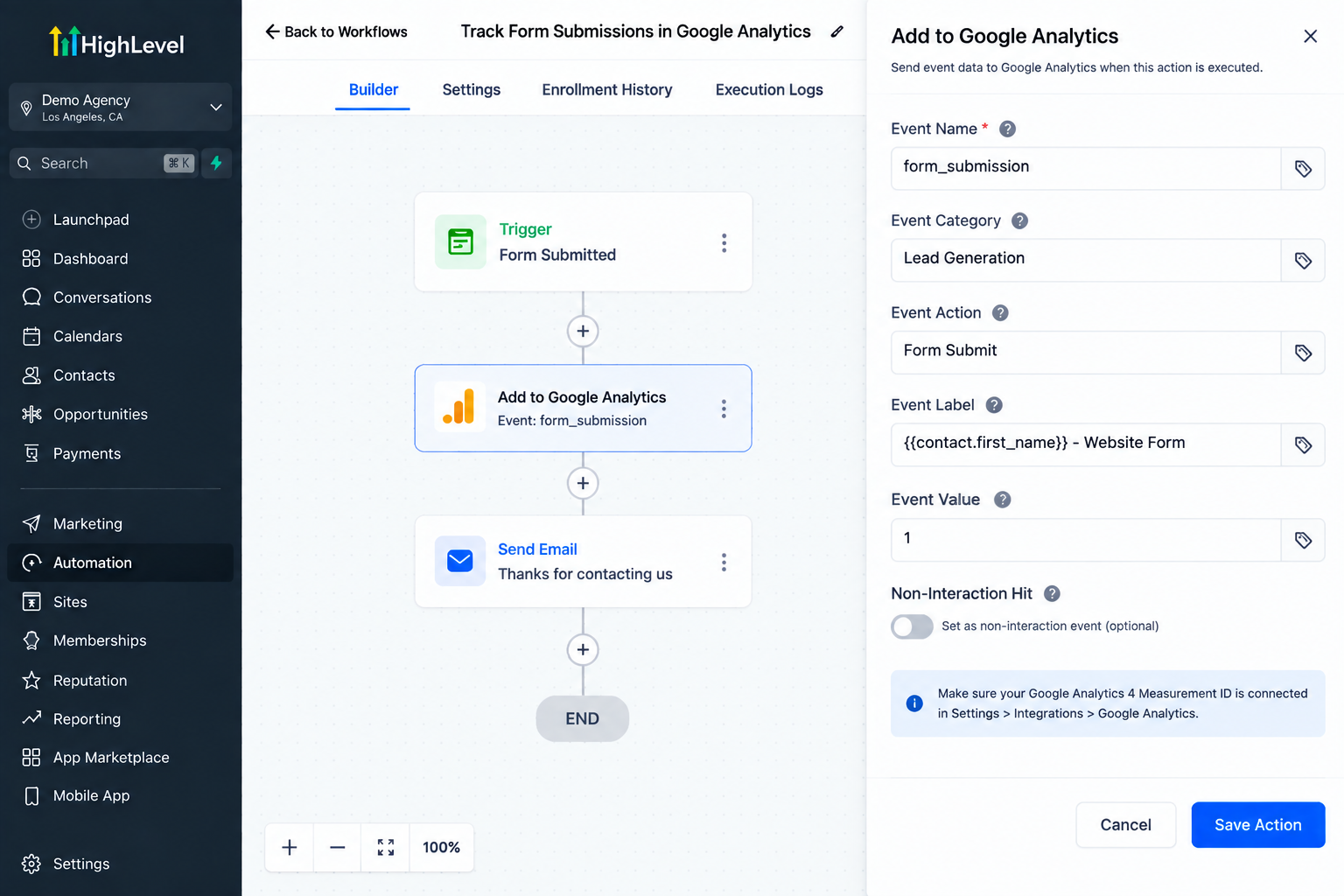
3. Connect Your Tracking Strategy
Make sure your Google Analytics setup is properly connected and that your tracking events match your reporting goals.
4. Review Performance Data
After collecting data, review Google Analytics insights and use the information to improve campaigns, workflows, and customer experiences.
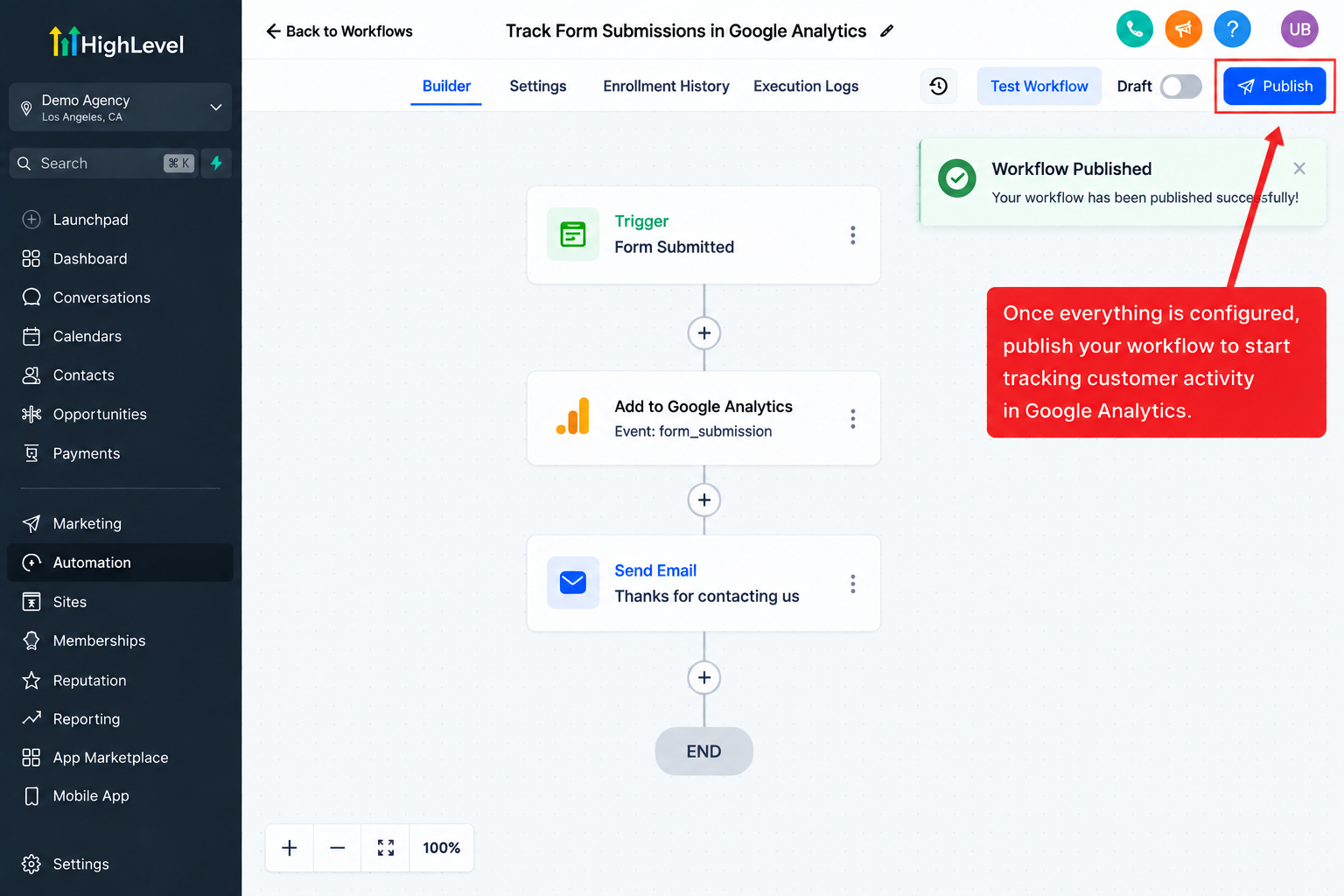
The exact tracking setup may vary depending on business goals, website configuration, and analytics requirements.
Best Practices for Better Analytics Tracking
Create a Clear Event Tracking Strategy
Avoid tracking random actions without a purpose. Decide which customer activities provide valuable business insights before creating workflow events.
Connect Analytics Data With Marketing Decisions
Tracking data is only valuable when businesses use it. Review insights regularly and adjust campaigns based on customer behavior.
Maintain Clean Customer Data
Accurate CRM data improves reporting quality. Keep workflows organized and ensure customer information remains updated.
Review Performance Regularly
Customer behavior changes over time. Regularly reviewing analytics helps businesses identify new opportunities and improve their marketing approach.
Conclusion
Understanding customer behavior is essential for businesses that want to improve their marketing performance. The Add to Google Analytics Action in GoHighLevel helps businesses connect workflow automation with analytics tracking, creating better visibility into customer interactions.
By combining GoHighLevel’s CRM capabilities, automation tools, and Google Analytics insights, businesses can better understand their audience, improve customer journeys, and make smarter marketing decisions.
Whether you are managing leads for real estate, insurance, services, or client campaigns, automated tracking provides the information needed to optimize your processes and create more effective customer experiences.
Frequently Asked Questions (FAQs)
1. What is the Add to Google Analytics Action in GoHighLevel?
The Add to Google Analytics Action in GoHighLevel is a workflow feature that allows businesses to send customer activity events to Google Analytics. It helps track specific actions that happen during a customer journey, allowing businesses to better understand engagement and improve marketing decisions.
2. Does GoHighLevel replace Google Analytics?
No, GoHighLevel does not replace Google Analytics. Instead, both platforms work together. GoHighLevel manages CRM data, customer relationships, and workflow automation, while Google Analytics provides additional insights into website traffic and user behavior.
3. How does GoHighLevel help with customer activity tracking?
GoHighLevel helps businesses track customer activity by using workflows, CRM records, campaigns, and automation. Businesses can create workflows that respond to customer actions and send relevant tracking information to connected analytics tools.
4. Why is tracking customer activity important for businesses?
Tracking customer activity helps businesses understand how users interact with their marketing funnel. It allows companies to identify successful campaigns, improve follow-up strategies, optimize customer journeys, and make better data-driven decisions.
5. Can I use the Add to Google Analytics Action for marketing campaigns?
Yes. Businesses can use this action as part of their GoHighLevel workflow automation to track important customer interactions related to campaigns, lead nurturing sequences, and funnel activities.
6. What industries can benefit from GoHighLevel analytics tracking?
Many industries can benefit from GoHighLevel analytics tracking, including real estate, insurance, service businesses, consultants, and marketing agencies. Any business that wants better visibility into customer behavior can use analytics insights to improve their processes.
Need Expert Help with GoHighLevel?
New to GoHighLevel and ready to get started? Buy your GoHighLevel account here and launch with confidence.
Already know what you need and want our team to handle everything, from complete setup and customization to funnels, workflows, automations, CRM, and pipelines? Click here.



