

GoHighLevel Goal Event Automation
How to Track Customer Milestones and Trigger Workflow Automation Using the Goal Event Action in GoHighLevel
Imagine a lead enters a 10-day nurture workflow designed to get them to book a consultation. On Day 1, they receive an email. On Day 2, an SMS goes out. Then, before the next scheduled follow-up, they book the consultation.
The business has already achieved the outcome it wanted.
But if the automation continues blindly, that same lead may still receive messages saying, “Ready to book your consultation?”
That creates an awkward customer experience.
This is where the GoHighLevel Goal Event becomes valuable. Instead of treating every contact as if they must complete every step in a workflow, Goal Events allow your automation to recognize an important milestone and adjust the contact’s path when that milestone occurs.
What Is the Goal Event Action in GoHighLevel?
A Goal Event is a workflow action that represents an outcome you want a contact to achieve.
When the configured goal condition is met, GoHighLevel can move the contact forward to the Goal Event step, allowing them to bypass workflow actions that are no longer relevant.
Think of it as a checkpoint inside your automated customer journey.
Instead of designing a workflow as:
Message → Wait → Message → Wait → Message
you can design it around an actual business objective:
Nurture the lead → Detect the desired milestone → Move them forward
Current Goal Event types can work with trackable events such as form submissions, payment events, appointment statuses, email interactions, trigger-link clicks, tag changes, document statuses, and certain other events available within HighLevel.
Why Customer Milestones Matter in Automation
Customers rarely move through a funnel at exactly the same speed.
One prospect might need six follow-ups before taking action. Another might receive the first email and immediately book an appointment.
If your GoHighLevel workflows treat both contacts identically, your automation can quickly become irrelevant.
Milestone-based automation focuses on progress instead.
Useful customer milestones might include:
Submitting a specific form
Reaching the required appointment status
Making a tracked payment
Clicking a specific trigger link
Having a relevant contact tag added or removed
The key is that the milestone must be based on information GoHighLevel can actually detect. A Goal Event cannot respond to behavior that is not available to the workflow.
How Does a Goal Event Fit Into a GoHighLevel Workflow?
Setting up goal-based workflow automation starts with the business outcome, not the software.
1. Identify the outcome
Ask: What are we actually trying to get this contact to do?
For a lead-nurture workflow, that could be progressing to a booked or confirmed appointment. For another process, it might be submitting a form or completing a payment.
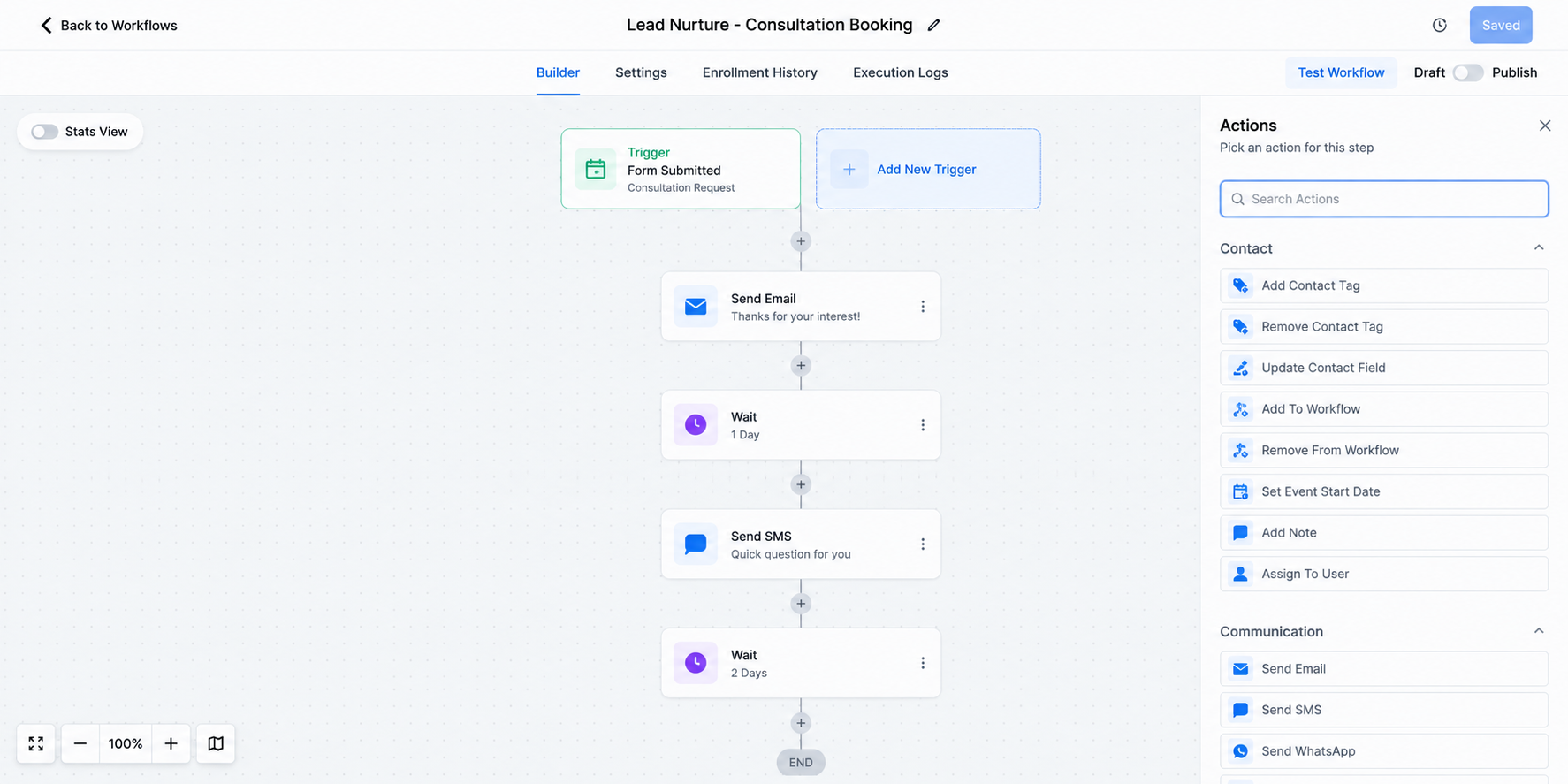
2. Build the journey leading to that outcome
Create the emails, SMS messages, waits, internal actions, or other steps needed to move the contact toward the goal.
3. Add the Goal Event
Within the Workflow Builder, add a Goal Event action and configure it around the supported event that accurately represents your desired milestone.
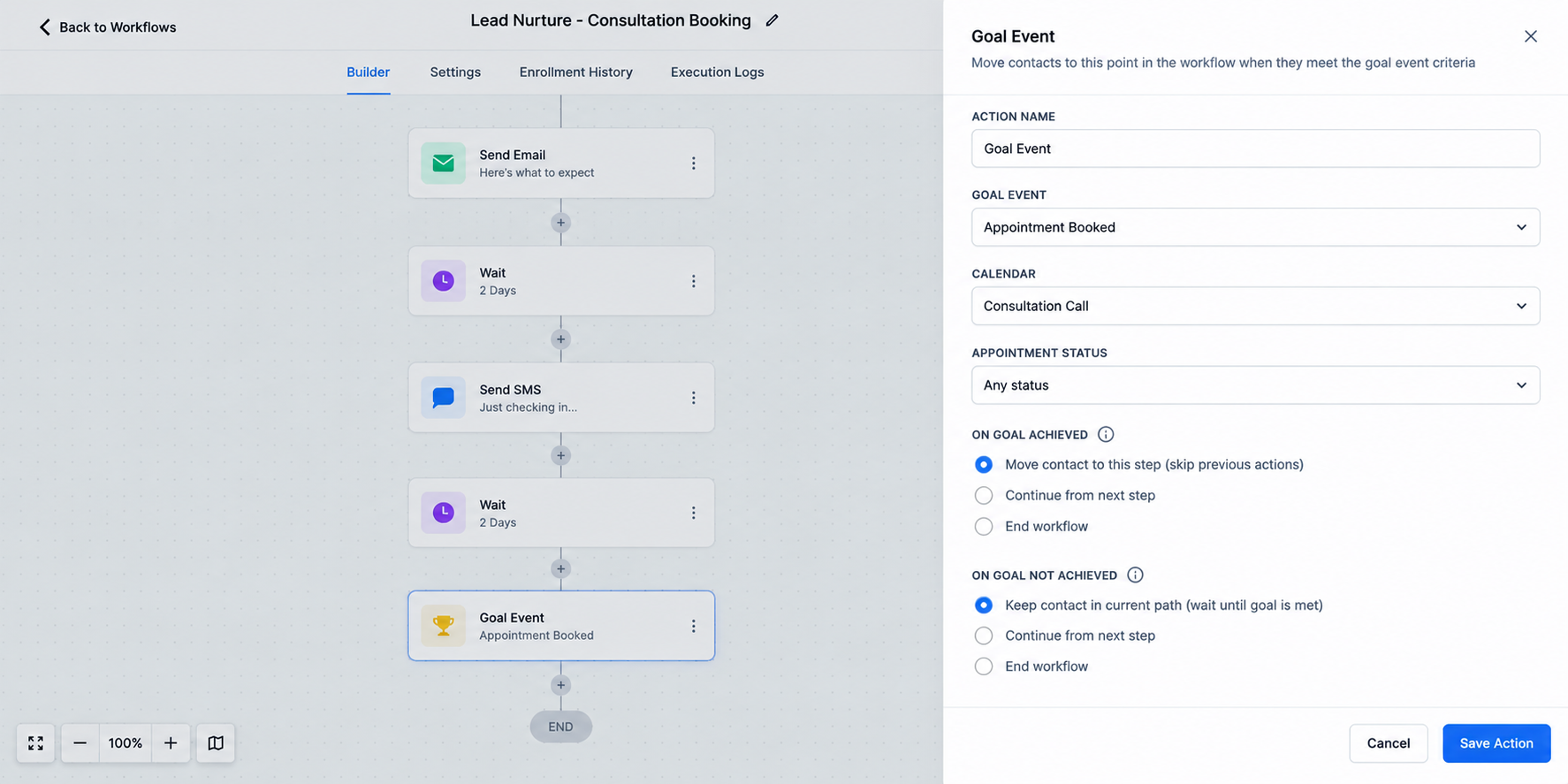
4. Decide what happens at the goal
Once the milestone is reached, consider what communication is still appropriate.
The next steps might confirm the customer’s progress, begin another phase of the journey, or simply prevent unnecessary nurture messages.
HighLevel also provides behavior for contacts who reach the Goal Event step without having satisfied its conditions, including continuing, ending the workflow, or waiting for the goal, depending on the configuration.
5. Test before publishing
Test both the normal path and the goal-achieved path. Workflow logic that looks correct on the canvas can still produce unwanted communication if different customer scenarios have not been tested.
Practical Example: Consultation Booking
Consider a home-services company running a lead nurturing sequence.
A new lead enters the workflow and receives:
Day 1: Introductory email
Day 2: SMS reminder
Day 4: Follow-up email
Day 6: Another booking reminder
Day 8: Final follow-up
The purpose of all five touches is to encourage the prospect to schedule a consultation.
Now imagine the prospect books after the Day 2 SMS.
Without milestone-aware logic, the workflow could continue sending booking reminders.
With a Goal Event configured around the appropriate appointment milestone, GoHighLevel can recognize that progress and move the contact to the goal step, skipping unnecessary actions between their current position and that goal.
The automation is no longer simply following a timer. It is responding to what the customer actually did.
Goal Event vs. If/Else: What’s the Difference?
Goal Events and If/Else conditions solve different problems.
An If/Else action evaluates conditions at a particular point and sends contacts down different branches. A Goal Event is designed around reaching a defined milestone and can allow a qualifying contact to skip ahead to that goal within the workflow.
You might use If/Else to ask:
“Which path should this contact take right now?”
A Goal Event is more like:
“Has this contact achieved the outcome this workflow is working toward?”
They can complement each other rather than compete.
Common Goal Event Mistakes to Avoid
A smart GoHighLevel automation can still fail if the goal is poorly designed.
Avoid these common mistakes:
Choosing vague goals: Define a specific, measurable outcome.
Using unreliable data: Make sure GoHighLevel can actually detect the event.
Ignoring post-goal messaging: Remove or bypass communication that no longer makes sense.
Overcomplicating workflows: Use goals where they simplify the customer journey rather than adding unnecessary logic.
Testing only one path: Test contacts who achieve the goal early, late, and not at all.
Assuming external behavior is automatically visible: If HighLevel does not receive the relevant data, the Goal Event cannot act on it.
Best Practices for Smarter Goal-Based Workflows
Start with one clear business outcome and build backward from it.
Use reliable data to define the milestone, keep the workflow easy to understand, and make every action after the goal relevant to the contact’s new stage.
Also review your workflows regularly. Your sales process, forms, calendars, offers, and customer journey can change, so your CRM automation should evolve with them.
Build Workflows Around Progress, Not Just Time
Powerful automation is not about sending more messages. It is about knowing when a message is still necessary.
The GoHighLevel Goal Event helps turn a linear sequence into a more responsive customer journey by allowing workflows to recognize meaningful progress and adjust accordingly.
When configured carefully, Goal Events can make GoHighLevel workflows cleaner, reduce irrelevant communication, and help your automation stay aligned with what the customer has actually done.
Review your existing workflows and ask one question:
What milestone means this contact no longer needs the steps they are currently receiving?
That may be the perfect place to introduce goal-based automation.
Conclusion
Effective automation is not about sending every contact through the same sequence of emails, SMS messages, and waiting periods. It is about recognizing when someone has taken an important action and adjusting their journey accordingly.
The GoHighLevel Goal Event helps you design workflows around meaningful customer milestones. When a contact reaches the outcome your workflow is working toward, such as completing a form, reaching a relevant appointment status, or completing another supported and trackable event, the workflow can respond instead of continuing unnecessary steps.
This can make GoHighLevel workflows cleaner, more relevant, and easier to manage while reducing the risk of sending messages that no longer match where a lead or customer is in their journey.
When reviewing your existing GoHighLevel automation, ask yourself: What action tells us that this contact has successfully progressed?
Once you identify that milestone and ensure GoHighLevel can reliably detect it, you may have an ideal opportunity to introduce goal-based workflow automation.
Frequently Asked Questions
What is a Goal Event in GoHighLevel?
A Goal Event is a workflow action used to represent a specific milestone or desired outcome in a contact’s journey. When the configured goal conditions are satisfied, the workflow can move the contact forward to the Goal Event, helping bypass steps that are no longer relevant.
What can I use as a customer milestone in GoHighLevel?
A milestone should be based on an event or information that GoHighLevel can reliably detect within the workflow environment. Depending on your setup and available Goal Event types, examples can include form submissions, appointment-related events, payments, tag changes, trigger-link clicks, email events, and document-related events.
Can a Goal Event stop unnecessary follow-up messages?
Yes. One useful application of a Goal Event is preventing contacts from continuing through follow-up steps that are designed to achieve something they have already done. For example, once the appropriate appointment milestone has been reached, a contact may no longer need additional messages encouraging them to schedule.
What is the difference between Goal Event and If/Else in GoHighLevel?
An If/Else action evaluates specified conditions at a particular point in a workflow and routes contacts into different branches. A Goal Event represents a milestone that the workflow is designed around and can allow qualifying contacts to move forward to that goal. They solve different automation problems and can be used together.
Can Goal Events track actions outside GoHighLevel?
Not automatically. GoHighLevel needs access to the relevant data or event before workflow logic can respond to it. If an action happens in another system and that information is never passed into GoHighLevel, a Goal Event cannot simply detect it on its own.
Should every GoHighLevel workflow use a Goal Event?
No. Goal Events are most useful when a workflow has a clearly defined outcome and contacts may achieve that outcome at different points in the automation. Simple workflows may not need one.
Why should I test a Goal Event before publishing the workflow?
Testing helps confirm that contacts who reach the milestone follow the intended path while contacts who have not reached it continue correctly. Test multiple scenarios, including contacts who achieve the goal early, later in the workflow, and those who never achieve it.
Need Expert Help with GoHighLevel?
New to GoHighLevel and ready to get started? Buy your GoHighLevel account hereand launch with confidence.
Already know what you need and want our team to handle everything, from complete setup and customization to funnels, workflows, automations, CRM, and pipelines?Click here.



