
GoHighLevel Funnel Conversion Optimization Guide
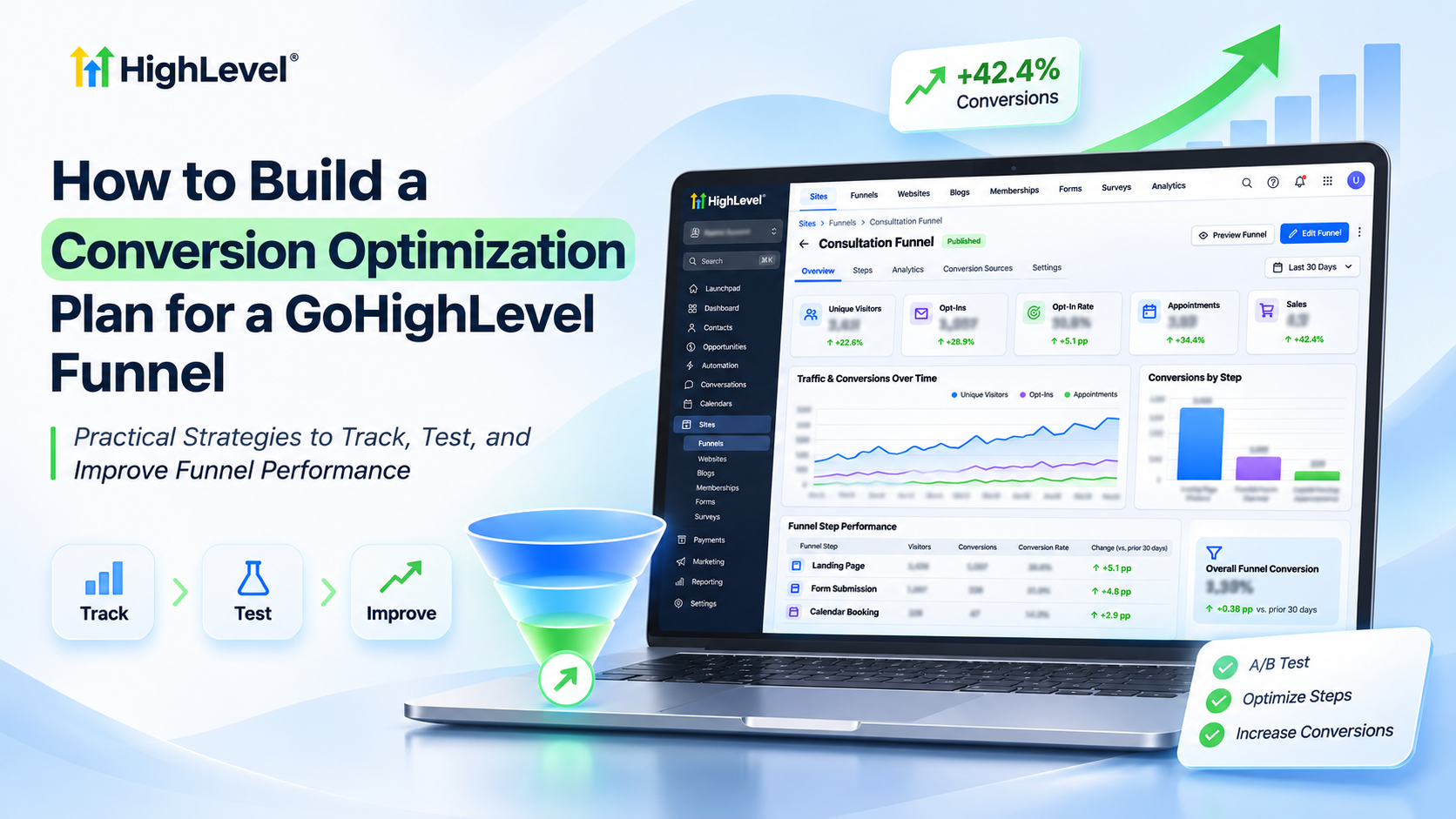
How to Build a Conversion Optimization Plan for a GoHighLevel Funnel
A marketing agency drives 1,000 visitors to its landing page, but only 40 become leads. Despite consistent traffic, appointments remain low, and advertising costs continue increasing.
The problem may not be traffic. Weak messaging, complicated forms, or an ineffective booking process could be reducing conversions.
GoHighLevel helps businesses investigate these issues through funnel analytics, split testing, CRM tracking, and automated follow-ups.
With a structured conversion optimization plan, you can identify performance gaps, test improvements, and turn more visitors into qualified leads.
How GoHighLevel Funnel Conversion Optimization Works
GoHighLevel funnel optimization involves analyzing visitor behavior, improving funnel elements, and measuring results.
Its built-in funnel statistics track page views, opt-ins, and applicable sales metrics. Split testing allows businesses to compare page variations without replacing the original design immediately.
GoHighLevel workflows also support lead follow-up through automated emails, SMS messages, and CRM actions.
However, optimization is not automatic. You must interpret performance data, identify potential problems, and implement improvements strategically.
What You Need Before Optimizing Your Funnel
Before starting, ensure you have:
Access to the appropriate GoHighLevel sub-account.
An existing, published funnel with a connected domain.
A defined conversion goal, such as form submissions or booked appointments.
Enough reliable traffic data to establish a baseline.
Relevant forms, calendars, and tracking configured correctly.
Permission to modify funnel pages and workflows.
These requirements help ensure your optimization decisions rely on meaningful information.
How to Build a Conversion Optimization Plan in GoHighLevel
Follow these six steps to create and implement your strategy.
Step 1: Define Your Primary Conversion Goal
Start by identifying the action your funnel should generate.
For example, a marketing agency might use a consultation funnel to capture leads and book strategy calls.
Its primary goal could be completed appointment bookings, while form submissions serve as a supporting metric.
Track both outcomes to avoid optimizing for lead volume while overlooking lead quality.
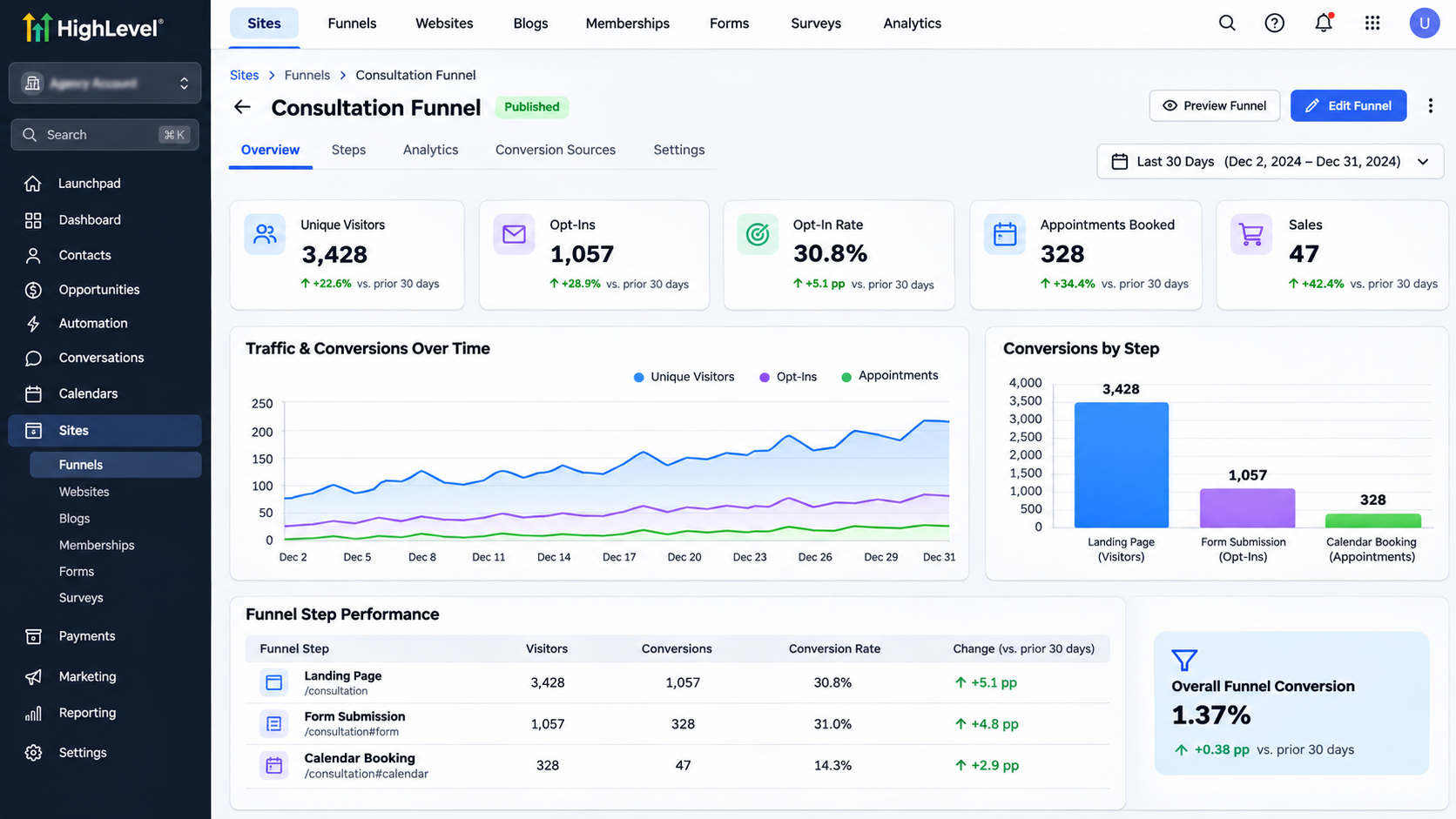
Step 2: Analyze Your Existing Funnel Performance
Navigate to Sites → Funnels and open your funnel.
Select the Stats tab and review the relevant date range.
Examine available metrics, including:
Unique page views.
Opt-in counts and rates.
Sales performance, where applicable.
Conversion differences between funnel steps.
Calculate conversion rates using:
Conversion Rate = (Conversions ÷ Unique Visitors) × 100
If 1,000 unique visitors generate 40 leads, your conversion rate is 4%.
For appointment conversions, calculate the percentage of leads who successfully book appointments separately using CRM or calendar records.
Record these results before changing anything.
Step 3: Identify Conversion Bottlenecks
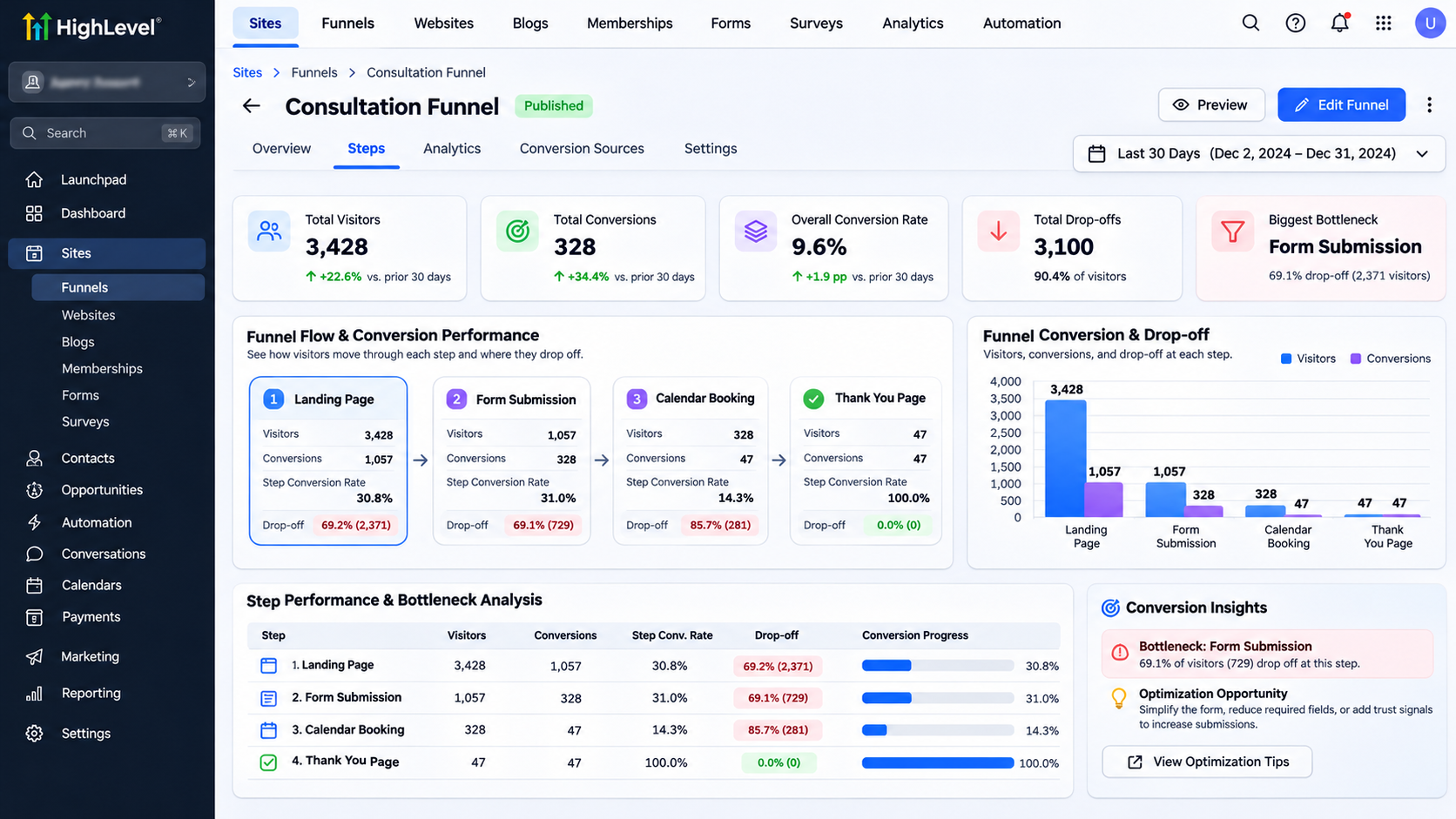
Review each stage of your funnel to identify potential friction.
Check whether your landing page headline matches your advertisement and whether visitors understand the offer.
Examine excessive form fields, unclear call-to-action buttons, poor mobile layouts, and complicated appointment booking.
For example, if 40 visitors submit a consultation form but only eight book appointments, investigate the booking process.
Test the funnel yourself on mobile and desktop devices.
Treat suspected problems as hypotheses rather than confirmed causes.
Step 4: Prioritize and Implement Improvements
Create a simple improvement list based on expected impact, supporting evidence, and implementation effort.
Prioritize changes that address measurable problems.
For example:
Replace a vague headline with a specific value proposition.
Remove unnecessary form fields.
Make the primary CTA more visible.
Simplify the transition from form submission to appointment booking.
Use GoHighLevel's funnel page editor to implement the selected change.
Avoid modifying several unrelated elements simultaneously if you need to understand what influenced performance.
Step 5: Run A/B Tests on Funnel Pages
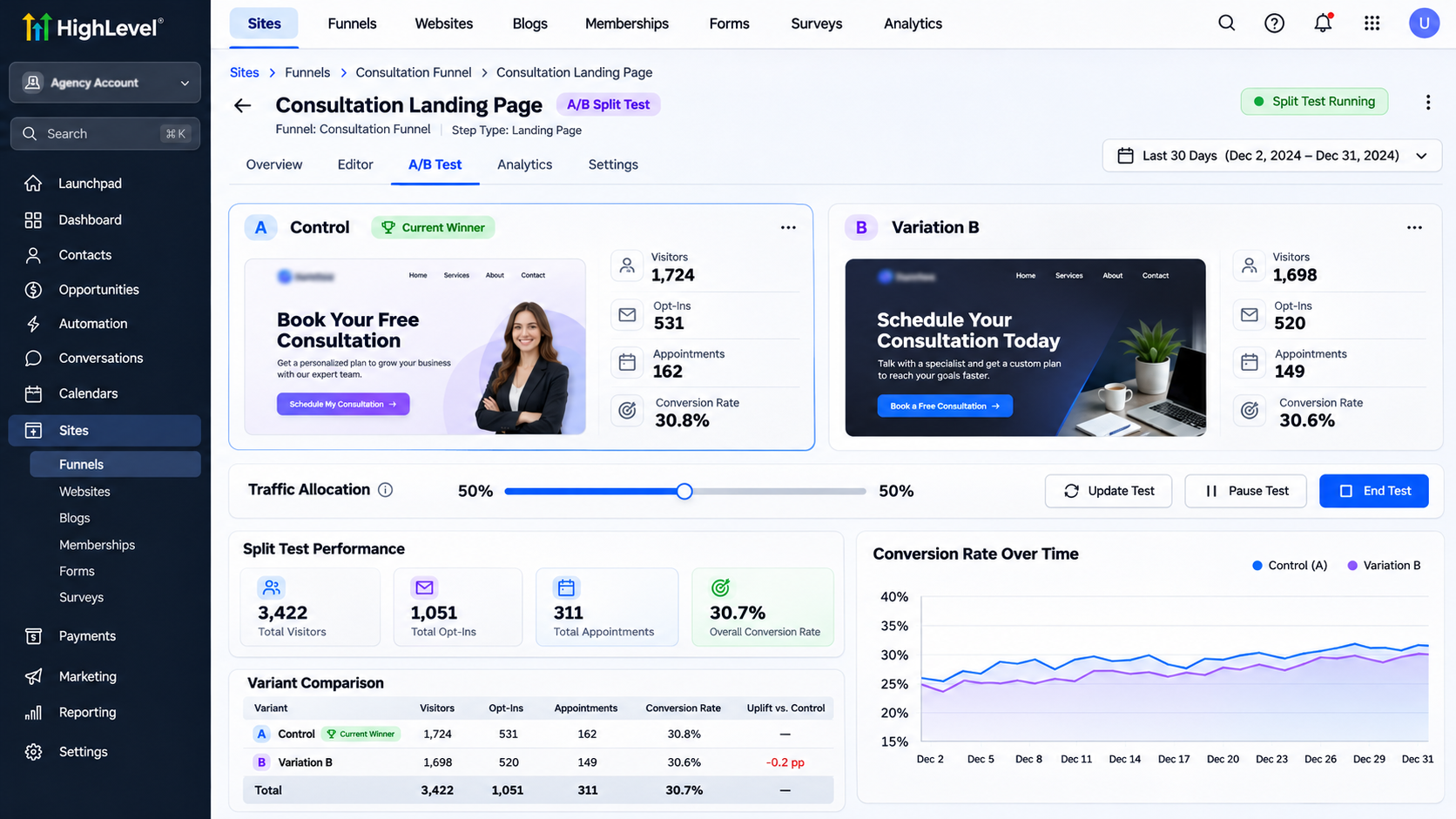
GoHighLevel supports split testing for funnel pages.
Open the desired funnel step and select Create Variation.
Create an alternative page, configure traffic distribution using the available slider, and start the split test.
For example, compare:
Version A: "Book a Free Consultation"
Version B: "Book Your Free 30-Minute Marketing Strategy Call"
Your hypothesis is that the more specific headline will generate more qualified appointment bookings.
Monitor results in the funnel's Stats tab.
Maintain consistent measurement and avoid selecting a winner before collecting sufficient evidence.
Step 6: Improve Lead Follow-Up With Workflows
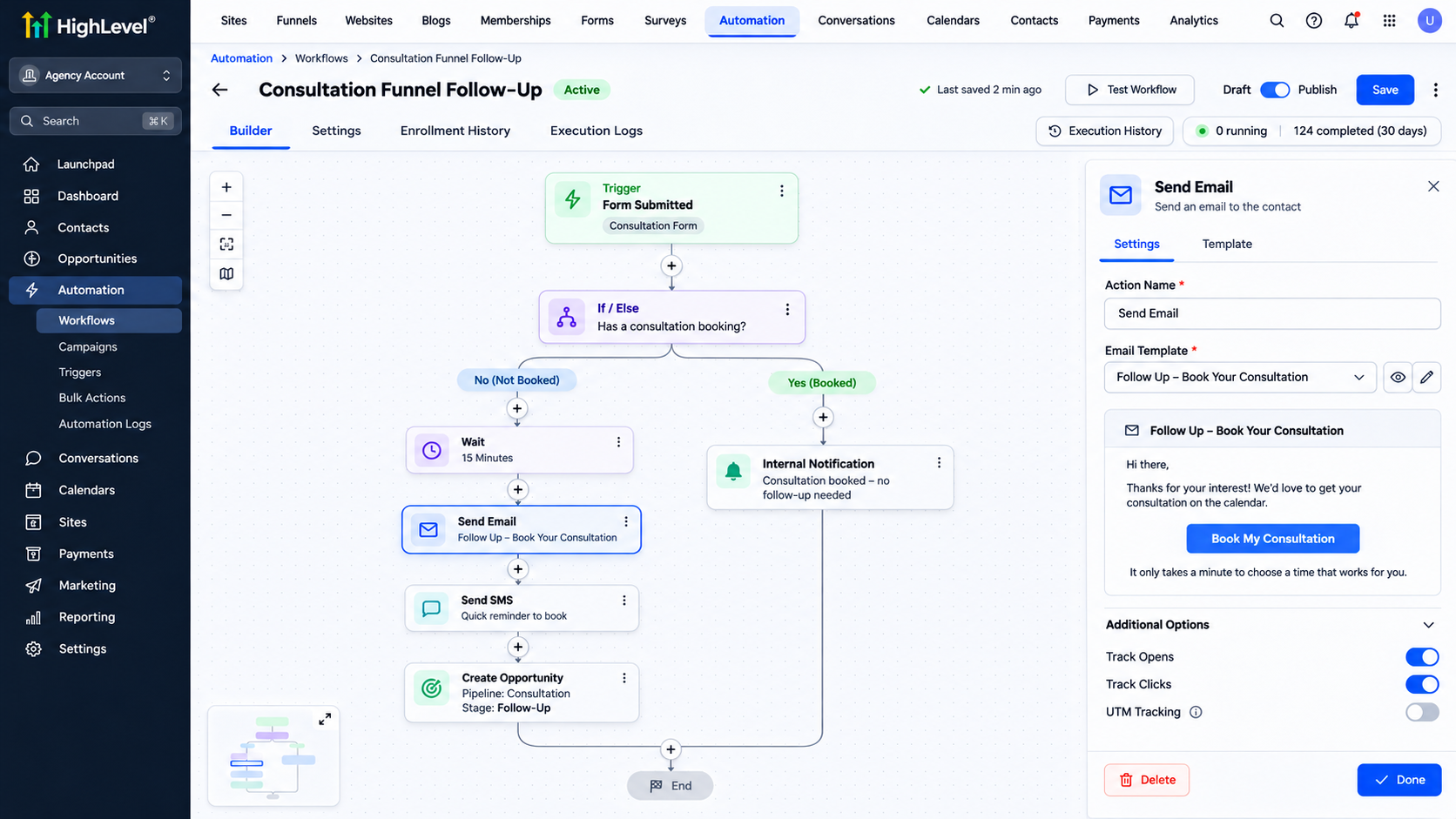
Navigate to Automation → Workflows → Create Workflow.
Start from scratch and configure the Form Submitted trigger.
Filter the trigger to the consultation form used in your funnel.
Add appropriate actions, such as:
Send Email: Deliver a confirmation and booking instructions.
Create/Update Opportunity: Add the lead to the relevant sales pipeline.
Internal Notification: Alert the responsible team member.
Use conditions where necessary to prevent inappropriate duplicate follow-ups.
This workflow supports consistent lead handling, although it does not guarantee additional conversions.
Test and Monitor Your Optimization Plan
Submit a test form, verify contact creation, and check whether the workflow executes correctly.
Test appointment booking and confirmation messages separately.
Review funnel statistics after changes and compare results using equivalent measurement periods.
Monitor both lead conversion rates and downstream appointment outcomes.
Common Conversion Optimization Problems and Fixes
Low conversion rates: Review message relevance, offers, forms, and mobile usability.
Missing tracking data: Verify published funnel pages and tracking configuration.
Split test not working: Confirm the funnel has a connected domain and an active test.
Automation not triggering: Check workflow publication, trigger filters, and execution history.
Poor booking rates: Test calendar usability and follow-up communications.
Best Practices for Higher Funnel Conversions
Focus on one measurable objective, test meaningful hypotheses, and document results.
Review performance regularly, prioritize qualified leads over vanity metrics, and avoid interpreting small data samples as definitive evidence.
Continue improving based on reliable findings.
Conclusion
A successful GoHighLevel conversion optimization plan combines accurate tracking, focused improvements, controlled testing, and consistent follow-up.
Start by auditing your funnel, identifying its biggest conversion bottleneck, and testing one measurable improvement.
Need help optimizing your GoHighLevel funnels? WispCode provides GoHighLevel funnel optimization, CRM automation, and conversion-focused solutions tailored to your business goals.
Frequently Asked Questions
1. Can GoHighLevel track funnel conversion rates?
Yes. GoHighLevel provides funnel statistics for page views, opt-ins, and applicable sales conversions.
2. Does GoHighLevel support A/B testing?
Yes. Its funnel split testing feature lets you compare different page variations and analyze performance.
3. Can GoHighLevel automate lead follow-ups?
Yes. Workflows can trigger relevant emails, SMS messages, notifications, and CRM actions.
4. How often should I optimize my funnel?
Review performance regularly and prioritize changes when reliable data reveals meaningful opportunities.
5. What should I optimize first?
Start with the most significant measurable bottleneck affecting your primary conversion goal.
Need Expert Help with GoHighLevel?
New to GoHighLevel and ready to get started? Buy your GoHighLevel account here and launch with confidence.
Already know what you need and want our team to handle everything, from complete setup and customization to funnels, workflows, automations, CRM, and pipelines? Click here.