

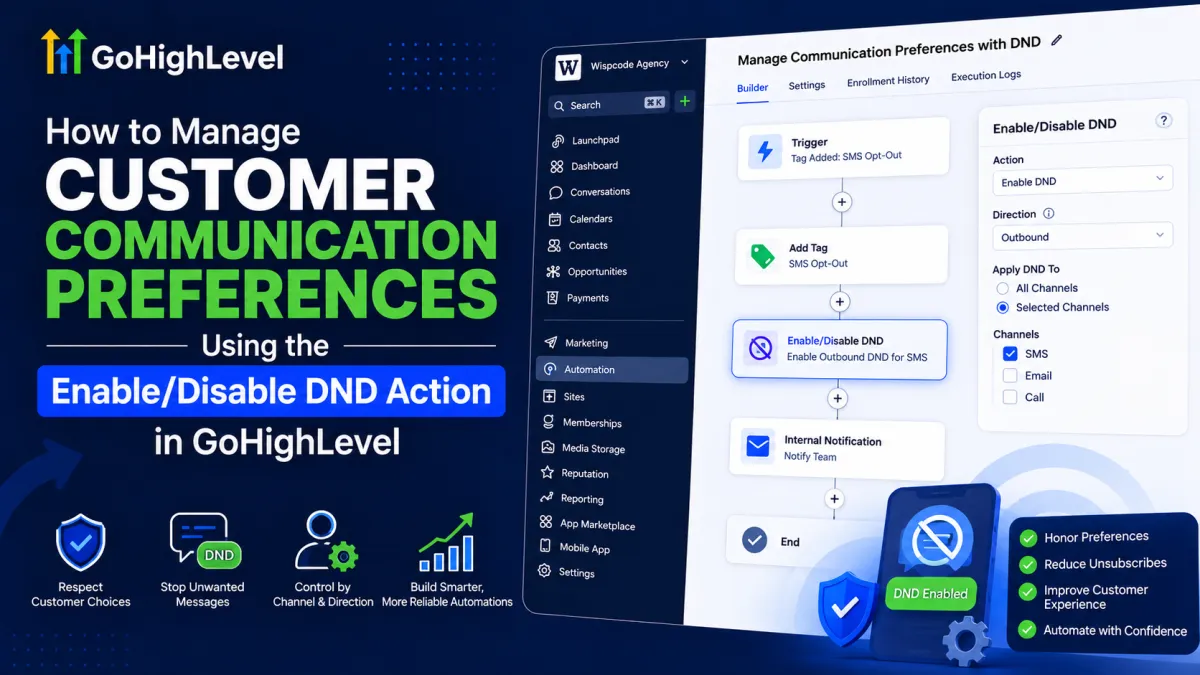
Manage Customer Communication Preferences Using Enable/Disable DND in GoHighLevel
How to Manage Customer Communication Preferences Using the Enable/Disable DND Action in GoHighLevel
Automation is valuable only when it communicates with customers at the right time and through the right channels. If a contact asks not to receive SMS messages, for example, continuing to send automated texts can quickly damage the customer experience.
This is where the Enable/Disable DND action in GoHighLevel becomes useful. The action lets a workflow manage a contact’s Do Not Disturb (DND) status, including the ability to apply DND to specific communication channels and control whether it affects inbound or outbound communication.
Used correctly, DND becomes more than a simple “stop messaging” switch. It can become part of a structured communication-preference system inside your GoHighLevel automation.
What Is DND in GoHighLevel?
In GoHighLevel, Do Not Disturb (DND) is a contact-level communication control that can be enabled or disabled for communication channels. Rather than treating every contact as eligible for every type of communication, you can use DND to control where communication should or should not occur.
An important detail is that DND is not necessarily an all-or-nothing setting. Depending on the configuration, DND can be applied to all available channels or selected channels, giving you more granular control over a contact’s communication preferences. HighLevel also provides direction controls for Inbound and Outbound communication.
That distinction matters when designing workflows. A customer may want to stop receiving SMS messages while remaining reachable through email, for example.
What Does the Enable/Disable DND Action Do?
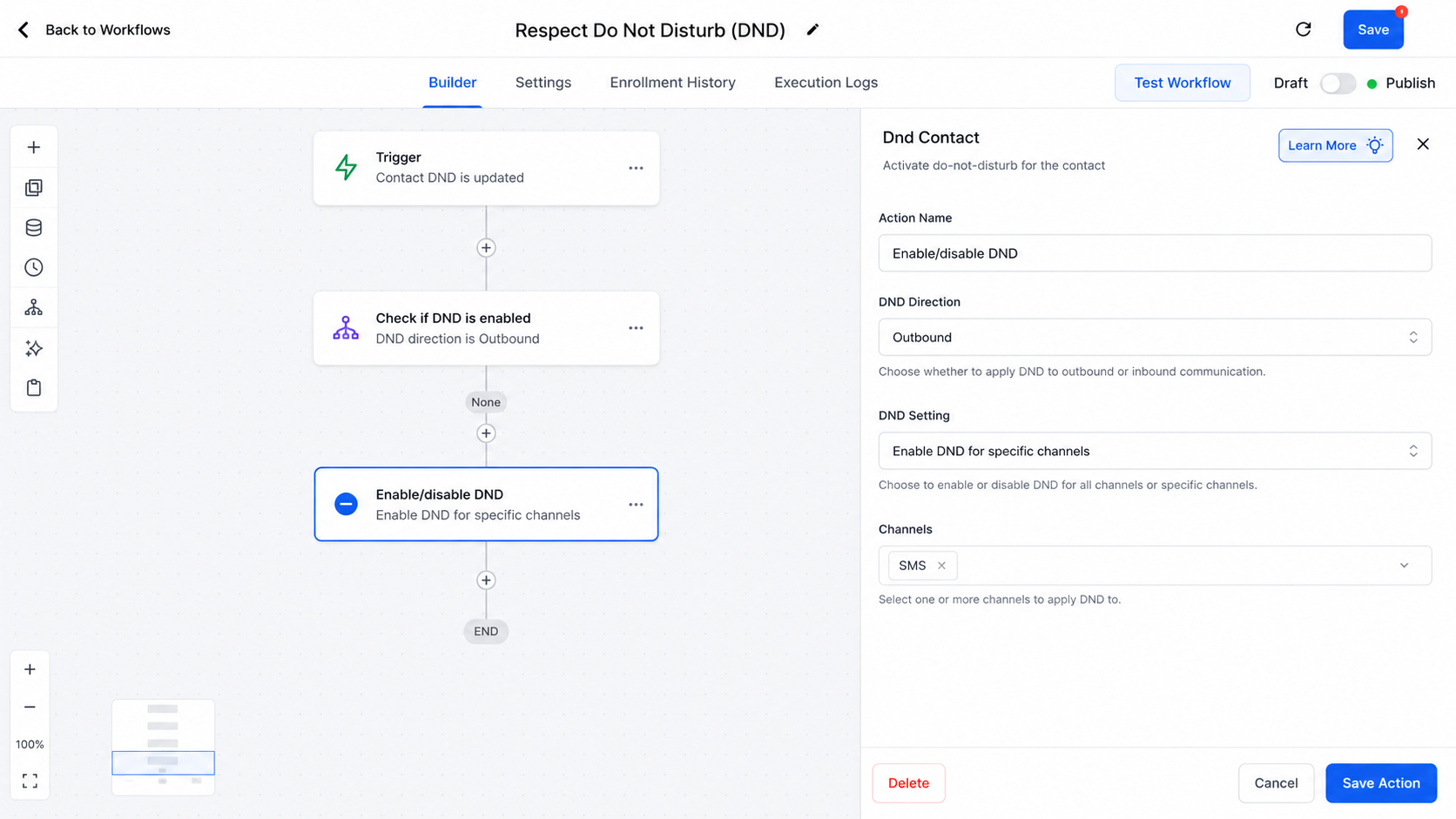
The workflow action is labeled Enable/Disable DND in the workflow builder and is documented by HighLevel as the DND Contact action. It allows an automation to change a contact’s DND status instead of requiring a team member to update it manually.
There are two fundamental operations:
Enable DND: Applies DND according to the selected direction and channel configuration.
Disable DND: Removes DND according to the selected direction and channel configuration.
The action supports Inbound or Outbound direction and can enable or disable DND for all channels or selected channels.
This is why saying “DND blocks everything” is too simplistic. The actual effect depends on how the action is configured.
For example, an outbound DND setting can be used to prevent outgoing communication through a selected channel, while inbound DND can be used for scenarios such as blocking unwanted incoming calls or SMS.
How to Use Enable/Disable DND in a Workflow
A reliable workflow starts with a clear event that tells the automation why DND should change.
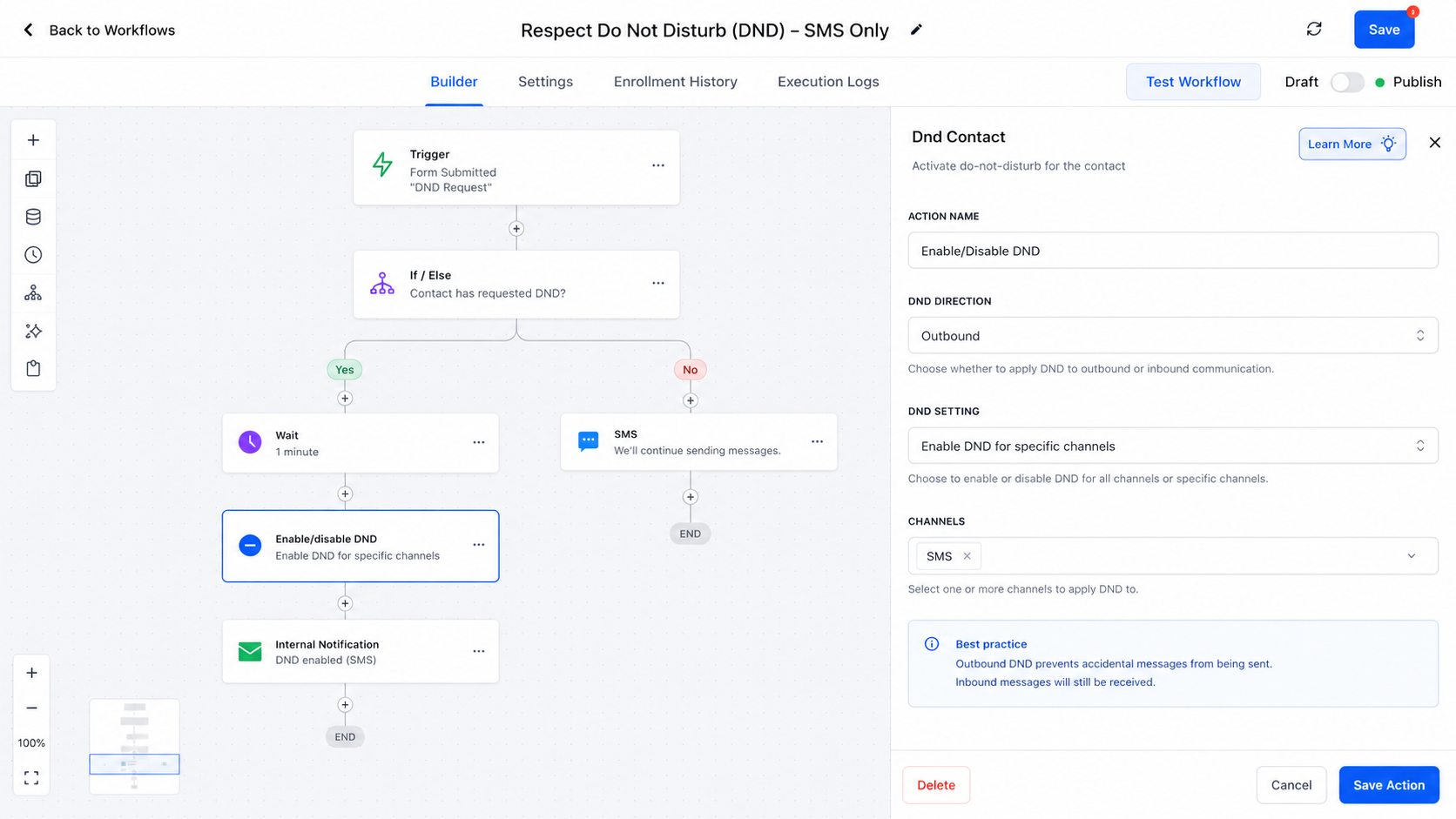
First, create or open a workflow under Automations → Workflows. Add the trigger or workflow logic that identifies the communication-preference event. Then add an action and search for Enable/Disable DND. HighLevel's documented setup allows you to select the DND direction and then choose whether to enable or disable DND for all channels or specific channels.
The sequence should make logical sense:
Preference event → DND action → follow-up automation
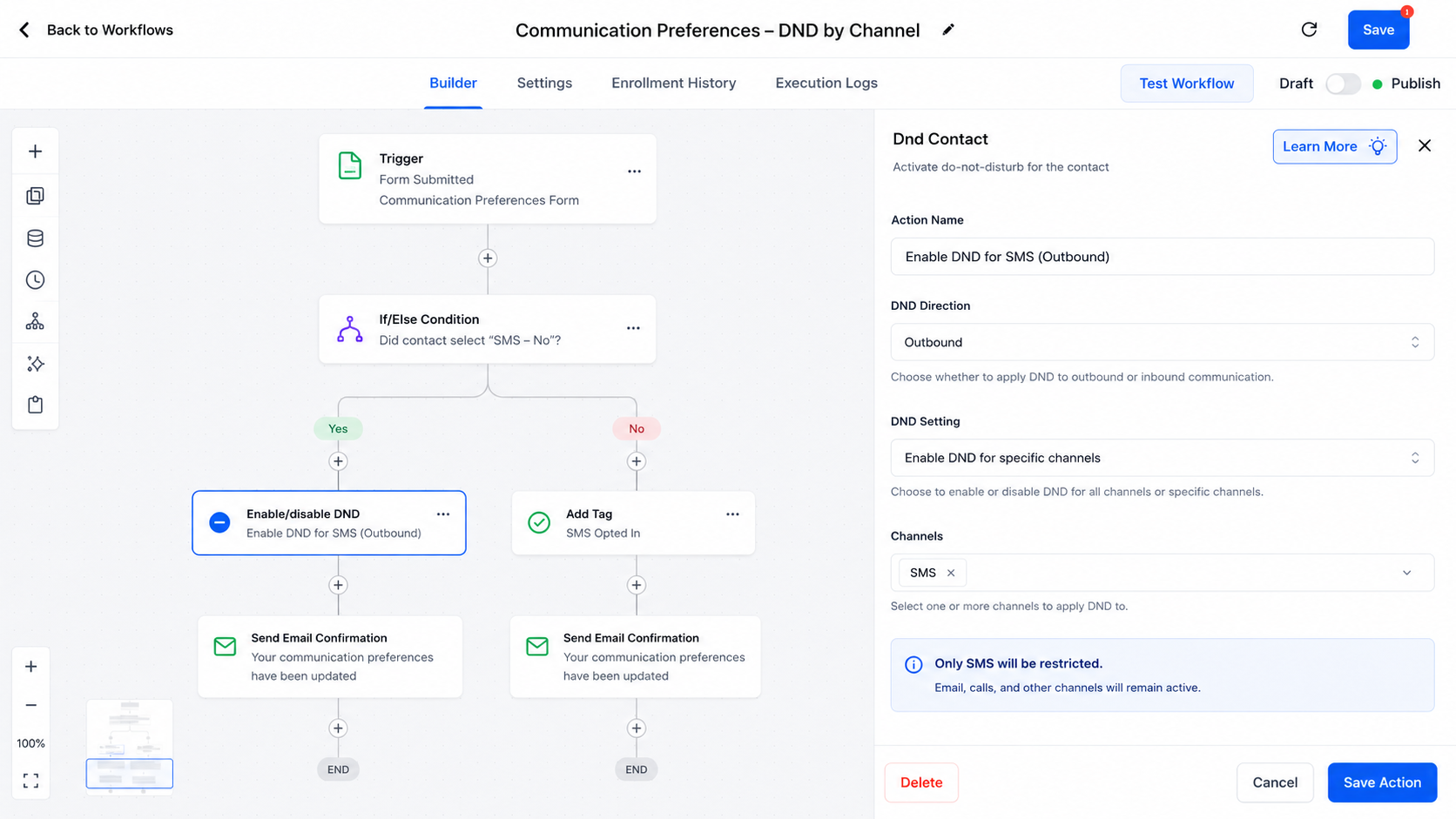
For example, if a customer requests no promotional SMS, the workflow should first identify that request and then enable outbound DND specifically for SMS. Additional workflow steps can then handle internal notifications, record supporting information, or manage other automation logic.
Before publishing, test the exact channel and direction you selected. Small configuration differences can produce very different communication outcomes.
A Practical Customer Preference Example
Imagine a customer tells your support team, “Please stop sending me text messages, but email is fine.”
Instead of disabling communication everywhere, build the automation around the customer's actual preference:
Use an appropriate workflow trigger or process to identify the SMS opt-out.
Add Enable/Disable DND.
Set the direction to Outbound.
Enable DND for the SMS channel only.
Leave other communication channels unaffected.
HighLevel specifically documents this type of channel-specific configuration as a way to keep SMS disabled while allowing communication through other channels.
If the customer later gives genuine permission to resume SMS communication, a separate workflow or appropriate process can use Disable DND for the relevant channel.
However, disabling DND should not be treated as proof that the customer has automatically opted back into every marketing channel. DND is an automation control; your broader consent and communication-preference process still needs to reflect the customer's actual choice.
Best Practices for GoHighLevel DND
Use the narrowest appropriate setting. If a customer wants to stop SMS, avoid unnecessarily applying DND to every channel.
Be deliberate about direction. Inbound and outbound DND serve different purposes. Confirm which direction your workflow is supposed to control before publishing.
Prevent accidental re-enablement. Review other workflows that could disable DND and make sure they do not unintentionally override a customer's preference.
Keep supporting records when useful. A custom field, tag, or internal process can help your team understand why a communication restriction exists, although those records are separate from the DND setting itself.
Test before going live. Use test contacts and verify the exact channel, direction, and resulting workflow behavior.
HighLevel also records DND changes in Conversations and activity logs, including whether the change was made by a workflow, user, or contact. This can be valuable when troubleshooting unexpected communication behavior.
Common DND Mistakes to Avoid
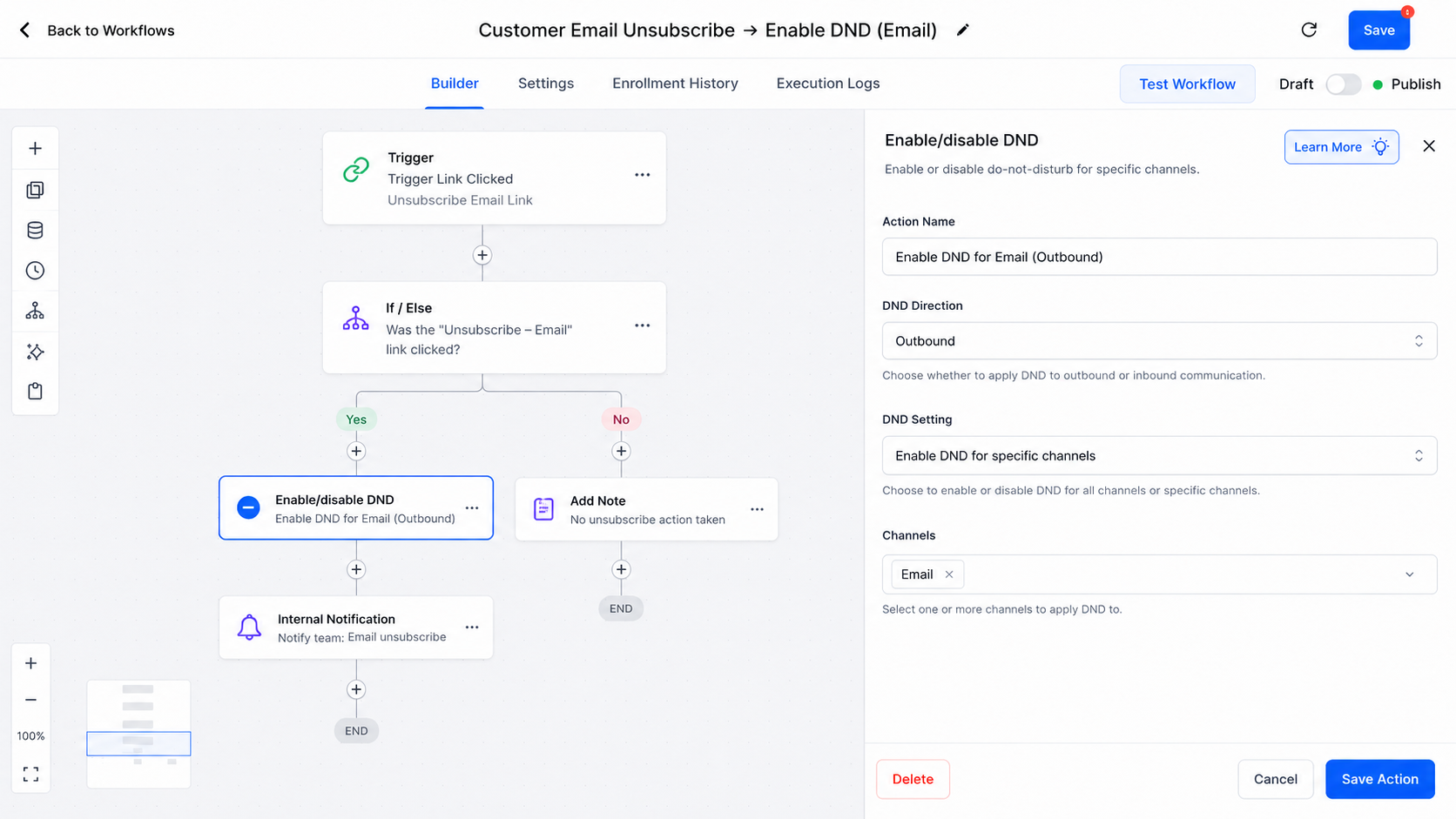
One common mistake is confusing DND with an email unsubscribe or another channel-specific opt-out mechanism. They are related to communication preferences but should not automatically be treated as identical concepts.
Another mistake is assuming DND stops the entire workflow. Enabling DND changes the applicable communication preference; it does not mean the contact record is deleted or that every workflow action automatically disappears.
Finally, avoid assuming that disabling DND means “the customer has opted back into everything.” Restoration should be based on an appropriate customer action or consent process.
Conclusion
The Enable/Disable DND action in GoHighLevel is most effective when treated as a precise communication-control mechanism rather than a universal emergency switch. By choosing the correct direction and channel, automation specialists can respect customer preferences without unnecessarily cutting off other legitimate communication.
The key is simple: automate communication preferences with the same precision you use to automate communication itself. When DND is thoughtfully incorporated into your GoHighLevel workflows, your automations become more controlled, predictable, and respectful of how customers want to be contacted.
Frequently Asked Questions
What is DND in GoHighLevel?
DND stands for Do Not Disturb. In GoHighLevel, DND is used to control communication for a contact based on the configured communication channel and direction. It can be managed manually or through workflow automation.
What does the Enable/Disable DND action do in GoHighLevel?
The Enable/Disable DND workflow action changes a contact’s DND status automatically. You can use it to enable or disable DND and, where applicable, specify the communication direction and channel affected.
Can I enable DND for only one communication channel?
Yes. GoHighLevel supports configuring DND for specific communication channels rather than always applying it universally. This is useful when a customer wants to stop one type of communication while remaining reachable through another.
Does enabling DND stop all GoHighLevel workflows?
No. DND should not be confused with stopping a workflow or removing a contact from automation. The DND setting controls applicable communication, while other workflow actions may continue to execute depending on the workflow's logic.
What is the difference between Enable DND and Disable DND?
Enable DND applies the configured Do Not Disturb restriction to the selected communication direction and channel. Disable DND removes that restriction according to the configuration you specify.
Does disabling DND mean the customer has opted back into marketing?
Not necessarily. Disabling DND changes the DND status, but it should not automatically be interpreted as proof of renewed marketing consent. Your communication and consent process should determine whether the customer is actually eligible to receive that communication.
Can DND be used for inbound and outbound communication?
Yes. GoHighLevel's DND configuration can distinguish between Inbound and Outbound communication. Selecting the correct direction is important because it determines what type of communication the DND setting is intended to control.
Need Expert Help with GoHighLevel?
New to GoHighLevel and ready to get started? Buy your GoHighLevel account here and launch with confidence.
Already know what you need and want our team to handle everything, from complete setup and customization to funnels, workflows, automations, CRM, and pipelines? Click here.



