

GoHighLevel Email Sync Update: Gmail & Outlook
Email two-way sync: What you need to know before connecting your inbox
Connecting an email inbox to a business platform is a decision users should make with a clear understanding of what the connection involves. Before linking Gmail or Outlook with GoHighLevel, users now see a disclosure notice explaining what will sync, who can read it, and what happens if the connection is disconnected. The purpose is to make these details available before proceeding.
This is an update to the email connection experience, not to how GoHighLevel email synchronization works. Existing sync behavior remains the same. What has changed is the information users are shown, when they see it, and how they can return to it later.
What's New in GoHighLevel's Email Sync Experience?
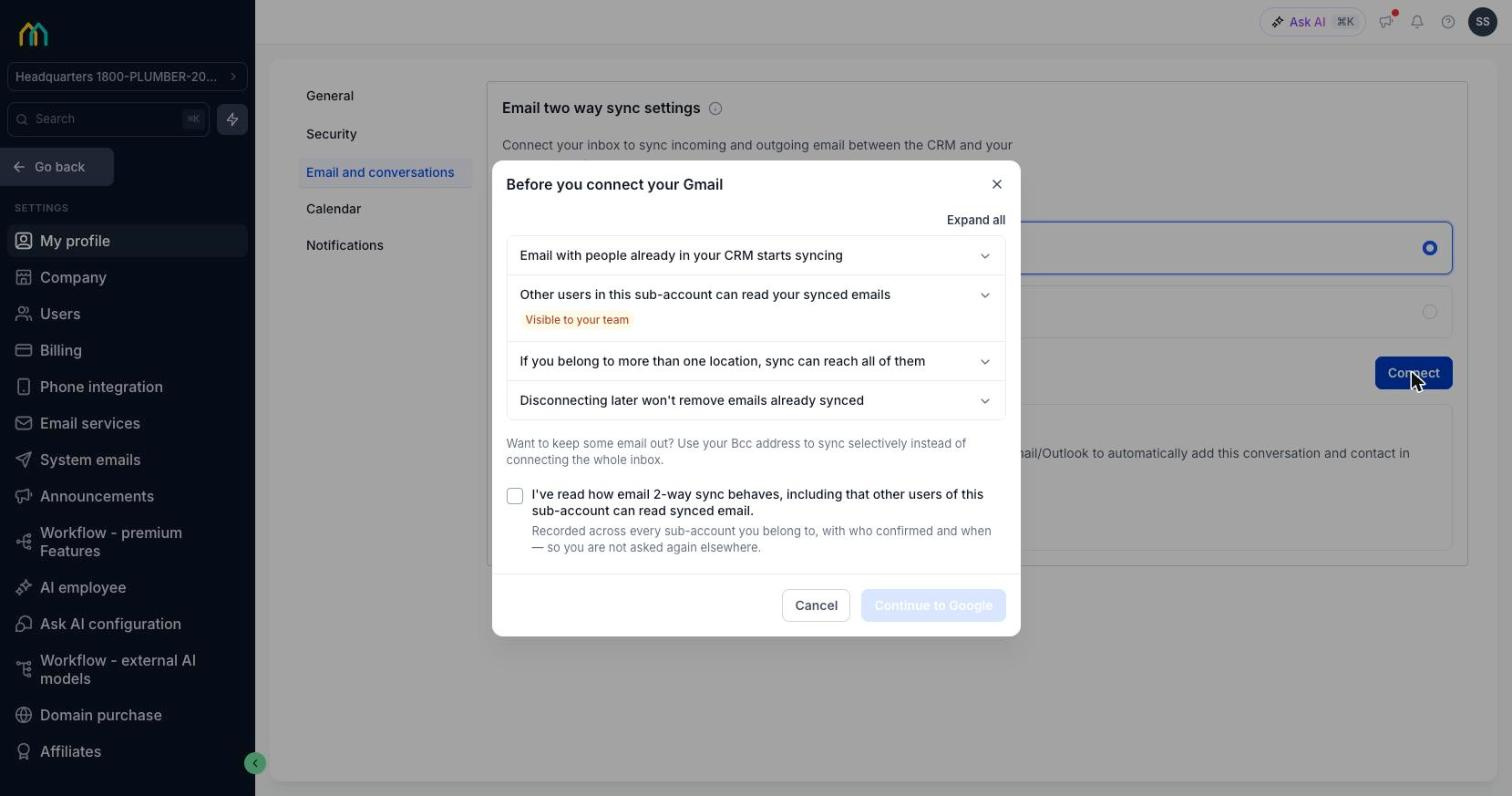
GoHighLevel has introduced a disclosure experience that appears before a user connects a Gmail or Outlook inbox. The notice presents four points describing what changes once an inbox is connected. Users can open any point for more detail, then confirm that they have read the information before continuing to their email provider.
The update makes relevant information available before a user proceeds with the Gmail and Outlook inbox connection. The same disclosure can also be accessed afterwards through the email sync settings.
The scope of this release is important: GoHighLevel has not announced a new synchronization method or a change to what happens with connected inboxes. The update adds a clearer disclosure step around the existing GoHighLevel Email Sync experience.
Understanding the Three Key Improvements
1. A Notice Before Connecting Your Inbox
When users begin connecting Gmail or Outlook, GoHighLevel displays a notice containing four points about what changes once an inbox is connected. The notification covers what will sync, who can read it, and what happens if the inbox is disconnected.
Users can open the four points individually to read more detail. They are then asked to confirm that they have read the information before continuing to the email provider. This confirmation acknowledges that the information has been presented and read.
The source update does not provide the individual titles or full contents of all four points, so those details should be reviewed in the GoHighLevel interface. The key change is that users see this information before continuing with a Gmail or Outlook connection.
2. Access Email Sync Information Anytime
The disclosure is not limited to the initial connection screen. GoHighLevel has added a "How email sync works" option beside the email sync settings. Selecting it reopens the same four points, allowing users to revisit the information whenever they need it.
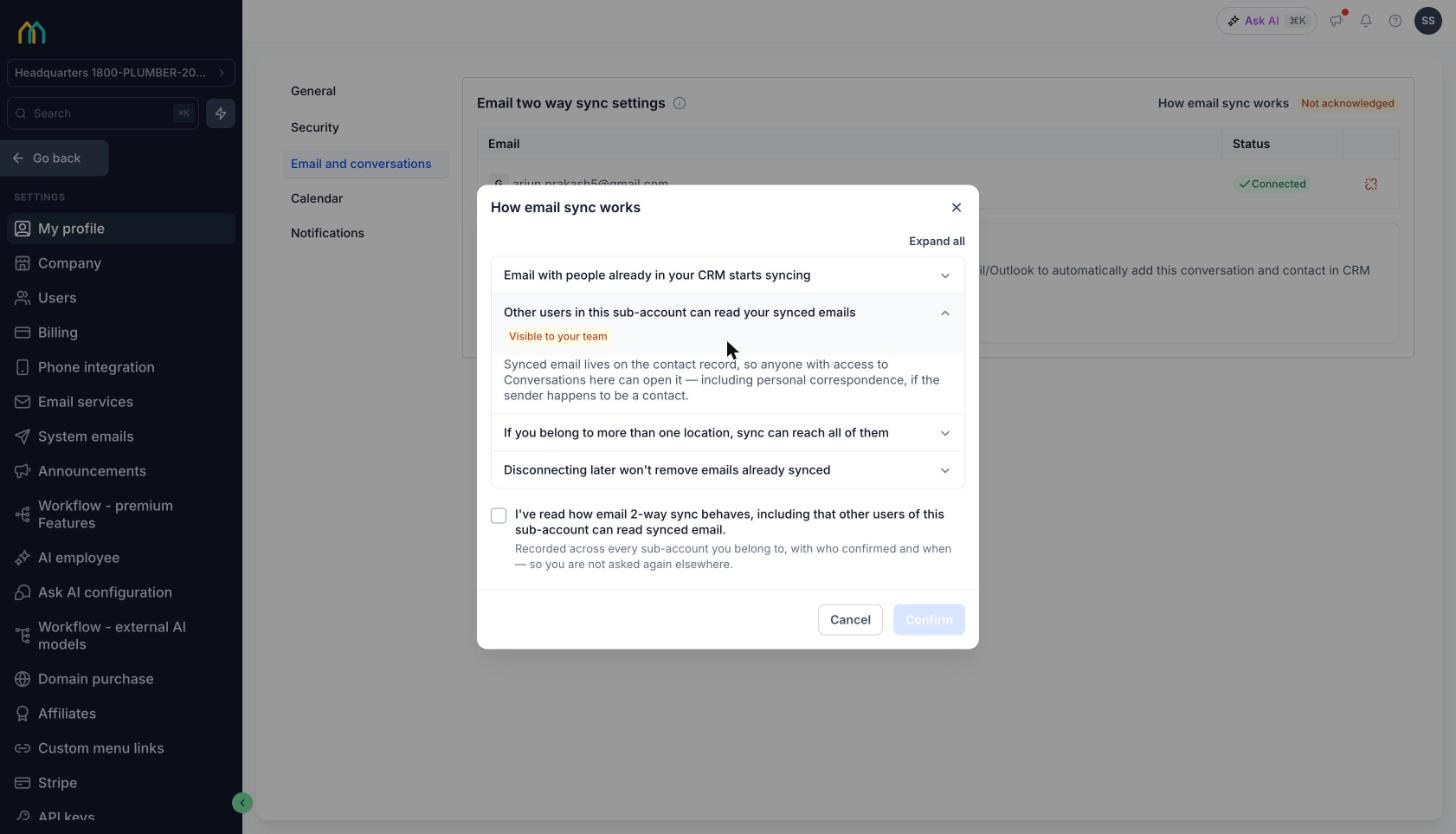
Users therefore have a consistent place to review the disclosure after an inbox has been connected, rather than relying on remembering the original notice. For anyone reviewing GoHighLevel Email Settings, this is an important part of the update: the explanation is available before connection and afterwards.
3. A One-Time Notice for Existing Connected Inboxes
The update also applies to users who connected their Gmail or Outlook inbox before the disclosure experience was introduced. Those users will see the same four points once, explaining how their inbox already behaves.
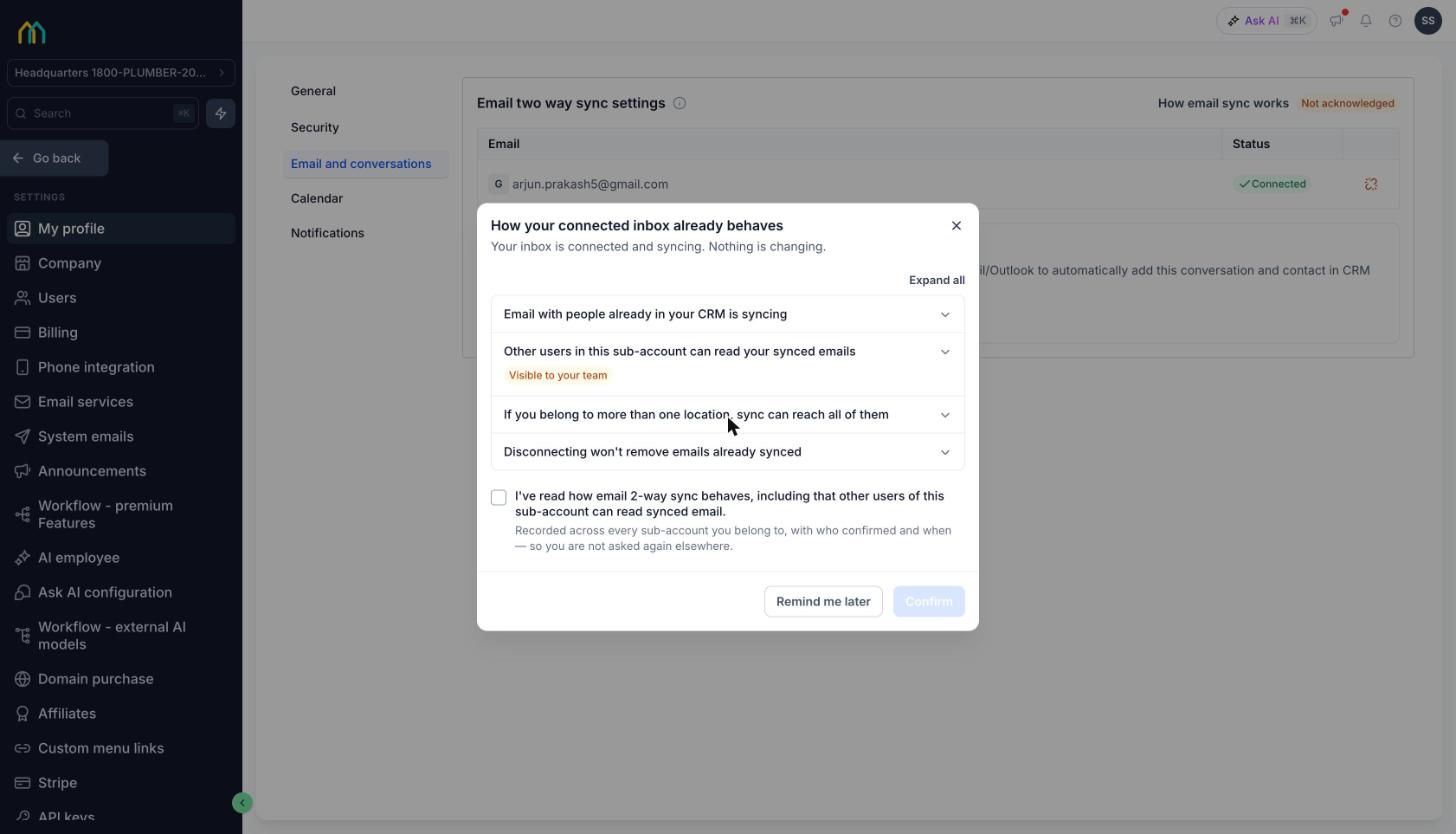
Seeing this notice does not mean GoHighLevel has changed the existing connection or its synchronization behavior. The official update states that nothing about the sync changes. The notice provides the disclosure to existing users as well as people connecting an inbox for the first time.
How to Access the New Email Sync Disclosure in GoHighLevel
To view the notice while connecting an inbox, follow these steps:
Go to Settings › My Profile › Email and conversations.
Select a provider, either Gmail or Outlook, and press Connect.
Read the four disclosure points. Open any point to see its additional detail.
Tick the confirmation to acknowledge that you have read the information, then continue to the provider.
To review the information later, select How email sync works beside your email sync settings.
These steps explain how to access and acknowledge the disclosure. Confirmation does not turn synchronization on or off, and it does not change any settings.
What Existing GoHighLevel Users Should Know
There are four important details to keep in mind when the notice appears.
First, email synchronization behavior has not changed. GoHighLevel describes this release as disclosure only. The notice explains the existing arrangement; it does not announce a change to how a connected inbox syncs.
Second, confirming the notice records who confirmed and when. This is the confirmation record described in the official update; it does not change the user's email connection or its behavior.
Third, confirmation applies across every sub-account the user belongs to. The user is therefore not asked to confirm the same notice again in each of those sub-accounts.
Finally, confirmation does not enable or disable email synchronization and does not change any settings. It is an acknowledgment of the disclosure, not an instruction to modify the connection. This distinction is central to understanding the Gmail and Outlook Email Sync Transparency Update.
Final Thoughts
GoHighLevel's Gmail and Outlook email sync update makes information about inbox connections more visible when users need it. Users can review four disclosure points before continuing to their provider, return to the same information later through "How email sync works," and existing users will receive the notice once.
The key point is that this is a transparency improvement, not a change to email synchronization. The way connected inboxes sync remains unchanged, and confirming the notice does not alter settings or switch sync on or off. The update gives GoHighLevel users a clearer opportunity to understand the existing email sync arrangement before connecting an inbox.
Frequently Asked Questions
1. What is the new GoHighLevel Email Sync update?
GoHighLevel has introduced a disclosure notice that explains what will sync, who can read it, and what happens when a Gmail or Outlook inbox is disconnected.
2. Does the new update change how Gmail and Outlook synchronization works?
No. GoHighLevel confirms that existing email synchronization behavior remains unchanged. This update is exclusively about disclosure and transparency.
3. Where can I find the email sync disclosure in GoHighLevel?
Navigate to Settings › My Profile › Email and conversations. You can also revisit the same four disclosure points using the How email sync works option beside your email sync settings.
4. Do existing users need to confirm the new email sync notice?
Yes. Users who connected their inboxes before the update will see the same disclosure points once. These points explain how their inbox already behaves.
5. What happens after confirming the email sync notice?
GoHighLevel records who confirmed the notice and when. The confirmation applies across every sub-account the user belongs to. It does not enable or disable synchronization or change any settings.
Need Expert Help with GoHighLevel?
New to GoHighLevel and ready to get started? Buy your GoHighLevel account here and launch with confidence.
Already know what you need and want our team to handle everything, from complete setup and customization to funnels, workflows, automations, CRM, and pipelines? Click here.