

How to Fix Email Deliverability
How to Diagnose Email Deliverability Problems in GoHighLevel
Your GoHighLevel campaign shows as successfully sent, but customers are not receiving your emails. Some messages land in spam, others bounce, and engagement continues to decline. The problem may not be your campaign itself. It could originate from your sending domain, email authentication, sender reputation, contact list, or email provider. Diagnosing GoHighLevel email deliverability problems requires examining the entire sending process rather than changing random settings.
Understanding Email Deliverability in GoHighLevel
Email delivery and email deliverability are two different things. Delivery means the recipient's mail server has accepted your message. Deliverability concerns whether that message reaches the primary inbox instead of spam or another folder. Inbox placement determines where the email appears, while engagement measures actions such as opens, clicks, and replies.
An email marked as delivered does not guarantee inbox placement. Therefore, a successful sending status alone cannot confirm healthy GoHighLevel email deliverability.
Step 1: Identify Your Email Sending Source
Before investigating technical problems, identify which email infrastructure your GoHighLevel sub-account uses.
GoHighLevel supports different sending configurations, including:
LC Email: LeadConnector's managed email infrastructure, which supports dedicated sending domains and built-in deliverability capabilities.
Mailgun: A third-party email service that can be integrated with GoHighLevel for sending and reporting.
External SMTP: Providers such as SendGrid, Amazon SES, and other compatible services can connect through SMTP.
These configurations do not provide identical reporting or diagnostic capabilities. For example, HighLevel documents that SMTP integrations may not provide delivered events, while LC Email and Mailgun offer different tracking capabilities.
Identify the active provider before interpreting missing statistics or failed messages.
Step 2: Review Email Statistics and Bounce Information
GoHighLevel provides email statistics across workflows, campaigns, and bulk sending activities.
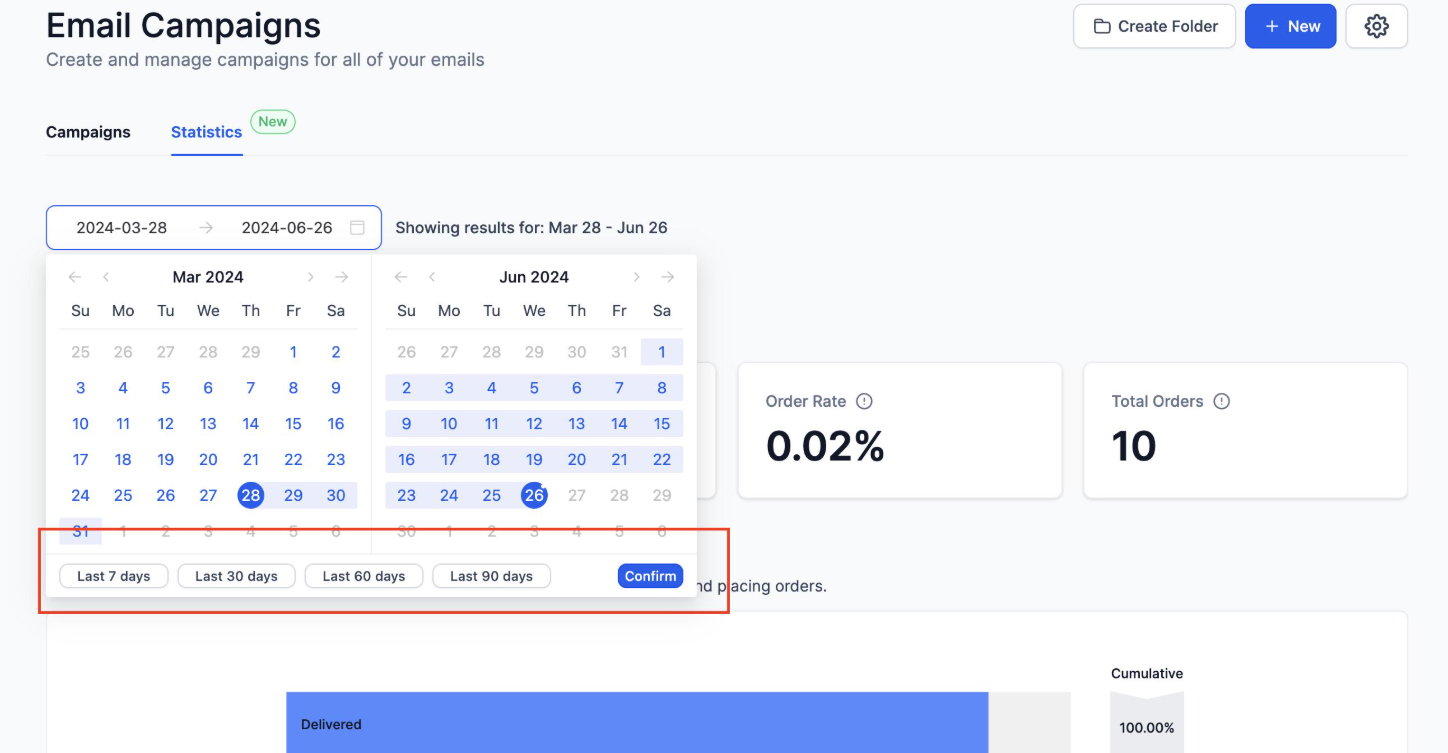
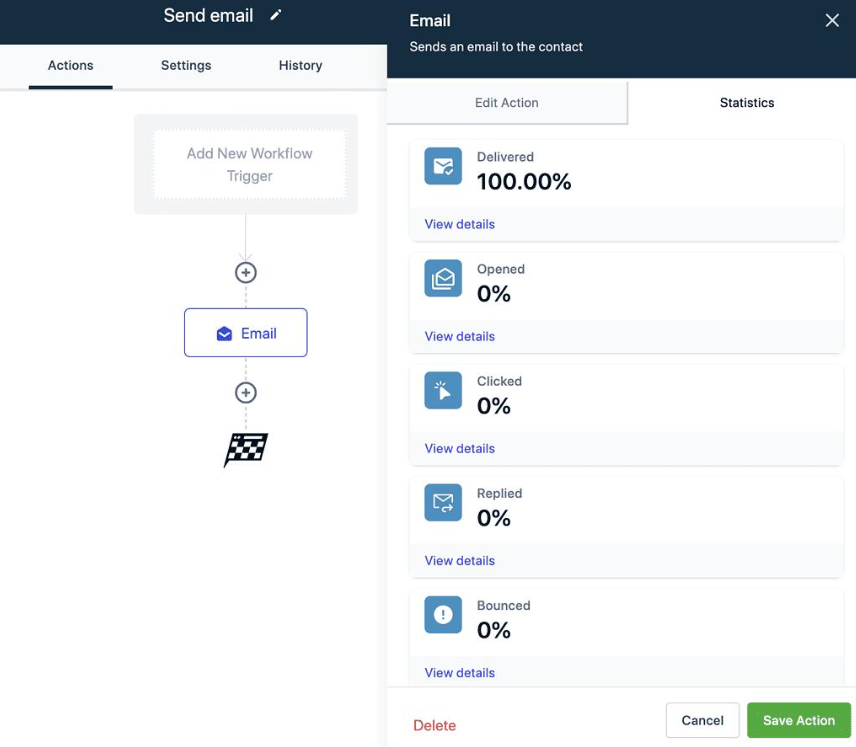
For workflow emails, navigate to Automation > Workflows, open the relevant workflow, select its Email action, and review Statistics.
Depending on the sending provider, available metrics can include:
Delivered: Messages accepted by recipient mail servers.
Opened: Recorded email open events.
Clicked: Recorded link clicks.
Bounced: Messages that could not be delivered.
Complained: Recipients who reported messages as spam.
Unsubscribed: Recipients who opted out.
For bulk sends, review the relevant activity under Contacts > Bulk Actions.
Understand Different Bounce Types
A hard bounce indicates a permanent delivery failure, commonly caused by an invalid address or inactive mailbox. A soft bounce represents a temporary problem, such as a full mailbox or receiving server issue.
Spam complaints are different because the recipient has marked the message as unwanted. Meanwhile, spam folder placement can happen even when the receiving server accepts the email.
Look for repeated patterns instead of treating every failure as an isolated incident.
Step 3: Investigate Domain Authentication
Incorrect DNS authentication is a common cause of email sending problems.
Go to Settings > Email Services and inspect your sending domain configuration.
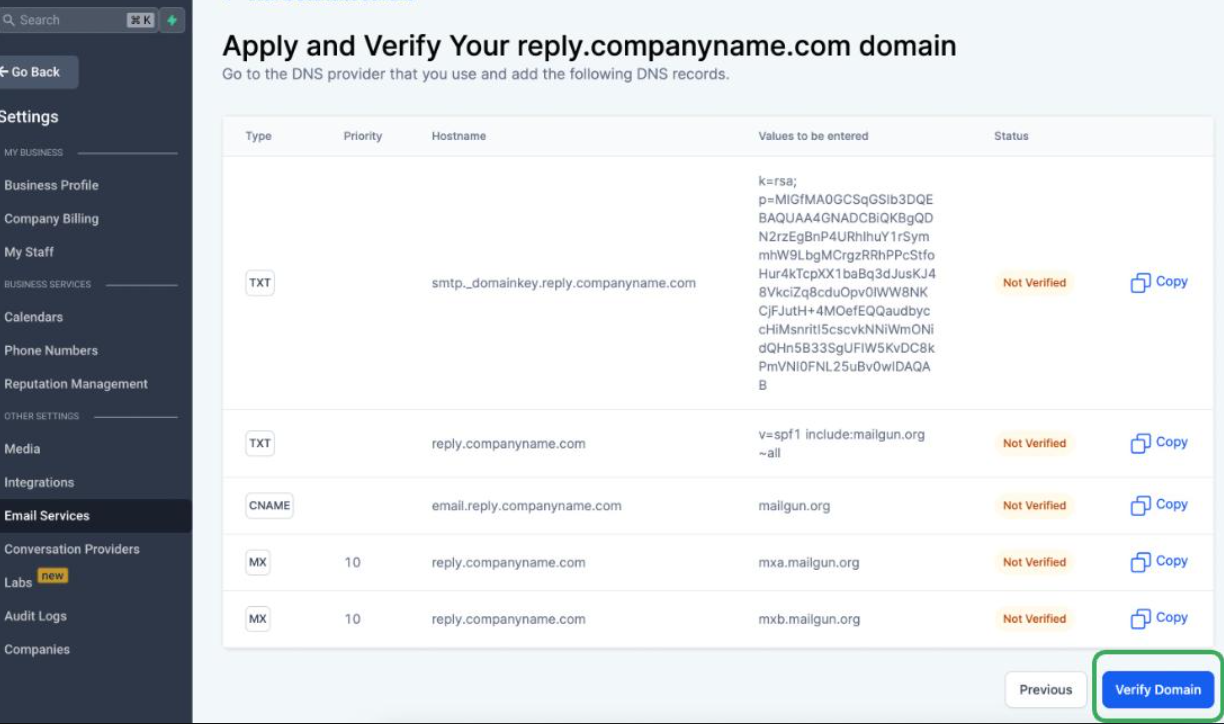
For LC Email dedicated domains, HighLevel provides the DNS records required for verification.
Pay particular attention to three authentication methods:
SPF: Identifies which servers are authorized to send emails for your domain.
DKIM: Adds a cryptographic signature that helps receiving servers verify message authenticity.
DMARC: Defines how receiving servers should handle messages that fail authentication checks and provides reporting information.
Check that the DNS records match the exact values provided by your email provider.
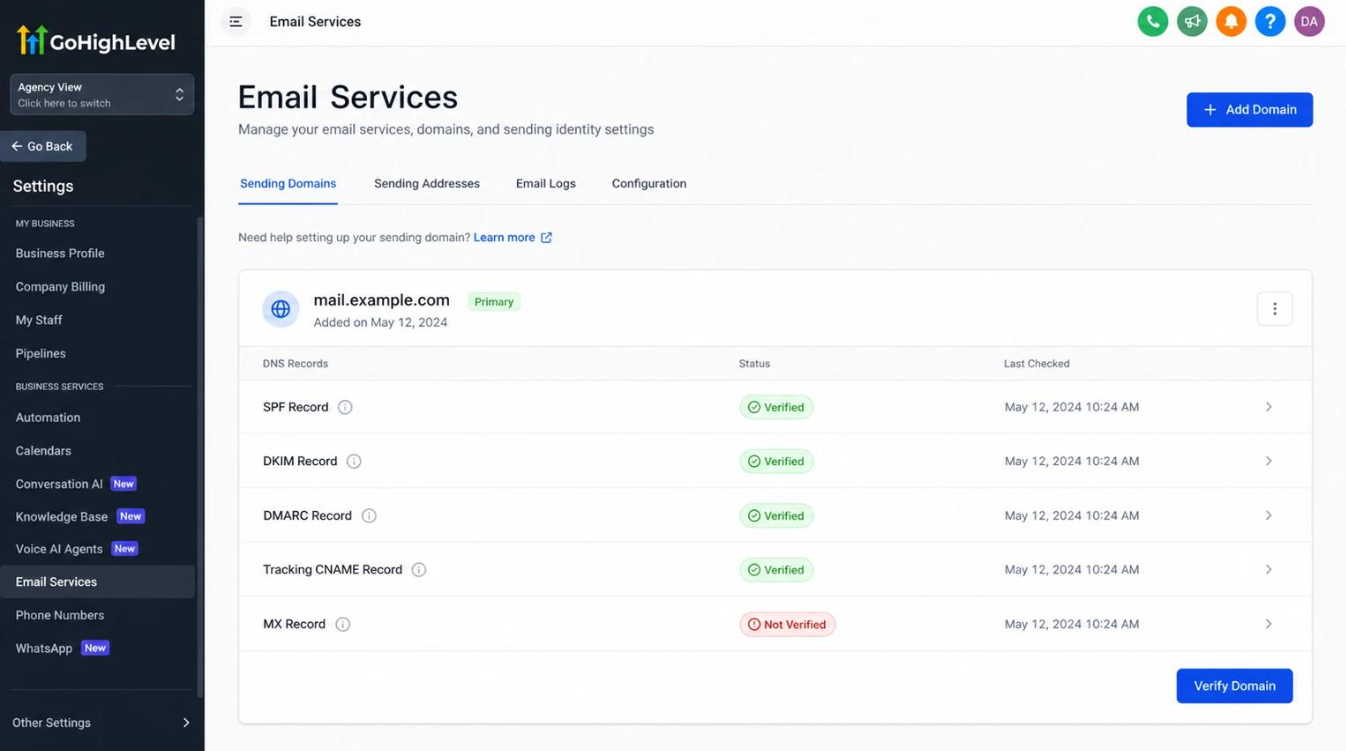
Common problems include missing SPF records, incorrect DKIM keys, duplicate SPF records, and DMARC alignment failures.
Do not randomly replace existing DNS records. Multiple email services may already depend on your domain configuration.
Step 4: Examine Sender Reputation and Contact Quality
Even correctly authenticated emails can reach spam folders when sender reputation is poor.
Mailbox providers evaluate sending history, complaint activity, bounce patterns, recipient engagement, and sending consistency.
For LC Email, available deliverability tools and reputation monitoring can help identify potential problems. Google Postmaster Tools can also provide insights into domain reputation when sufficient sending data is available.
Review your contact database for outdated addresses, purchased lists, invalid emails, and contacts who never gave permission to receive marketing messages.
Remove invalid addresses, respect unsubscribes, and avoid repeatedly emailing unengaged recipients. These practices help reduce unnecessary bounces and spam complaints.
Step 5: Investigate Workflow and Campaign Problems
If emails fail only in one workflow or campaign, investigate that specific sending process.
Check whether the email action is configured correctly, whether contacts are entering the expected workflow path, and whether the sender address matches the authenticated sending configuration.
For example, if appointment confirmation emails work but promotional campaigns experience high bounce rates, the issue may involve the campaign audience, sending frequency, or message content rather than the entire email infrastructure.
Also review subject lines, excessive promotional language, broken links, and image-heavy layouts. Sending large volumes suddenly from a new domain can create additional reputation problems.
Step 6: Apply Corrective Actions and Monitor Results
Once the underlying issue is identified, apply the appropriate correction.
Fix incorrect DNS records using the values supplied by your provider. Remove invalid contacts, suppress previous complainers, and reduce unnecessary sending volume. If a new dedicated domain is involved, gradually increase sending activity rather than immediately emailing your entire database.
When using external SMTP, investigate provider-side logs, authentication, sending limits, and account restrictions.
After implementing changes, monitor delivery, bounce, complaint, and engagement trends across subsequent sends.
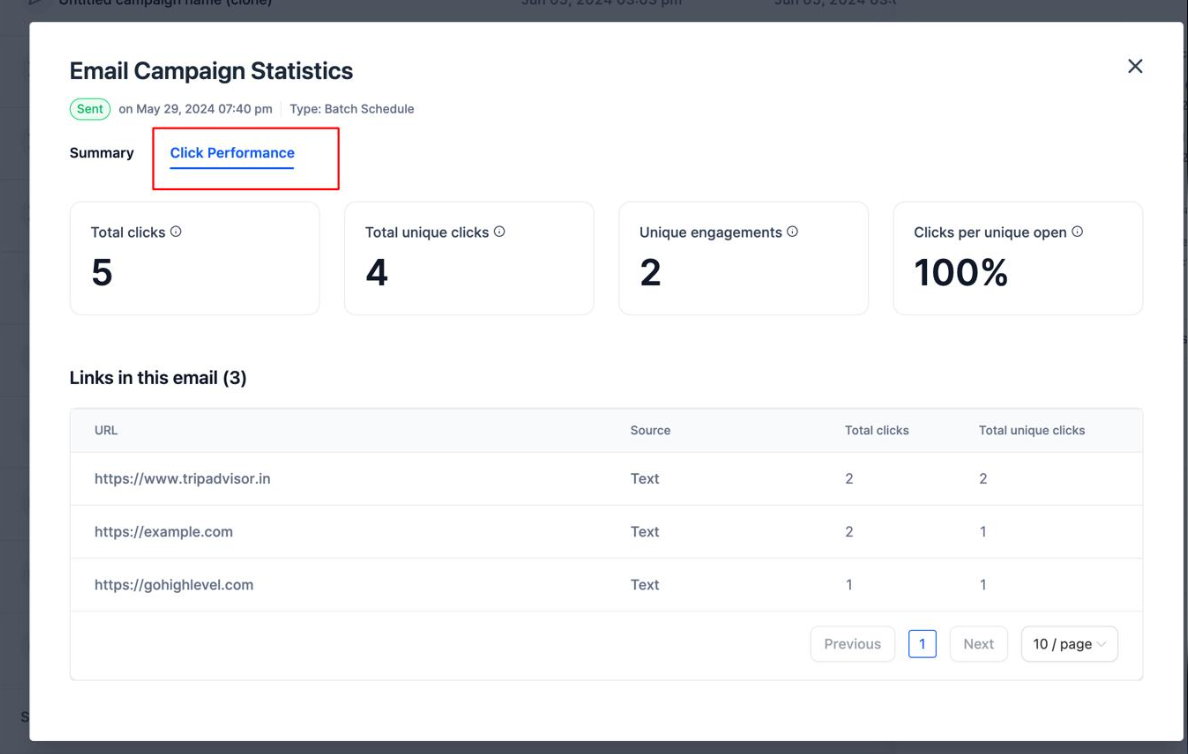
Compare similar audiences and campaigns to determine whether performance is improving.
Prevent Future GoHighLevel Email Deliverability Problems
Healthy email deliverability requires ongoing maintenance, not a one-time configuration.
Maintain authenticated sending domains, use permission-based contact lists, send relevant messages, and keep sending volumes consistent. Regularly review workflow statistics and investigate unusual changes before expanding campaign volume.
A properly configured GoHighLevel email system combines reliable infrastructure, accurate authentication, responsible sending practices, and continuous monitoring. Understanding how these elements work together makes diagnosing email delivery issues considerably easier.
Frequently Asked Questions
1. Why Are GoHighLevel Emails Landing in Spam?
Common causes include poor sender reputation, authentication failures, spam complaints, and low-quality contact lists. Email content and sending patterns can also influence inbox placement.
2. How Can I Check Email Deliverability in GoHighLevel?
Review email statistics inside workflow actions, campaign reporting, or Contacts > Bulk Actions. Available reporting depends on your configured sending provider.
3. What Causes Email Bounces in GoHighLevel?
Hard bounces commonly result from invalid or inactive addresses, while soft bounces involve temporary receiving server problems. Incorrect sending configurations can also cause failures.
4. Does Domain Authentication Improve Email Deliverability?
Yes. SPF, DKIM, and DMARC help establish sender authenticity and reduce authentication-related delivery problems. However, they cannot guarantee inbox placement.
5. How Can I Prevent GoHighLevel Email Deliverability Problems?
Use authenticated sending domains, maintain clean contact lists, monitor bounce and complaint activity, and maintain consistent sending practices. Regularly review email performance to identify problems early.
Need Expert Help with GoHighLevel?
New to GoHighLevel and ready to get started? Buy your GoHighLevel account here and launch with confidence.
Already know what you need and want our team to handle everything, from complete setup and customization to funnels, workflows, automations, CRM, and pipelines? Click here.