

GoHighLevel Email Authentication: SPF, DKIM & DMARC Guide
SPF, DKIM, and DMARC: What GoHighLevel Users Need to Know
Introduction
Sending emails through GoHighLevel is more than writing a message, choosing a contact list, and clicking send. Behind every successful email is a series of authentication checks that help receiving mail servers determine whether the message is legitimate.
Three of the most important technologies involved are SPF, DKIM, and DMARC.
If you use GoHighLevel for marketing emails, automated follow-ups, lead nurturing, appointment reminders, or other email communication, understanding these records can help you build a more reliable sending setup and troubleshoot authentication problems when they occur.
The good news is that you do not need to become a DNS expert to understand them. Once you know what each record does, how they work together, and what GoHighLevel expects from your sending domain, the setup becomes much easier to manage.
What Are SPF, DKIM, and DMARC?
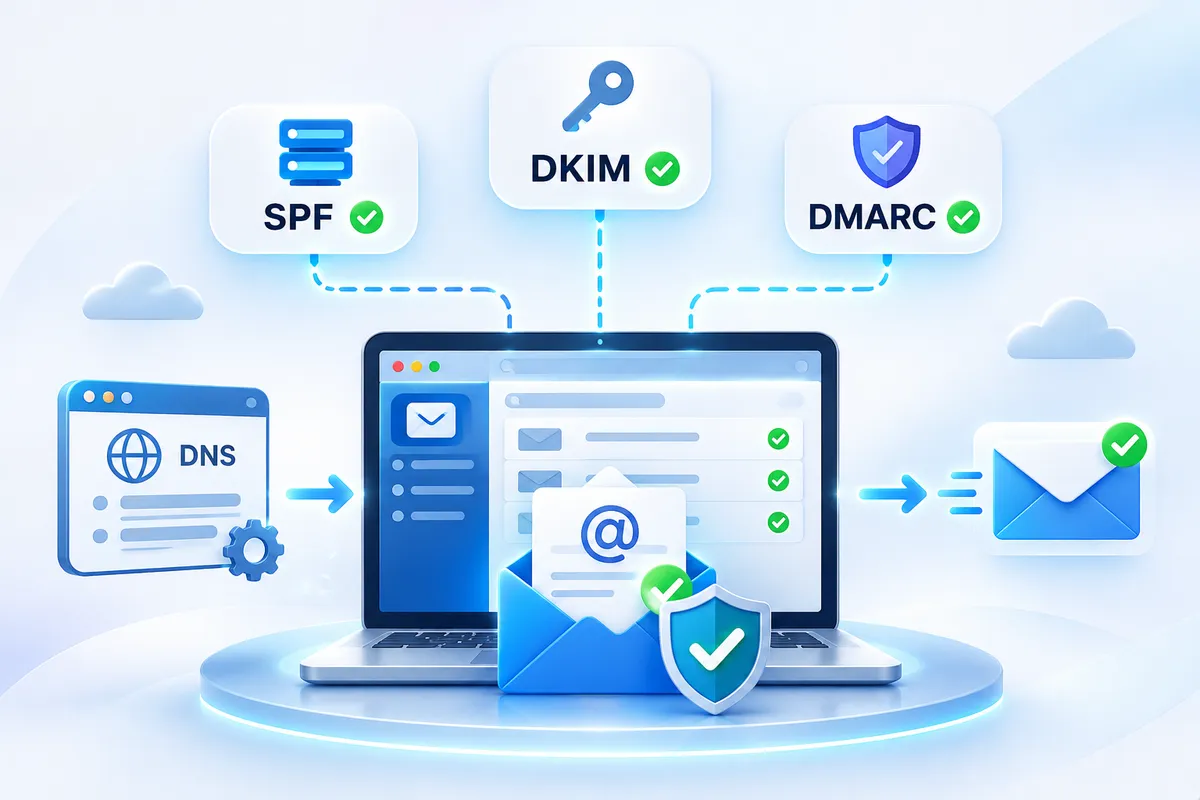
SPF, DKIM, and DMARC are email authentication standards that work together to help verify legitimate email traffic.
They each have a different job:
SPF identifies which servers are authorized to send email on behalf of a domain.
DKIM adds a cryptographic signature that allows receiving servers to verify the authenticity and integrity of a message.
DMARC builds on SPF and DKIM by checking authentication and domain alignment and telling receiving servers how to handle messages that fail the policy.
HighLevel's documentation describes DMARC as an authentication standard that combines SPF and DKIM while allowing domain owners to define a policy for unauthorized messages.
Think of the three as different layers of verification rather than three interchangeable DNS records.
Why Email Authentication Matters in GoHighLevel
When you send email through a marketing platform, recipients need a way to determine whether the platform is legitimately authorized to send messages using your domain.
This is particularly important when using a custom or dedicated sending domain.
HighLevel currently recommends configuring a dedicated email sending domain and provides DNS records that can include SPF, DKIM, DMARC, MX, and CNAME records depending on the configuration.
Authentication does not guarantee that every email will reach the inbox. Email deliverability also depends on factors such as sender reputation, message quality, engagement, sending behavior, and recipient-provider policies.
However, missing or incorrectly configured authentication can create avoidable delivery and compliance problems.
HighLevel specifically documents SPF, DKIM, and DMARC failures as potential reasons emails may be rejected by recipient servers.
How SPF Works
SPF stands for Sender Policy Framework.
SPF is published as a DNS record and identifies the servers that are authorized to send email for your domain.
For example, imagine your business owns:
example.com
You send marketing emails using an authorized email service. The receiving mail server can check your domain's SPF record to determine whether the sending infrastructure is authorized.
A simplified SPF record looks like:
v=spf1 ... ~all
The actual value required for your GoHighLevel configuration should come from the platform's current domain-authentication instructions rather than being copied from an unrelated example.
Why SPF Can Cause Problems
One common mistake is creating multiple SPF records for the same domain.
HighLevel's troubleshooting documentation specifically warns against multiple SPF records and notes that only one SPF record should exist for a domain.
Another issue is exceeding the DNS lookup limit associated with SPF. HighLevel identifies too many DNS lookups as a common SPF failure category.
Therefore, do not simply add another SPF record every time you connect a new email service.
If several legitimate services send email for your domain, your DNS configuration may need to be consolidated correctly.
How DKIM Works
DKIM stands for DomainKeys Identified Mail.
Instead of simply checking whether a server is authorized to send, DKIM adds a digital signature to outgoing messages.
The receiving server can use the public key published in your DNS records to verify the signature.
This helps demonstrate that the message was authorized by the sending domain and that the signed content has not been improperly modified in transit.
In GoHighLevel, the platform provides the DKIM information required for your sending-domain configuration. HighLevel's domain verification documentation explains that the system displays the required DNS records and provides values that can be copied into your DNS provider.
Why DKIM Is Important
A properly configured DKIM record gives receiving providers another authentication signal when evaluating your messages.
It is also particularly important because DMARC can rely on DKIM authentication and alignment.
For example, an email may technically have a valid DKIM signature but still encounter a DMARC issue if the authenticated DKIM domain does not align appropriately with the domain used in the From address.
That distinction is important when troubleshooting.
How DMARC Works
DMARC stands for Domain-based Message Authentication, Reporting and Conformance.
DMARC sits above SPF and DKIM.
It allows a domain owner to specify what receiving servers should do when messages fail DMARC authentication.
The three primary policy options are:
p=none: monitor authentication results without requesting enforcement.
p=quarantine: ask receiving providers to treat failing messages as suspicious, commonly directing them toward spam or junk handling.
p=reject: request that failing messages be rejected.
HighLevel's current DMARC documentation explains these three policy levels and recommends beginning with monitoring before moving toward stronger enforcement.
A basic DMARC record can look like:
v=DMARC1; p=none;
This is only an example. Your organization's final DMARC configuration should reflect all legitimate sending sources and your own authentication strategy.
SPF, DKIM, and DMARC Work Together
It is easiest to understand the relationship by looking at a simplified flow.
Step 1: SPF Authentication
The receiving server checks whether the sending infrastructure is authorized according to the domain's SPF record.
Step 2: DKIM Authentication
The receiving server checks the DKIM signature and verifies it against the public key published in DNS.
Step 3: DMARC Evaluation
DMARC evaluates whether SPF and/or DKIM authentication passes and whether the authenticated domain aligns with the domain in the From address.
That last part is important.
Authentication and alignment are not the same thing.
HighLevel explains that DMARC can fail even when SPF or DKIM technically passes if the authenticated domain does not align with the From domain.
What Is DMARC Alignment?
Alignment is one of the concepts that causes the most confusion.
Suppose your email displays:
From: [email protected]
The receiving server checks the authentication domains associated with SPF and DKIM.
DMARC then determines whether those authenticated domains appropriately align with example.com.
HighLevel documents two alignment modes:
Relaxed alignment (
r)Strict alignment (
s)
Relaxed alignment allows related subdomains under the same organizational domain, while strict alignment requires an exact domain match.
This is why simply seeing "SPF PASS" or "DKIM PASS" does not always mean your DMARC configuration is correct.
Setting Up Email Authentication in GoHighLevel
The exact interface can change, but the general process is straightforward.
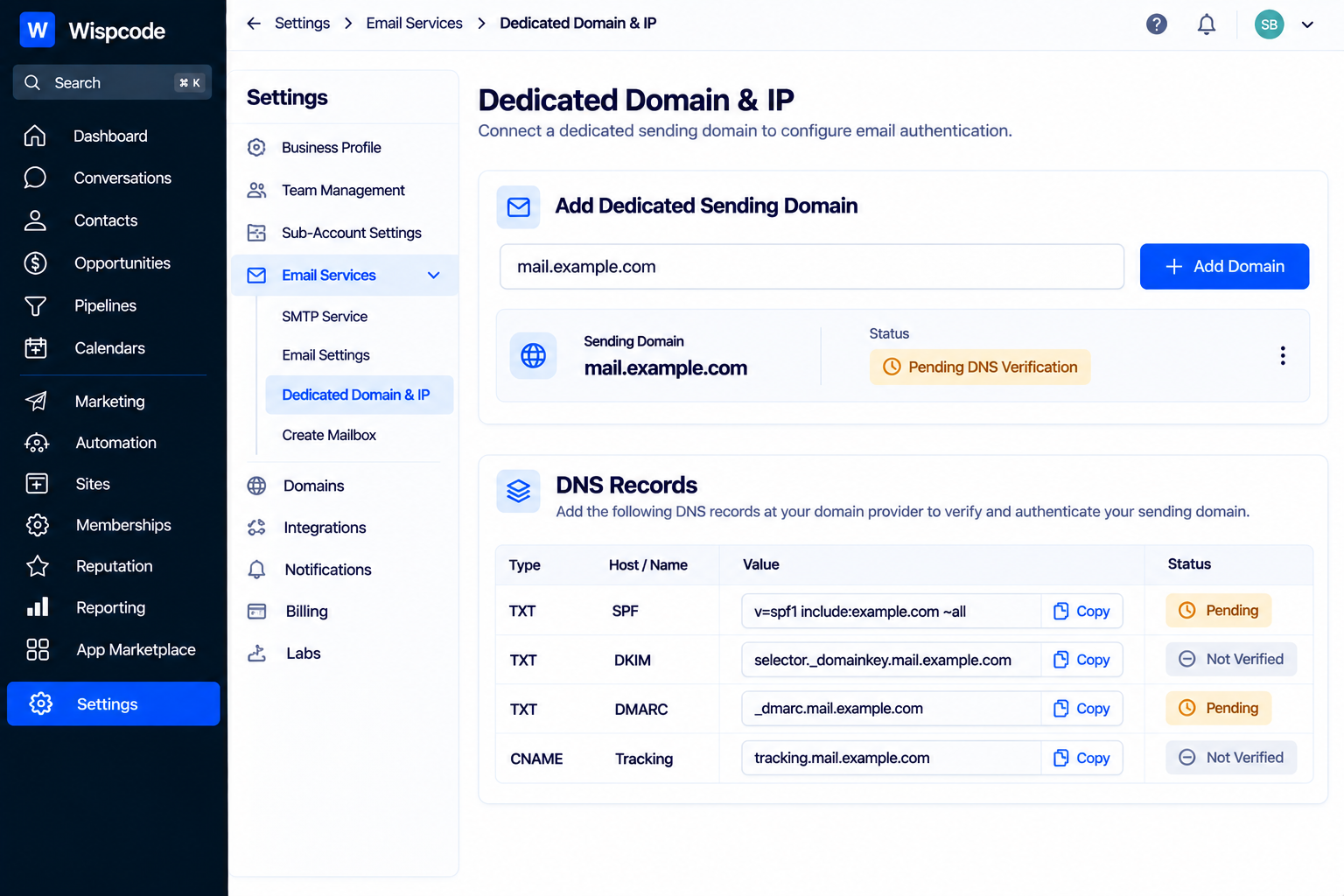
1. Add a Dedicated Sending Domain
HighLevel's current documentation directs users to the dedicated-domain area under:
Settings → Email Services → Dedicated Domain & IP
From there, you can add the domain or subdomain you want to use for email sending. HighLevel recommends using a subdomain for dedicated email sending in its current setup guide.
2. Review the DNS Records
After adding the domain, HighLevel provides the DNS records required for authentication.
Depending on your setup, these may include:
SPF
DKIM
DMARC
MX
CNAME
Do not guess the values.
Copy the records provided by HighLevel and add them to the DNS provider controlling your domain.
3. Add the Records to Your DNS Provider
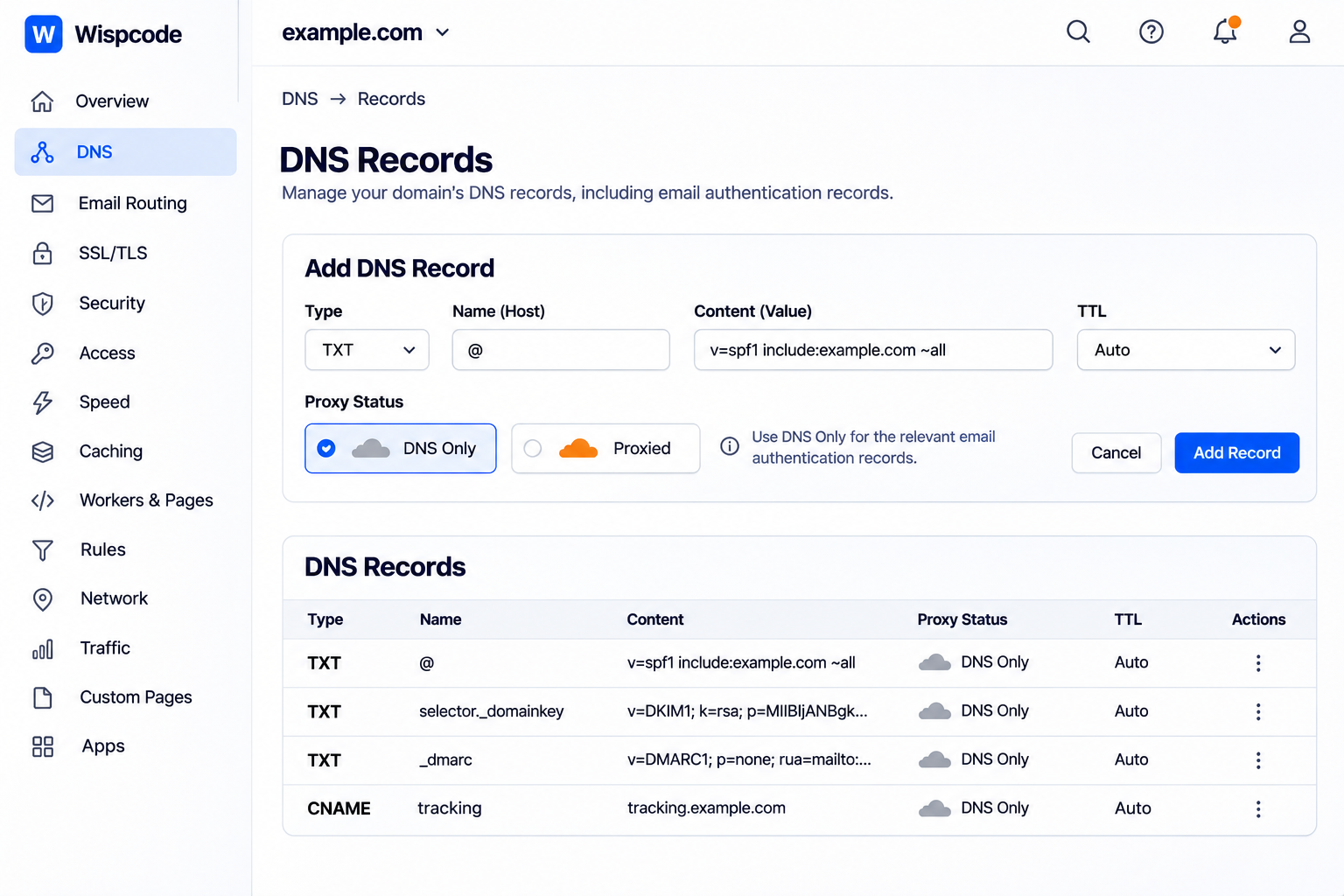
Your DNS provider could be Cloudflare, GoDaddy, Namecheap, or another service.
The interface will vary, but the basic process is to create the appropriate DNS records and enter the exact host/name and value provided by HighLevel.
If you are using Cloudflare, HighLevel's documentation specifically notes that relevant DNS records should use "DNS" only rather than being proxied.
4. Verify the Domain
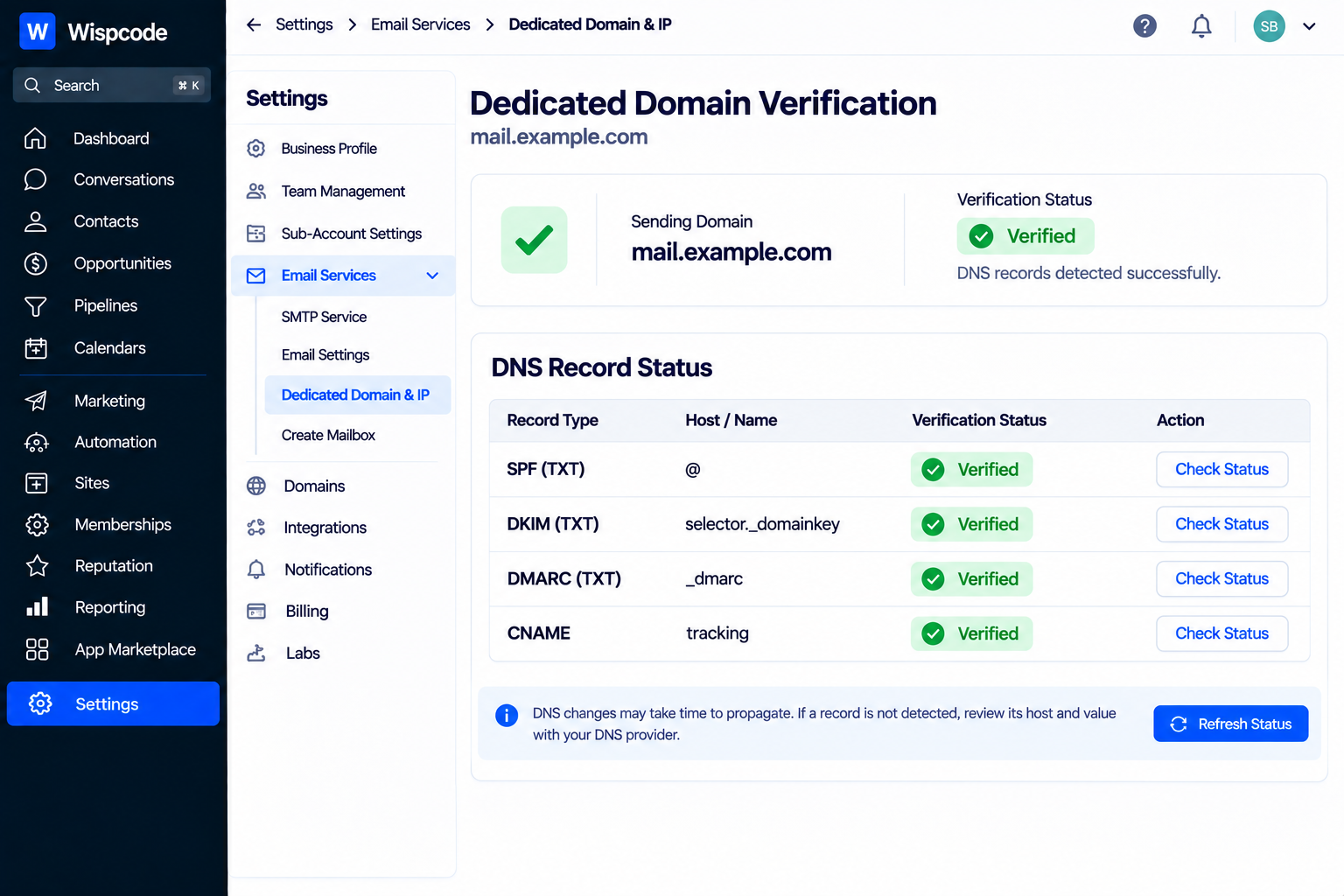
After saving the records, return to HighLevel and use the domain verification process.
HighLevel checks the DNS records and displays their verification status. DNS changes can take time to propagate, so an immediate failure does not necessarily mean the record is wrong.
How to Check Whether Your Authentication Is Working
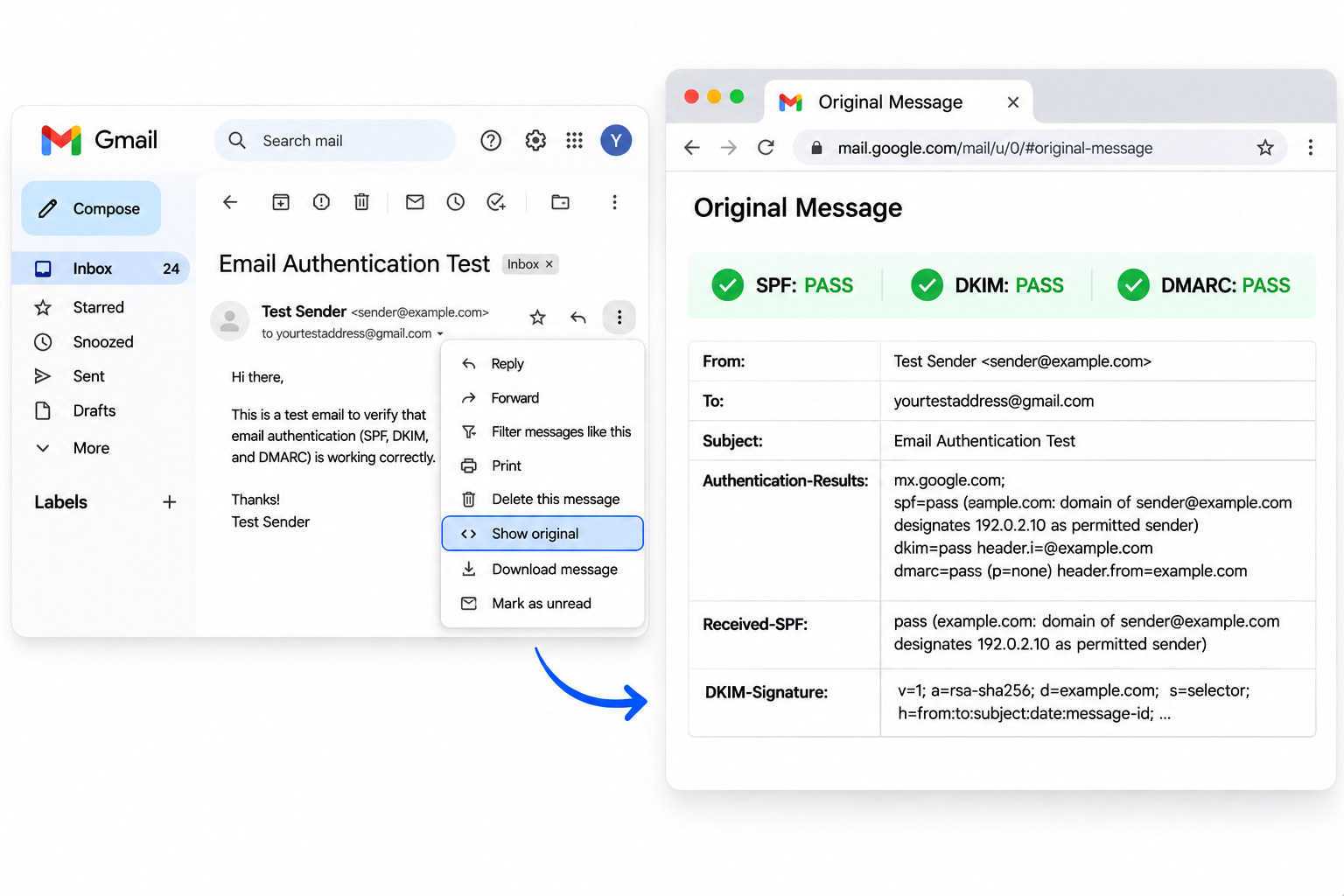
One of the easiest ways to test email authentication is to send a test email to a Gmail account and inspect the message headers.
HighLevel's troubleshooting documentation recommends opening the original message in Gmail and checking the authentication results for SPF, DKIM, and DMARC.
You are looking for results that indicate successful authentication.
If one of the checks fails, investigate that specific authentication mechanism instead of changing DNS records randomly.
For example:
SPF FAIL
Check your SPF record and confirm that the authorized sending infrastructure is included correctly.
DKIM FAIL
Check whether the required DKIM DNS record exists and whether its value matches what your sending platform provided.
DMARC FAIL
Check both authentication and alignment. A passing SPF or DKIM result alone does not guarantee DMARC will pass.
Common SPF, DKIM, and DMARC Mistakes
Creating Multiple SPF Records
Do not create separate SPF TXT records for different email platforms.
Review your existing SPF configuration and consolidate authorized sending sources appropriately.
Copying DNS Records From Another Account
Every domain has its own configuration.
Do not copy authentication records from another client's GoHighLevel account or another domain.
Use the values generated for the domain you are configuring.
Publishing an Aggressive DMARC Policy Too Early
Moving directly to p=reject without understanding your legitimate sending sources can cause legitimate messages to fail DMARC.
HighLevel recommends starting with monitoring and progressively moving toward stronger enforcement once legitimate traffic is understood.
Ignoring Domain Alignment
A message can pass an individual authentication check and still fail DMARC because the authenticated domain does not align with the From domain.
Always investigate alignment when troubleshooting DMARC.
Using Gmail or Yahoo Addresses as Your Marketing From Address
You should not use a personal @gmail.com or @yahoo.com address as the From identity for third-party platform sending.
HighLevel specifically explains that Gmail and Yahoo enforce strict authentication policies on their own domains and recommends using a domain you own and control instead.
SPF, DKIM, and DMARC Are Not the Whole Deliverability Strategy
Authentication is essential, but it is only one part of email deliverability.
Even with SPF, DKIM, and DMARC correctly configured, emails can still encounter spam-folder placement or other delivery issues.
HighLevel's email guidance also emphasizes sending practices, domain setup, warm-up, reputation, and engagement.
That means authentication should be treated as the foundation rather than the entire deliverability strategy.
A strong setup combines:
Proper domain authentication
Accurate DNS configuration
Consistent sending behavior
Appropriate sending volume
Healthy engagement
Clean contact lists
Relevant email content
Monitoring of authentication and reputation signals
A Practical Authentication Checklist for GoHighLevel Users
Before launching an important email campaign, review the following:
A dedicated sending domain or subdomain is configured.
SPF is correctly configured.
DKIM is correctly configured.
DMARC is published.
Your From address uses the authenticated domain.
There is no duplicate SPF record.
SPF does not exceed its DNS lookup limitations.
SPF/DKIM domains align appropriately with your From domain.
The domain shows as verified in HighLevel.
A test email has been checked for SPF, DKIM, and DMARC results.
Your sending practices are appropriate for your domain reputation.
Conclusion
SPF, DKIM, and DMARC may sound like highly technical DNS concepts, but GoHighLevel users do not need to understand every detail of email infrastructure to manage them effectively.
The important thing is to understand what each layer does.
"SPF tells receiving servers which sending sources are authorized. DKIM provides a cryptographic signature for your messages. DMARC brings authentication and alignment together and defines how authentication failures should be handled."
When these records are correctly configured on your sending domain, you give receiving providers stronger signals that your emails are legitimate.
Just remember that authentication is not a guarantee of inbox placement. It is one essential part of a broader deliverability strategy.
For GoHighLevel users, the safest approach is to configure the dedicated sending domain carefully, use the exact DNS values provided by HighLevel, verify the records, test actual messages, and monitor authentication results before scaling email activity.
Need Expert Help with GoHighLevel?
New to GoHighLevel and ready to get started? Buy your GoHighLevel account here and launch with confidence.
Already know what you need and want our team to handle everything, from complete setup and customization to funnels, workflows, automations, CRM, and pipelines? Click here.