

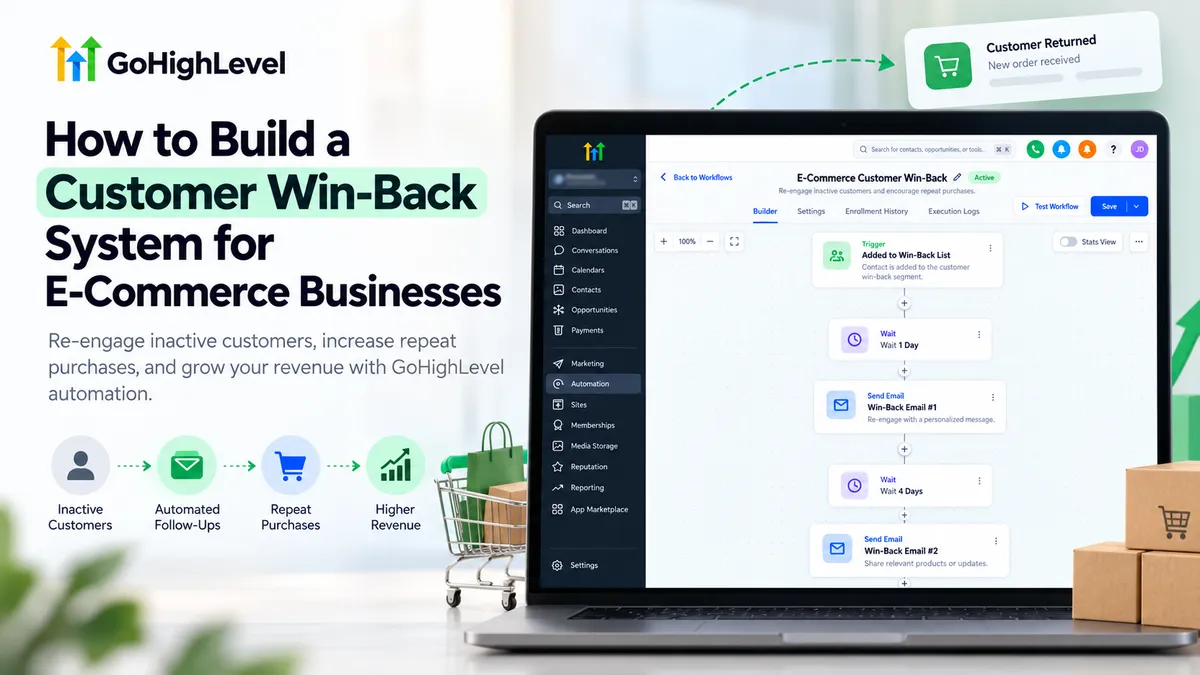
How to Build a Customer Win-Back System for E-Commerce
How to Build a Customer Win-Back System for E-Commerce Businesses
E-commerce businesses often spend considerable resources attracting new customers while overlooking people who have already purchased from them. Some customers stop ordering because their needs change, competitors offer better options, or the brand simply slips from their attention.
A customer win-back system for e-commerce helps businesses reconnect with these previous buyers through timely, relevant communication. Instead of manually following up with every inactive customer, businesses can use GoHighLevel to organize purchase information, identify customers who have stopped buying, and create automated campaigns that encourage repeat purchases.
What Is a Customer Win-Back System?
A customer win-back system is a structured process for re-engaging previous customers who have not purchased within an expected timeframe.
Unlike abandoned checkout recovery, which targets shoppers who leave without completing an order, win-back campaigns focus on customers with an established purchase history.
For example, a skincare store might identify customers who previously reordered moisturizer every six weeks but have not purchased for three months. A personalized reminder or relevant product recommendation could encourage them to return.
The objective is to restore customer relationships rather than continuously offer discounts.
How to Build a Customer Win-Back System in GoHighLevel
Building an effective GoHighLevel customer win-back automation requires reliable purchase data, meaningful customer segmentation, and carefully configured follow-up workflows.
Step 1: Connect Your E-Commerce Store and Prepare Customer Data
Start by connecting your e-commerce store to GoHighLevel.
For Shopify, use the supported integration available through your HighLevel sub-account's integration settings. Complete the connection process and enable the appropriate customer and order synchronization options.
Once connected, verify that customer records contain accurate purchasing information.
Relevant Shopify fields include:
Shopify Last Order Date: Identifies the customer's most recent completed purchase.
Shopify Order Count: Shows the number of completed orders.
Shopify Lifetime Value: Records the customer's total purchasing value within the connected Shopify store.
These fields help distinguish inactive customers from active buyers.
Review several customer records before proceeding. Missing purchase dates, outdated information, or duplicate contacts can compromise campaign targeting.
Other e-commerce platforms may require different integrations or additional data synchronization.
Step 2: Identify and Segment Inactive Customers
Not every customer becomes inactive after the same period.
A business selling consumable products might consider 30 days without purchasing significant, while a furniture retailer may have much longer purchasing intervals.
Consider these example thresholds:
30 days: Frequently replenished products.
60 days: Products purchased periodically.
90+ days: Products with longer purchasing cycles.
Adjust these periods according to actual customer behavior.
In GoHighLevel, navigate to Contacts → Smart Lists and open Advanced Filters.
For synchronized Shopify customers, combine conditions such as Shopify Order Count greater than zero and Shopify Last Order Date older than your chosen threshold.
Save the filtered segment as a Smart List.
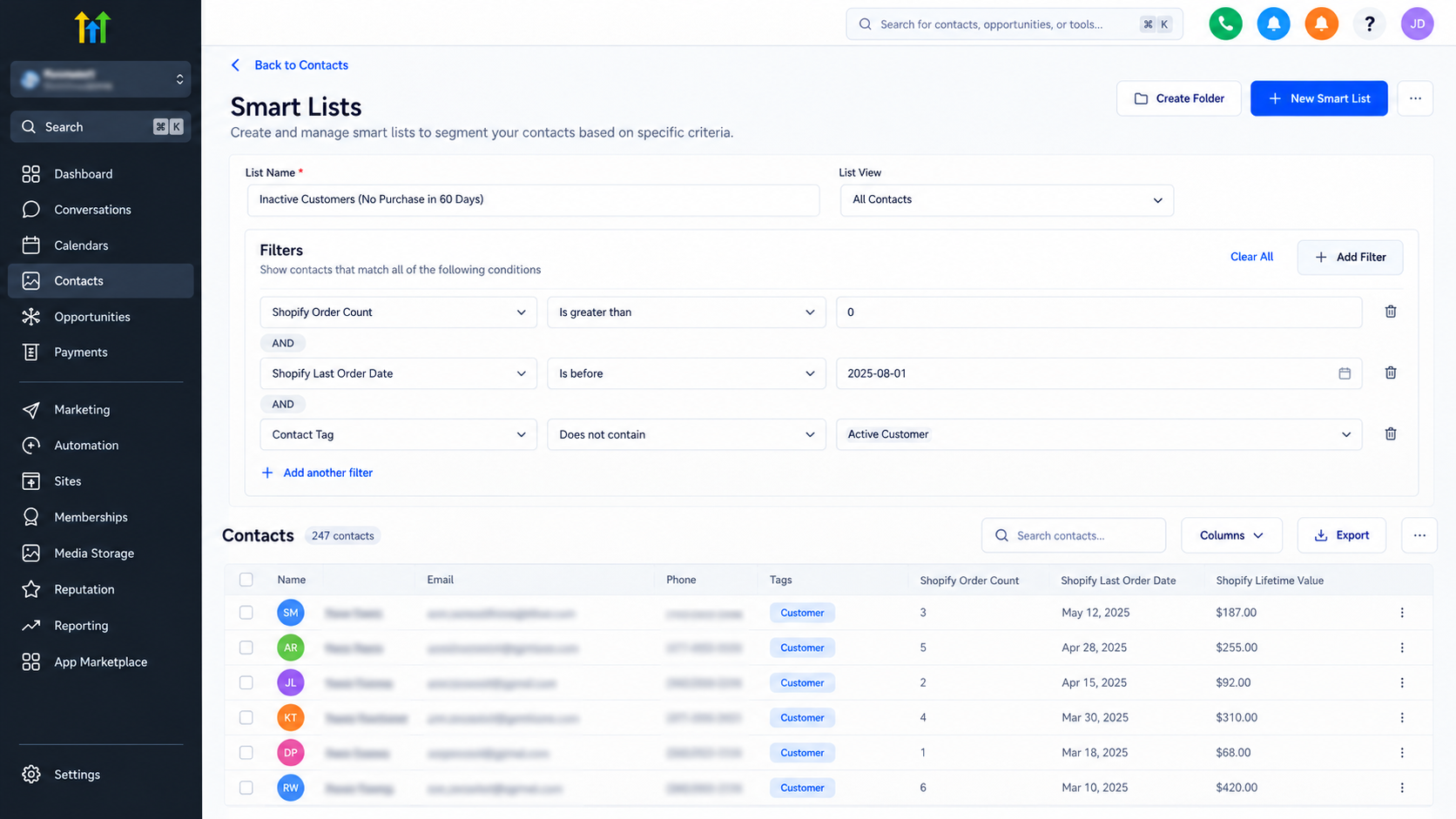
This helps exclude people who have never purchased and keeps your win-back targeting focused on genuine previous customers.
Step 3: Create a Customer Win-Back Workflow
Navigate to Automation → Workflows in GoHighLevel and create a workflow from scratch.
Name it something recognizable, such as E-Commerce Customer Win-Back.
For an initial campaign, you can enroll customers directly from your inactive-customer Smart List.
After publishing the workflow, select qualified contacts and use the Trigger Automation bulk action to add them to the workflow.
For continuously operating campaigns, configure a suitable enrollment mechanism based on available purchase data and supported automation triggers.
A basic customer reactivation workflow can contain:
An initial Send Email action.
A Wait action to control follow-up timing.
An If/Else condition to check relevant customer information.
Additional messages for customers who remain eligible.
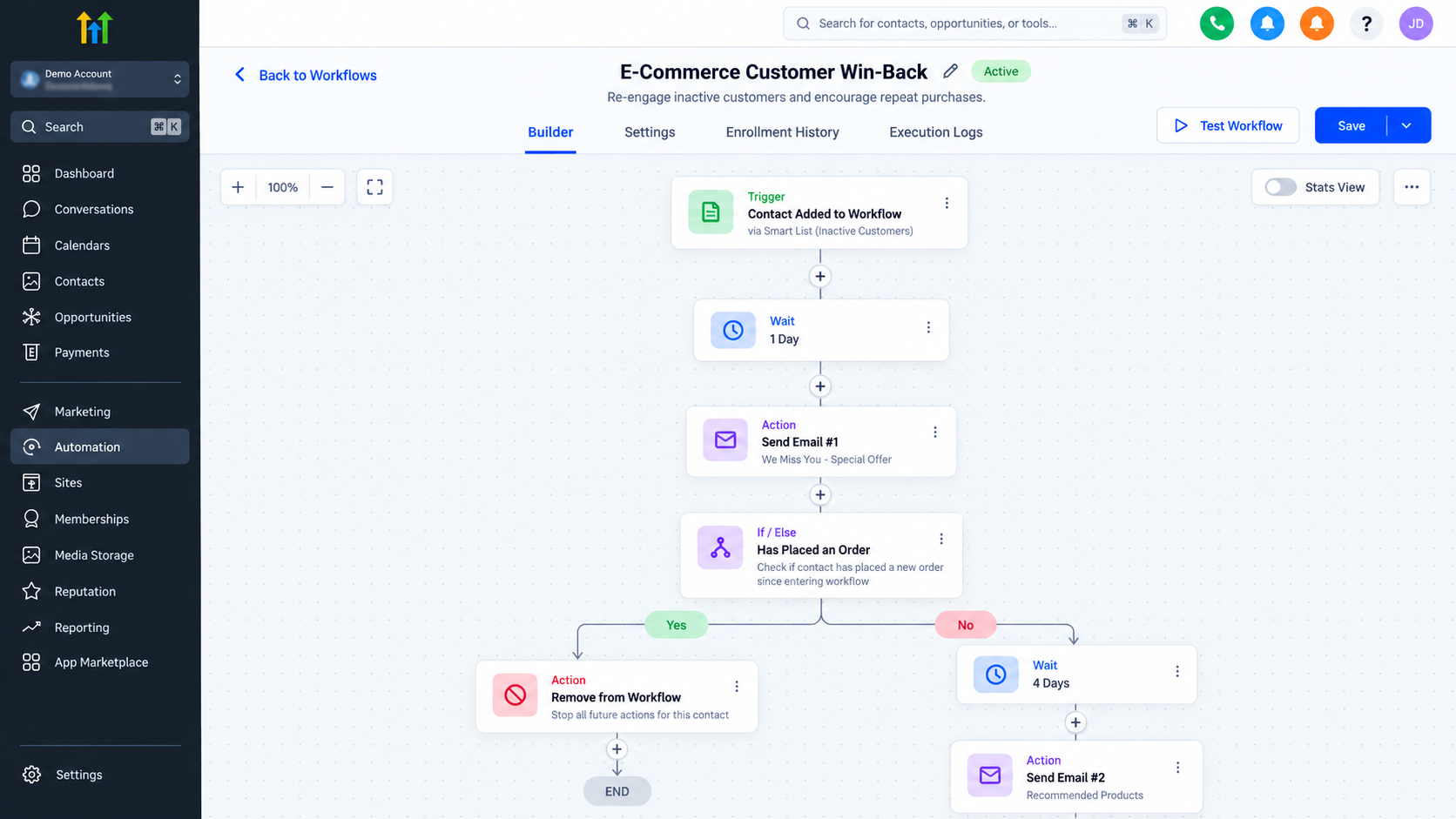
A customer win-back workflow in GoHighLevel illustrating automated re-engagement emails, timed delays, and conditional follow-ups.
Apply contact tags where useful for organizing campaign participation.
Remember that a saved Smart List does not, by itself, establish a complete inactivity-triggered automation. Enrollment and eligibility checks must be configured appropriately.
Step 4: Design a Personalized Win-Back Message Sequence
An effective win-back email sequence should give customers a meaningful reason to reconnect.
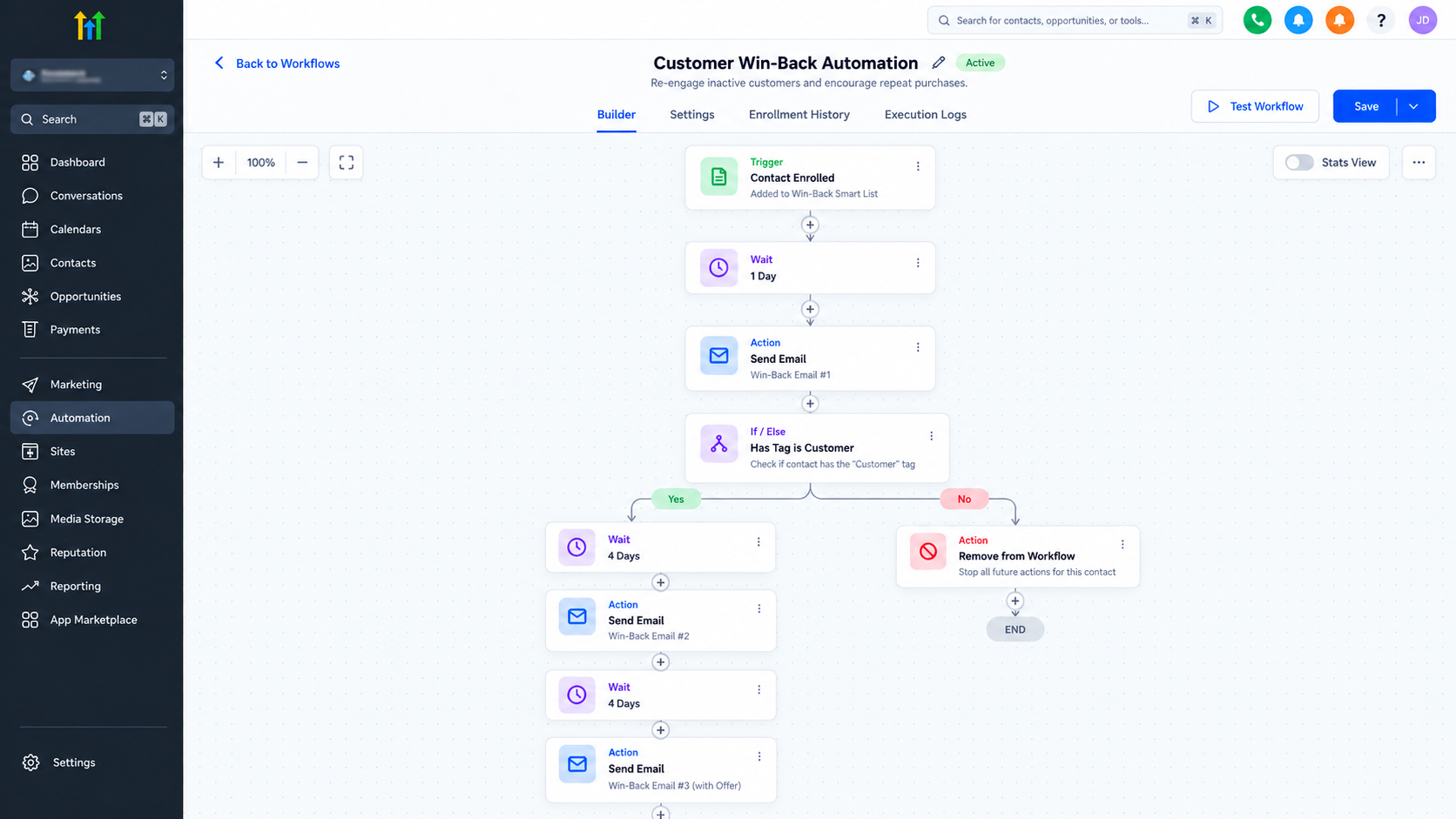
Consider this three-message example:
Day 1 → Friendly Reconnection
Remind customers about your brand and acknowledge their previous interest without pressuring them to buy.
Day 4 → Relevant Recommendation
Suggest a useful product, replenishment opportunity, or new arrival based on available customer information.
Day 8 → Return Incentive
Offer a suitable incentive, such as a limited discount or free shipping, when commercially appropriate.
A simple message might read:
"It's been a while since your last order. We've added a few products you might enjoy. Take a look whenever you're ready."
Personalization should reflect verified purchase history rather than assumptions about customer preferences.
SMS can supplement email when customers have provided the necessary consent. Respect unsubscribe requests, contact preferences, and applicable marketing rules.
These message intervals are illustrative recommendations, not GoHighLevel defaults.
Step 5: Stop Follow-Ups When Customers Purchase Again
A win-back campaign should stop targeting customers once they purchase again.
Otherwise, someone who has just placed an order might receive an irrelevant message encouraging them to return.
Configure a separate purchase-based workflow using an order event supported by your connected store.
Add the Remove from Workflow action and select your customer win-back workflow as the destination for removal.
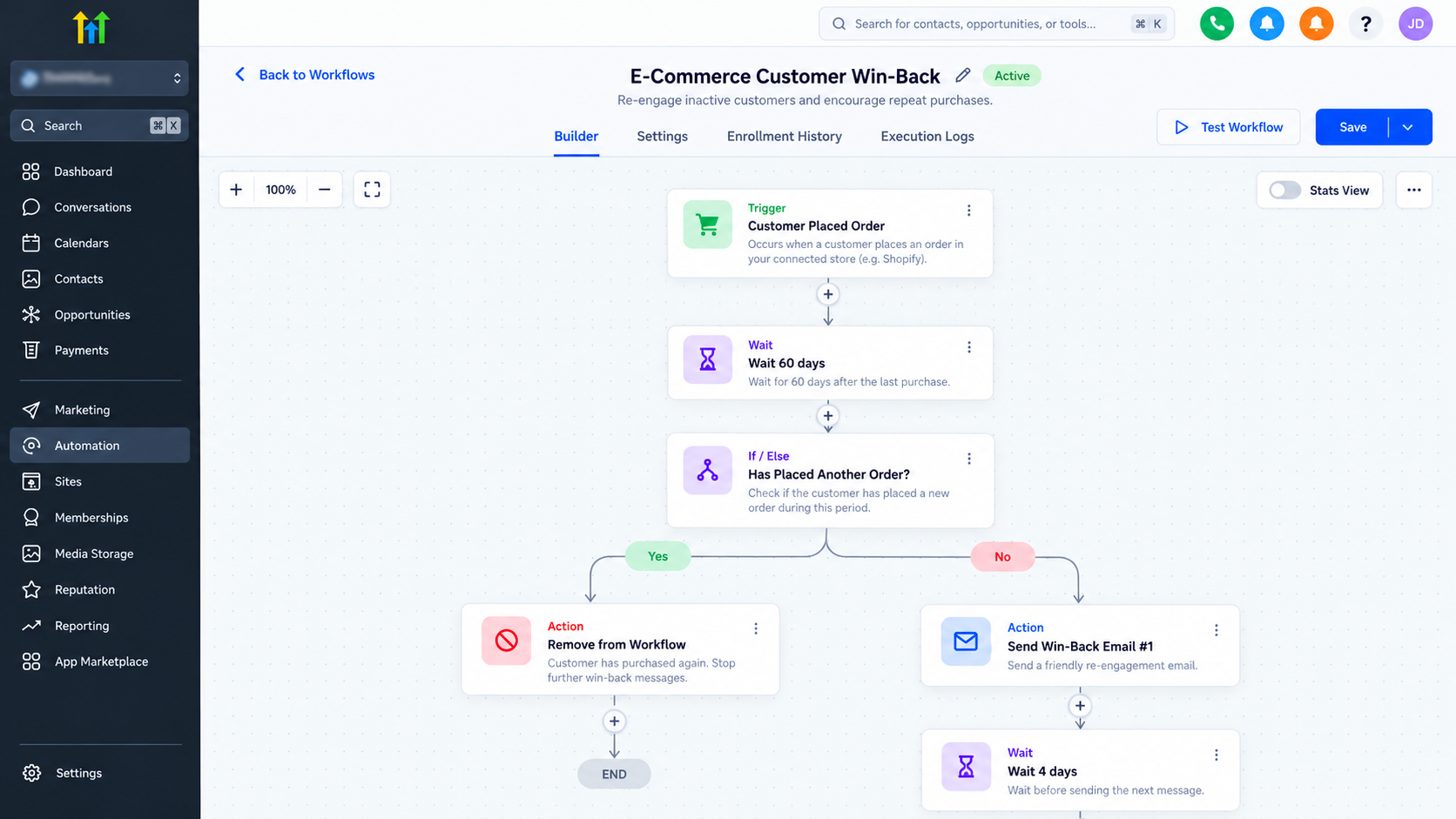
You can also use If/Else conditions to check updated purchase information before subsequent messages.
Test this process using a sample customer: enroll the contact, simulate a supported purchase event, and verify that the remaining win-back messages are cancelled.
How to Measure and Improve Your Win-Back Campaign
A campaign's success should be measured by purchasing behavior, not simply email opens.
Track reactivated customers, repeat purchase rates, win-back conversions, returning-customer revenue, and unsubscribes.
Calculate win-back conversion rate by dividing reactivated purchasing customers by the number of eligible customers contacted, then multiplying by 100.
Compare GoHighLevel campaign activity with actual store orders to evaluate results accurately.
Review which customer segments, message timings, and offers produce meaningful responses. Use those findings to refine future campaigns.
Final Thoughts
Winning back previous customers requires more than sending occasional promotional emails.
With reliable customer data, thoughtful segmentation, and properly configured GoHighLevel workflows, e-commerce businesses can build a repeatable customer reactivation process.
The strongest approach is to reconnect when communication is relevant, recognize when customers return, and continuously improve the experience based on actual purchasing behavior.
Frequently Asked Questions (FAQs)
1. What is a customer win-back system in e-commerce?
A customer win-back system is a structured strategy designed to re-engage previous customers who have stopped making purchases. It uses customer purchase history, segmentation, and automated follow-up messages to encourage repeat purchases and improve long-term customer retention.
2. Can GoHighLevel automate customer win-back campaigns?
Yes. GoHighLevel allows businesses to create automated customer reactivation workflows using email, SMS, Wait actions, and conditional logic. When connected to a supported e-commerce platform, businesses can use available purchase data to identify inactive customers and coordinate personalized follow-ups.
3. How long should an e-commerce business wait before sending a win-back email?
The ideal timing depends on the product and customers' typical purchasing behavior. Businesses selling frequently replenished products might begin after 30 days of inactivity, while other retailers may wait 60–90 days or longer. Analyzing historical purchase intervals helps determine the most appropriate timing.
4. How can I stop GoHighLevel win-back messages when a customer purchases again?
You can configure a purchase-based workflow using supported order events from your connected store. The workflow can remove returning customers from the active win-back sequence. Conditional checks can also help prevent unnecessary follow-ups, provided the purchase data updates correctly.
5. How do I measure the success of a customer win-back campaign?
Measure campaign performance by tracking reactivated customers, repeat purchases, win-back conversion rates, and revenue from returning buyers. Email engagement and unsubscribe rates provide additional insights. Comparing GoHighLevel campaign activity with actual e-commerce order data helps evaluate results and improve future campaigns.
Need Expert Help with GoHighLevel?
New to GoHighLevel and ready to get started? Buy your GoHighLevel account here and launch with confidence.
Already know what you need and want our team to handle everything, from complete setup and customization to funnels, workflows, automations, CRM, and pipelines? Click here.



