

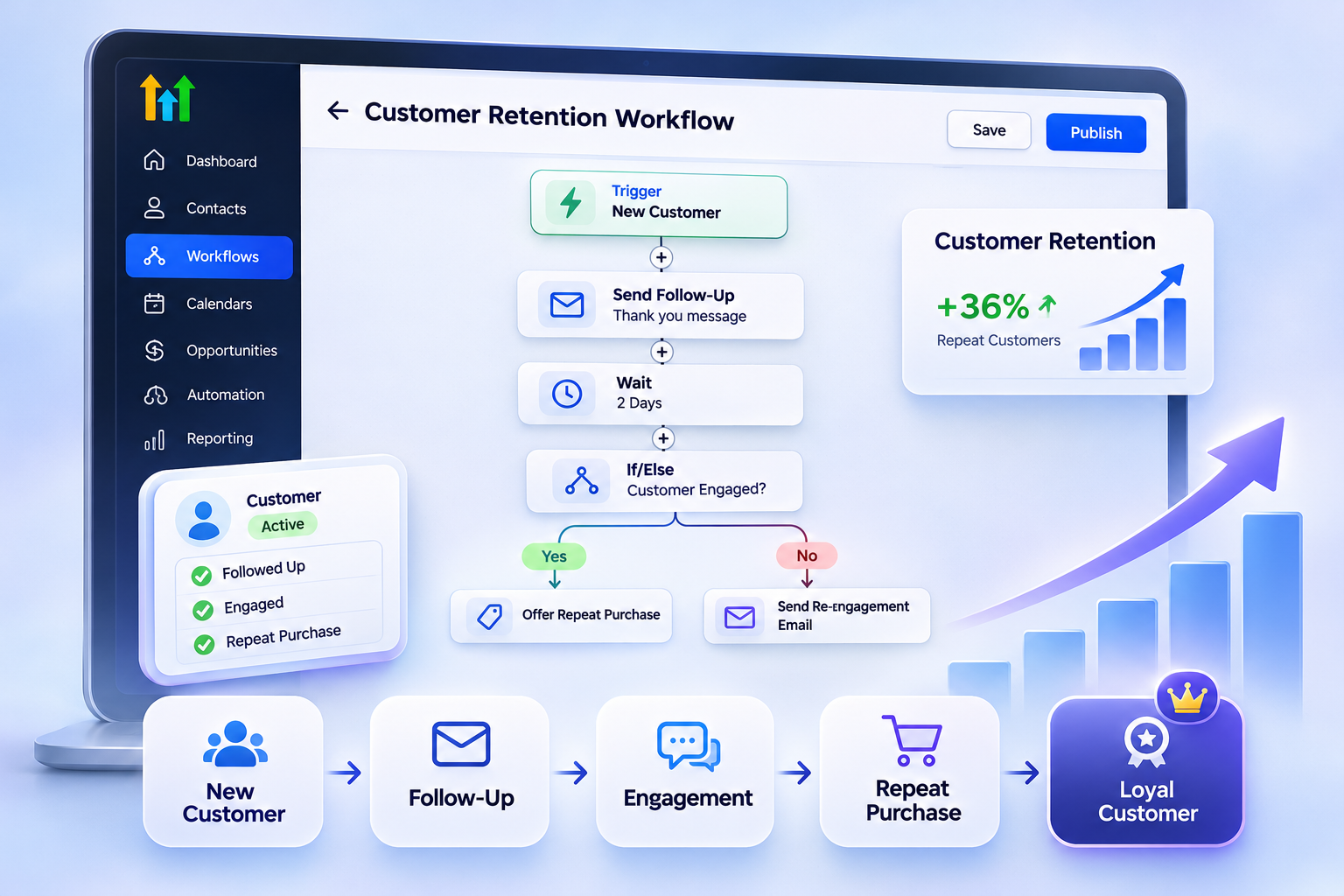
How to Build a Customer Retention Workflow in GoHighLevel
How to Build a Customer Retention Workflow in GoHighLevel
Introduction
Getting a customer is only the beginning of the relationship. The real challenge is keeping that customer engaged, satisfied, and connected to your business long after the first purchase or appointment.
A well-designed customer retention workflow in GoHighLevel can help businesses stay in touch with customers automatically, recognize important milestones, follow up after appointments or purchases, and identify opportunities to re-engage customers who become inactive.
The goal is not to send customers endless automated messages. Instead, the goal is to create timely communication based on what customers actually do.
GoHighLevel's Workflows provide triggers, actions, waits, conditions, and branching logic that can be combined to build these customer journeys. For example, workflows can respond to appointment status changes, customer replies, opportunity changes, tags, and other events.
What Is a Customer Retention Workflow?
A customer retention workflow is an automated process designed to maintain communication with existing customers after they have already taken an important action, such as making a purchase, completing an appointment, or becoming a customer.
Instead of relying entirely on manual follow-up, the workflow can respond to specific events and continue the customer journey automatically.
A basic retention workflow might look like this:
Customer becomes a customer → Wait → Send follow-up → Wait → Check customer status → Send relevant communication → Continue or stop
The exact structure depends on the business.
For a service business, the workflow might begin after a completed appointment. For another business, it might begin when an opportunity is marked as won.
The important principle is that the automation should be connected to a meaningful customer event rather than simply sending messages on an arbitrary schedule.
Why Customer Retention Automation Matters
Customer retention depends heavily on consistent communication.
A customer may have a positive experience but still forget about a business if there is no meaningful follow-up afterward. At the same time, excessive or irrelevant communication can have the opposite effect.
Automation helps create consistency while allowing businesses to define when communication should happen.
For example, a business could:
Follow up after a completed appointment
Check in with customers after a period of inactivity
Send educational or helpful information
Request customers to schedule their next service
Follow up after a cancellation
Route customer replies to the appropriate team
Stop automated communication when a customer takes the desired action
The objective is not automation for its own sake. It is "timely communication based on customer behavior."
Step 1: Define Your Retention Goal
Before opening the Workflow Builder, decide what you actually want the workflow to accomplish.
A retention workflow can have very different objectives depending on the business.
For example:
Service businesses:
Encourage customers to schedule their next appointment.Professional services:
Maintain communication after a completed engagement and identify future needs.Agencies:
Keep clients engaged with ongoing updates, check-ins, or service-related communication.Appointment-based businesses:
Follow up after completed appointments and encourage the next appropriate booking.
Start with one clear objective.
For example:
“When an existing customer completes an appointment, follow up later and encourage them to schedule their next service when appropriate.”
This is much easier to build and measure than a workflow that tries to handle every possible customer interaction.
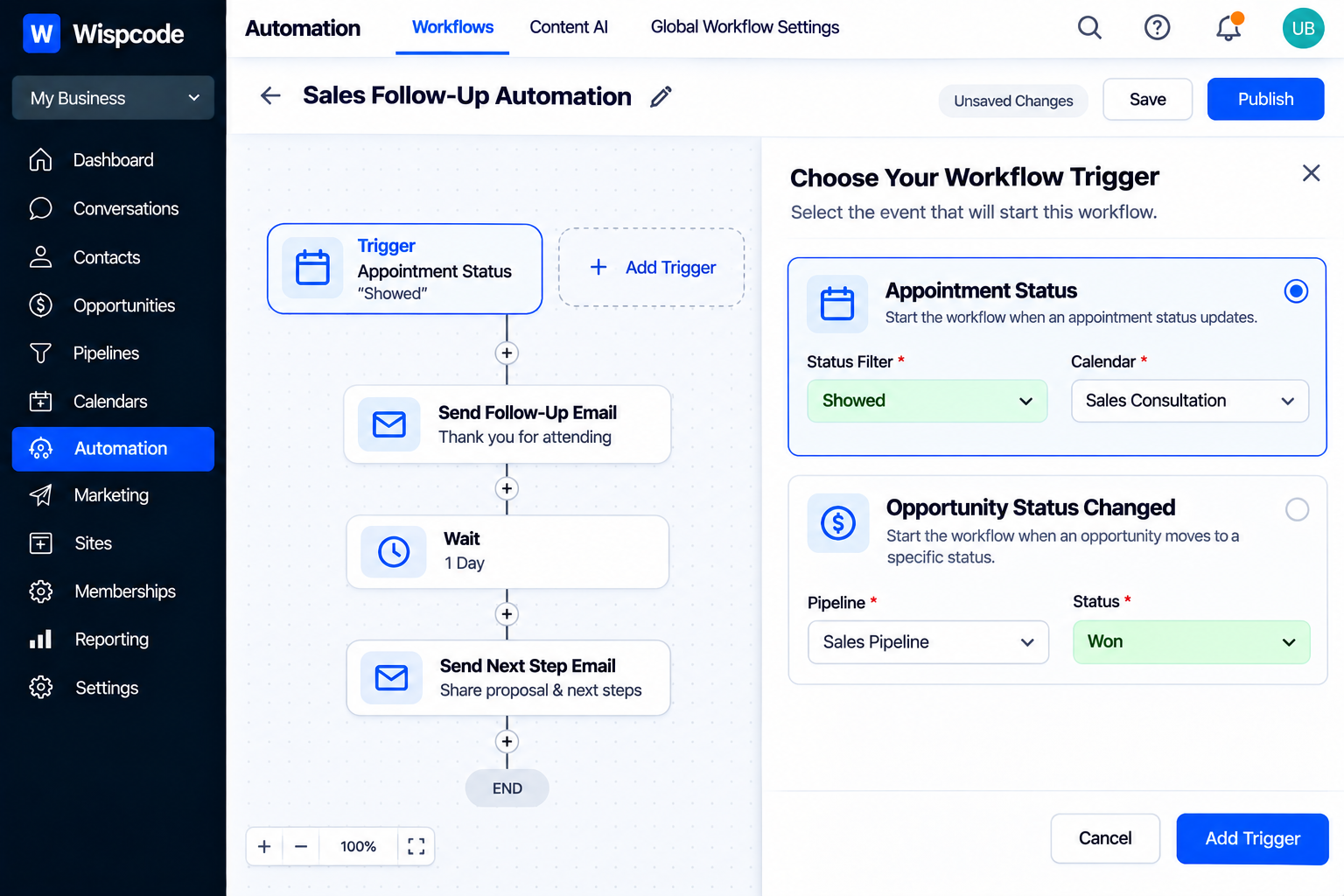
Step 2: Choose the Right Workflow Trigger
The trigger determines when the customer enters the workflow.
GoHighLevel provides multiple workflow triggers, so choose one that directly represents the event you want to use as the starting point.
For appointment-based retention, "Appointment Status" can be particularly useful. HighLevel's Appointment Status trigger can respond to statuses such as New, Confirmed, Cancelled, Showed, No-show, and Invalid.
For example, if the goal is to follow up with customers after they actually attended an appointment, you can build the workflow around the appropriate appointment status rather than triggering it when the appointment is merely booked.
Another option is an opportunity-based trigger. HighLevel's "Opportunity Status Changed" trigger can respond when an opportunity changes status, such as moving from Open to Won or Lost.
The best trigger is the one that most accurately represents the customer event you care about.
Step 3: Add an Appropriate Wait
Retention communication does not always need to happen immediately.
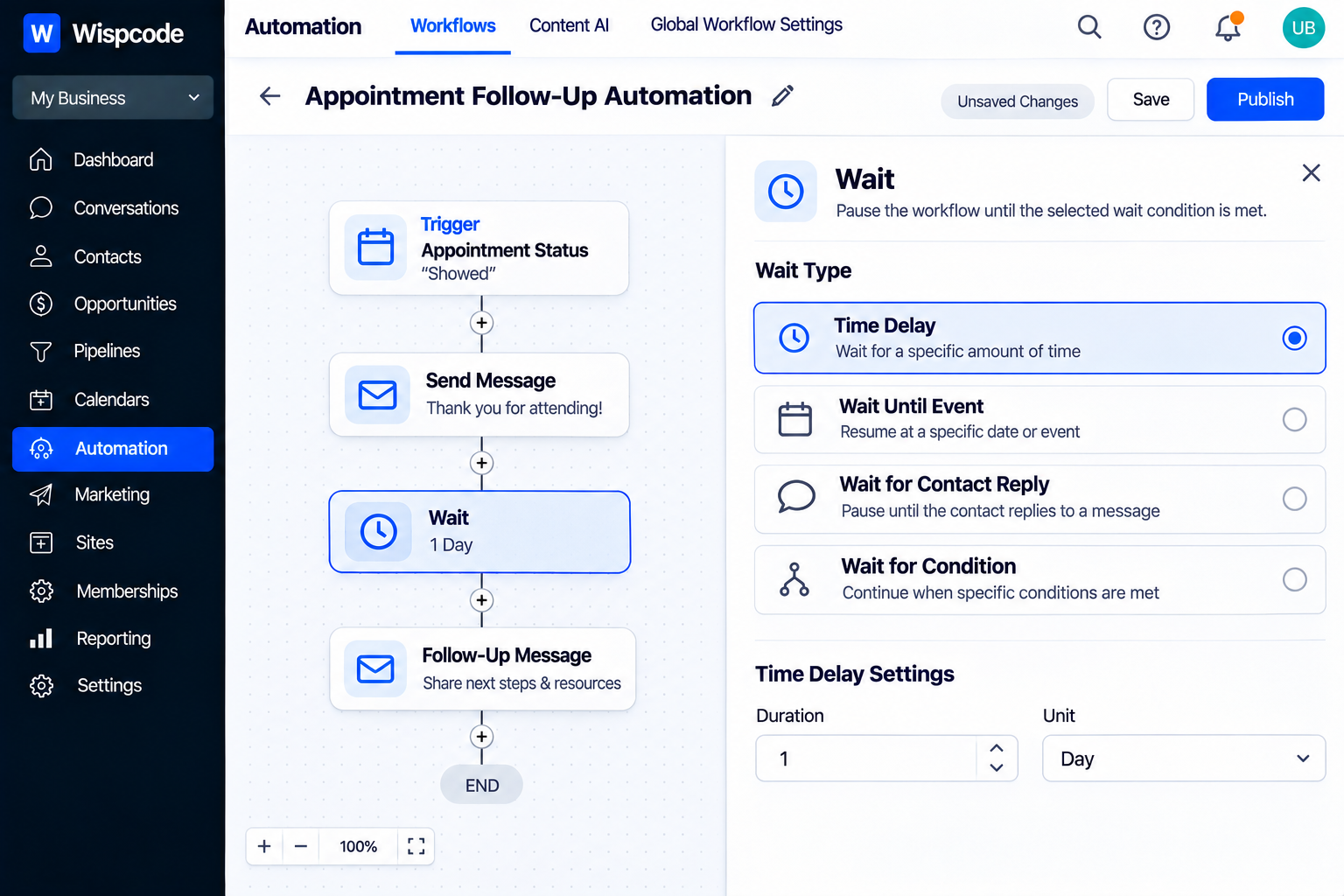
GoHighLevel's "Wait" action allows a workflow to pause before continuing. The current Wait action supports fixed time periods as well as conditions involving dates, appointments, replies, actions, and custom conditions.
For example:
Appointment Showed → Wait → Follow-up message
The length of the wait should depend on the customer journey.
A follow-up immediately after an appointment may make sense for one business, while another may need several days before asking the customer about their next service.
Avoid choosing delays simply because they are easy to configure. Ask what timing makes sense from the customer's perspective.
Step 4: Send Useful Follow-Up Communication
After the wait, add the communication that supports your retention goal.
Depending on the workflow and communication strategy, this could include an email or SMS message.
The message should provide a reason for contacting the customer.
For example, instead of repeatedly saying:
“We haven't heard from you.”
The message could provide useful information, a relevant reminder, or a clear next step.
A retention workflow should feel like a continuation of the customer relationship—not an automated sales blast.
Keep messages:
Relevant
Concise
Timely
Easy to understand
Connected to the customer's previous interaction
Step 5: Add Conditions With If/Else
A strong retention workflow should not treat every customer identically.
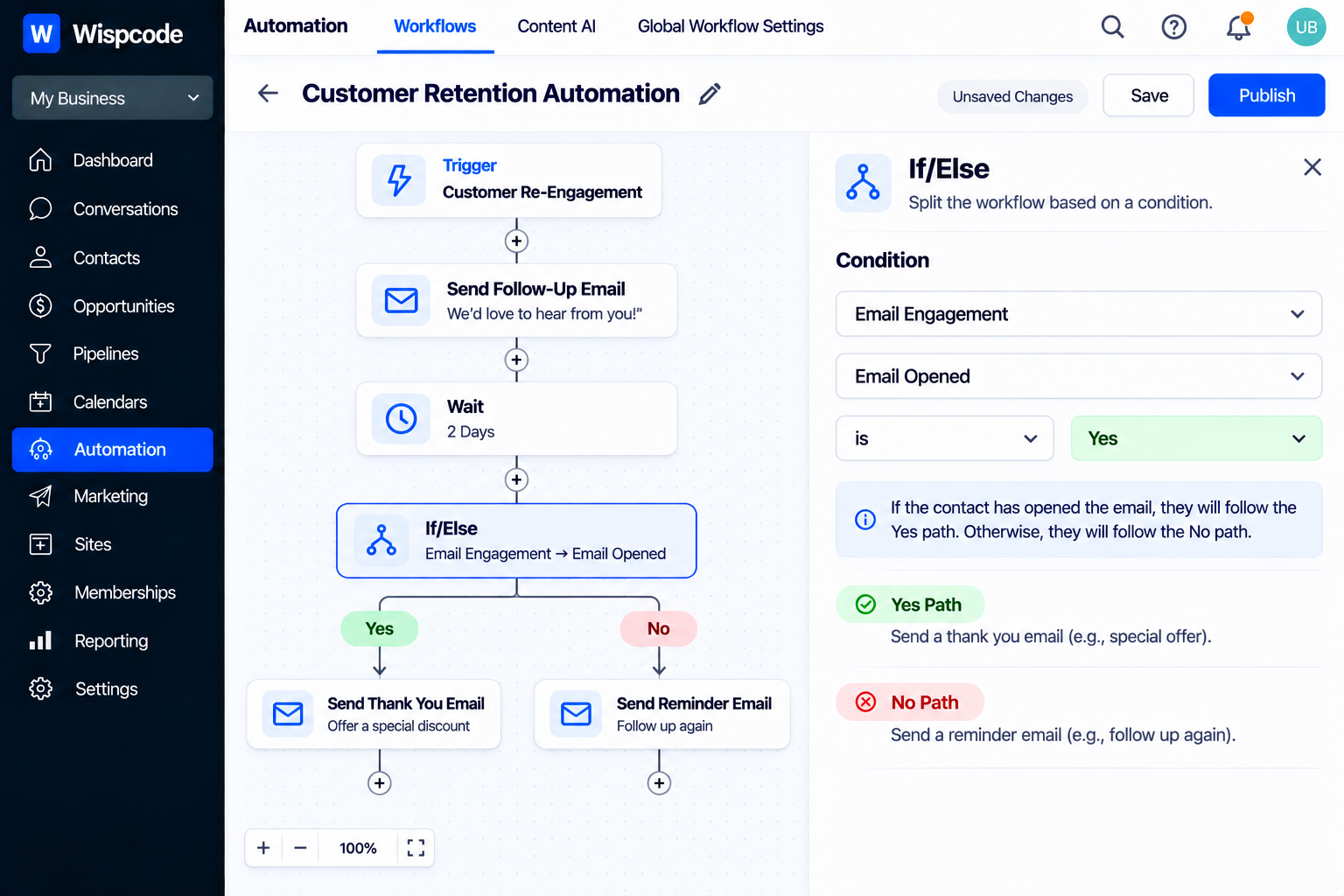
GoHighLevel's "If/Else" action allows workflows to evaluate conditions and send contacts down different branches. Conditions can be combined using AND/OR logic.
For example:
Customer follow-up → Wait → If/Else
Yes: Customer has taken the desired action → stop or continue with a different journey.
No: Customer has not taken the action → send another appropriate follow-up.
This prevents the workflow from continuing to send the same messages after the customer has already responded or completed the desired action.
The more important principle is to make your workflow behavior-aware.
Step 6: Stop or Change the Journey When Customers Respond
Customer replies are important signals.
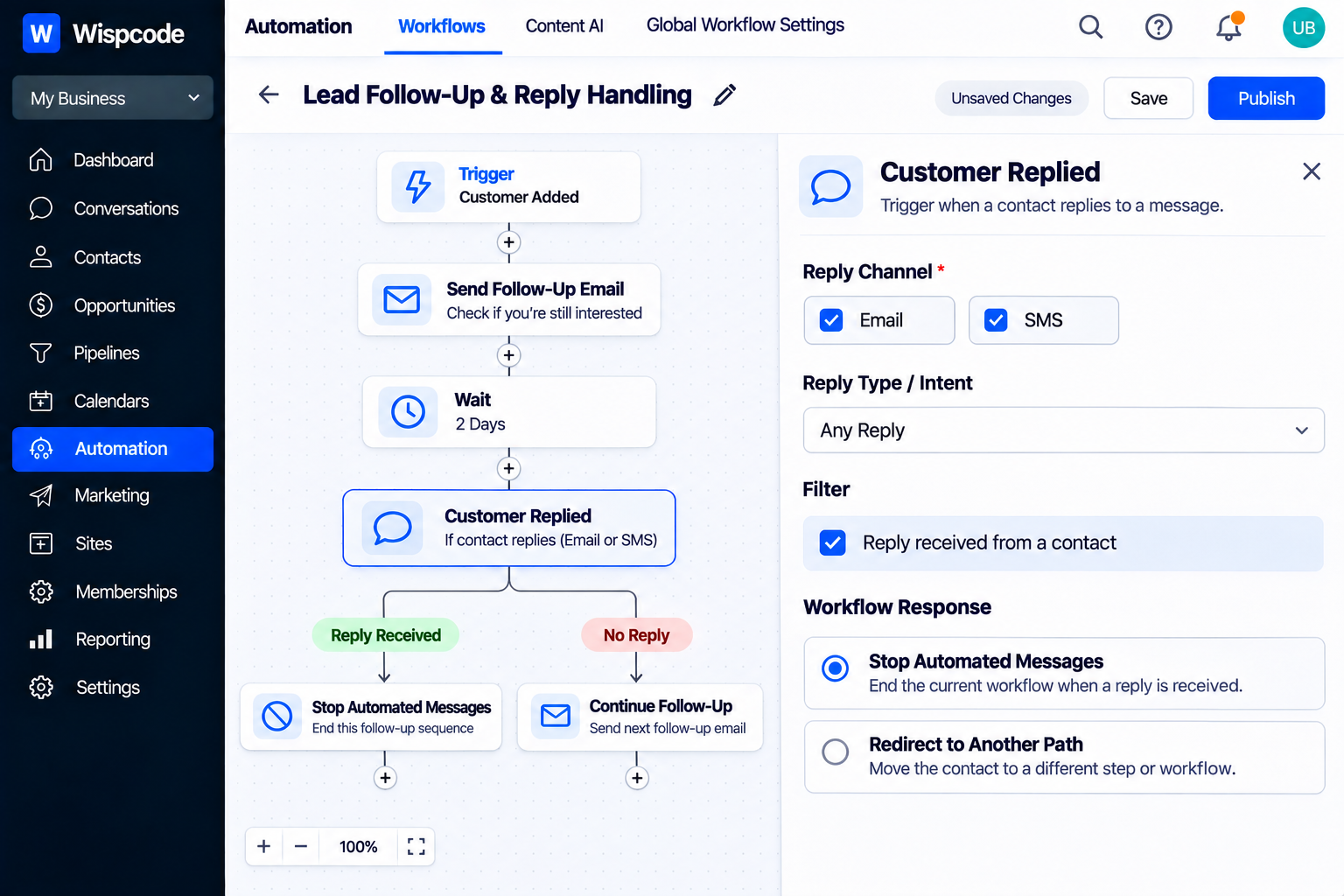
GoHighLevel's "Customer Replied" trigger can respond when a contact replies and can be filtered by options such as reply channel, phrases, tags, intent type, and whether the contact replied to a specific workflow.
This can be useful when a customer responds to a retention message.
For example:
Retention message → Customer replies → Route to appropriate follow-up
You can also use the Wait action to wait for a customer reply before continuing. HighLevel supports waiting for a contact to reply on selected channels, with optional timeouts.
This helps prevent a workflow from behaving as if the customer never responded.
Step 7: Handle Appointments as Part of Retention
For businesses that depend on appointments, scheduling behavior can be an important part of retention.
HighLevel's Appointment Status trigger can respond to appointment changes, including cancellations and no-shows.
This makes it possible to create different experiences.
For example:
Customer books appointment → Appointment occurs → Showed → Retention follow-up
Another path could be:
Appointment cancelled → Cancellation follow-up → Encourage rescheduling
Or:
No-show → No-show follow-up → Offer next appropriate step
Each path should have its own purpose rather than forcing every appointment outcome into the same retention sequence.
Step 8: Use Tags or CRM Data Carefully
Tags and contact information can help organize customer journeys.
For example, you might use a tag to identify a customer segment or use contact information to determine which branch of a workflow should apply.
However, avoid creating unnecessary tags for every small event.
Before adding a tag, ask:
“Will this information actually help another workflow, filter, or process?”
If the answer is no, the tag may add unnecessary complexity.
Your CRM should become easier to understand as the automation grows, not harder.
Step 9: Build a Re-Engagement Path
Not every customer will respond to the first follow-up.
A retention workflow can include a separate path for customers who remain inactive.
For example:
Customer event → Wait → Follow-up → Wait → Check condition
If the customer has responded or completed the desired action, continue appropriately.
If not, the workflow can send another relevant communication or route the customer into a different re-engagement process.
The important thing is to avoid creating an endless sequence.
A customer who does not respond should not continue receiving the same message indefinitely.
Step 10: Test the Workflow Before Publishing
Testing is one of the most important parts of building automation.
GoHighLevel provides workflow execution logs and enrollment history that can help you understand where contacts are in a workflow and investigate issues. GoHighLevel also recommends checking execution behavior when contacts do not progress as expected.
Before publishing your retention workflow, test scenarios such as:
A customer enters normally
A customer responds
A customer does not respond
A customer books another appointment
An appointment is cancelled
An appointment becomes a no-show
A customer satisfies the desired condition
A customer reaches a timeout
Testing these paths helps identify problems before real customers experience them.
A Simple Customer Retention Workflow Example
Consider a business that wants to follow up with customers after completed appointments.
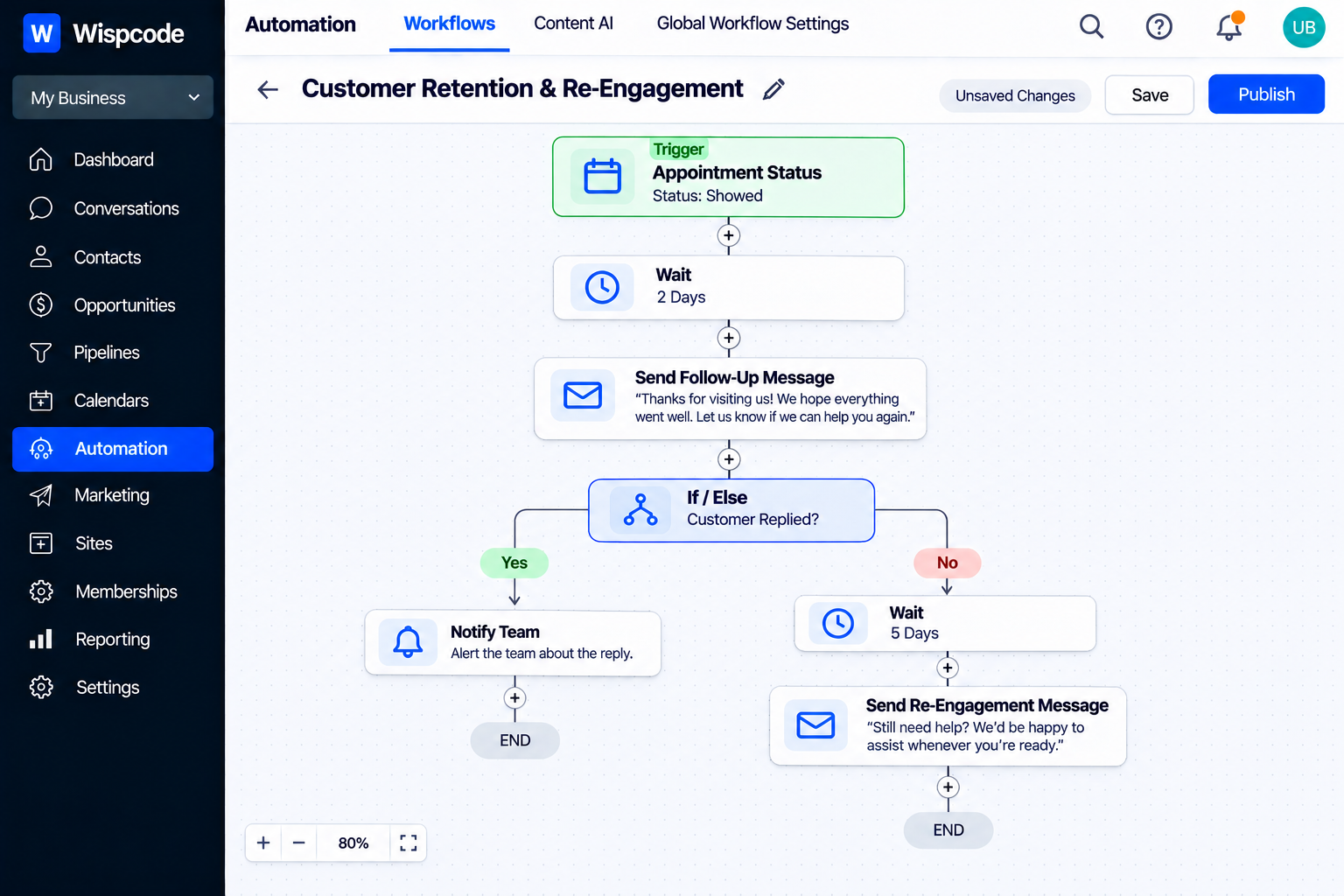
The workflow could be structured like this:
Trigger: Appointment Status → Showed
↓
Wait: Appropriate period after the appointment
↓
Action: Send a helpful follow-up message
↓
Wait: Allow time for a response or action
↓
If/Else: Has the customer taken the desired next step?
Yes: End or move to the next customer journey.
No: Send a relevant follow-up.
↓
Customer Replied: Route the conversation to the appropriate process when necessary.
This structure is simple enough to maintain while still responding to customer behavior.
Common Mistakes to Avoid
Starting With Too Many Branches
A complicated workflow is not automatically a better workflow.
Start with one customer journey and expand it only when there is a clear reason.
Sending Messages Too Frequently
Automation should respect the customer's experience.
Use appropriate waits and communication windows rather than sending repeated messages simply because the workflow allows it.
Ignoring Customer Responses
If a customer responds, your automation should account for that response instead of continuing a generic sequence.
Using the Wrong Trigger
A workflow triggered when an appointment is booked may not be appropriate if your retention process is supposed to begin after the customer actually attends.
Choose the trigger that matches the business event.
Forgetting Cancellations and No-Shows
Appointment-based businesses should consider different paths for completed appointments, cancellations, and no-shows.
Not Testing Every Branch
Testing only the happy path can leave important workflow problems undiscovered.
Best Practices for Customer Retention Workflows
Keep your workflow focused on a specific customer outcome.
Use these principles:
Start with a clear retention objective.
Choose a trigger that represents the right customer event.
Use Wait actions to control timing.
Use If/Else conditions when customer behavior should change the journey.
Respect customer replies and interactions.
Create different paths for meaningful appointment outcomes.
Avoid unnecessary tags and complexity.
Test every important branch before publishing.
Review workflow performance and adjust when the customer journey changes.
A good retention workflow should be easy for another team member to understand months after it was created.
Frequently Asked Questions(FAQ's)
1. What is a customer retention workflow in GoHighLevel?
A customer retention workflow is an automation that helps businesses maintain communication with existing customers based on events, conditions, appointments, replies, or other CRM activity.
2. What trigger should I use for a retention workflow?
It depends on the customer journey. For appointment-based businesses, Appointment Status can be useful. For sales-driven processes, an opportunity status change may be more appropriate.
3. Can GoHighLevel stop a retention workflow when a customer replies?
Yes. Customer replies can be used as workflow triggers, and workflows can also wait for a contact reply before continuing.
4. Can I create different retention paths for customers?
Yes. The If/Else action allows you to evaluate conditions and send contacts through different workflow branches.
5. Should every customer receive the same retention sequence?
No. The best workflow depends on the customer's actions, business relationship, appointment history, and the goal of the retention process. Use conditions and relevant triggers to make communication more appropriate.
Conclusion
A successful customer retention workflow in GoHighLevel is not simply a sequence of automated emails or SMS messages.
It is a structured customer journey that responds to meaningful events and changes based on customer behavior.
Start with a clear retention goal, choose the right trigger, use appropriate waits, add conditions where necessary, and make sure customer replies or appointment changes can influence what happens next.
GoHighLevel provides the workflow triggers, waits, conditions, appointment-status controls, and customer-reply functionality needed to build these types of automated journeys.
The best retention automation is not the most complicated one.
It is the one that sends "the right message, at the right time, based on what the customer actually did."
Need Expert Help with GoHighLevel?
New to GoHighLevel and ready to get started? Buy your GoHighLevel account here and launch with confidence.
Already know what you need and want our team to handle everything, from complete setup and customization to funnels, workflows, automations, CRM, and pipelines? Click here.