

GoHighLevel Custom Webhook Automation
How to Automate Data Sharing and Workflow Integrations Using the Custom Webhook Action in GoHighLevel
What Is the GoHighLevel Custom Webhook Action?
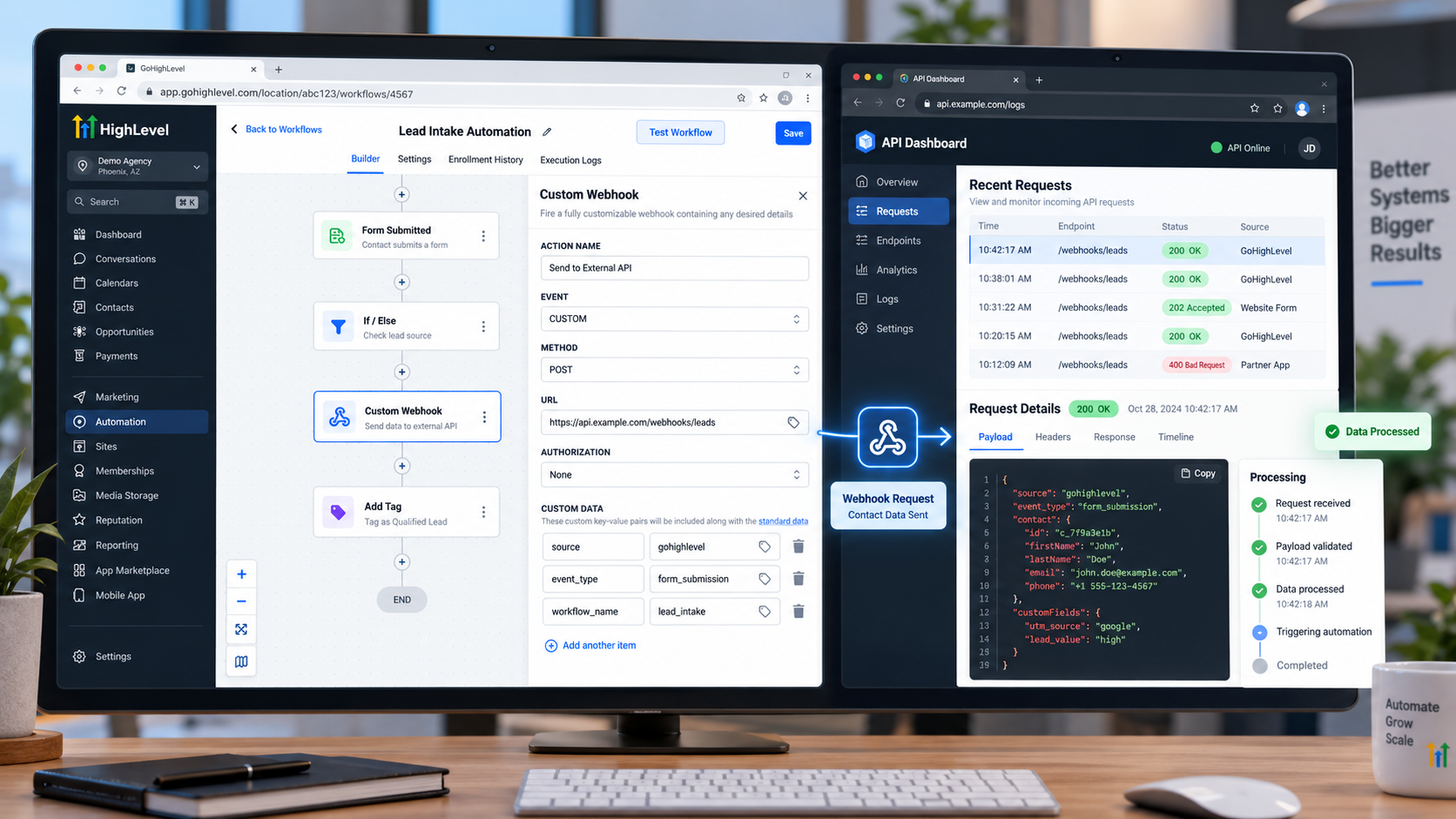
The Custom Webhook is an outbound workflow action. When a workflow reaches this action, HighLevel sends an HTTP request to the URL you configure. The receiving endpoint can then process the information according to its own application or API requirements.
The important distinction is that Custom Webhook sends information; it is not the same as an Inbound Webhook trigger, which allows GoHighLevel to receive a webhook request and start or continue workflow automation.
Conceptually:
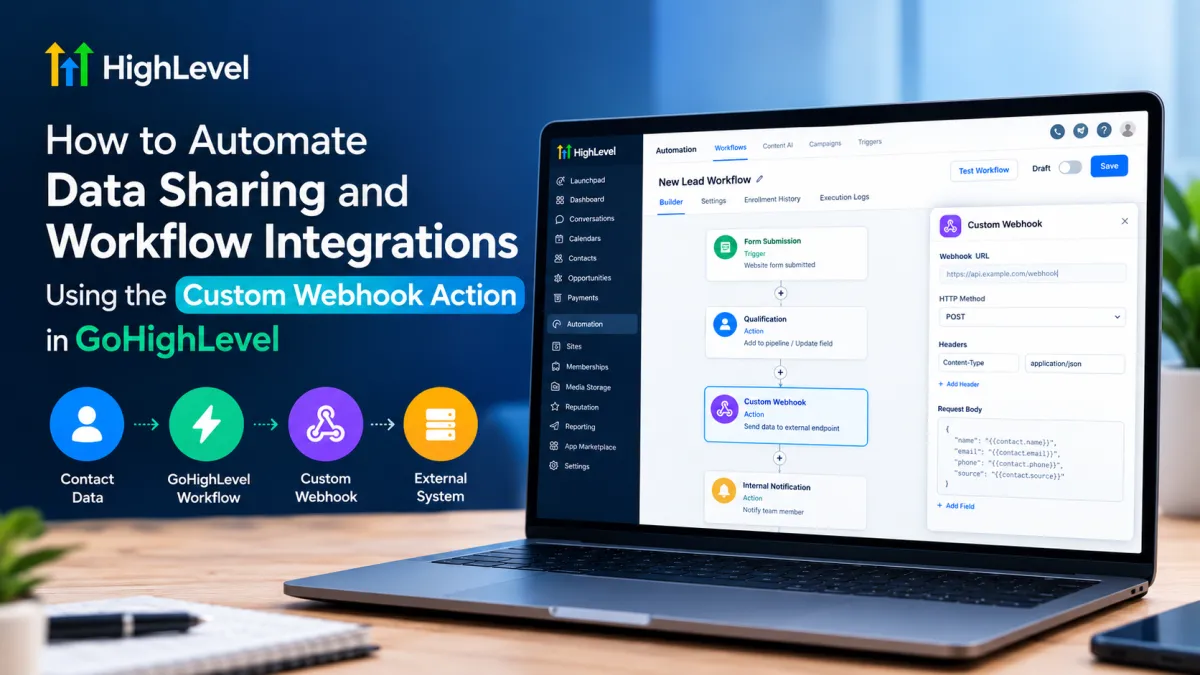
GoHighLevel Workflow → Custom Webhook → External Endpoint → External Processing
The external endpoint could belong to an automation platform, third-party application, custom API, or another service capable of receiving the request.
How the Data Flow Works
Imagine a new lead submits a form on your website.
The workflow might look like:
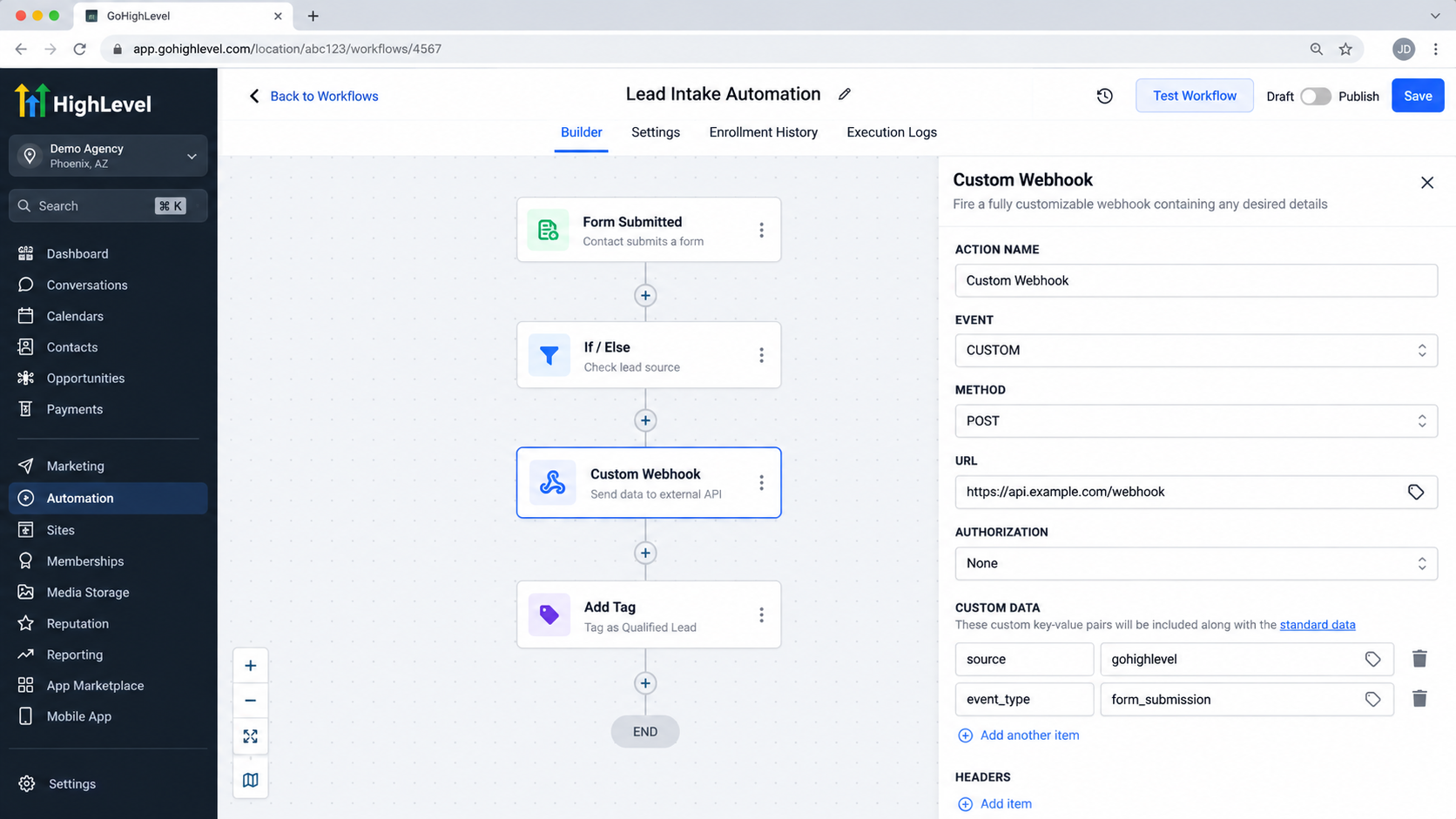
Form Submission → Workflow Trigger → Qualification/Actions → Custom Webhook → External System
When the contact reaches the Custom Webhook step, HighLevel prepares the configured request and sends it to the destination URL. Depending on the configuration and the receiving system's requirements, the request can contain information such as contact data, custom values, headers, query parameters, or a request body. HighLevel's current documentation describes support for HTTP methods including GET, POST, PUT, and DELETE, along with configurable request components.
The receiving system not GoHighLevel determines what it does with that request.
Practical Example: Send a New Lead to an External System
Suppose a real-estate company wants to send selected information about every new lead to an external automation platform.
A simple workflow could be:
A prospect submits a GoHighLevel form.
The form submission triggers the workflow.
The workflow performs any required internal actions.
The workflow reaches Custom Webhook.
The Custom Webhook sends the selected lead information to the external endpoint.
The external platform receives and processes the request.
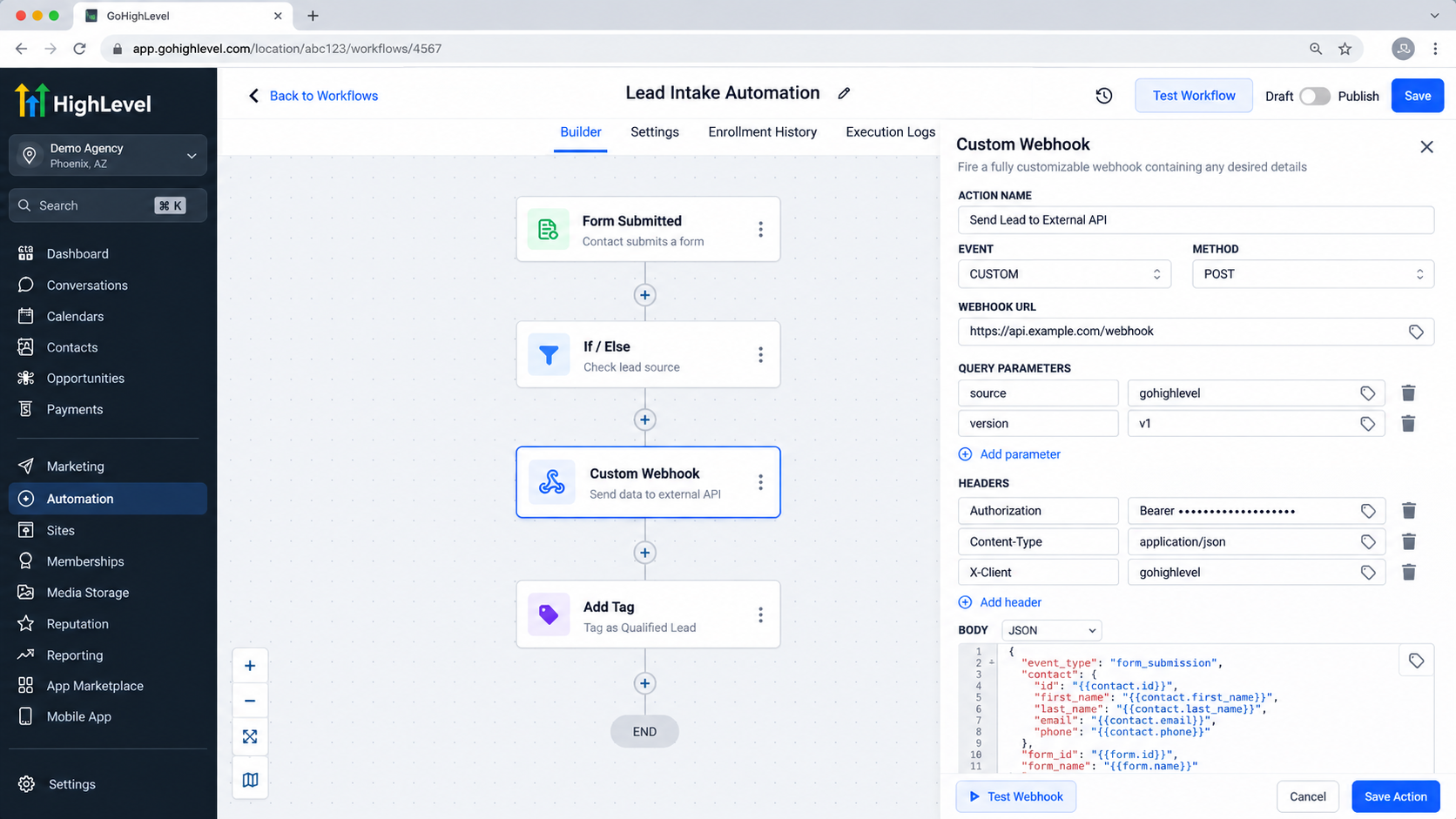
The webhook URL is the destination address supplied by the external service. It tells GoHighLevel where the HTTP request should be sent.
The request can be structured according to what the receiving endpoint expects. For example, an API may expect JSON containing values conceptually similar to:
{ "name": "{{contact.name}}", "email": "{{contact.email}}", "phone": "{{contact.phone}}", "lead_source": "{{contact.source}}"
}
The exact custom values available depend on the workflow context and the data available to that workflow. The receiving API may also require particular headers, authentication, parameters, or a specific payload structure. HighLevel documents configurable headers, query parameters, authentication methods, and mapped dynamic values for Custom Webhooks.
Why Dynamic Data Matters
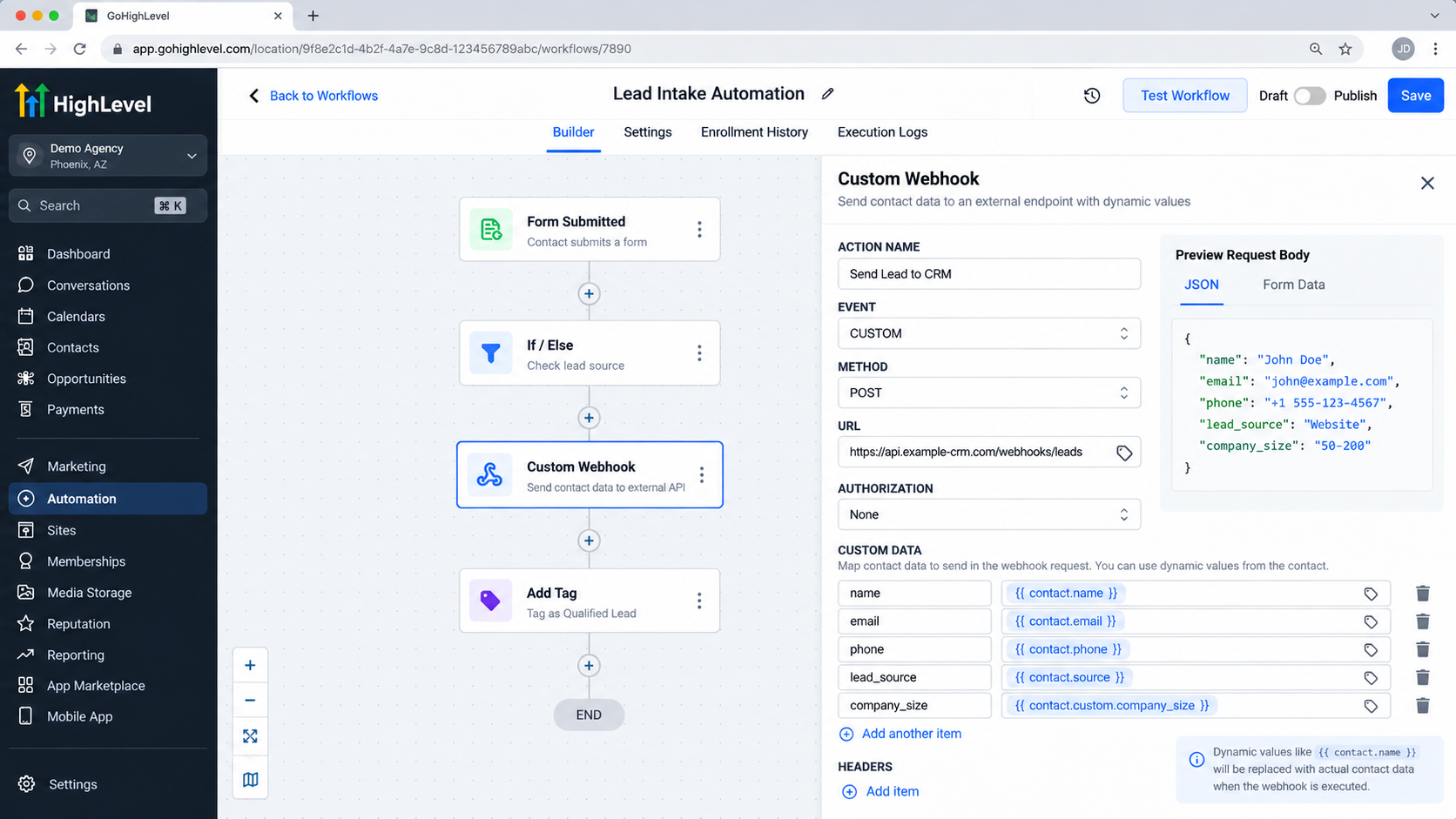
A webhook becomes significantly more useful when the request contains relevant information from the workflow instead of static text.
For example, you might send a contact's:
Name
Email address
Phone number
Lead source
Relevant custom-field values
Other workflow-available information
This allows one workflow to send different data for every contact automatically. Instead of creating a separate integration for every lead, the same webhook configuration can use dynamic values as each workflow execution occurs.
The key is to send only the information the external system actually needs.
Real-World Use Cases
Custom Webhook can support many integration scenarios, including:
Sending qualified lead information to another application.
Passing selected CRM data to an external automation platform.
Triggering an external process when a contact reaches a particular workflow stage.
Sending updates to a custom business application.
Synchronizing selected information with another system.
Notifying an external service when an important workflow event occurs.
The webhook does not automatically synchronize two databases. It simply sends a request; the receiving system must be designed to interpret and process it.
Common Mistakes to Avoid
Webhook integrations often fail because of small configuration mismatches.
Avoid:
Using the wrong endpoint URL.
Sending a payload that does not match the receiving API's expected structure.
Confusing an outbound Custom Webhook with an inbound webhook trigger.
Sending unnecessary or sensitive information.
Ignoring authentication requirements.
Testing only the GoHighLevel workflow without checking the receiving application.
Assuming a successful workflow step means the external business process completed successfully.
The external service may reject a request because of authentication, formatting, validation, rate limits, or other requirements. HighLevel notes that successful execution depends partly on the receiving API's response and server capacity.
Testing and Troubleshooting
Treat webhook testing as a two-sided process.
First, confirm that the workflow actually reached the Custom Webhook action. Then verify that the external endpoint received the request.
Check:
Workflow execution — Did the contact reach the webhook step?
Endpoint — Was the correct destination URL used?
Request structure — Are the headers, parameters, and body formatted correctly?
Authentication — Did the external service receive the credentials it requires?
Payload — Are the dynamic values populated as expected?
External response — Did the receiving application accept or reject the request?
This approach helps isolate whether the problem is in the workflow, the HTTP request, or the receiving system.
Best Practices for Reliable Webhook Automation
For dependable integrations:
Understand the receiving endpoint's documentation before configuring the workflow.
Send only required information.
Keep your payload structure consistent.
Protect authentication credentials and sensitive data.
Test with realistic data before deploying.
Document what the webhook sends and where it sends it.
Design the integration so that unnecessary dependencies between systems are minimized.
HighLevel also provides credential-management options for supported authentication methods, including masked credentials, helping reduce accidental exposure of secrets.
Conclusion
The GoHighLevel Custom Webhook Action gives workflow builders a practical way to extend GoHighLevel beyond its built-in automation paths. Instead of manually transferring information, a workflow can send an HTTP request containing selected, dynamically populated data to an external endpoint.
The important principle is simple: Custom Webhook sends; the external endpoint receives and processes.
Once that distinction is understood, webhook automation becomes much easier to design. Whether you are connecting an automation platform, custom API, CRM, database service, or another business application, Custom Webhook can serve as the communication layer between your GoHighLevel workflow and the external system provided that the receiving endpoint is properly configured to handle the request.
Frequently Asked Questions
Is GoHighLevel Custom Webhook used to receive data?
No. Custom Webhook is an outbound workflow action used to send an HTTP request to an external endpoint. Receiving webhook requests in GoHighLevel is a separate inbound-webhook workflow mechanism.
What can I send through a Custom Webhook?
You can configure request information such as mapped dynamic values, headers, parameters, and request data according to the endpoint's requirements. HighLevel documents support for multiple HTTP methods and customizable request components.
Do I need an external system to use Custom Webhook?
Yes. The webhook needs a destination endpoint capable of receiving and processing the HTTP request. GoHighLevel sends the request, while the external service determines what happens next.
Can Custom Webhook send dynamic contact information?
Yes. HighLevel supports mapping dynamic values into webhook request components. The specific values available depend on the context and data available within the workflow.
Is Custom Webhook the same as the GoHighLevel API?
No. Custom Webhook is a workflow action for making outbound HTTP requests. The GoHighLevel API is a separate developer-facing interface for programmatic interaction with GoHighLevel resources.
Need Expert Help with GoHighLevel?
New to GoHighLevel and ready to get started? Buy your GoHighLevel account here and launch with confidence.
Already know what you need and want our team to handle everything, from complete setup and customization to funnels, workflows, automations, CRM, and pipelines? Click here.



