

GoHighLevel Custom Date Reminders: Direct Opportunity Access Update
GoHighLevel Custom Date Reminders: Access Opportunity Details Without Find Opportunity
GoHighLevel continues to improve its workflow automation capabilities with a practical update to Custom Date Reminders. Users can now access opportunity details directly within workflows triggered by Custom Date Reminders based on opportunity date fields, without adding a separate Find Opportunity action.
Previously, retrieving information about the opportunity that triggered a reminder required an additional Find Opportunity action. This meant adding another step before using opportunity information in workflow messages or notifications. With this improvement, GoHighLevel makes the process more straightforward by providing access to opportunity details natively.
For businesses that rely on opportunity-based reminders, this update reduces unnecessary workflow steps and makes it easier to create relevant notifications using existing CRM information.
What's New in GoHighLevel Custom Date Reminders?
The main improvement is that opportunity information is now available directly in workflows triggered by a Custom Date Reminder using an opportunity date field.
Previously, users needed to add a Find Opportunity action to retrieve the opportunity associated with the reminder. Now, the workflow can access that opportunity's details without requiring the additional lookup.
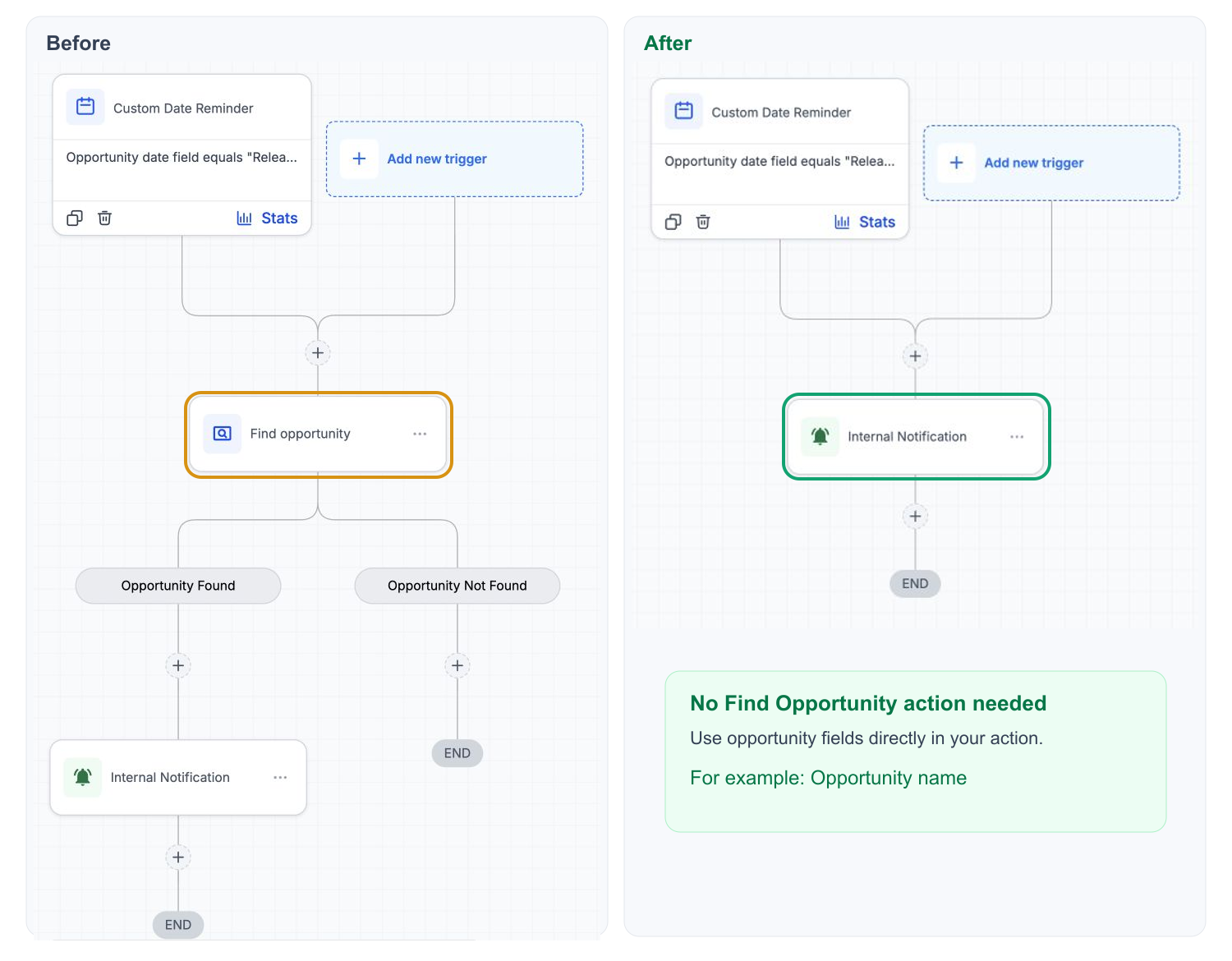
For example, users can directly use the custom value:
{{opportunity.name}}
This allows the workflow to reference the name of the opportunity that triggered the reminder.
The improvement is particularly useful for businesses that manage multiple opportunities and need their automated reminders to include relevant deal information.
Access Opportunity Details Directly in Workflows
One of the most useful parts of this update is the ability to select opportunity information directly from the custom value picker.
Use Opportunity Fields Without an Additional Lookup
When configuring a workflow, users can access opportunity fields through the Opportunity menu in the custom value picker.
This includes standard opportunity fields as well as custom fields.
Instead of adding a Find Opportunity action to retrieve the required information, users can select the relevant opportunity values directly.
For example, if a business wants to include the opportunity name in a reminder, it can use {{opportunity.name}} without introducing another lookup step.
This makes GoHighLevel workflow automation easier to manage, particularly when reminders need to reference information associated with a specific opportunity.
Opportunity Custom Fields Are Also Available
The update is not limited to standard opportunity information.
Users can also select opportunity custom fields from the Opportunity menu in the custom value picker.
This gives businesses access to their existing opportunity-related information when creating reminder messages, without requiring the additional Find Opportunity action for this use case.
Send Internal Notifications to the Right People
Another important improvement involves Internal Notifications.
When configuring an Internal Notification in a Custom Date Reminder workflow, users can now choose the Owner of the opportunity or use Opportunity followers.
This makes it easier to direct reminders toward the people associated with the relevant opportunity.
For businesses where multiple team members are involved in managing opportunities, this provides a more direct way to use opportunity-related notification recipients.
Rather than relying on an additional opportunity lookup to access the triggering opportunity's details, users can work with the opportunity information already available in the workflow.
Simpler Workflow Creation and Maintenance
Every additional action in a workflow creates another step that users need to configure and maintain.
Although the Find Opportunity action remains available, it is no longer necessary simply to retrieve the triggering opportunity's details in this particular Custom Date Reminder scenario.
Removing that extra lookup requirement makes opportunity-based reminder workflows simpler to build and maintain.
Users can focus on the purpose of the reminder instead of adding an additional action just to retrieve information that the workflow can now access directly.
For GoHighLevel users managing multiple date-based reminders, this improvement can also make workflow configurations easier to understand.
It is a focused improvement, but one that removes an unnecessary part of the process.
Practical Example: Automated Contract Review Reminders
Consider a business that manages customer contracts through GoHighLevel opportunities.
The business wants to create a reminder based on an opportunity's contract review date. When the Custom Date Reminder is triggered, the workflow needs to send an internal message containing the opportunity name so the relevant team members can identify which contract requires attention.
Previously, retrieving the opportunity name required adding a Find Opportunity action.
With the updated functionality, users can directly include the opportunity name in their reminder message.
The message can be written as:
Review {{opportunity.name}} and confirm the next steps.
If the opportunity is named "Acme Annual Contract," the message will display as:
Review Acme Annual Contract and confirm the next steps.
This example demonstrates how the improvement makes opportunity-based reminders more straightforward. The workflow can use the opportunity's name directly without an additional lookup action.
Does This Update Affect Existing Workflows?
GoHighLevel has confirmed that this update is backward compatible.
This means existing workflows will continue working as before. Users do not need to worry that the improvement will disrupt their current Custom Date Reminder automations.
It is also important to understand where this functionality applies.
The improvement specifically applies when a Custom Date Reminder uses an opportunity date field. Reminders based on contact date fields remain unchanged.
Therefore, this update should not be confused with a general change to every type of Custom Date Reminder. Its purpose is to simplify access to opportunity information in the relevant opportunity-based reminder workflows.
Final Thoughts
The GoHighLevel Custom Date Reminders update makes opportunity-based workflow automation more convenient by removing the need for an additional Find Opportunity action when accessing the opportunity that triggered the reminder.
With direct access to opportunity fields, support for opportunity custom fields, and improved Internal Notification recipient options, users can build simpler and more relevant date-based reminders.
For businesses using GoHighLevel to manage opportunities and automate important reminders, this is a useful improvement that reduces unnecessary workflow complexity while keeping existing automations compatible.
It is a small but practical enhancement that makes working with opportunity information inside GoHighLevel workflows more straightforward.
Frequently Asked Questions (FAQs)
1. What are GoHighLevel Custom Date Reminders?
GoHighLevel Custom Date Reminders allow users to trigger workflows based on specific date fields associated with contacts or opportunities.
2. Can I access opportunity details without using Find Opportunity?
Yes. When a Custom Date Reminder is triggered by an opportunity date field, you can access the triggering opportunity's details directly without adding a Find Opportunity action.
3. Can I use opportunity custom fields in Custom Date Reminder workflows?
Yes. You can select standard opportunity fields and custom fields from the Opportunity menu in the custom value picker.
4. Can I include opportunity names in automated reminder messages?
Yes. You can use {{opportunity.name}} directly in your reminder messages to display the name of the opportunity that triggered the reminder.
5. Can I send internal notifications to the opportunity owner?
Yes. GoHighLevel allows you to select Owner of the opportunity or use Opportunity followers when configuring Internal Notifications.
Need Expert Help with GoHighLevel?
New to GoHighLevel and ready to get started? Buy your GoHighLevel account here and launch with confidence.
Already know what you need and want our team to handle everything, from complete setup and customization to funnels, workflows, automations, CRM, and pipelines? Click here.